010-6097 4119Book a Demo


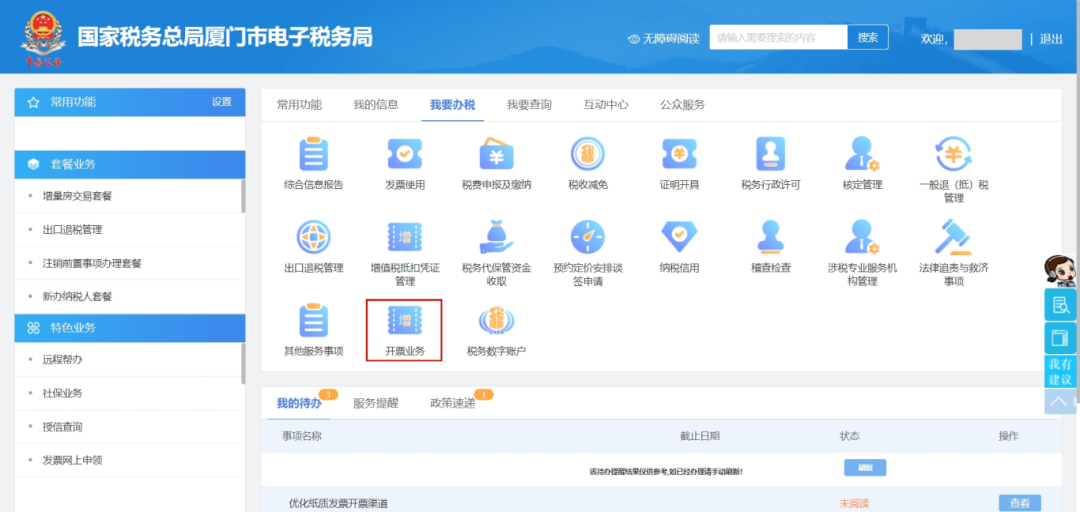
Save it! How to issue a fully digitalized red-letter invoice for the special motor vehicle business?Published: 2024-06-13 17:07 Currently, the electronic invoice platform has launched the invoicing function for special motor vehicle business. Pilot motor vehicle business taxpayers meeting certain conditions can, on the electronic invoice service platform, fully or partially red-ink the issued blue-letter motor vehicle special invoices in red-letter invoices according to actual business. Prerequisite: the taxpayer has already issued an electronic special invoice (motor vehicle special invoice) and the buyer has used the invoice; the process is initiated by the seller. Step 1 The seller taxpayer logs in to the electronic tax bureau and selects [I Want to Handle Taxes] -- [Invoicing Business] in sequence.
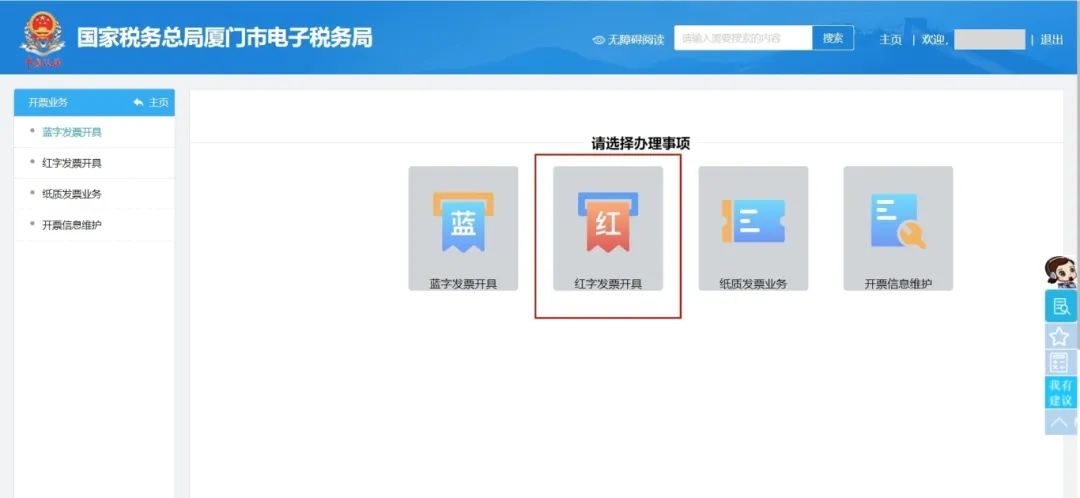
Step 2 Click the [Red-Letter Invoice Issuance] function
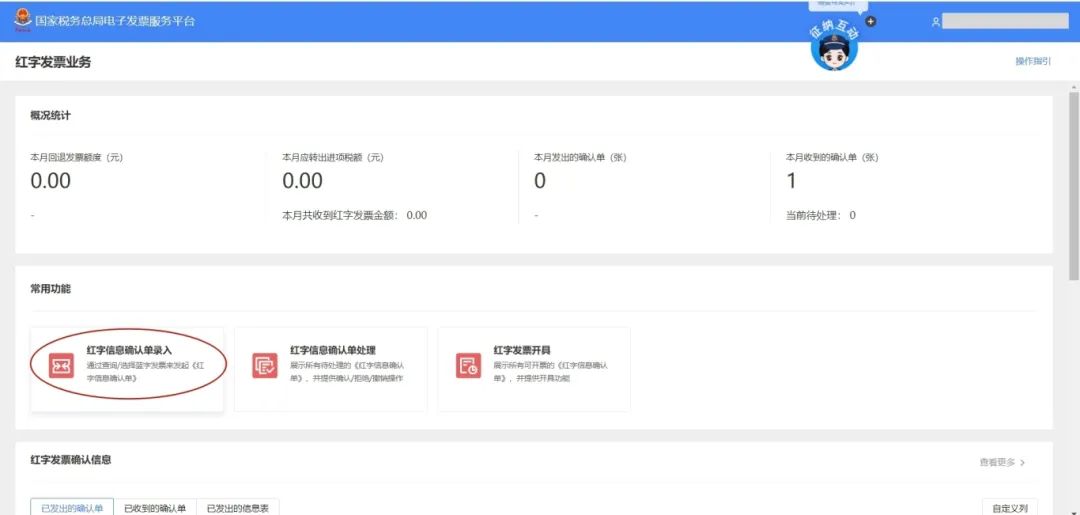
Step 3 Click [Red-Letter Information Confirmation Form Entry]
Step 4 Query the corresponding invoice based on the invoice information, and click [Select]
Step 5
Step 6 Red-letter information confirmation form entered successfully
Step 7 The purchaser logs in to the Electronic Tax Bureau and selects [Red-Letter Information Confirmation Form Processing] on the secondary function page of [Red-Letter Invoice Issuance].
Step 8 Purchaser/seller selection: I am the purchaser, select the corresponding "confirmation sheet status," "counterparty taxpayer name," etc. for inquiry, click [View] to see detailed information
Step 9 Click [Confirm], and a prompt box pops up
Step 10 After confirmation, the status of the red-letter invoice information confirmation form changes to: confirmed by both buyer and seller
Step 11 After the purchaser confirms, the seller clicks [Red-Letter Invoice Issuance] on the secondary function page of [Red-Letter Invoice Issuance].
Step 12 The seller queries based on the corresponding "Confirmation Form status" and other relevant information, and clicks [Go to Invoice].
Step 13 Enter the red-letter invoice issuance page and click [Issue Invoice]
Step 14 Red-letter invoice issued successfully
Precautions 1.When the reason for issuing a red-letter invoice is selected as "invoicing error" or "sales return," the specification and model must be filled in with the VIN code. After the red-letter confirmation form is successfully issued, the VIN code status changes from normal to red-letter reversing; after the red-letter invoice is successfully issued, the VIN code status changes from red-letter reversing to normal, and the VIN code ledger is updated to restore the seller's invoice quota according to the existing logic. A VIN code with red-letter reversing status cannot initiate red-letter reversing again. 2.In the case of a "sales allowance," when the specification and model are empty, after the red-letter invoice is successfully issued, the VIN code is not transferred, and the seller's invoice quota is restored according to existing logic. 3.When the VAT usage status, booking status, and consumption tax usage status are all blank, the seller can directly click to issue an invoice after submitting the red-letter information confirmation form, issuing a red-letter invoice without the other party's confirmation, and the buyer cannot initiate it. 4.For red-letter reversal of special VAT invoices for domestically produced motor vehicles before May 1, 2021, the motor vehicle certificate of conformity must be in normal status; for red-letter reversal of special VAT invoices for domestically produced motor vehicles after May 1, 2021, the VIN code must be normal and under the purchaser's name, and invoice association information is required. 5.When performing red reversal on imported motor vehicle special VAT invoices, the VIN code is normal and under the purchaser's name. 6.Consolidated motor vehicle special invoices are automatically split into lines on the red-letter information confirmation form entry page, and a line can be red-flushed or partially red-flushed based on the actual business. Source:Xiamen Taxation Beijing Kailing Technology Co., Ltd.——an enterprise business-finance-tax digitalization solution service provider. Kailing Technology provides solutions for sales management systems, procurement management systems, output invoicing systems, input invoice collection systems, imaging management systems, financial posting systems, electronic accounting archives, fully digitalized e-invoice and Leqi interfaces and other businesses according to enterprise needs, professionally and efficiently helping enterprises transform and upgrade their business-finance-tax digital management. If you have any business-finance-tax digital transformation needs, welcome to contact us. Beijing Kailing Technology will serve you wholeheartedly.
|