010-6097 4119Book a Demo


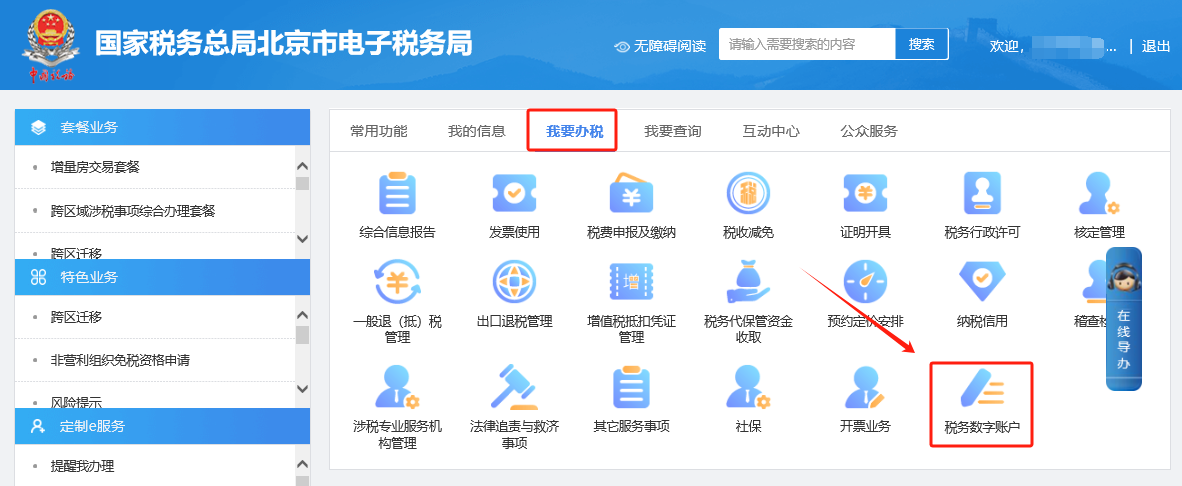
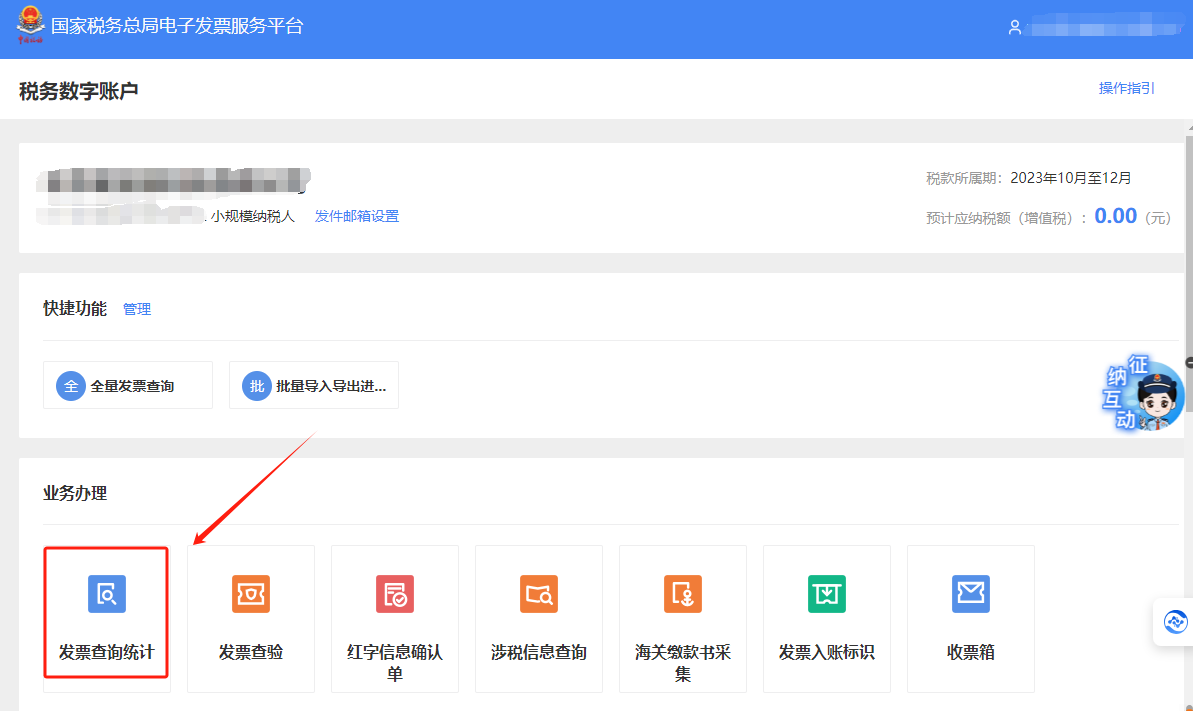
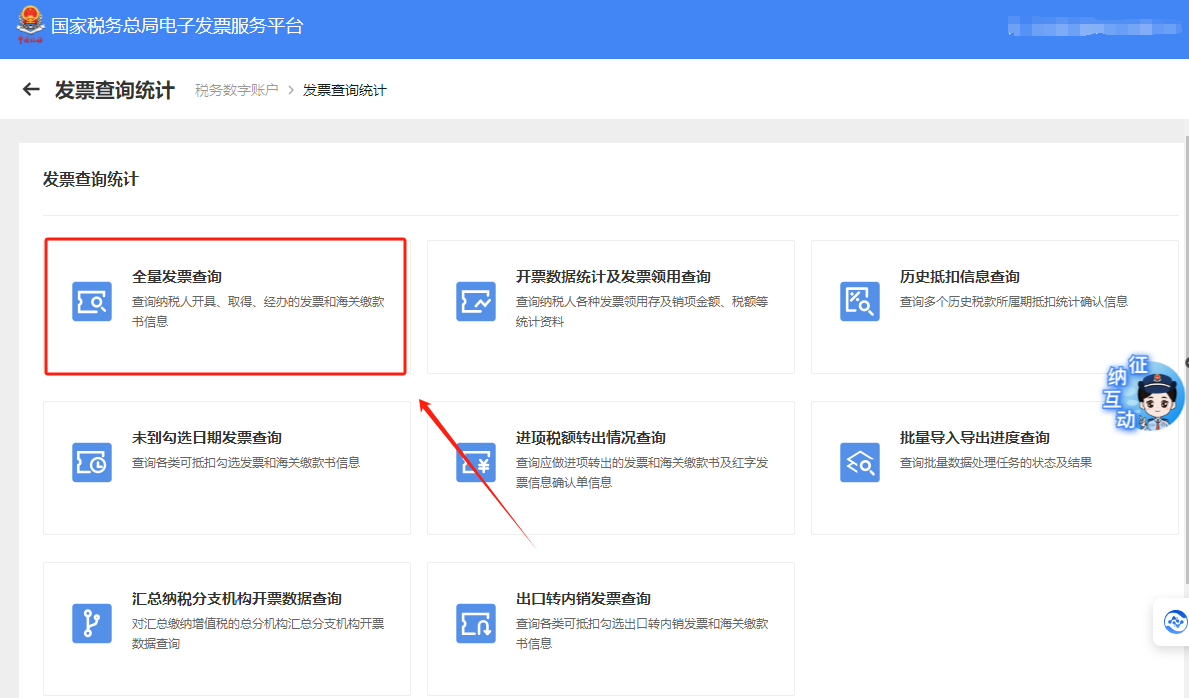
E-Tax Bureau Operation Guide | How to query invoices already selected?Published: 2023-12-29 16:18 1.On the electronic tax bureau, for invoices verified through [Tax Digital Account] — [Deduction Selection], before confirmation, how do you revoke the "Selected" status to "Unselected"? Answer: Hello, please log in to the Beijing Electronic Tax Bureau and enter [I Want to Handle Taxes] — [Tax Digital Account] — [Invoice Selection Confirmation] — [Deduction-type Selection] in sequence. In the "Selection Status" column, select "Selected." In the query condition area, select the range of selection dates and click the "Query" button to query invoices already selected for the current tax period. Select the invoice information to be revoked and click the "Revoke" button. A prompt indicating successful submission means the operation is complete. (After processing this invoice, the invoice changes to the "Not Selected" status.) 2. How do you perform invoice deduction selection on the electronic tax bureau?Answer: Hello, please log in to the Beijing Electronic Tax Bureau and enter [I Want to Handle Taxes] — [Tax Digital Account] — [Invoice Selection Confirmation] — [Deduction-type Selection] in sequence. In the "Selection Status" column, select "Not Selected." Enter or select relevant query conditions as needed, then click the "Query" button; the system will display invoices meeting the query conditions in the selection operation area. Select the invoice information to be selected and click the "Submit Selection" button. In the pop-up interface, click "Confirm" and follow the prompt; successful submission means the operation is complete. 3. How do you query selected invoices on the electronic tax bureau?Answer: Hello, please click [I Want to Handle Taxes] — [Tax Digital Account] — [Invoice queryStatistics】—【Full invoice query】select the corresponding query conditions and click "Query" to display query results based on the conditions. Click the "Details" link, and the system will query the current label information of that invoice based on the invoice selected by the taxpayer, displaying the "Status Information" tab by default. Click the "Red-letter reversal", "Tax refund", or "Deduction" tabs to view the information on the corresponding tab in detail. Click the "Preview" link to pop up the invoice face information. I. I Want to Handle Taxes—Tax Digital Account.
II. Tax digital account—invoice query and statistics.
III. Invoice inquiry statistics — full-volume invoice inquiry.
IV. On the full invoice query page, select the corresponding query conditions and click "Query" to display query results according to the query conditions. Click the "Details" link, and the system will query the current tag information of that invoice according to the invoice selected by the taxpayer, displaying the "Status Information" tab by default. Click the "Red-Letter Reversal," "Tax Refund," or "Deduction" tabs to view the information on the corresponding tab in detail. Click the "Preview" link to pop up the invoice face information.
Source: Beijing Tax official account Beijing Kailing Technology Co., Ltd.——an enterprise business-finance-tax digitalization solution service provider. Kailing Technology provides solutions for sales management systems, procurement management systems, output invoicing systems, input invoice collection systems, imaging management systems, financial posting systems, electronic accounting archives and other businesses according to enterprise needs, professionally and efficiently helping enterprises transform and upgrade their business-finance-tax digital management. If you have any business-finance-tax digital transformation needs, welcome to contact us. Beijing Kailing Technology will serve you wholeheartedly.
|