010-6097 4119Book a Demo


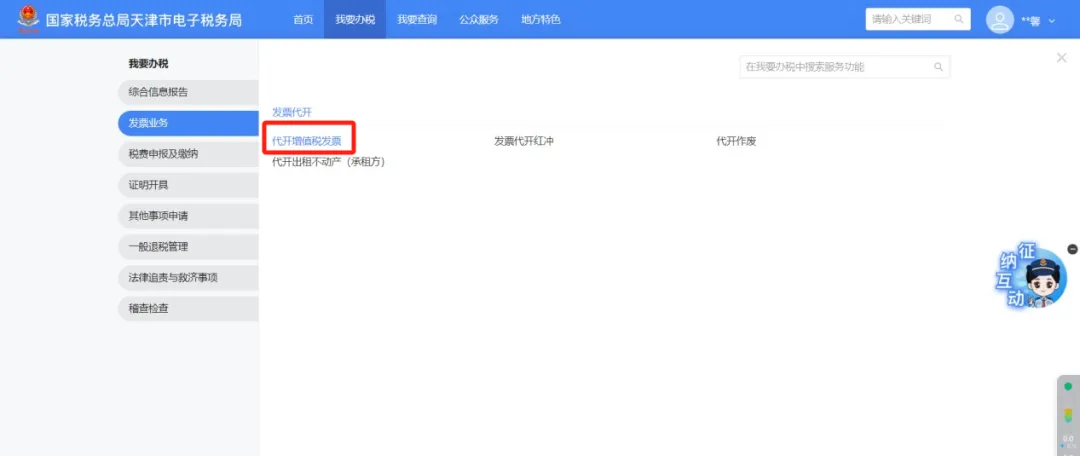
New electronic tax bureau operation guide | How can individuals apply for agency issuance of fully digitalized e-invoices?Published: 2024-05-29 17:12 1.、Business OverviewWhere a natural person temporarily obtains income or meets other circumstances requiring invoice issuance, the competent tax authority may issue an invoice on their behalf. When other taxpayers determined by the State Taxation Administration who may have VAT special invoices issued on their behalf engage in VAT taxable acts and need to issue VAT special invoices, they may apply to their competent tax authority for issuance on their behalf. After tax authorities issue invoices on behalf of taxpayers, if the taxpayer has sales returns or sales allowances, or in cases such as sales returns, incorrect invoicing, or suspension of taxable services, and if conditions are met, they should apply to the tax authority to void, issue a VAT red-letter invoice, re-issue an agency invoice, or handle tax refunds and other matters. II、Operation Guidelines (1) After logging in to the new Electronic Tax Bureau, click the [I Want to Handle Taxes] - [Invoice Business] - [Invoice Issuance for Individuals] function menu.
(2) Supports invoice issuance for individuals for "general issuance for goods, services, etc.," "real estate leasing," "construction services," "freight transport services," and "passenger transport services." Specific operations are as follows:
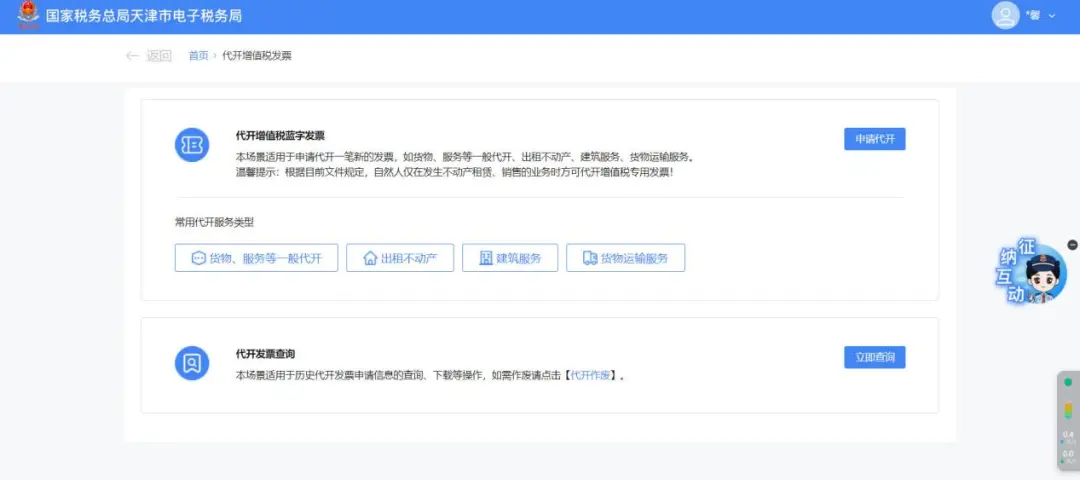
1.Application for general agency issuance invoices such as goods and services (1)Click [General Reverse Invoicing for Goods, Services, etc.] or [Apply for Reverse Invoicing] to enter the reverse invoicing application page.
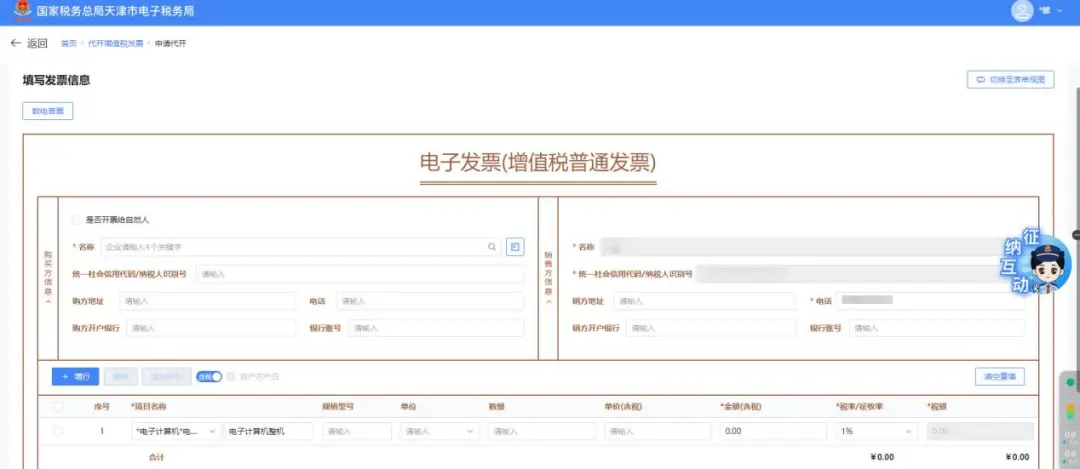
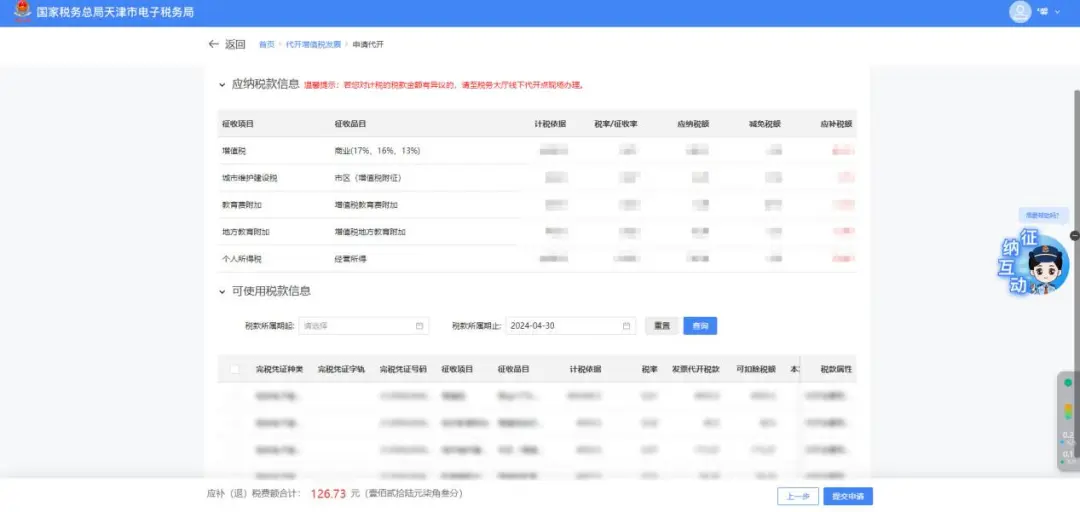
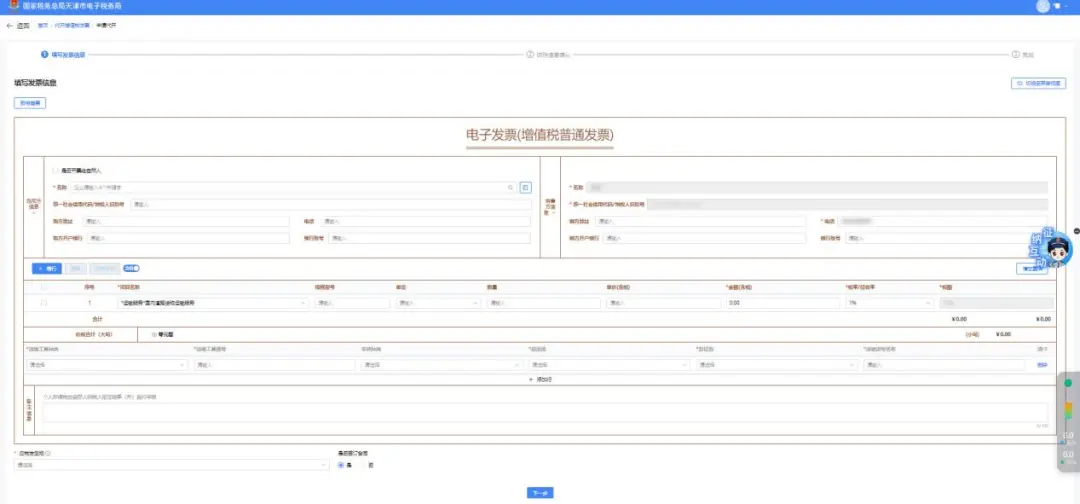
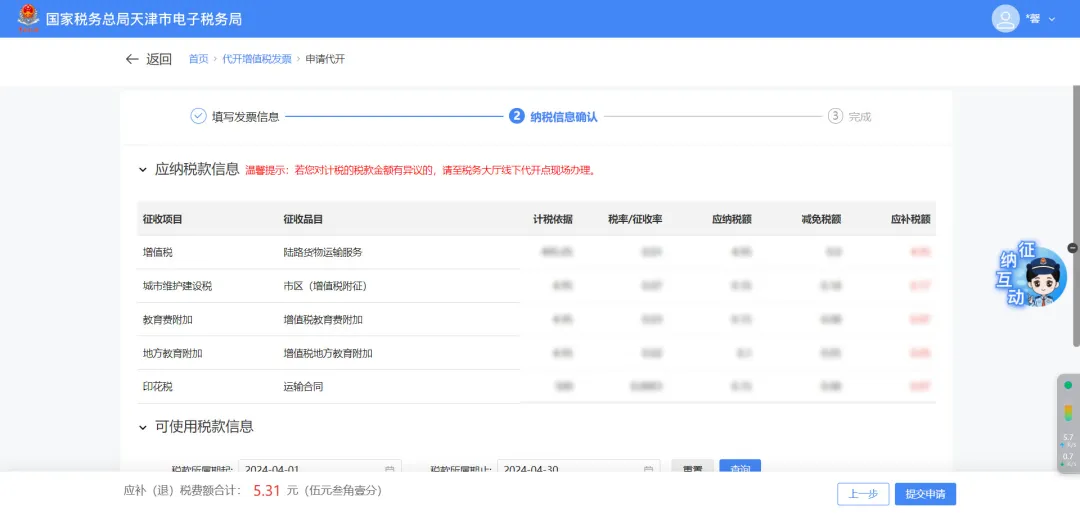
(2) Fill in invoice information:Enter the purchaser information, project name, remarks, and other data, then click [Next]. (3) Tax information confirmation:The system automatically loads the tax payable information and the available tax amount information for the current month based on the entered invoice information. Users can also manually enter a time period, click [Query] to retrieve all available tax amount information within that period, and after the taxpayer confirms it is correct, click [Submit Application].
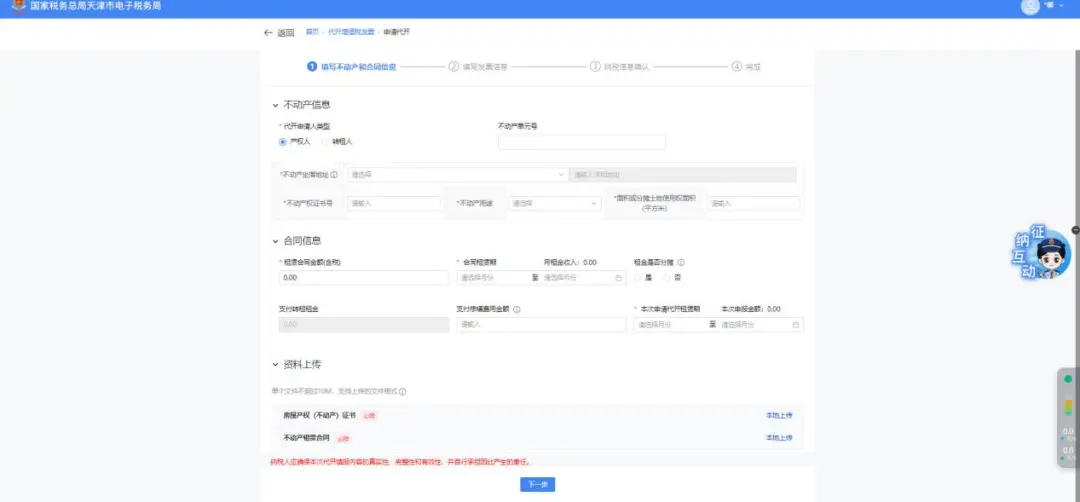
2.Agency issuance of real estate leasing invoices (1)Click [Lease of Real Estate] to enter the reverse invoicing application page.
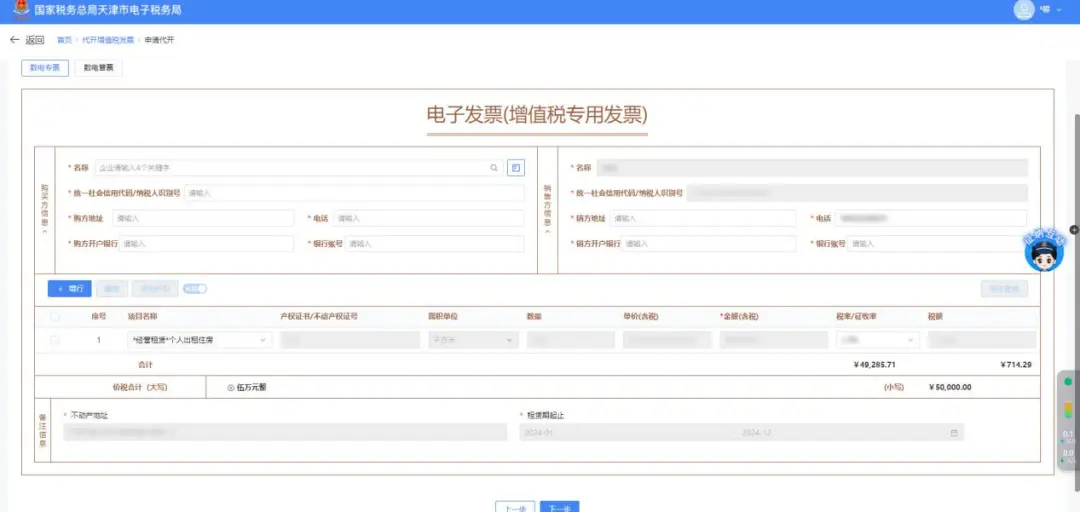
(2) Fill in real estate and contract information:Select the invoice issuance applicant type, real estate unit number, real estate location address, real estate ownership certificate, real estate use, area, lease contract amount, contract lease term, and other data, upload the materials, then click [Next]. (3) Fill in invoice information:Select "Fully Digitalized Special Invoice" or "Fully Digitalized Ordinary Invoice," enter data such as purchaser information and item name, and click [Next].
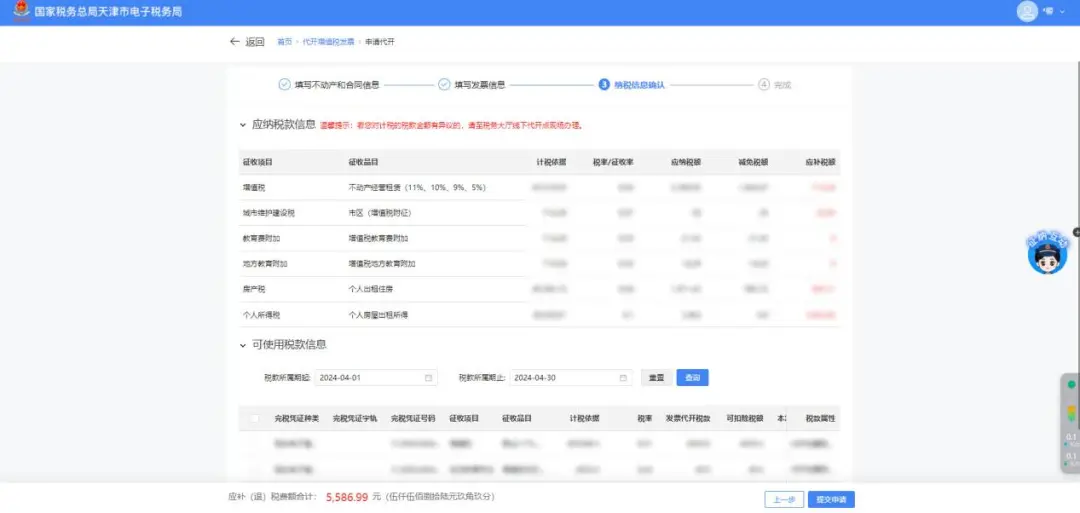
(4) Tax information confirmation:The system automatically loads the tax payable information and the available tax amount information for the current month based on the entered invoice information. Users can also manually enter a time period, click [Query] to retrieve all available tax amount information within that period, and after the taxpayer confirms it is correct, click [Submit Application].
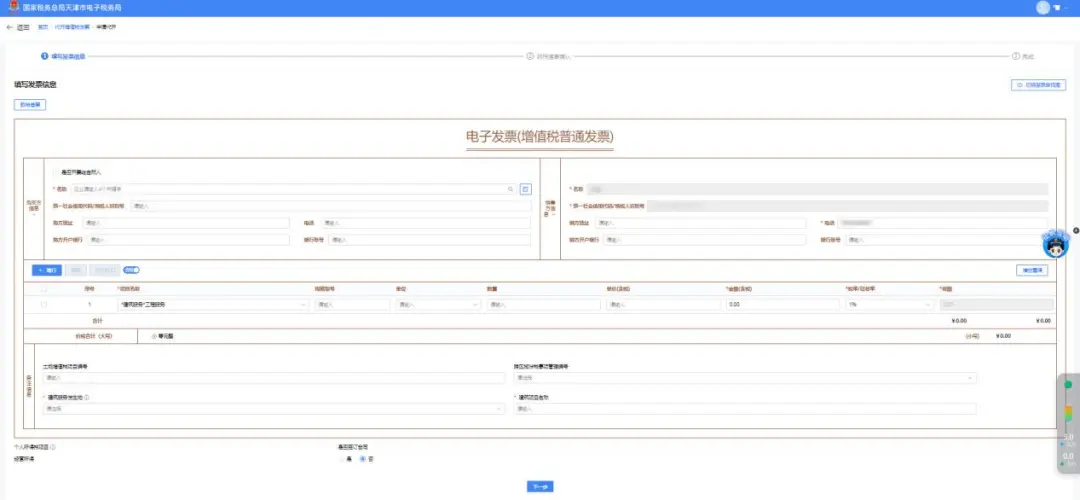
3.Agency issuance of construction service invoices (1)Click [Construction Services] to enter the reverse invoicing application page.
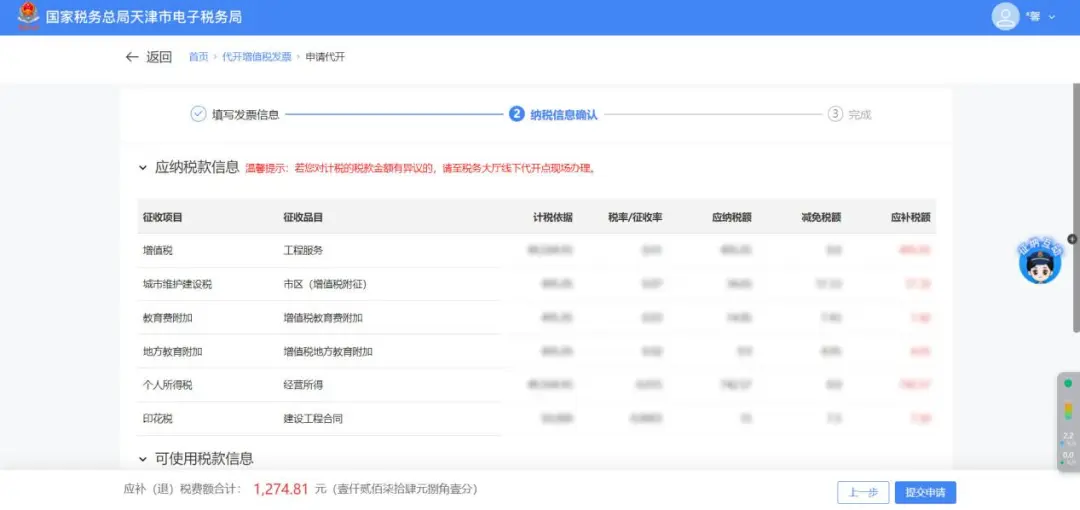
(2) Fill in invoice information:Enter the purchaser information, construction project name, place where construction services occur, and other data, then click [Next]. (3) Tax information confirmation:The system automatically loads the tax payable information and the available tax amount information for the current month based on the entered invoice information. Users can also manually enter a time period, click [Query] to retrieve all available tax amount information within that period, and after the taxpayer confirms it is correct, click [Submit Application].
4.Agency issuance of goods transport service invoices (1)Click [Goods Transport Services] to enter the reverse invoicing application page.
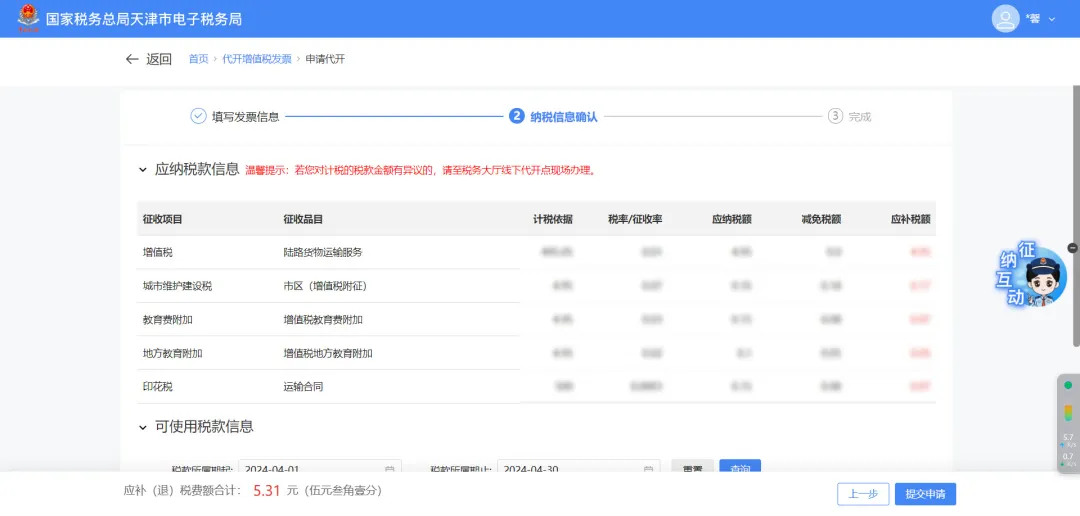
(2) Fill in invoice information:Enter the purchaser information, project name, type of transport vehicle, transport vehicle plate number, place of departure, place of arrival, name of transported goods, and other data, then click [Next]. (3) Tax information confirmation:The system automatically loads the tax payable information and the available tax amount information for the current month based on the entered invoice information. Users can also manually enter a time period, click [Query] to retrieve all available tax amount information within that period, and after the taxpayer confirms it is correct, click [Submit Application].
5.Self-produced agricultural product invoice (1)Click [General Reverse Invoicing for Goods, Services, etc.] or [Apply for Reverse Invoicing] to enter the reverse invoicing application page.
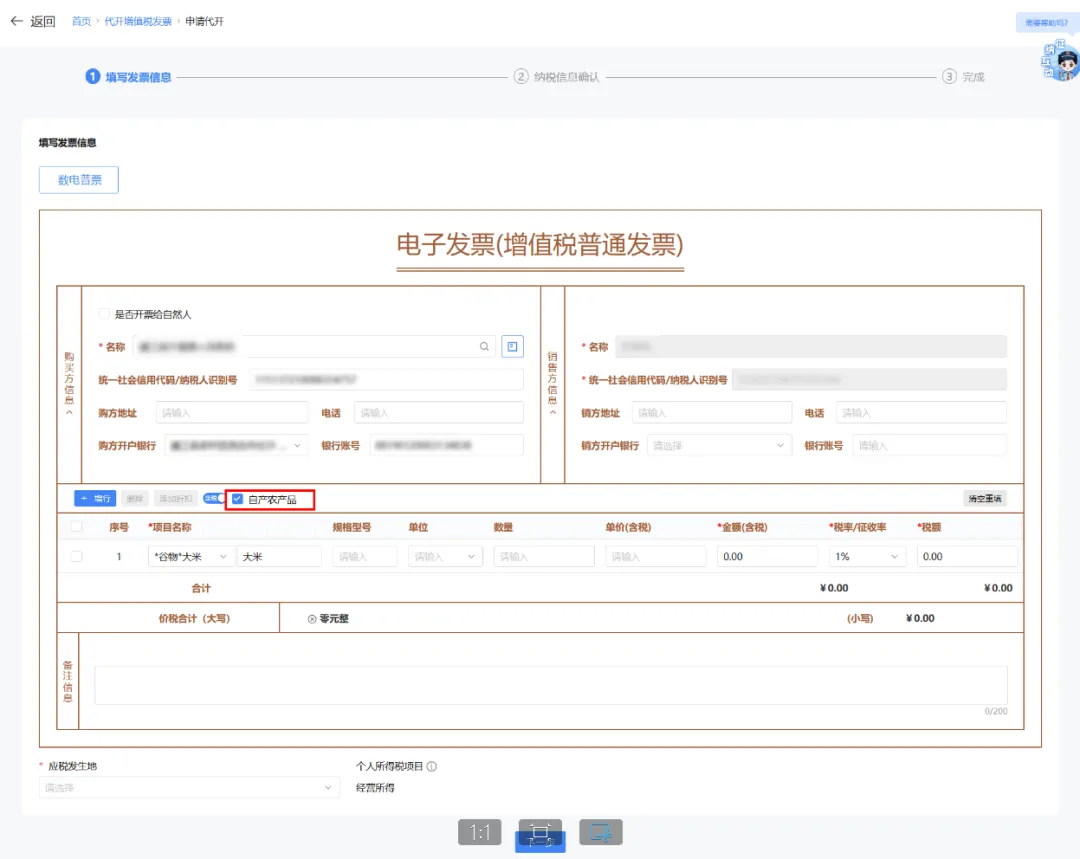
(2) Fill in invoice information:Enter the purchaser information, project name, remarks, and other data, check [Self-produced Agricultural Products], and click [Next]. (3) Tax information confirmation:The system automatically loads the tax payable information and the available tax amount information for the current month based on the entered invoice information. Users can also manually enter a time period, click [Query] to retrieve all available tax amount information within that period, and after the taxpayer confirms it is correct, click [Submit Application].
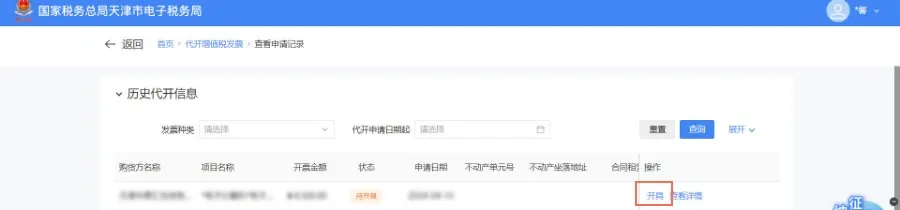
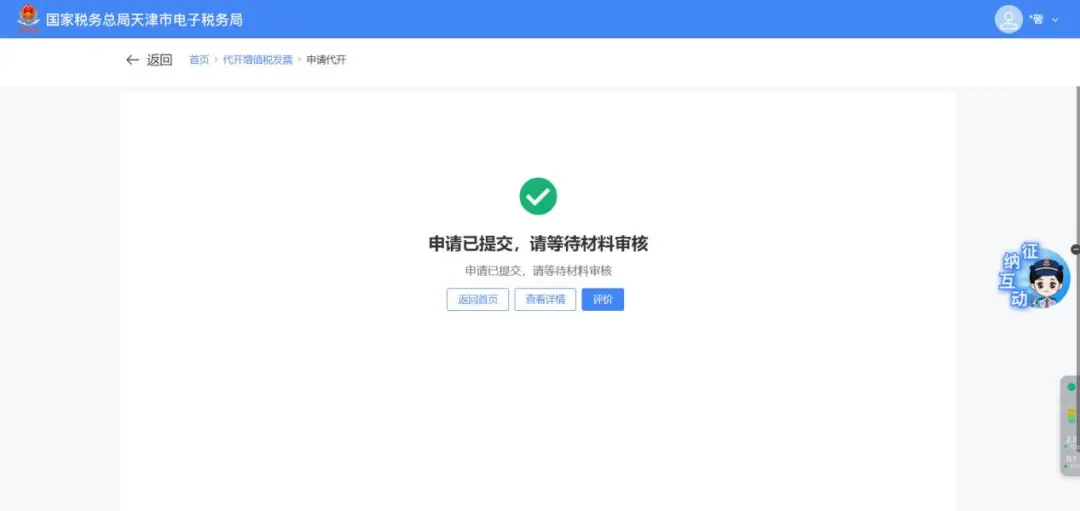
(3) After clicking [Submit Application], the system automatically determines the risk of reverse invoicing based on information such as the natural person's identity characteristics and invoicing behavior, and provides online handling measures such as immediate reverse invoicing, reverse invoicing after prompt, reverse invoicing after providing materials, pop-up blocking of reverse invoicing (reverse invoicing after offline guidance), and pop-up blocking of reverse invoicing (reverse invoicing not allowed). Taxpayers can handle it according to the pop-up prompt. After the agency issuance application is submitted successfully, it is specifically divided into the followingThree situations。 Situation 1 The agency issuance application is submitted successfully. If it meets the conditions for automatic review, no manual review is required and no payment is required, and you can enter [Agency IssuanceInvoice query] - [Query Now], click [Issue] to complete the issuance of the fully digitalized e-invoice;
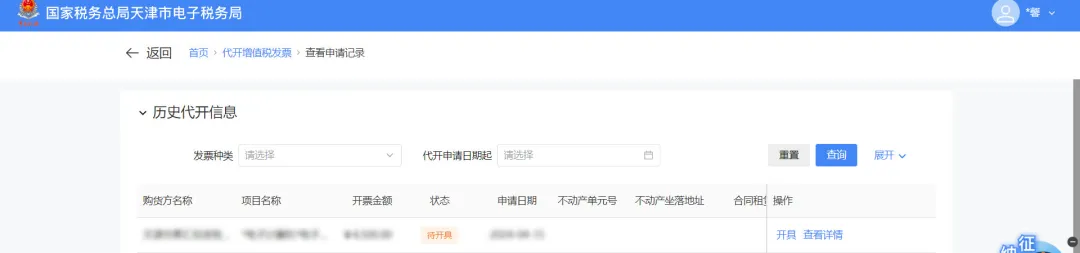
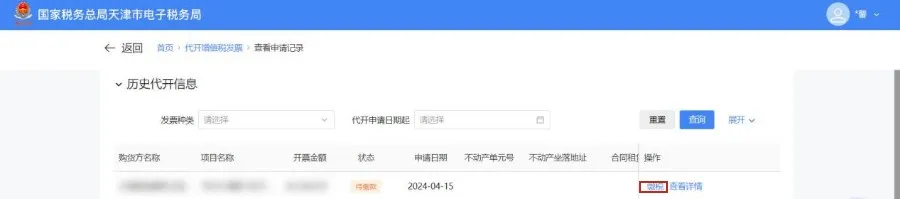
Situation 2 The agency issuance application is submitted successfully. If it meets the conditions for automatic review, no manual review is required, but payment is required; enter [Agency Issuance Invoice Query] - [Query Now], and click [Pay Tax].
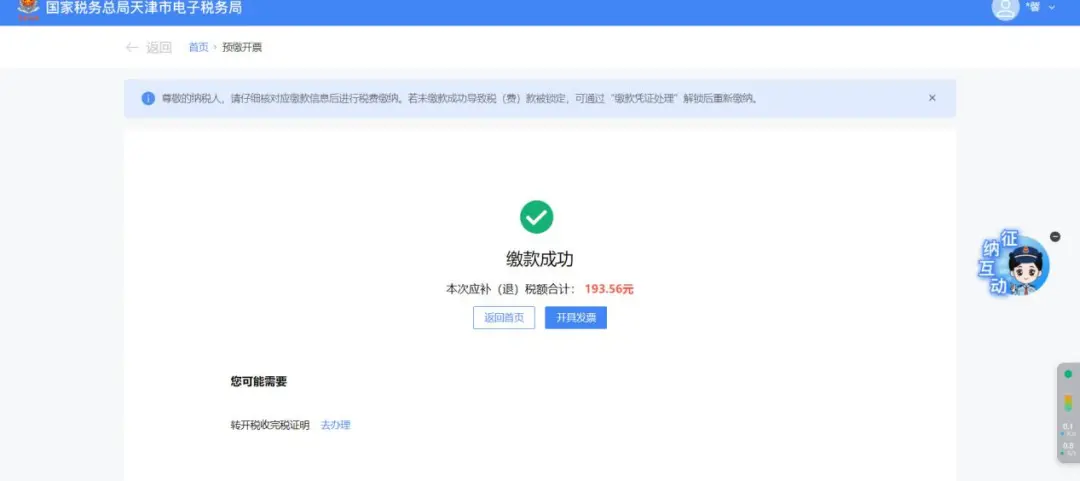
After successful payment, click [Issue Invoice] on the redirected page.
Or enter [Issuance for Individuals Query]-[Query Now], click [Issue] to complete the issuance of a fully digitalized e-invoice;
Situation 3 The agency issuance application is submitted successfully. If it does not meet the conditions for automatic review, manual review is required, and subsequent operations can only be carried out after tax personnel complete the review.
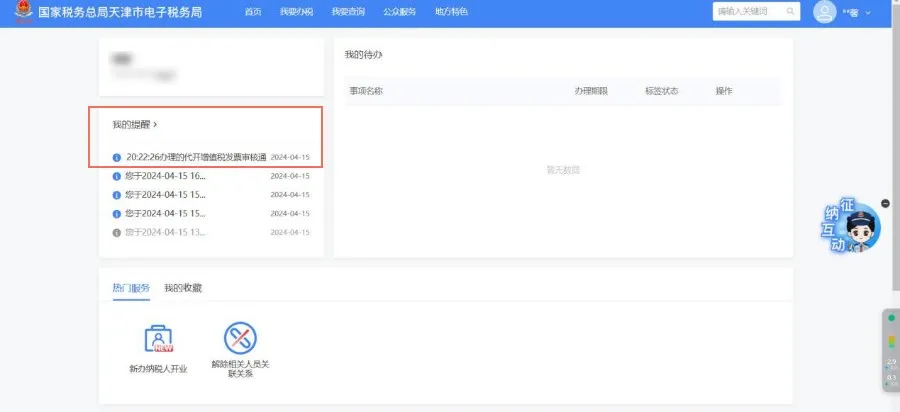
After the tax officer's review, relevant information will appear in [My Reminders] on the new electronic tax interface, and the taxpayer can proceed with follow-up operations based on the review result. If the review is successful, complete operation 1 or 2 depending on whether payment is required.
(4) Voiding of invoice issuance for individuals of fully digitalized e-invoices 1. 2.
3.
4.
5.
(5) Issuance of fully digitalized e-invoices on behalf of others 1.
2.
(6) Reversal of fully digitalized e-invoices issued on behalf of others 1.
2.
3.
4.
5.
Three、Precautions (1)The taxpayer is responsible for the authenticity and legality of the submitted materials. (2)To apply for issuing fully digitalized e-invoices on behalf of others, taxpayers need to fill in the place where the taxable activity occurs according to the interface prompts. (3)For other individuals selling real estate they have acquired and leasing real estate, if the purchaser or lessee is not another individual, the taxpayer may apply to the competent tax authority at the location of the real estate for issuance of a special VAT invoice on their behalf after paying VAT and other taxes and fees. (4)When providing construction services and taxpayers issue VAT invoices on their behalf, the name of the county (city, district) where the construction service occurs and the project name shall be provided. (5)When selling real estate and a taxpayer issues a VAT invoice on behalf, the "name of goods or taxable labor or services" column should state the name of the real estate and the property ownership certificate number (which may be omitted if there is no property ownership certificate), the "unit" column should state the area unit, and the detailed address of the real estate should be provided. When leasing real estate and a taxpayer issues a VAT invoice on behalf, the detailed address of the real estate should be provided. IV、Common Questions (1)What tax rates apply to agency issuance of fully digitalized general invoices? Answer:For invoice issuance for individuals of fully digitalized general e-invoices at Tianjin's new electronic tax bureau, there are two tax rates, 3% and 1%, and taxpayers can choose according to their actual circumstances. (2)How can taxpayers withdraw invoice issuance for individuals applications not yet accepted by tax officials? Answer:Taxpayers may, in the [I Want to Query] — [Tax Handling Progress and Result Information Query] module, click the [Withdraw] button to complete the operation. (3)Can an issued fully digitalized electronic invoice be voided? Answer:Issued fully digitalized e-invoices are not allowed to be voided. Issued fully digitalized e-invoices issued on behalf of others do not support voiding and can only be red-letter reversed through the [Invoice Issuance on Behalf Red-Letter Reversal] function. Source: State Taxation Administration, Tianjin Tax, etc. Beijing Kailing Technology Co., Ltd.——an enterprise business-finance-tax digitalization solution service provider. Kailing Technology provides solutions for sales management systems, procurement management systems, output invoicing systems, input invoice collection systems, imaging management systems, financial posting systems, electronic accounting archives, fully digitalized e-invoice and Leqi interfaces and other businesses according to enterprise needs, professionally and efficiently helping enterprises transform and upgrade their business-finance-tax digital management. If you have any business-finance-tax digital transformation needs, welcome to contact us. Beijing Kailing Technology will serve you wholeheartedly.
|