010-6097 4119Book a Demo


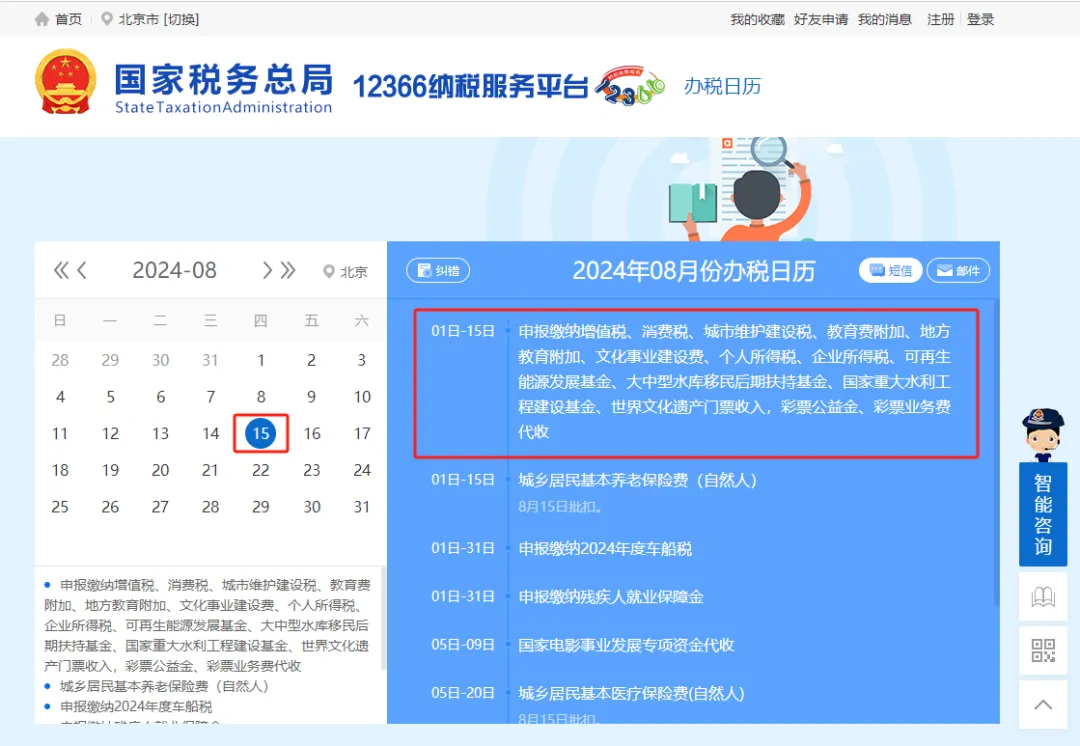
New Electronic Tax Bureau upgrade and adjustment! Tax bureau notice!Published: 2024-08-05 17:24 The August 2024 filing period is set! Please arrange your time reasonably! Here are several key points for the August filing period: 1、 The August filing period is set! Deadline is the 15th!2. The new electronic tax bureau has changed! The page display and functional module layout have been adjusted! 3. Operation guide for changing the legal representative, financial officer, and tax handler at the New Electronic Tax Bureau! 4、 5、 How should uninvoiced income be declared for VAT? Look here!6、 How do I enjoy the disabled employment security fund reduction and exemption in the New Electronic Tax Bureau?Come and take a look! 01. The August filing period is set! Deadline is the 15th!
The tax bureau clarifies:AugustFiling and tax payment deadline as ofAugust 15! File VAT, consumption tax, urban maintenance and construction tax, education surcharge, local education surcharge, cultural undertaking construction fee, individual income tax, enterprise income tax, assessed stamp tax, environmental protection tax, resource tax. Minor differences exist across locations. Taxpayers are advised to arrange their time reasonably and complete tax filing on time! The New Electronic Tax Bureau has changed! The speed of learning cannot keep up with the speed of change! This changeAdjusted the page display and functional module layout! Added new features!
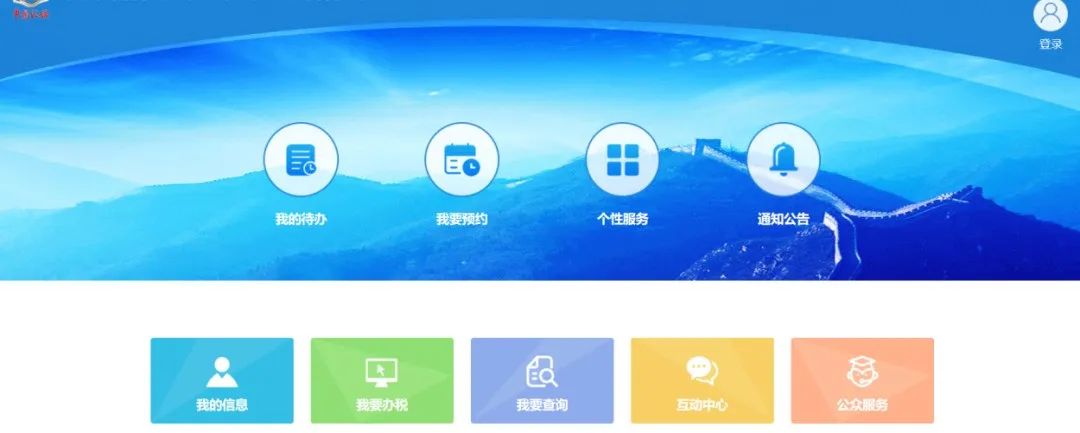
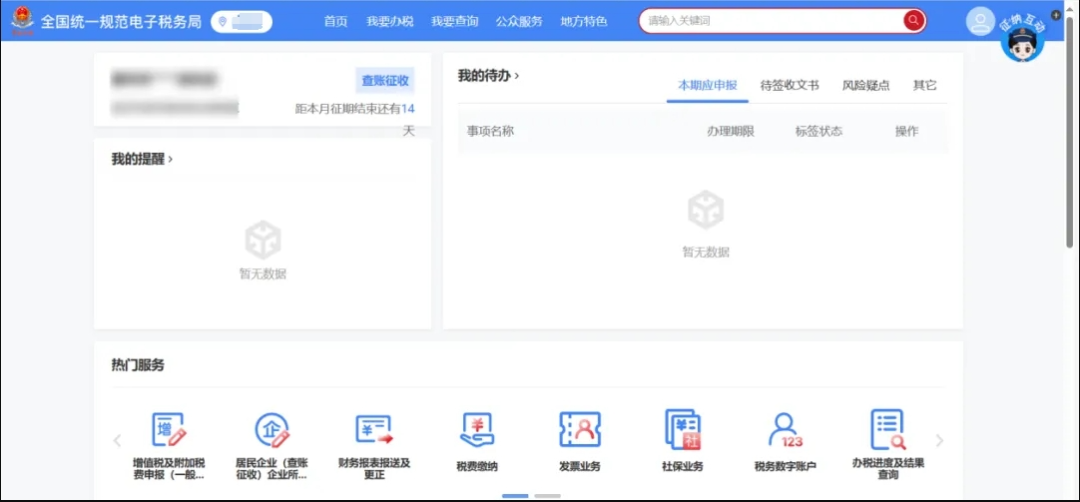
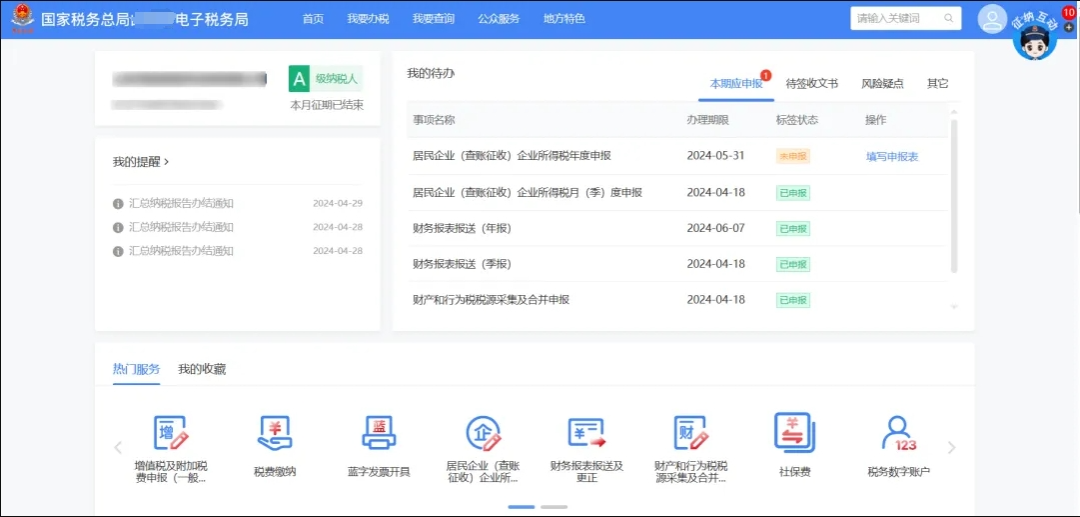
Before filing taxes in August, get familiar with the adjusted system in advance! Let's take a look below! 02.The New Electronic Tax Bureau has changed! The page display and functional module layout have been adjusted! According to the construction requirements of the nationally unified and standardized electronic tax bureau specifications, the Tianjin New Electronic Tax Bureau has been upgraded to use the nationally unified interface. This upgrade adjusted page displays and functional module layouts. The specific adjustments are as follows: I. Pre-login interface adjustmentAfter the upgradeThe interface is as follows:
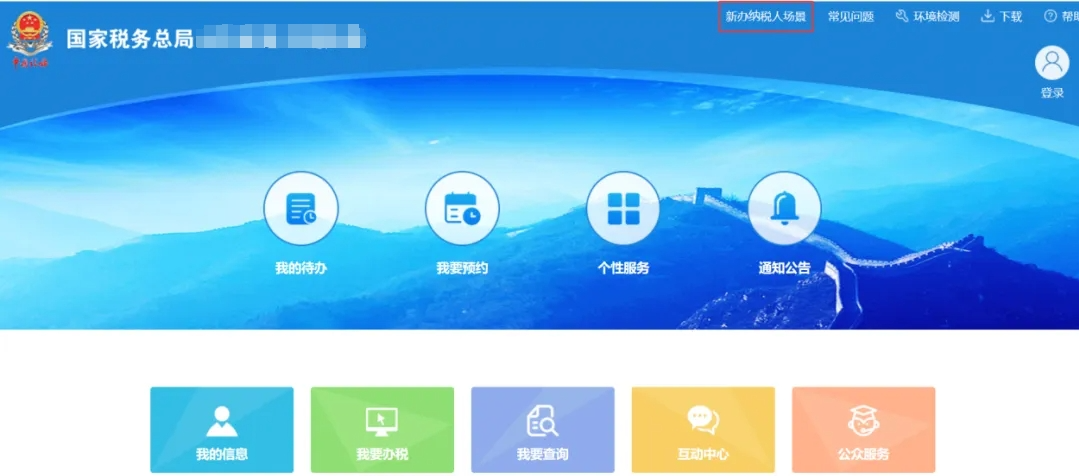
Before the upgrade, the interface was as follows:
II. Position adjustment of "new taxpayer scenario"The position of "new taxpayer scenario" is adjusted under "public services,"After the upgradeThe interface is as follows:
Before the upgrade, the locations of the functional modules were as follows:
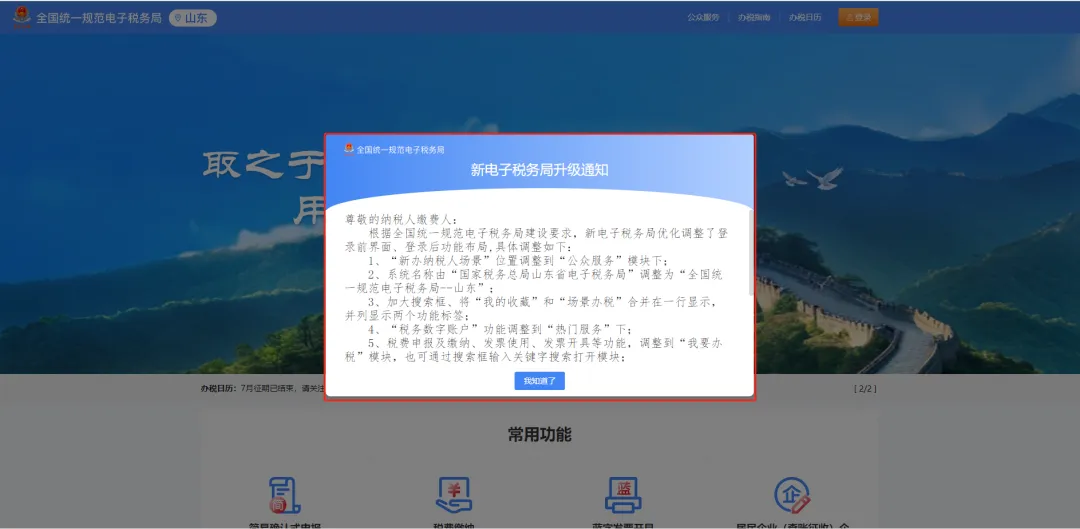
III. Adjust the system name after logging inThe system name is adjusted from "State Taxation Administration Tianjin Electronic Tax Bureau" to "National Unified Standard Electronic Tax Bureau--Tianjin",After the upgradeThe interface is as follows:
Before the upgrade, the interface was as follows:
IV. Adjust the position of the search box and move it forwardEnlarge the search box,After the upgradeThe interface is as follows:
Before the upgrade, the interface was as follows:
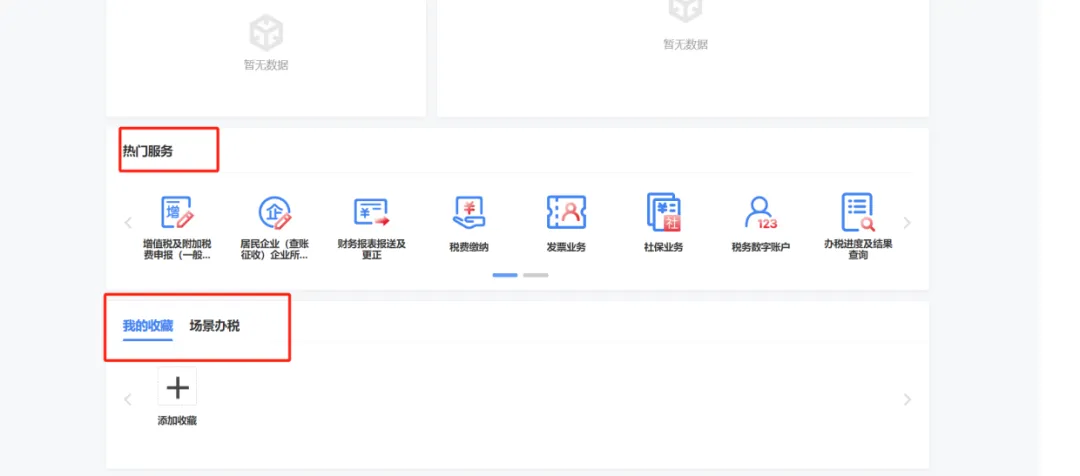
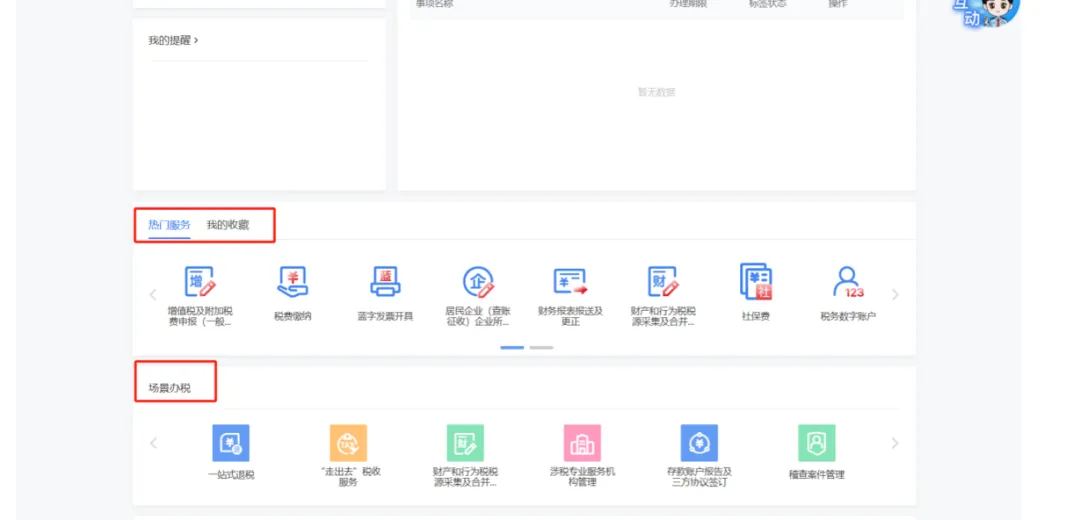
V. "My Favorites" and "Scenario-based Tax Handling" are merged and displayed in one row, with the two function tabs displayed side by side. After the upgradeThe interface is as follows:
Before the upgrade, the interface was as follows:
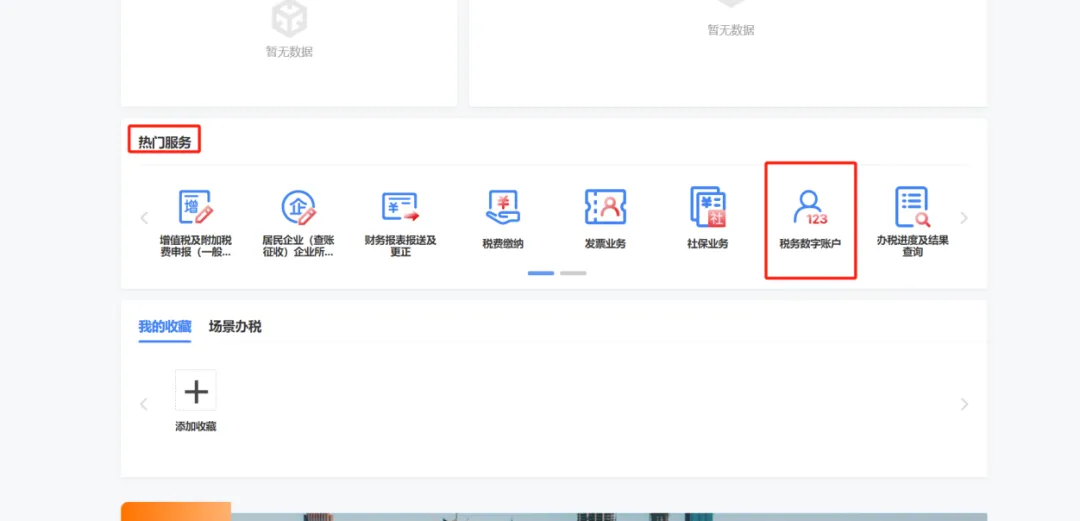
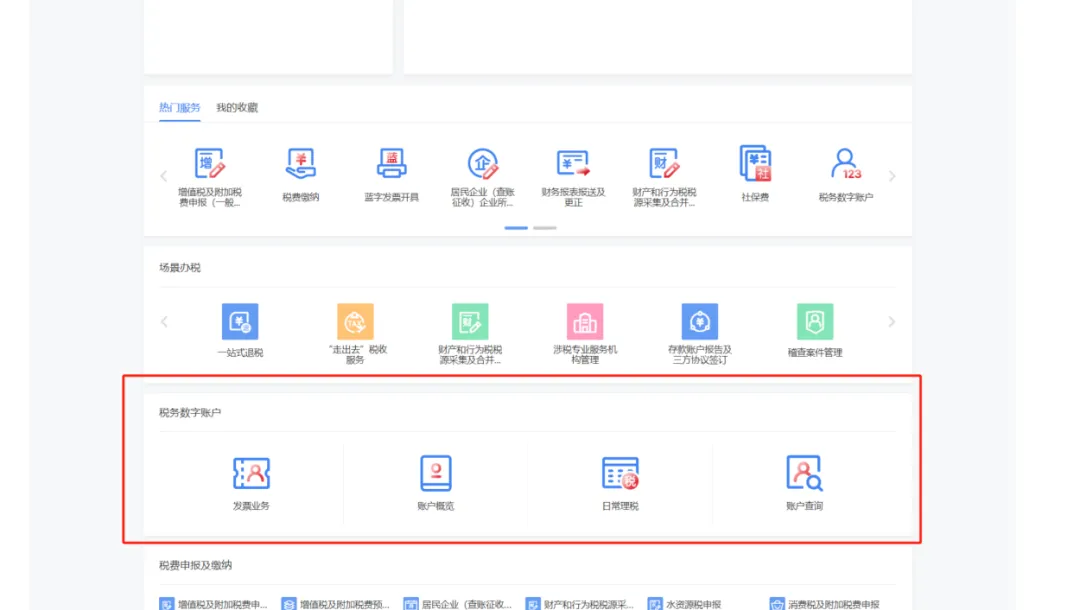
Six, The "Tax Digital Account" function has been moved under "Popular Services"After the upgradeThe interface is as follows:
Before the upgrade, the interface was as follows:
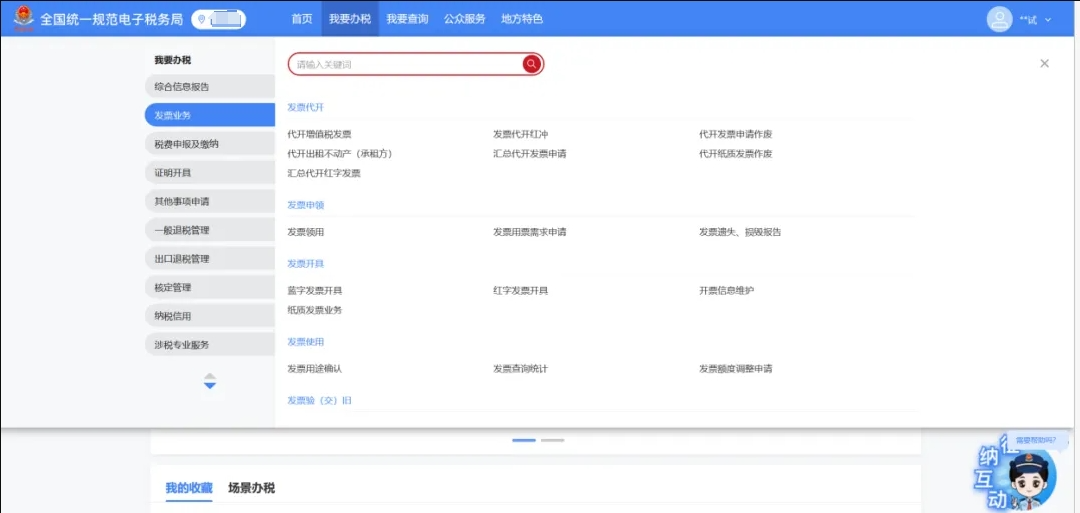
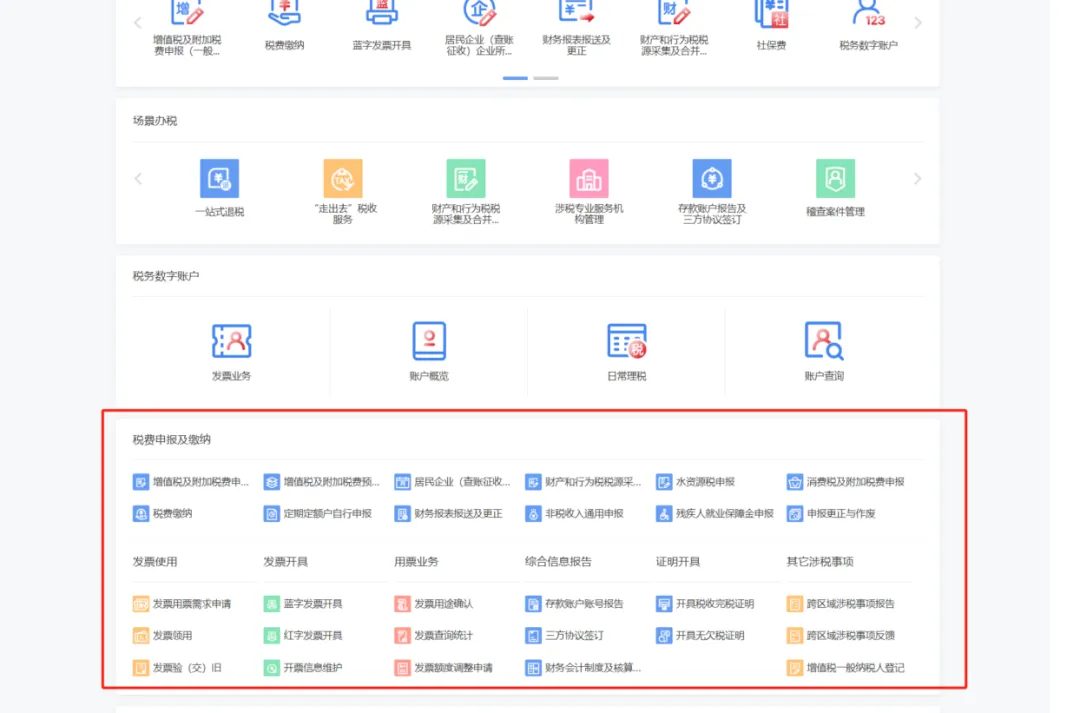
Seven, the original homepage functions such as tax declaration and payment, invoice use, and invoice issuance have been adjusted under the "I Want to Handle Taxes" module, and the module can also be opened by entering keywords in the search box. After the upgradeThe interface is as follows:
Before the upgrade, the interface was as follows:
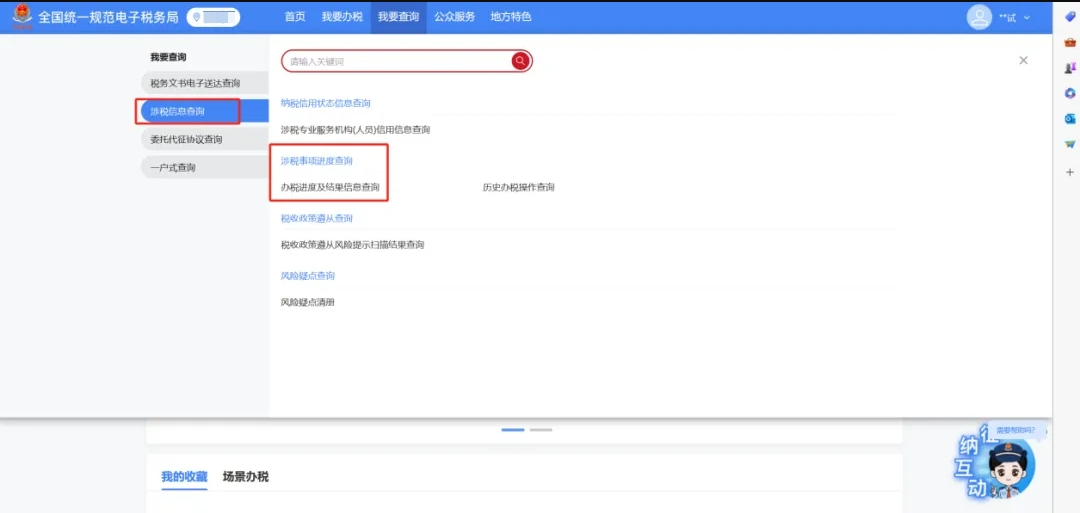
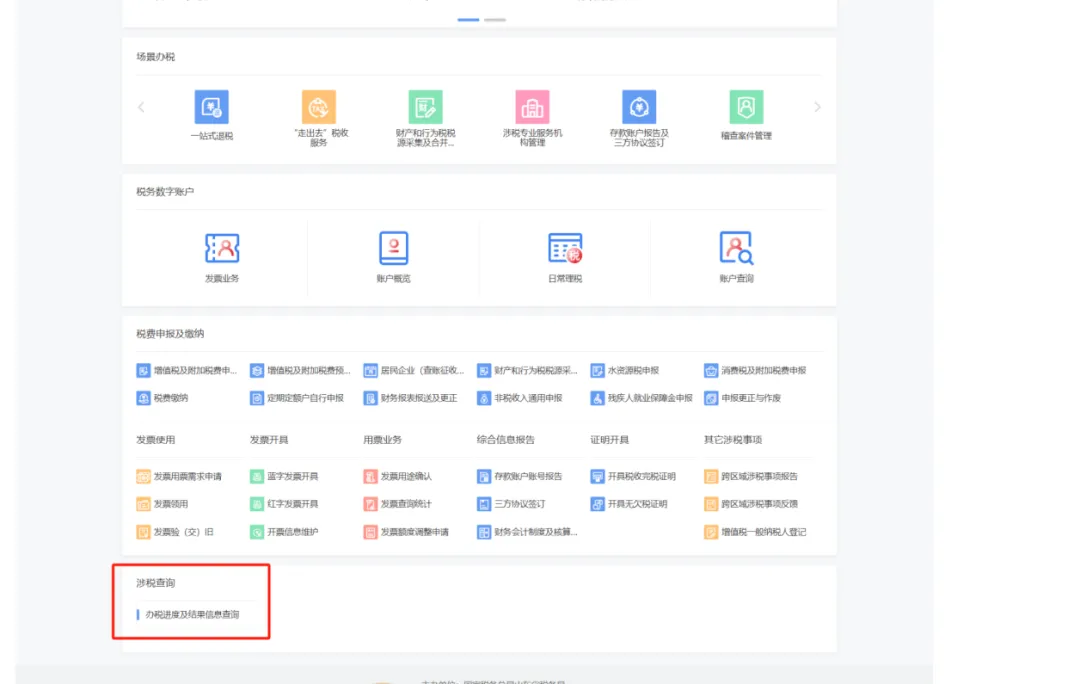
Eight, the original homepage "tax-related query" function has been adjusted to under the "I want to query" module, and keywords can also be entered in the search box for searching. After the upgradeThe interface is as follows:
Before the upgrade, the interface was as follows:
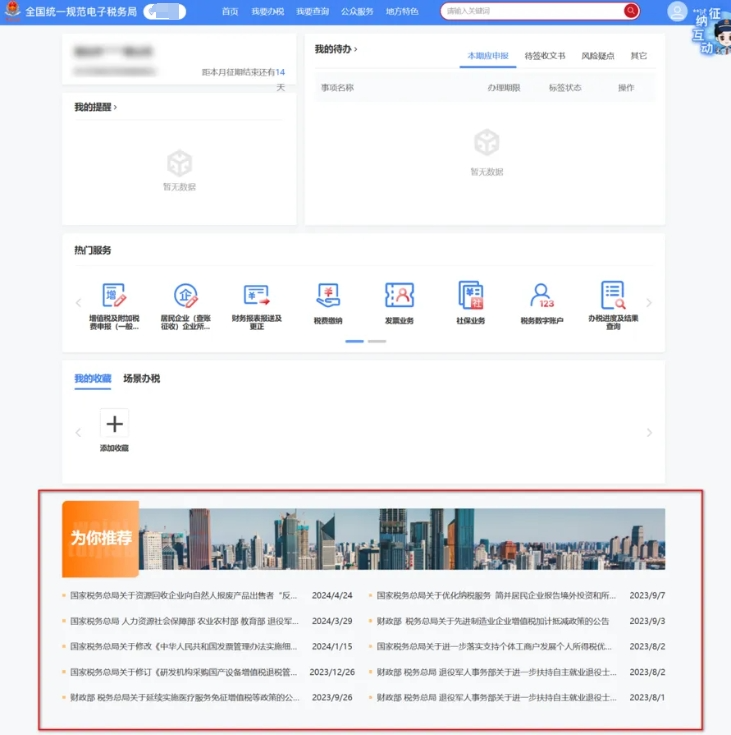
IX. Added the "Recommended for You" related policy featureAfter the upgradeThe interface is as follows:
03.New electronic tax bureauOperation guide for changing the legal representative, financial officer, and tax handler! 1.Q: If an enterprise's legal representative changes, how should it be handled? Answer:The taxpayer should first go to the market regulation department to handle the legal representative information change. After completing the change registration in accordance with the law, log in to the new Electronic Tax Bureau, then click in sequence [I Want to Handle Taxes]-[Comprehensive Information Report]-[Tax-Related Market Entity Identity Information Change] to enter the [Tax-Related Market Entity Identity Information Change] function interface. The system will automatically populate the registration information changed by the market regulation department, including pre-change and post-change information. After the taxpayer confirms it is correct, click [Confirm].
Warm reminder: Legal representatives who have not completed real-name verification should complete the real-name verification through the "User Registration" module under "Natural Person Business" in the electronic tax bureau.
2.Q: If an enterprise's financial officer changes, how should it be handled? Answer:① After the legal representative logs in to the New Electronic Tax Bureau with the "Enterprise Business" identity, click [I Want to Handle Taxes] - [Comprehensive Information Report] - [Identity Information Report] - [Tax-Related Market Entity Identity Information Change] in sequence to enter the module.
② Click [Add], and select [Name of Financial Officer] for the change item.
③ In the [Content After Change] column, select or fill in the correct information, and click [Confirm] after verification.
④ The system prompts "Saved successfully" and "The change of tax-related market entity identity information has been completed for you. You may click to download the Tax Registration Change Form." You may choose to download the "Tax Registration Change Form" or click [Continue Change], [Return to Home], or other follow-up functions.
⑤ The changed finance head needs to log in to the Electronic Tax Bureau as a "natural person business" identity, enter the [Account Center], click [Enterprise Authorization Management] - [Pending Authorization] in sequence, select the information to be confirmed, and click [Confirm].
3.Q: If an enterprise's tax handler changes, how should it be handled? Answer:The first method handles the change through the [Tax-Related Market Entity Identity Information Change] module: ① After the legal representative or financial officer logs in to the New Electronic Tax Bureau with the "Enterprise Business" identity, click [I Want to Handle Taxes] - [Comprehensive Information Report] - [Identity Information Report] - [Tax-Related Market Entity Identity Information Change] in sequence to enter the module.
② Click [Add], and select [Tax Handler Name] for the change item.
③ In the [Content After Change] column, select or fill in the correct information, and click [Confirm] after verification.
④ The system prompts "Saved successfully" and "The change of tax-related market entity identity information has been completed for you. You may click to download the Tax Registration Change Form." You may choose to download the "Tax Registration Change Form" or click [Continue Change], [Return to Home], or other follow-up functions.
⑤ The changed tax handler needs to log in to the Electronic Tax Bureau as a "natural person business" identity, enter the [Account Center], click [Enterprise Authorization Management] - [Pending Authorization] in sequence, select the information to be confirmed, and click [Confirm].
Second method: Handle changes through the [Account Center] module: ① After the legal representative or financial officer logs in to the New Electronic Tax Bureau with the "Enterprise Business" identity, click "Name" in the upper right corner to display taxpayer-related information, then click [Account Center] again to enter the module.
② Click [Personnel Permission Management]-[Add Tax Handler], fill in the relevant information of the tax handler to be added (select "tax handler" for identity type), and after confirming the information is correct, click [Confirm].
③ The changed tax handler needs to log in to the electronic tax bureau as a "natural person business" identity, enter [Account Center], click [Enterprise Authorization Management]-[Authorization Pending Confirmation] in sequence, select the information pending confirmation, and click [Confirm].
4.Q: How can a natural person terminate an association relationship with an enterprise through the new electronic tax bureau? Answer:After logging in to the new electronic tax bureau as an individual, click [I Want to Handle Taxes] - [Comprehensive Information Report] - [Remove Personnel Association Relationship] in sequence to enter the module.
The system displays taxpayer information associated with the individual. Click [Remove Association].
Select the [Reason for Cancellation] based on the actual situation, submit the application as prompted on the page, and wait for review by the tax authority.
You can enter [I Want to Query] - [Tax-Related Information Query] to enter [Tax Handling Progress and Result Information Query] to check the handling progress.
04.Invoicing requires face recognition, tax filing requires an oath! How should accountants respond? After the new Company Law and new Accounting Law took effect, new electronic tax bureaus across the country have also been put into use successively. Compared with the previous system, there are two key changes. 1、 Data changes from self-declaration to automatic calculation2. Each time an invoice is issued or a tax return is filed, facial recognition is required, and it is confirmed whether it is true and valid, and willingness to bear legal responsibility for the tax filing content. This has also been jokingly called "swearing an oath" by netizens, becoming a hot topic of discussion among friends in business-finance-tax and enterprises...... Invoicing face scan:This is a technological innovation of the China Golden Tax Phase IV system. It uses facial recognition technology to ensure the authenticity of the identity of invoicing personnel and prevent false invoicing. Tax filing "oath":Although the saying "you must 'swear' when filing taxes" may be somewhat exaggerated, it actually means that the China Golden Tax Phase IV system requires enterprises to provide more authentic and accurate information during the tax filing process and to bear legal responsibility for the authenticity of the information reported. This requires enterprises and finance personnel to strictly comply with tax law provisions and ensure tax compliance. "Face scan for invoicing, swear for tax filing" has led countless accounting colleagues and netizens to say: "This generation of accountants is too hard to handle!" 05.How should uninvoiced income be declared for VAT? Look here! (Including general taxpayers and small-scale taxpayers)I. Will Reporting Tax on Uninvoiced Income Definitely Result in a Fine?According to the provisions of the Measures for the Administration of Invoices, when enterprises engage in business operations, they shall issue invoices according to regulations. The specific provisions are as follows:1. Invoice issuance requirements
2. Penalties for failing to issue an invoice when required to do so
II. Can uninvoiced income be left undeclared?No! According to relevant provisions, VAT declared income includes invoiced income, uninvoiced income, tax assessment income, inspection and supplementary income, etc. Therefore, declaring only invoiced income is neither compliant nor legal! III. How should uninvoiced income be recorded?When there is revenue for which no invoice has been issued, the booking method is as follows:
1. Learn through specific cases how a general taxpayer fills in the filing for un-invoiced income! Some people believe that filing VAT only requires reporting invoiced revenue, but this understanding is actually wrong! Why is that? Let's first look at the filing form! (Taking a general VAT taxpayer as an example)
Case One:A certain general VAT taxpayer A is in the catering industry. Because most customers are individual diners and generally do not request invoices after dining, of the 600,000 yuan in tax-exclusive sales revenue obtained in June, 400,000 yuan was not invoiced. So when Enterprise A files VAT, how should this 400,000 yuan be handled? The Interim Regulations on VAT clearly stipulate that the VAT liability for sales services arises on the day the sales payment is received or the voucher for the sales payment is obtained. Enterprise A bears the tax liability on the day it collects the meal fee. Although the customer did not request an invoice, this income is part of Enterprise A's normal operating revenue, so RMB 400,000 of uninvoiced income should be declared. The declaration form should be filled in like this!
Case Two:Taxpayer B distributed self-produced food to company employees as a holiday benefit without issuing an invoice. The cost was 500,000 yuan, and the tax-exclusive value for external sales was 1 million yuan. How should Enterprise B declare this? According to the relevant provisions of the Interim Regulations on Value-Added Tax, Enterprise B's act of using self-produced goods for collective welfare conforms to the situation of deemed sales of goods; even if no invoice is issued, it shall declare 100 million yuan of uninvoiced income. The declaration form should be filled in like this!
Case Three:Taxpayer C is a property leasing enterprise. In 2023, it signed a lease contract with a client with a tax-exclusive total amount of 2.8 million yuan, and the contract stipulated payment by advance receipt, with invoices issued centrally at year-end. In January 2023, Enterprise C received the first advance receipt of 1.4 million yuan, and in July received the second advance receipt of 1.4 million yuan. How should Enterprise C declare these two advance receipt incomes for which no invoices were issued? For taxpayers providing leasing services using the advance receipt method, the tax obligation occurs on the day the advance receipt is received. If Enterprise C receives two payments in January and July, the tax payable should be calculated at that time, and the two receipts should be filed separately in the month following receipt; if no invoice is issued, it should be filed as un-invoiced income. The declaration form should be filled in like this!
Case Four: When taxpayer D was inspected by the tax bureau, an unreported tax-exclusive sales revenue of RMB 200,000 from last year was discovered. Facing this tax inspection adjustment income, should Enterprise D file it? According to relevant VAT regulations, in addition to declaring invoicing income, Enterprise D should also declare various items such as audit-recovered income and tax assessment incomerevenue and pay the corresponding VAT in order to avoid risks and develop sustainably and healthily. The declaration form should be filled in like this!
Notes on filing reminders: According to tax law, income obtained should be reported for VAT according to the time when the tax obligation arises. When the tax obligation time is reached, it should be reported and taxed even if no invoice has been issued. Regarding the filing of uninvoiced income, the Chengdu Municipal State Taxation Bureau, in Article 5 of the "Latest Warm Reminder on the New Rules for VAT Tax Filing Comparison," provides the following notes for general taxpayers when filing uninvoiced income: ①During the period when an uninvoiced tax obligation occurs: for VAT filing, simply fill in the positive sales amount in the "uninvoiced income" column, but relevant evidence such as contracts and payment records must be retained for future verification. ②If an invoice is issued later for previously un-invoiced income, then during the period when the invoice is issued, a negative amount is filled in under "un-invoiced income" for VAT filing to offset it. The system will initiate an abnormal comparison handling procedure, requiring review at the service hall and submission of the bookkeeping voucher for the previously obtained un-invoiced income, the invoice issued in the current period, and other evidence as proof, to apply for normal filing and unlock the tax control device. 2. Through specific cases, learn how small-scale taxpayers fill in and file returns for un-invoiced income! Small-scale taxpayers do not have a separate 'uninvoiced revenue' item, so how should a small-scale taxpayer declare uninvoiced revenue obtained? The first quarter sales situation of xx Company is as follows:
Fill in the declaration form as follows:
For small and micro enterprise tax exemption, uninvoiced revenue can be entered directly in the small and micro enterprise tax exemption column; there is no need to enter it in the levy column. Note:When uninvoiced income exceeds 300,000, it is actually directly filled in the 3% levy column to pay tax. Because no invoice was issued, the sub-item of the levy column does not need to include the amount of the uninvoiced portion; simply fill in the summary item. If the customer no longer needs an invoice later, there is no need to adjust the later filing form; if the customer later requests the invoice, an adjustment needs to be made in the period when the invoice is issued. The principle of this adjustment is also very simple: it is to avoid repeatedly filling in sales amounts and paying taxes twice. You have already declared the sales amount and tax amount when declaring uninvoiced income. If you declare again when issuing the invoice later, wouldn't that be duplicate? So when issuing supplementary invoices later, we need to consider excluding the corresponding previously unissued revenue portion from the current period. So-called exclusion means entering a negative number in the corresponding column. Of course, in actual operation, filling in a negative number may cause an abnormality in the VAT filing comparison. If the comparison is abnormal, you need to file at the tax bureau hall. 06. How do I enjoy the disabled employment security fund reduction and exemption in the New Electronic Tax Bureau?1. My unit employs persons with disabilities, and the number of active employees does not exceed 30. Why can't we enjoy the tax exemption when filing the employment security fund for persons with disabilities with the new electronic tax bureau? According to the Announcement of the Ministry of Finance on Adjusting the Collection Policy for the Employment Security Fund for Persons with Disabilities (Announcement No. 98 of 2019) and the Announcement of the Ministry of Finance on Continuing the Implementation of Preferential Policies for the Employment Security Fund for Persons with Disabilities (Ministry of Finance Announcement No. 8 of 2023), from January 1, 2020 to December 31, 2027, enterprises with 30 or fewer employees (inclusive) are temporarily exempt from the employment security fund for persons with disabilities. The new electronic tax bureau system determines whether the taxpayer is an enterprise type based on the taxpayer's tax registration information. Taxpayers can view basic taxpayer information through "I Want to Query — One-Household Query — Taxpayer Information Query," as shown in the figure below:
If the taxpayer is an enterprise type, and the "number of employees on the job last year" did not exceed 30, and the "amount payable for the current period" is greater than 0, then the "nature of reduction or exemption" and "current period reduction or exemption amount" will be automatically populated, and the reduction or exemption will be enjoyed. If the taxpayer is a non-enterprise type, it cannot enjoy this reduction or exemption policy. If your unit complies with the policy of the Announcement of the Ministry of Finance on Continuing the Implementation of the Preferential Policy for Employment Security Funds for Persons with Disabilities (Ministry of Finance Announcement No. 8 of 2023), it can enjoy tiered reductions in employment security funds for persons with disabilities.
2. When our unit files environmental protection tax and calculates tax reductions and exemptions in the new electronic tax bureau, the system prompts that the taxpayer had excessive emissions in May 2024 and cannot enjoy the tax reduction and exemption preferences. What should we do? If any discharge outlet exceeds the standard when your unit files the environmental protection tax, none of the discharge outlets in that month can enjoy the environmental protection tax reduction or exemption. You can compare the standard concentration value in the tax source collection interface with the maximum concentration value in the filing calculation and reduction/exemption information interface. If the maximum concentration value is greater than the standard concentration value, it has exceeded the standard.
3. When our unit adds new property tax source information through the New Electronic Tax Bureau, the house location address (street/township) and the detailed house location address are both blank and cannot be filled in. What should we do?
This situation occurs because the "house location address (administrative division)" does not reach the specific district or county. Please check the "house location address (administrative division)" in the tax source information. If the address is at the provincial or municipal level without reaching the specific district or county, you can use the "I Want to Handle Taxes - Comprehensive Information Report - Identity Information Report - Tax-Related Market Entity Identity Information Change" module to change the "production and operation address administrative division" item and fill in the specific administrative division information.
4. In the new electronic tax bureau's tax exemption and refund filing, where can the export tax rebate commodity code be queried? You can search for the corresponding export tax rebate commodity name through "I Want to Query - One-Household-Style Query - Export Tax Rebate Library" to obtain the export tax rebate commodity code.
5. When our unit files other withholding and remitting or collecting and remitting declarations through the new electronic tax bureau, what should we do if the withheld taxpayer identification number and the name of the withheld or collected taxpayer cannot be brought up?
These two pieces of information are filled in on the detail information entry screen. After the "ID number" under the withholding agent information is entered for the filing, the system automatically queries related information. If the information can be retrieved, a confirmation option will appear; if the system cannot find it, it must be entered manually, as shown in the figure below:
Please register according to the prompts. 6. Our unit is a branch that pays taxes locally. When logging into the new electronic tax bureau and filling out the return through "My To-Do—Resident Enterprise (Audit Collection) Corporate Income Tax Monthly (Quarterly) Filing," only two items are displayed: "Branch Allocation Ratio and Branch Current Period Allocated Supplementary (Refund) Income Tax Amount." The complete Corporate Income Tax Monthly (Quarterly) Prepayment Tax Return (Type A) is not displayed. What should be done?
For taxpayers labeled "simple business" in the scenario-based tax handling of the new electronic tax bureau, the "confirmation-based filing" method is set. Your unit is of the branch type, and the two items "branch allocation ratio and current-period allocated income tax payable (refundable) of the branch" can be obtained from the head office's filing information (if not obtained, they can be filled in independently). Therefore, you only need to confirm the populated data and submit the filing after confirming it is correct. If you need to view the filing form, click "Preview Report" to view it, as shown in the figure below:
Kailing Technology provides enterprise business-finance-tax digital product lines according to enterprise needs: Solutions for businesses including sales contract management system, procurement contract management system, fully digitalized Leqi interface project, output automatic invoicing system, employee expense control and reimbursement system, input VAT invoice management system, supply chain collaborative reconciliation system, image OCR recognition system, automatic financial bookkeeping system, and electronic accounting archives system, professionally and efficiently supporting the transformation and upgrading of enterprise business-finance-tax digital management. If you have any business-finance-tax digital transformation needs, welcome to contact us. Beijing Kailing Technology will serve you wholeheartedly.
|