010-6097 4119Book a Demo


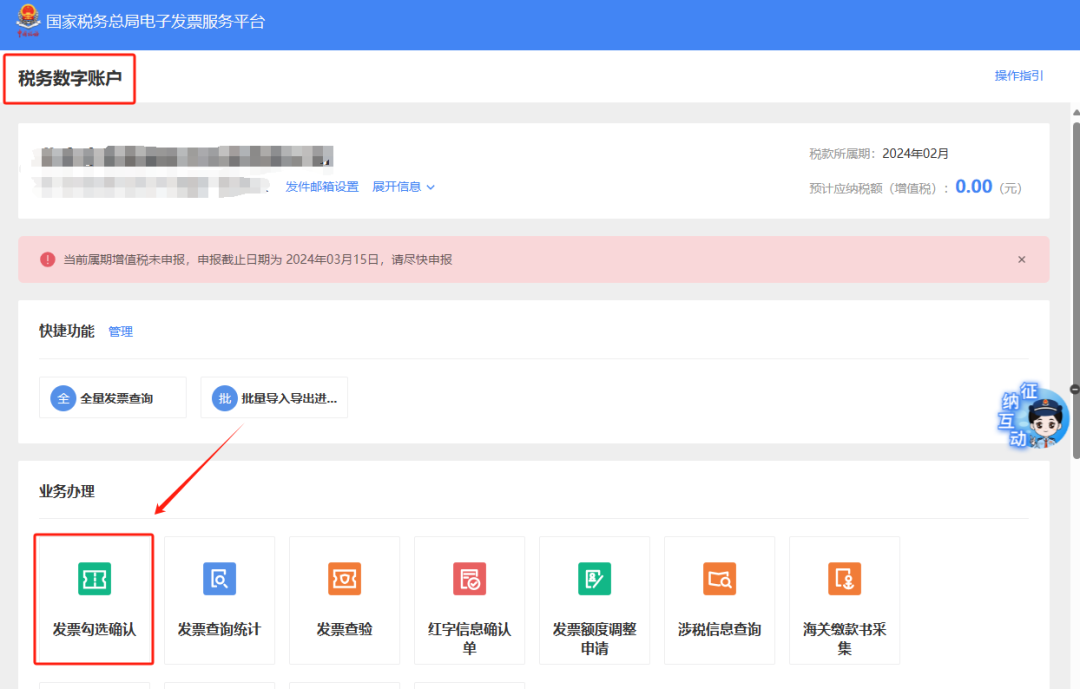
Summary of hot operational questions on fully digitalized e-invoicesPublished: 2024-07-15 17:23 01Q: How can I print the invoice details of deduction data that have been certified and successfully statistically confirmed?Answer: Log in to the Electronic Tax Bureau, I Want to Handle Taxes — Tax Digital Account — Invoice Selection Confirmation.
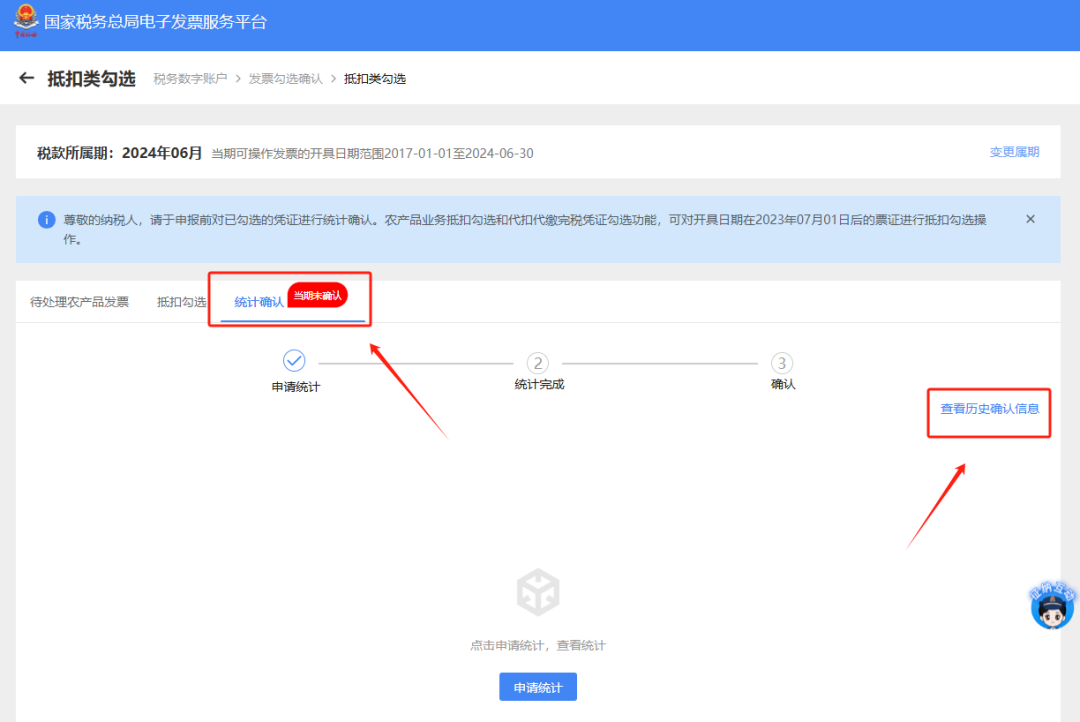
Select the [Deduction-type Selection] module.
In the [Statistical Confirmation] module, click [Print] or [Download Invoice Details] to print the summary data and download the details. Note:To query past data, you can click [Historical Confirmation Information] on the right side of this page to enter, and select the month to view.
02Q: How can I query and export the summary data of issued invoice materials on the electronic tax bureau? Answer: Hello, please click [I Want to Handle Taxes] - [Tax Digital Account] - [Invoice queryEnter the Statistics】-【Full invoice query】module, select query conditions and click 【Query】. The system will display query results based on the conditions. In the query results, select the invoice data to be exported and click "Export". 03Q: The taxpayer has received an invoice, but cannot find the corresponding invoice in the selection module. What should be done? Answer: If this problem occurs, troubleshoot according to the following steps: (1) Confirm invoice information and check whether the query conditions are set accurately; (2) Check the invoice face information, such as whether the identification number is correct, whether the invoice is a negative invoice, whether the tax control invoice number is correct, or log in to the "State Taxation AdministrationNational VAT Invoice Verification Platform"(https://inv-veri.chinatax.gov.cn/) for verification; (3) Check whether it is a withholding tax payment certificate, customs payment document, etc. If so, select it according to the corresponding voucher selection steps; (4) Check whether the corresponding invoice was mistakenly marked as "no deduction selection". Through the [Tax Digital Account] - [Invoice Selection Confirmation] - [No Deduction Selection] module, set the query conditions and click Query to obtain the query results of invoice information matching the filter conditions. If it is confirmed that the invoice has been authenticated as "no deduction selection", the selection can be revoked; (5) Check whether the invoice status is selected. The checking method is to view invoice details through the [Invoice Query Statistics] - [Full Invoice Query] module, or enter the [Invoice Selection Confirmation] - [Deduction Selection] module and select the corresponding query conditions to query invoice data, or click the "Confirm Historical Information" function under "Statistical Confirmation" to query previous selection situations. 04Q: After obtaining a fully digitalized e-invoice, if the issuer initiates the red-letter invoice issuance process, can the recipient still confirm the invoice use for that invoice? Answer: If the purpose of a fully digitalized e-invoice has not been confirmed and it has not been recorded in accounts, after the invoicing party initiates the red-letter reversal process, the corresponding fully digitalized e-invoice will be locked, and the invoicing recipient will not be allowed to perform invoice purpose confirmation operations. If the purpose of a fully digitalized e-invoice has not been confirmed but it has been recorded in accounts, if the invoicing party issues a partial red-letter invoice, the invoicing recipient is allowed to perform deduction selection on the portion of the fully digitalized e-invoice that has not been reversed; if the invoicing party issues a full red-letter invoice, continued deduction selection is not allowed. 05Q: For pilot taxpayers of fully digitalized e-invoices, if the tax control equipment has not been deregistered, do they still need to report taxes and clear the card every month? Answer: Taxpayers that have not deregistered their tax control equipment still need to report and clear the card every month. 06Q: Under what circumstances can a red-letter fully digitalized e-invoice be issued? Answer: In general, when pilot taxpayers have sales returns, incorrect invoicing, service termination, sales discounts, etc., they may issue red-ink fully digitalized e-invoices in accordance with the provisions. However, red-letter fully digitalized e-invoices are not allowed to be issued under the following circumstances: (1) When the blue-letter invoice has been voided, fully red-letter reversed, determined as an abnormal deduction voucher, or locked (a red-letter confirmation form or information table has been initiated but no red-letter invoice has been issued, and the red-letter confirmation form or information table has not been revoked), a red-letter reversal is not allowed to be initiated; (2) When the VAT purpose of the blue invoice is "pending tax refund", "tax refunded", "deducted (refund upon change)", "tax refund on behalf", or "no tax refund and no deduction", initiating a red-letter reversal is not allowed; (3) Among the tax preference tags of the blue invoice, when the "Winter Olympics tax refund tag" is "Winter Olympics tax refund applied for", initiating a red-letter reversal is not allowed; (4) When initiating a red-letter reversal, if the counterparty taxpayer is in a status such as "abnormal" or "deregistered" and cannot log in to the system to perform relevant operations, initiating a red-letter reversal is not allowed. 07Q: How can a fully digitalized e-invoice that has been issued be reversed with a red-letter invoice on the electronic tax bureau? Answer: After a taxpayer issues a blue-letter invoice, if there are circumstances such as sales returns (including full returns and partial returns), incorrect invoicing, service termination (including full termination and partial termination), and sales discounts, a red-letter invoice shall be issued according to regulations. Taxpayers may enter the [I Want to Handle Taxes] - [Invoicing Business] - [Red-Letter Invoice Issuance] page in sequence, click "Red-Letter Information Confirmation Form Entry", and enter the red-letter information confirmation form entry interface. Enter query conditions and click the [Query] button to query the blue-letter invoice information that needs red-letter reversal. After clicking "Select" in the query results, enter the [Red-Letter Information Confirmation Form Entry Page]. On this page, if the fully digitalized e-invoice type selected is "Electronic Invoice", click the [Submit] button, and the prompt will appear: "Dear taxpayer, the red-letter invoice type you selected is 'Electronic Invoice'. After confirmation by the confirming party, the system will directly generate a red-letter invoice. Please confirm whether to continue submitting?" Click [Confirm], and the red-letter invoice is successfully issued; if the fully digitalized e-invoice type selected is "Paper Invoice of the Same Type as the Original Blue Invoice", click [Confirm], and it will jump to the "Submission Successful" interface, prompting that the red-letter information confirmation form has been submitted successfully. If the situation requires confirmation by the other party, after logging in, the other taxpayer can handle it on the [I Want to Handle Taxes]-[Invoicing Business]-[Red-Letter Invoice Issuance]-[Red-Letter Information Confirmation Form Processing] page. To agree to the red-letter reversal, select "Confirm"; to disagree, select "Reject"; the red-letter information confirmation form can also be revoked. When the status of the red-letter information confirmation form is confirmed by both buyer and seller or confirmation is not required, the taxpayer may successively enter the [I Want to Handle Taxes]-[Invoicing Business]-[Red-Letter Invoice Issuance] page, click "Red-Letter Invoice Issuance" in the common functions module, enter query conditions to find the previously issued red-letter information confirmation form, click "Go to Invoice" on the right, enter the red-letter invoice issuance page, and then issue the red-letter invoice normally. 08Q: When initiating a red-letter reversal for a fully digitalized e-invoice, how should the red-letter invoice type be selected? Answer: The red-letter reversal rules between invoice types are "new reverses old, electronic reverses paper," as follows: (1) Fully digitalized e-invoices can be red-letter reversed against fully digitalized e-invoices, fully digitalized paper invoices (paper invoices issued by the electronic invoice service platform), and tax control invoices (provided that the tax control archive has been deregistered); (2) Fully digitalized paper invoices can be red-letter reversed against fully digitalized paper invoices and tax control invoices, but red-letter reversal against fully digitalized e-invoices is not allowed (the premise is that the tax control archives have been cancelled); (3) Tax-controlled invoices may only be red-letter reversed against tax-controlled invoices; red-letter reversal against fully digitalized e-invoices or fully digitalized paper invoices is not allowed. 09Q: If a fully digitalized e-invoice bearing the words "Air Transport Electronic Ticket Itinerary" or "Railway Electronic Ticket" is to be used for tax deduction, pre-tax deduction, and financial reimbursement, how should the fully digitalized e-invoice be issued? Answer: Currently, fully digitalized e-invoices bearing the words "Air Transport Electronic Ticket Itinerary Receipt" and "Railway Electronic Ticket" include the "Purchaser Name" and its "Unified Social Credit Code". If they are to be used for tax deduction, pre-tax deduction, and financial reimbursement, the information of the unit using the invoice for tax deduction, pre-tax deduction, and financial reimbursement shall be filled in at the "Purchaser Name" and its "Unified Social Credit Code", and after invoicing, it shall be delivered directly to the tax digital account of the corresponding unit. Relevant traveler information is displayed in the passenger information column (area). Source: Beijing Chaoyang Tax Kailing Technology provides enterprise business-finance-tax digital product lines according to enterprise needs: Solutions for businesses including sales contract management system, procurement contract management system, fully digitalized Leqi interface project, output automatic invoicing system, employee expense control and reimbursement system, input VAT invoice management system, supply chain collaborative reconciliation system, image OCR recognition system, automatic financial bookkeeping system, and electronic accounting archives system, professionally and efficiently supporting the transformation and upgrading of enterprise business-finance-tax digital management. If you have any business-finance-tax digital transformation needs, welcome to contact us. Beijing Kailing Technology will serve you wholeheartedly.
|