010-6097 4119Book a Demo


What should we do when we receive a fully digitalized e-invoice? Do we need to mark it for accounting entry?Published: 2024-05-23 16:50 Now, our fully digitalized e-invoices have achieved broad coverage in most cities. Recently, a friend sent a private message to the editor asking how to respond when receiving a fully digitalized e-invoice? Is it necessary to mark it for accounting entry? So today, the editor will explain this issue to everyone in detail. Table of Contents: 01 What is invoice posting? 02 How to use the [Invoice Accounting Entry Identifier] module for invoice accounting entry? 03 How to query and adjust "posted" invoices? 04 What matters should a taxpayer pay attention to when issuing and obtaining a fully digitalized e-invoice for reimbursement, accounting, and archiving? I. What is invoice posting?E-invoice Service PlatformCollect all invoices obtained by taxpayers (including customs payment certificates) and withholding tax payment vouchers. Taxpayers may throughPass: Click Electronic Tax Bureau-[Tax Digital Account] - [Invoice Posting Identifier]module to perform invoice posting operations. This function can effectively help taxpayersPrevent the invoicing party from mistakenly issuing red-letter invoices, recipient's electronic invoiceRisk of duplicate booking and archiving。 II. How to use the [Invoice Accounting Entry Identifier] module for invoice accounting entry?Log in to the Beijing Electronic Tax Bureau,Click[I Want to Handle Taxes] - [Tax Digital Account], enter the invoice posting identification function.
Taxpayers may, as needed,The followingUnder three label types,
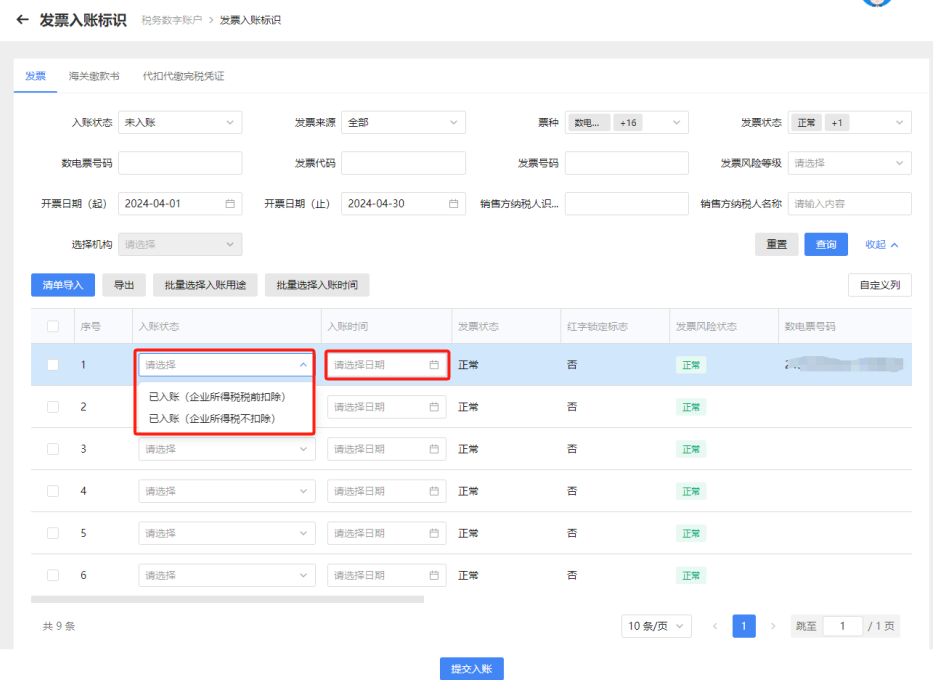
Input or select query conditions, click[Query], the system will display eligible invoice information in list form in the query results area:
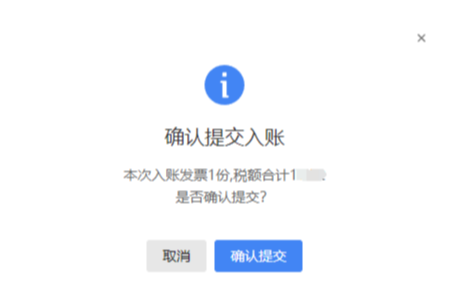
Specific operation steps: 1. Post entries item by itemIf a taxpayer needs to perform an invoice recording operation for a single invoice, it may select the invoice information to be recorded and choose in the drop-down menu"Invoice entry status"and"Invoice entry time", click[Submit for Bookkeeping], in the pop-up submission-for-posting confirmation box, click"Confirm Submission", to complete the invoice posting operation.
2. Batch postingIf a taxpayer has multiple invoices to be recorded and the recording status and recording time are the same, the recording operation can be performed in batches. In[Invoice booking identifier]On the interface, check multiple invoices that need to be booked, then separately complete"Batch select booking purpose"and"Batch select booking time"operation, click"Confirm Submission", to complete the posting operation.
(Bulk selection of booking status interface)
(Bulk selection of booking status interface) 3. List import for accounting entryIf a taxpayer has multiple invoices to be recorded and the status and recording time are different, this can be achieved through the list import function. Click[List Import], fill in and uploadBatch Invoice Posting Import Templateand then complete the invoice posting operation.
(Prompt screen after successful import) III. How to query and adjust "posted" invoices?For invoices that have completed the posting operation, you can query their"Entry status", and can also apply to its"Entry purpose"Make adjustments。 Specific operation steps: 1. Query "booked" invoicesAfter completing the invoice posting operation, you can[Invoice booking identifier]module, select the corresponding"Entry status"and then query.
2. Booking adjustmentTo change the accounting purpose or cancel accounting,In the queried"Booked"On the invoice information screen, check the corresponding invoice and click that row"Entry status"After selecting to change the purpose or cancel booking through the drop-down menu, click"Entry adjustment"and then complete the modification. If the taxpayer cancels the accounting entry,The invoice posting status needs to be readjusted, which can be done in[Booking status]Select from the drop-down menu"Entry cancellation", query and readjust invoice posting status.
IV. What matters should a taxpayer pay attention to when issuing and obtaining a fully digitalized e-invoice for reimbursement, accounting, and archiving?Where a taxpayer issues and obtains a fully digitalized e-invoice for reimbursement, accounting, and archiving, it shall comply with relevant regulations such as the Notice of the Ministry of Finance and the National Archives Administration on Regulating the Reimbursement, Accounting, and Archiving of Electronic Accounting Vouchers (Cai Kuai [2020] No. 6, hereinafter referred to as the Notice), the Measures for the Administration of Accounting Archives (Order No. 79 of the Ministry of Finance and the National Archives Administration), and the Notice of the Accounting Department of the Ministry of Finance on Publishing the Accounting Data Standards for Electronic Vouchers (Trial Version) (Cai Kuai Bian Han [2023] No. 18). First,Fully digitalized e-invoices are provided in three electronic file formats: PDF, OFD, and XML. Among them, PDF and OFD are formats for previewing invoice content, while the XML format containing a digital signature is the electronic file format that meets the Ministry of Finance's recording requirements. According to Articles 3 and 5 of the Notice, taxpayers who use only XML electronic files of fully digitalized e-invoices for reimbursement, recording, and archiving may no longer keep paper copies. Second,If a taxpayer needs to use a paper printout of a fully digitalized e-invoice as the basis for reimbursement, accounting, and archiving, it shall, in accordance with Article 4 of the Notice, simultaneously keep the XML-format electronic file of the fully digitalized e-invoice containing the digital signature. Source: Beijing Xicheng Tax Beijing Kailing Technology Co., Ltd.——an enterprise business-finance-tax digitalization solution service provider. Kailing Technology provides solutions for sales management systems, procurement management systems, output invoicing systems, input invoice collection systems, imaging management systems, financial posting systems, electronic accounting archives, fully digitalized e-invoice and Leqi interfaces and other businesses according to enterprise needs, professionally and efficiently helping enterprises transform and upgrade their business-finance-tax digital management. If you have any business-finance-tax digital transformation needs, welcome to contact us. Beijing Kailing Technology will serve you wholeheartedly.
|

![How to use the [Invoice Accounting Entry Identifier] module for invoice accounting entry?](/assets/27201696.s21i.faiusr.com/4/ABUIABAEGAAg_Ya8sgYojPDo9gMwqQQ4uwE.png "descript")
![How to use the [Invoice Accounting Entry Identifier] module for invoice accounting entry?](/assets/27201696.s21i.faiusr.com/4/ABUIABAEGAAg_Ya8sgYolcLJigIwuAg4rAI.png "descript")
![How to use the [Invoice Accounting Entry Identifier] module for invoice accounting entry?](/assets/27201696.s21i.faiusr.com/4/ABUIABAEGAAg_Ya8sgYo4oCcuwEw1gc4pQU.png "descript")