010-6097 4119Book a Demo


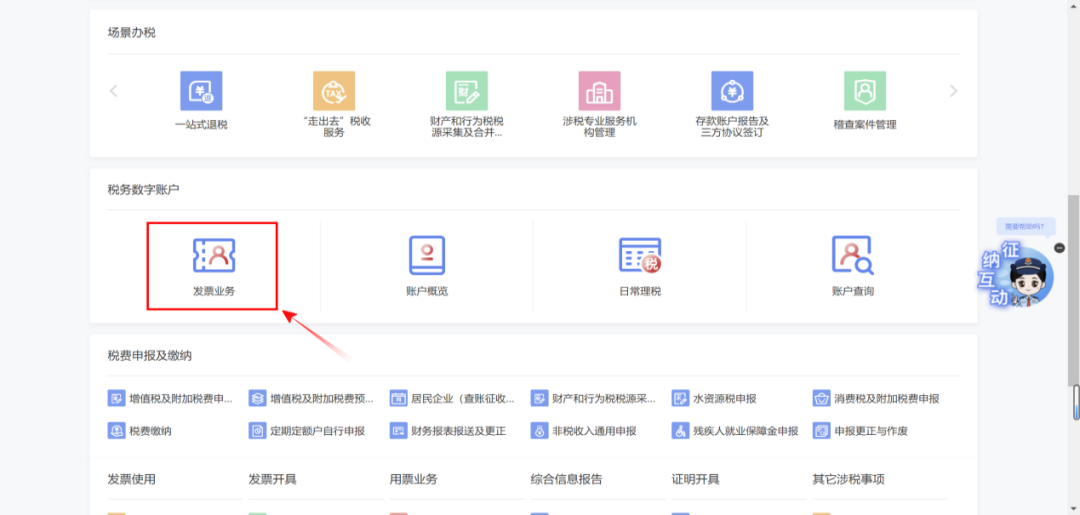
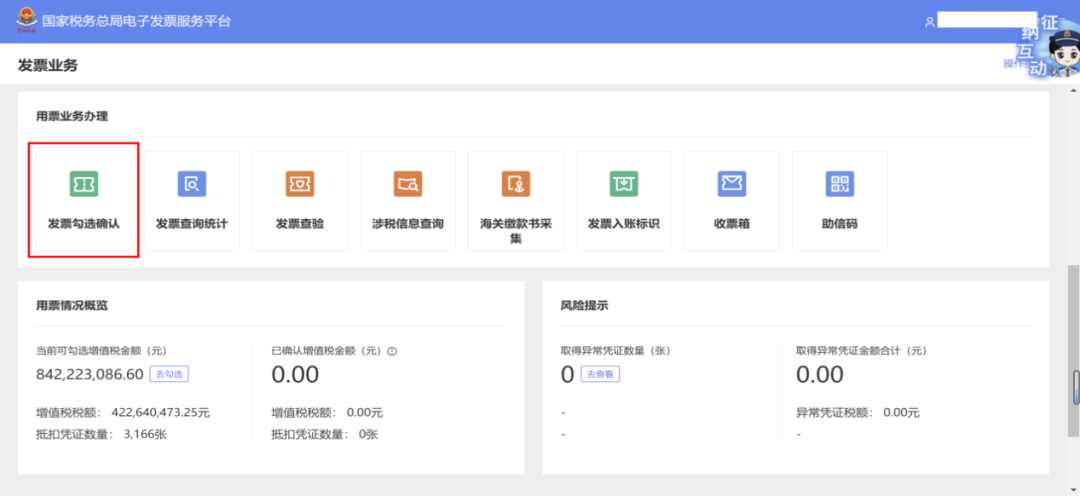
[Operation Guide] Do this after an abnormal VAT deduction voucher is released from abnormalityPublished: 2025-01-22 17:02 The enterprise receivesNotice of Release from Anomaly for Anomalous VAT Deduction Vouchers (hereinafter referred to as "release from anomaly")What should be done afterward? Scenario 1 Can invoices for which VAT input credit has not yet been declared, export tax rebates have not yet been declared, or export tax rebates have been declared but not yet processed, or consumption tax credit has not yet been declared, still be selected? Answer:Yes. If, when you receive the notice of release from abnormality, you have not yet applied for VAT deduction, export tax rebate, or have already applied but not yet completed the export tax rebate, or have not yet applied for consumption tax deduction, you can continue to select and declare, and there is no need to make transfer-out or other adjustments. Scenario 2 How should it be handled if VAT input tax has been transferred out, the refunded tax has been returned upon processing export tax refund, or consumption tax has been offset or supplemented? Answer:If, when you receive the notice of abnormal release, you have already completed the transfer-out of VAT input tax, handled the return of already refunded export tax rebate amounts, or offset or paid the consumption tax, and upon verification there are no other abnormal issues, the corresponding abnormal voucher returns to normal status and you can continue to file and enjoy it. So how is it operated? Taking input VAT amount transfer-out as an example: 1. Invoice selection:Log in to the new Electronic Tax Bureau and click [I Want to Handle Taxes] - [Tax Digital Account] - [Invoice Business] - [Invoice Usage Business Handling] - [Invoice Selection and Confirmation] - [Select Deduction Selection].
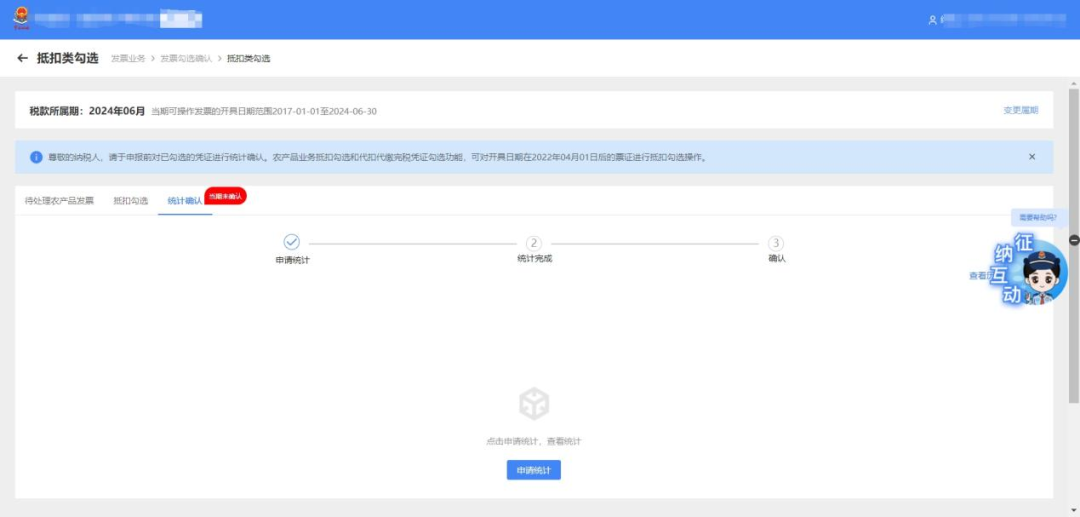
Tips For abnormal vouchers that had already been processed as input transfer-out before the tax period of July 2021, there is no need to check and deduct again. After verification by the tax authority, the tax amount allowed to continue to be deducted may be directly declared as a negative amount. 2. Statistical confirmation:Click [Tax Digital Account] - [Invoice Business] - [Invoice Selection and Confirmation] - [Deduction-Type Selection] - [Statistical Confirmation].
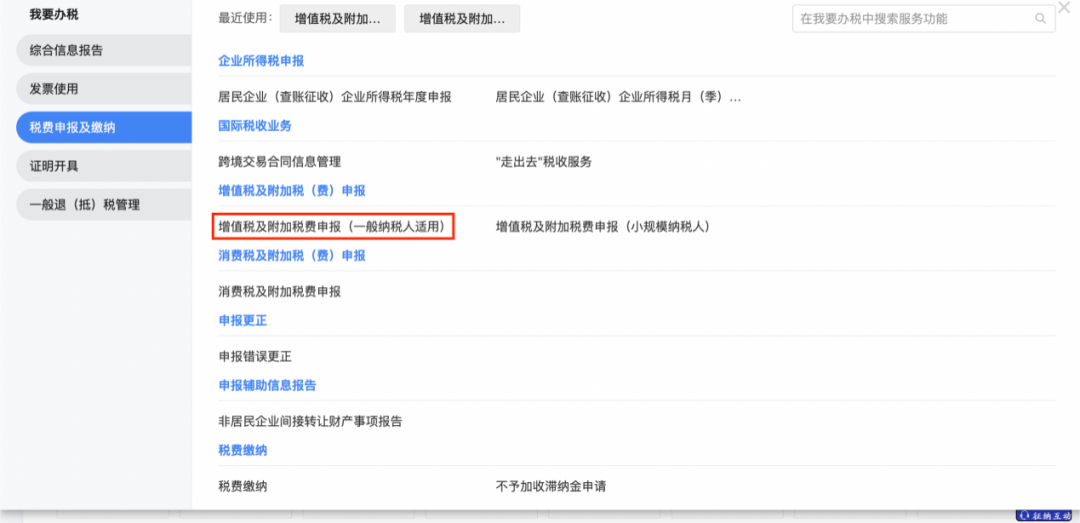
3. Declaration:(1) Click [I Want to Handle Taxes] - [Tax and Fee Filing and Payment] - [VAT and Surcharge Filing (Applicable to General Taxpayers)]
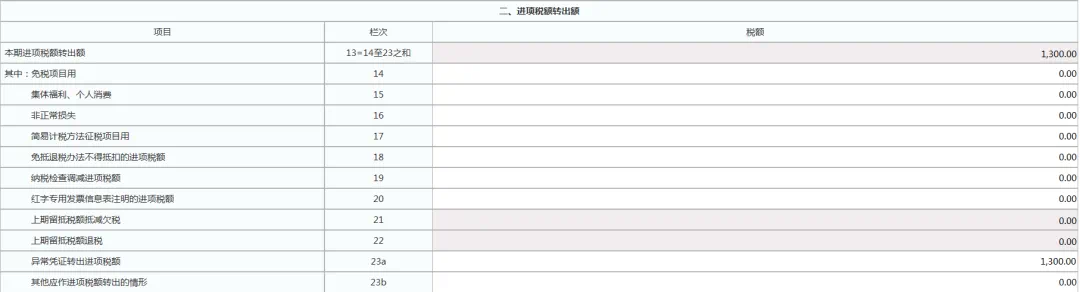
(2) After abnormal vouchers are transferred out, if verification permits continued deduction and the taxpayer reconfirms use for deduction, fill in the "input VAT transferred out for abnormal vouchers" column in Item 23a of the VAT and Additional Taxes Return Supplementary Schedule (II), entering the negative amount of the corresponding abnormal voucher transferred-out tax in this column.
As a comprehensive business-finance-tax digitalization solution service provider, Kailing Technology provides business-finance-tax management digital transformation products and operational services for various government agencies, institutions, and large, medium, and small enterprises. The product line includes: Solutions for sales contract management system, procurement contract management system, fully digitalized Leqi interface project, automatic output VAT invoicing system, invoice issuance for individuals system, employee expense control and reimbursement system, input VAT invoice management system, supply chain collaborative reconciliation system, imaging OCR recognition system, automatic financial bookkeeping system, electronic accounting archives system and other businesses, comprehensively advancing the digitalization process across various fields. If you have any business-finance-tax digital transformation needs, welcome to contact us. Beijing Kailing Technology will serve you wholeheartedly.
|