010-6097 4119Book a Demo


[Summary of Hot Issues on Fully Digitalized E-Invoices] What to do about duplicate bookkeeping of fully digitalized e-invoices? How to avoid it?Published: 2025-01-20 17:05 As fully digitalized e-invoices become widespread nationwide, finance personnel face a series of new challenges. During the use of fully digitalized e-invoices, the issuer may red-letter reverse an invoice due to operational error, while the recipient may record and archive the same electronic invoice multiple times. How can these problems be effectively avoided? Let's learn about the "invoice posting identifier" function together~ I. What is an invoice posting identifier?The E-invoice Service Platform provides invoice posting identification services for taxpayers. When taxpayers use this function, the system will simultaneously assign a posting status label to the invoice for finance personnel to check promptly and avoid duplicate reimbursement and posting. Taxpayers can use the "Invoice Posting Identification" module to perform posting identification operations on invoices obtained from the E-invoice Service Platform issued after January 1, 2022, helping taxpayers reduce the risk of duplicate posting and facilitating accounting management. Taxpayers may through: Click Electronic Tax Bureau - [Tax Digital Account] - [Invoice Business] - [Invoice Posting Identifier] module to perform invoice posting. This function can effectively help taxpayers prevent the risk of the invoicing party mistakenly issuing red-letter invoices and the risk of the receiving party repeatedly recording and archiving electronic invoices. II. What is the purpose of the invoice posting mark?1. Avoid duplicate reimbursement and booking by the invoice recipientThrough the invoice booking identification function, the system can record the booking status of each invoice. Once an invoice is marked as booked, the system will automatically prompt when a subsequent reimbursement is attempted, effectively preventing duplicate reimbursement. 2. The invoice recipient can verify invoice status in batchesYou can use the "Invoice Accounting Mark" function module and "List Import" (batch import). This function module will feed back various statuses of the invoices obtained: invoice has been voided; invoice has been red-letter reversed; whether the invoice is normal; whether the invoice can be selected for accounting, etc. 3. Prevent the invoicing party from mistakenly issuing red-letter invoicesThe invoice posting mark function can confirm at the time of invoice posting. Once confirmed, the issuing party cannot arbitrarily void or reverse the invoice with a red-letter invoice without the consent of the receiving party, thereby protecting the rights and interests of the receiving party. III. Which invoices can be marked for invoice booking?Invoices issued after January 1, 2022, and not falling under the following circumstances, can be marked using the [Invoice Booking Identifier] function: (1) Abnormal VAT deduction vouchers; (2) Invoices that have been voided; (3) Invoices previously recorded; (4) Other. IV. Is the invoice posting mark required?For reimbursement, booking, and archiving of fully digitalized e-invoices, follow the relevant regulations of the finance and archive departments. The e-invoice service platform provides an invoice booking function, and you can mark the invoice booking identifier through the tax digital account of the e-invoice service platform. If you keep your own accounts in accordance with the Measures for the Administration of Accounting Archives, the Notice of the Ministry of Finance and the National Archives Administration on Standardizing the Reimbursement, Booking, and Archiving of Electronic Accounting Vouchers, and other relevant regulations, you may also keep your own accounts without marking the invoice booking identifier on the e-invoice service platform. V. How to use the [Invoice Accounting Entry Identifier] module for invoice accounting entry?Log in to the Beijing Municipal Electronic Tax Bureau: Click [I Want to Handle Taxes] - [Tax Digital Account] - [Invoice Business] to enter the invoice posting identification function.
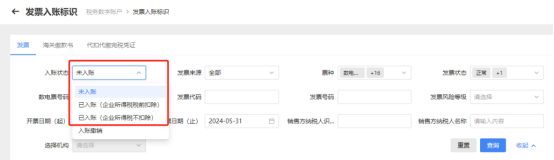
Taxpayers may, as needed, in the followingUnder three label types:
Input or select query conditions, click [Query], and the system will display matching invoice information in list form in the query results area:
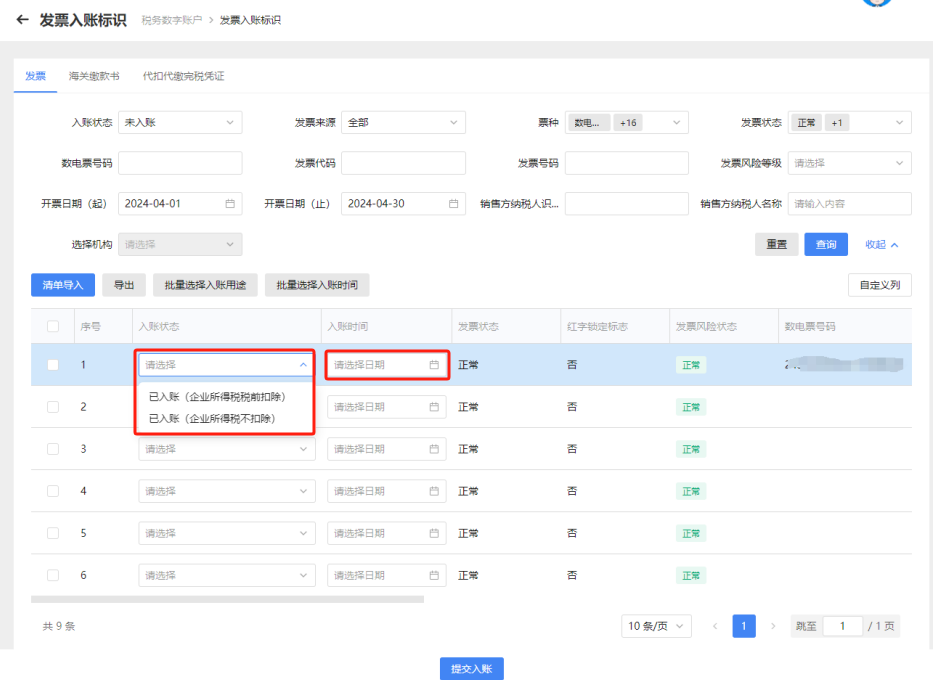
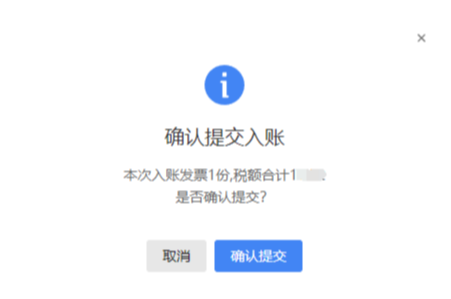
Specific operation steps: 1. Post entries item by itemIf a taxpayer needs to perform an invoice recording operation for a single invoice, it may select the invoice information to be recorded, choose "Invoice Recording Status" and "Invoice Recording Time" in the drop-down menu, click [Submit Recording], and click "Confirm Submission" in the pop-up recording submission confirmation box to complete the invoice recording operation.
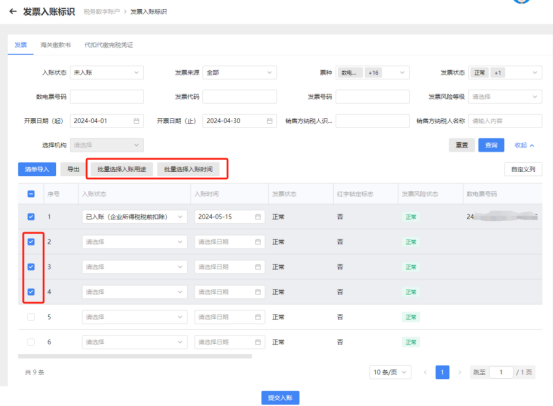
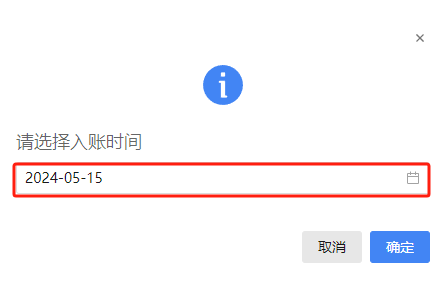
2. Batch postingIf a taxpayer has multiple invoices to be recorded and the recording status and recording time are the same, the recording operation can be performed in batches. On the [Invoice Posting Identifier] interface, after checking multiple invoices to be posted, separately complete the "Batch Select Posting Purpose" and "Batch Select Posting Time" operations, then click "Confirm Submit" to complete the posting operation.
(batch selection of booking status screen)
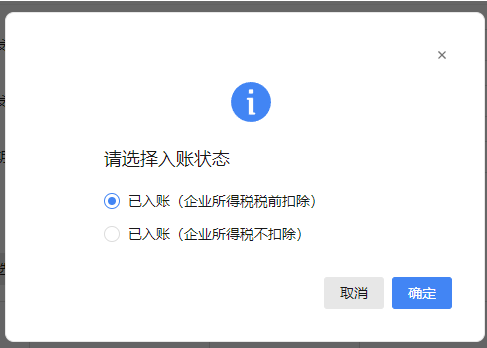
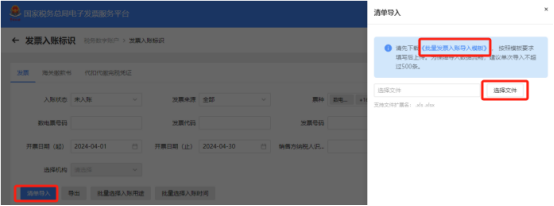
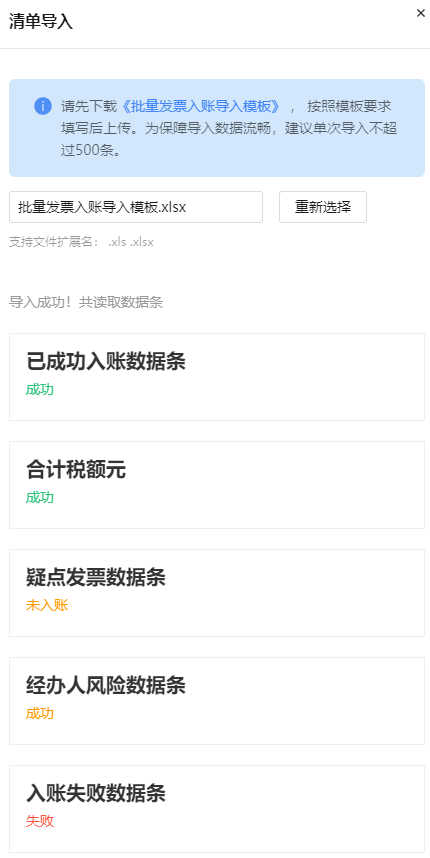
(batch selection of booking status screen) 3. List import for accounting entryIf a taxpayer has multiple invoices to be recorded and the status and recording time are different, this can be achieved through the list import function. Click [List Import], fill in and upload the "Batch Invoice Posting Import Template" to complete the invoice posting operation.
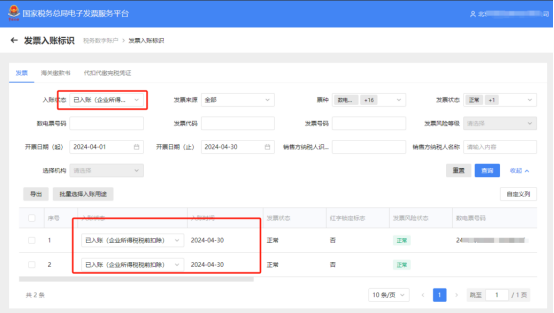
(prompt screen after successful import) Six, How to query and adjust "posted" invoices?For invoices that have completed the posting operation, you can query their "posting status" and also adjust their "posting purpose": Specific operation steps: 1. Query "booked" invoicesAfter completing the invoice posting operation, you can query by selecting the corresponding "posting status" in the [Invoice Posting Identifier] module.
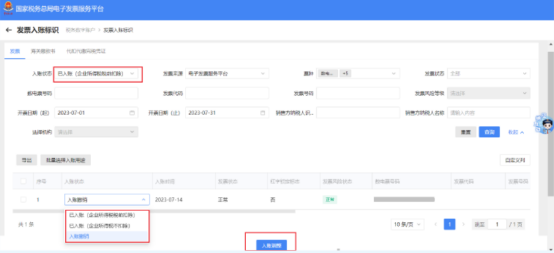
2. Booking adjustmentTo change the accounting purpose or cancel accounting, select the corresponding invoice in the queried "Accounted" invoice information interface, Click the "Posting Status" drop-down menu in that row to change the purpose or cancel posting, then click "Posting Adjustment" to complete the modification. If the taxpayer cancels the accounting entry and needs to readjust the invoice accounting status, they can select "Accounting Cancellation" in the [Accounting Status] drop-down menu, query, and readjust the invoice accounting status.
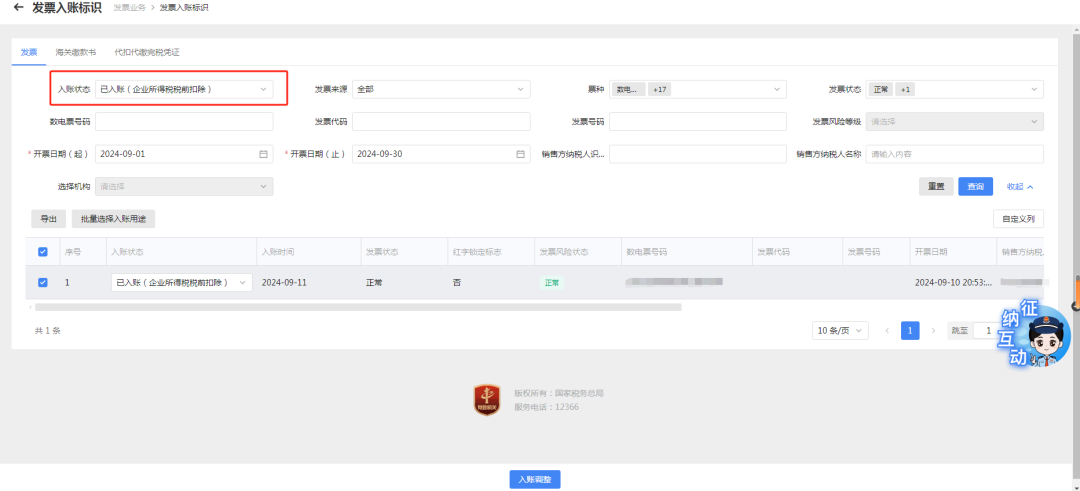
Seven, Can the booking status of an already booked invoice be adjusted?Except for invoices that are "not booked", all others can be adjusted for booking. Specific operations: Select a booking status such as "Booked (deductible before corporate income tax)," enter other query conditions, and click the [Query] button; the corresponding invoice information is displayed in the query results area.
Select the invoices that need adjustment, click [Batch Select Accounting Purpose], the accounting status selection box pops up, select the status to be adjusted, click [Confirm] to adjust the accounting status for all selected invoices. You can also adjust the accounting status of a single invoice separately. After confirmation, click accounting adjustment.
Source: Beijing Xicheng Tax As a comprehensive business-finance-tax digitalization solution service provider, Kailing Technology provides business-finance-tax management digital transformation products and operational services for various government agencies, institutions, and large, medium, and small enterprises. The product line includes: Solutions for sales contract management system, procurement contract management system, fully digitalized Leqi interface project, automatic output VAT invoicing system, invoice issuance for individuals system, employee expense control and reimbursement system, input VAT invoice management system, supply chain collaborative reconciliation system, imaging OCR recognition system, automatic financial bookkeeping system, electronic accounting archives system and other businesses, comprehensively advancing the digitalization process across various fields. If you have any business-finance-tax digital transformation needs, welcome to contact us. Beijing Kailing Technology will serve you wholeheartedly.
|

![How to use the [Invoice Accounting Entry Identifier] module for invoice accounting entry?](/assets/27201696.s21i.faiusr.com/4/ABUIABAEGAAgwKS4vAYouJqcsAMwuAg46QE.png "descript")
![How to use the [Invoice Accounting Entry Identifier] module for invoice accounting entry?](/assets/27201696.s21i.faiusr.com/4/ABUIABAEGAAgwKS4vAYo1rug4QIwuAg4rAI.png "descript")
![How to use the [Invoice Accounting Entry Identifier] module for invoice accounting entry?](/assets/27201696.s21i.faiusr.com/4/ABUIABAEGAAgwKS4vAYouKeYgwIw1gc4pQU.png "descript")