010-6097 4119Book a Demo


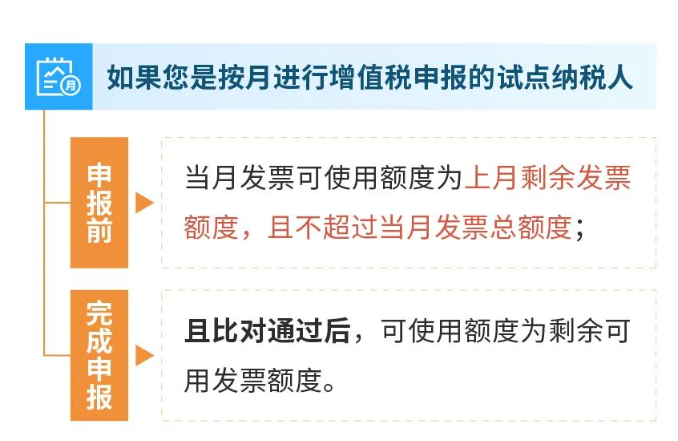
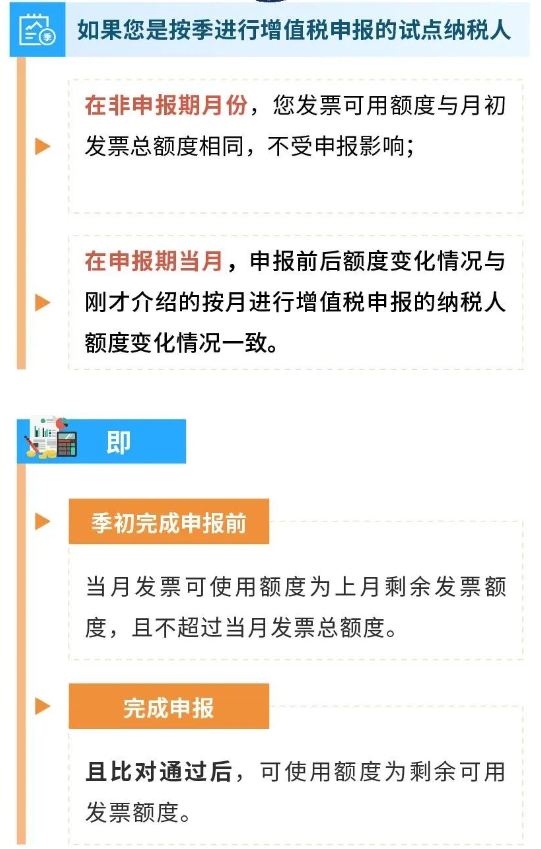
Practical Guide | A Detailed Explanation of "Fully Digitalized E-Invoice Quota"Published: 2023-12-06 13:59 I. What do total invoice quota and available invoice quota mean?Total invoice quota It refers to within one calendar month, the total invoice issuance amount (excluding VAT) of pilot taxpayersUpper limit amount。 Includes the total upper limit amount of fully digitalized e-invoices, paper special invoices, and paper ordinary invoices that you can issue through the Electronic Invoice Service Platform; and the upper limit total amount of paper special invoices, paper ordinary invoices, VAT ordinary invoices (roll type), VAT electronic special invoices, and VAT electronic ordinary invoices that can be issued through the VAT invoice management system. Note:At the beginning of each month, the system will automatically calculate your company's total invoice quota based on factors such as your company's risk level, tax credit rating, and actual business conditions. Remaining available quota It refers to within one calendar month, pilot taxpayersCurrent month's total invoice quota minus the amount already used in the current month。 Among them, the used quota includes the invoice amount issued by pilot taxpayers through the electronic invoice service platform; and the paper special invoices, paper ordinary invoices, roll invoices, electronic special invoices, and electronic ordinary invoices issued through the VAT invoice management systemThe product of the number of copies collected and the maximum invoicing limit per invoice。 In addition, the invoice quota is also related to your filing behavior.:
II.Our company is a taxpayer that files VAT quarterly and does not file this month. How should my available invoice quota for this month be calculated?
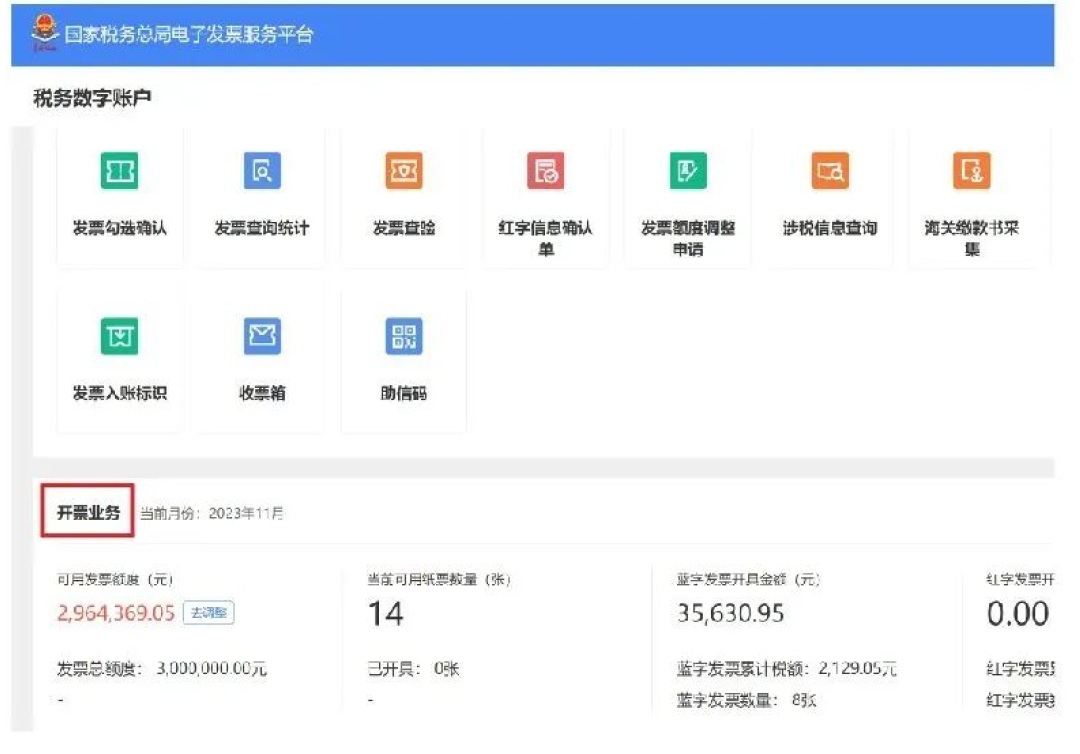
III. So where can I view my total invoice quota and available invoice quota?You can log in to the Beijing Electronic Tax Bureau, path: [I Want to Handle Taxes】-【Tax digital account】-Under the "Invoicing Business" tab.
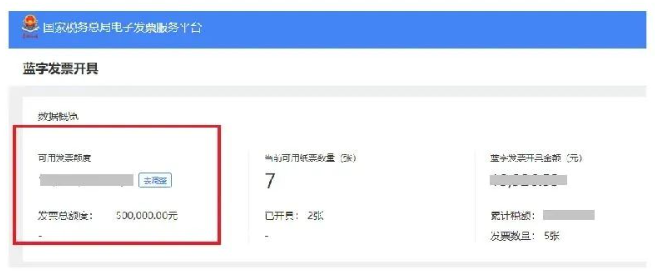
You can also enter the [Invoicing Business] - [Blue-Letter Invoice Issuance] interface, and in the data overview section you can also view the total invoice quota and available invoice quota.
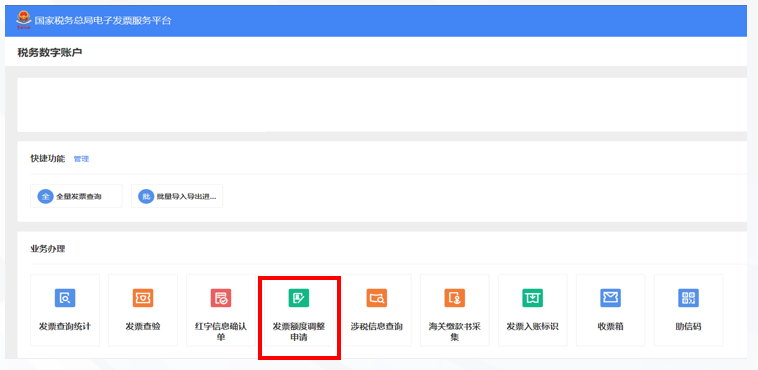
IV. What should I do if my quota is insufficient?There are three ways to adjust the total invoice issuance amount limit, including regular adjustment, temporary adjustment, and manual adjustment. (1) Periodic adjustment Periodic adjustment means the electronic invoice service platform automatically adjusts the total invoicing amount limit of pilot taxpayers each month. (2) Temporary adjustment Temporary adjustment means that when the invoice amount issued by a pilot taxpayer with a relatively low tax risk reaches a certain proportion of the total invoice amount limit for the first time, the electronic invoice service platform automatically increases the total invoice amount limit once temporarily for that month. (3) Manual adjustment Manual adjustment means that a pilot taxpayer applies to adjust the total issued amount quota due to changes in actual business conditions, and if the competent tax authority finds no abnormality upon review in accordance with laws and regulations, it shall adjust the total issued amount quota for the taxpayer. V. Both periodic adjustment and temporary adjustment are automatic system adjustments, so under what circumstances is a manual adjustment needed?If your total invoicing amount quota is insufficient and remains insufficient after automatic adjustment by the system, you can apply to the competent tax authority to adjust the total invoicing amount quota. The tax authority will adjust your total invoicing amount quota based on factors such as the taxpayer's risk level, tax credit rating, and actual business conditions. Six, How should it be operated? How to apply to adjust the total invoicing quota?You can log in to the Electronic Tax Bureau and, in the "Tax Digital Account - Invoice Quota Adjustment Application" module, upload materials such as purchase and sales contracts to apply to the tax authority for adjusting the invoice quota. Log in to the Electronic Tax Bureau and click [I Want to Handle Taxes] -- [Tax Digital Account] -- [Invoice Quota Adjustment Application].
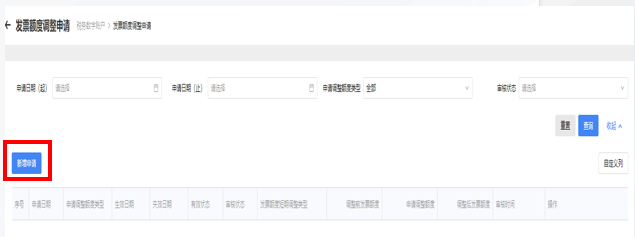
You can also enter the [Invoicing Business] - [Blue-Letter Invoice Issuance] interface and click "Adjust" and the system will automatically jump to the invoice quota adjustment application interface. After entering the invoice quota adjustment application interface, click [New Application].
On the pop-up new application page, fill in the quota adjustment application information, including [Type of Quota Adjustment Applied For], [Short-term Invoice Quota Adjustment Type], [Validity Period Start and End], [Quota Adjustment Applied For (yuan)], and [Reason for Application]; after uploading attachments such as purchase and sales contracts and fixed asset status tables, click [Apply]. Seven, After being included as a pilot enterprise for fully digitalized e-invoices, can paper invoices still be issued? How is the remaining available quota used when issuing paper invoices?You throughE-invoice Service PlatformWhen issuing paper special invoices and paper ordinary invoices, the invoicing amount of a single invoice shall not exceed the maximum invoicing limit per invoice and shall not exceed the remaining available quota for the month, and the remaining available quota for the month is deducted according to the actual invoicing amount. Pilot taxpayers obtain throughVAT invoice management systemWhen issuing paper special invoices, paper ordinary invoices, roll invoices, VAT electronic special invoices, and VAT electronic ordinary invoices, the remaining available quota for the month is deducted by the product of the number of copies collected and the maximum invoicing limit per invoice, and the remaining available quota for the month is no longer deducted at the time of issuance. Eight, If the fully digitalized e-invoice is issued incorrectly, can I still issue a red-letter reversal? After the red-letter reversal, will the deducted quota be returned?After you issue a fully digitalized e-invoice, if a red-letter fully digitalized e-invoice is issued in the same month, the electronic invoice service platform will synchronously increase its available invoice quota. If a red-letter fully digitalized e-invoice is issued across months, or if the red-letter fully digitalized e-invoice issued cannot correspond to a fully digitalized e-invoice, the electronic invoice service platform will not increase the available invoice quota for the current month. In the case of sales allowances, it will also not increase the available invoice quota. Source: Beijing Tax Beijing Kailing Technology Co., Ltd.——an enterprise business-finance-tax digitalization solution service provider. Kailing Technology provides solutions for sales management systems, procurement management systems, output invoicing systems, input invoice collection systems, imaging management systems, financial posting systems, electronic accounting archives and other businesses according to enterprise needs, professionally and efficiently helping enterprises transform and upgrade their business-finance-tax digital management. If you have any business-finance-tax digital transformation needs, welcome to contact us. Beijing Kailing Technology will serve you wholeheartedly. |