010-6097 4119Book a Demo


A full analysis of the digitalization workflow for paper archivesPublished: 2024-10-15 16:53
I. Why carry out digital scanning of archives?1. More convenient management and utilizationTraditional archive management methods retrieve archive information through archive catalogs and manage and utilize archives by retrieving volumes from the warehouse. If there is a digital electronic catalog, retrieval is relatively easy; if there is only a manually registered paper catalog, retrieval difficulty increases exponentially, or even becomes impossible. Once the needed archive information is retrieved, warehouse volume retrieval can be carried out through the archive number to achieve archive management and utilization, but efficiency is relatively low. After digital scanning and data linking, one-to-one correspondence between digital originals and archive catalogs can be achieved, greatly improving archive utilization efficiency and reducing the labor burden of staff. 2. Protect the original physical paper archivesReduce the use of paper physical originals, protecting paper physical originals to the greatest extent, avoiding unnecessary wear and aging, and also avoiding possible loss, missing pages, and other situations of originals. II. Basis for Carrying Out Archive Digitization Work1.Archives Law of the People's Republic of China (Order No. 47 of the President of the People's Republic of China)It is stipulated that governments at all levels shall incorporate archive informatization into informatization development plans, ensuring the safe preservation and effective utilization of archive digital resources such as electronic archives and digitization results of traditional carrier archives. Archives repositories and agencies, organizations, enterprises, public institutions, and other organizations shall advance the digitization of traditional carrier archives. Where digitization has already been achieved, the original archives shall be properly preserved. 2.Order No. 13 of the National Archives Administration: Provisions on the Management of Institutional ArchivesIt is stipulated that agencies shall carry out the construction of digital archive rooms, coordinating the digitization of traditional carrier archives, electronic document archiving, and electronic archive management. III. Steps to Carry Out Digital Scanning1.Formulate work plans, equip facilities and equipment ① The work plan should include the digitization objects, work objectives, work content, cost accounting, digitization technical methods and main technical indicators, acceptance basis, personnel arrangements, division of responsibilities, schedule, safety management measures, and other content. ② Establish digital work systems for position management, personnel management, site management, equipment management, data management, archive entity management, and other aspects. ③ Equip a dedicated processing site, with work areas for archive storage, pre-digitization processing, description, scanning, image processing, quality inspection, and other work arranged in zones; equip necessary computers, scanners, storage disks, archive organizing and processing tools; equip security management facilities and equipment such as anti-theft alarms and video surveillance; ④ If the digitization of paper archives needs to be outsourced, the relevant qualifications of the digitization processing enterprise should be strictly reviewed in terms of enterprise nature, shareholder composition, security and confidentiality, enterprise scale, registered capital, etc., and dedicated personnel should be assigned to participate in the supervision and guidance of the outsourced business, completing work in quality monitoring, progress monitoring, investment monitoring, security monitoring, and coordination and communication. During project implementation, strict security management requirements should be enforced at levels including the digitization site, digitization processing equipment, archive entities, and the handover, receipt, and equipment disposal of digitization results. 2. Do a good job in archive outbound work① Carry out preliminary preparations such as archive retrieval, counting, and registration according to the digitization objects determined in the work plan, submit an archive outbound application, and after approval by the relevant responsible persons, handle outbound procedures for the digitization objects in strict accordance with archive repository management regulations, and after jointly counting with the digitization department with no discrepancies, hand over the archives for outbound transfer. ② During the digitization of paper archives, a storage repository relatively close to the digital processing site should be set up for temporary storage of paper archives, and strict management should be carried out for the receipt and return of paper archives, with inspection, counting, registration, and other work done carefully to ensure the safety of paper archives. 3. Digital pre-processing(1) Determine the scanned pages In principle, all paper archives determined to be digitization targets should be scanned, and selective scanning is not appropriate. If there are pages that do not need to be scanned, they should be marked. Classified archives must not be scanned together with ordinary archives. If scanning is required, a dedicated classified computer, scanner, and storage disk must be set up separately, and scanned and stored separately. (2) Number the pages ① Re-number archives that have no page numbers or incorrect page numbers. ② When renumbering pages, page numbers should be written in a unified position and should not cover archive content. Generally, the blank position at the upper right corner of the front side and the upper left corner of the back side, 1CM from the vertical or horizontal top edge. If page numbers have already been compiled at the upper right corner or upper left corner, they may be uniformly compiled at the lower left corner or upper right corner. ③ Use a relatively soft pencil to compile page numbers. ④ Register special situations such as damaged pages and missing pages. (3) Remove binding Whether to remove binding should be determined based on the principle of protecting paper archives. If binding materials need to be removed, care should be taken to protect archives from damage, and archives with inaccurate arrangement order should be rearranged. For archives with special binding that need to be restored after unbinding, photos and other methods should be used to record the original appearance of the archives when removing binding materials, to facilitate restoration. (4) Technical repair ① Paper archives that are severely damaged or otherwise cannot be scanned directly should first undergo technical restoration; the technical standards for mounting and repair shall refer to the Technical Specifications for Archive Mounting and Repair (DA/T25-2022). ② Paper archives that are wrinkled and uneven and affect scanning quality should first undergo corresponding technical processing such as flattening. 4. Catalog description data① Use archives management software to establish archive categories. For archives managed by "volume," create volume-level and document-level catalogs; for archives managed by "item," create document-level catalogs. Set description items, including fonds number, archive category code, retention period, year, entity classification number, volume number, item number, archive number, document number, page number, number of pages, title, responsible party, document creation time, date, confidentiality level, etc., with specific reference to the Rules for Archival Description (DA/T18-2022). During configuration, you may contact the local archival administrative department or professional staff at the archives for assistance. ② Determine the "archive number" rules. Archives of the same category need to remain consistent within the same administrative region. The standard refers to the Rules for Compiling Archive Numbers (DA/T13—2022). For specific settings, it is necessary to contact the local archive administrative department or professional staff of the archives for assistance in determining them. ③ Data description of description items shall be carried out in accordance with the Rules for Archival Description, among which "fonds number, archive category code, retention period, year, entity classification number, volume number, item number, archive number, page number, number of pages, title, responsible party, document creation time, filing date" are generally required items, and other description items are optional as needed. ④ The "title" in the description items refers to the title of the document material. If there is no title, the title is non-standard, or the title cannot reflect the main content of the document and is inconvenient for retrieval, a title should be fully or partially self-drafted, with the self-drafted content enclosed in square brackets "[ ]". (5) The data format of descriptive items needs to be unified and meet specification requirements. For example, the fonds number is uniformly compiled by the local archives and should not have extra or missing characters; archive category codes, entity classification numbers, and retention periods generally use uppercase letters; the year uses four Arabic numerals without the Chinese character "year"; page numbers and page counts must not contain symbols or letters; document creation time and filing date are 8-digit Arabic numerals, etc. For details, refer to the "Rules for Archival Description" (DA/T18-2022). ⑥ The described "volume number, item number, retention period, and year" must be consistent with the arrangement plan of the archive entities, with no discrepancy whatsoever. 5. Archive Scanning(1) Basic requirements for archive scanning For archive scanning, corresponding scanning equipment should be selected and relevant parameters should be set and adjusted according to the actual condition of the original paper archives, the purpose of digitization, the scale of digitization, and computer network and storage conditions. The setting and adjustment of parameters should ensure that the scanned digital images are clear, complete, and undistorted, with image effects closest to the original appearance of the archives. (2) Selection of scanning device ① Special attention should be paid to protecting the physical archives, and scanning equipment that causes little damage to physical archives should be used for digitization as much as possible. For paper that is old, thin and brittle, or damaged, high-speed scanners must not be used for scanning. ② Archives exceeding the scanning size of the scanner used may be scanned with a larger-format scanner, or processed by split-frame scanning with a small-format scanner followed by image stitching. During split-frame scanning, sufficient overlap should be left between adjacent images, and the split-frame method should be clearly explained using methods such as a target plate; if software automatic stitching is used later, the overlap size is recommended to be no less than 1/3 of the size of the original document corresponding to a single image. ③ Regular maintenance and upkeep should be carried out in accordance with the usage patterns of the relevant equipment. (3) Scanning color mode ① Color mode should be used for all scanning. ② The color, brightness, and saturation of scanned electronic images need to be basically consistent with the original archive entity. ③ Scanned images must not show abnormal colors that are not present in the original archive entity. (4) Scanning resolution Generally, the scanning resolution for paper archives is 300 DPI. Photographic archives, text-dense archives, and precious archives may use 600 DPI or higher resolution. (5) Storage format ① The long-term preservation format for digital images of paper archives shall be common formats such as TIFF and JPEG, and the same batch of archives should use the same storage format. ② The choice of image compression ratio can be determined according to actual application needs. Generally, the file size of A4-format archive images should be controlled between 500KB and 1.5MB, and A3-format archive images should be controlled between 500KB and 2MB. ③ When using digital images of paper archives, comprehensive consideration may also be given to network browsing speed, ease of operation, storage space occupation, and other aspects, and images may be converted to PDF and other formats. (6) Image naming ① Digital images should be named based on the archive number to ensure the uniqueness of image naming. ② It is recommended to store digital images as single-page files and name the images by the combination of archive number and image serial number. Archives with "volume" as the custody unit Named in the form of "archive number" + "." + "scan page sequence number" + "image extension", with the scan page sequence number generally using three Arabic numerals. Such as: J001-WS·1999-Y-0001-001.001.tif J001-WS·1999-Y-0001-001.002.tif Archives with "piece" as the custody unit Named in the form of "archive number" + "." + "scan page sequence number" + "image extension", with the scan page sequence number generally using three Arabic numerals. Such as: J001-WS·2012-Y-0001.001.tif J001-WS·2012-Y-0001.002.tif ③ When digital images really need to be stored as multi-page files, the archive number of the archive may be used to name the images. Such as: J001-WS·1999-Y-0001-001.pdf J001-WS·2020-Y-0001.pdf ④ Classify and store digital resources using the components of the "archive number" to ensure the accuracy of data linking. The Rules for Arranging Archived Documents stipulate that the structure of the archival code of archived documents should preferably be: Fonds number - archival category code · year - retention period - organizational (issue) code - item number Such as: J011-WS·2020-Y-BGS-0001 So the storage path can be: \Fonds number\Archive category code\Year\Retention period\Institution (issue) code\Archive number i.e. \J011\WS\2020\Y\BGS\J011-WS·2020-Y-BGS-0001 Example of archival code compilation for archives organized by volume (tax audit archives) provided by the Archival Code Compilation Rules Fonds number - archival category code · secondary category number · tertiary category number · year · retention period Example: J019-ZY•JC•CC•2019•D30-001-001 Note: J019 is the fonds number, ZY is the archive category code (specialized archives), JC is the secondary category number (tax audit), CC is the tertiary category number (investigation and handling), 2019 is the year, D30 is the retention period code, 001 is the file number, and 001 is the item number. So the storage path can be: \Fonds number\Archive category code\Secondary category number\Tertiary category number\Year\Retention period\File-level archive number\Document-level archive number i.e. \J019\ZY\JC\CC\2019\D30\J019-ZY•JC•CC•2019•D30-001\J019-ZY•JC•CC•2019•D30-001-001 When using the constituent items of archive numbers to classify and store digital resources, they can be classified and stored according to the order of the constituent items of the archive number, or adjusted according to actual work conditions; however, as an archival category, it must be able to unify standards. 6. Image processing(1) Image stitching For multiple digital images formed by split-frame scanning, stitching should be performed to merge them into one complete image to ensure the integrity of the digital image of paper archives. During stitching, the seams should blend smoothly, and the entire stitched image should show no obvious stitching traces. (2) Rotation and skew correction ① Digital images that do not conform to the reading direction should be rotated back; 90-degree and 180-degree clockwise or counterclockwise rotations are generally performed during the scanning stage, so do not wait until the image processing stage to do this. ② Images skewed during scanning due to human or equipment reasons should be corrected so that they are basically not visually perceived as skewed. If the archive entity itself is skewed, the scanned image does not need correction. Under general circumstances, for human or equipment reasons, control should be exercised through institutional constraints, technical detection, and other means; if it occurs, rescan promptly rather than waiting until the image processing stage for repair and adjustment. (3) Edge trimming If digital images need edge cropping, the image should be cropped at least 2 to 3 millimeters from the outermost edge of the page. Under general circumstances, no cropping operation of any kind may be performed on the digital image archive page portion. (4) Decontamination If digital images need despeckling to remove spots, lines, black edges, and other impurities affecting image quality generated during scanning, the principle of presenting the original appearance of the archives should be followed; during processing, original traces on archive pages such as paper fading spots, water stains, spots, and binding holes must not be removed. 7. Digital quality inspection(1) Catalog quality check ① Completeness of description items: fill in all required items completely in accordance with regulations and in compliance with description rules; ② Title completeness, and title description accurate; if the title is incomplete or cannot fully express the archive content information, a title needs to be drafted. The drafted title should be standardized and accurate; ③ Accurate and standardized, with description data accurate and free of missing characters, wrong characters, and repeated characters; the full name of the responsible party must be accurate, and abbreviations must be unified and standardized; document numbers must be filled in standardly; page numbers and number of pages must be consistent with the physical archives; ④ Data format: archive number, fonds, year, retention period, classification number, time, volume number, item number, page number, number of pages, etc. must meet database format requirements; ⑤ Metadata collection: collect and gather metadata generated during the digitization process and save it in the archive description item data; ⑥ Accuracy of items: item data is consistent with paper entity archives and consistent with digitized scanned images; (2) Image quality inspection ① If a digital image is incomplete, cannot be clearly identified, or has significant distortion, it should be rescanned. ② For missed scans, duplicate scans, extra scans, and similar situations, corrections should be made promptly. ③ When the arrangement order of digital images is inconsistent with the original archives, adjustments should be made promptly. ④ Check the processing of digital images such as stitching, rotation and correction, cropping, and stain removal. If image quality requirements are not met, image processing should be redone. 8. Data linking(1) Relevant software should be used to link the catalog data in the database with the corresponding digital images of paper archives, so as to realize the association between catalog data and digital images. (2) Check the linking results one by one, including the accuracy of the correspondence between catalog data and digital images of paper archives, the consistency between linked digital images and the actual scanned quantity, and whether the digital images can be opened normally. Correct any errors promptly.
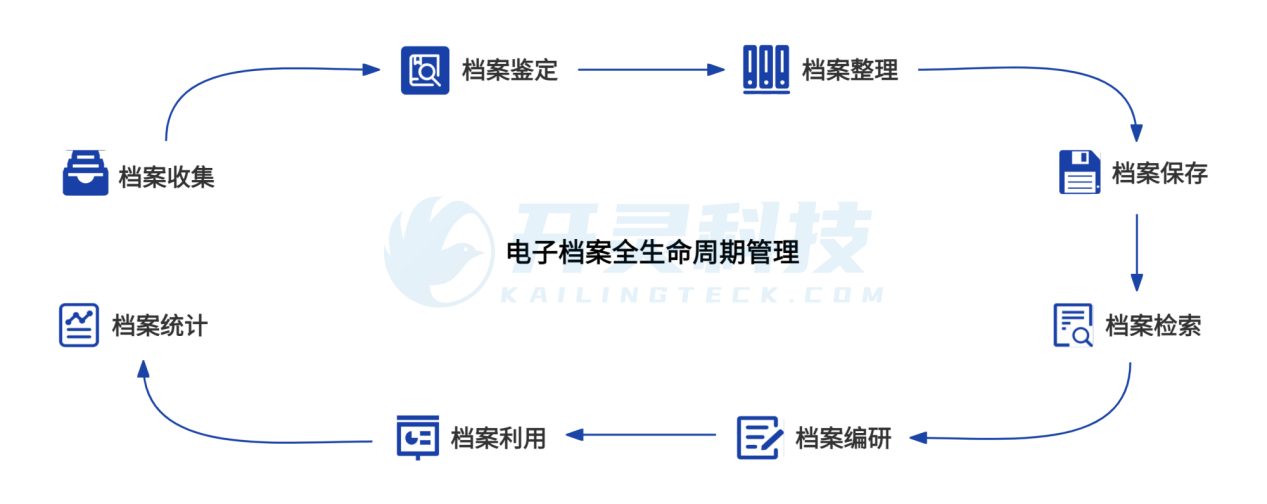
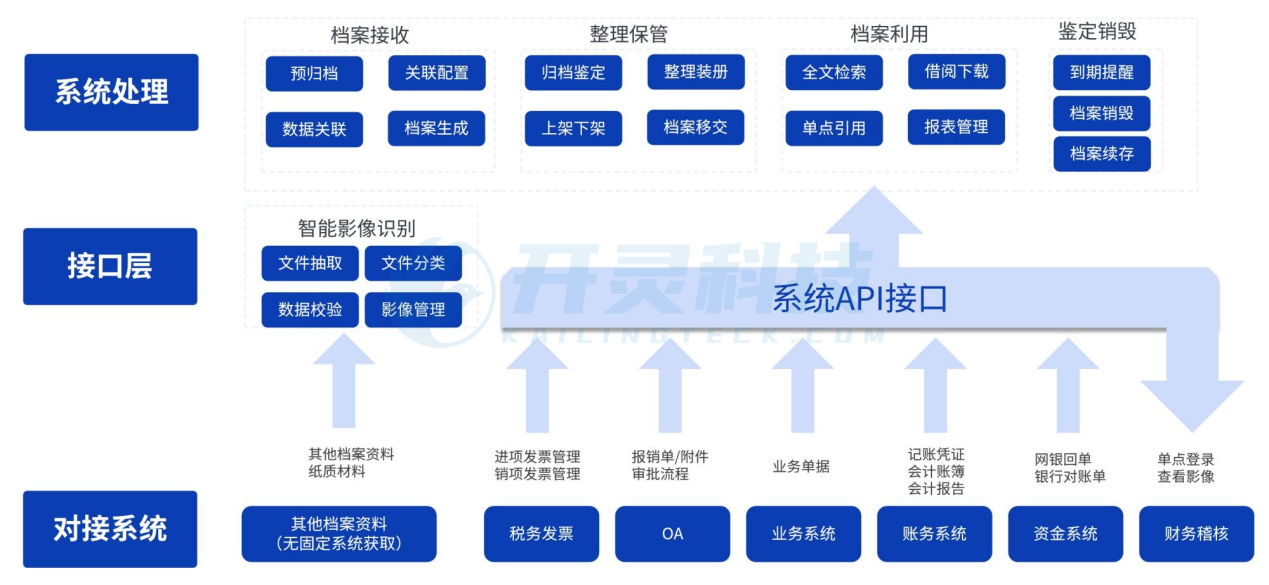
Kailing Technology Integrated Digital Archive Management System, comprehensively covering archive collection, archive appraisal, archive arrangement, archive preservation, archive retrieval, archive compilation and research, archive utilization, and archive statistics, conforming to the digital archive process, and scientifically, compliantly, reasonably, and legally completing full lifecycle archive management. To further learn about Kailing's comprehensive digital archives management system, please communicate or consult in the comments section or via private message, or directly call the consultation hotline to contact Kailing Technology! Kailing Technology provides enterprise business-finance-tax digital product lines according to enterprise needs: Solutions for businesses including sales contract management system, procurement contract management system, fully digitalized Leqi interface project, output automatic invoicing system, employee expense control and reimbursement system, input VAT invoice management system, supply chain collaborative reconciliation system, image OCR recognition system, automatic financial bookkeeping system, and electronic accounting archives system, professionally and efficiently supporting the transformation and upgrading of enterprise business-finance-tax digital management. If you have any business-finance-tax digital transformation needs, welcome to contact us. Beijing Kailing Technology will serve you wholeheartedly.
|