010-6097 4119Book a Demo


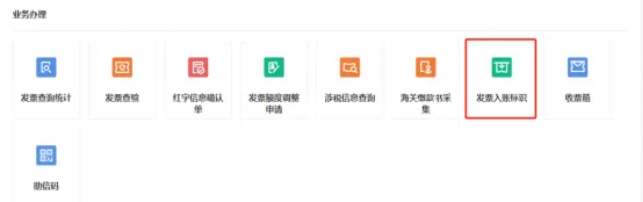
Issued red-letter invoices by mistake, or e-invoices recorded twice? Learn about the "invoice posting identifier" featurePublished: 2024-09-06 17:01 When using fully digitalized e-invoices, how can you prevent the invoicing party from mistakenly issuing red-letter invoices and prevent the invoice recipient from repeatedly recording and archiving electronic invoices? Below, let's introduce how to use the "accounting entry identifier" function~ 01 What is the invoice posting function Invoice posting means collecting data on all invoices obtained by taxpayers (including customs payment documents) and withholding and remitting tax payment vouchers through the electronic invoice platform. 02 How do I perform invoice posting Taxpayers may log in to the New Electronic Tax Bureau and click [I Want to Handle Taxes] - [Tax Digital Account] - [Invoice Booking Identifier] module to perform invoice booking operations.
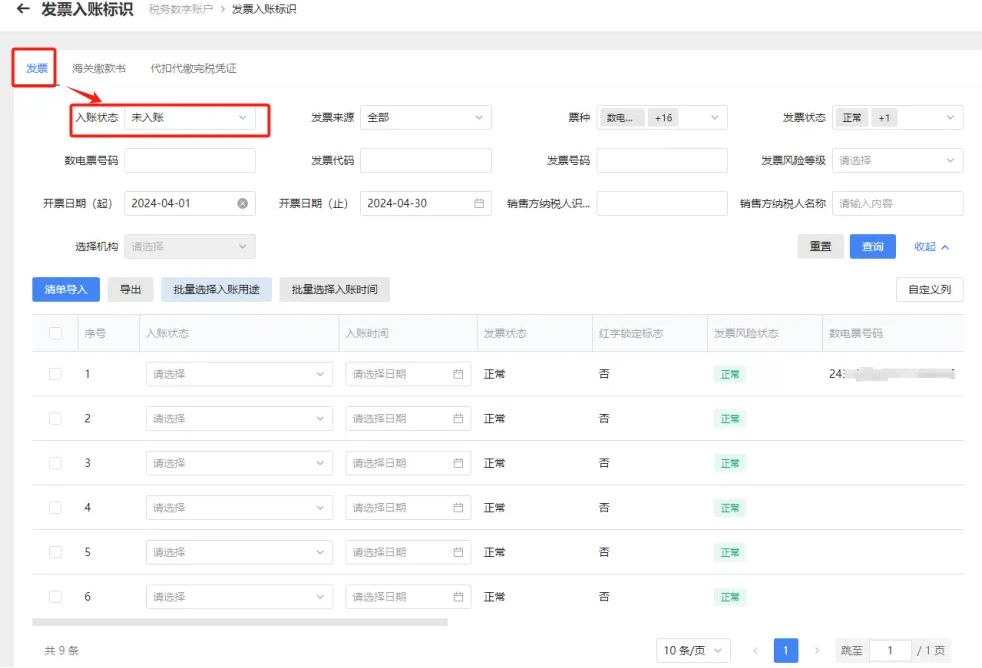
Taxpayers may, as needed,Invoices, customs payment certificates, and withholding tax payment certificatesUnder three label types, enter or select query conditions to search, and the system will display invoice information meeting the conditions in a list in the query results:
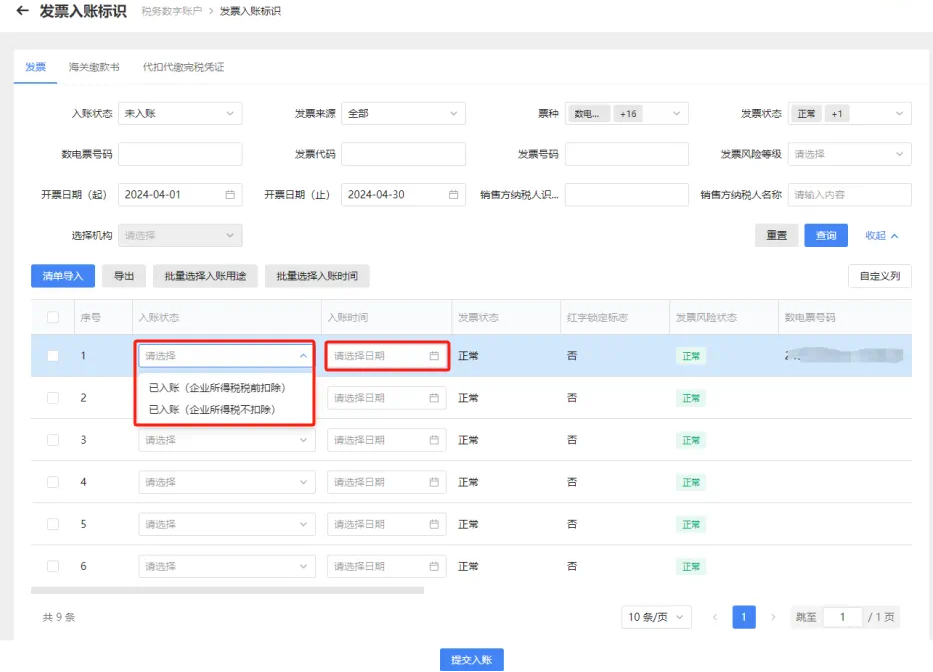
As needed, you can choosePost entries item by item, post entries in bulk, and post entries via list importThree methods, let's take a look~ 1. Entry by item:If a taxpayer needs to perform an invoice recording operation for a single invoice, it may select the invoice information to be recorded, choose "Invoice Recording Status" and "Invoice Recording Time" in the drop-down menu, click [Submit Recording], and click "Confirm Submission" in the pop-up recording submission confirmation box to complete the invoice recording operation.
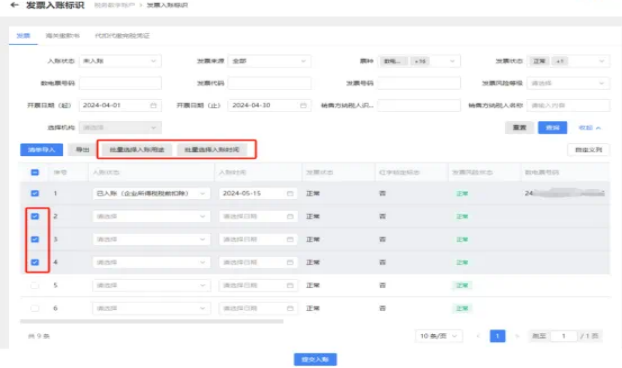
2. Batch accounting:If a taxpayer has multiple invoices to be recorded, andSame booking status and booking time's situation, bookkeeping operations can be performed in batches. On the [Invoice Posting Identifier] interface, after checking multiple invoices to be posted, separately complete the "Batch Select Posting Purpose" and "Batch Select Posting Time" operations, then click "Confirm Submit" to complete the posting operation.
3. List import and booking:If a taxpayer has multiple invoices that need to be booked, and their statuses and booking times differ, this can be achieved through the list import function. Click [List Import], fill in and upload the "Batch Invoice Posting Import Template" to complete the invoice posting operation.
Through the above operations, the recipient can batch-verify invoice status, avoid duplicate reimbursement and accounting, and also prevent the issuer from mistakenly issuing red-letter invoices~ Get it quickly. Source: Shanghai Tax Kailing Technology provides enterprise business-finance-tax digital product lines according to enterprise needs: Solutions for businesses including sales contract management system, procurement contract management system, fully digitalized Leqi interface project, output automatic invoicing system, employee expense control and reimbursement system, input VAT invoice management system, supply chain collaborative reconciliation system, image OCR recognition system, automatic financial bookkeeping system, and electronic accounting archives system, professionally and efficiently supporting the transformation and upgrading of enterprise business-finance-tax digital management. If you have any business-finance-tax digital transformation needs, welcome to contact us. Beijing Kailing Technology will serve you wholeheartedly.
|