News Details

How to download and print issued or obtained fully digitalized e-invoices in the new electronic tax bureau?

Published: 2024-08-23 17:37

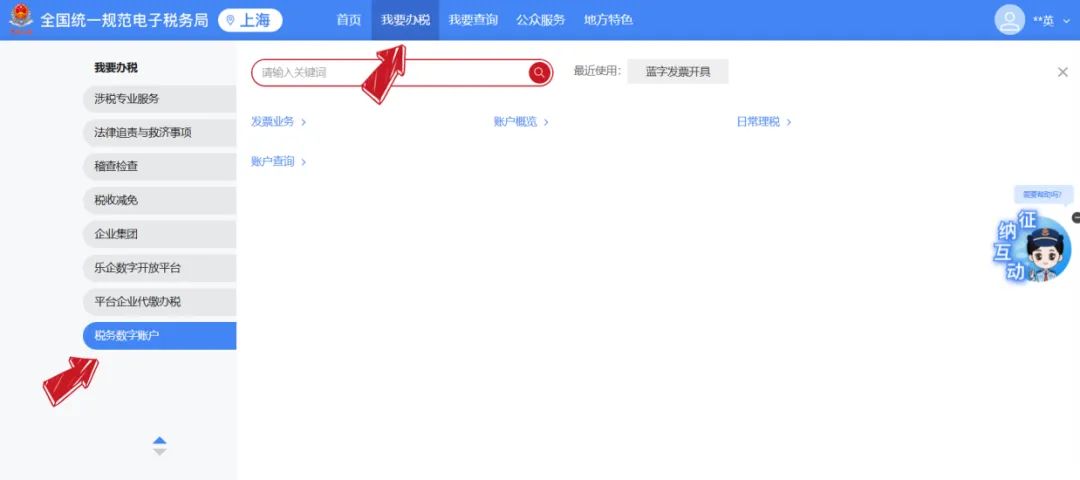
After logging in to the new Electronic Tax Bureau, click [Tax Digital Account] under [I Want to Handle Taxes] to jump to the Electronic Invoice Service Platform, where you can download and print fully digitalized e-invoices in the following ways.

How to download and print issued or obtained fully digitalized e-invoices in the new electronic tax bureau?


Method 1

For invoices issued by enterprises

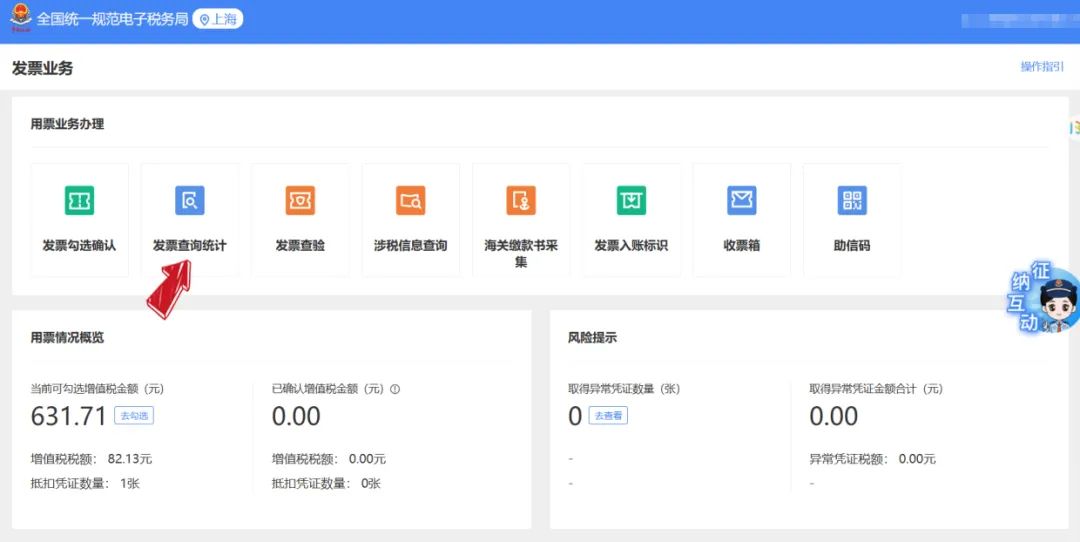
Click in sequence [Tax Digital Account] - [Invoice queryStatistics】-【Full invoice query】

How to download and print issued or obtained fully digitalized e-invoices in the new electronic tax bureau?

How to download and print issued or obtained fully digitalized e-invoices in the new electronic tax bureau?

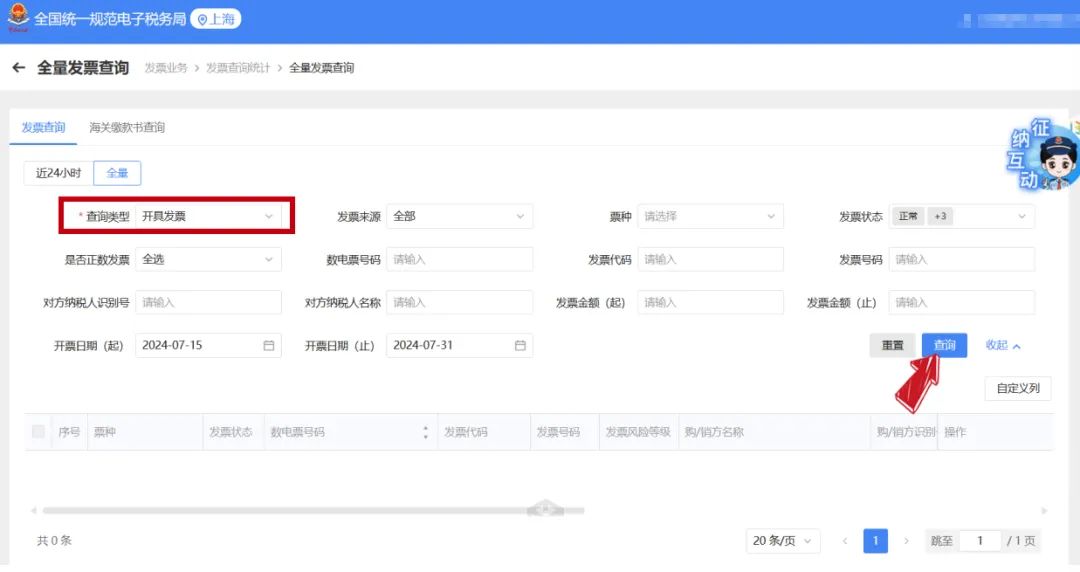
Enter the invoice query page, select "Issued Invoices" as the query type, choose the corresponding query conditions yourself, and click [Query];

How to download and print issued or obtained fully digitalized e-invoices in the new electronic tax bureau?

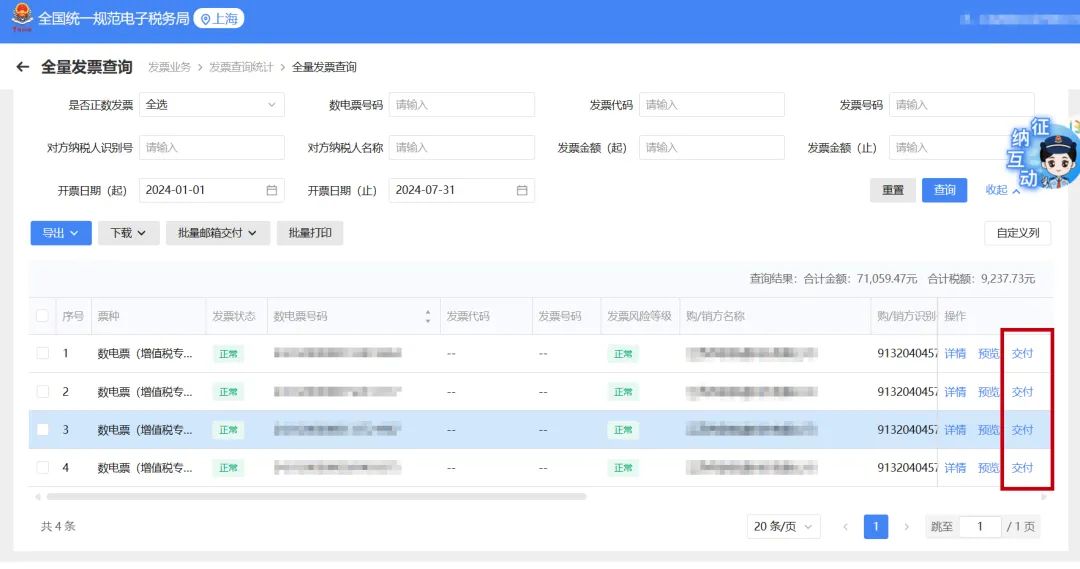
In the results display column, select a data record and click [Deliver] to the right of that record;

How to download and print issued or obtained fully digitalized e-invoices in the new electronic tax bureau?

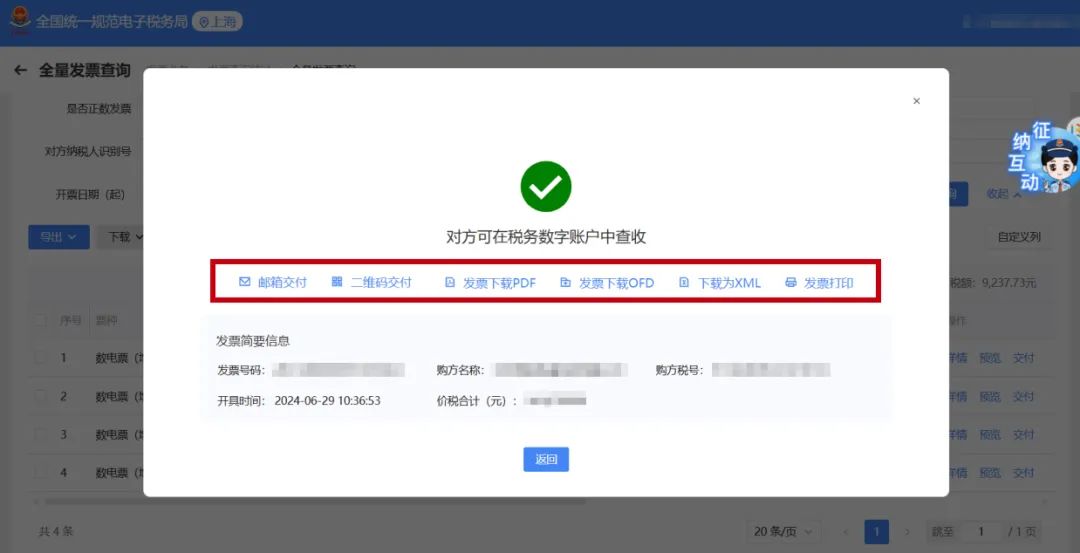
On the pop-up page, select and click the [Invoice Download PDF], [Invoice Download OFD], or [Download as XML] buttons to download the invoice to your local computer. This page also supports clicking [Invoice Print] to print the invoice directly;

How to download and print issued or obtained fully digitalized e-invoices in the new electronic tax bureau?


Method 2

For invoices obtained by enterprises

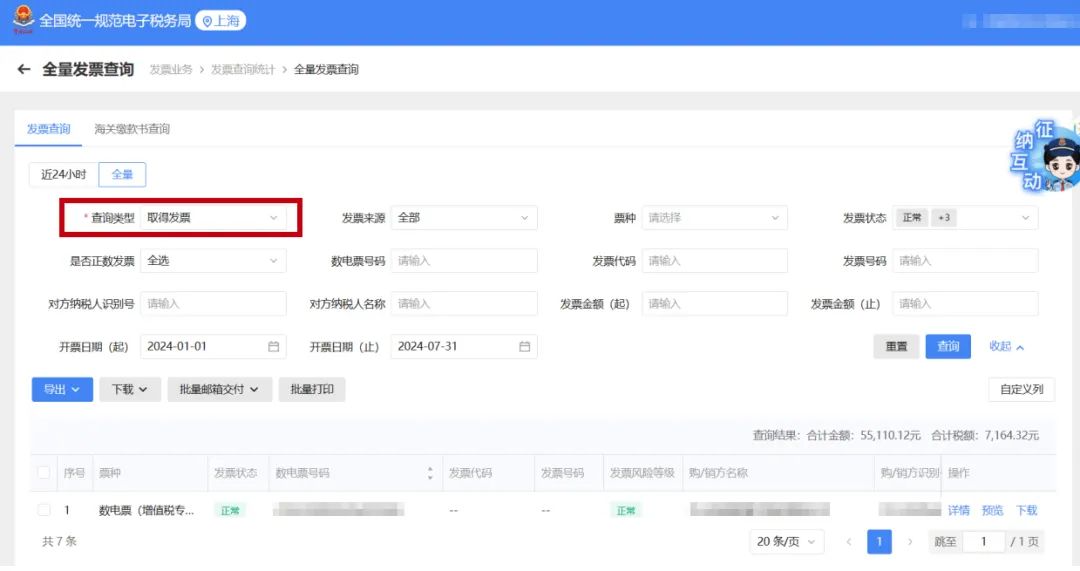
Click in sequence [Tax Digital Account] - [Invoice Query Statistics] - [Full Invoice Query] to enter the invoice query page, and select "Obtained Invoices" as the query type;

How to download and print issued or obtained fully digitalized e-invoices in the new electronic tax bureau?

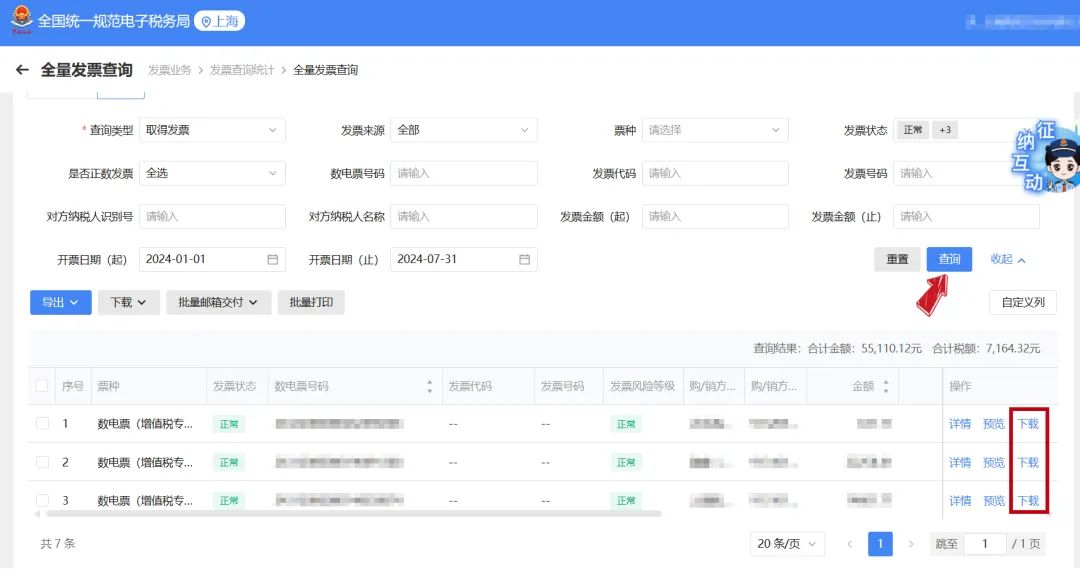
Select the corresponding query conditions yourself, click [Query], select a record in the results display column, and click [Download] to the right of that record;

How to download and print issued or obtained fully digitalized e-invoices in the new electronic tax bureau?

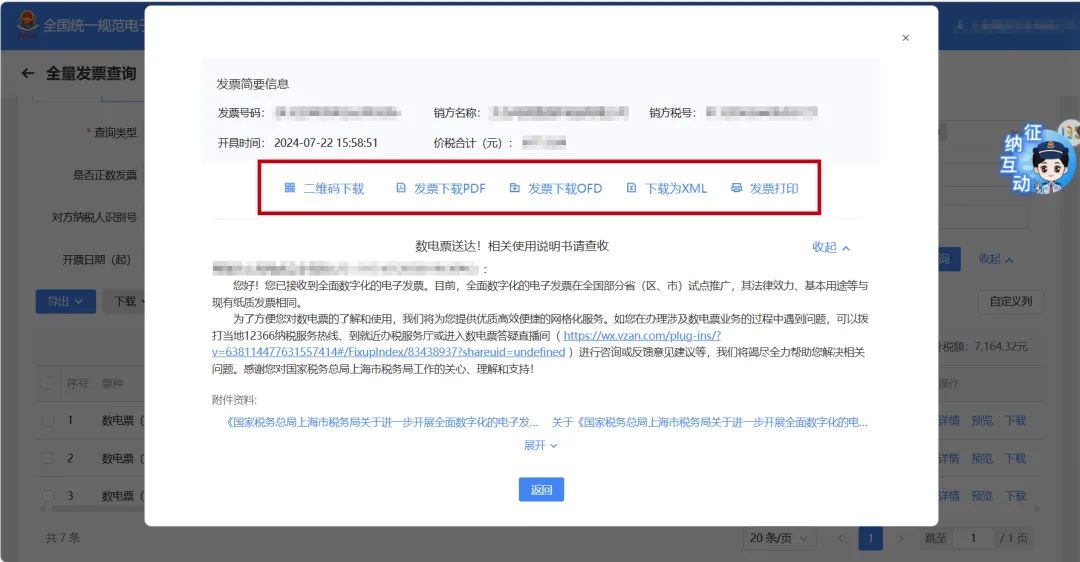
On the pop-up page, you can choose [QR Code Download], [Invoice Download PDF], [Invoice Download OFD], or [Download as XML] to download the invoice. This page also supports clicking [Invoice Print] to print the invoice directly;

How to download and print issued or obtained fully digitalized e-invoices in the new electronic tax bureau?


Kailing Technology provides enterprise business-finance-tax digital product lines according to enterprise needs:

Solutions for businesses including sales contract management system, procurement contract management system, fully digitalized Leqi interface project, output automatic invoicing system, employee expense control and reimbursement system, input VAT invoice management system, supply chain collaborative reconciliation system, image OCR recognition system, automatic financial bookkeeping system, and electronic accounting archives system, professionally and efficiently supporting the transformation and upgrading of enterprise business-finance-tax digital management.

If you have any business-finance-tax digital transformation needs, welcome to contact us. Beijing Kailing Technology will serve you wholeheartedly.


Share to:
Contact Us

Contact: 010-60974119

VIP Dedicated Consultant: 185-1389-5936

Address: Room 410, 4th Floor, Jianjin Center, No. Jia 1 Yongtaiyuan, Qinghe, Haidian District, Beijing
Scan to add customer service on WeChat
Industry Websites
Scan to follow our WeChat official account
Scan to view our video account
Scan to follow our Douyin account
Common Questions
How can you download and print fully digitalized e-invoices issued by your own company in the new electronic tax bureau?
Log in to the new Electronic Tax Bureau, click [I Want to Handle Taxes] - [Tax Digital Account] - [Invoice Query Statistics] - [Full Invoice Query], select "Issued Invoices" as the query type, set the conditions and query, then click [Deliver] in the result column, where you can select [Download Invoice PDF], [Download Invoice OFD], or [Download as XML], or directly [Print Invoice].
How to download and print received fully digitalized e-invoices in the new electronic tax bureau?
Log in to the new Electronic Tax Bureau, go to [I Want to Handle Taxes] - [Tax Digital Account] - [Invoice Query Statistics] - [Full Invoice Query], select "Obtained Invoices" as the query type, set the conditions and query, then click [Download] in the result column, where you can select [QR Code Download], [Download Invoice PDF], [Download Invoice OFD], or [Download as XML], or directly [Print Invoice].
What file formats are supported for downloading fully digitalized e-invoices from the New Electronic Tax Bureau?
Supports three formats: PDF, OFD, and XML. For issued invoices, download can be selected on the [Delivery] page; for obtained invoices, the same three formats are supported on the [Download] page, and QR code download is also provided.
What business-finance-tax digitalization products does Kailing Technology provide?
Kailing Technology provides solutions including sales contract management, procurement contract management, fully digitalized e-invoice Leqi interface, automatic output invoicing, employee expense control and reimbursement, input VAT invoice management, supply chain collaborative reconciliation, image OCR recognition, automatic financial bookkeeping, and electronic accounting archives, helping enterprises transform their business-finance-tax digital management.
Related solutions
Leqi Direct Connection solution
Direct connection to the tax bureau's Leqi channel, connecting the last mile of ERP →
Output Invoicing Management Platform
As soon as business occurs, invoices are automatically issued, automatically delivered, and automatically returned →
Enterprise expense control and reimbursement system
Intelligent reimbursement, compliance control, one-click bookkeeping →
Further Reading
How do I operate fully digitalized e-invoice quota and invoice type approval in the New Electronic Tax Bureau?
1. In the new electronic tax bureau, a situation occurs where an enterprise invoicing clerk identity cannot enter the digital account, but other... →
E-Tax Bureau Operation Guide | How to query invoices already selected?
1. On the electronic tax bureau, through [Tax Digital Account] — [Deduction Category Check] certified… →
Self-filing process for fixed-amount households in the new electronic tax bureau
01 Filing After logging into the electronic tax bureau, click [I Want to Handle Taxes] → [Tax and Fee Filing and Pay... →