010-6097 4119Book a Demo


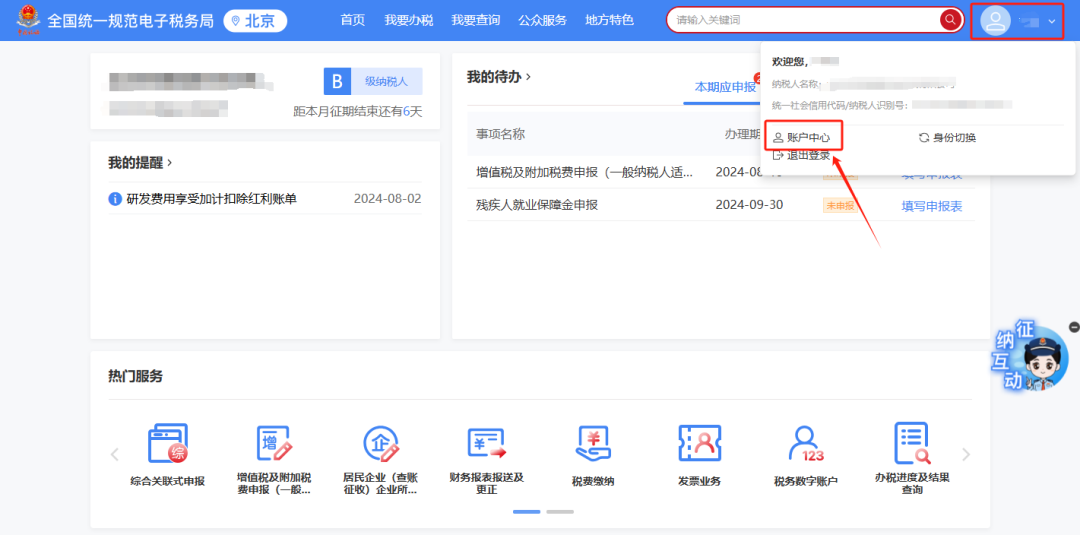
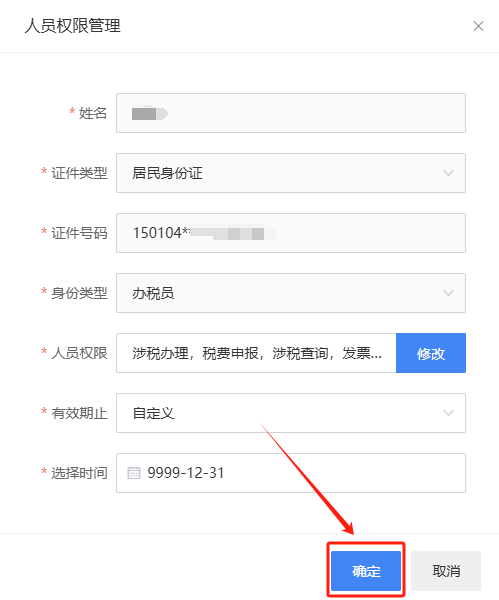
How do I operate fully digitalized e-invoice quota and invoice type approval in the New Electronic Tax Bureau?Published: 2024-08-14 16:59 1.In the New Electronic Tax Bureau, if an enterprise invoicer identity cannot enter the digital account, but other real-name tax officers can enter, how should this be handled?Answer:Invoicers must obtain authorization from the legal representative or financial officer before they can use functions related to the "tax digital account." The specific authorization operation is as follows: after the enterprise legal representative or financial officer logs into the new electronic tax bureau with an enterprise business identity, click the avatar in the upper right corner → "Account Center" to enter "Account Center," click "Personnel Permission Management" → "Existing Tax Handlers," click [Manage] in the operation column of the tax handler whose permissions need to be modified, the system pops up the "Personnel Permission Management" dialog box, click [Modify] after "Personnel Permissions"; in the "Select Personnel Permissions" pop-up, check "Invoice Business," click [Confirm] below; click [OK] on the "Personnel Permission Management" pop-up, and the tax handler (invoice issuer) is successfully granted fully digitalized e-invoice business permissions. The illustrated guidance is as follows: I. Click the avatar in the upper right corner → "Account Center" to enter the "Account Center."
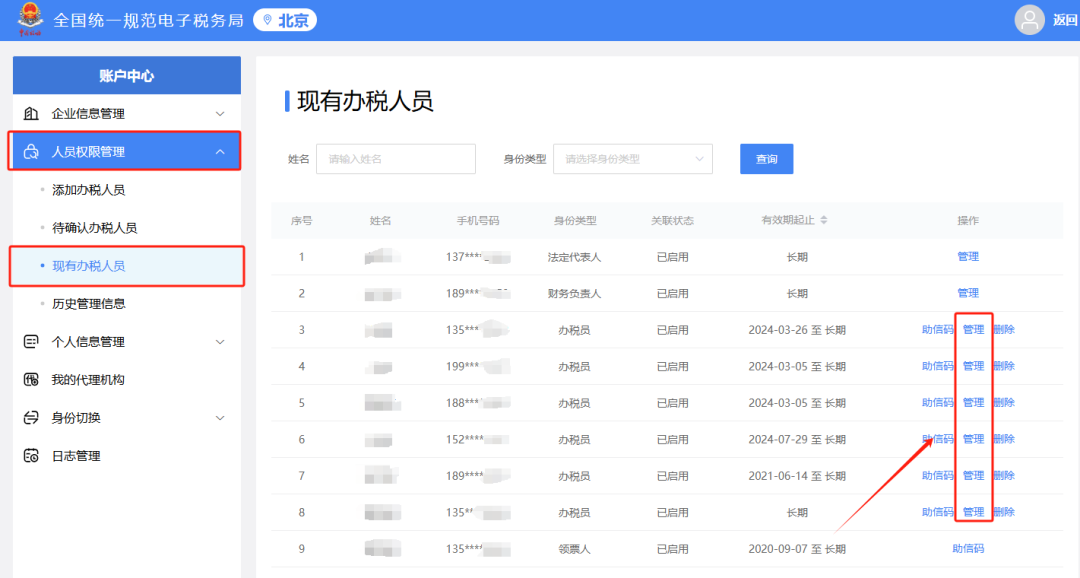
II. Click "Personnel Permission Management" → "Existing Tax Handlers", and click [Manage] in the operation column of the tax handler whose permissions need to be modified.
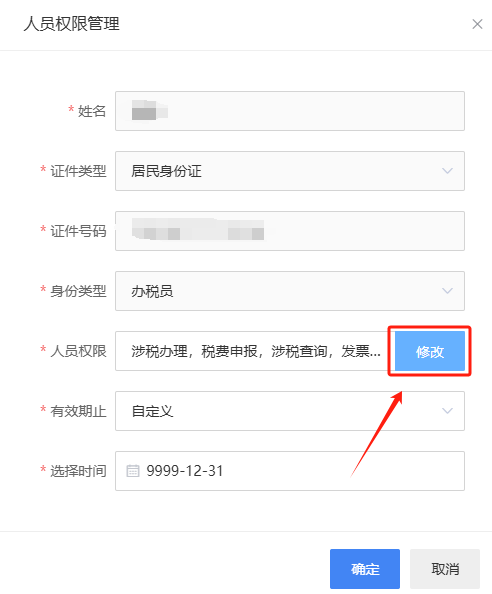
III. The system pops up the "Personnel Permission Management" dialog box; click [Modify] after "Personnel Permissions".
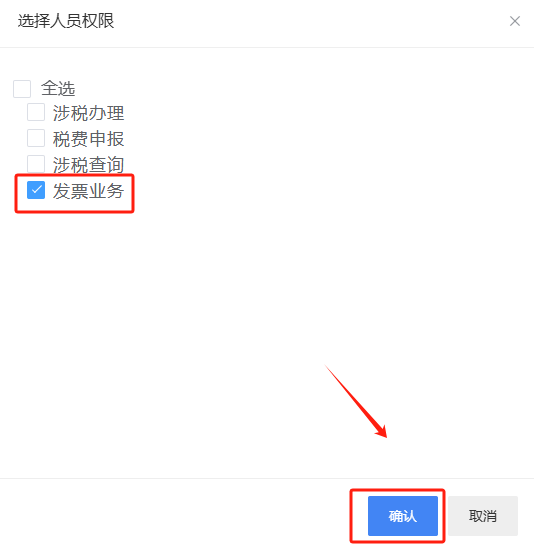
IV. In the "Select Personnel Permissions" pop-up, check "Invoice Business" and click [Confirm] below.
V. Click [Confirm] on the "Personnel Permission Management" pop-up, and the fully digitalized e-invoice business permissions are successfully granted to the tax handler (invoice issuer).
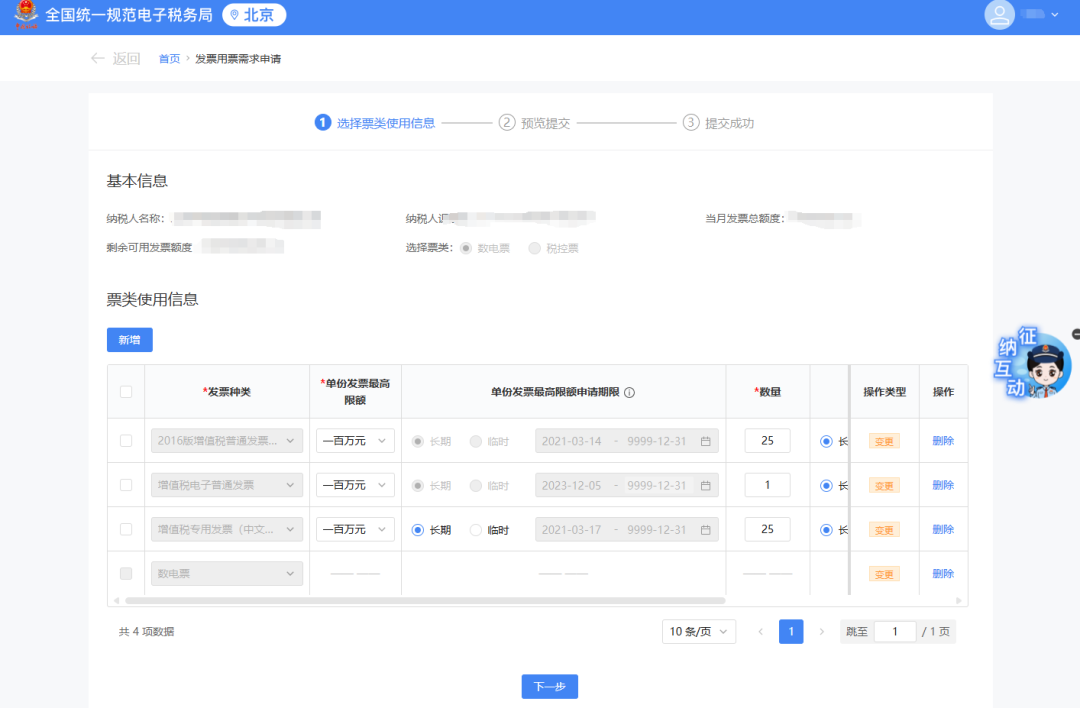
2.There is no fully digitalized e-invoice quota module or invoice type approval module in the New Electronic Tax Bureau. How should this be handled? Answer:Invoice type approval and fully digitalized e-invoice quota allocation are both applied for through the [Invoice Usage Demand Application] function module. The illustrated guidance is as follows: Invoice type approval and fully digitalized e-invoice quota allocation are both applied for through the [Invoice Usage Demand Application] function module.
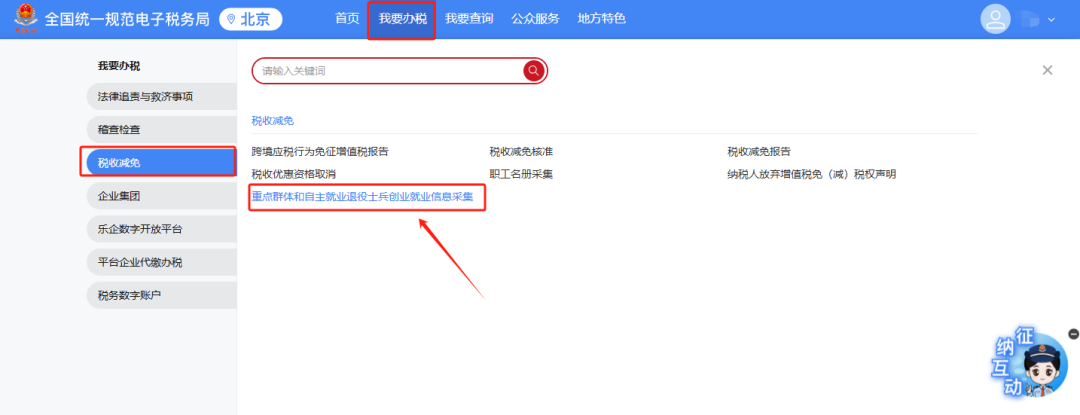
3.In the New Electronic Tax Bureau, if a taxpayer needs to enjoy the preferential policy for enterprises hiring self-employed retired soldiers, in which module should retired soldier information be collected? Answer:① After logging in to the New Electronic Tax Bureau, click the function menu [I Want to Handle Taxes] — [Tax Reduction and Exemption] — [Information Collection for Entrepreneurship and Employment of Key Groups and Self-Employed Retired Soldiers]. ② After entering the system, key groups and self-employed retired soldiers that have already been collected will be automatically brought out. If they have not been collected, the query result will be empty. ③ Click the [Add] button, select [Self-employed Veteran Soldier] as the personnel type, fill in the relevant collection items in the form, and click [Confirm]. After verification passes, information collection is complete. The illustrated guidance is as follows: I. I Want to Handle Taxes—Tax Reduction and Exemption—Menu for the Function of Collecting Information on Entrepreneurship and Employment of Key Groups and Retired Soldiers Who Are Self-Employed.
II. After entering the system, key groups and self-employed retired soldiers that have already been collected will be automatically brought up. If they have not been collected, the query result will be empty.
III. Click the [Add] button.
IV. For personnel type, select [Self-employed retired soldiers], fill in the relevant collection items in the form, and click [Confirm]. After verification passes, information collection is completed.
Source: Beijing Tax Kailing Technology provides enterprise business-finance-tax digital product lines according to enterprise needs: Solutions for businesses including sales contract management system, procurement contract management system, fully digitalized Leqi interface project, output automatic invoicing system, employee expense control and reimbursement system, input VAT invoice management system, supply chain collaborative reconciliation system, image OCR recognition system, automatic financial bookkeeping system, and electronic accounting archives system, professionally and efficiently supporting the transformation and upgrading of enterprise business-finance-tax digital management. If you have any business-finance-tax digital transformation needs, welcome to contact us. Beijing Kailing Technology will serve you wholeheartedly.
|