010-6097 4119Book a Demo


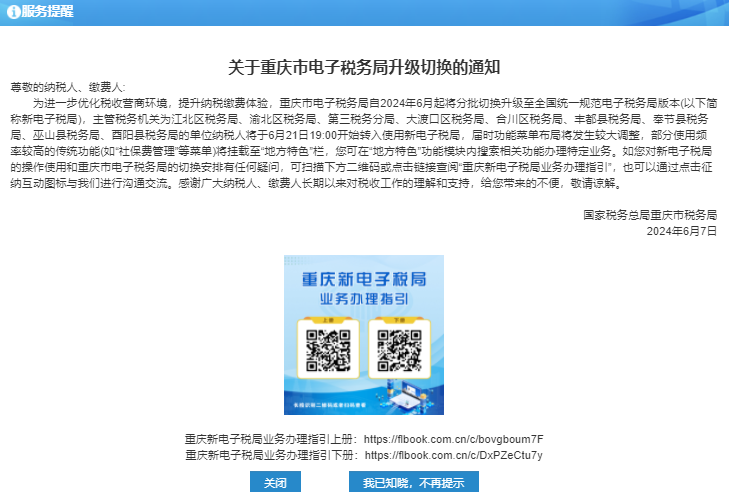
The national unified new electronic tax bureau is online!Published: 2024-06-28 16:15 The Chongqing Electronic Tax Bureau has been switched and upgraded in batches to the nationally unified and standardized Electronic Tax Bureau version since June 2024. Unit taxpayers under some competent tax authorities began transitioning to the new Electronic Tax Bureau at 19:00 on June 21.
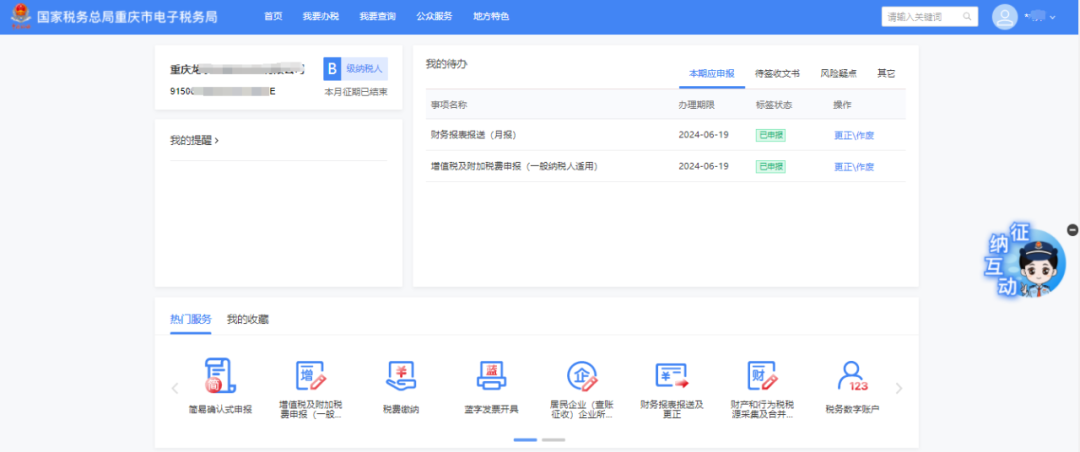
Let us learn together what is different about the nationally unified and standardized electronic tax bureau! The new electronic tax bureau (new tax bureau) is the abbreviation of the nationally unified and standardized electronic tax bureau. Its purpose is to build a nationally unified, standardized, and intelligent electronic tax bureau, achieving one standard, one rule, and one platform for cross-regional business handling nationwide. New electronic tax bureau homepage:
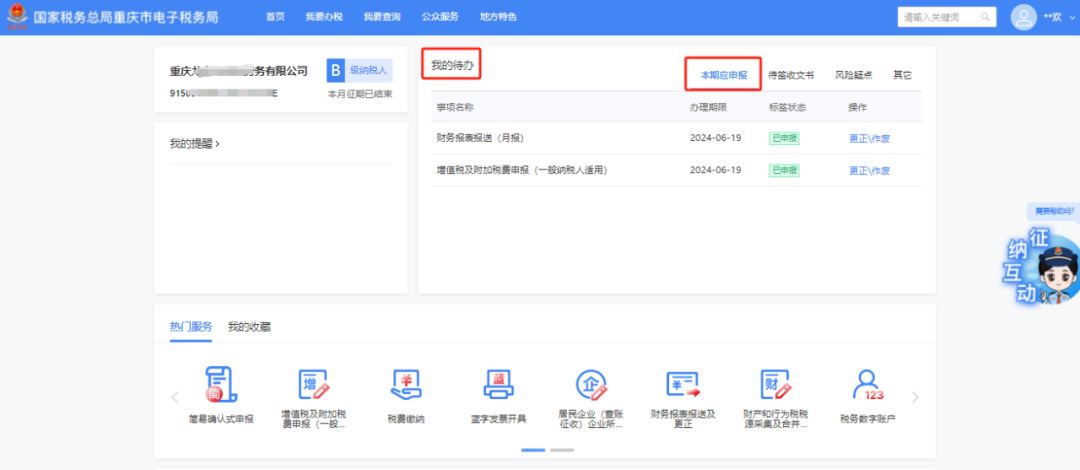
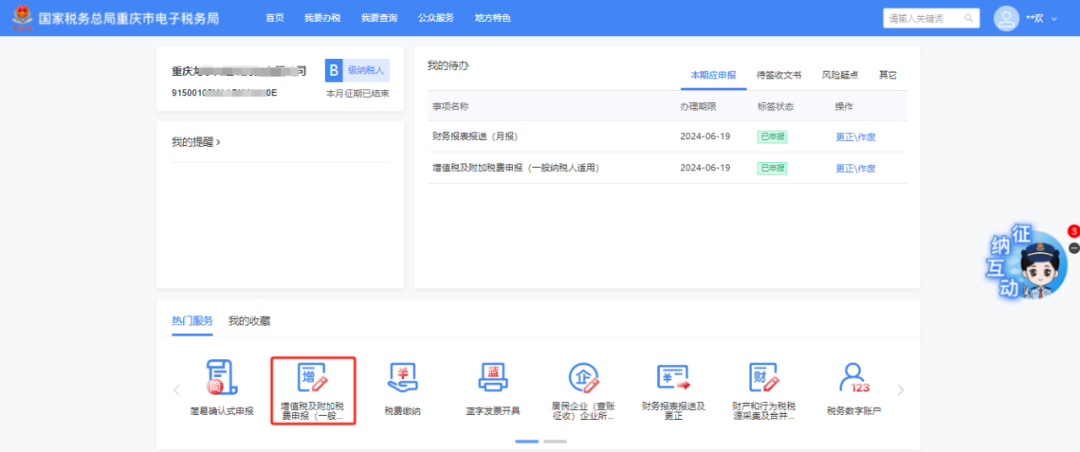
Provide users with a convenient transportation hub and an entry point for commonly used information, navigating to each functional module of the application in a hub-and-spoke manner; Present information that the enterprise currently needs to pay attention to, shorten the path to key information, and realize a personalized desktop for each user. (1) Tax declaration - VAT and surtax declaration (general taxpayer) Path One: After logging into the New Electronic Tax Bureau, on the homepage [My To-Do] - [Periodic Tax Filing] - [Fill in Tax Return]
Path Two: After logging into the New Electronic Tax Bureau, on the homepage [Popular Services] - [VAT and Surcharge Filing (General Taxpayer)]
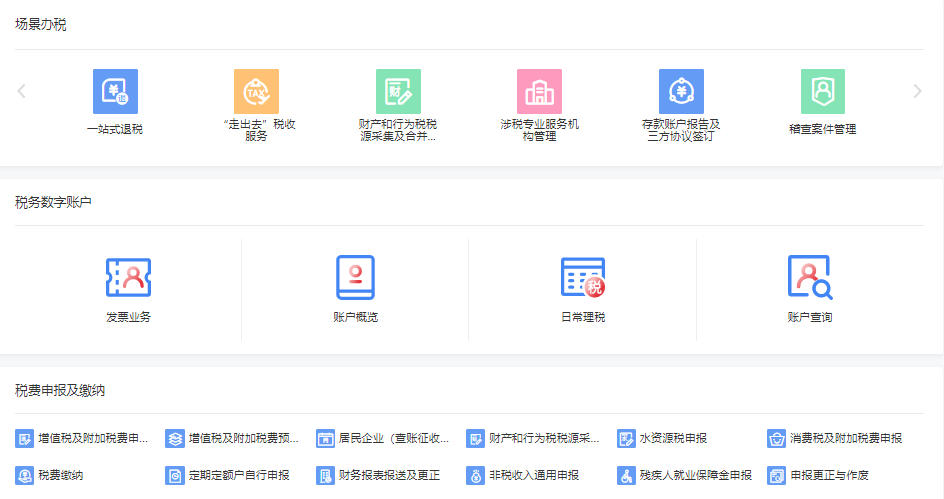
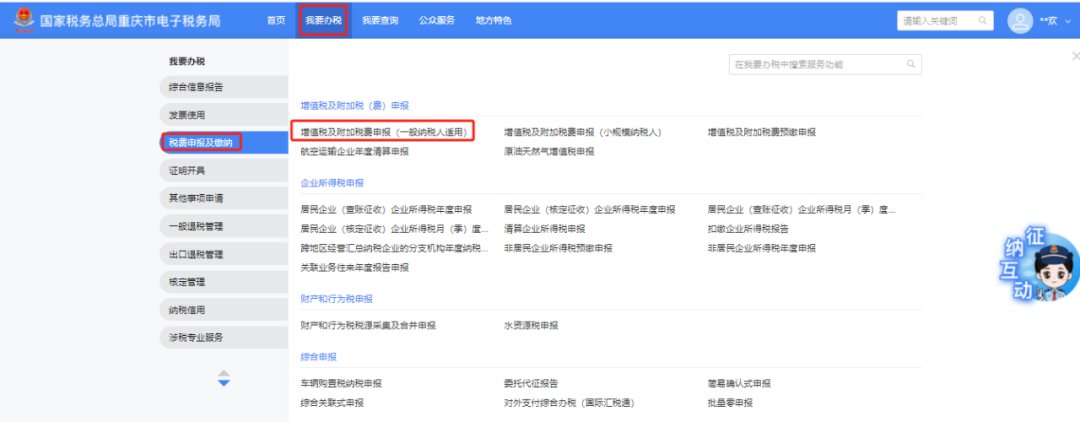
Path Three: [I Want to Handle Taxes] - [Tax and Fee Filing and Payment] - [VAT and Surcharge Filing (General Taxpayer)]
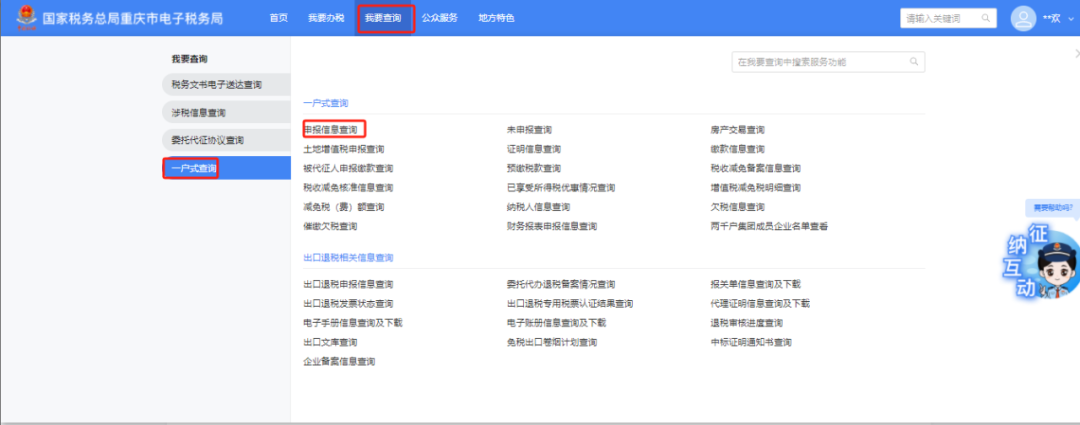
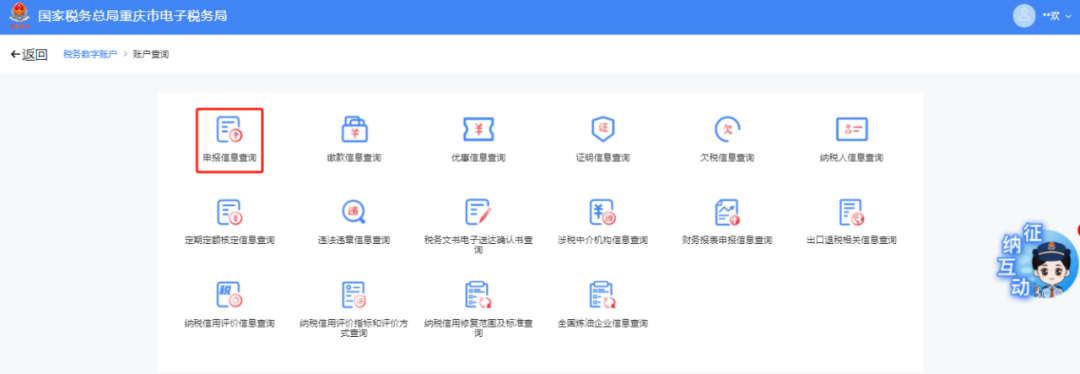
After entering the filing, the system obtains tags such as taxpayer characteristics, makes judgments according to the rules, and enters different filing modes (confirmation filing mode, supplementary filing mode, form-filling filing mode). (II) Tax and Fee Filing - Tax Filing Information Query and Printing Path One: After logging in, go to [I Want to Handle Taxes] - [One-Household Query] - [Tax Filing Information Query]
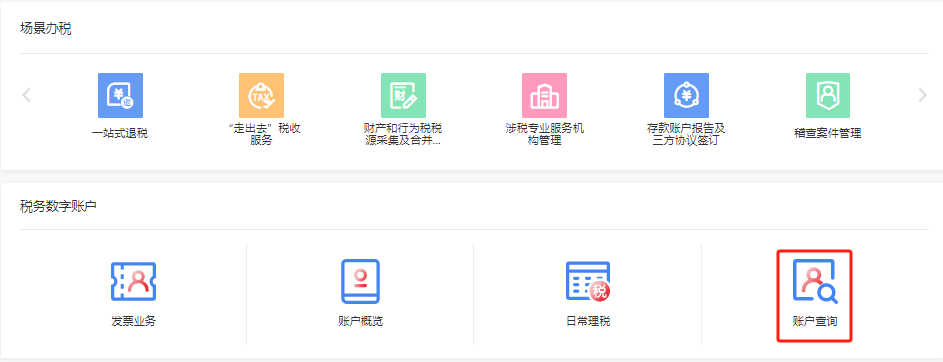
Path Two: After logging in, on the homepage [Tax Digital Account] - [Account Query] - [Tax Filing Information Query]
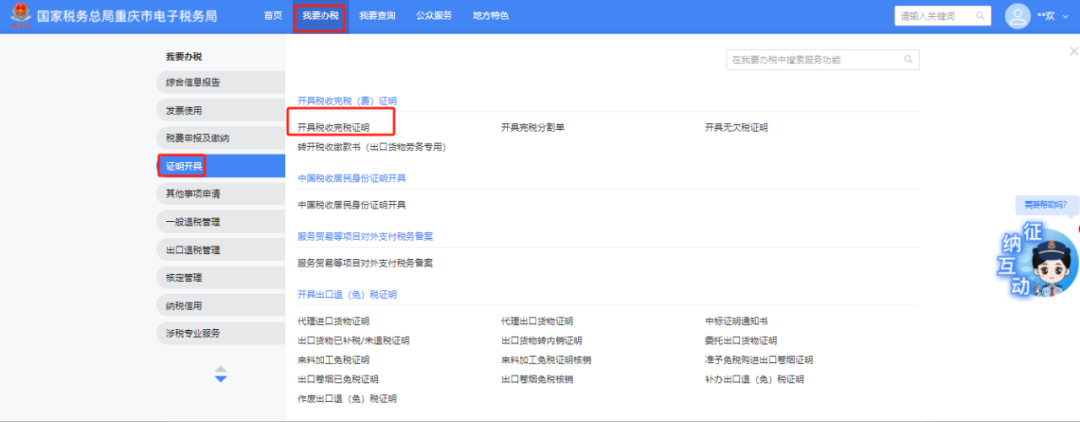
(3) Certificate issuance - tax payment certificate. Path 1: [I Want to Handle Taxes] - [Certificate Issuance] - [Issue Tax Payment Certificate]
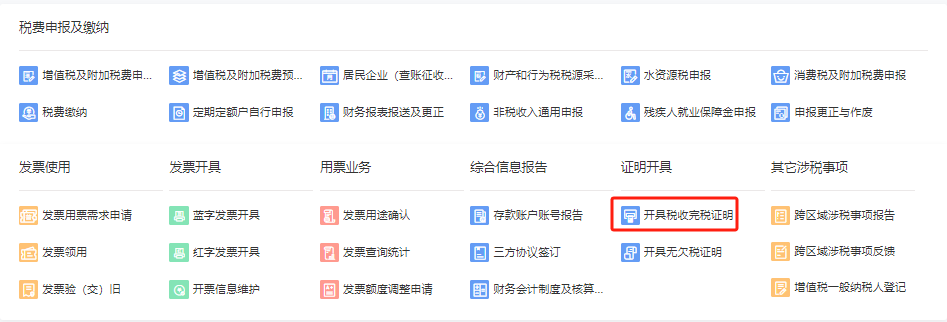
Path Two: On the homepage [Certificate Issuance] - [Issue Tax Payment Certificate]
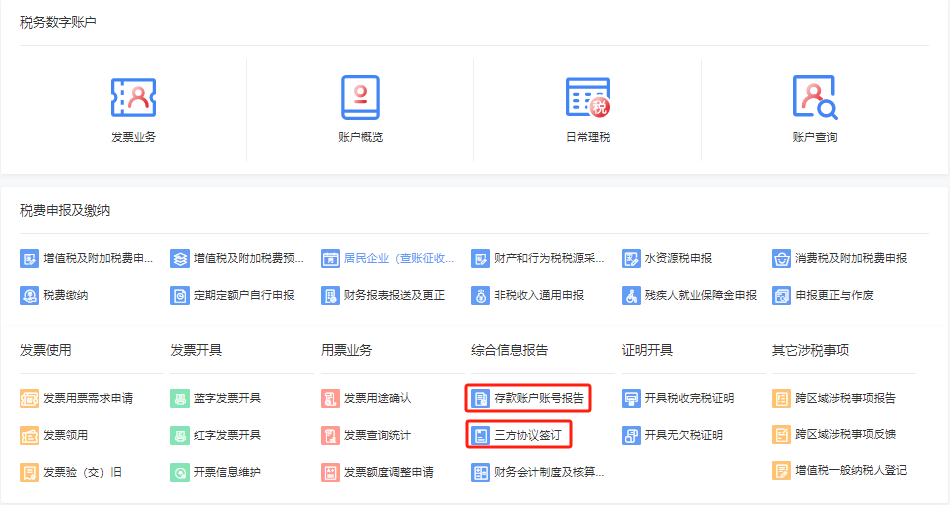
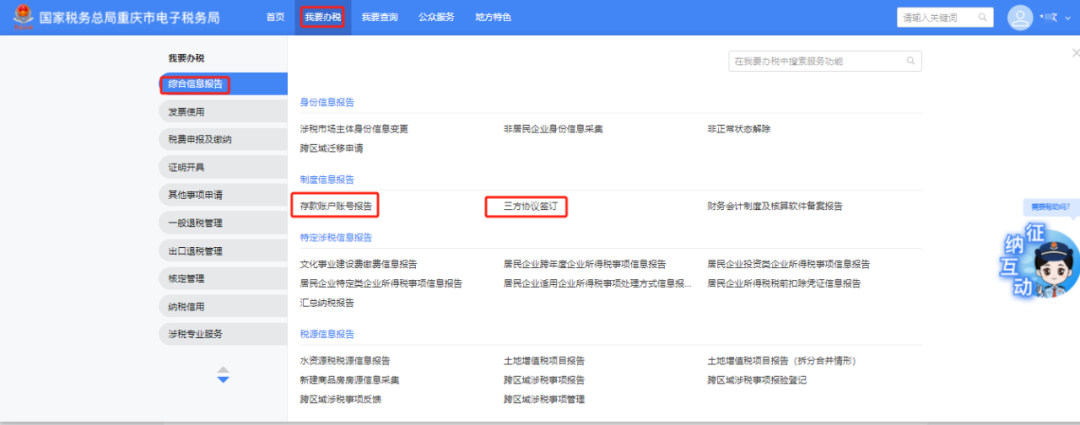
(4) Deposit account reporting and tripartite agreement signing. Path 1: On the Home page, [Comprehensive Information Report] - [Deposit Account Number Report]
Path Two: [I Want to Handle Taxes] - [Comprehensive Information Report] - [Deposit Account Number Report]
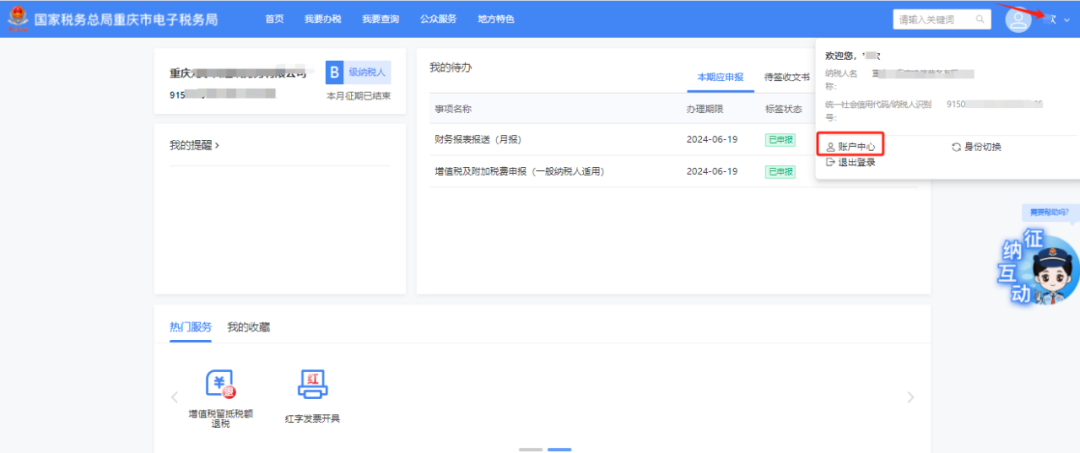
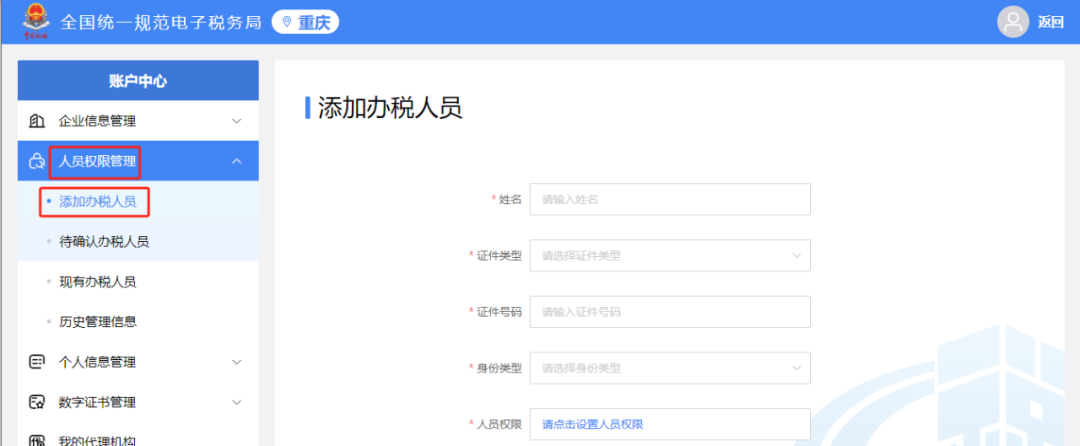
(5) Add tax handlers: click Personal Center in the upper right corner, select [Account Center] - [Personnel Permission Management] - [Add Tax Handler]
(1) What filing modes are available for VAT and additional tax filing (applicable to general taxpayers)? How do I choose which mode to use? There are three modes for VAT and surcharge filing (applicable to general taxpayers). First, for taxpayers with simple business, the system recommends confirmation-based filing, automatically pre-fills data, and taxpayers can file with one click after confirming it is correct. Second, for taxpayers with relatively complex business, the system recommends supplementary filing, where taxpayers can quickly file after supplementing information such as uninvoiced income, other deductions, input tax transferred out, and tax credits on the basis of the system's pre-filled data. Third, for taxpayers with complex business, the system recommends form-based filing, i.e., the traditional filing mode. The above filing modes are automatically recommended for you by the system based on taxpayer characteristic tags and tax-related data, and you do not need to choose. (II) The filing mode recommended by the system is the form-filling mode. Can I choose the confirmation mode or supplementary entry mode? No. If the system determines that your business is relatively complex and does not meet the conditions for the confirmation mode or supplementary entry mode, and cannot fully pre-fill the relevant data for you, you cannot switch to the confirmation mode or supplementary entry filing mode. (3) If there is a discrepancy between the data pre-filled by the system and our company's actual data, how should I modify it? The system pre-fills data based on the taxpayer's tax-related data and business rules. If the pre-filled results do not match actual operations, in confirmation-style and supplementary-entry filing modes, you may click the supplementary entry areas on pages such as "Sales Revenue" and "Input Tax Amount" to supplement entries based on actual business data; you may also click "I Want to Fill in the Form" to switch to form-filling filing mode, and after completing the entries, click [Confirm] to complete the modification. Kailing Technology provides enterprise business-finance-tax digital product lines according to enterprise needs: Solutions for businesses including sales contract management system, procurement contract management system, fully digitalized Leqi interface project, output automatic invoicing system, employee expense control and reimbursement system, input VAT invoice management system, supply chain collaborative reconciliation system, image OCR recognition system, automatic financial bookkeeping system, and electronic accounting archives system, professionally and efficiently supporting the transformation and upgrading of enterprise business-finance-tax digital management. If you have any business-finance-tax digital transformation needs, welcome to contact us. Beijing Kailing Technology will serve you wholeheartedly.
|