News Details

E-Tax Bureau Operation Guide | Excuse me, how to assign a fully digitalized e-invoice quota?

Published: 2024-04-15 17:33

1.How do I perform quota allocation for fully digitalized e-invoices on the Electronic Tax Bureau?

Answer
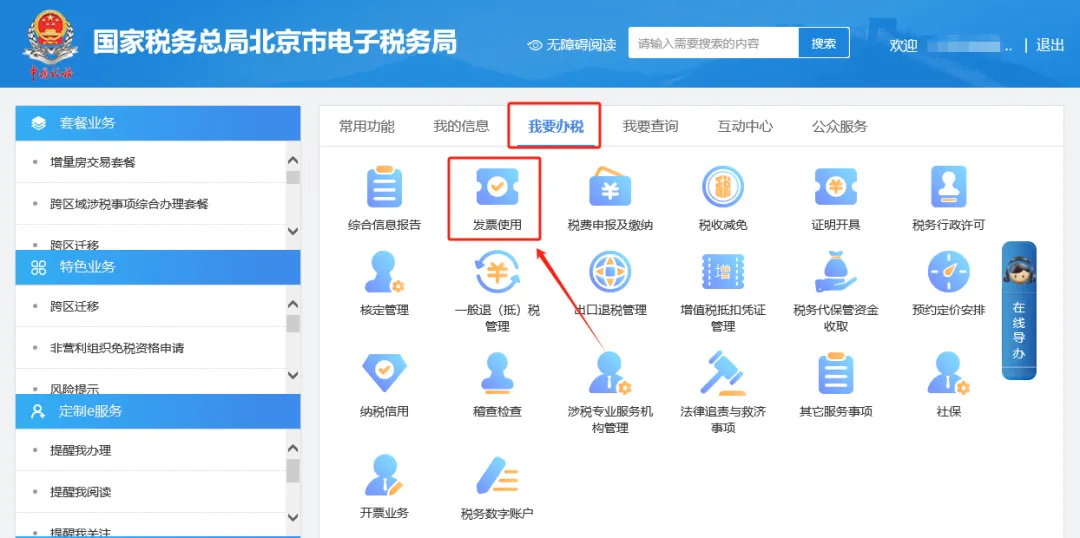
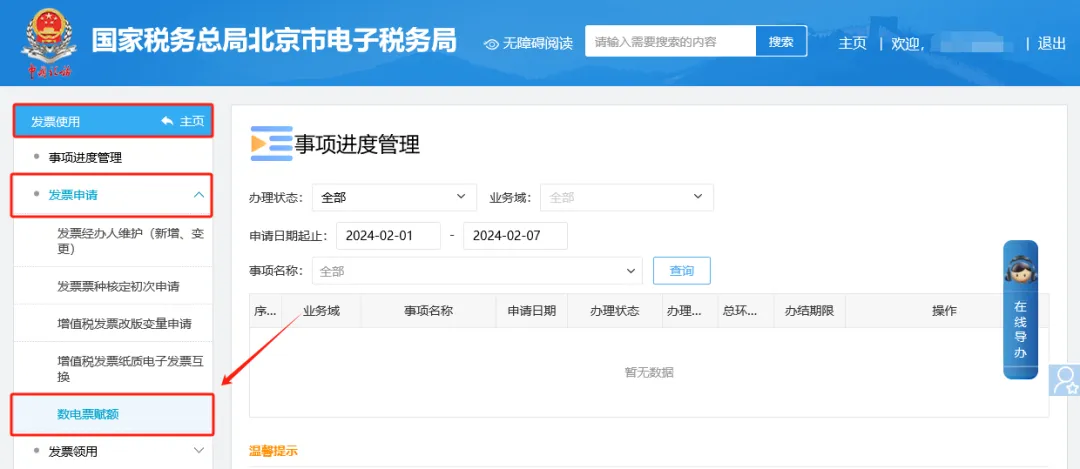
Hello, please enter through the Electronic Tax Bureau [I Want to Handle Taxes] — [Invoice Use] — [Invoice Application] — [Fully Digitalized Invoice Quota] module. After entering, if there is no monitoring information, please browse the system text prompt content, and click "Next" after confirming it is correct. When the system interface shows "Tax-Related Matter Acceptance System Receipt", it means that the business has been successfully submitted. You can query the acceptance progress of the business matter in "Matter Progress Management".


The illustrated guidance is as follows

I.I Want to Handle Tax Matters—Invoice Use

How do I perform quota allocation for fully digitalized e-invoices on the Electronic Tax Bureau?

II. Enter Invoice Use - Invoice Application - Fully Digitalized E-Invoice Limit Module. After entering, if there is no monitoring information, please browse the system text prompts, confirm they are correct, and click "Next". When the system interface shows the "Tax-related Matter Acceptance System Receipt", it means the business has been successfully submitted. The acceptance progress of the business matter can be queried in "Matter Progress Management".

How do I perform quota allocation for fully digitalized e-invoices on the Electronic Tax Bureau?


2.How to issue a tax payment certificate?

Answer
Hello, tax payment certificates are divided into two types: tabular and documentary:

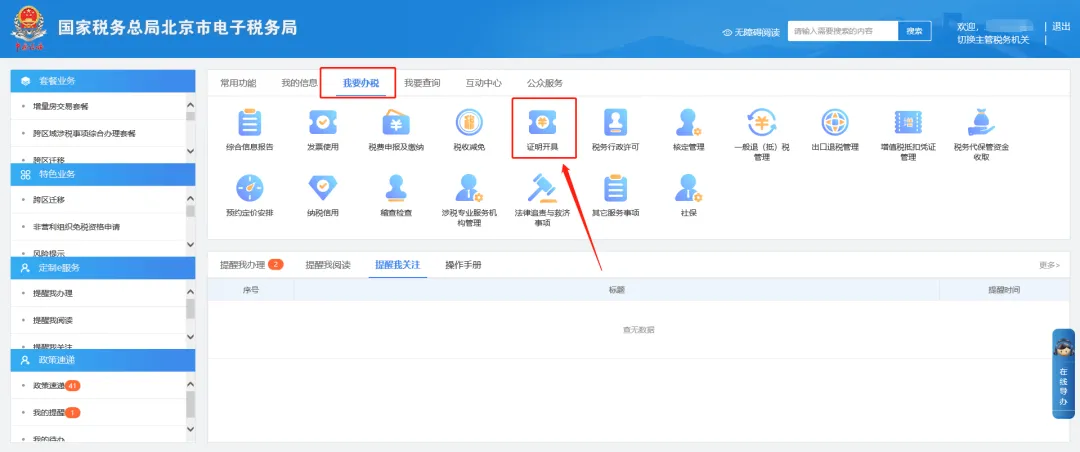
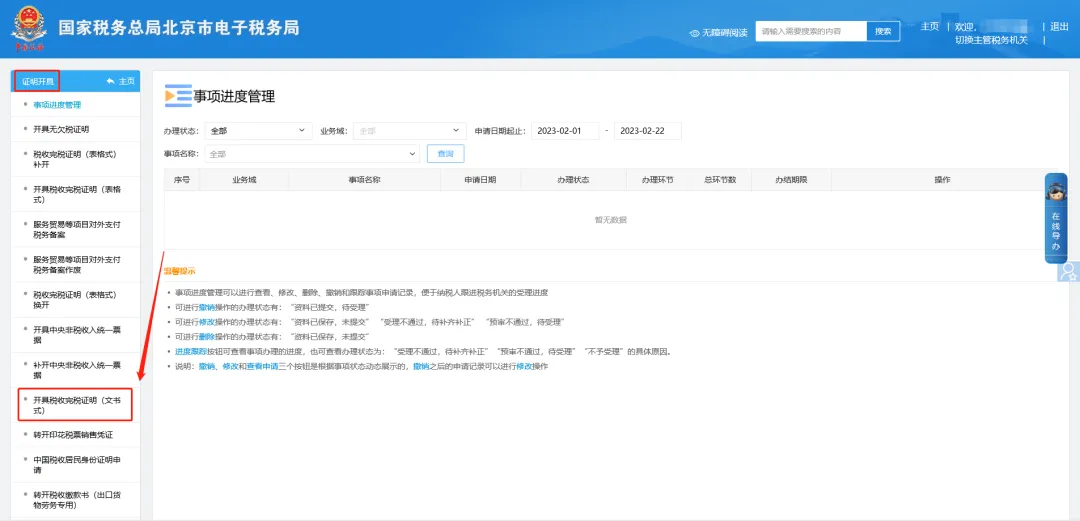
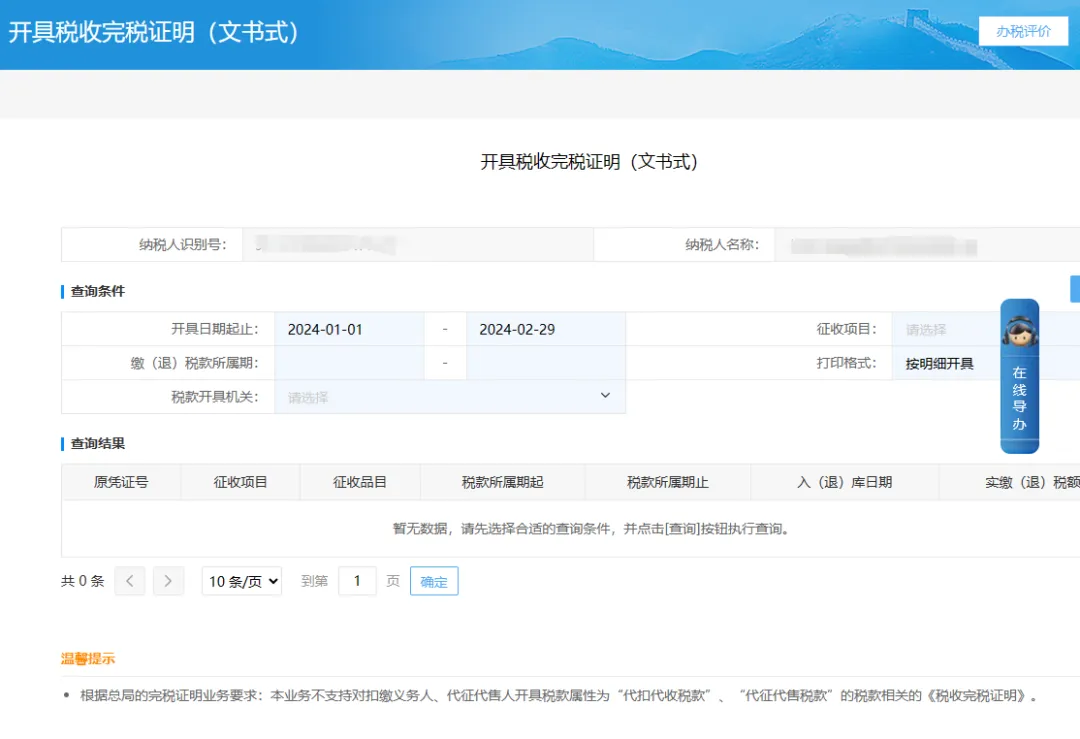
(1) Documentary tax payment certificates can be queried and issued through the Electronic Tax Bureau [I Want to Handle Taxes] — [Certificate Issuance] — [Issue Tax Payment Certificate (Documentary Form)];

Note: If you need a full-year tax payment certificate for 2022/2023, please clear the issuance date start and end in the document-style interface, select the tax payment (refund) period: 2022.1.1-2022.12.31/2023.1.1-2023.12.31, then click query and issue.

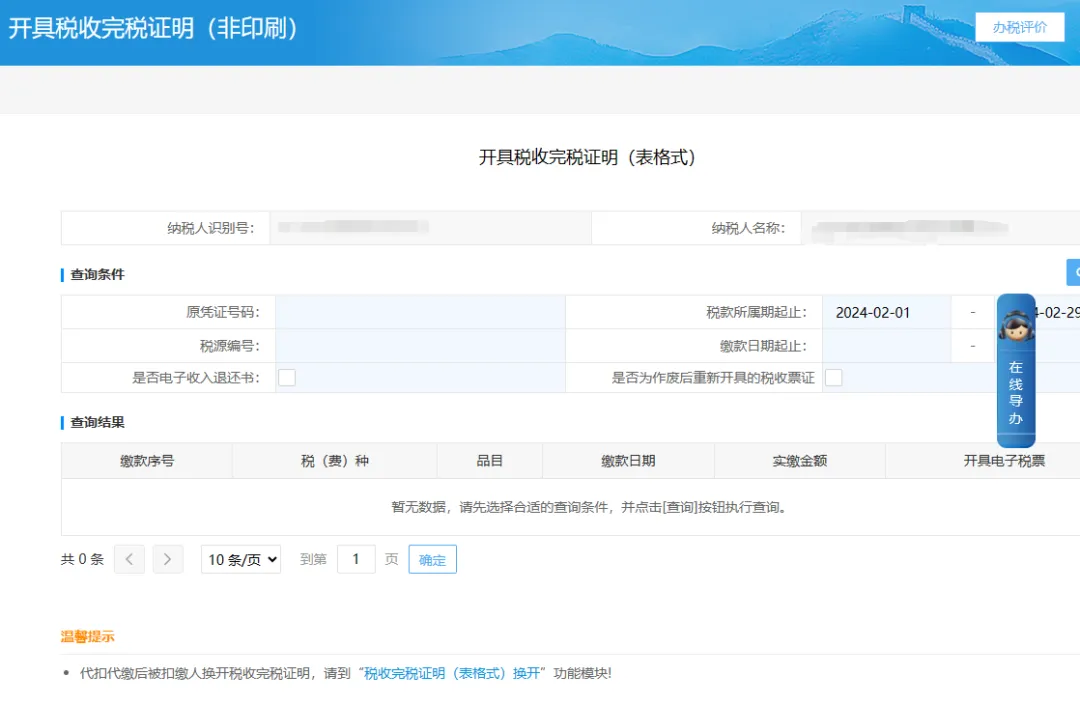
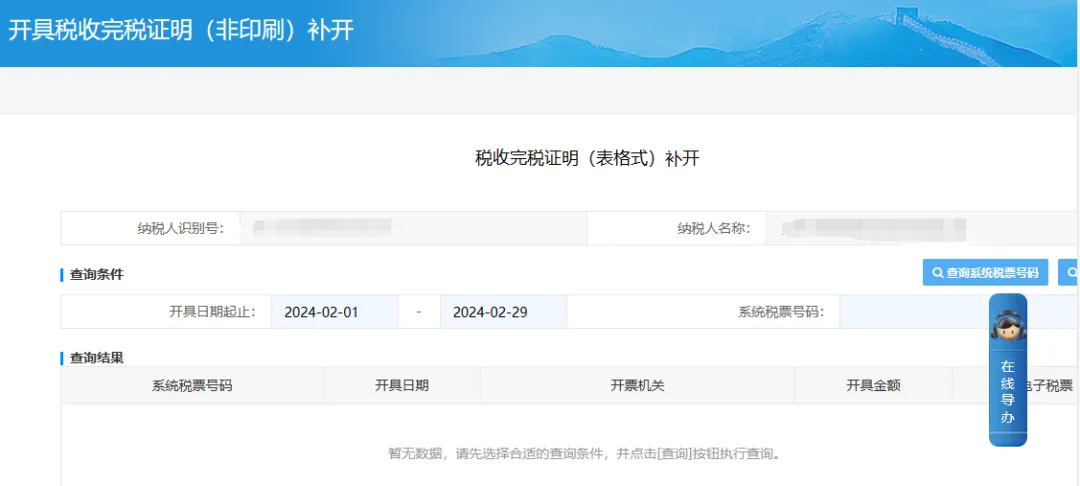
(2) A tabular tax payment certificate can be queried and issued through the Electronic Tax Bureau under [I Want to Handle Taxes] — [Certificate Issuance] — [Issue Tax Payment Certificate (Tabular)]. A tabular tax payment certificate can only be issued once. If reprinting is required, it can be done through the Electronic Tax Bureau under [I Want to Handle Taxes] — [Certificate Issuance] — [Reissue Tax Payment Certificate (Tabular)].


The illustrated guidance is as follows

Method 1:

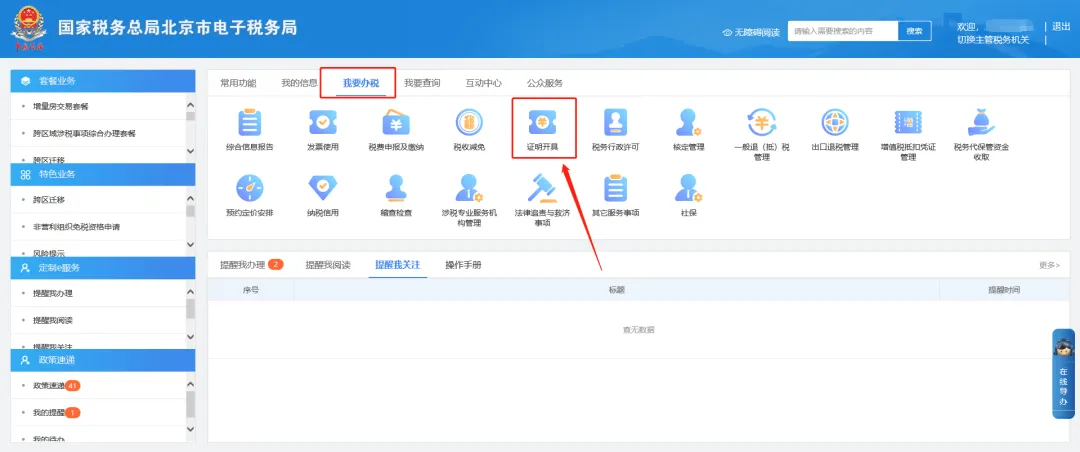
I.I Want to Handle Tax Matters—Certificate Issuance.

How do I perform quota allocation for fully digitalized e-invoices on the Electronic Tax Bureau?

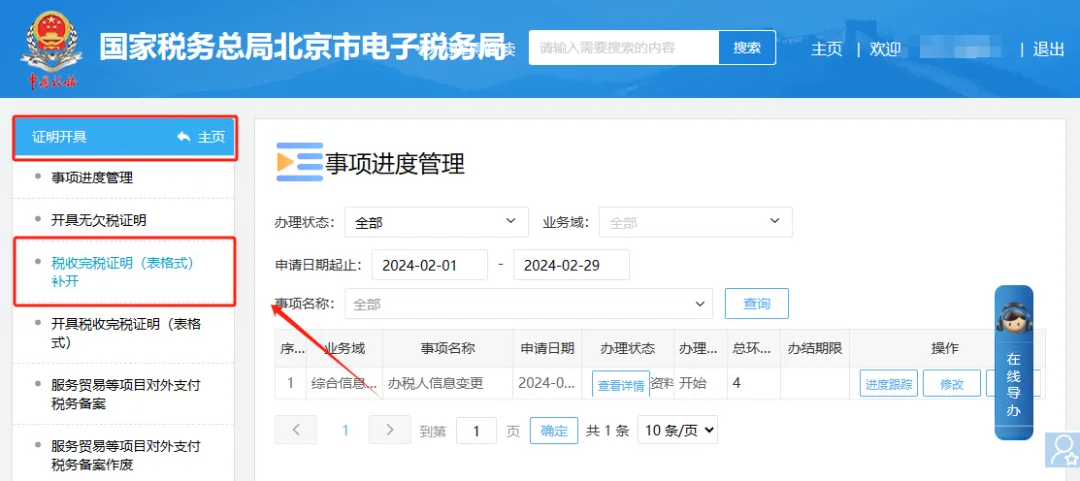
II.Prove issuance - issue tax payment certificate (documentary form).

How do I perform quota allocation for fully digitalized e-invoices on the Electronic Tax Bureau?

III.Query and issue on the page for issuing tax payment completion certificates (document-style).

How do I perform quota allocation for fully digitalized e-invoices on the Electronic Tax Bureau?

Method 2:

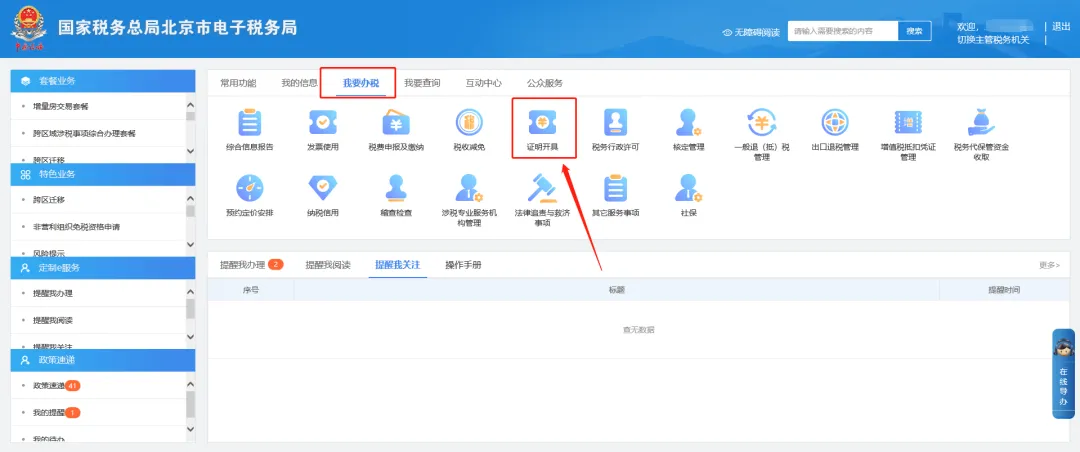
I.I Want to Handle Tax Matters—Certificate Issuance.

How do I perform quota allocation for fully digitalized e-invoices on the Electronic Tax Bureau?

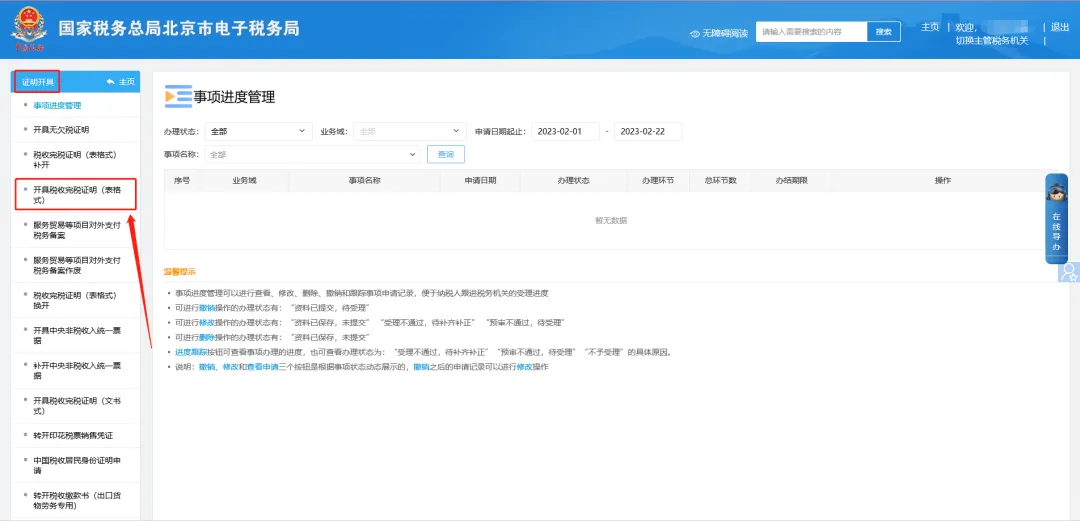
II. Certificate Issuance—Issue Tax Payment Certificate (Tabular Format).

How do I perform quota allocation for fully digitalized e-invoices on the Electronic Tax Bureau?

III. Query and issue on the page for issuing tax payment certificates (table style).

How do I perform quota allocation for fully digitalized e-invoices on the Electronic Tax Bureau?

To print again

I.I Want to Handle Tax Matters—Certificate Issuance.

How do I perform quota allocation for fully digitalized e-invoices on the Electronic Tax Bureau?

II. Certificate Issuance—Reissue Tax Payment Certificate (Tabular Format).

How do I perform quota allocation for fully digitalized e-invoices on the Electronic Tax Bureau?

III. Operation of the Tax Payment Certificate (Tabular Form) Reissuance Module.

How do I perform quota allocation for fully digitalized e-invoices on the Electronic Tax Bureau?


3.How to change investor information?

Answer
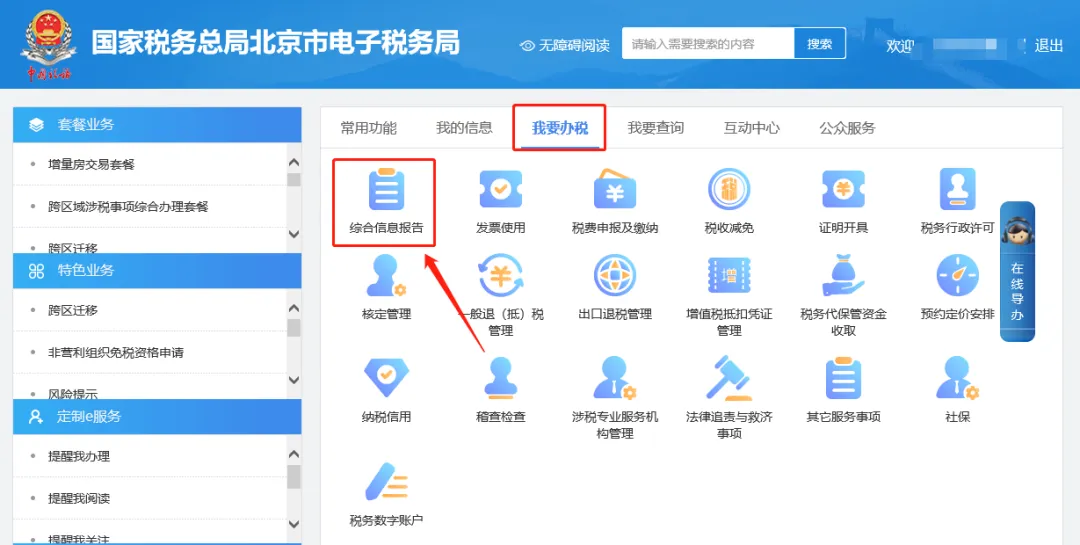
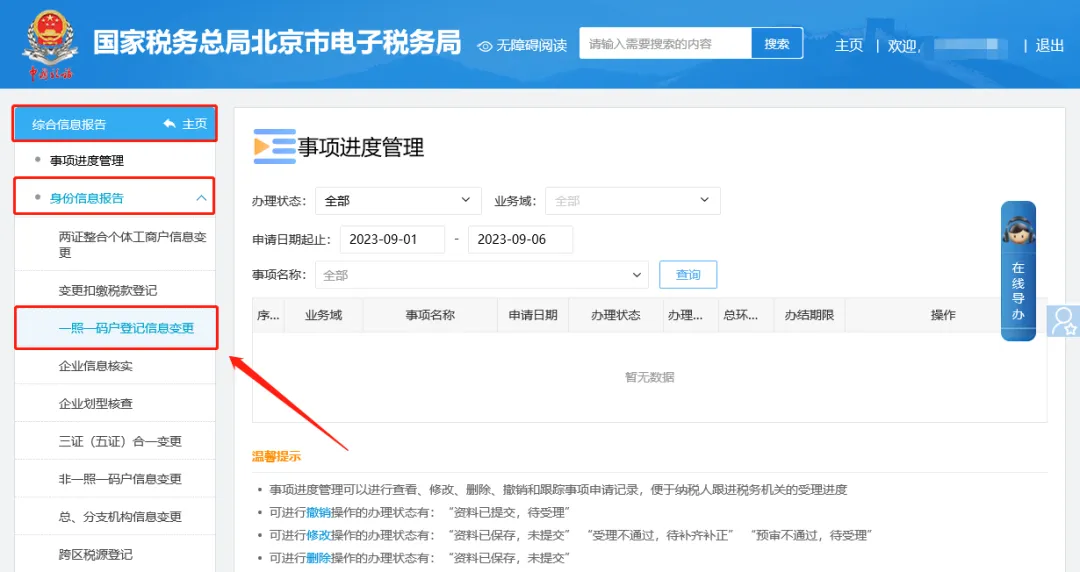
Hello, please click [I Want to Handle Taxes] — [Comprehensive Information Report] — [Identity Information Report] — [One License One Code Household Registration Information Change]. On this interface, check "Investor Related Information" and the system will populate the change items. Please add or delete and modify them yourself, then click Next in the upper right corner to submit.


The illustrated guidance is as follows

I. I Want to Handle Taxes—Comprehensive Information Report.

How do I perform quota allocation for fully digitalized e-invoices on the Electronic Tax Bureau?

II. Comprehensive Information Report—Identity Information Report—One-License-One-Code Household Registration Information Change.

How do I perform quota allocation for fully digitalized e-invoices on the Electronic Tax Bureau?

III. On the one-license-one-code household registration information change page, check "Investor-related information" on this interface and the system will bring out the change items. Please add, delete, or modify them yourself, and after completion click Next in the upper right corner to submit.

How do I perform quota allocation for fully digitalized e-invoices on the Electronic Tax Bureau?


Beijing Kailing Technology Co., Ltd.——an enterprise business-finance-tax digitalization solution service provider.

Kailing Technology provides solutions for sales management systems, procurement management systems, output invoicing systems, input invoice collection systems, imaging management systems, financial posting systems, electronic accounting archives, fully digitalized e-invoice and Leqi interfaces and other businesses according to enterprise needs, professionally and efficiently helping enterprises transform and upgrade their business-finance-tax digital management.

If you have any business-finance-tax digital transformation needs, welcome to contact us. Beijing Kailing Technology will serve you wholeheartedly.

How do I perform quota allocation for fully digitalized e-invoices on the Electronic Tax Bureau?


Share to:
Contact Us

Contact: 010-60974119

VIP Dedicated Consultant: 185-1389-5936

Address: Room 410, 4th Floor, Jianjin Center, No. Jia 1 Yongtaiyuan, Qinghe, Haidian District, Beijing
Scan to add customer service on WeChat
Industry Websites
Scan to follow our WeChat official account
Scan to view our video account
Scan to follow our Douyin account
Common Questions
How to apply for a fully digitalized e-invoice quota in the E-Tax Bureau?
Log in to the Electronic Tax Bureau and enter the [I Want to Handle Taxes] — [Invoice Use] — [Invoice Application] — [Fully Digitalized E-Invoice Quota] module. If there is no monitoring information, browse the prompt content and click "Next"; when the "Tax-Related Matter Acceptance System Receipt" appears, the submission is successful. You can check the acceptance progress in "Matter Progress Management".
How is a tax payment certificate issued? What is the difference between the documentary form and the tabular form?
Documentary tax payment certificates are issued through [I Want to Handle Taxes]—[Certificate Issuance]—[Issue Tax Payment Certificate (Documentary)], and can be queried and printed multiple times; tabular certificates are issued through [Issue Tax Payment Certificate (Tabular)] under the same path, can only be issued once, and if reprinting is needed, the [Tabular Reissue] module must be used.
How do I change investor information on the Electronic Tax Bureau?
Log in to the Electronic Tax Bureau and click [I Want to Handle Taxes] — [Comprehensive Information Report] — [Identity Information Report] — [One License One Code Household Registration Information Change], check "Investor Related Information", the system will bring out the change items, add or delete and modify them yourself, and click "Next" in the upper right corner to submit.
Related solutions
Leqi Direct Connection solution
Direct connection to the tax bureau's Leqi channel, connecting the last mile of ERP →
Electronic Accounting Archive Management
Electronic voucher archiving, single-set system, compliant and auditable →
Output Invoicing Management Platform
As soon as business occurs, invoices are automatically issued, automatically delivered, and automatically returned →
Further Reading
In the era of fully digitalized e-invoices, how to compliantly manage electronic accounting voucher archives?
First, the recipient may, in accordance with Articles 3 and 5 of the Notice, use only fully digitalized e-invoices... →
How to respond to complex "fully digitalized e-invoice" application scenarios
Currently, "fully digitalized e-invoices" bring certain challenges to enterprises' existing invoice management systems, job responsibilities, business processes… →
A Guide for Enterprises to Quickly Integrate and Apply Fully Digitalized E-invoices
A fully digitalized e-invoice is a digital electronic invoice, based on a trusted identity authentication system and a new type of electronic invoice voucher... →