News Details

After tax control equipment is deregistered, how to issue fully digitalized e-invoices quickly, conveniently, safely, and efficiently?

Published: 2024-04-19 16:25

After deregistering the tax control equipment, many people assumed web-based invoicing would be somewhat easier—only to find themselves tormented by the electronic tax bureau's "frequent logins."

You probablyMay alsoHave encountered these annoying situations:

-The fully digitalized e-invoice account automatically goes offline every 15 minutes

-NoCautionClose browserAlsoWill automatically go offline

-Frequent entry of login information

-Frequent automatic disconnections

Do you find web-based invoicing unbearably annoying?

Whether alsoWillFeeling troubled by the following situations:

-Invoicing information provided by customers is incorrect, resulting in frequent invoice errors

-Always worried about errors leading to poor invoicing efficiency

-Customers wait in line too long for invoicing

If an invoicing software could achieve the following functions, it would not only be highly efficient but also less prone to errorsIt can meet almost all your pain points. Would you look forward to it?


Kailing Technology·Lingshuitong:Invoicing solution under dual-track operation of tax control disk + fully digitalized e-invoices

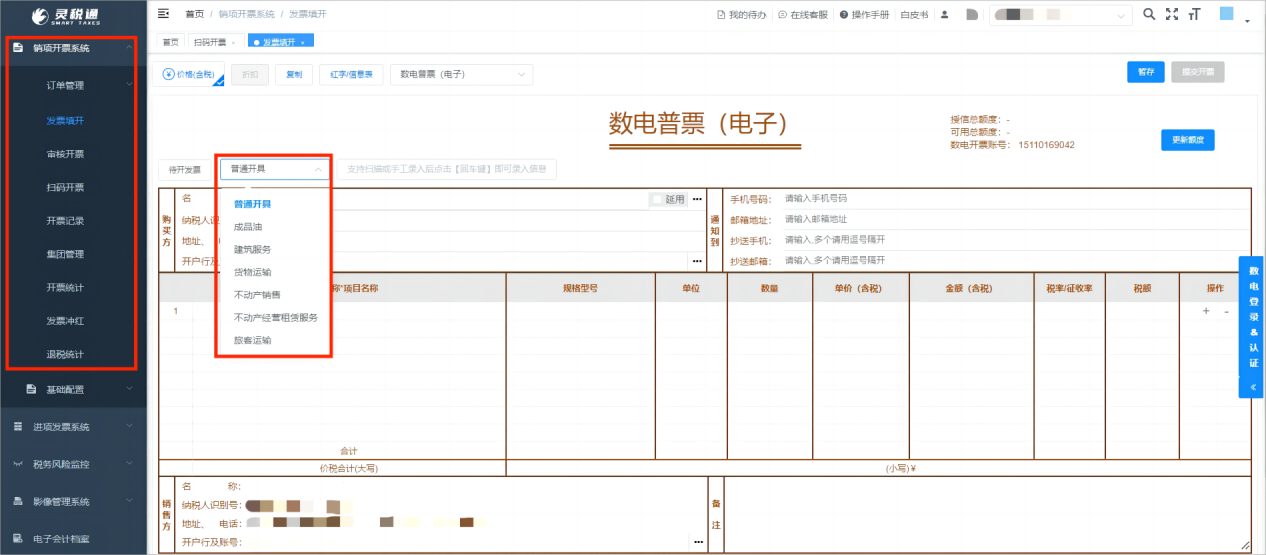
Multi-scenario invoicing

Supports list import, batch invoicing, scan-code invoicing, self-service invoicing, and review-based invoicing

After tax control equipment is deregistered, how to issue fully digitalized e-invoices quickly, conveniently, safely, and efficiently?

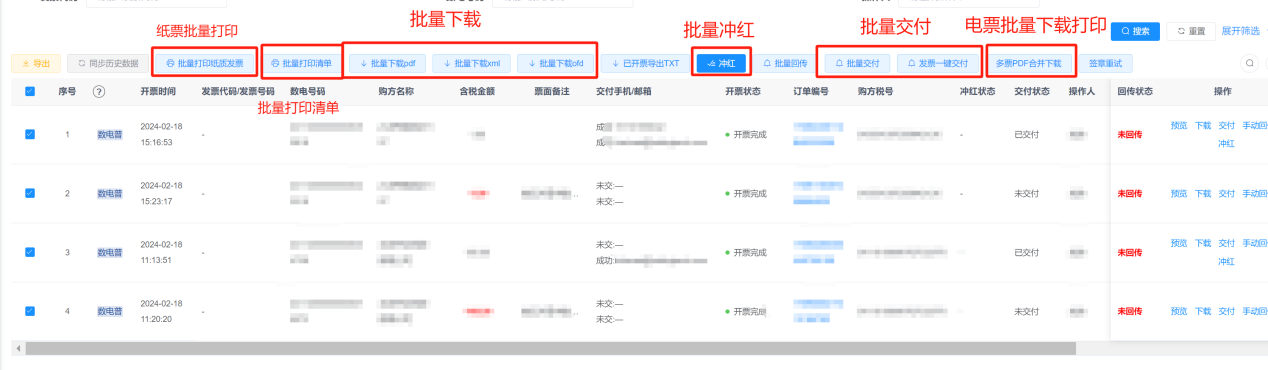
Batch invoicing

Use EXCEL templates for batch import, supporting simultaneous issuance of invoices for different goods, different invoice types, and different tax rates. One invoice, multi-goods list, supports one-click batch import.

After tax control equipment is deregistered, how to issue fully digitalized e-invoices quickly, conveniently, safely, and efficiently?

Review invoicing

Management permissions for different users can be set, custom invoicing conditions can be defined, and after operators input them, they are submitted to reviewers to review the invoice, and invoicing can only proceed after confirming the content is correct, ensuring invoicing accuracy to the greatest extent.

Fuzzy header data is complete

At invoicing, entering a keyword from the purchaser's name can automatically bring up the tax number, address, phone number, bank, and bank account number, eliminating the need for frequent manual entry.

Scan code invoicing

Merchants enter the invoice amount, generate and print a receipt with an invoicing QR code, and customers can scan the code themselves to fill in the invoice title for invoicing. One invoice per code prevents duplicate invoicing. The QR code validity period can be up to30days.

After tax control equipment is deregistered, how to issue fully digitalized e-invoices quickly, conveniently, safely, and efficiently?


Official account/mini-program invoicing

Enter the "Kailing Technology" official account, click "Mobile Invoicing" in the middle of the lower menu bar, enter the login screen, and log in using the enterprise account information bound on the Ling Shui Tong platform. After entering the workspace, you can use the relevant functions for mobile invoicing.

After tax control equipment is deregistered, how to issue fully digitalized e-invoices quickly, conveniently, safely, and efficiently?

If needed, you are welcomeThrough comments, direct messages, phone calls, and other meansandKailing TechnologyContact us to obtain a login account and password for a trial~


Beijing Kailing Technology Co., Ltd.——an enterprise business-finance-tax digitalization solution service provider.

Kailing Technology provides solutions for sales management systems, procurement management systems, output invoicing systems, input invoice collection systems, imaging management systems, financial posting systems, electronic accounting archives, fully digitalized e-invoice and Leqi interfaces and other businesses according to enterprise needs, professionally and efficiently helping enterprises transform and upgrade their business-finance-tax digital management.

If you have any business-finance-tax digital transformation needs, welcome to contact us. Beijing Kailing Technology will serve you wholeheartedly.

After tax control equipment is deregistered, how to issue fully digitalized e-invoices quickly, conveniently, safely, and efficiently?


Share to:
Contact Us

Contact: 010-60974119

VIP Dedicated Consultant: 185-1389-5936

Address: Room 410, 4th Floor, Jianjin Center, No. Jia 1 Yongtaiyuan, Qinghe, Haidian District, Beijing
Scan to add customer service on WeChat
Industry Websites
Scan to follow our WeChat official account
Scan to view our video account
Scan to follow our Douyin account
Common Questions
After deregistering tax control equipment, what should I do if web-based invoicing keeps logging out?
Using Kailing Technology · LingShuiTong invoicing software, there is no need to frequently log in to the web portal. It supports batch invoicing, scan-code invoicing, review invoicing and other functions, avoiding the 15-minute logout issue and improving invoicing efficiency.
How do you issue fully digitalized e-invoices in batches? Can different tax rates be supported?
Lingshuitong supports batch import via EXCEL templates, enabling simultaneous invoicing of different products, invoice types, and tax rates. Multiple product lists on a single invoice can also be imported in batches with one click, greatly improving invoicing efficiency.
Customer information is always entered incorrectly at invoicing—is there an auto-population function?
Lingshuitong supports fuzzy title data completion. Entering a keyword of the purchaser name automatically brings up the tax number, address, phone number, bank, and bank account number, reducing manual input errors.
Customers wait in line too slowly for invoicing. How can customers scan a code to issue an invoice themselves?
Lingshuitong provides scan-to-invoice functionality. Merchants enter the amount to generate a QR code receipt, and customers scan the code to fill in the invoice title themselves. One code per invoice, with a QR code validity of up to 30 days, avoiding duplicate invoicing.
Can I issue fully digitalized e-invoices on mobile? How does it work?
Yes. Follow the "Kailing Technology" official account, click "Mobile Invoicing" in the menu bar, and log in with the enterprise account bound to Lingshuitong to use the relevant invoicing functions on your mobile phone, which is convenient and fast.
Related solutions
Leqi Direct Connection solution
Direct connection to the tax bureau's Leqi channel, connecting the last mile of ERP →
Enterprise Invoice Title Query
Look up the tax number by company name, complete the title information with one click →
Output Invoicing Management Platform
As soon as business occurs, invoices are automatically issued, automatically delivered, and automatically returned →
Further Reading
The Correct Way to Issue Fully Digitalized E-Invoices After Deregistering Tax Control Equipment
The fully digitalized e-invoice issuance pilot has covered 36 provinces and municipalities nationwide, and fully digitalized e-invoices have truly landed in enterprises. Fully... →
In the Era of Fully Digitalized E-Invoices, How Can Electronic Accounting Archives Be Managed Efficiently?
Since July this year, the invoicing scope of fully digitalized e-invoices has covered the whole country, and more and more enterprises have begun to receive... →
In the era of fully digitalized e-invoices, one-stop invoice management makes work easier
As the starting point of corporate financial management, invoices are the key... →