010-6097 4119Book a Demo


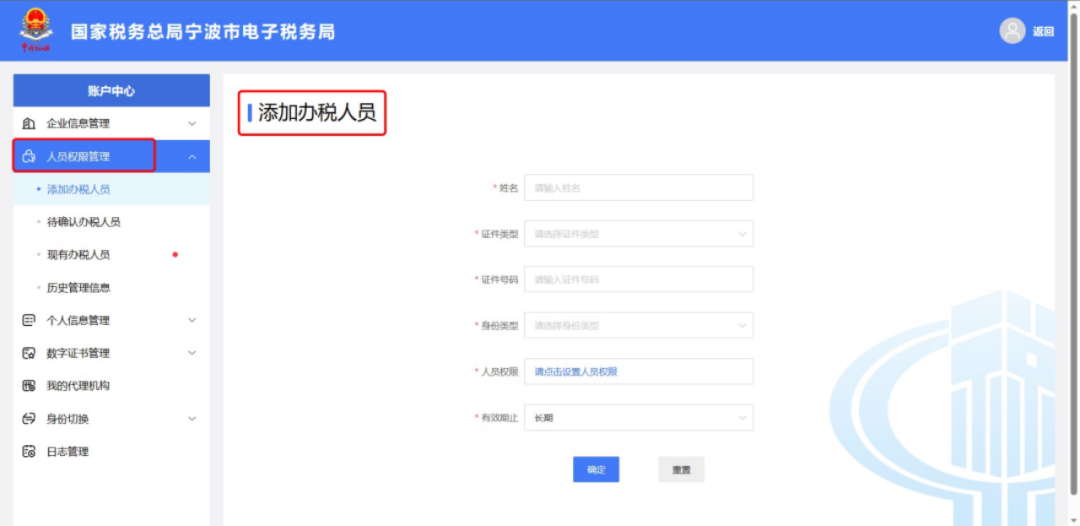
How to add an invoicing clerk when issuing a fully digitalized e-invoice for the first time?Published: 2024-04-01 15:51 Many enterprises have already been included in the fully digitalized e-invoice pilot, but some finance personnel find that they cannot issue fully digitalized e-invoices, or due to company personnel changes, they need to configure invoicing permissions for newly onboarded personnel. What should they do? Currently,Only the legal representative, financial officer, and invoicer have fully digitalized e-invoice issuance permissions.。Therefore, enterprises need to add the "issuer" permission to invoice issuance personnel before fully digitalized e-invoices can be issued normally. How to add invoicer permissions? 01 Registration, login, and real-name authentication Newly added invoicing personnel must have completed natural person user registration and real-name authentication in the Electronic Tax Bureau. 02 Log in to the Electronic Tax Bureau as an enterprise The enterprise's legal representative or financial officer logs into the Electronic Tax Bureau with the enterprise identity and enters [Account Center]. 03 Personnel permission management Click [Personnel Permission Management], click [Add Tax Officer], enter the relevant information of the new person, and select "Invoicing Officer" in the personnel identity type option.
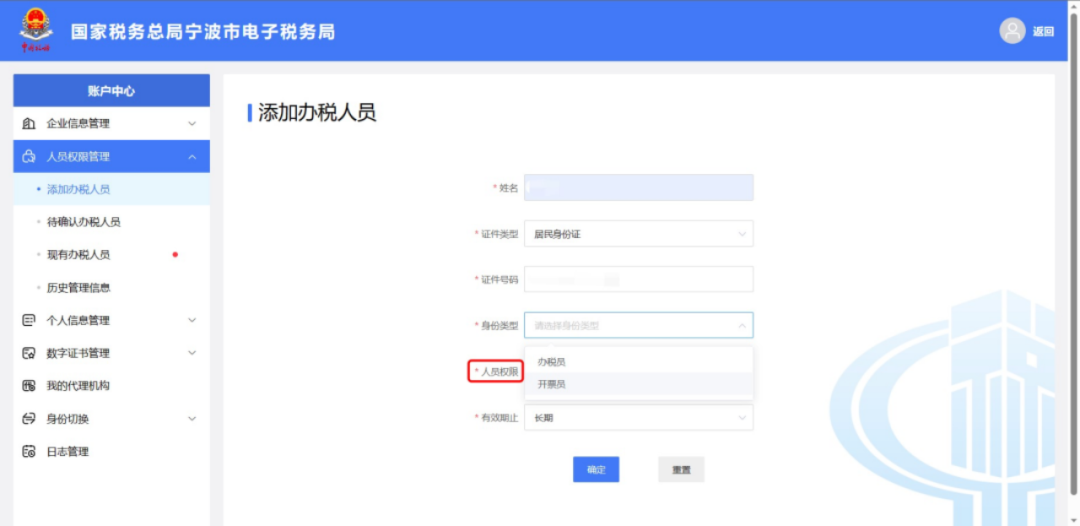
04 Add tax handling personnel Click [Personnel Permissions], configure tax handling permissions, and click [Confirm] to complete the operation of adding an invoicing officer identity on the enterprise side.
05 Identity confirmation Identity confirmation is performed by the added invoice issuer. Method 1: When logging in, the added invoicing clerk selects [Enterprise Business] and logs in to the electronic tax bureau as an enterprise. After being added as an invoicer, log in to the enterprise electronic tax bureau. A pop-up for identity confirmation will appear on the interface. Click [Confirm] to complete the operation of adding an invoicer.
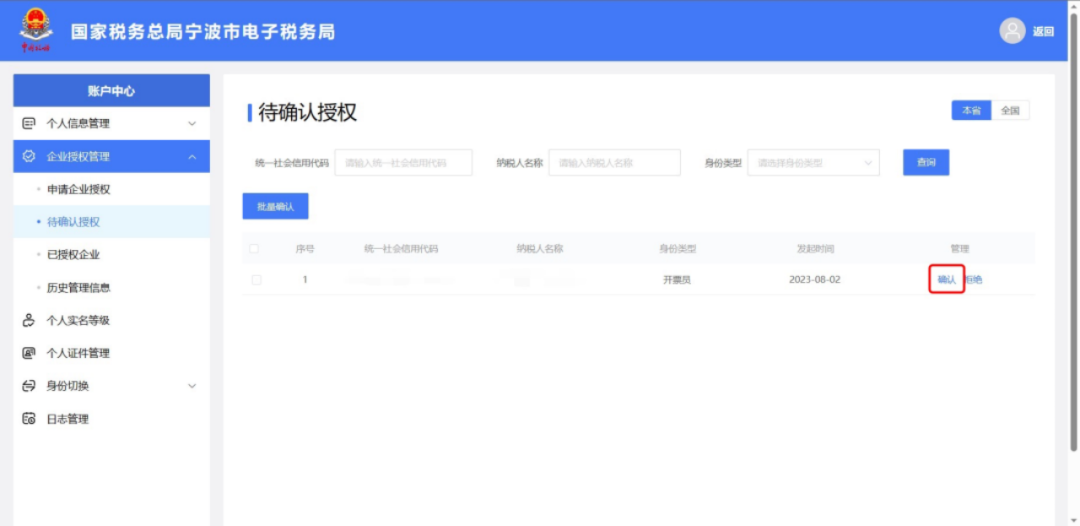
Method 2: On the login page, the added invoicing clerk selects [Individual Business] and logs in to the electronic tax bureau as an individual. In the [Pending Authorization Confirmation Function] menu, confirm the authorization and click [Confirm] to complete the addition of the invoicer identity.
How do I efficiently manage fully digitalized e-invoices? Kailing Technology's fully digitalized e-invoice Leqi solution is a digital invoice management solution based on the Leqi digital open platform, utilizing self-developed delivery service capabilities to provide China Golden Tax Phase IV taxpayers with fully digitalized e-invoice services including invoicing, usage, and delivery, achieving full lifecycle management of fully digitalized e-invoices. Currently, the Kailing system is compatible with all devices and all invoice types, achieving automated management of the entire process including issuance, query, verification, deduction certification, tax refund selection, invoice booking, and automatic archiving of fully digitalized e-invoices and tax-controlled invoices.
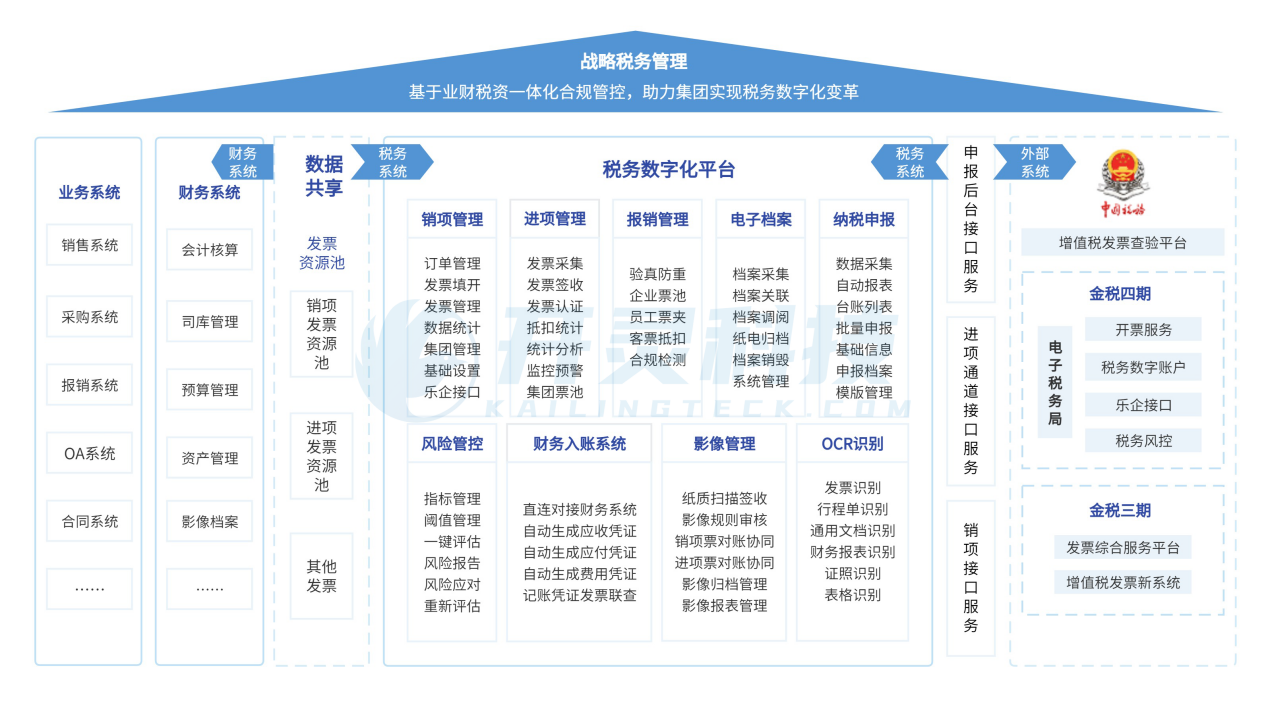
Supports stable invoicing on PC and mobile; can quickly connect to business-finance systems, supporting centralized control of invoice data across multiple tax numbers and multiple invoicing terminals; supports automatic matching of invoices and documents, and automatically initiates check-and-deduction certification after business completion; builds a risk monitoring and early-warning mechanism with automated invoice data verification and compliance checks to prevent tax-related risks; the electronic accounting archives system can directly connect to Kailing's input and output invoice system, syncing the latest invoice status to achieve invoice posting and archiving; thereby helping enterprises comply with policy standards, achieve one-stop management of fully digitalized e-invoices, and improve management efficiency. Beijing Kailing Technology Co., Ltd.——an enterprise business-finance-tax digitalization solution service provider. Kailing Technology provides solutions for sales management systems, procurement management systems, output invoicing systems, input invoice collection systems, imaging management systems, financial posting systems, electronic accounting archives, fully digitalized e-invoice and Leqi interfaces and other businesses according to enterprise needs, professionally and efficiently helping enterprises transform and upgrade their business-finance-tax digital management. If you have any business-finance-tax digital transformation needs, welcome to contact us. Beijing Kailing Technology will serve you wholeheartedly.
|