010-6097 4119Book a Demo


New changes in fully digitalized e-invoice red-letter reversal! Be careful of partial red-letter reversal!Published: 2024-09-18 17:14 Note! New changes in red-flushing of fully digitalized e-invoices! Now, fully digitalized e-invoices no longer require the invoice recipient to confirm usage, and partial red-flushing can be done directly! When receiving fully digitalized e-invoices for accounting, be careful of partial red-flushing! Let's take a look! 1. New changes in fully digitalized e-invoice red-letter reversal! Be careful of partial red-letter reversal!As everyone knows, fully digitalized e-invoices can be partially red-letter reversed. However, there is a prerequisite for partial red-letter reversal: the invoice recipient must first confirm the purpose (including checking for accounting entry, checking for deduction, etc.). If the recipient has not confirmed the purpose, the seller can only perform a full red-letter reversal! If the invoice recipient has not yet completed the purpose confirmation, the seller cannot initiate a partial red flush; the system automatically blocks changes to the amount, and the red-flush amount cannot be modified!
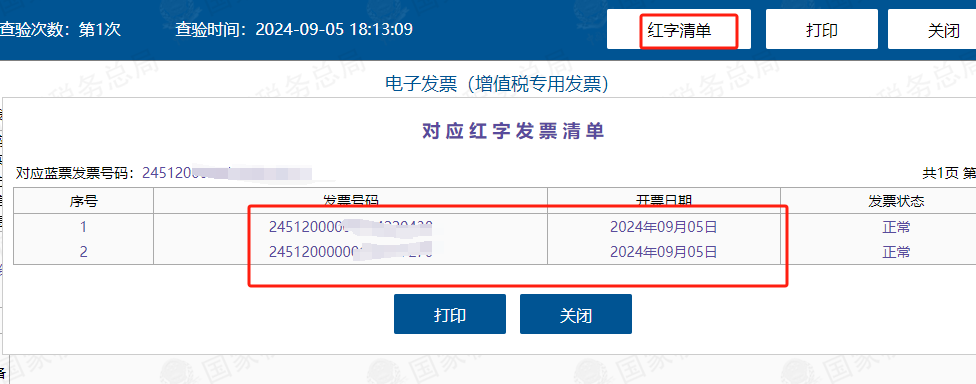
But now, fully digitalized e-invoices no longer require the recipient to confirm the purpose, and partial red-letter offsetting can be done directly! As shown: this invoice is the result after two partial red-letter reversals. The purchaser does not need to confirm, and I can also directly reverse it.
From the red-letter list, it can also be seen that this invoice was reversed in two separate red-letter reversals.
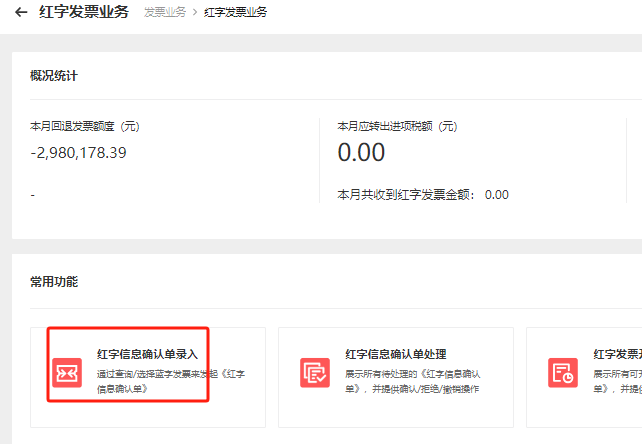
ThenAs a purchaser, especially when obtaining fully digitalized ordinary e-invoices, you need to pay even more attention in the future. Be careful that your invoice seller has partially red-flushed it. To avoid partial red-letter reversal by the seller while you have recorded the full amount, it is recommended that you still verify the invoice; invoices that have been partially red-letter reversed will show a partial red-letter reversal. Of course, it is still best to use software for invoice verification; manual inquiry is too time-consuming and labor-intensive. 2. New changes to fully digitalized e-invoices! Partial red-flushing function fully opened up!AtThe partial red-letter reversal function is fully opened up's circumstances, attention should also be paid to:For partial red-letter reversal, the reason for issuing a red-letter invoice must be selected as "sales return" or "sales discount"; if "incorrect invoicing" is selected, only a full red-letter reversal can be performed.The specific operations are as follows: ①Log in to the Electronic Tax Bureau and click Invoice Business - Red Invoice Business
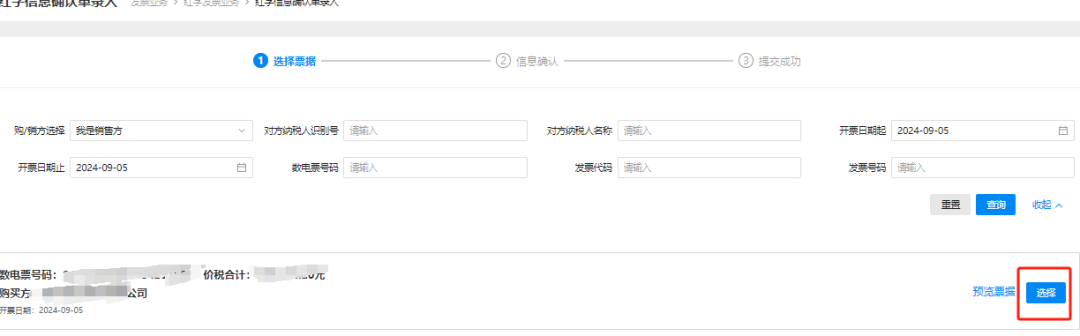
②Select the invoice to be red-letter reversed
③Click to issue for sales returns or sales allowances
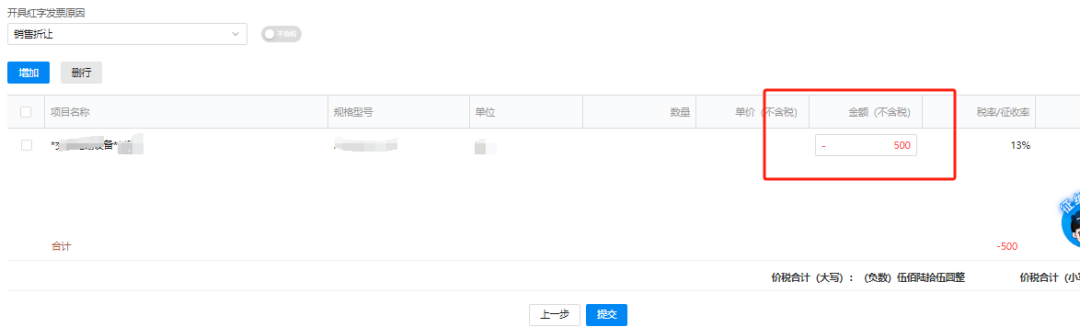
④Change the amount and click Submit.
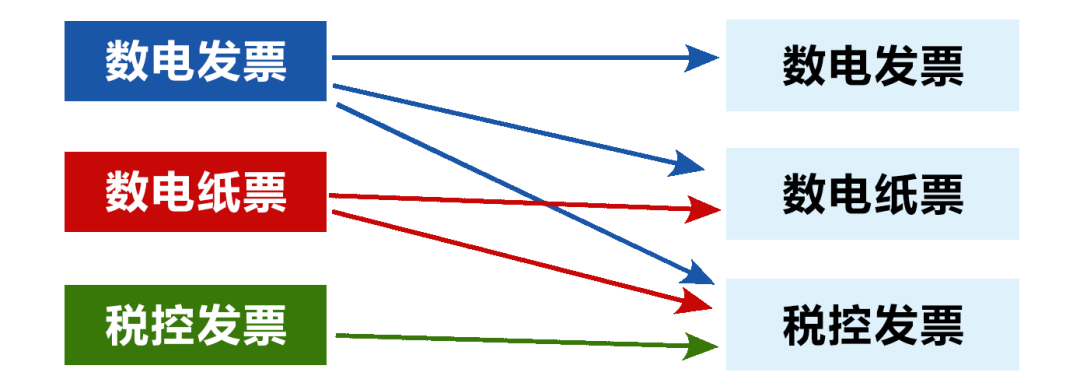
You can try the specific operation of partial red-letter reversal in the system yourself, which will bring considerable convenience to future work. 3. What are the rules for fully digitalized e-invoice red-letter reversal?01 During red-letter reversal, how should the reason for red-letter reversal be selected? Answer:The reason for red-letter reversal should be selected by the taxpayer according toActual businessConfirmed. Note the following: (1) If the commodity and service code of the original blue-letter invoice is only goods or labor, the reason for red-letter reversal cannot be selected as "service termination"; (2) When the commodity and service code is for services only, the red-letter reversal reason may not be selected as "sales return." 02 On the electronic invoice service platform, can the red-letter invoice issuance process be initiated multiple times for the same invoice whose purpose has already been confirmed? Answer:Except for the following special situations, pilot taxpayers may issue red-letter invoices multiple times for the same invoice whose purpose has been confirmed through the electronic invoice service platform: (1) The reason for red-letter reversal is"Incorrect invoicing"when, a full-amount red-letter reversal must be made; (2) The blue invoice tag is"Differential taxation - differential invoicing"when, a full-amount red-letter reversal must be made. 03 What are the rules for fully digitalized e-invoice red-letter reversal? Answer:The red-ink reversal rules between invoice types are"New offsets old, electronic offsets paper": (1) Fully digitalized e-invoices can be red-letter reversed against fully digitalized e-invoices, fully digitalized paper invoices (paper invoices issued by the electronic invoice service platform), and tax control invoices. (Provided that the tax control device and tax control user information have been deregistered) (2) Fully digitalized paper invoices can be red-letter reversed against fully digitalized paper invoices and tax control invoices, but red-letter reversal against fully digitalized e-invoices is not allowed. (The premise is that the tax control equipment and tax control user information have been cancelled) (3) Tax-controlled invoices may only be red-letter reversed against tax-controlled invoices; red-letter reversal against fully digitalized e-invoices or fully digitalized paper invoices is not allowed.
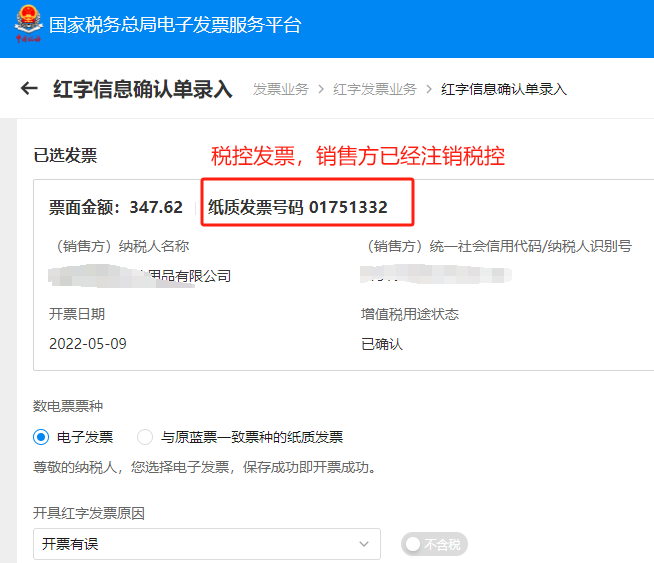
04 What are the situations where issuing red-letter fully digitalized e-invoices is not allowed? Answer:(1) Blue-letter invoiceVoided、Fully red-flushed、has beenIdentify anomaliesTax withholding vouchers,Locked(when a red-letter confirmation form or information table has been initiated but no red-letter invoice has been issued and the red-letter confirmation form or information table has not been revoked), initiating a red-letter reversal is not allowed; (2) The VAT purpose of the blue invoice is"Pending tax refund," "Tax refunded," "Deducted (changed to refund)," "Refund processed on behalf," "No refund and no deduction"when, a red-letter reversal may not be initiated; (3) When initiating a red-letter reversal, if the counterparty taxpayer is"Abnormal" "Deregistered"and other statuses, and cannot log in to the system to perform related operations, red-ink reversal may not be initiated. 05 When issuing a red-letter invoice through the electronic invoice service platform, if an error is found, how should the red-letter invoice issuance process be voided? Answer:The specific rules are as follows: (1)SellerInitiate a red-letter confirmation form that requires no confirmation; before the red-letter invoice is issued, the seller is allowed toWithdraw; (2) After the initiator of the red-letter confirmation information submits the red-letter confirmation form, before the other party confirms it, modification is not allowed; the initiatorCan be revokedRed-letter confirmation form; (3) For a red-letter confirmation form initiated by either the buyer or seller and confirmed by the counterparty, the initiating partyNot allowed.Revoke the red-letter confirmation form; the confirming party canConfirmCancel the confirmation form afterward and before issuing a red-letter invoice; (4)IssuedRed-letter confirmation form for red-letter invoicesNot allowed.Revoke. (5) After initiating a red-letter confirmation form and before issuing a red-letter invoice, if the original blue-letter invoice is determined to be an abnormal voucher, the systemAutomatic VoidingRed-letter reversal process. 4.With fully digitalized e-invoices, the tax control device has not been deregistered.,How do I reverse previous invoices? Recently a friend consulted us with this question: “We issued a paper special VAT invoice to the other party, and the other party has already deducted it. But we have now adopted fully digitalized e-invoices, and the tax control device has not yet been deregistered. The other party wants us to issue a red-letter reversal invoice. How should we issue it?” HereThere are two solutions: Solution 1: Seller cancels tax control device → Buyer cancels the previously issued red-letter information form (must cancel first) → Seller logs into the fully digitalized e-invoice platform and applies for red-letter invoice business As shown in the figure below:
Select an already issued tax-controlled invoice, and the system will pop up a red-letter confirmation form (note that this is now a red-letter confirmation form)
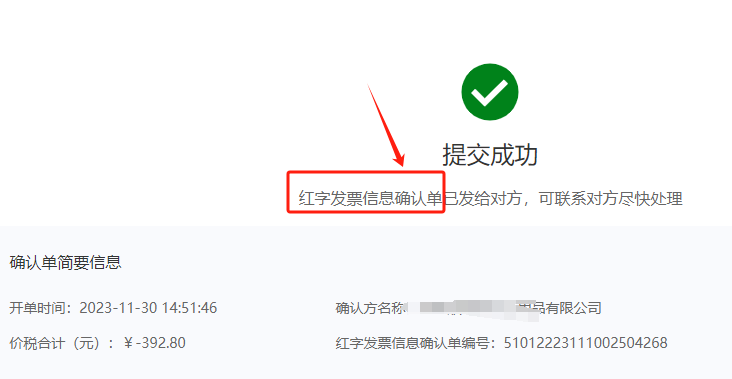
The confirmation form is transmitted to the buyer; after the buyer logs into the platform and confirms, the seller can use a fully digitalized e-invoice to issue a red-letter reversal of this tax-control invoice. Solution 2: Seller does not cancel the tax control device, and applies for an additional tax control special invoice If the tax authority still approves issuance, simply obtain one paper invoice and issue the red-letter invoice through the tax control device. Source: internet compilation Kailing Technology provides enterprise business-finance-tax digital product lines according to enterprise needs: Solutions for businesses including sales contract management system, procurement contract management system, fully digitalized Leqi interface project, output automatic invoicing system, employee expense control and reimbursement system, input VAT invoice management system, supply chain collaborative reconciliation system, image OCR recognition system, automatic financial bookkeeping system, and electronic accounting archives system, professionally and efficiently supporting the transformation and upgrading of enterprise business-finance-tax digital management. If you have any business-finance-tax digital transformation needs, welcome to contact us. Beijing Kailing Technology will serve you wholeheartedly.
|