010-6097 4119Book a Demo


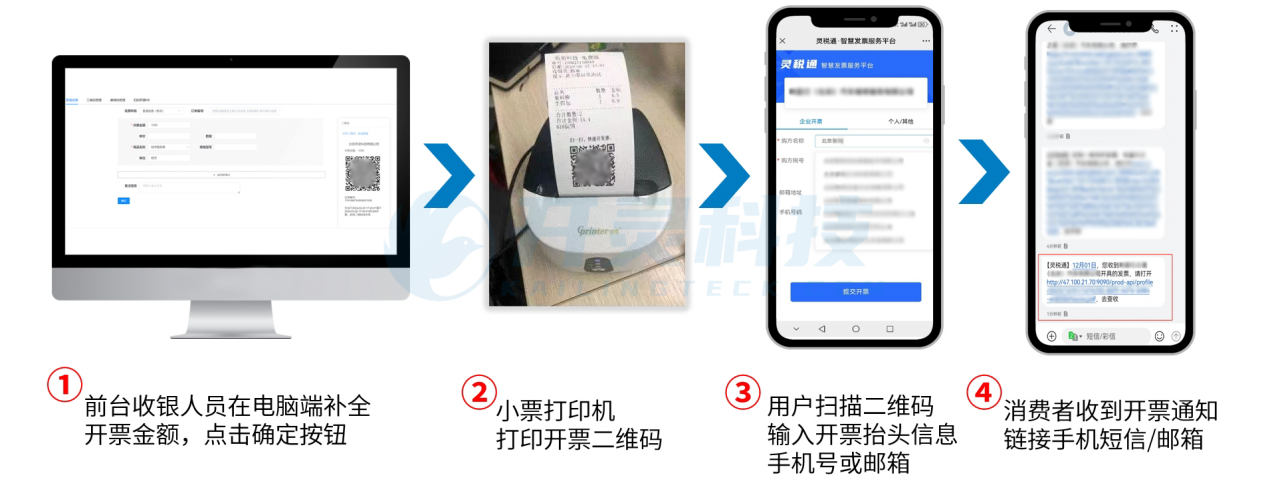
Fully digitalized e-invoice issuance tips revealed, helping you issue invoices easily and efficientlyPublished: 2024-07-22 16:34 The worries of business owners: As an enterprise owner, are you often troubled by the slow speed and constant errors when issuing fully digitalized e-invoices for employees? Are you plagued by numerous customer complaints due to untimely issuance of fully digitalized e-invoices? The troubles of invoicing personnel: As an invoicing staff member, are you constantly anxious because there are many urgent invoicing needs but you always have to return to the company to issue invoices? During peak business periods, facing a large number of customers and a large volume of itemized invoicing tasks, plus the cumbersome process of frequently contacting the person in charge for face scanning, do you feel exhausted? So,Lingshuitongthese four fully digitalized e-invoice issuance techniques, you must understand! 01 Usage scenarios such as catering and hotels——[Scan Code Invoicing] Difficulties in Enterprise Invoicing Poor customer satisfaction:When business is booming, the invoice issuance queue is long and sluggish, leaving customers full of dissatisfaction and complaints. Relatively high invoicing risk:The risk of incorrect invoicing always exists, especially for complex invoice titles, which are more prone to frequent errors. Advantages of scan code invoicing Improve customer satisfaction:Supports customers to scan codes and issue invoices themselves, eliminating long queues and waiting. Improve work efficiency:The self-service scan-to-invoice function is simple and clear, and can be easily operated without special training. QR codes have a longer validity period:The receipt QR code is valid for up to 30 days, effectively reducing customer complaints caused by expired QR codes. Electronic Tax Bureau The QR code on the E-Tax Bureau receipt is valid for only 24 hours. Scan code invoicing function Receipt QR code:
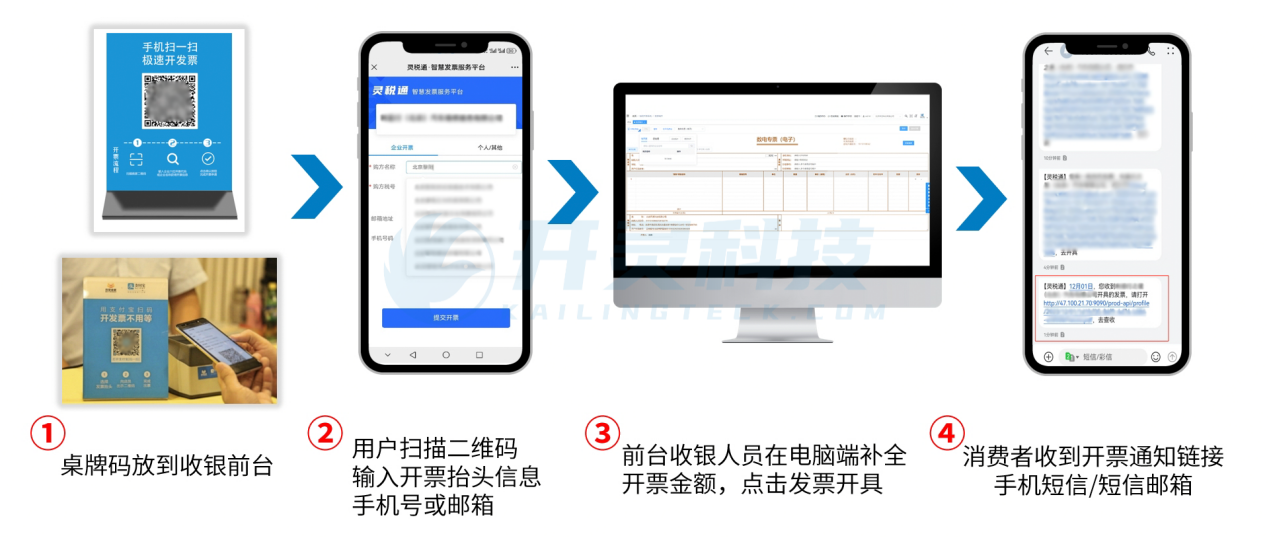
Fixed code card:
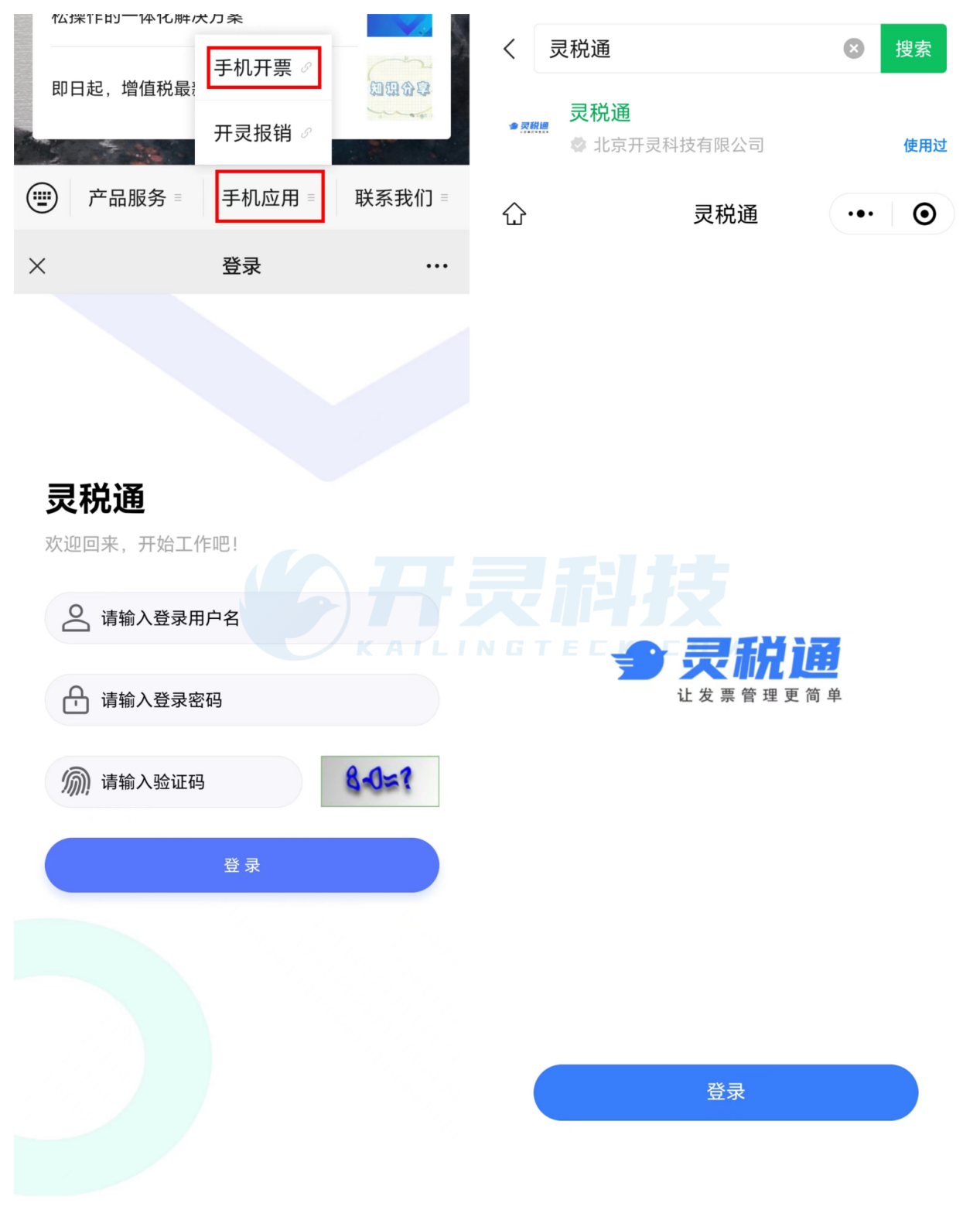
02 No computer nearby, urgently need to issue an invoice——[Mobile Invoicing] Difficulties in Enterprise Invoicing 1. When out and about, if an urgent invoicing request suddenly arises and there is no computer nearby, one can only rush back to the company to issue the invoice, leaving customers anxious and complaining constantly. 2. Small-scale enterprises are very strict about cost control. Traditional invoicing methods require invoicing computers and printers, resulting in persistently high costs. Advantages of mobile invoicing 1. Only a mobile phone is needed to issue invoices anytime and anywhere, making travel easier and more convenient. 2. Invoicing can be done with just one mobile phone, eliminating the cost of purchasing an invoicing computer and printer. Mobile invoicing features Supports official accountsH5 pageas well asMini programInvoicing:
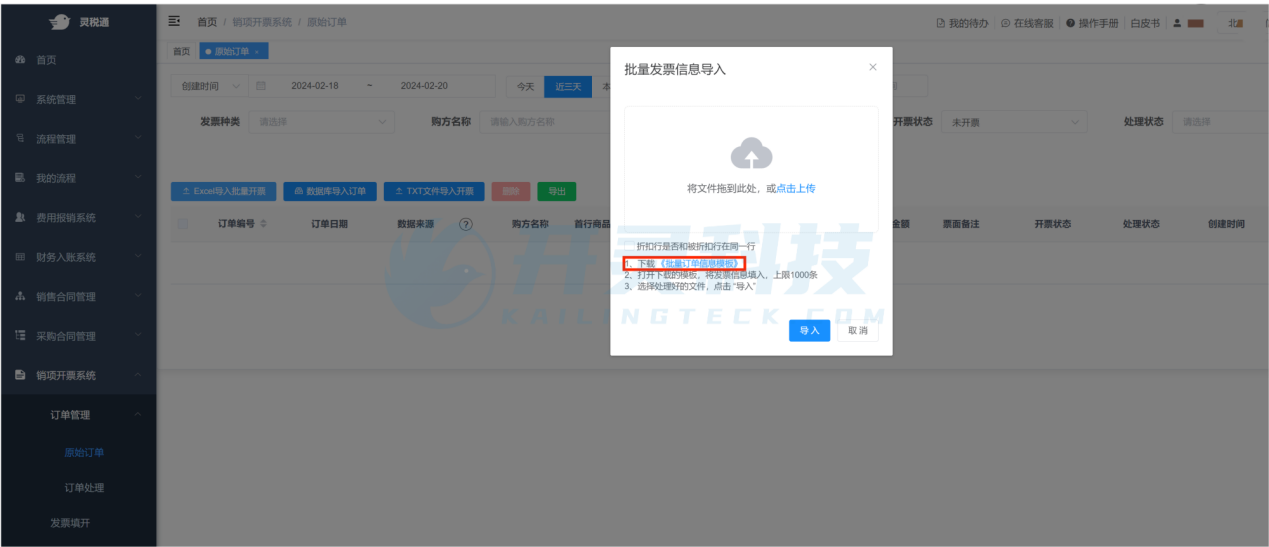
03 Customers have large invoicing volume and many invoicing contents——[Batch Invoicing] [Invoice List Import] Enterprise Invoicing Difficulties There are many invoicing customers:As the number of customers continues to increase, the number of invoices that need to be issued also grows larger and larger, and each invoice must be carefully checked, resulting in extremely low efficiency. Numerous invoice commodity details:Each piece of product information needs to be entered one by one. This process is not only cumbersome and complex but also highly prone to errors due to oversight, posing huge hidden risks. Advantages of batch features Batch invoicing:Able to issue large quantities of invoices in one click, greatly improving invoicing speed and reducing the probability of errors. Invoice list import:With templates that can be imported with one click, intelligent coding is achieved, with significant advantages such as improving data accuracy, greatly improving invoicing efficiency, and saving labor and time costs. BatchInvoicingFeatures
04 Urgently need to issue an invoice, but the person who can scan face cannot be reached——[Invoice Review] Difficulties in Enterprise Invoicing Invoices can be issued only after completing face-scan authentication. Each invoice issuance requires contacting the enterprise legal representative/invoicer, and the enterprise legal representative/invoicer also needs to frequently cooperate with face-scan authentication. Advantages of review invoicing Achieve invoicing first, facial recognition authentication later! Invoice content can be entered first, and the backend submits it to the enterprise legal representative/invoicer, who can confirm the content and issue the invoice with one click at their convenience! This maximizes the accuracy and efficiency of invoicing! Electronic Tax Bureau Currently, the electronic tax bureau does not have this function. Kailing Technology provides enterprise business-finance-tax digital product lines according to enterprise needs: Solutions for businesses including sales contract management system, procurement contract management system, fully digitalized Leqi interface project, output automatic invoicing system, employee expense control and reimbursement system, input VAT invoice management system, supply chain collaborative reconciliation system, image OCR recognition system, automatic financial bookkeeping system, and electronic accounting archives system, professionally and efficiently supporting the transformation and upgrading of enterprise business-finance-tax digital management. If you have any business-finance-tax digital transformation needs, welcome to contact us. Beijing Kailing Technology will serve you wholeheartedly.
|