News Details

Universal across industries, list import invoicing: no matter how many line items, invoicing is effortless

Published: 2024-03-26 17:00


Trade, retail, pharmaceuticals, supply chain... Good news is here!

List import for invoicing——A convenient invoicing tool for all industriesLet your enterpriseQuality and efficiency improvement is more than just a little!


Lingshuitong Smart List Import:No matter how many line items, invoicing is worry-free

Highlight One

Supports import of invoicing details via Excel template. The content to be filled in is simple and clear, can be imported multiple times, and is suitable for invoices with too many product information lines.

Highlight Two

Supports invoicing by importing outbound delivery orders (custom Excel tables) with no need for copy-paste boards or editing. One-click import and smooth web operation greatly improve office efficiency.

Highlight Three

Supports intelligent coding of tax classification codes with automatic matching, saving significant time.

Highlight Four

Supports both fully digitalized e-invoices and tax disk invoices, easy to get startedEasy to operate


Operation Method

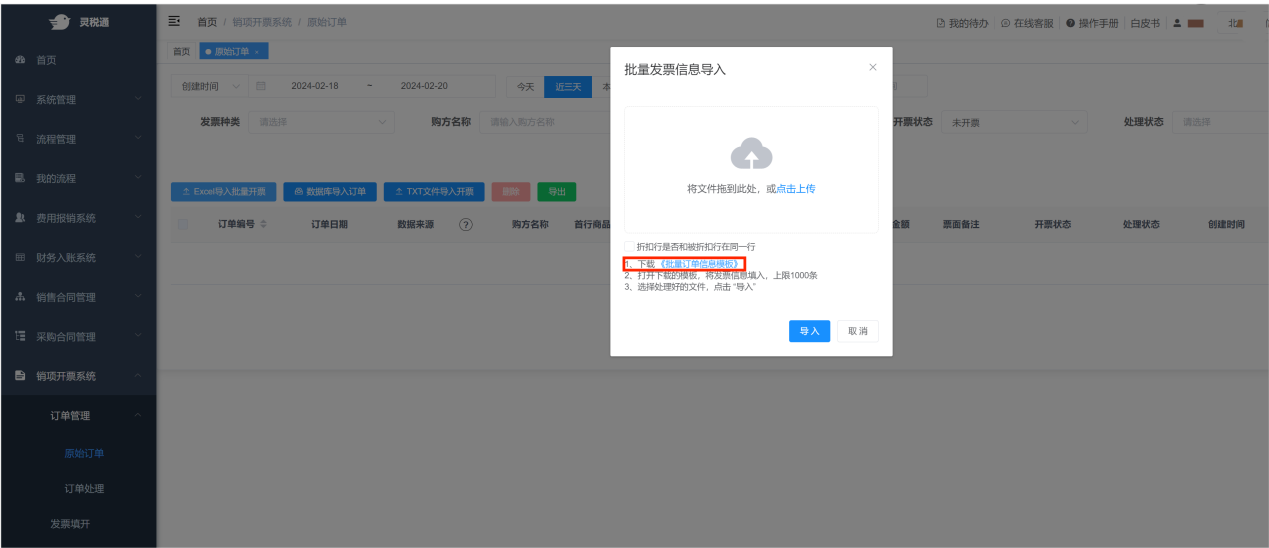
1. On the [Original Order] pageClickExcel ImportBatchInvoicingbutton to download the "Batch Order Information Template"; when filling in the template, note that the cell format should be changed to text format.

Universal across industries, list import invoicing: no matter how many line items, invoicing is effortless

Universal across industries, list import invoicing: no matter how many line items, invoicing is effortless

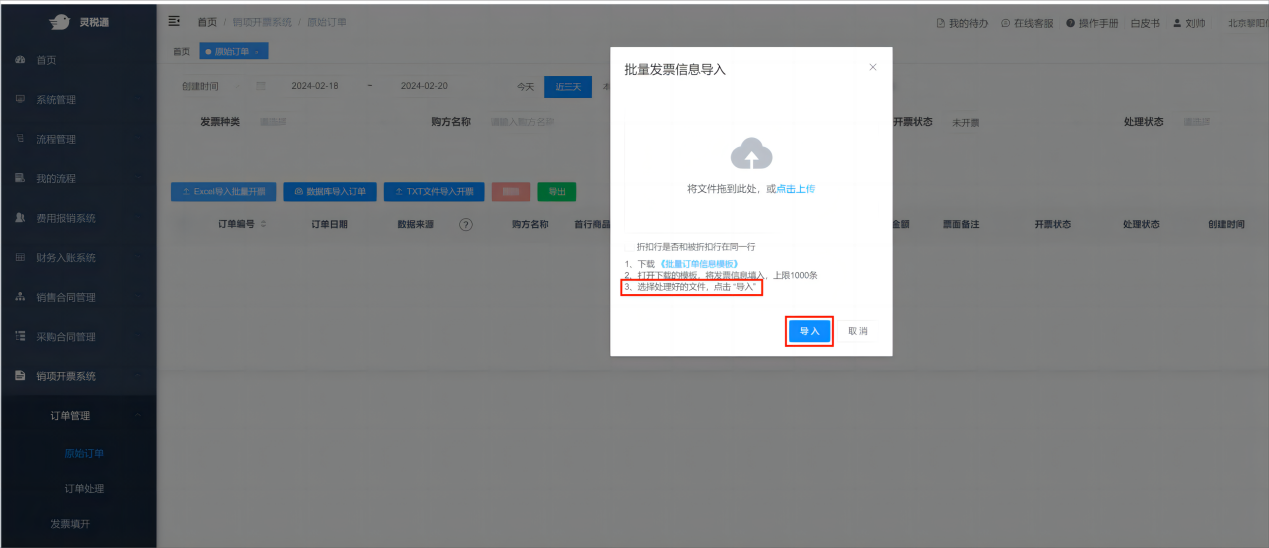
2.After completing the template, click import. After import is completeProduct information that meets invoicing conditions can enter the [Order Processing] interface.

Universal across industries, list import invoicing: no matter how many line items, invoicing is effortless

3. Enter the [Order Processing] page to perform batch invoicing and other operations; for invoices that need improved invoicing information, enter the [Invoice Issuance] page, continue adding and completing the buyer information, confirm the invoicing information is correct, and click the "Submit Invoice" button. After submission, you can check the invoice issuance result in [Invoicing Records].

Universal across industries, list import invoicing: no matter how many line items, invoicing is effortless


Universal across industries, list import invoicing: no matter how many line items, invoicing is effortless


Beijing Kailing Technology Co., Ltd.——an enterprise business-finance-tax digitalization solution service provider.

Kailing Technology provides solutions for sales management systems, procurement management systems, output invoicing systems, input invoice collection systems, imaging management systems, financial posting systems, electronic accounting archives, fully digitalized e-invoice and Leqi interfaces and other businesses according to enterprise needs, professionally and efficiently helping enterprises transform and upgrade their business-finance-tax digital management.

If you have any business-finance-tax digital transformation needs, welcome to contact us. Beijing Kailing Technology will serve you wholeheartedly.

Universal across industries, list import invoicing: no matter how many line items, invoicing is effortless


Share to:
Contact Us

Contact: 010-60974119

VIP Dedicated Consultant: 185-1389-5936

Address: Room 410, 4th Floor, Jianjin Center, No. Jia 1 Yongtaiyuan, Qinghe, Haidian District, Beijing
Scan to add customer service on WeChat
Industry Websites
Scan to follow our WeChat official account
Scan to view our video account
Scan to follow our Douyin account
Common Questions
Which industries support list import for invoicing?
Supports general use across trade, retail, pharmaceutical, supply chain and other industries, suitable for issuing invoices with an excessive number of product information lines.
How to import invoicing details using an Excel template?
On the [Original Order] page, click the "Excel Import for Batch Invoicing" button, download the "Batch Order Information Template," and when filling it in, note that the cell format should be changed to text. After completing the entry, import it; information that meets the conditions will enter the [Order Processing] interface for batch invoicing.
What are the highlights of list import for invoicing?
Highlights include: support for Excel template import, outbound order import (custom Excel), intelligent assignment of tax classification codes, support for fully digitalized e-invoices and tax disk invoices, and simple operation.
Related solutions
Output Invoicing Management Platform
As soon as business occurs, invoices are automatically issued, automatically delivered, and automatically returned →
Leqi Direct Connection solution
Direct connection to the tax bureau's Leqi channel, connecting the last mile of ERP →
Supply chain collaboration management platform
Full-chain collaboration of procurement, orders, reconciliation, and settlement →
Further Reading
Your fully digitalized invoicing assistant, easily handle fully digitalized invoicing challenges
Now that fully digitalized e-invoices have been fully promoted, are you still laboriously adding line by line on the invoicing page… →
Those things about the "invoicing quota" of fully digitalized e-invoices
What is the invoicing quota? The invoice issuance amount quota includes three types: total issuance amount quota,... →
The Correct Way to Issue Fully Digitalized E-Invoices After Deregistering Tax Control Equipment
The fully digitalized e-invoice issuance pilot has covered 36 provinces and municipalities nationwide, and fully digitalized e-invoices have truly landed in enterprises. Fully... →