News Details

Operation Guide | Notice of the State Taxation Administration on Doing a Good Job in Real-Name Authentication of Taxpayers and Fee Payers and the Real-Name Authentication Operation Process

Published: 2026-01-21 17:48

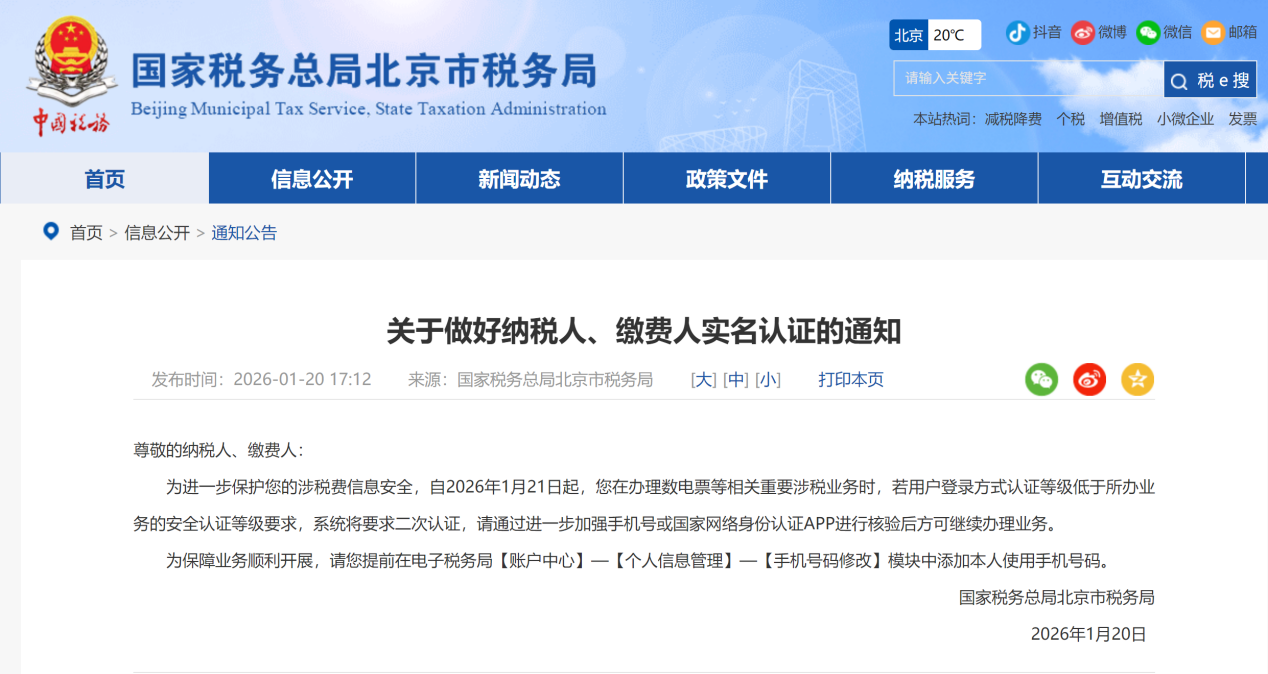
The national electronic tax bureau underwent a comprehensive upgrade and adjustment on the evening of January 20, 2026. Starting January 21, 2026, when you handle important tax-related business such as invoice issuance, if the authentication level of your login method is lower than the security authentication level required for the business, the system will require secondary authentication. Verification must be completed via the mobile phone number reserved with a UnionPay card or the National Network Identity Authentication APP before the business can continue.

Operation Guide | Notice of the State Taxation Administration on Doing a Good Job in Real-Name Authentication of Taxpayers and Fee Payers and the Real-Name Authentication Operation Process


If you are atLingshuitongWhen the platform issues invoicesDisplay issuance failure, and inNoteDisplayed in: [Warm reminderYour current authentication level cannot access this function, please authenticate first]You need to follow the steps belowAtProceed via the E-Tax Bureau web portal or APPVerificationOperation, after successful authentication, simply reissue the failed invoice on the platform.


Real-name authentication operation process

(1) Operation process of the PC end of the electronic tax bureau

1.Log in to the Electronic Tax Bureau website and click [Account Center] in the upper right corner

Operation Guide | Notice of the State Taxation Administration on Doing a Good Job in Real-Name Authentication of Taxpayers and Fee Payers and the Real-Name Authentication Operation Process


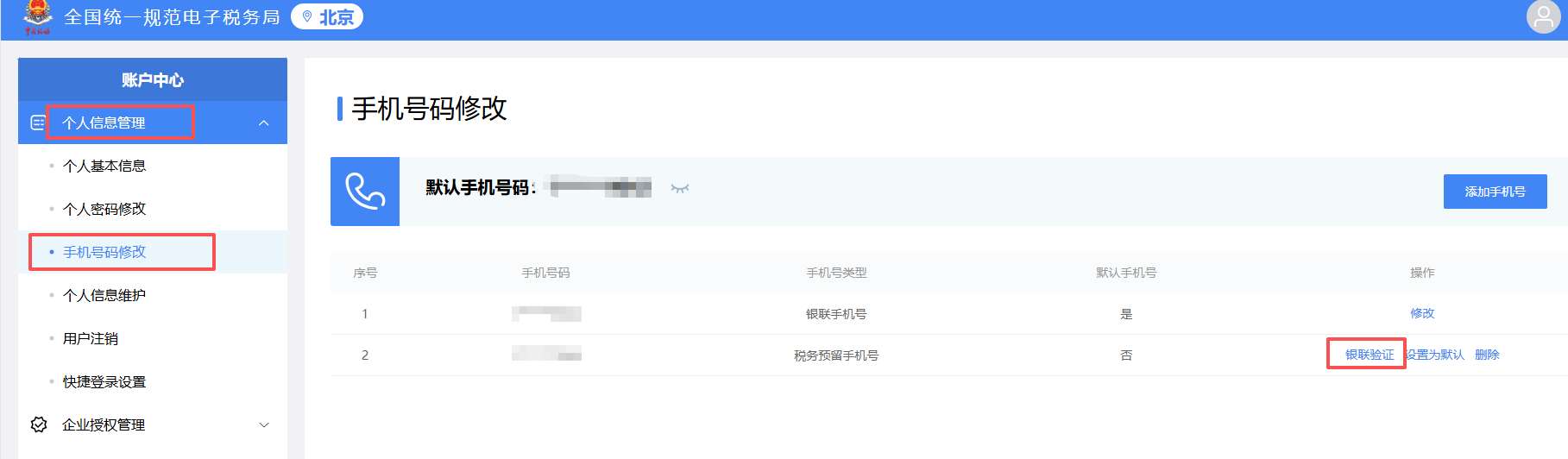
2.In the account center, select [Personal Information Management] — [Mobile Number Modification] — [UnionPay Verification]

Operation Guide | Notice of the State Taxation Administration on Doing a Good Job in Real-Name Authentication of Taxpayers and Fee Payers and the Real-Name Authentication Operation Process


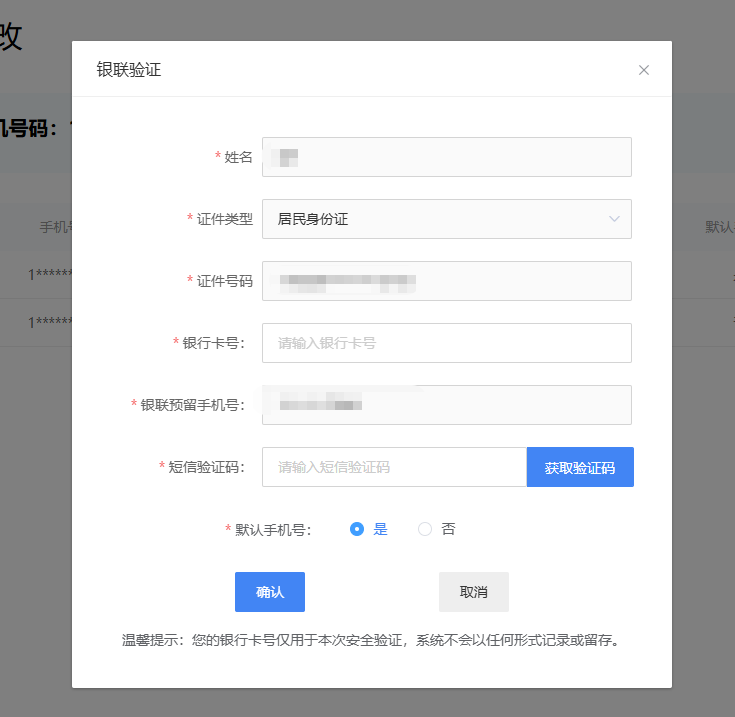
3.Click [UnionPay Authentication] and follow the promptsFill in informationComplete authentication.

Operation Guide | Notice of the State Taxation Administration on Doing a Good Job in Real-Name Authentication of Taxpayers and Fee Payers and the Real-Name Authentication Operation Process


II) electronic tax bureauAPPClient operation process

1. Open the tax bureau APP and log in

Open the tax bureau APP and log in


2. Click [My] - [Account Center]

Click [My] - [Account Center]


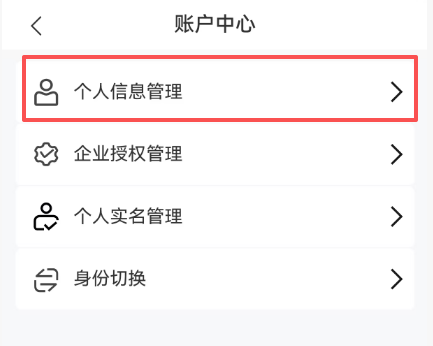
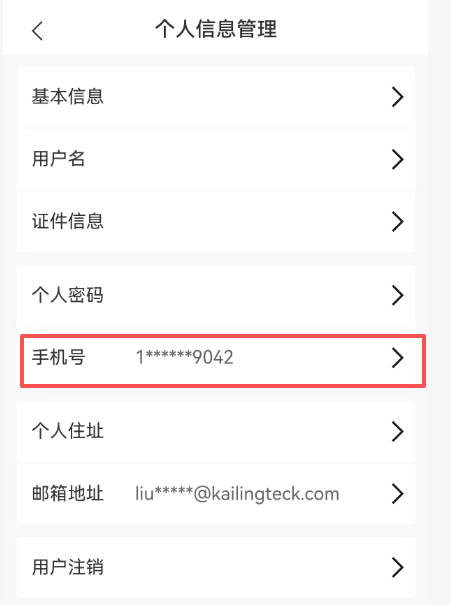
3. Select Personal Information Management

Select Personal Information Management


4. Click the mobile number

Click the mobile number


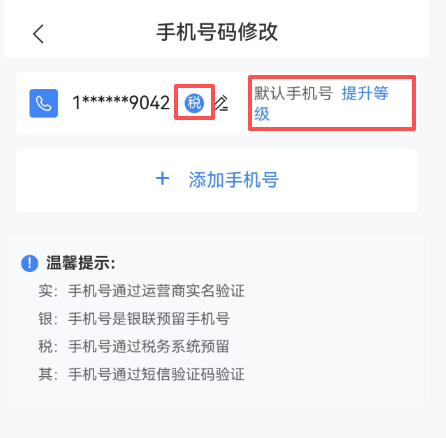
5.If the mobile phone label is [Other], you need to click the [Upgrade Level] button and use a UnionPay mobile number for verification; after completion, the level can be upgraded.

Click the mobile number


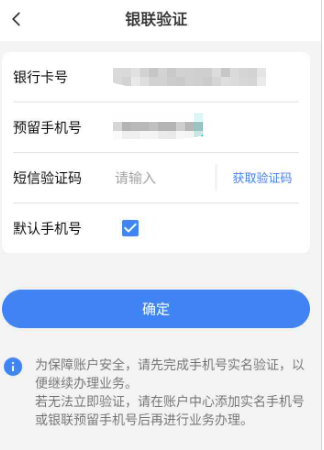
6.After clicking to upgrade the level, UnionPay mobile number verification will appear. You need to enter the bank card and mobile number bound to that mobile number, receive the verification code, and submit it to complete the level upgrade.

Click the mobile number


Kailing TechnologyAs a comprehensive business-finance-tax digitalization solution service provider, we provide business-finance-tax management digital transformation products and operational services for various government agencies, institutions, and large, medium, and small enterprises. The product line includes:

Sales contract management system, procurement contract management system, fully digitalized Leqi interface project, output automatic invoicing system,Reverse invoicing system,Natural personSolutions for the invoicing system, employee expense control and reimbursement system, input VAT invoice management system, supply chain collaboration and reconciliation system, image OCR recognition system, automated financial bookkeeping system, electronic accounting archives system, and other businesses, comprehensively advancing digitalization across all fields.

If you have any business-finance-tax digital transformation needs, welcome to contact us. Beijing KailingKailing TechnologyWe will serve you wholeheartedly.

Click the mobile number


Share to:
Contact Us

Contact: 010-60974119

VIP Dedicated Consultant: 185-1389-5936

Address: Room 410, 4th Floor, Jianjin Center, No. Jia 1 Yongtaiyuan, Qinghe, Haidian District, Beijing
Scan to add customer service on WeChat
Industry Websites
Scan to follow our WeChat official account
Scan to view our video account
Scan to follow our Douyin account
Common Questions
I failed to issue an invoice in Ling Shui Tong. It prompts that the authentication level is insufficient. What should I do?
Real-name authentication must be completed on the electronic tax bureau web portal or APP. Web portal: after logging in, click [Account Center] in the upper right corner → [Personal Information Management] → [Mobile Number Modification] → [UnionPay Verification], and fill in the information as prompted. APP: after logging in, click [My] → [Account Center] → [Personal Information Management] → click the mobile number → click [Upgrade Level] → use UnionPay mobile number authentication, enter the bank card and mobile phone verification code. After successful authentication, return to the platform and reissue the failed invoice.
How exactly do I complete UnionPay verification for real-name authentication on the Electronic Tax Bureau?
On the PC end of the electronic tax bureau, after logging in, click [Account Center] in the upper right corner, select [Personal Information Management] → [Mobile Number Modification] → [UnionPay Verification], and follow the page prompts to fill in the mobile phone number reserved with the bank card and other information to complete verification. The APP operation is similar: click [My] → [Account Center] → [Personal Information Management] → click the mobile number; if marked as [Other], click [Upgrade Level], select UnionPay mobile number verification, and enter the bank card bound to that mobile number, the mobile number, and the verification code.
What new changes are there in real-name authentication of the electronic tax bureau starting January 21, 2026?
The national electronic tax bureau was upgraded on the evening of January 20, 2026. Starting January 21, when handling important tax-related business such as invoice issuance, if the login authentication level is lower than the business requirement, the system will require secondary authentication. Verification must be completed via the mobile phone number reserved with a UnionPay card or the National Network Identity Authentication APP before the business can continue.
What business-finance-tax digitalization solutions does Kailing Technology provide?
Kailing Technology provides products and services for the digital transformation of business-finance-tax management, including sales/procurement contract management systems, fully digitalized e-invoice Leqi interfaces, automated output VAT invoicing, reverse invoicing, invoice issuance for individuals, employee expense control and reimbursement, input VAT invoice management, supply chain collaborative reconciliation, image OCR recognition, automated financial bookkeeping, electronic accounting archives, and other systems, covering all enterprise business-finance-tax scenarios.
Related solutions
Output Invoicing Management Platform
As soon as business occurs, invoices are automatically issued, automatically delivered, and automatically returned →
Leqi joint use for banking and financial industry
Bank charges and interest scenarios: direct issuance of fully digitalized e-invoices →
Enterprise expense control and reimbursement system
Intelligent reimbursement, compliance control, one-click bookkeeping →
Further Reading
Self-filing process for fixed-amount households in the new electronic tax bureau
01 Filing After logging into the electronic tax bureau, click [I Want to Handle Taxes] → [Tax and Fee Filing and Pay... →
E-Tax Bureau Tax Digital Account Operation Guide: Invoice posting
Invoice posting means that after a taxpayer obtains an invoice, the electronic invoice service platform system... →
Electronic Tax Bureau operation guide | How do I add tax digital... for a tax handling officer
Q: I am the company's tax officer, but I do not have digital account permissions, so every time I have to ask the legal representative or finance... →