As a finance professional, have you ever encountered this trouble in your daily work: to avoid duplicate booking of electronic invoices, you need to manually verify the invoice status one by one, which not only consumes a lot of time and energy; more troublesome is that sometimes an invoice is normal at the time of reimbursement, but is later mistakenly red-flushed by the issuer, planting hidden risks for financial accounting. Faced with such problems, is there actually an efficient solution?
According to the requirements for reimbursement, accounting, and archiving of electronic accounting vouchers, electronic vouchers must meet the core condition of "effectively preventing duplicate accounting" before they can serve as a lawful basis for accounting. Even if the initial invoice reimbursement process has been completed, if subsequent risks such as "erroneous red-letter reversal" occur, the accuracy of financial data will still be affected. The "invoice accounting identifier" function precisely addresses these issues—it can both batch-verify and check the real-time status of obtained invoices and effectively avoid risks such as duplicate accounting and archiving of electronic invoices and erroneous issuance of red-letter invoices by the issuer. Therefore, timely "accounting confirmation identifiers" for electronic invoices have become a key step in ensuring compliance and security in financial work.
Next, let us specifically understand how the "invoice posting identifier" function operates~
Method 1:
The E-invoice Service Platform Tax Digital Account currently supports posting identification methods such as single, batch, and list import.
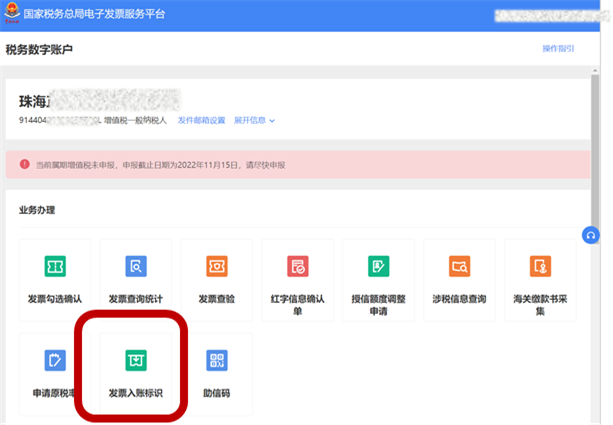
Taking Guangdong Province as an example,Entry path:
1.Guangdong Provincial Electronic Tax Bureau — [I Want to Handle Taxes] — [Tax Digital Account] — [Invoice Booking Identifier]
![Guangdong Provincial Electronic Tax Bureau — [I Want to Handle Taxes] — [Tax Digital Account] — [Invoice Booking Identifier]](/assets/27201696.s21i.faiusr.com/4/ABUIABAEGAAgnMnqxQYomeaR5AMw1AQ4-gE.png "IMG_256")
2.Select the "Invoice" tab, enter query conditions, click the [Query] button, and the corresponding invoice information is displayed in the query results area.
![Select the "Invoice" tab, enter query conditions, click the [Query] button, and the corresponding invoice information is displayed in the query results area.](/assets/27201696.s21i.faiusr.com/4/ABUIABAEGAAgncnqxQYo3ImjzgcwqgQ4jQI.png "IMG_258")
3.Booking status is divided into "Booked (deductible before corporate income tax)" and "Booked (not deductible before corporate income tax)"; after selecting the booking status, click the [Submit Booking] button.
![Booking status is divided into "Booked (deductible before corporate income tax)" and "Booked (not deductible before corporate income tax)"; after selecting the booking status, click the [Submit Booking] button.](/assets/27201696.s21i.faiusr.com/4/ABUIABAEGAAgncnqxQYo4831nAcwqgQ4jQI.png "IMG_259")
4.The system pops up a submission confirmation box for booking. Select the [Confirm Submit] button to complete the invoice booking operation, and it prompts that the invoice has been successfully booked.
![The system pops up a submission confirmation box for booking. Select the [Confirm Submit] button to complete the invoice booking operation, and it prompts that the invoice has been successfully booked.](/assets/27201696.s21i.faiusr.com/4/ABUIABAEGAAgncnqxQYozKf2_AEwqgQ4jQI.png "IMG_260")
5.To adjust or cancel the accounting status, query the relevant accounted invoices, reselect the accounting status, and if "Cancel Accounting" is selected, then click [Accounting Adjustment].
![To adjust or cancel the accounting status, query the relevant accounted invoices, reselect the accounting status, and if "Cancel Accounting" is selected, then click [Accounting Adjustment].](/assets/27201696.s21i.faiusr.com/4/ABUIABAEGAAgncnqxQYohdPD4QUwqgQ4jQI.png "IMG_261")
Method 2:
Kailing Technology·The input VAT invoice management system of the Lingshuitong Smart Invoice Service Platform can automatically complete the "entry identification" through interface calls.
Specific process:
1. In the basic configuration, turn on the "automatic booking" configuration and select the automatic booking status.
2.After the reimbursement approval process is completed, when the invoice becomes reimbursed, the interface is automatically called to trigger the tax authority accounting operation, based on the configured reason [“Booked (deductible before corporate income tax)”“Booked (not deductible for corporate income tax)”] Submit the posting at the tax bureau to complete the invoice binding operation and prevent the seller from arbitrarily reversing the invoice with a red-letter invoice.
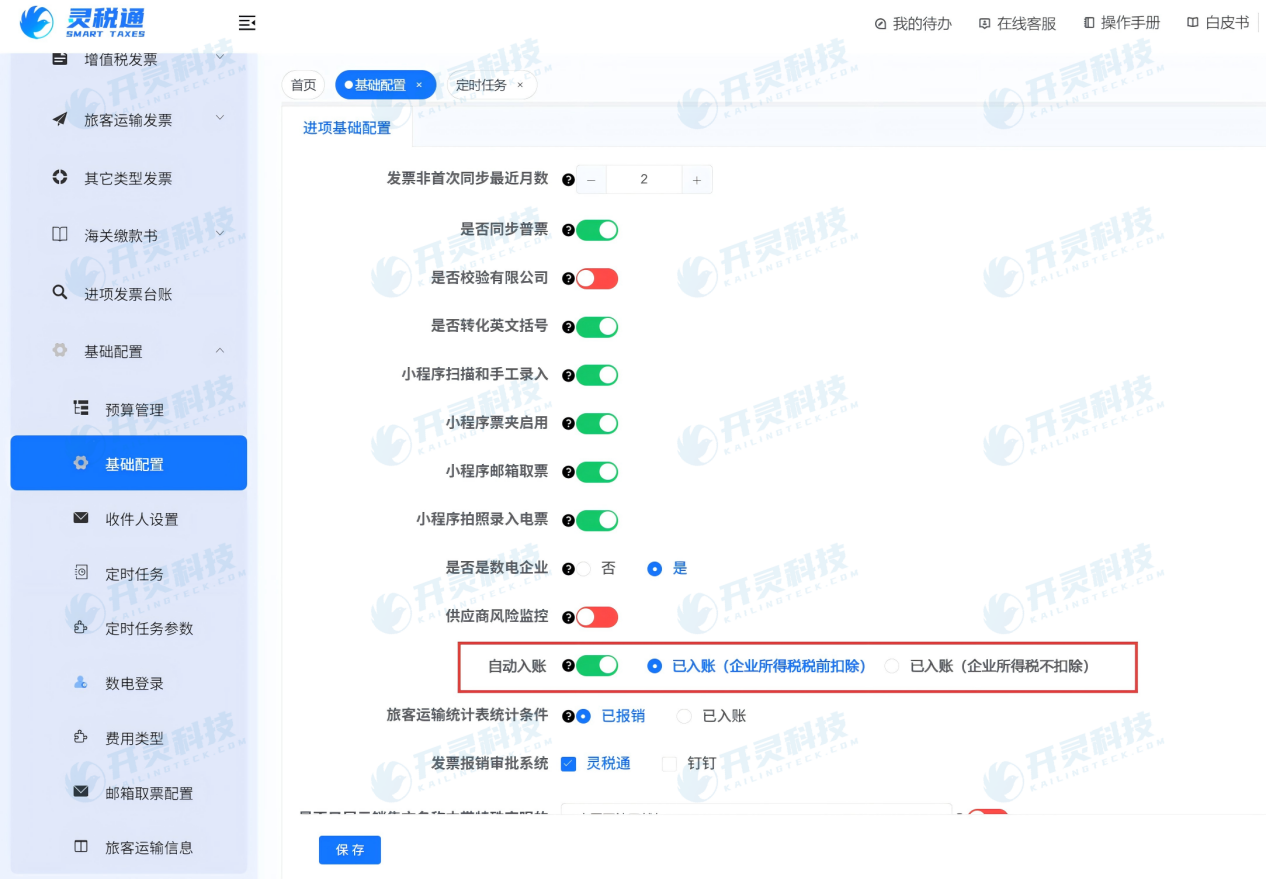
Even if the automatic posting configuration is not enabled, finance personnel can manually complete batch posting of electronic invoices in the system according to actual needs; if the posting status needs to be adjusted, it can also be manually operated here.

Tips:Whether it is automatic posting through an interface or manual batch posting, after the operation is completed, the corresponding invoice posting identifier will be displayed synchronously in the electronic tax bureau system, ensuring that the posting status is queryable in real time and unified.
To further learn about the "Automatic Accounting" feature and more fully digitalized e-invoice solutions, please consult Kailing Technology:https://www.kailingteck.com/ 。
As a comprehensive business-finance-tax digitalization solution service provider, Kailing Technology provides business-finance-tax management digital transformation products and operational services for various government agencies, institutions, and large, medium, and small enterprises. The product line includes:
Solutions for sales contract management system, procurement contract management system, fully digitalized Leqi interface project, automatic output VAT invoicing system, invoice issuance for individuals system, employee expense control and reimbursement system, input VAT invoice management system, supply chain collaborative reconciliation system, imaging OCR recognition system, automatic financial bookkeeping system, electronic accounting archives system and other businesses, comprehensively advancing the digitalization process across various fields.
If you have any business-finance-tax digital transformation needs, welcome to contact us. Beijing Kailing Technology will serve you wholeheartedly.