010-6097 4119Book a Demo


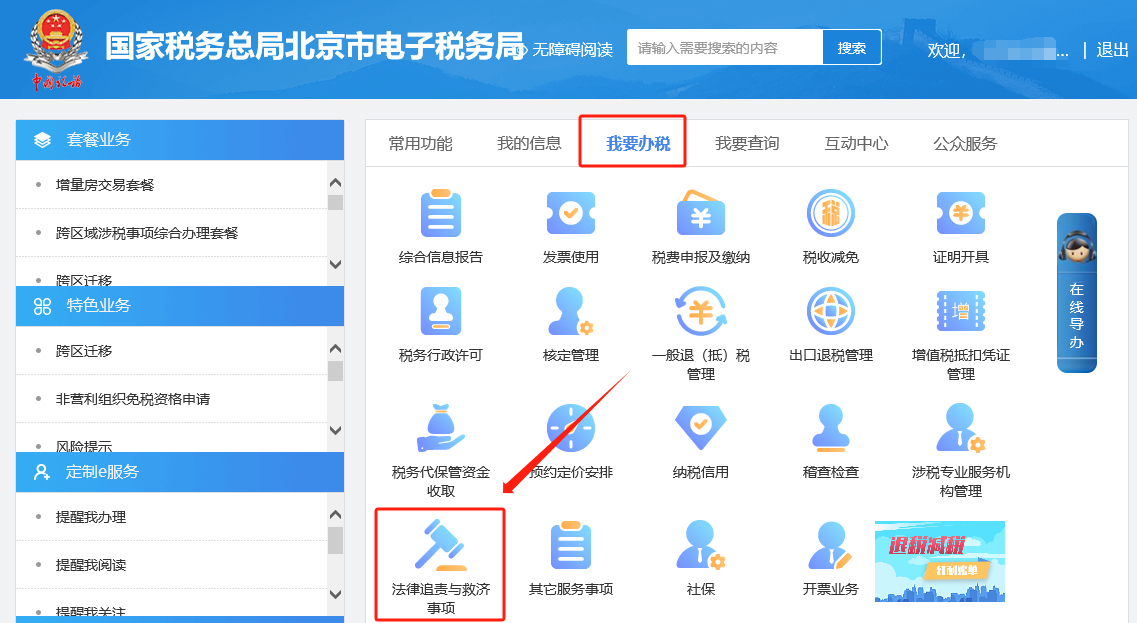
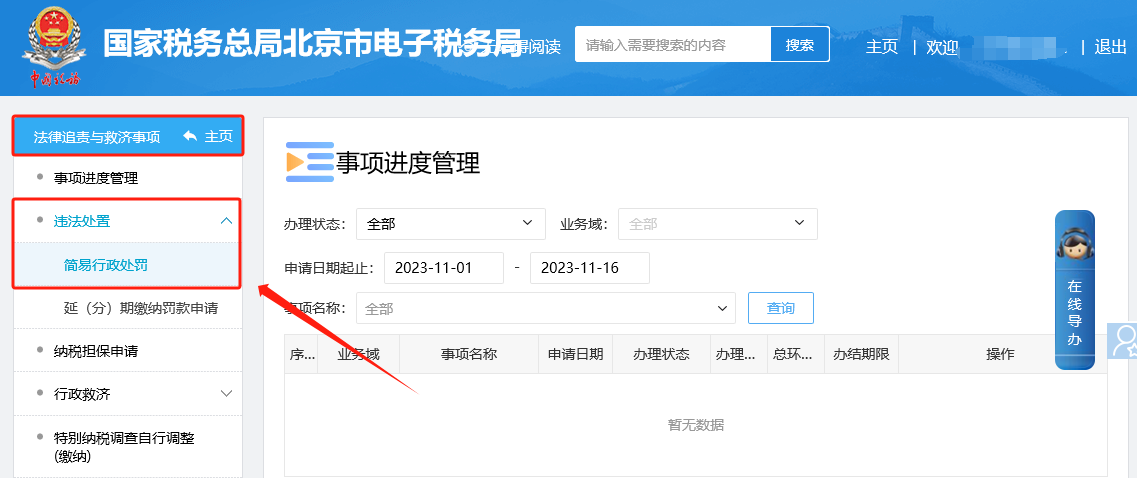
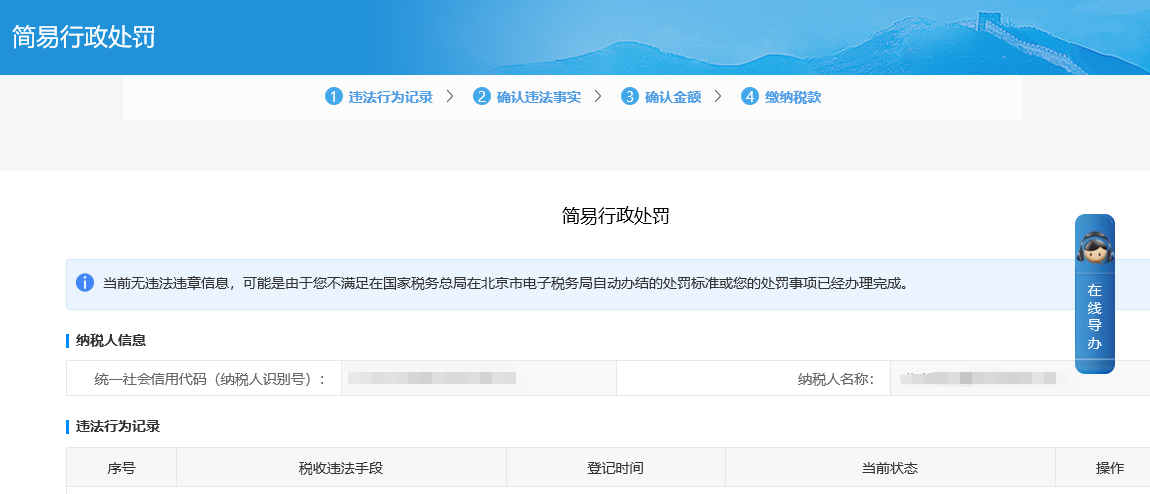
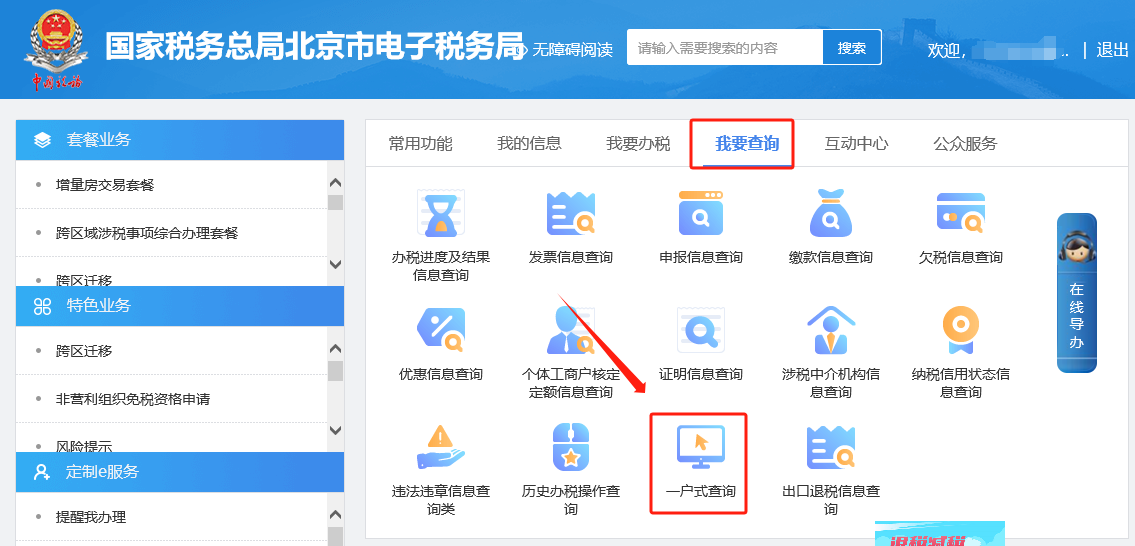
E-Tax Bureau Operation Guide | How to check whether there are penalty and violation information?Published: 2023-12-22 16:08 1.How do I check whether there is any penalty or illegal/irregular information on the Electronic Tax Bureau? Answer: Hello, you can check whether there is penalty information and illegal or irregular content through the following two modules; ①You can click [I Want to Handle Taxes] - [Handling of Legal Accountability and Relief Matters] - [Illegal Handling] - [Summary Administrative Penalty] to check whether there is penalty information on this interface; ②You can click [I Want to Query] - [One-Household-Style Query] - [Illegal and Violation Query] to check whether there is illegal or violation information. On this interface, adjust the query conditions as needed (case registration date start and end, case status, handling status, tax period start and end, query date start and end) and click the query button to query and display illegal and violation information. Method 1 I. I Want to Handle Taxes—Handling of Legal Accountability and Relief Matters.
II. Handling of legal accountability and relief matters—illegal handling—summary administrative penalty.
III. Summary Administrative Penalty: Check on this interface whether there is penalty information.
Method 2 I. I Want to Query—One-Household Query.
II. I Want to Query—One-Household Query—Violation and Offense Query page to check whether there is violation or offense information. On this page, adjust the query conditions as needed (case registration date range, case status, handling status, tax period range, query date range) and click the Query button to display the violation and offense information.
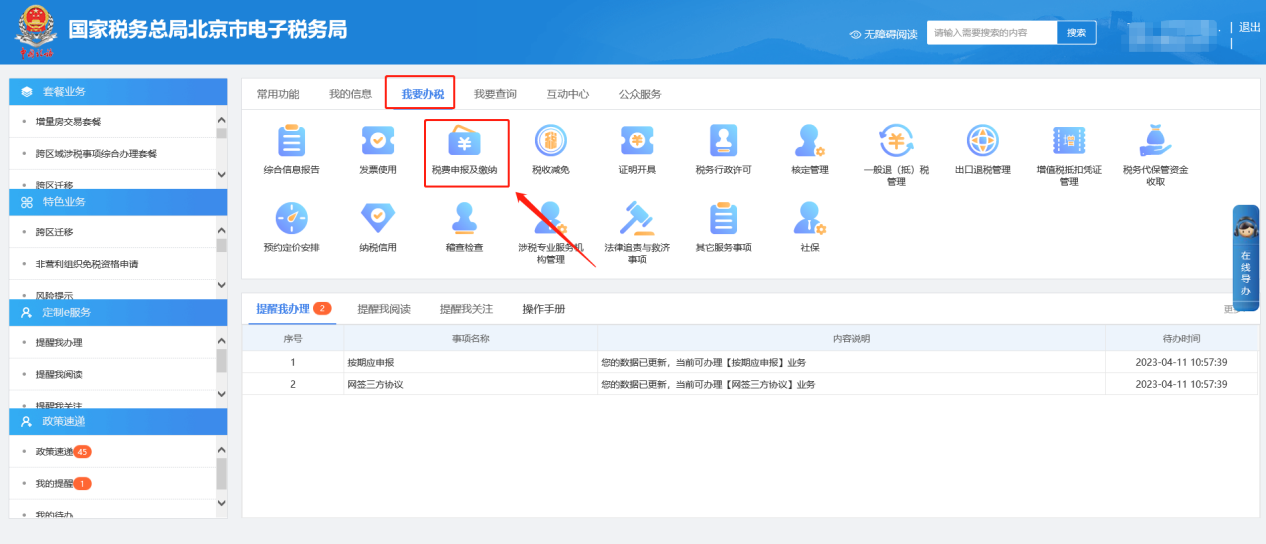
2.On the Electronic Tax Bureau, if the tax payment page does not display the tax amount payable, how should this be handled? Answer: Hello, please click [I Want to Handle Taxes] — [Tax and Fee Filing and Payment] — [Tax and Fee Payment]. On this interface, click Void and Unlock Unpaid Voucher to bring out the unpaid tax and fee information. I. I Want to Handle Taxes—Tax and Fee Filing and Payment.
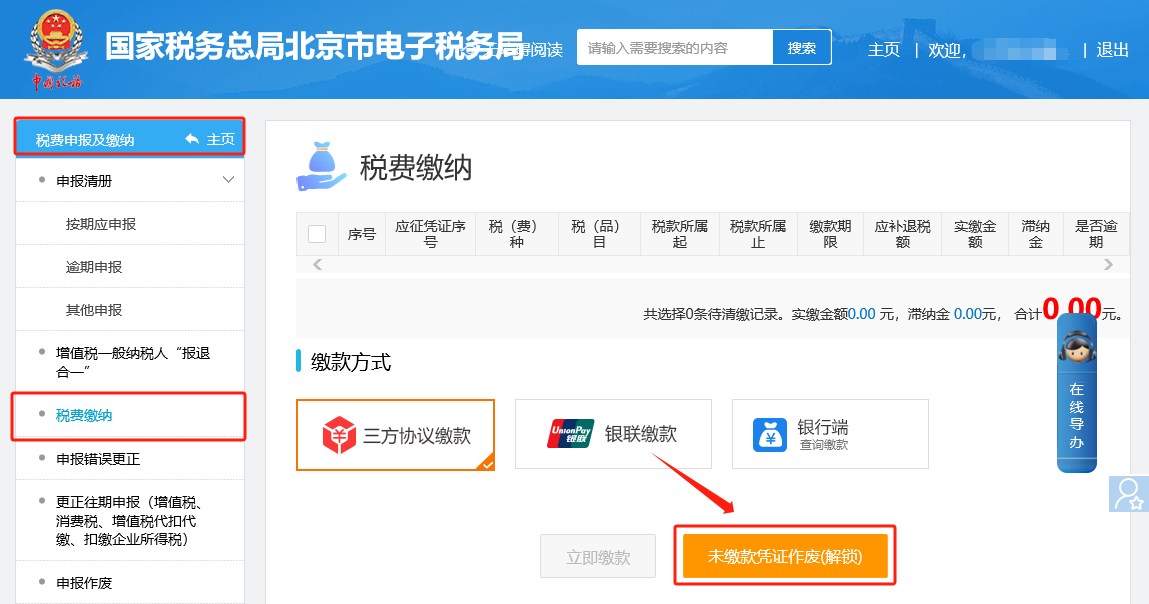
II. Tax and fee filing and payment—Tax and fee payment. On this page, click Void and Unlock Unpaid Payment Vouchers to bring up the unpaid tax and fee information.
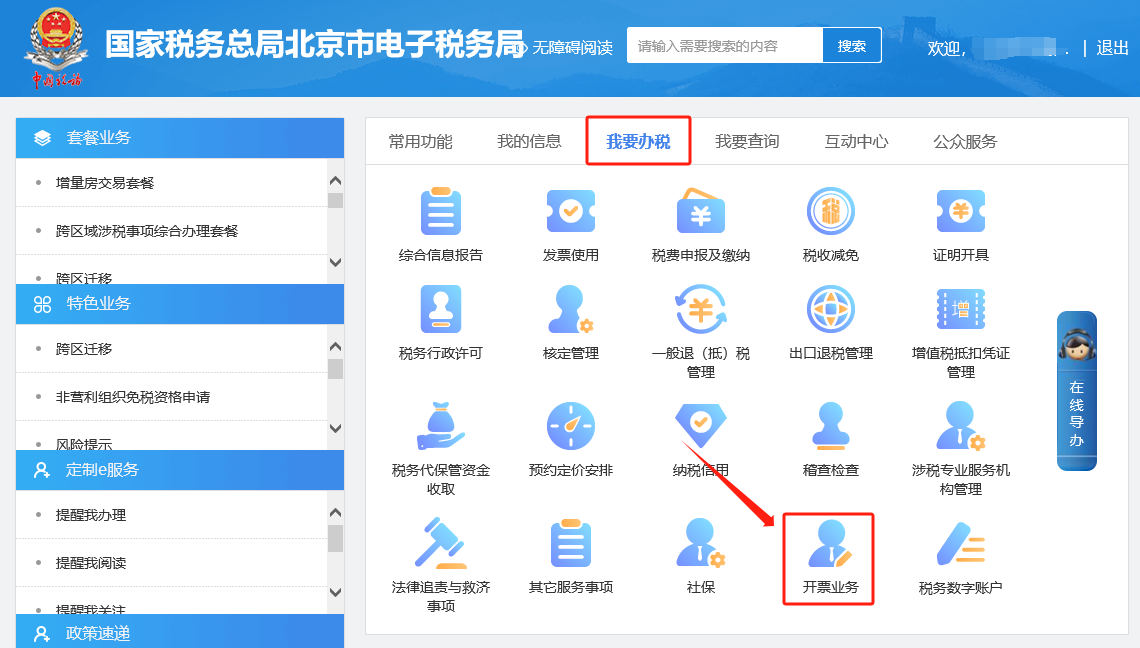
3.On the invoice information maintenance screen of the Electronic Tax Bureau, can I enter customer information and product information in batches? Answer: Hello, you can download the Excel template from the Electronic Tax Bureau, edit the information yourself, and then import it in batches. Please click [I Want to Handle Taxes]—[Invoicing Business]—[Invoicing Information Maintenance]—[Item Information Maintenance] or [Customer Information Maintenance] module, click [Batch Import], and a batch import window will pop up on the right side of the interface. Click the blue text in the prompt above, "Customer Information—Batch Import Template" or "Item Information—Batch Import Template," to download the template. After successful download, fill in the information as required by the template. After entry is complete, directly click [Select File] in the batch import interface. After successful upload, the information will be automatically recognized; click Save. I. I Want to Handle Taxes—Invoicing Business.
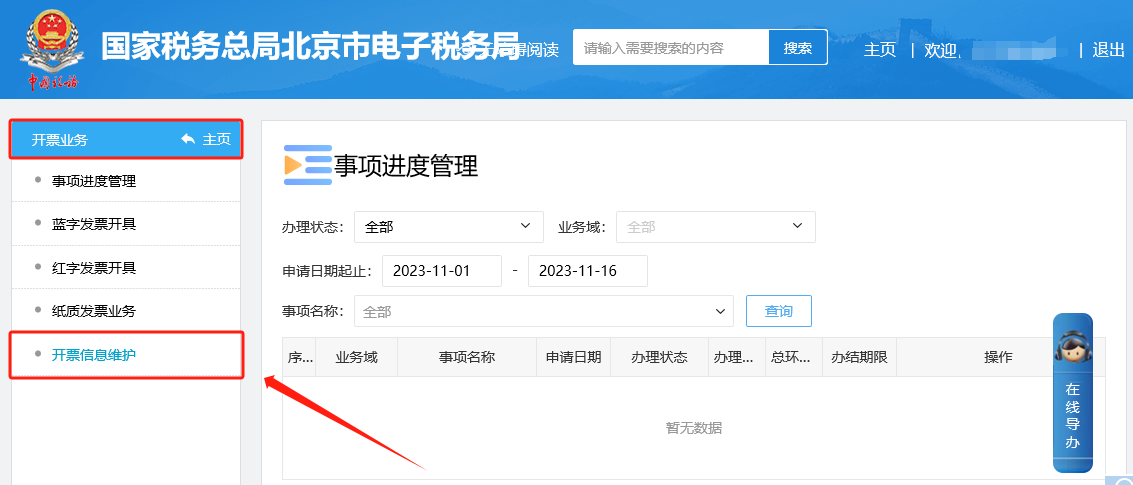
II. Invoicing Business - Invoice Information Maintenance - [Item Information Maintenance] or [Customer Information Maintenance] module, click [Batch Import], and a batch import window will pop up on the right side of the interface. Click the blue text in the prompt above, "Customer Information - Batch Import Template" or "Item Information - Batch Import Template", to download the template. After successful download, fill in the information according to the template requirements. After entry is completed, directly click [Select File] in the batch import interface. After successful upload, the information will be automatically recognized; click Save.
Source: Beijing Tax Beijing Kailing Technology Co., Ltd.——an enterprise business-finance-tax digitalization solution service provider. Kailing Technology provides solutions for sales management systems, procurement management systems, output invoicing systems, input invoice collection systems, imaging management systems, financial posting systems, electronic accounting archives and other businesses according to enterprise needs, professionally and efficiently helping enterprises transform and upgrade their business-finance-tax digital management. If you have any business-finance-tax digital transformation needs, welcome to contact us. Beijing Kailing Technology will serve you wholeheartedly.
|