News Details

The fully digitalized e-invoice quota is insufficient—how to apply for an adjustment to the invoice credit limit? Here is the detailed tutorial!

Published: 2023-11-28 10:59
Content timeliness statement (updated 2026-08-29)
This article was originally published on 2023-11-28. The following are changes to current regulations related to this article since publication:
  • The "Value-Added Tax Law of the People's Republic of China" and the "Implementing Regulations of the Value-Added Tax Law of the People's Republic of China" (State Council Order No. 826) have taken effect since January 1, 2026, and the original "Interim Regulations on Value-Added Tax" are simultaneously repealed. The business processes and operating methods described in this article still apply; for statements involving tax rates, input deduction criteria, and collection management, please refer to the current Value-Added Tax Law and its implementing regulations. View Enterprise Application Guide for the Implementation Regulations of the VAT Law →


The company's sales have increased a lot recently, and the invoice quota is insufficient. How can it apply for an invoice quota adjustment? Don't worry, Kailing Technology will guide you through it~


When the existing invoice quota is insufficient and the dynamic quota automatically initiated by the system cannot meet the demand, the taxpayer may apply to increase the quota through the "Invoice Quota Adjustment Application" function in the electronic tax bureau, supplementing purchase and sales contracts, fixed asset lists, and other materials.


Operation Steps:

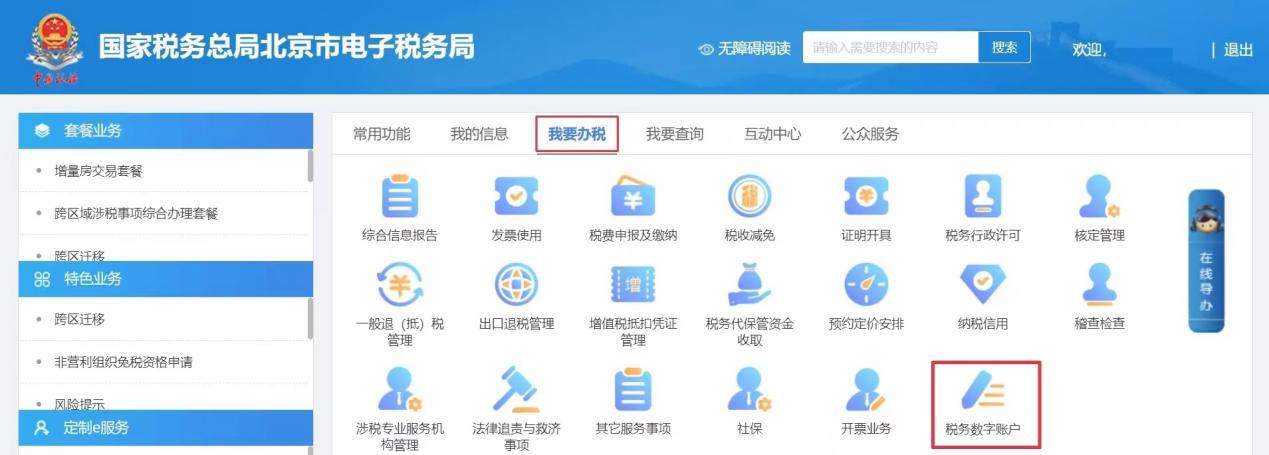
1.Log in to the Electronic Tax Bureau and click [I Want to Handle Taxes] - [Tax Digital Account]

The fully digitalized e-invoice quota is insufficient—how to apply for an adjustment to the invoice credit limit? Here is the detailed tutorial!

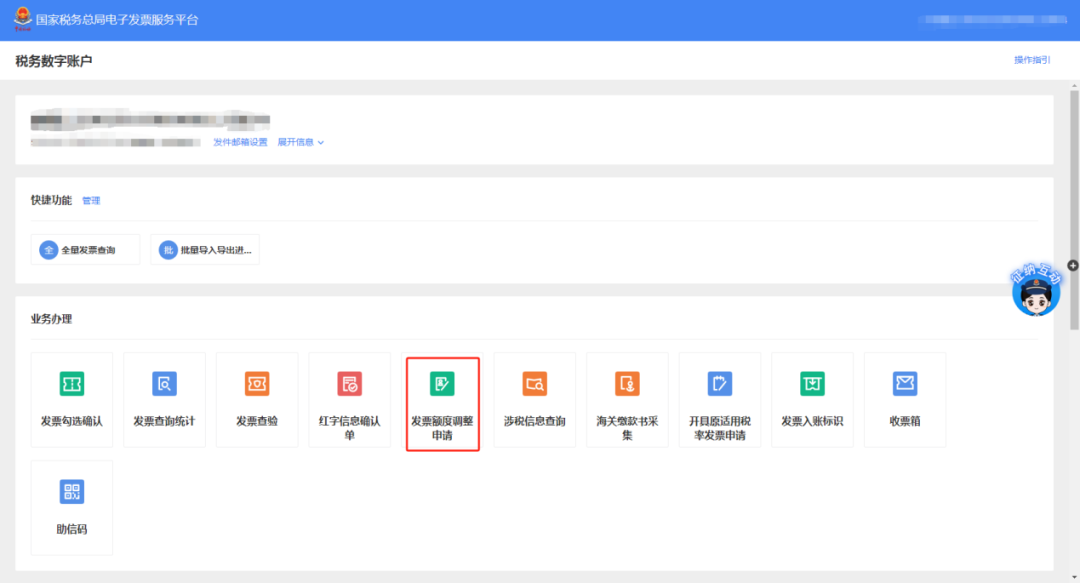
2. Click [Invoice Quota Adjustment Application].

The fully digitalized e-invoice quota is insufficient—how to apply for an adjustment to the invoice credit limit? Here is the detailed tutorial!


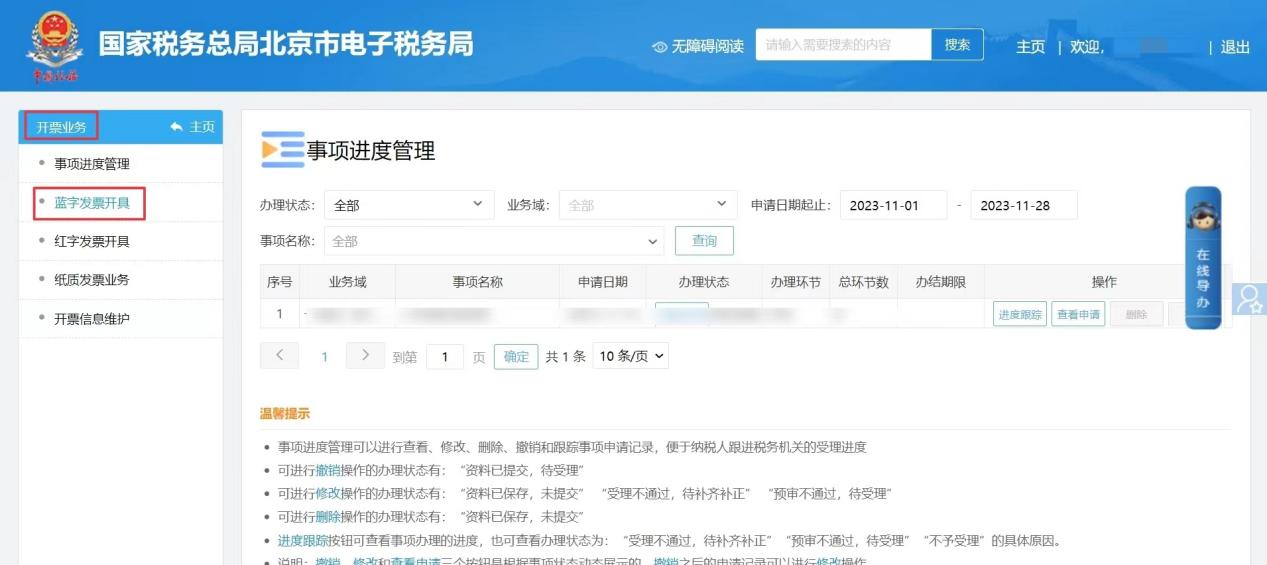
▲Or after logging into the electronic tax bureau, click [I Want to Handle Taxes]-[Invoicing Business]-[Blue Invoice Issuance] in sequence, then click the [Adjust] button next to "Available Invoice Quota" to also enter the invoice quota adjustment application interface.

The fully digitalized e-invoice quota is insufficient—how to apply for an adjustment to the invoice credit limit? Here is the detailed tutorial!

The fully digitalized e-invoice quota is insufficient—how to apply for an adjustment to the invoice credit limit? Here is the detailed tutorial!


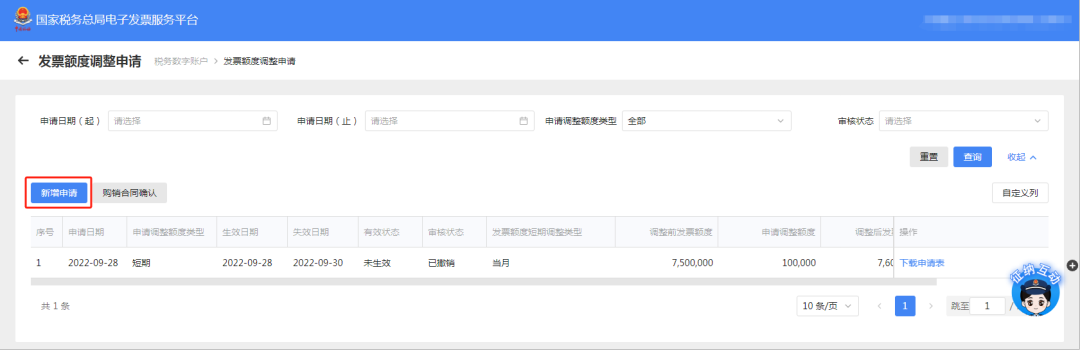
3. Click the [Add Application] button.

The fully digitalized e-invoice quota is insufficient—how to apply for an adjustment to the invoice credit limit? Here is the detailed tutorial!


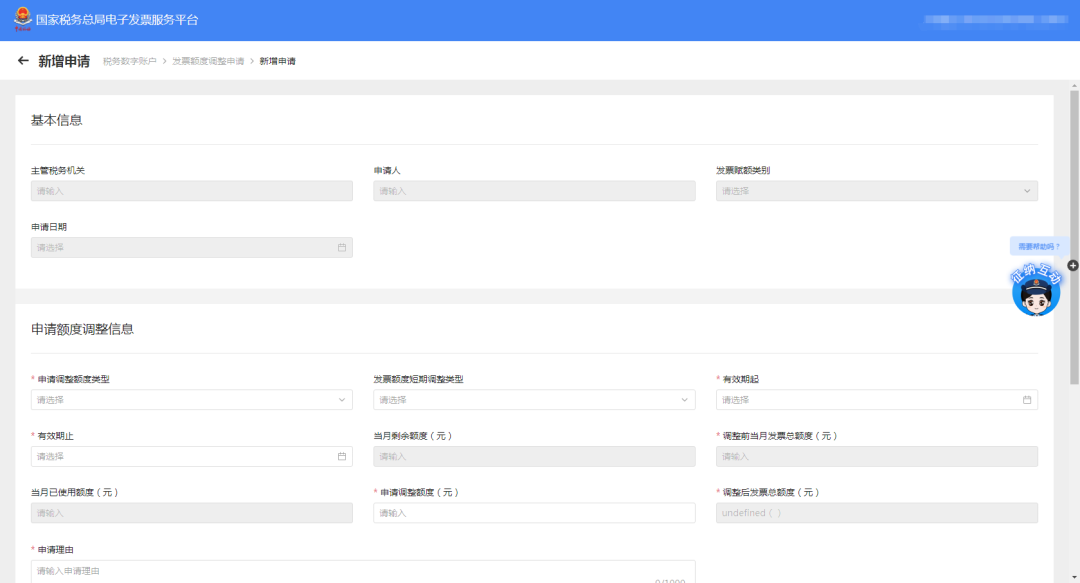
4. On the invoice quota new application page, fill in the "application adjustment quota type", "invoice quota short-term adjustment type", validity start and end dates, applied adjustment quota (yuan), application reason and other fields. Fields marked with "*" are mandatory.

The fully digitalized e-invoice quota is insufficient—how to apply for an adjustment to the invoice credit limit? Here is the detailed tutorial!

The fully digitalized e-invoice quota is insufficient—how to apply for an adjustment to the invoice credit limit? Here is the detailed tutorial!

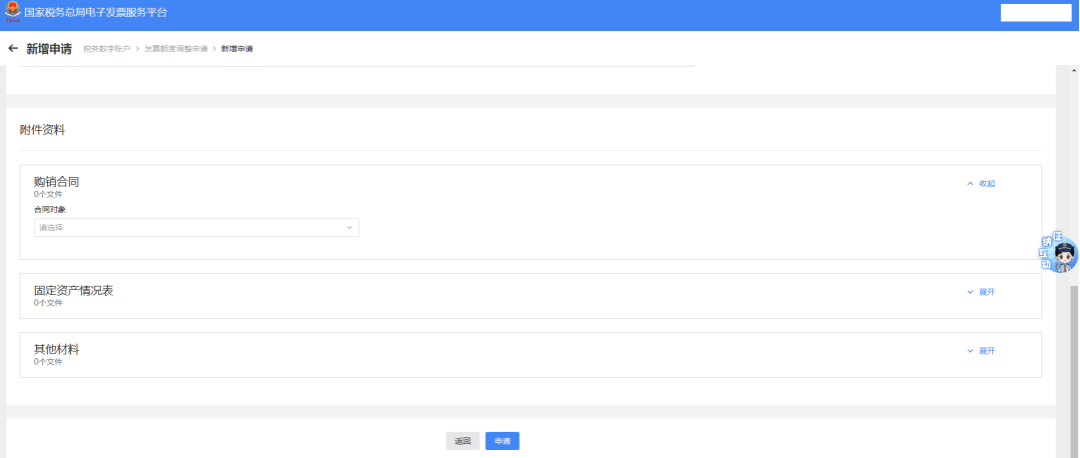
The attachment materials at the bottom of the page include three options: purchase and sales contract, fixed asset status table, and other materials. Please fill in and upload truthfully according to the actual situation, then click the [Apply] button.

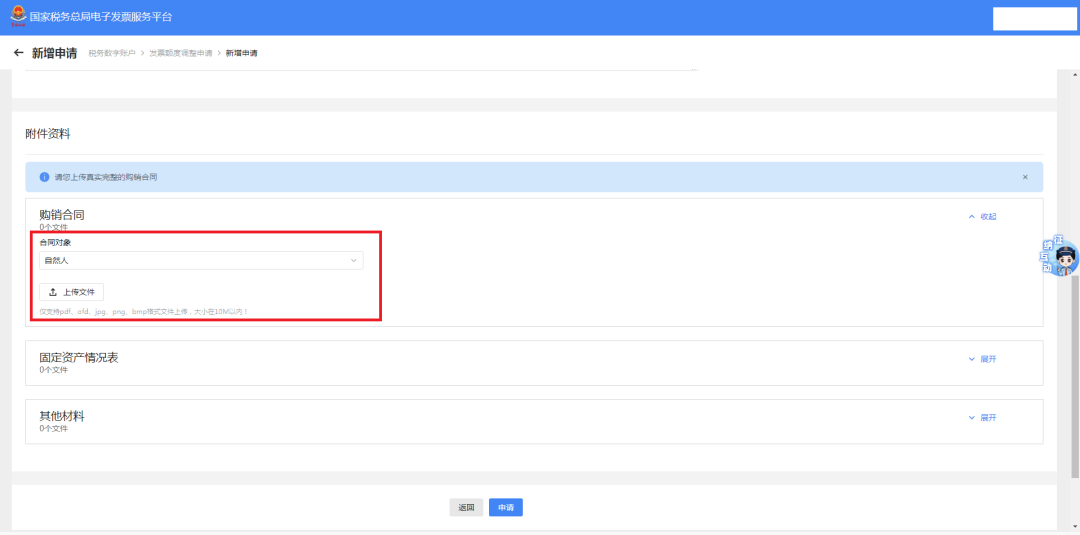
If the taxpayer chooses to upload a purchase and sales contract and selects the contract counterparty as "natural person," the purchase and sales contract must be uploaded

The fully digitalized e-invoice quota is insufficient—how to apply for an adjustment to the invoice credit limit? Here is the detailed tutorial!

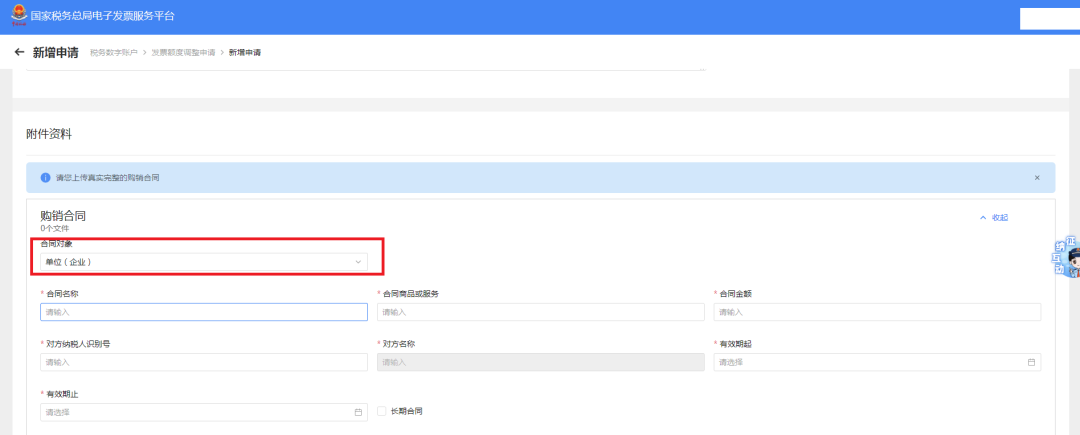
If a purchase and sales contract is uploaded and the contract counterparty is selected as "Unit (Enterprise)", fill in according to the page prompts: contract name, contract goods or services, contract amount, counterparty taxpayer identification number, and other information.

Warm reminder: In this case, the purchaser of the purchase and sale contract can log in to the electronic tax bureau to confirm the purchase and sale contract.

The fully digitalized e-invoice quota is insufficient—how to apply for an adjustment to the invoice credit limit? Here is the detailed tutorial!

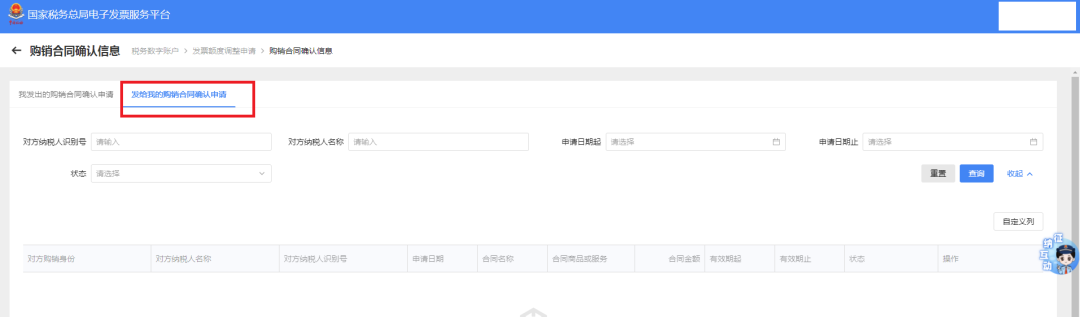
The purchaser's contract confirmation path is as follows: [I Want to Handle Taxes]-[Tax Digital Account]-[Invoice Quota Adjustment Application]-[Purchase and Sales Contract Confirmation] module, select "Purchase and Sales Contract Confirmation Application Sent to Me" to confirm the authenticity of the contract.

The fully digitalized e-invoice quota is insufficient—how to apply for an adjustment to the invoice credit limit? Here is the detailed tutorial!

In addition, taxpayers can also view the status of sent contract confirmation applications in this module under "My Sent Purchase and Sales Contract Confirmation Applications".


5. The back office will review after the application is submitted. Once the review is complete, the invoice quota adjustment status can be seen on the invoice quota adjustment application page, including the adjusted quota, adjustment date, etc.

The fully digitalized e-invoice quota is insufficient—how to apply for an adjustment to the invoice credit limit? Here is the detailed tutorial!


Some text & imagesSource: Shanghai Tax


Beijing Kailing Technology Co., Ltd.——an enterprise business-finance-tax digitalization solution service provider.Based on extensive professional knowledge and experience in the business-finance-tax field, using new concepts and new technologiesPrecisely grasp the integrated management needs of business, finance, tax, imaging, and electronic archives, helping enterprises achieve automation, intelligence, and digital transformation in business-finance-tax, promoting more efficient operations, smarter management, and release of more value for enterprise business-finance-tax users and management organizations.

Kailing Technology can provide customers withThe complete management solution, from the early stageConsulting Service Capabilities + Mature Software ProductsTo project planReliable implementation and rolloutand the most important thing after project deliveryFull-service support, committed to making enterprise business-finance-tax management simpler, more worry-free, and more efficient, so users are satisfied, worry-free, and reassured.

The Kailing Technology team hasSenior talent deeply engaged in the finance and tax industry, with a deep understanding of the current state and future trends of enterprise business-finance-tax operations management, using industry experience to provide customers with suitable system management solutions and information technology services, including:Automated business contract management process(sales/procurement) consulting and implementation,Tax Invoice Management(input invoice collection, output invoicing) consulting and implementation,Electronic management of financial content(electronic imaging system, electronic accounting archives system),Financial process automation(AR and AP automated reconciliation) and other services. Core team members come from globally renowned consulting companies and localized distinctiveFinance and TaxA well-known informatization enterprise,Can provide professional, high-quality solutions according to the enterprise's actual business needs

If you have any business-finance-tax digital transformation needs, welcome to contact us,Beijing Kailing Technology will serve you wholeheartedly


Share to:
Contact Us

Contact: 010-60974119

VIP Dedicated Consultant: 185-1389-5936

Address: Room 410, 4th Floor, Jianjin Center, No. Jia 1 Yongtaiyuan, Qinghe, Haidian District, Beijing
Scan to add customer service on WeChat
Industry Websites
Scan to follow our WeChat official account
Scan to view our video account
Scan to follow our Douyin account
Common Questions
How to apply for adjustment in the electronic tax bureau when the invoice quota is insufficient?
Log in to the Electronic Tax Bureau and click [I Want to Handle Taxes] - [Tax Digital Account] - [Invoice Quota Adjustment Application], or enter via [Invoicing Business] - [Blue Invoice Issuance] - [Adjust] next to the available invoice quota. Click [Add Application], fill in the adjustment type, validity period, amount, and reason, upload attachments such as purchase and sales contracts, and submit. After approval, you can view the adjustment result on the page.
What materials need to be uploaded to apply for invoice quota adjustment?
Attachment materials include three items: purchase and sales contract, fixed asset status table, and other materials, to be uploaded according to actual conditions. If the contract counterparty is a natural person, the purchase and sales contract must be uploaded; if it is a unit (enterprise), information such as contract name, goods, amount, and counterparty tax number must be filled in, and the purchaser must log in to the Electronic Tax Bureau to confirm the authenticity of the contract in [Tax Digital Account] - [Invoice Quota Adjustment Application] - [Purchase and Sales Contract Confirmation].
How long does it take for an invoice quota adjustment application to be approved after submission?
The backend will review after the application is submitted. After review is completed, information such as the adjusted limit and adjustment date can be viewed on the invoice limit adjustment application page. The specific review duration is not stated in the text; it is recommended to follow notifications from the electronic tax bureau or contact the competent tax authority.
What if the system's automatic dynamic quota allocation is insufficient? How do I manually apply to increase the quota?
When the dynamic quota automatically initiated by the system cannot meet the demand, you can apply manually through the "Invoice Quota Adjustment Application" function in the electronic tax bureau. Operation path: Log in to the electronic tax bureau, click [I Want to Handle Taxes]-[Tax Digital Account]-[Invoice Quota Adjustment Application], or enter through [Invoicing Business]-[Blue-Letter Invoice Issuance] and then click [Go to Adjust]. Fill in the application information and upload materials such as purchase and sales contracts, then submit.
Related solutions
Leqi Direct Connection solution
Direct connection to the tax bureau's Leqi channel, connecting the last mile of ERP →
Electronic Accounting Archive Management
Electronic voucher archiving, single-set system, compliant and auditable →
Output Invoicing Management Platform
As soon as business occurs, invoices are automatically issued, automatically delivered, and automatically returned →
Further Reading
How should you choose the type of fully digitalized e-invoice interface?
The popularization of fully digitalized e-invoices has greatly improved enterprise business-finance-tax management efficiency, while also leaving enterprises facing... →
How to Archive Electronic Accounting Archives Under the Fully Digitalized E-Invoice Model
In recent years, the emergence of "new variables" represented by fully digitalized e-invoices has further accelerated the digitization of accounting vouchers… →
Regulations and impacts of fully digitalized e-invoices
Fully digitalized e-invoices have gradually become widespread. Based on relevant materials released by tax bureaus in various regions, this article introduces... →