010-6097 4119Book a Demo


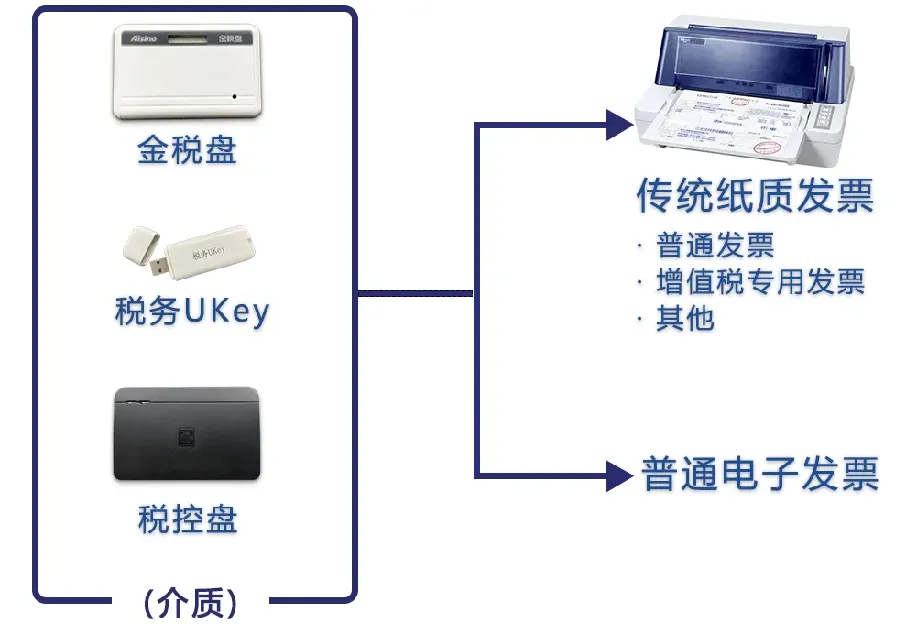
Confirm deactivation! Immediate deregistration! The tax bureau has made it clear!Published: 2024-09-29 16:50 In the era of fully digitalized e-invoices, have you deregistered all your tax control equipment?01Tax control equipment exits the stage of history,Must the tax control disk be deregistered? In the era of fully digitalized e-invoices, fully digitalized e-invoices no longer require a tax control device for invoicing, making invoice issuance very convenient and efficient. No need to struggle over whether the invoicer is the administrator, or whether the reviewer and payee are the same person, while also saving time. Fully digitalized e-invoices directly eliminate the invoice application process, and taxpayers no longer need to go to the tax bureau to apply for invoices. Electronic invoices and paper invoices both require the use of various special tax control devices, while fully digitalized e-invoices have already achieved "demediumization," with no need for invoicing media such as golden tax disks, tax control disks, and tax UKey.
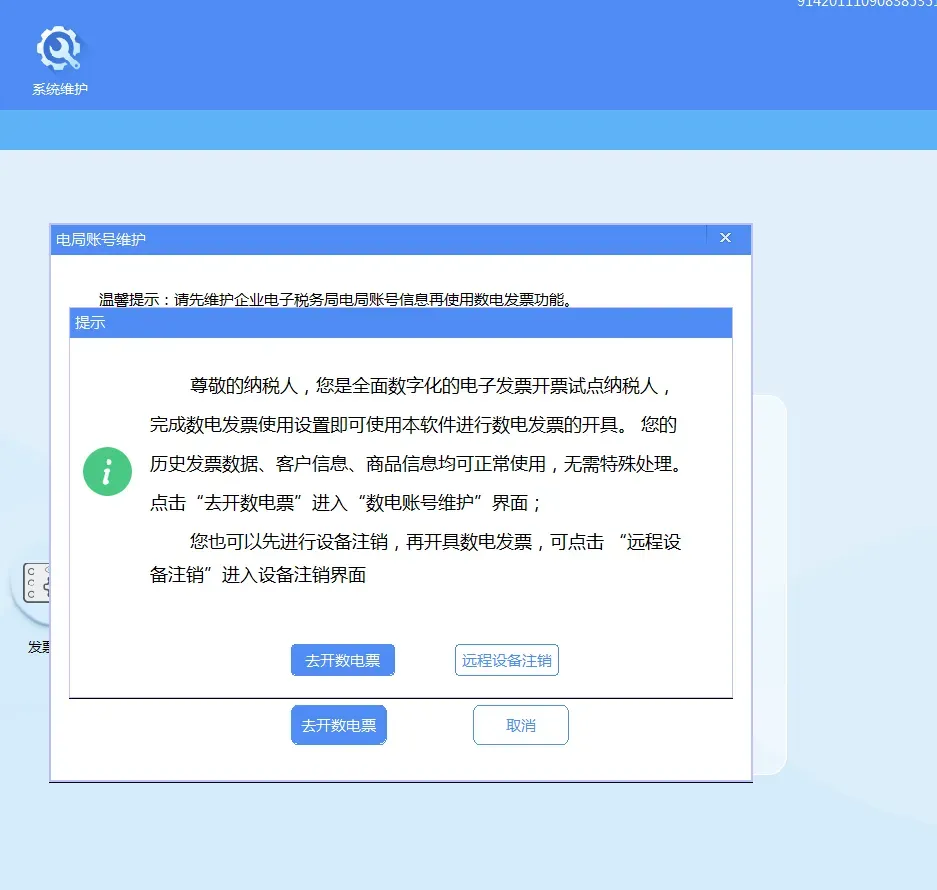
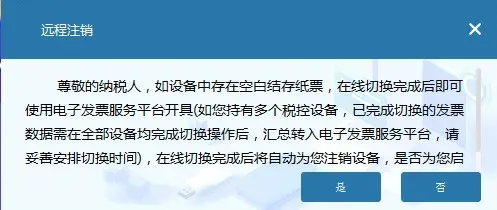
Keeping the old tax control device is useless. Besides requiring an annual maintenance fee of 280 yuan, you still have to log in to the tax control device system every month to report and summarize, and clear the card and reverse-write monitoring. If you forget to clear the card, it will be troublesome, soCan the invoice issuing device be deregistered? For eligible taxpayers in pilot regions, after enabling fully digitalized e-invoices, tax control devices such as tax control disks, tax UKey, and golden tax disksYou can choose whether to deregister according to your own circumstances. The VAT invoice management system has added a remote cancellation function for tax control devices. For taxpayers who pass the qualification verification, they canComplete the remote online cancellation of tax control equipment without leaving home. So what are the specific operating procedures for different tax control devices? What conditions must be met? After online remote deregistration, how should the tax control device in hand be handled? 02Tax Disk 1. The taxpayer inserts the golden tax disk and logs in to the VAT invoice issuing software (golden tax disk version). After entering the page, if the taxpayer is eligible for remote cancellation, an eligibility prompt automatically pops up.
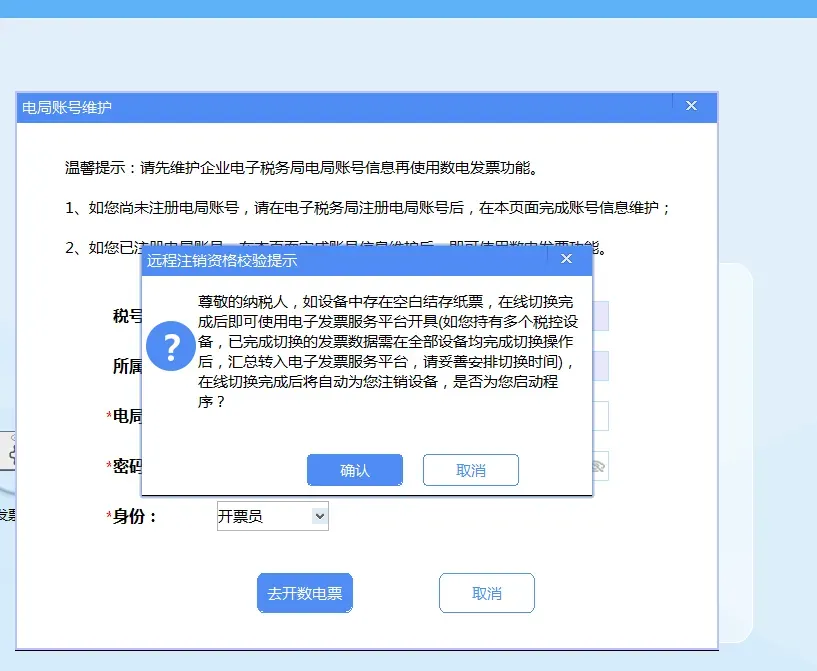
2. Click the "Remote Device Deregistration" button; the system automatically verifies whether there are unuploaded invoices and whether the tax-period reporting has been submitted. If verification passes, a prompt automatically pops up asking whether to confirm starting the deregistration process.
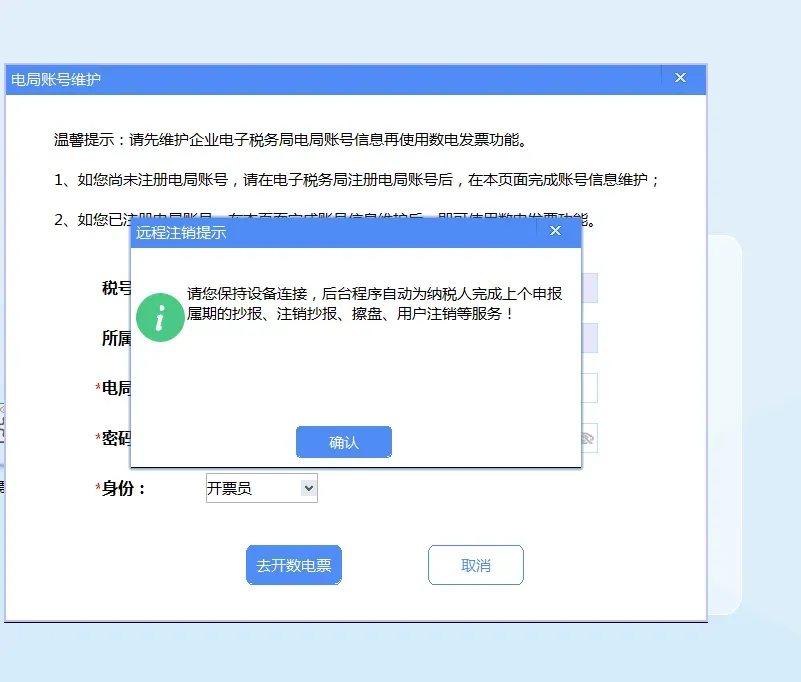
3. The taxpayer clicks the "Confirm" button, and the invoicing software displays a "Confirm" prompt.
4. Click the "Confirm" button in the figure, and the invoicing software will again initiate a query to the tax authority to verify eligibility for remote cancellation of the Golden Tax device. If qualified, the tax control device will be automatically deregistered remotely. After successful remote deregistration, the remaining blank paper invoices in the tax control device will automatically switch to being issued on the e-invoice platform, and the remaining blank electronic invoices in the tax control device will automatically be returned to the tax authority end, with no operation required.
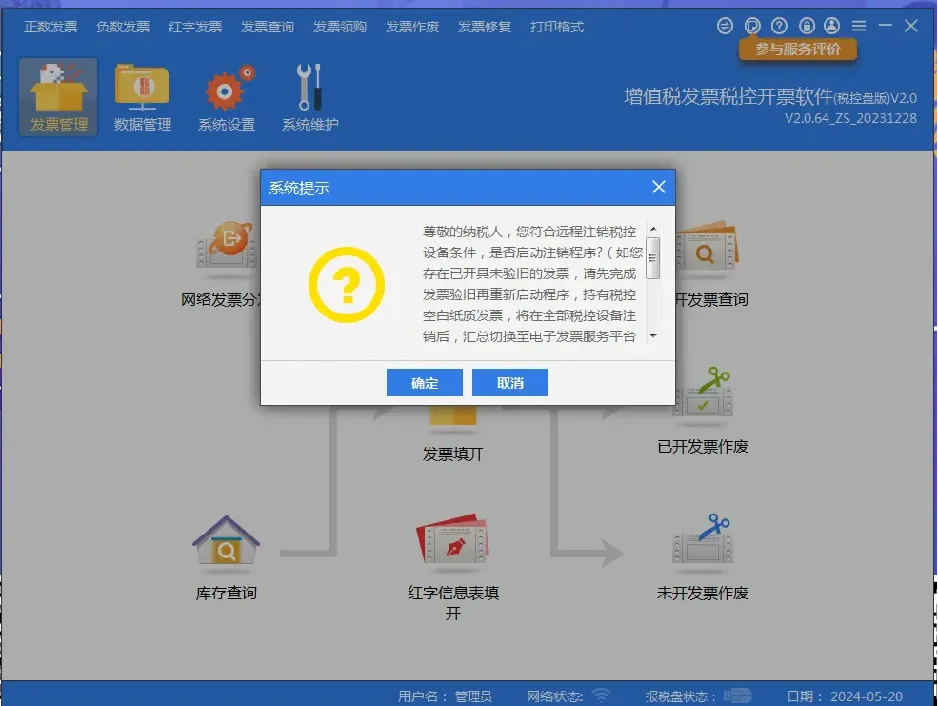
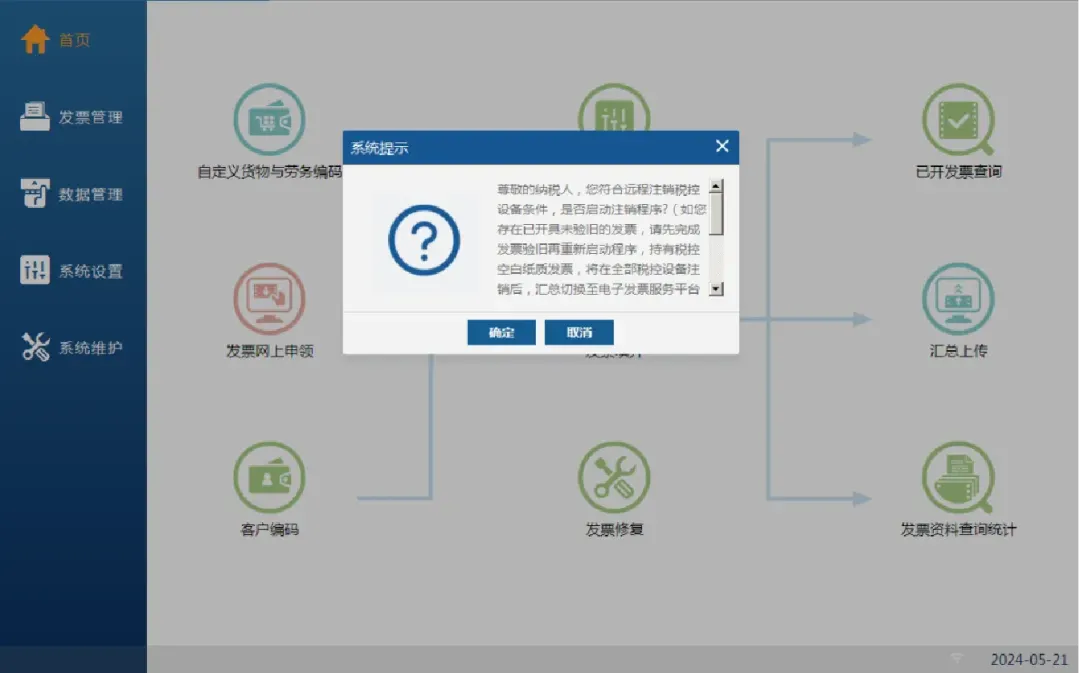
03Tax control disk 1. The taxpayer inserts the tax control disk and logs in online to the VAT invoice issuing software (tax control disk version) (hereinafter referred to as the "invoicing software"). It automatically checks whether the taxpayer is eligible for remote cancellation of tax-controlled equipment. After entering the main page, if the taxpayer is eligible, a prompt automatically pops up.
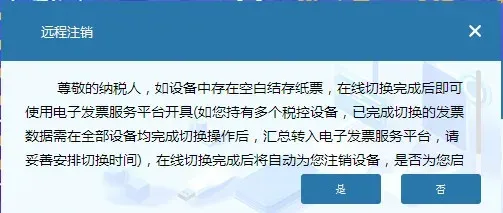
2. If the taxpayer clicks the "Cancel" button, it automatically returns to the main page of the invoicing software; if the taxpayer clicks the "Confirm" button, the system automatically verifies whether there are blank invoices, whether there are unuploaded invoices, and whether the tax-period reporting has been submitted. (1) If the verification passes, a reminder will automatically pop up asking whether to confirm the activation of the deregistration procedure.
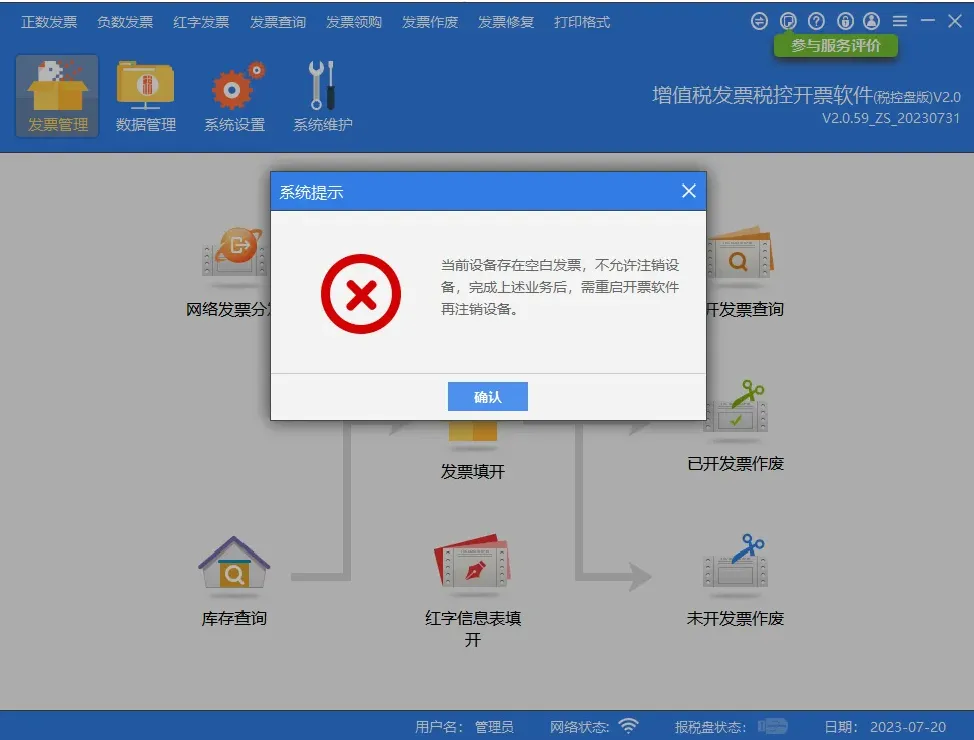
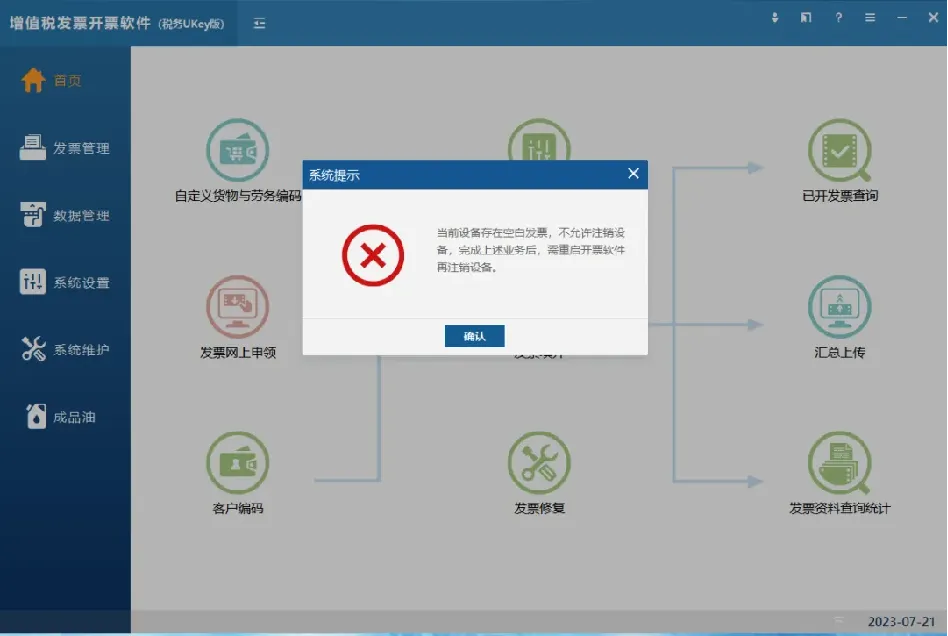
(2) If verification fails, a corresponding prompt will automatically pop up. After the taxpayer completes the corresponding business according to the prompt, restarting the invoicing software will allow the remote cancellation of tax control equipment to be performed again, as shown in the figure below (taking the existence of blank invoices in the tax control equipment as an example).
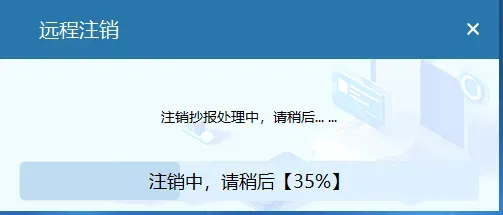
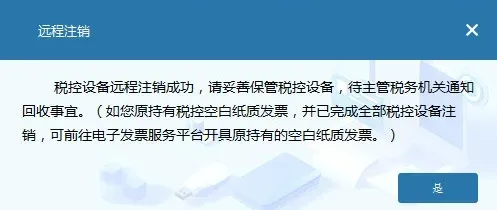
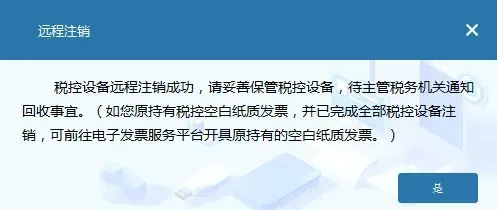
3. After the verification passed prompt pops up, if the taxpayer clicks the "Cancel" button, the system automatically returns to the main page of the invoicing software; if the taxpayer clicks the "OK" button, the invoicing software again initiates a query to the tax bureau for the qualification to remotely deregister the tax control device. (1) If qualified, the tax control device is automatically remotely deregistered; after remote deregistration is completed, a prompt indicating successful remote deregistration pops up.
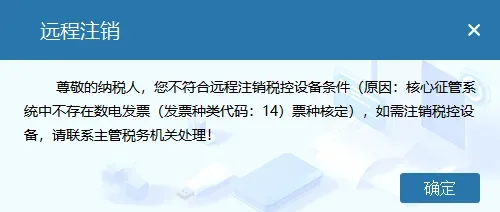
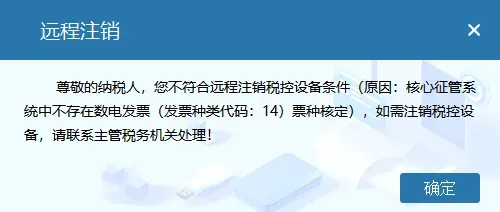
(2) If the qualifications are not met, a specific prompt indicating non-compliance will pop up, and the taxpayer may communicate with the competent tax authority for confirmation.
4. During the taxpayer's remote cancellation of tax control equipment, if the cancellation is interrupted due to an anomaly, the taxpayer may log in to the invoicing software online and remotely cancel again according to the prompts until successful. If after the remote cancellation is interrupted, the invoicing software cannot be logged into, the taxpayer must contact the competent tax authority for handling. 5. If a taxpayer has multiple devices or main and extension devices, they need to complete remote cancellation of the extension devices in sequence before remotely canceling the main device. 04Tax UKEY 1. The taxpayer inserts the tax UKey and logs in online to the VAT invoice issuing software (tax UKey version) (hereinafter referred to as the "invoicing software"). It automatically checks whether the taxpayer is eligible for remote cancellation of tax-controlled equipment. After entering the main page, if the taxpayer is eligible, a prompt automatically pops up.
2. If the taxpayer clicks the "Cancel" button, it automatically returns to the main page of the invoicing software; if the taxpayer clicks the "Confirm" button, the system automatically verifies whether there are blank invoices, whether there are unuploaded invoices, and whether the tax-period reporting has been submitted: (1) If the verification passes, a reminder will automatically pop up asking whether to confirm the activation of the deregistration procedure.
(2) If verification fails, a corresponding prompt will automatically pop up. After the taxpayer completes the corresponding business according to the prompt, restarting the invoicing software will allow the remote cancellation of tax control equipment to be performed again.
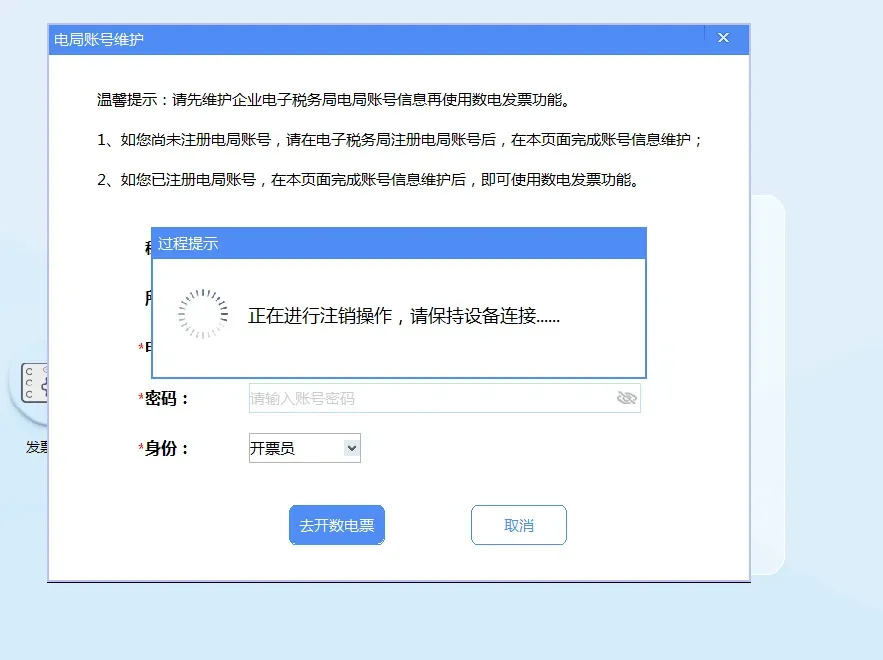
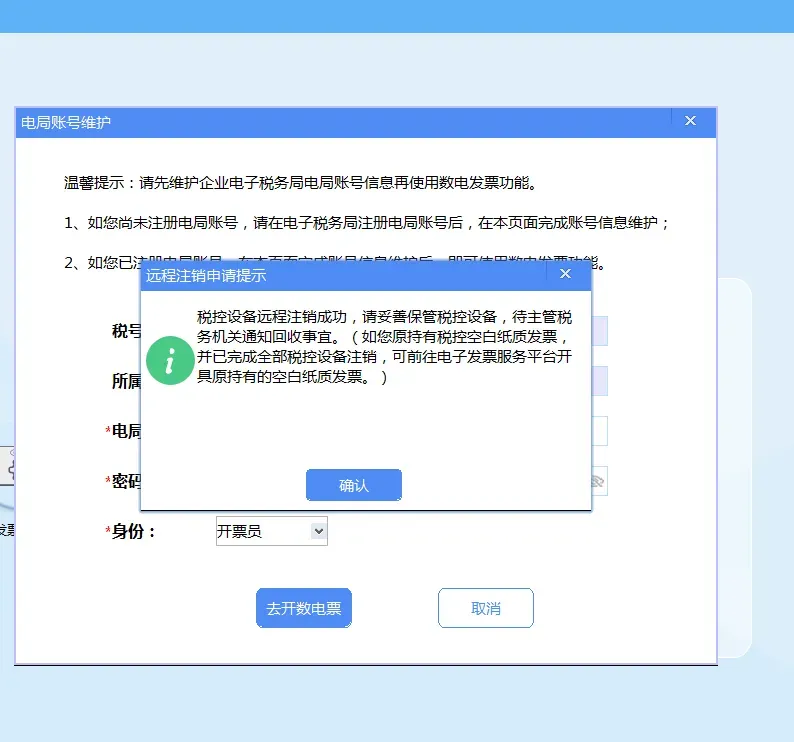
3. After the verification passed prompt pops up, if the taxpayer clicks the "Cancel" button, the system automatically returns to the main page of the invoicing software; if the taxpayer clicks the "OK" button, the invoicing software again initiates a query to the tax bureau for the qualification to remotely deregister the tax control device: (1) If qualified, the tax control device will automatically be remotely deregistered. After the remote deregistration is completed, a prompt message indicating successful remote deregistration will pop up, as shown in the figures below.
(2) If the qualifications are not met, a specific prompt indicating non-compliance will pop up, and the taxpayer may communicate with the competent tax authority for confirmation.
4. During the taxpayer's remote cancellation of tax control equipment, if the cancellation is interrupted due to an anomaly, the taxpayer may log in to the invoicing software online and remotely cancel again according to the prompts until successful. If after the remote cancellation is interrupted, the invoicing software cannot be logged into, the taxpayer must contact the competent tax authority for handling. 5. If a taxpayer has multiple devices or main and extension devices, they need to complete remote cancellation of the extension devices in sequence before remotely canceling the main device. 05Answers to hot questions on remote deregistration of tax control equipment 1. What should taxpayers pay attention to before remotely deregistering tax control equipment? It is recommended that taxpayers confirm before performing remote deregistration of tax control equipment.Complete the return of blank tax-control invoices, upload of issued tax-control invoices, and tax-period reporting of tax-control invoices. 2. Which taxpayers are qualified for remote cancellation of tax control devices? Which taxpayers will receive reminders for remote cancellation of tax control devices? Taxpayers who do not meet the conditions are temporarily not open to the remote tax control device cancellation function. Taxpayers who meet the verification conditions are eligible for remote tax control device cancellation,Will receive an automatic pop-up reminder after opening the VAT invoice issuance software,The message is: "Dear taxpayer: You are a pilot taxpayer for fully digitalized e-invoice issuance. You can issue invoices through the electronic invoice service platform without using a tax control device. Do you need us to remotely cancel your current tax control device?" The system will verify the taxpayer's remote deregistration eligibility respectively when the VAT invoice issuance software is started online and when remote deregistration of tax control equipment is confirmed,Only taxpayers who meet the qualification verification conditions in both verifications can perform the remote tax control device deregistration operation. The qualification verification conditions for remote deregistration are: 1. The taxpayer's status is "normal"; 2. There is a tax type approval for fully digitalized e-invoices (invoice type code: 14), and the tax-controlled invoice type approval includes only one or more of 04 two-copy general invoice, 05 five-copy general invoice, 1130 three-copy special invoice, 1160 six-copy special invoice (including no tax-controlled invoice type approval); 3. The taxpayer's tax-control invoice type balance is all 0 (i.e., all invoices obtained under tax-control invoice types have been fully issued and verified); 4. There are no pending tasks for invoice type verification or maximum invoicing limit approval; 5. Non-refined oil production and distribution enterprises, and non-motor vehicle and non-used vehicle enterprises; 3. Which tax control devices support remote deregistration? Tax control devices eligible for remote cancellation include only: tax UKey, tax control disk, and golden tax disk. 4. Which version of the VAT invoice issuance software supports taxpayers' remote cancellation of tax control equipment? Taxpayers eligible for remote cancellation of tax control devices can perform the remote cancellation of tax control devices according to the prompts after upgrading the VAT invoice issuance software to the corresponding version. You can download and upgrade the corresponding version of the "Enterprise Invoicing Software" through [Electronic Tax Bureau] → [Public Services] → [Download Services]。
5. After the VAT invoice issuance software prompts that it is eligible for remote cancellation of tax control equipment, is it necessary to immediately execute the cancellation operation? After the taxpayer receives the reminder on whether to remotely deregister the tax control equipment,There is no need to immediately execute the remote cancellation operation; it can be executed as needed based on business needs and tax personnel recommendations。 6. When confirming remote deregistration, the prompt says, "Dear taxpayer, you do not meet the conditions for remote deregistration of tax control devices (reason: ***). If you need to deregister the tax control device, please contact the competent tax authority for handling." How should this be handled? This prompt indicates that the taxpayer has not passed the secondary verification of remote deregistration eligibility. The taxpayer may contact the competent tax authority for handling. 7. If an error is reported when remotely deregistering tax control equipment, can the deregistration be repeated? The VAT invoice issuance software supports re-remote cancellation of tax control devices that have not completed remote cancellation. During the remote cancellation process of the tax control device, if an abnormality causes the remote cancellation of the tax control device to be incomplete,As long as the device can be connected to log in to the VAT invoice issuance software, after logging in online, the system will automatically prompt whether to perform the remote deregistration operation.。 After the taxpayer confirms sequentially according to the prompts, the system can automatically carry out the deregistration operation again; if the remote deregistration of the tax control device is not completed due to an abnormality, and the invoicing software cannot be logged into, the taxpayer needs to contact the competent tax authority and go to the local tax service hall at an appropriate time for tax personnel to perform the tax control device deregistration operation. 8. What should be done when remote cancellation of tax control equipment fails and it is impossible to log in to the VAT invoice issuance software? The taxpayer needs to contact the competent tax authority and bring all tax control devices under their name to the local tax service hall for tax control device deregistration by tax personnel. 9. How should a taxpayer remotely cancel tax control equipment when there are multiple tax control devices under the taxpayer's name? If there are multiple tax-control devices or main and extension devices under a taxpayer's name,After completing the remote deregistration of all extension devices, proceed with the remote deregistration of the main device,Otherwise, the system will block the remote tax-controlled device deregistration operation after prompting. 10. In the current month, it was indicated that remote cancellation eligibility was available, but due to business needs the tax control device was not remotely cancelled. At the end of the month, upon logging into the VAT invoice issuance software again, no remote cancellation prompt was received, and the tax control device could not be remotely cancelled. To avoid the inability to handle cross-month processing after an abnormal situation occurs, the remote deregistration function is temporarily suspended from the last three working days of each month, and during the temporary suspension period, remote deregistration reminders are no longer pushed to taxpayers. Taxpayers eligible for remote deregistration can log in again to the VAT invoice issuance software starting from the 1st of the following month to use the remote tax control device deregistration function and perform remote deregistration operations on the tax control device. 11. After the tax control device is successfully cancelled, what does the taxpayer need to do? After tax control equipment is successfully deregistered remotely, pleaseProperly keep the tax control equipment and wait for the competent tax authority to notify regarding collection. Source: internet Kailing Technology provides enterprise business-finance-tax digital product lines according to enterprise needs: Solutions for businesses including sales contract management system, procurement contract management system, fully digitalized Leqi interface project, output automatic invoicing system, employee expense control and reimbursement system, input VAT invoice management system, supply chain collaborative reconciliation system, image OCR recognition system, automatic financial bookkeeping system, and electronic accounting archives system, professionally and efficiently supporting the transformation and upgrading of enterprise business-finance-tax digital management. If you have any business-finance-tax digital transformation needs, welcome to contact us. Beijing Kailing Technology will serve you wholeheartedly.
|