News Details

New electronic tax bureau | Changes in personnel permission management (taking personnel permission management—invoice business as an example)

Published: 2024-07-08 17:33

The main change in personnel permission management is that the old login did not support changes to personnel permissions, while the new login now supports personnel permission management.

Taking personnel permission management—invoice business as an example, the legal representative and financial officer of an enterprise can directly use invoice business-related functions; tax handlers (invoicing clerks) can only use invoice business-related functions after authorization by the legal representative or financial officer; if a tax handler (invoicing clerk) cannot use functions such as invoicing business and tax digital accounts, the legal representative or financial officer must log in to the electronic tax bureau with the enterprise business identity and authorize the permissions of the existing tax handler (invoicing clerk).

Step 1:

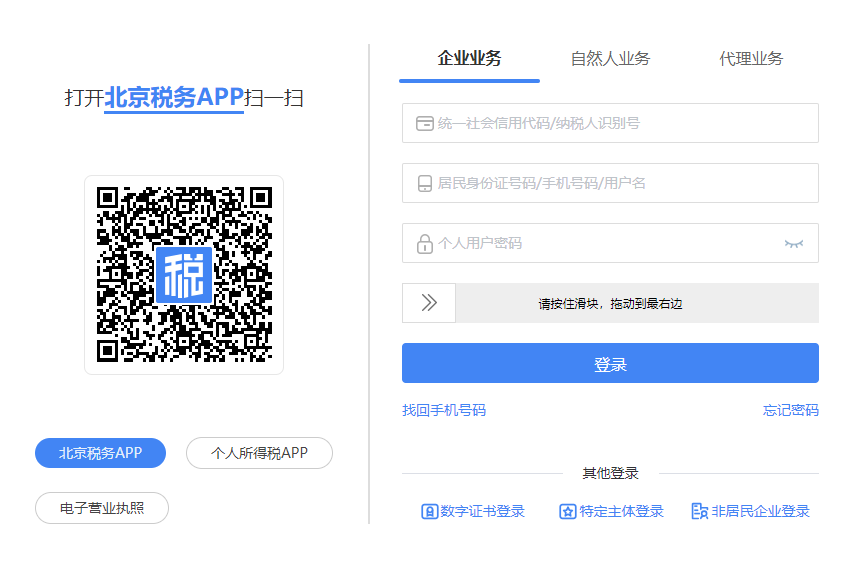
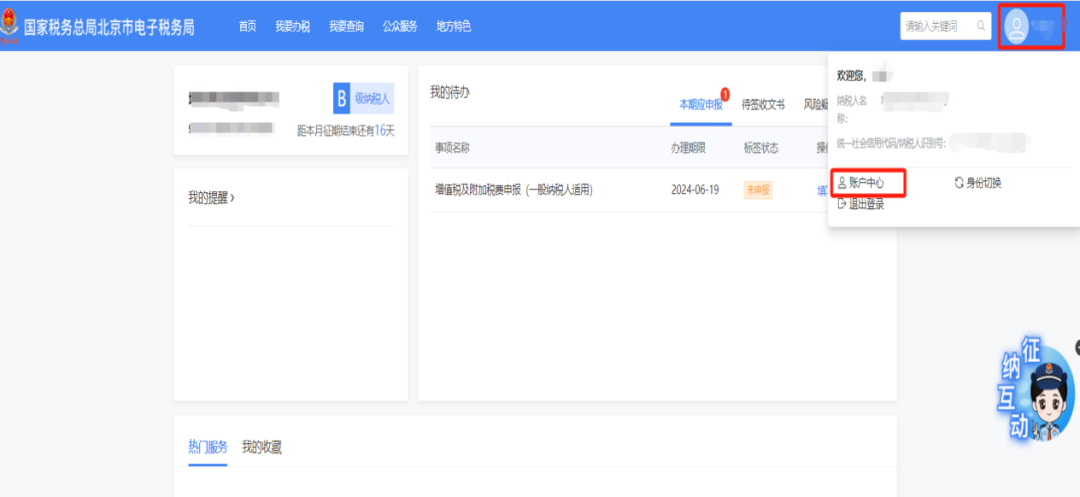
After the enterprise legal representative or financial officer logs in to the electronic tax bureau with an enterprise business identity, click the avatar in the upper right corner → "Account Center."

New electronic tax bureau | Changes in personnel permission management (taking personnel permission management—invoice business as an example)

New electronic tax bureau | Changes in personnel permission management (taking personnel permission management—invoice business as an example)

Step 2:

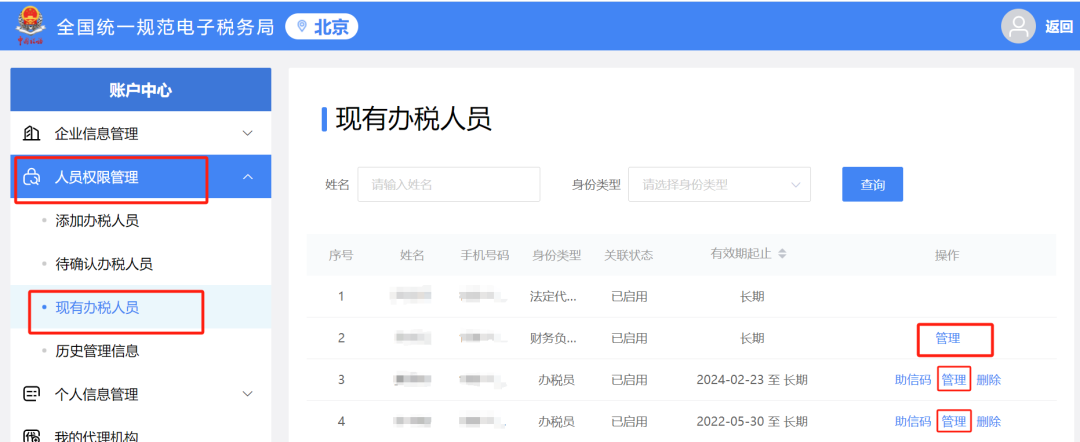
Enter the "Account Center," click "Personnel Permission Management" → "Existing Tax Handlers," and in the operation list of the tax handler whose permissions need to be modified, click the [Manage] button.

New electronic tax bureau | Changes in personnel permission management (taking personnel permission management—invoice business as an example)

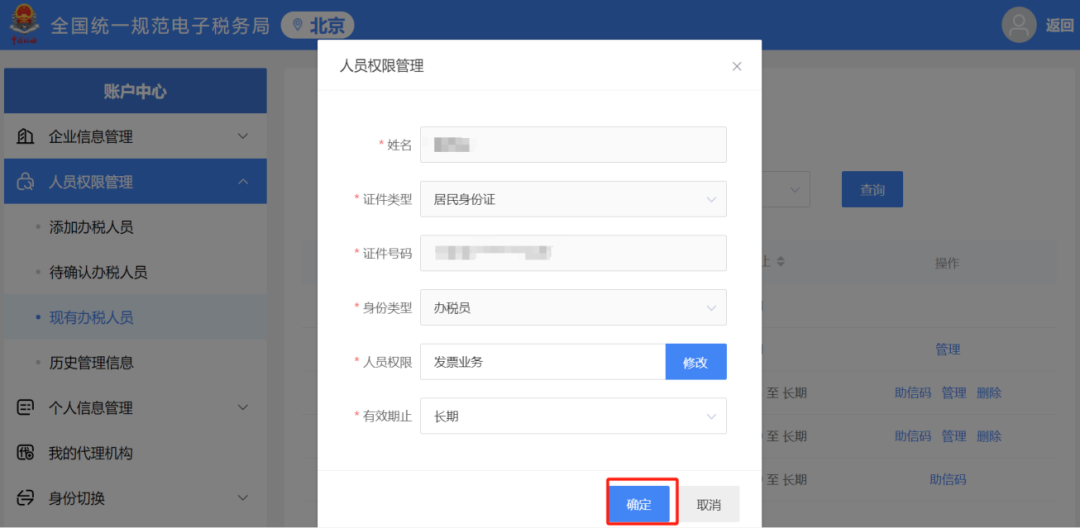
Step 3:

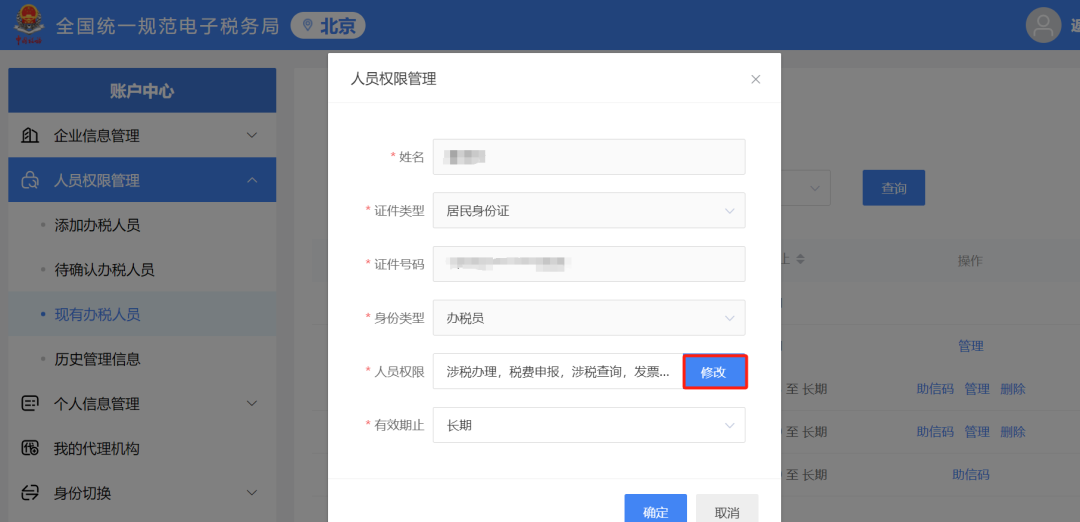
The system pops up the "Personnel Permission Management" dialog box. Click the [Modify] button after "Personnel Permissions."

New electronic tax bureau | Changes in personnel permission management (taking personnel permission management—invoice business as an example)


Step 4:

In the "Select Personnel Permissions" pop-up, check "Invoice Business" and click the [Confirm] button below.

New electronic tax bureau | Changes in personnel permission management (taking personnel permission management—invoice business as an example)


Step 5:

Click the [Confirm] button on the "Personnel Permission Management" pop-up, and the tax officer (invoicing officer) invoice business permission is successfully granted.

New electronic tax bureau | Changes in personnel permission management (taking personnel permission management—invoice business as an example)


Source: Beijing Tax


Kailing Technology provides enterprise business-finance-tax digital product lines according to enterprise needs:

Solutions for businesses including sales contract management system, procurement contract management system, fully digitalized Leqi interface project, output automatic invoicing system, employee expense control and reimbursement system, input VAT invoice management system, supply chain collaborative reconciliation system, image OCR recognition system, automatic financial bookkeeping system, and electronic accounting archives system, professionally and efficiently supporting the transformation and upgrading of enterprise business-finance-tax digital management.

If you have any business-finance-tax digital transformation needs, welcome to contact us. Beijing Kailing Technology will serve you wholeheartedly.

New electronic tax bureau | Changes in personnel permission management (taking personnel permission management—invoice business as an example)


Share to:
Contact Us

Contact: 010-60974119

VIP Dedicated Consultant: 185-1389-5936

Address: Room 410, 4th Floor, Jianjin Center, No. Jia 1 Yongtaiyuan, Qinghe, Haidian District, Beijing
Scan to add customer service on WeChat
Industry Websites
Scan to follow our WeChat official account
Scan to view our video account
Scan to follow our Douyin account
Common Questions
In the new electronic tax bureau, how do tax handlers (invoice issuers) obtain invoice business permissions?
The enterprise's legal representative or financial officer must log in to the electronic tax bureau with the enterprise business identity, click the avatar in the upper right corner to enter the "Account Center," find the corresponding tax handler in "Personnel Permission Management," click [Manage] → [Modify] personnel permissions, check "Invoice Business," and confirm.
What changes have been made to personnel permission management in the new electronic tax bureau compared with the old version?
The old login version did not support personnel permission changes, while the new login version now supports personnel permission management. Enterprise legal representatives and financial officers can directly use invoice services; tax handlers (invoicers) must be authorized before use.
What should be done if the tax handler (invoicing clerk) cannot use invoicing business or the tax digital account?
The legal representative or financial officer must log in to the electronic tax bureau with the enterprise business identity, authorize the existing tax handler (invoicer) permissions, and check "Invoice Business" in "Personnel Permission Management."
Related solutions
Output Invoicing Management Platform
As soon as business occurs, invoices are automatically issued, automatically delivered, and automatically returned →
Enterprise expense control and reimbursement system
Intelligent reimbursement, compliance control, one-click bookkeeping →
Leqi Direct Connection solution
Direct connection to the tax bureau's Leqi channel, connecting the last mile of ERP →
Further Reading
New Electronic Tax Bureau upgrade and adjustment! Tax bureau notice!
File VAT, consumption tax, urban maintenance and construction tax, education surcharge, local education surcharge… →
How can enterprises realize electronic accounting archives
As the digital economy develops, key policies in the field of accounting archives continue to advance. The State Taxation Administration... →
New changes! Two new styles added to fully digitalized e-invoices!
The Shanghai Tax Service and Xiamen Tax Service announced the pilot launch of motor vehicle and second-hand... →