010-6097 4119Book a Demo


Fully digitalized e-invoicing tool: quickly solve issues such as mobile invoicing, batch invoicing, and slow invoicingPublished: 2024-02-02 10:51 As of now, all 36 provinces, regions, and municipalities nationwide (including separately listed cities) have achieved full coverage of the fully digitalized e-invoice pilot. But many accountants are very unfamiliar with fully digitalized invoicing: the invoicing interface is complex, it takes a long time to find how to issue one invoice, invoice volume is large and time is short, issuing them one by one is hectic, the accountant is outside while the customer urgently needs the invoice...... How to issue invoices quickly and improve work efficiency? Lingshuitong·Smart Invoice Service Platform,Supports issuance of fully digitalized e-invoices on mobile and computer. Historical data from tax control devices can be migrated to the new system with one click. Code scan invoicing, batch invoicing, API invoicing, and more... multi-scenario invoicing solutions to help you invoice easily~ 1. Mobile invoicingEnter the "Kailing Technology" official account, click "Mobile Invoicing" in the middle of the lower menu bar, enter the login screen, and log in using the enterprise account information bound on the Ling Shui Tong platform. After entering the workspace, you can use the relevant functions for mobile invoicing. The specific functions are shown in the figure:
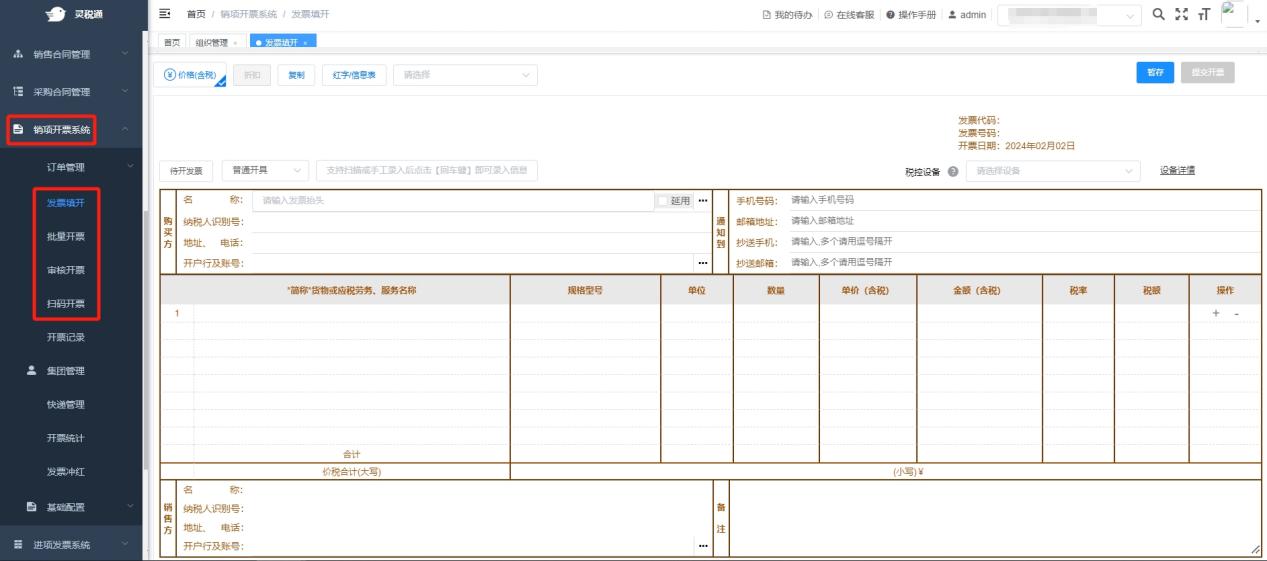
2. PC invoicingEnter the web version of the Ling Shui Tong · Intelligent Invoice Service Platform, log in using the enterprise account information bound on the LingShuiTong platform, and click "Output Invoicing System", the system supports invoice issuance, table card (static code) invoicing, generated invoicing code scan (dynamic code) invoicing, batch invoicing, settlement statement invoicing, API invoicing, and other invoicing methods.
First, batch invoicing. It supports importing a simple template to issue invoices in batches; simply fill in the product name, amount, and tax rate to issue invoices easily. Second, order invoicing. Standard interfaces are provided and can connect to charging systems such as cashier systems and order systems, supporting direct generation of invoicing data from order data to achieve error-free and timely invoicing. Third, support invoicing for special business scenarios. Support special business scenarios such as invoice limit splitting and discounted invoicing. In addition,LingshuitongPlatformIt also provides functions such as order split invoicing, order merged invoicing, month-end one-click invoicing, review-based invoicing, input VAT invoice verification and reimbursement, selection and certification, tax risk monitoring, and electronic archives system.If needed, you are welcome to contact us to obtain a login account and password for a trial.。 Beijing Kailing Technology Co., Ltd.——an enterprise business-finance-tax digitalization solution service provider. Kailing Technology provides solutions for sales management systems, procurement management systems, output invoicing systems, input invoice collection systems, imaging management systems, financial posting systems, electronic accounting archives, fully digitalized e-invoice and Leqi interfaces and other businesses according to enterprise needs, professionally and efficiently helping enterprises transform and upgrade their business-finance-tax digital management. If you have any business-finance-tax digital transformation needs, welcome to contact us. Beijing Kailing Technology will serve you wholeheartedly.
|