010-6097 4119Book a Demo


Practical Insights | These 4 types of fully digitalized e-invoices cannot be red-letter reversed!Published: 2024-06-26 16:56 Content timeliness statement (updated 2026-08-29) This article was originally published on 2024-06-26. The following are changes to current regulations related to this article since publication:
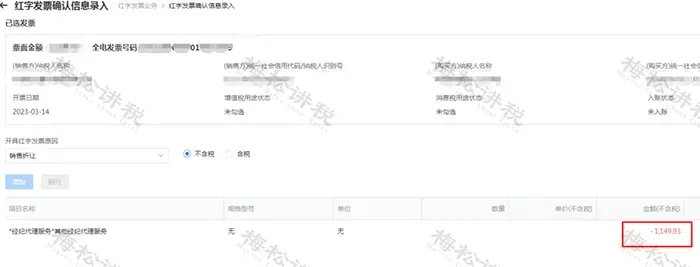
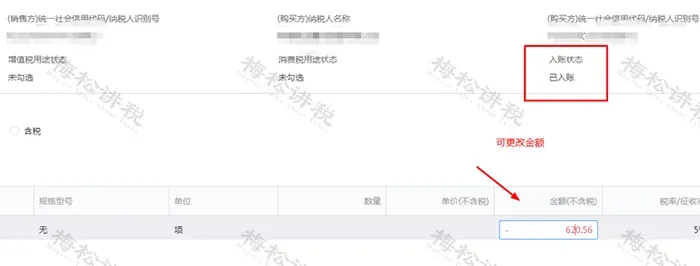
Fully digitalized e-invoice red-letter reversal carries risks and must never be done arbitrarily. These 4 types of fully digitalized e-invoices cannot be red-letter reversed! 01Note! 4 types of fully digitalized e-invoices cannot be red-flushed! Pilot taxpayerIn cases such as sales returns, incorrect invoicing, service suspension, and sales discounts, red-letter fully digitalized e-invoices may be issued according to regulations.However, there are 4 circumstances in which red-letter invoices are not allowed to be issued: (1) When the blue-letter invoice has been voided, determined as an abnormal deduction voucher, or locked (a red-letter confirmation form or information table has been initiated but no red-letter invoice has been issued, and the red-letter confirmation form or information table has not been revoked), a red-letter reversal is not allowed to be initiated; (2) When the VAT purpose of the blue invoice is "pending tax refund", "tax refunded", "deducted (refund upon change)", "tax refund on behalf", or "no tax refund and no deduction", initiating a red-letter reversal is not allowed; (3) Among the tax preference tags of the blue invoice, when the "Winter Olympics tax refund tag" is "Winter Olympics tax refund applied for", initiating a red-letter reversal is not allowed; (4) When initiating a red-letter reversal, if the counterparty taxpayer is in a status such as "abnormal" or "deregistered" and cannot log in to the system to perform relevant operations, initiating a red-letter reversal is not allowed. 02Can fully digitalized e-invoices be partially red-letter reversed? Fully digitalized e-invoices can of course be partially red-flushed, but partial red-flushing is only possible after the buyer has recorded it (the recording function of the tax system); otherwise, only full red-flushing is allowed. Scenario 1: If the purchaser has not yet performed accounting treatment,Initiated by sellerPartial red-letter reversal,Amount cannot be modified!
Scenario 2: Purchaser doesAfter booking operation, then the buyer or seller initiates a partial red-flush operation, and after the other party confirms, the sellerPartial red-letter reversal。
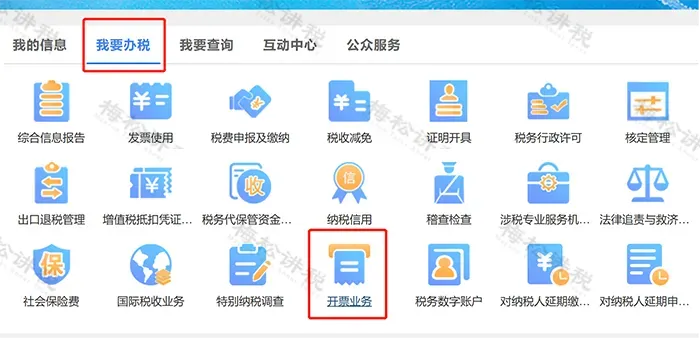
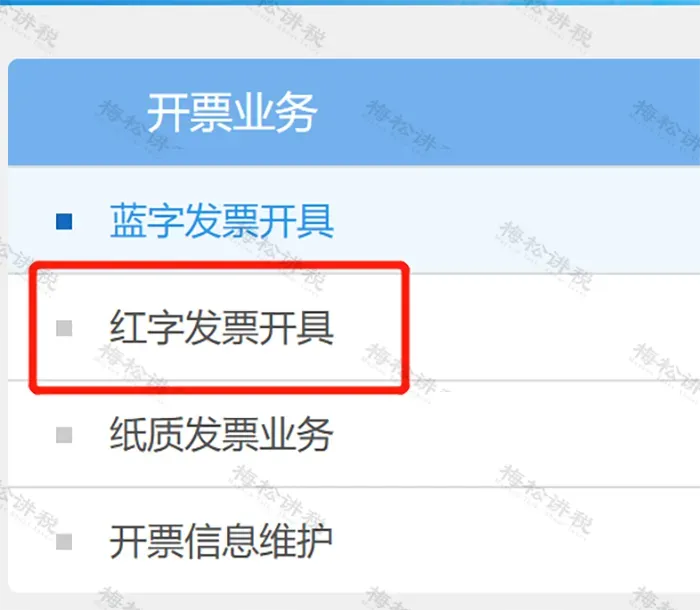
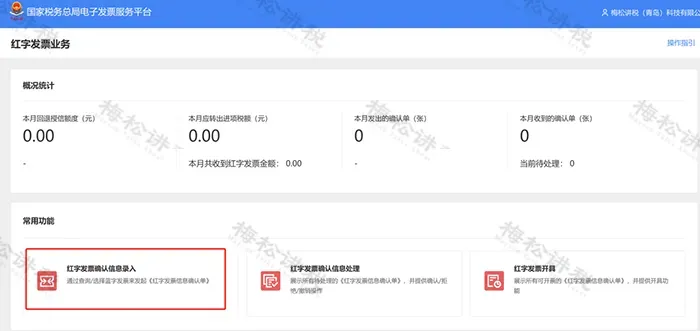
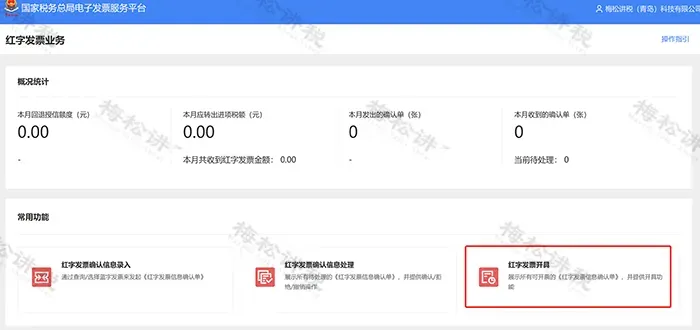
However, for the following 3 circumstances,Partial red-letter reversal is not allowed., only "full-amount red-letter reversal" is possible: (1) When the reason for red-letter reversal is "invoicing error", a full-amount red-letter reversal must be made; (2) If the corresponding "VAT preferential purpose tag" of the blue invoice is "pending full additional deduction for agricultural products" or "already used for full additional deduction for agricultural products", the first red-letter reversal may only fully reverse the non-additionally-deducted portion or fully reverse the entire invoice. If the non-additionally-deducted portion is fully reversed the first time, the second red-letter reversal may only fully reverse the remaining portion (i.e., the additionally-deducted portion); (3) When the blue invoice tag is "differential taxation - differential invoicing", a full red-letter reversal is required. 03Fully digitalized e-invoice red-letter reversal operation process Scenario 1: After the invoicing party issues a fully digitalized e-invoice, if the invoice recipient has not made purpose confirmation or accounting confirmation, the invoicing party, after filling out the Red-Letter Invoice Information Confirmation Form on the electronic invoice service platform, issues a full red-letter fully digitalized e-invoice without the need for confirmation by the invoice recipient. The specific operation steps are as follows: I. Log in to the Electronic Tax Bureau, [I Want to Handle Taxes]——[Invoicing Business]——[Red-Letter Invoice Issuance]. As shown in the figure below:
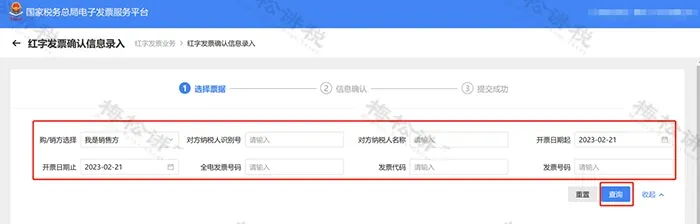
II. Select [Red-Letter Invoice Confirmation Information Entry], enter the corresponding blue-letter invoice information, and click [Query]
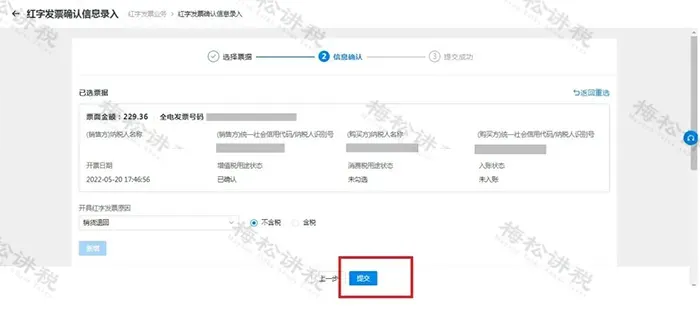
III. Click [Select] on the page, and the selected blue-letter invoice information will be automatically brought into the page.
IV. Click "Select" on the page to automatically bring the selected blue-letter invoice information into the page.
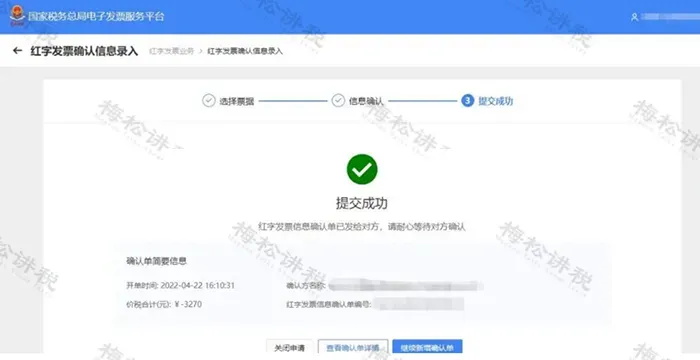
V. After the Confirmation Form is submitted successfully, select [Red-Letter Invoice Issuance], click the corresponding Confirmation Form, and the red-letter invoice can be issued. As shown in the figure below:
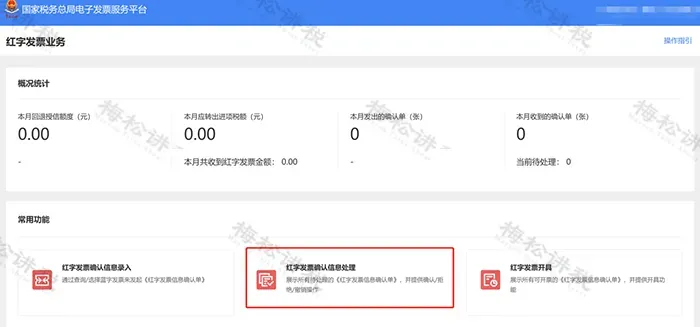
Scenario 2: The invoice recipient has already made purpose confirmation or accounting confirmation I. Use by the invoice recipient[Electronic Invoice Service Platform], either the invoicing party or the invoiced party may fill out and upload the "Red-Letter Invoice Information Confirmation Form" on the electronic invoice service platform. After confirmation by the other party on the electronic invoice service platform, the invoicing party may then issue the full or partial red-letter fully digitalized e-invoice. The confirmation steps are as follows: (1) The taxpayer logs in to the Electronic Tax Bureau, [I Want to Handle Taxes] — [Invoicing Business] — [Red-Letter Invoice Issuance] — [Red-Letter Invoice Confirmation Information Processing]. As shown in the figure below:
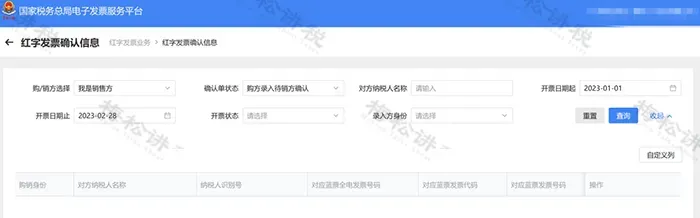
(2) Enter the query conditions and click the [Query] button.
(3) Click the [View] button to enter the page for information confirmation.
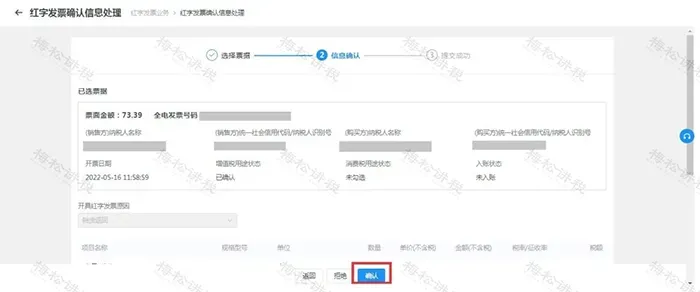
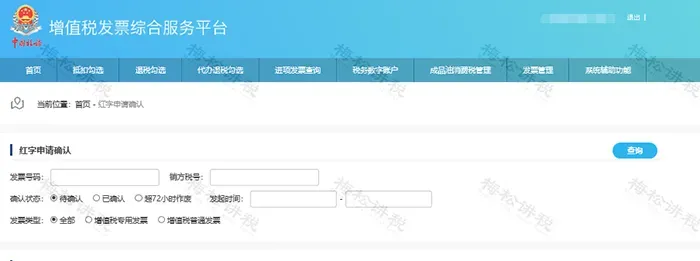
(4) Click the [Confirm] button, and a prompt will indicate successful confirmation. II. The invoice recipient continues to use[VAT Invoice Comprehensive Service Platform], the invoicing party fills out and uploads the Confirmation Form on the electronic invoice service platform, and after the receiving party confirms it on the VAT invoice comprehensive service platform, the invoicing party issues a full or partial red-letter fully digitalized e-invoice or red-letter paper invoice. The confirmation steps are as follows: (1) Select [Invoice Management] — [Red-Letter Application Confirmation] in sequence in the menu to enter the following interface.
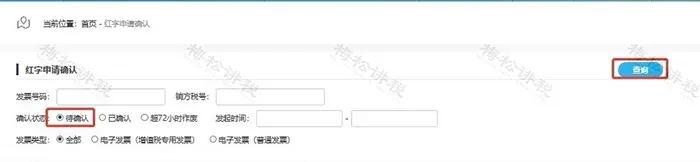
(2) Select "Pending Confirmation", enter the invoice number and seller identification number based on the invoice information, and click [Query].
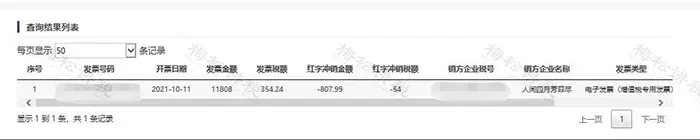
(3) The query results are shown in the figure below:
(4) Drag the slider to the right and click [Operate].
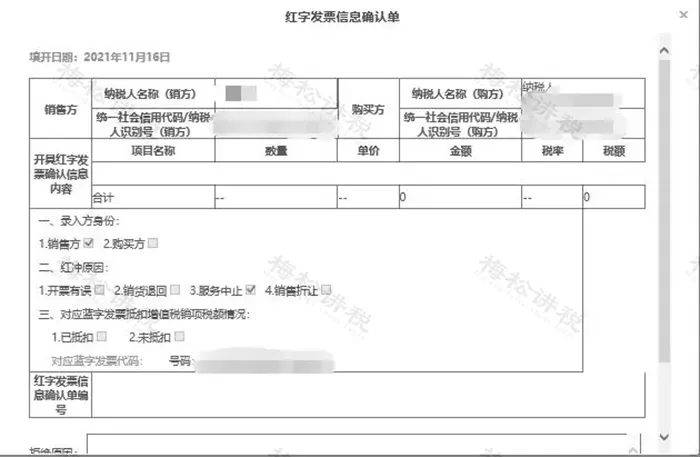
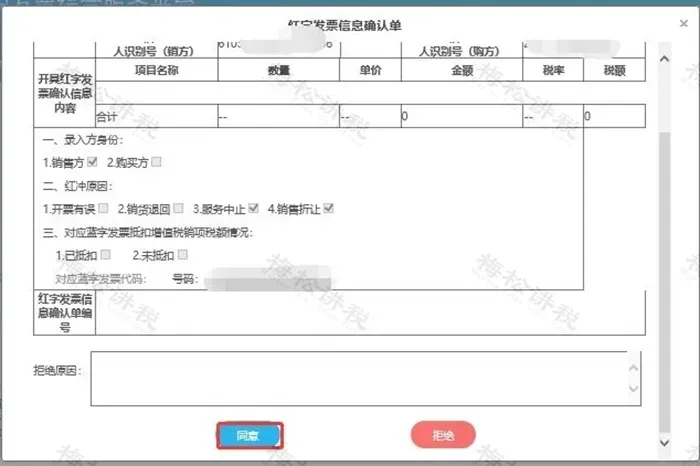
(5) A pop-up window appears, as shown in the figure below:
(6) In the pop-up window, check whether the data of the red-letter invoice information confirmation form is correct, slide down the vertical bar to enter the interface.
(7) After verification, click the [Agree] button.
III. After the Confirmation Form is submitted successfully, select [Red-Letter Invoice Issuance], click the corresponding Confirmation Form, and the red-letter invoice can be issued. As shown in the figure below:
The editor has also compiled a table on invoice red-letter reversal to help everyone remember!
048 key points that must be noted for fully digitalized e-invoice red-letter reversal 1、 Reason for red-flush reversalThe reason for red-flush reversal should be determined by the taxpayer based on the actual business situation. Note that if the commodity and service code of the original blue invoice is only goods or labor, the red-flush reasonSelecting "service suspension" is not allowed.: When the goods and services code is for services only, the red-letter reversal reasonSelecting "sales return" is not allowed.。 2、 Select the red-letter invoice typeThe red-ink reversal rules between invoice types are"New offsets old, electronic offsets paper,"Specific details are as follows:
3、 Confirm purpose and recordingIf the purpose of a fully digitalized e-invoice has not been confirmed and it has not been recorded, once the issuer initiates the red-ink reversal process, the corresponding e-invoice will be locked and the recipient will not be allowed to confirm the invoice purpose. If the purpose of a fully digitalized e-invoice has been confirmed and it has been recorded, and the issuer issues a partial red-letter invoice, the recipient is allowed to select the un-reversed portion of the e-invoice for deduction; if the issuer issues a full red-letter invoice, further deduction selection is not allowed. 4、 Time limit requirementsAfter a pilot taxpayer initiates the red-letter invoice issuance process, the counterparty's confirmation is subject to a time limit: after initiating the red-letter offset process,The invoicing party or the invoice recipient must confirm within 72 hours; if confirmation is not made within the specified time, the process is automatically voided, and if a red-letter invoice needs to be issued, the process must be initiated again. 5、 Available credit limitAfter pilot taxpayers issue fully digitalized e-invoices, if red-letter fully digitalized e-invoices are issued in the same month, the electronic invoice service platform will simultaneously increase their available credit limit.。 If a red-letter fully digitalized e-invoice is issued across months, or if the red-letter fully digitalized e-invoice issued cannot correspond to a fully digitalized e-invoice, the electronic invoice service platform will not increase the available credit limit for the current month. In the case of sales allowances, it will also not increase the available credit limit. 6、 One-to-one correspondence with the original blue invoiceFor the red-letter invoice issuance process initiated through the electronic invoice service platform, whether it is the Confirmation Form or the Information Form, it must correspond one-to-one with the original blue-letter invoice. 7、 Process for issuing voided red-letter invoicesWhen a pilot taxpayer issues an invoice through the electronic invoice service platform, when issuing a red-letter invoice, the red-letter invoice issuance process can be voided.,The specific rules are as follows: (1) For a red-letter confirmation form initiated by the seller that requires no confirmation, the seller is allowed to withdraw it before a red-letter invoice is issued; (2) After the initiator of the red-letter confirmation information submits the red-letter confirmation form, before the other party confirms it, modification is not allowed; the initiator may revoke the red-letter confirmation form; (3) For a red-letter confirmation form initiated by either the buyer or seller and confirmed by the counterparty, the initiating party is not allowed to cancel the red-letter confirmation form; the confirming party may cancel the confirmation form after confirmation and before issuing the red-letter invoice; (4) A red-letter confirmation form for which a red-letter invoice has already been issued may not be revoked. (5) After initiating a red-letter confirmation form and before issuing a red-letter invoice, if the original blue-letter invoice is determined to be an abnormal voucher, the system will automatically void the red-letter reversal process. 8. After pilot taxpayers issue red-letter invoices through the electronic invoice service platform, do they need to recover the invoices already issued? When a fully digitalized e-invoice issued by a pilot taxpayer through the electronic invoice service platform is reversed, there is no need to recover the reversed fully digitalized e-invoice or its paper printout.;When paper invoices issued through the electronic invoice service platform are red-ink reversed, the red-ink reversed paper invoices need to be recovered. 05Answers to other common questions in red-letter reversal practice 1. A pilot taxpayer has just issued a blue-letter invoice in the electronic tax bureau. Why is there no information after clicking the [Issue Red-Letter Invoice] module? After pilot taxpayers issue blue-letter invoices, if a red-letter invoice needs to be issued, they must log in to the Electronic Tax Bureau and, under [I Want to Handle Taxes]-[Invoicing Business]-[Red-Letter Invoice Issuance] or under [I Want to Handle Taxes]-[Tax Digital Account]-[Red-Letter Information Confirmation Form], click [Red-Letter Invoice Information Form Entry], select the invoice to be reversed, confirm the information, and click Submit. If the counterparty's confirmation is not required, click [Go to Issue Red-Letter Invoice] to issue the red-letter invoice; if the counterparty's confirmation is required, the red-letter invoice can only be issued after the counterparty confirms. 2. Why can't I issue a red-letter invoice in the [Red-Letter Invoice Issuance Module] after initiating the red-letter invoice information confirmation process? A red-letter invoice can be issued directly only when the status of the red-letter invoice information confirmation form is confirmed by both buyer and seller or does not require confirmation; otherwise, the red-letter invoice information form must be confirmed before issuance. For acquisition-type invoices, after deduction selection, initiating red-letter information does not require counterparty confirmation, and a red-letter invoice can be issued directly. 3. My enterprise is a pilot enterprise for fully digitalized e-invoices and has already issued fully digitalized e-invoices. Now I need to issue a red-letter reversal. Why can't I find the invoicing business module when logging into the electronic tax bureau now? When pilot taxpayers log in to the Electronic Tax Bureau, they should confirm whether the selected personnel permission is that of an invoicing clerk, legal representative, or financial officer. If a tax handler is selected to log in, there will be no invoicing business module. It is recommended to switch to an invoicing clerk, legal representative, or financial officer for the operation. 4. Why can I only issue a full-amount red-letter invoice when issuing a red-letter invoice on the electronic tax bureau? When the invoice recipient has not confirmed the use, the issuer initiates the Red-Letter Information Confirmation Form through the electronic tax bureau and then issues a full red-letter digitalized electronic invoice without the recipient's confirmation; If the invoice recipient has confirmed the purpose, either party to the purchase and sale may initiate a "Red-Letter Information Confirmation Form" in the Electronic Tax Bureau (when the invoice recipient is a non-pilot taxpayer, initiate and confirm it on the VAT Invoice Comprehensive Service Platform), and after confirmation by the other party, may choose to issue a full or partial red-letter fully digitalized e-invoice. 5. I am a pilot taxpayer and have already issued a red-letter information form in the VAT invoice management system but have not yet issued a red-letter invoice. Can I issue it directly in the electronic tax bureau? No. The red-letter information form and the red-letter confirmation form have not achieved mutual conversion. For red-letter information forms that pass verification, a red-letter invoice still needs to be issued through the VAT invoice management system. 6. I am a pilot taxpayer. If a fully digitalized e-invoice received through the electronic tax bureau is incorrect and has not been selected for deduction, can a red-letter invoice be issued? Yes, but only the invoicing party can initiate the process of issuing a red-letter invoice, and the reason for issuing the red-letter invoice should be selected as “incorrect invoicing.” 7. Can I view the red-letter information form issued by the VAT invoice management system in the electronic tax bureau? The taxpayer needs to log into the electronic tax bureau and, under the [I Want to Handle Taxes]-[Invoicing Business]-[Red-Letter Invoice Issuance] module, scroll down the page to view in the "Information Forms I Issued" module within "Red-Letter Invoice Confirmation Form Information"; to download and revoke, please operate in the value-added tax invoice management system. Source: internet Kailing Technology provides enterprise business-finance-tax digital product lines according to enterprise needs: Solutions for businesses including sales contract management system, procurement contract management system, fully digitalized Leqi interface project, output automatic invoicing system, employee expense control and reimbursement system, input VAT invoice management system, supply chain collaborative reconciliation system, image OCR recognition system, automatic financial bookkeeping system, and electronic accounting archives system, professionally and efficiently supporting the transformation and upgrading of enterprise business-finance-tax digital management. If you have any business-finance-tax digital transformation needs, welcome to contact us. Beijing Kailing Technology will serve you wholeheartedly.
|