
How much can 3,000 reimbursement documents per year actually save? Kailing Technology uses one account to calculate clearly the cost changes after an expense control system goes live

Every budget review, proposals for expense control projects almost always encounter the same question: how much money can this system actually save in a year after it goes live. The person asking wants to hear a crisp number, but those who have worked in finance know that this number should not be decided by the vendor on the enterprise's behalf—different workforce compositions, approval levels, and document types lead to different results. When Kailing Technology builds expense control reimbursement solutions, it is accustomed to putting the calculation assumptions out in the open first: based on 3,000 reimbursement documents per year, without filling in amounts for now, first break down the steps of a single document from creation to filing one cell at a time. In this article, Kailing Technology does not give a ready-made answer, only an account into which you can fill in your own numbers.
▍First make the premise clear: why use "three thousand documents" instead of an amount
One easily misguided step in expense control benefit calculation is tying the measurement basis to reimbursement amount. Amount only reflects how much was spent, not how much work went into processing that money. Regardless of amount, a document occupies a similar number of actions along the chain of organizing, form filling, approval, payment, voucher creation, and archiving; the process is not skipped just because the amount is small.
So the correct measure is "processing cost per document × annual document volume", not "total reimbursement amount × some percentage". 3,000 documents per year is a reference magnitude that is easy to understand horizontally. Document volume is directly related to headcount and travel frequency, so converting it to your own situation is not difficult. The number of documents can also be counted directly from the ledger, unlike work hours, which are described differently by different people.
▍Opening up a reimbursement form: money is spent in six invisible steps
The cost of offline reimbursement is hard to calculate because it is not attached to any account but scattered across fragmented actions in six stages.
- Organizing and pasting: Employees sort accumulated invoices into piles, trim them, and paste them onto pasting sheets. Damaged invoice surfaces must be found again. This generates no management value but genuinely takes time.
- Manual reimbursement form filling: Copy expense type, date, amount, and reason cell by cell, then check again after filling, afraid the numbers won't match and it will be returned.
- Sign off level by level: The document becomes a piece of paper that must move through physical space. When leaders are on business trips, on different floors, or in different cities, the document sits on someone's desk.
- Payment and receipts: The cashier exports the payment file, pays transaction by transaction via online banking, then downloads receipts one by one and manually attaches them back. The more transactions there are, the more likely mismatches become.
- Manual voucher creation: Re-entering reimbursement form fields into financial software to generate vouchers at month-end, with repetitive work concentrated in the closing days.
- Paper binding and archiving: Voucher printing, sorting, binding, labeling, and filing consume both labor hours and space.

With the six grids laid out, it's clear: only the approval grid truly requires human judgment; the other five grids are all about moving and copying. Once the volume reaches the level of three thousand sheets, these actions will consume the capacity of several positions in a manner of "occurring daily, each time brief."
▍After go-live: which steps Kailing Technology removes, and which it only shortens
A common way to overestimate returns in calculations is to write every step as "eliminated." Some will disappear, while others merely become shorter; only by accounting for them separately can the review hold up. First, look at the few cells that will disappear.
- Organizing and pasting can be eliminated: Kailing Technology's Lingdong Reimbursement moves collection to employees' phones: besides scanning codes, those lying in WeChat card wallets, forwarded by others in chat records, received in email, along with manual supplementary entry and paper invoice photos, can all enter the same intelligent invoice folder.
- Manual form filling can be eliminated: Check the invoices to be reimbursed in the invoice folder, and the reimbursement form is generated immediately; the content is populated according to the invoice information and can still be modified, and the document and invoice are mutually traceable.
- Paper document delivery can be eliminated: Approval workflows are configured in the system yourself, and approvals can be done on both Web and mobile. Documents no longer need to be carried between floors, and progress is visible at any time.
- Download the receipt and you can remove: Payment files are exported in the format recognized by each bank and then processed in batches through online banking, or online payments can be made through bank-enterprise direct connection with more than 100 banks. Bank receipts are automatically returned and attached to the corresponding form.
- Manual voucher creation can be eliminated: After the reimbursement form is completed, the middleware matches the document fields to accounts according to established rules, and vouchers are generated and pushed into the financial software the enterprise is using. This channel is ready-made and requires no additional development.
- Paper binding can be eliminated: At the moment of booking, the three source files of the invoice—PDF, OFD and XML—are retained together; archiving is no longer a separate action, and documents, invoice source files and payment receipts sink into the electronic accounting archives as a complete set.
Look again at the two shortened cells. Approval will not disappear; someone still has to be responsible for whether it is compliant and whether the budget is sufficient. What changes is that Kailing Technology lets AI digital employees first translate the company's internal travel and subsidy management policy into executable rules. Expense standards, whether documents are complete, whether invoices are compliant, and how much budget remains can be judged by machines first, and only those that hit risk are passed to a person. Verification will also not disappear; it just merges check once, retrieve the file again, and verify again into one step: scan-and-flash entry directly requests the source file back from the tax bureau. These two cells should be recorded as shortened duration, not zeroed-out steps.

▍Don't miss the four hidden costs invisible on the books
The first six cells calculate explicit labor; what is more easily overlooked are the following four items—usually not in the budget table, but appearing all at once when problems occur.
- Invoice verification fees: Third-party verification channels usually charge per use, and the larger the invoice volume, the more this expense rises. This is only mentioned here; it deserves a separate calculation.
- Wrong-order rework: When a document is returned, it triggers a whole chain: employees supplementing receipts, finance rechecking, and approvers re-signing. Whether the header is correct, whether the tax number is wrong, whether the address, phone, and account are consistent, along with signature verification and duplicate reimbursement interception, are all done at the moment of collection, saving back-and-forth time across multiple positions.
- Archive retrieval: During audits and annual inspections, source files of documents and invoices from a year ago or even earlier must be retrieved. In a paper archive, this means searching manually, and each retrieval takes half a day.
- Audit and risk response: When invoice authenticity is in doubt, the same invoice is reimbursed twice, or a reimbursed invoice is red-ink reversed by the seller, the handling cost has no upper limit. Locking the tax booking status, duplicate checking, and blacklist traceability at the time of initiating reimbursement are investments whose value only shows when something goes wrong.
There is a rule of thumb for calculating hidden costs: don't estimate by feeling; fill it in using the actual number of occurrences over the past three years. How many reworks, how many archive adjustments, and how many inspections were handled—enterprises have their own records.
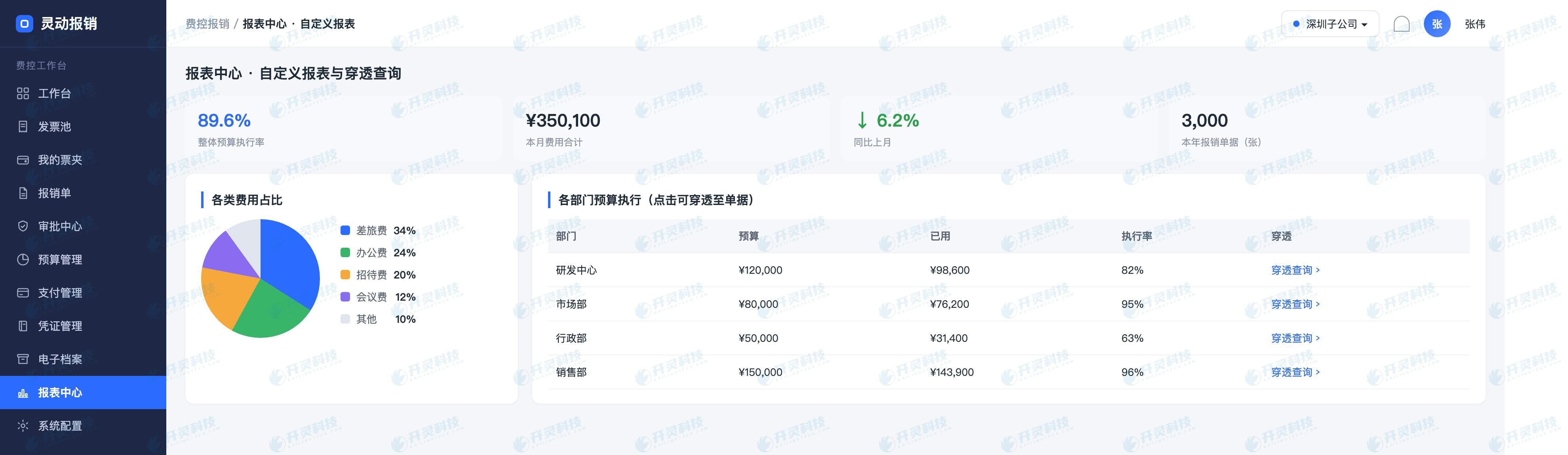
▍How to run this calculation against your own company's document volume
Turn the above breakdown into a table that can be handed to management, roughly in four steps.
- ① Count your annual document volume: Take the number of reimbursement forms in a normal month, multiply by twelve, and then adjust for peak and off-peak seasons. Three thousand is only a reference; your base may be larger or smaller.
- ② Assign positions and action counts to each grid: Organize who does what, who fills out forms, how many approval levels, how many payment transactions, how many vouchers, and how many volumes to bind. Count the number of times first; leave unit prices blank for now.
- ③ Distinguish between "disappearing" and "becoming shorter": The cells that will disappear are reset to zero according to the number of actions; for the cells that only become shorter, give a relatively conservative range. Better to estimate low than to have the entire table overturned during review.
- ④ List hidden costs on a separate line: Verification fees are charged by invoice volume, while rework, file retrieval, and audits are charged by the actual number of occurrences in the past three years, each as separate line items, and should not be mixed with labor.
After completing the four steps, enter your own labor unit price to get the number that belongs to this enterprise. Its value lies in the fact that every line can be traced to a specific action, rather than a vague "significant efficiency improvement." This table often also answers another question: Is financial capacity constrained by insufficient staff, or by too many actions in the chain that could have been avoided?
▍FAQ
Q: After the expense control system goes live, roughly how long until changes are visible in the data?
A: What changes first is the chain itself: invoices enter the invoice folder the same day, reimbursement forms are generated by selection, and receipts are automatically returned. These can be directly observed after go-live and completion of process configuration. Month-end links concentrated at the end of the cycle, such as voucher preparation, archiving, and archive retrieval, generally require one to two complete reimbursement and closing cycles before trends can be seen. It is recommended to compare by cycle, not by day.
Q: For a small enterprise with only a few hundred documents a year, is it still worth calculating this account?
A: It is worth calculating, but the conclusion should be drawn by yourself. When document volume is small, the explicit labor savings are indeed limited. At this point, more attention should be paid to the hidden items—whether duplicate reimbursements have occurred, whether separate fees have been paid for verification, and whether invoice source files can be immediately produced during archive retrieval. If these links have been trouble-free for the past two or three years, it is normal for the calculation results to be conservative; conversely, small-volume enterprises often lack manpower even more in compliance links.
Q: Should this account include the investment in the system itself?
A: Yes, it should be calculated. It is recommended to place it on the other side of the same table and align it by the same period standard. The benefit side is the actions that disappear, the time shortened, and the hidden expenses reduced; the investment side is system fees, integration and configuration investment, and the adaptation period for employees and finance. Only when both sides are placed together can management see a complete account.
Q: Can subsidiaries of different sizes be calculated together in one table?
A: Yes, they can be combined, but it is recommended to separate first and combine later. Expense standards, approval levels, and payment accounts often differ by entity, and document processing paths also differ, so counting actions separately is more accurate; at the system level, multiple organizations, roles, and processes are supported, with data isolation and independent permissions, and the group can then consolidate under a unified basis, making the general ledger more defensible.
If you want to calculate this account based on your own enterprise's document volume, welcome to work with Kailing Technology consultants to break down the criteria cell by cell: https://www.kailingteck.com/feikong/ .
As a comprehensive business-finance-tax digitalization solution service provider, Kailing Technology provides business-finance-tax management digital transformation products and operational services for various government agencies, institutions, and large, medium, and small enterprises. The product line includes:
Solutions for businesses including sales contract management system, procurement contract management system, fully digitalized Leqi interface project, output automatic invoicing system, reverse invoicing system, invoice issuance for individuals system, employee expense control and reimbursement system, input VAT invoice management system, supply chain collaborative reconciliation system, image OCR recognition system, automatic financial bookkeeping system, and electronic accounting archives system, comprehensively driving the digitalization process across various fields.
If you have any business-finance-tax digital transformation needs, welcome to contact us. Beijing Kailing Technology will serve you wholeheartedly.

Keywords: Kailing Technology, Lingdong Reimbursement, expense control reimbursement system, reimbursement cost calculation, reimbursement document processing, bank-enterprise direct connection, reimbursement form to voucher conversion, electronic accounting archives
As a comprehensive business-finance-tax digitalization solution service provider, Kailing Technology provides business-finance-tax management digital transformation products and operational services for various government agencies, institutions, and large, medium, and small enterprises. The product line includes: solutions for sales contract management system, procurement contract management system, fully digitalized Leqi interface project, automatic output invoicing system, reverse invoicing system, invoice issuance for individuals system, employee expense control and reimbursement system, input VAT invoice management system, supply chain collaborative reconciliation system, image AI OCR recognition system, automatic financial bookkeeping system, electronic accounting archives system, etc., comprehensively driving the digitalization process across various fields.
Consultation Hotline: 18513895936 / 010-60974119 Location: Beijing