The stack of signed delivery notes the driver brings back is placed into the scanner, which automatically recognizes the order number, merges the copies, and writes back to ERP to complete receipt. No more typing order numbers one by one, no more waiting for clerks to free up time—the receipt enters the system the same day.
Recorded on-site at the customer site, fully running through the process from scanning the entire stack to ERP return signing
It is not that no one manages it, but that relying on people to manage cannot sustain the volume. Once order volume rises, every link leaks.
Recognition does not rely on just one method; three checkpoints provide layered fallback, minimizing the proportion requiring manual intervention
No need to hold up a phone and photograph them one by one. Connect the scanner to the system, place the paper, press start, and documents come in one by one automatically, with thumbnails laid out in real time, scanning and recognizing as you go.
First scan the QR code on the document. If it cannot be scanned, use local OCR to recognize the printed document number. Only if it still cannot be recognized is it handed to AI vision as a fallback. In actual operation, 85% of documents are recognized in the first two steps.
For the same document number, no matter how many copies are returned, the system automatically merges them into one entry and records the number of copies, preventing duplicate sign-back and inflating the ledger count.
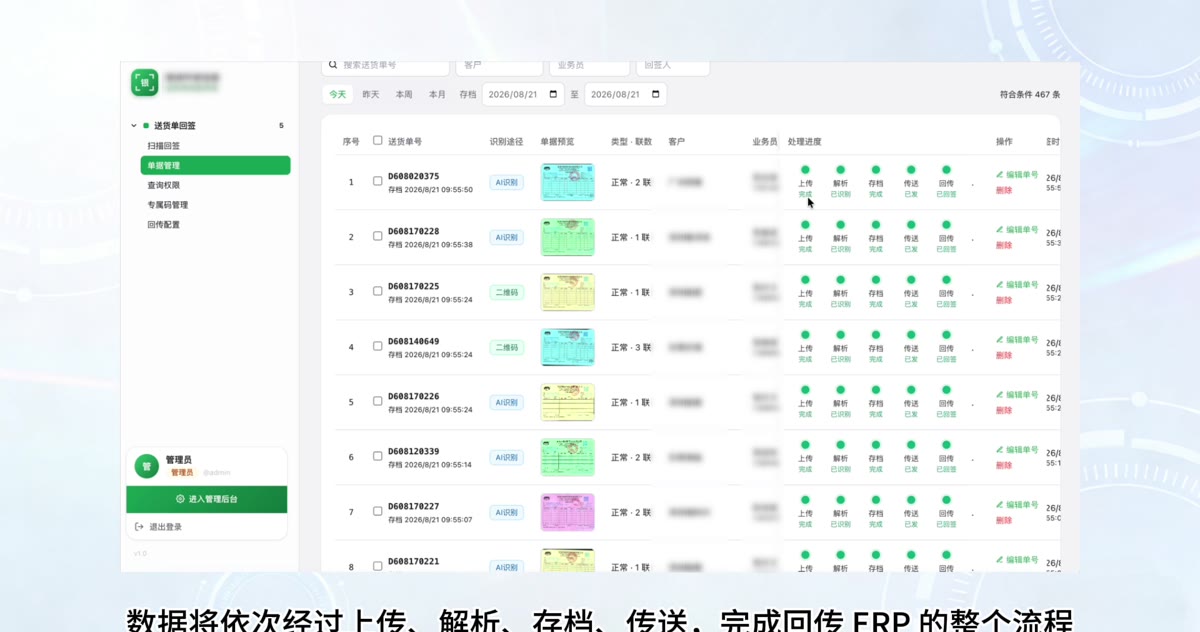
Once the order number is recognized, the ERP is immediately notified to complete receipt, and the customer, salesperson, delivery date, and license plate are written back and archived by the ERP. Orders with failed write-back are listed separately and can be retransmitted with one click.
When salespeople enter through the official account, the system automatically identifies them by WeChat identity and lists only the orders they submitted themselves; roles such as storage and transportation, finance, and business operations see the full volume. Price and quantity will not flow to people who should not see them.
The full process requires no manual entry of document numbers; only the few documents that cannot be recognized stop at the third step for someone to supplement.
Different positions have different habits; the entry point does not force uniformity, and after entry, the same recognition and re-signing logic is followed
Suitable for clerical positions that centrally process stacks of receipts every day. Place paper and it scans automatically one by one, thumbnails spread out in real time, and recognition results are visible and editable on the spot.
Suitable for drivers on the road and salespeople at customer sites submitting documents on the spot. Open WeChat and use it without installing an app; after taking a photo, it automatically compresses, uploads, and recognizes, with separate entries for normal and exception cases.
Suitable for the few cases where documents are damaged, handwriting is blurry, and none of the three checks can recognize them. The system lists the pending number list, and manual entry completes the sign-off.
The following screenshots are taken from the customer's actual operating environment on site; document images and customer information have been anonymized
The following are the actual operating data of the system at an environmental protection packaging manufacturing enterprise in South China
The same logic applies to any industry that relies on paper delivery notes to confirm receipt and whose volume is too large for manual handling.
Multi-copy delivery notes, settlement by order and monthly reconciliation: the receipt is the only basis for financial confirmation of rights.
High daily delivery frequency, large order volume, and scattered drivers; the pressure of receipt collection and entry is concentrated on clerks.
The customer has many outlets and signers are not fixed, and documents are often damaged or soiled, requiring multi-layer recognition as a fallback.
From demo to launch to long-term operation, every stage has someone who can handle it
Provides an online demo environment where you can try recognition on the spot using sample documents from your company.
Integrate according to your existing ERP's interface specifications; write-back fields and trigger timing are configurable.
Supports private deployment, with the system and document images kept on the enterprise's internal network servers.
Recognition strategies are continuously optimized, with version upgrades and routine operation inspections provided.
Bring a sample of your company's delivery note, and we will run recognition and signed return on real documents on site. See the results before discussing implementation