
Kailing Technology's expense control and reimbursement system smart invoice folder collects invoices from card wallets, chat records, and email in one go
In the last two days of the month, the same scene often appears at workstations: a stack of crumpled paper receipts piled next to the keyboard, taxi tickets tucked in wallet compartments, the e-invoice for the team-building dinner lost in WeChat chat history, the flight itinerary still not downloaded from email, and only a QR code left for the fully digitalized e-invoice a customer issued last week. Before even starting to fill out the reimbursement form, just gathering all the receipts takes up an entire lunch break—finding receipts, downloading, printing, trimming, pasting onto A4 paper, and still worrying about missing one. When many employees mention reimbursement, the first thought that comes to mind is not "filling out forms is annoying," but "I don't know where to start with the receipts." When Kailing Technology was refining the Lingdong Reimbursement employee expense control and reimbursement system, it placed this step at the starting point of the entire chain: let invoices come in on their own first, then talk about how to fill out reimbursement.
▍First see clearly: what blocks employees is never filling out forms, but "gathering invoices"
Break down a single reimbursement and the ranking of steps where employees actually spend time is often different from what finance imagines. Filling out the form is really just a few fields, approval is waiting, and payment is the system's job; what truly consumes people is the unmanaged "gathering of invoices" beforehand—invoices are scattered in completely different places, and the way to retrieve them differs from place to place.
- Paper invoices— Taxi receipts, parking receipts, restaurant roll receipts, and fixed-amount receipts pile up in wallets and drawers, only remembered and counted before reimbursement, often with worn edges and blurred text.
- Invoices in WeChat— After the merchant issues the invoice, it is pushed directly to the WeChat card wallet, or sent as a file in the chat history. Looking back through the chat history a few weeks later is basically a matter of luck.
- Invoices in the mailbox—— Air tickets, hotels, and online services mostly send invoices to email, mixed among hundreds of emails, requiring searching keyword by keyword and downloading attachments one by one.
- fully digitalized e-invoice—— The invoicing party provides a string of numbers or a QR code, and employees must look it up and download PDF/OFD/XML themselves; many people do not know which format to download and simply take a screenshot.
Four sources, four sets of retrieval methods, and in between a manual transfer is still needed: download, rename, print, paste. By the time it reaches finance, finance checks each one for authenticity, verifies the header and tax number, and checks whether it has been reimbursed before — the same batch of invoices is processed over and over for two or three rounds. This segment has no business value at all, yet it genuinely consumes the working hours of employees and finance. So the problem is not that "employees are uncooperative", but that the entry point for reimbursement is scattered from the very beginning.
▍Kailing Technology's approach: letting invoices file themselves instead of people retrieving them everywhere
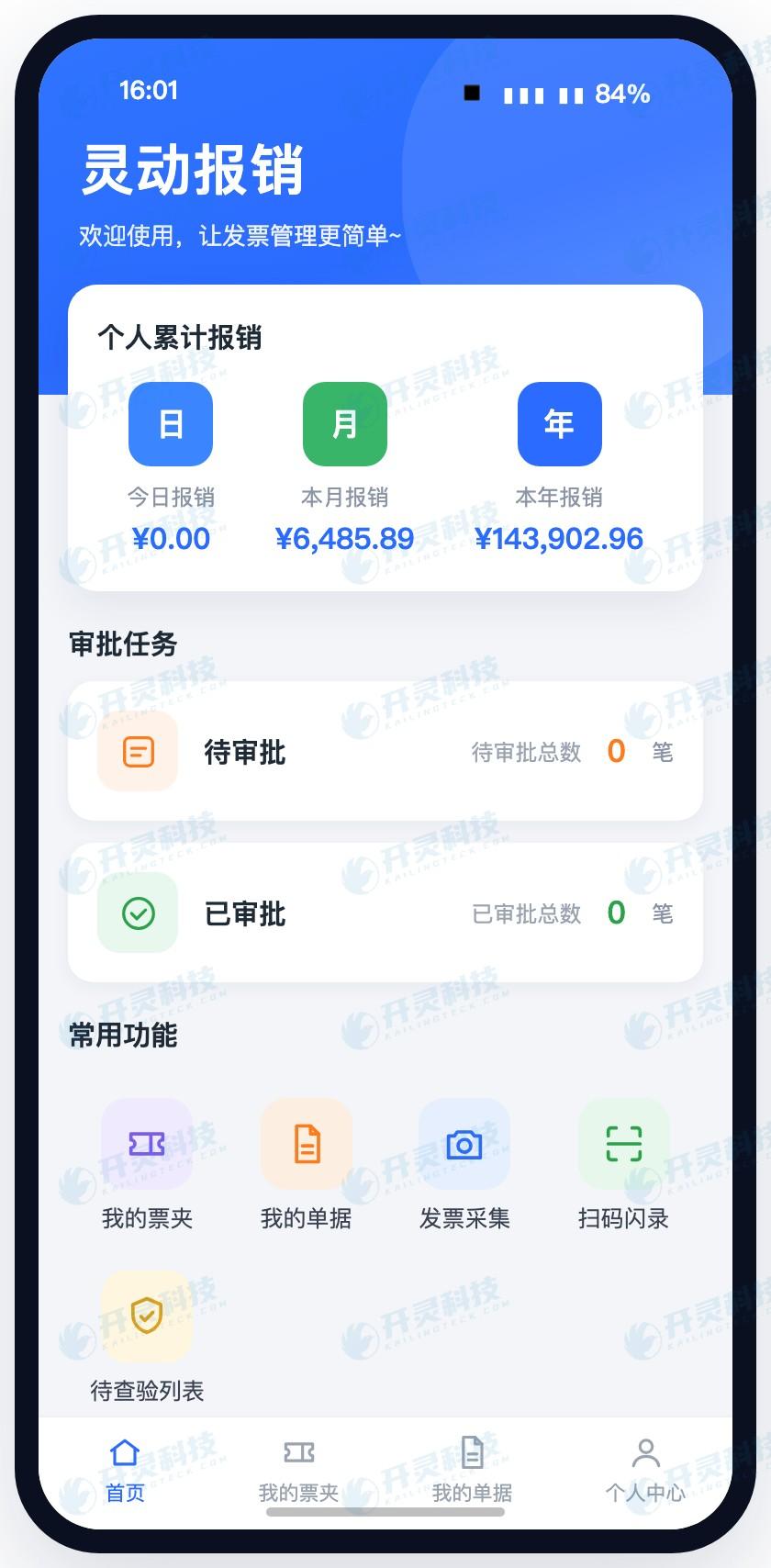
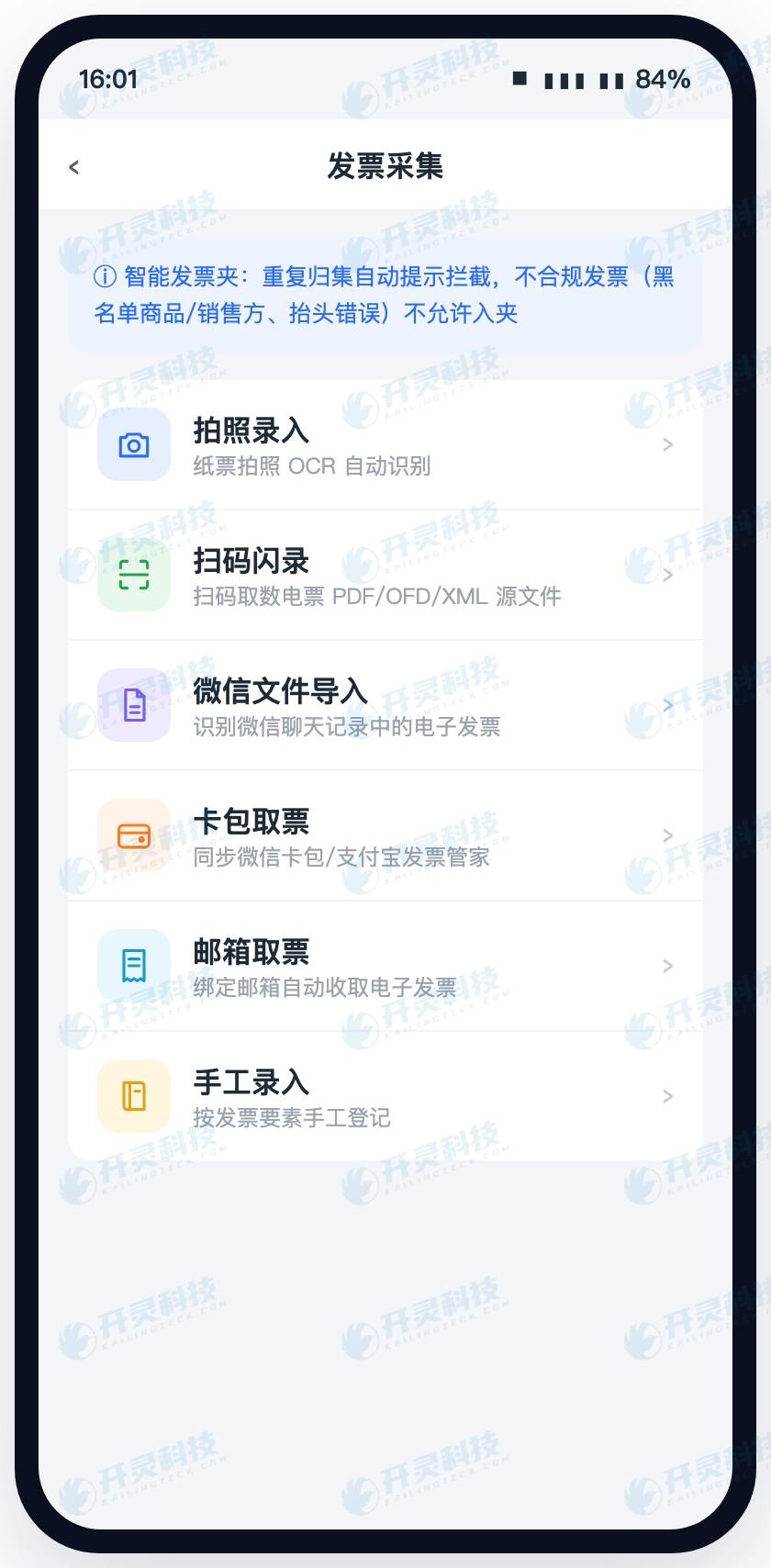
Lingdong Reimbursement turns this entry point into a "smart invoice folder", usable on mini-programs, APP, and web. The core idea is: wherever employees get an invoice, they collect it there, without needing to download first and then upload. Kailing Technology integrates common invoice retrieval channels into the same collection entry, completing collection in one go.
- Scan code collection—— Scan the QR code on the invoice, and the invoice goes into the folder; with the scan-and-flash-entry method, the system also retrieves and stores the PDF, OFD, and XML from the tax side—these are exactly the originals required to be retained for reimbursement and booking under Ministry of Finance Document No. 6, so employees do not have to figure out which one to save.
- WeChat Card Wallet sync— E-invoices pushed by merchants to the card wallet are directly collected into the invoice folder through card wallet sync, without first transferring them to a computer and uploading them again.
- Chat record file recognition— Invoices sent as files in WeChat chats can be identified and retrieved through chat records, eliminating the series of steps of scrolling through records, saving files, and then uploading.
- Email invoice retrieval—— Email synchronization extracts and collects invoice attachments from the mailbox, so tickets such as air tickets, hotels, and online subscriptions that are only sent by email and not on paper no longer need to be searched for one by one.
- One-click collection of fully digitalized e-invoices—— For fully digitalized e-invoice scenarios, one-click aggregation is supported, so employees do not need to determine which format to download themselves.
- Paper invoice photographing and manual entry— If employees still have paper invoices on hand, they can take a photo and upload it to file it into the invoice folder; occasionally, for invoices the system cannot fully recognize at once, manually supplementing a few fields also allows them to be filed.
In other words, the employee's action is compressed into one: when receiving the invoice, collect it in passing and casually store it in their own invoice wallet. As for what type of invoice it is, whether the source file is needed, and whether the format is correct, that is for the system to worry about. Kailing Technology also allows enterprises to enable strict control as needed, directly blocking non-compliant invoices outside the invoice wallet—employees know at the moment of entry whether the invoice has a problem, rather than redoing work only after reimbursement is rejected.
▍Collection is not the end: the personal invoice pool makes "what invoices I have and whether they're used" clear at a glance
After invoices are received, there must be a place for them to stay. Lingdong Reimbursement gives each employee a personal invoice pool; invoices collected from various channels all fall under their own name and can be browsed by time or type, and different invoice folders can also be created for classification based on the invoice pool—for example, grouping the air tickets, hotels, and local transportation from one business trip together, and placing daily entertainment meal expenses in a separate folder.
For employees, the more tangible change is visible status: which invoice has already been reimbursed, which one is still unused, and which one has verification issues can be seen on their own phone without asking finance. The previous uncertainty of "did I miss reimbursing one last month" largely came from invoices not being in one's own hands and the absence of a ledger. With a personal invoice pool, whether an invoice exists and whether it has been used becomes something one can confirm oneself.

▍From invoice folder to reimbursement form: one click to create the form, and form and invoice can find each other
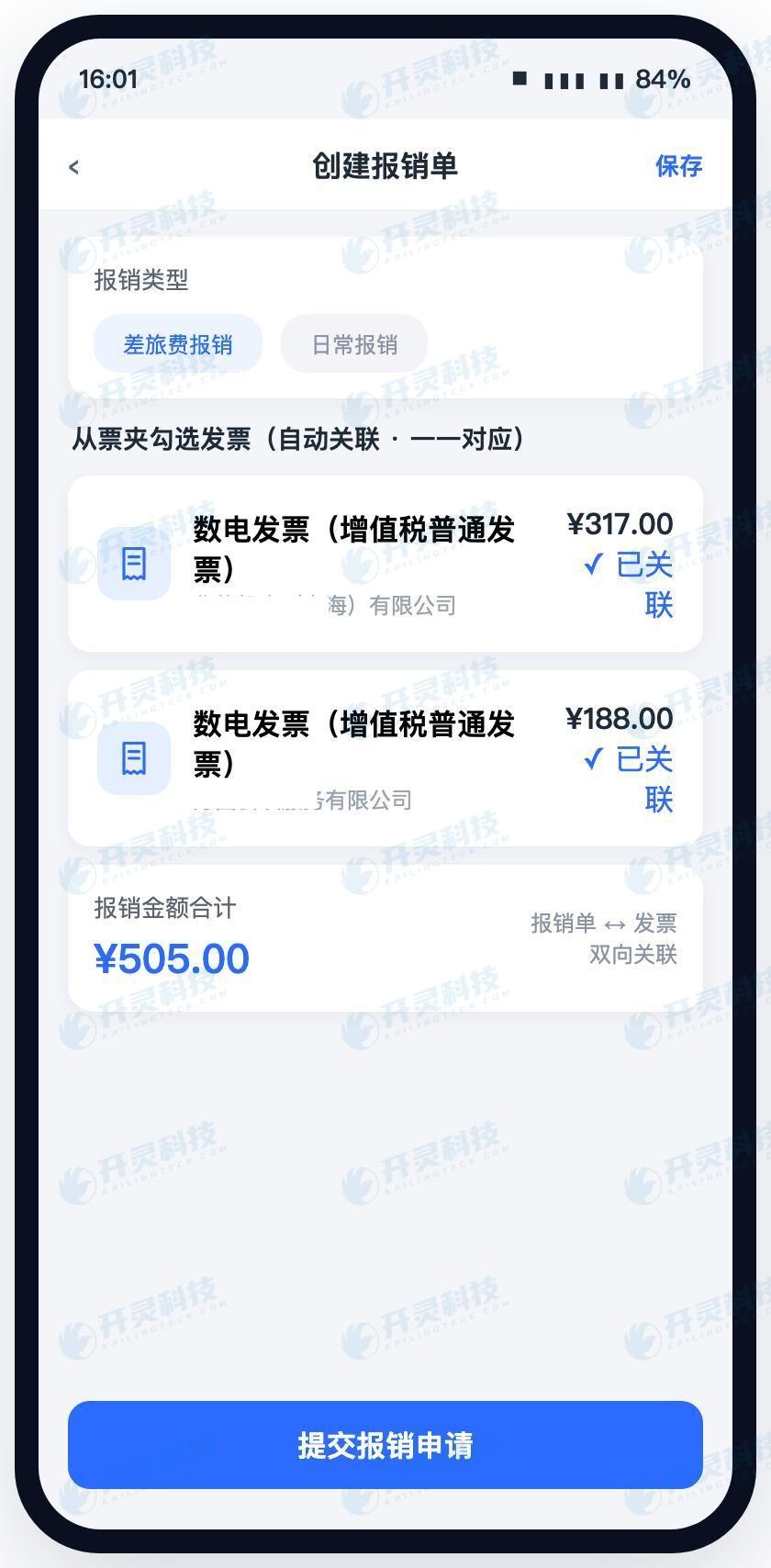
Once the problem of gathering invoices is solved, the step of filling out forms also becomes lighter. Employees check the invoices to be reimbursed this time in the invoice folder, and the system directly generates the associated reimbursement form. The reimbursement content can be automatically populated based on the invoice content (with manual adjustment when needed), or filled in by the user according to the actual business situation. Fields that originally had to be copied one by one, such as amount, invoice type, and number of invoices, no longer need to be moved by hand.
After a deal is closed, documents and invoices are bidirectionally linked: opening a reimbursement form shows which invoices are attached, and opening an invoice shows which form it is used on and what step it is currently at. When reimbursement is initiated, the invoice automatically locks its tax booking status, and reimbursement progress is linked in real time with the invoice ledger — employees save one more "where exactly is this form" inquiry, and finance no longer needs to cross-check between two lists.
This also means that the act of "pasting invoices" itself can exit the stage. When paper copies are truly needed, the reimbursement form and invoice can be printed together, and employees outside can remotely use the company's printer via mobile phone; on the finance side, centralized batch printing is also available. Paper is no longer the carrier of the process, but merely a result output when needed.
▍The same invoice will not be reimbursed twice: the alert occurs at the moment it enters the folder
Multi-channel collection brings a new problem: the same invoice may come in through two paths. For example, for an electronic catering invoice, the merchant both pushed it to the card wallet and sent the file in a group chat; if the employee receives it on both sides, there will be two records in the invoice folder. Lingdong Reimbursement intercepts this step—when the same invoice is repeatedly collected, it gives a prompt and does not allow duplicate addition.
The location of this prompt is critical. It occurs at the moment the employee receives the invoice, rather than waiting until the reimbursement form is submitted and finance checks for duplicates before it is rejected. For employees, it means one less rework; for finance, it means one less communication. The old problem of duplicate reimbursement is largely eliminated at the source.
▍FAQ
Q: For invoices received in WeChat, do I still need to transfer them to a computer before uploading?
A: No need. Lingdong Reimbursement's smart invoice folder supports WeChat card wallet synchronization and chat record file recognition. Electronic invoices pushed by merchants to the card wallet and invoices sent as files in chats can all be directly aggregated into the personal invoice pool, without needing to first download to a computer and upload again.
Q: What settings are needed to retrieve invoices from email? Will it read my other emails?
A: Email invoice retrieval obtains invoice attachments through email synchronization. A one-time email authorization configuration is required according to system prompts, after which newly arriving invoices can be continuously aggregated. Aggregation targets invoice attachments. The specific synchronization scope and permissions can be configured during implementation according to the enterprise's information security requirements.
Q: What happens if the same invoice is accidentally received twice?
A: The system will prompt duplicates during aggregation and will not allow duplicate addition to the invoice folder. The prompt occurs at the moment of invoice receipt, without waiting until after reimbursement submission to be returned.
Q: If I change phones or departments, will invoices previously stored in the invoice folder be lost?
A: After invoices are collected, they are stored in the personal invoice pool and do not depend on a particular mobile phone. After switching devices and logging in again, they can continue to be viewed. When personnel positions change, invoice ownership and viewing permissions are handled according to the enterprise's configured multi-organization and multi-role rules.
Q: Do paper invoices still need to be pasted onto A4 paper?
A: Paper invoices can be photographed and uploaded, recognized by OCR, and then enter the invoice pool. The process itself no longer depends on pasting. If internal or external inspections still require paper copies, reimbursement forms and invoices can be printed together, and even when traveling, employees can remotely use the company printer through their mobile phones.
Want to know exactly how many places your company's invoices are scattered across? Kailing Technology will accompany you to first clarify the invoice collection entry points: https://www.kailingteck.com/feikong/ .
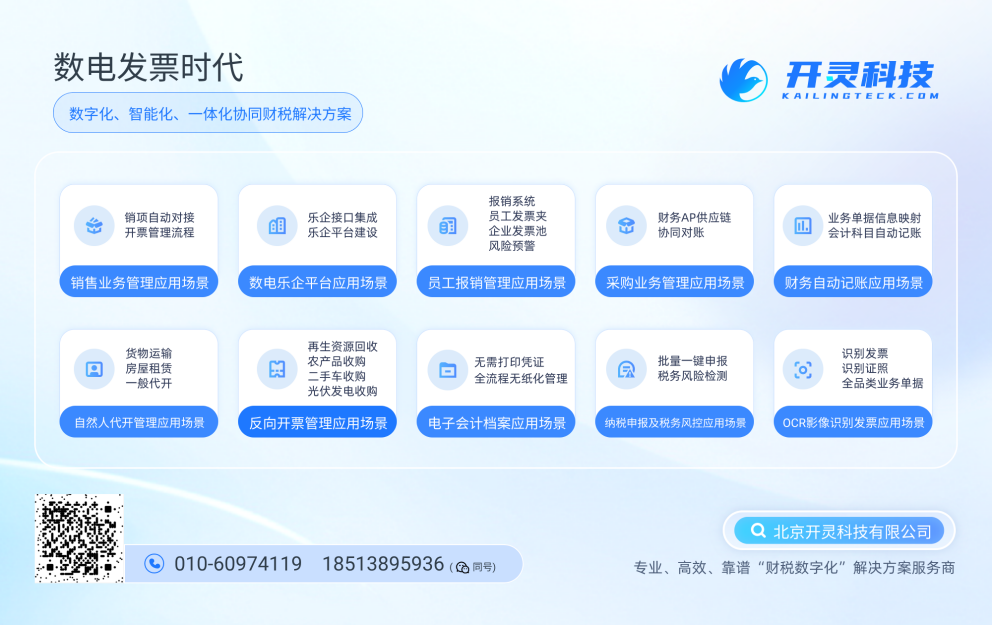
As a comprehensive business-finance-tax digitalization solution service provider, Kailing Technology provides business-finance-tax management digital transformation products and operational services for various government agencies, institutions, and large, medium, and small enterprises. The product line includes:
Solutions for businesses including sales contract management system, procurement contract management system, fully digitalized Leqi interface project, output automatic invoicing system, reverse invoicing system, invoice issuance for individuals system, employee expense control and reimbursement system, input VAT invoice management system, supply chain collaborative reconciliation system, image OCR recognition system, automatic financial bookkeeping system, and electronic accounting archives system, comprehensively driving the digitalization process across various fields.
If you have any business-finance-tax digital transformation needs, welcome to contact us. Beijing Kailing Technology will serve you wholeheartedly.
Keywords: Kailing Technology, Lingdong Reimbursement, Smart Invoice Folder, multi-channel invoice collection, WeChat Card Wallet invoice retrieval, email invoice retrieval, one-click collection of fully digitalized e-invoices, personal invoice pool, employee expense control reimbursement system, duplicate invoice collection alerts
As a comprehensive business-finance-tax digitalization solution service provider, Kailing Technology provides business-finance-tax management digital transformation products and operational services for various government agencies, institutions, and large, medium, and small enterprises. The product line includes: solutions for sales contract management system, procurement contract management system, fully digitalized Leqi interface project, automatic output invoicing system, reverse invoicing system, invoice issuance for individuals system, employee expense control and reimbursement system, input VAT invoice management system, supply chain collaborative reconciliation system, image AI OCR recognition system, automatic financial bookkeeping system, electronic accounting archives system, etc., comprehensively driving the digitalization process across various fields.
Consultation Hotline: 18513895936 / 010-60974119 Location: Beijing