
Where is the difficulty in implementing the Ministry of Finance Document No. 6? Kailing Technology explains thoroughly why reimbursement and booking must preserve PDF, OFD, and XML source files
During the days when auditors are on site, the sentence you least want to hear is: "For the invoice for this expense, send me the original file." The documents in the archive cabinet are neatly pasted, but what they want is not this piece of paper, but the electronic invoice itself—the one that can verify the signature, read the fields, and prove the invoice face has not been altered. After searching all systems and finding only a photo and a printout, you realize that "shall be kept simultaneously" in Ministry of Finance Document No. 6 is not a reminder, but a hard requirement. Kailing Technology works on connecting expense control and archive links, and this is the scene encountered most often: approval, payment, and bookkeeping are all complete, but that one file cannot be produced.
▍I. Which segment does Document No. 6 govern: the entire line from receipt to archiving
Document No. 6 mentioned here is Cai Kuai [2020] No. 6, jointly issued by the Ministry of Finance and the National Archives Administration. The words "standardizing the reimbursement, booking, and archiving of electronic accounting vouchers" in the title already define the scope: it is not only about the moment of archiving, but from the time a voucher enters the enterprise all the way until it enters the archive repository.
- The vouchers managed are not limited to invoices. In addition to VAT electronic invoices, electronic fiscal receipts, electronic train tickets and flight itineraries—vouchers generated and transmitted in electronic form—are also included, and none of the common types used in reimbursement are left out.
- Using only electronic form requires meeting conditions. The receipt, reimbursement, booking, and archiving of vouchers must be completed within the information system, with secure and reliable transmission and storage, and the archive side must be able to receive, manage, and retrieve them—pointing to an integrated system, not just adding a tool to one step.
- Even if printed, electronic copies cannot be omitted. Where reimbursement and booking are done in paper form, the electronic voucher that generated this paper must also be retained together; it is not a matter of replacing one with the other.
Article 3 is the easiest to overlook. Many enterprises only remember that “if it is printed and bound, there is no problem,” clear out electronic files as process documents, and only when someone requests the archives do they realize: the copy that could respond to challenges is gone.
▍II. Cognitive misconception: mistaking the "appearance" of an invoice for the invoice itself
Whether a screenshot is acceptable or a printout counts is the most common disagreement during implementation. The root cause is that many people assume by default that "if you can see the invoice face, it means you have an invoice," but the layout is only the appearance; what truly makes it a voucher is hidden inside the file.
- The appearance can be changed, but the file cannot. Images and paper are pixels and ink; a changed digit cannot be distinguished by the naked eye. The digital signature in the file is bound to the content on the face of the document, and any change will fail verification.
- There is no verification entry point for the appearance. Signatures can only be verified when opened with the corresponding tool. After screenshots, transfers, and compression, the signature information is long gone, and what remains is just an image that looks like an invoice.
- Fields cannot be read from the appearance. Numbers, dates, seller tax numbers, amounts, and tax amounts can only be guessed through recognition on images; in data files, they are fields that can be directly extracted, and verification, duplicate detection, and voucher mapping all depend on them.
▍3. To whom are PDF, OFD, and XML respectively accountable?
Fully digitalized e-invoices (all-electronic invoices) are usually retrieved from the Electronic Tax Bureau as three files. Many people think they are three download formats of the same invoice and that keeping any one is fine; in fact, they serve different purposes: some are for people to read, some for machines to read, and some to prove the invoice has not been altered.

Only when the three are combined is it a complete invoice: the layout governs the human side, the data governs the system side, and the signature governs "whether it is trustworthy"; the prudent approach is to retrieve all three together when retrieving.
▍IV. During audits and inspections, which copy does each party need to see?
Usually no difference is visible, but it shows at the moment of file retrieval. Inspectors' questions revolve around three points, each corresponding to a different document.
Question 1: Is this invoice genuine, and what is its status?
To answer it, the invoice face elements must be accurately extracted and checked against the tax end: the data file is the basis for data extraction, and the verification records left by the system are process evidence.
Question 2: Has the invoice face been tampered with?
This is the responsibility of the electronic signature in the layout file; re-verifying it will produce a conclusion; if it is replaced with a screenshot or photocopy, only each party's own account remains.
Question 3: Do the numbers on the books match the numbers on the invoices?
Whether the booking amount, tax amount and seller correspond one-to-one with vouchers and reimbursement forms requires placing the invoice fields and the account fields side by side for comparison: the fields come from data files, and the correspondence relies on the association records retained by the system.
▍V. Where implementation is difficult: source files are usually lost in these three places
First, what you get at the moment you walk in is not a document
Employees receive an invoice and casually take a screenshot to upload it; everything that enters the system from beginning to end is an image, while the actual file remains in a personal chat window and is gone if they switch phones. A design consulting company's self-inspection found that many electronic invoices from the previous year existed in the system only as images, so they had to contact issuers one by one to request them again.
Second, documents are scattered in individuals' hands, and the enterprise has no unified invoice pool
Some are in email, some in card wallets, and some lying in chat records. Individually each one exists, but together a complete list cannot be produced, and once personnel turnover occurs, they become ownerless.
Third, reimbursement and archiving belong to two different teams and two different points in time
Reimbursement is managed only up to accounting, while archives are centrally organized by another team, with a period of time in between. Reimbursement attachments are cleared as process files, and once you look back, they are no longer available. A manufacturing enterprise group once scheduled archiving uniformly at the end of the quarter, and each time had to trace back the invoice sources from the previous few months.
The common point of the three positions is that none of them is at the archiving step. The effective approach is not to add a sorting action at the end, but to move the point of retrieving files up to the moment the invoice enters the door. To find out where your own process falls short, run a real invoice through it: after scanning, are three files or one image retrieved; can the source file be opened by clicking in the list; when retrieving a reimbursement from the archive side, are the documents, invoices, and receipts a complete set.

▍VI. Kailing Technology's approach: move the point of retrieving files to the very front
Following the above three positions, Kailing Technology's approach in Lingdong Reimbursement is to treat files as part of the invoice rather than as attachments.
- Retrieve files upon receipt. Employees scan the QR code on the invoice, and the system retrieves PDF, OFD, and XML from the tax bureau all at once. What lands in the invoice pool from the very beginning is files rather than photos, and verification and retrieval are one action.
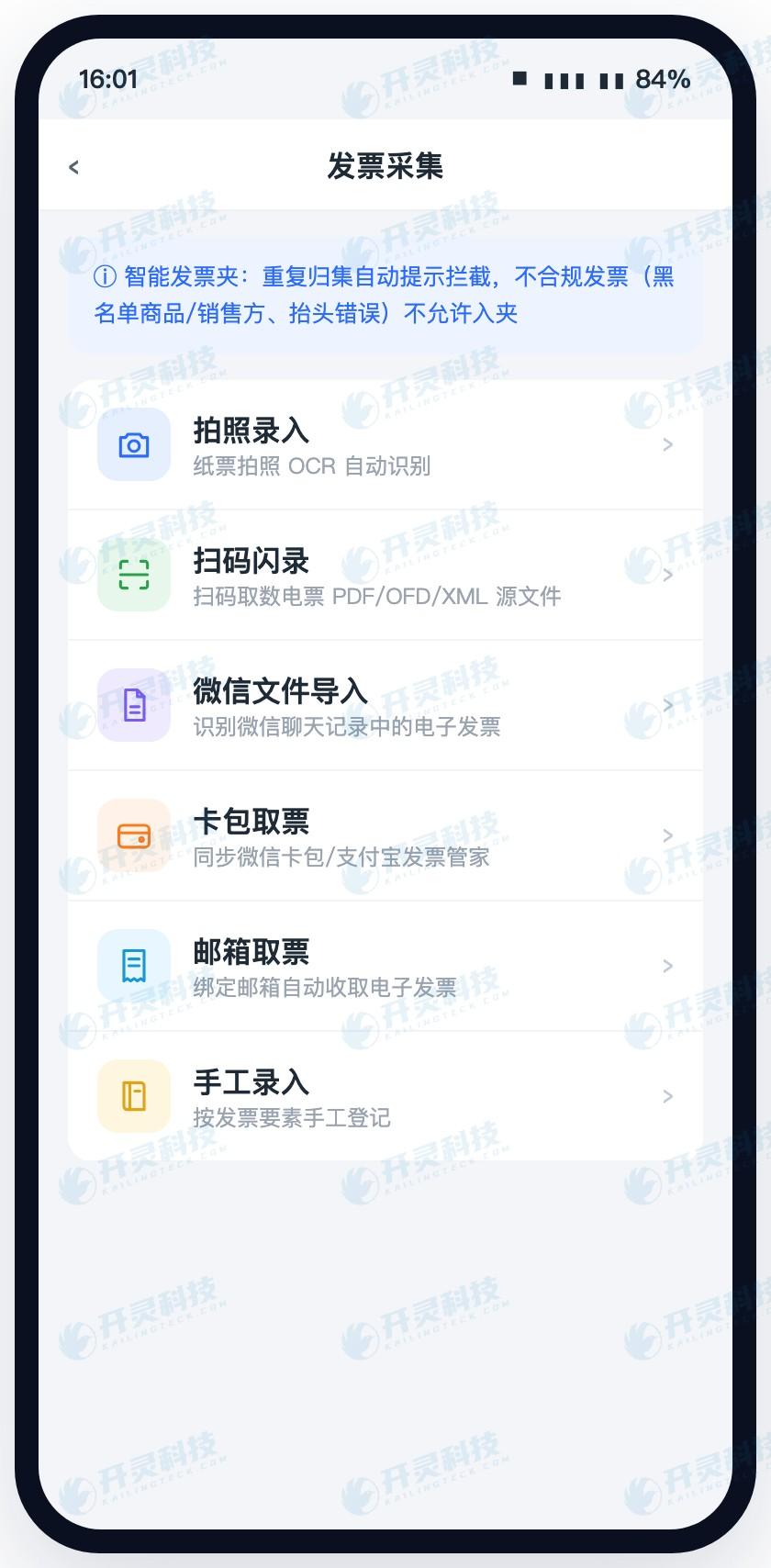
- Collect scattered invoices into one pool. Besides scanning and manual entry, invoices lying in WeChat card packs, sent by others in chat records, received in email, plus photos of paper invoices, can all be collected into the same invoice folder; collecting the same invoice again triggers a prompt and duplicate addition is not allowed.
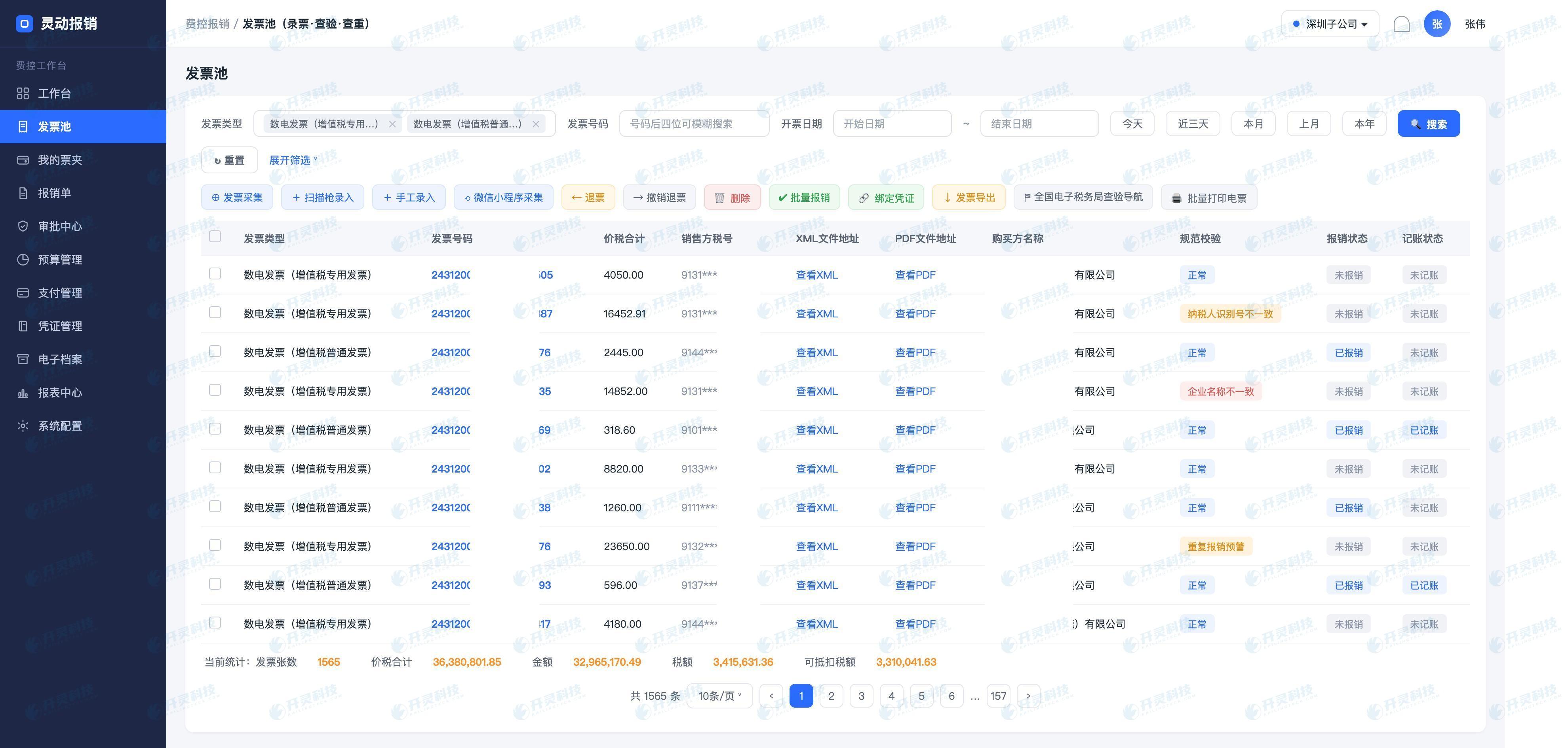
- Run validation once at the entry point first. Whether the header is correct, whether the tax ID is wrong, and whether the address, phone number, and bank account belong to the company are compared item by item by the system; paper invoice numbers are verified once more on the tax bureau side, while electronic invoices have their signatures checked for tampering. Results are marked directly on the invoice; mismatches indicate whether it is a tax ID mismatch or a company name mismatch, and non-compliant ones can be set to be barred from the folder.
- Booking and archiving are the same action. Once a reimbursement is initiated, the invoice's booking status on the tax side is locked; at booking, three documents are retained together with the form and synchronized into the repository through the channel connected to the electronic accounting archives, so that documents, invoice files, and bank receipts can later be presented as a complete set.
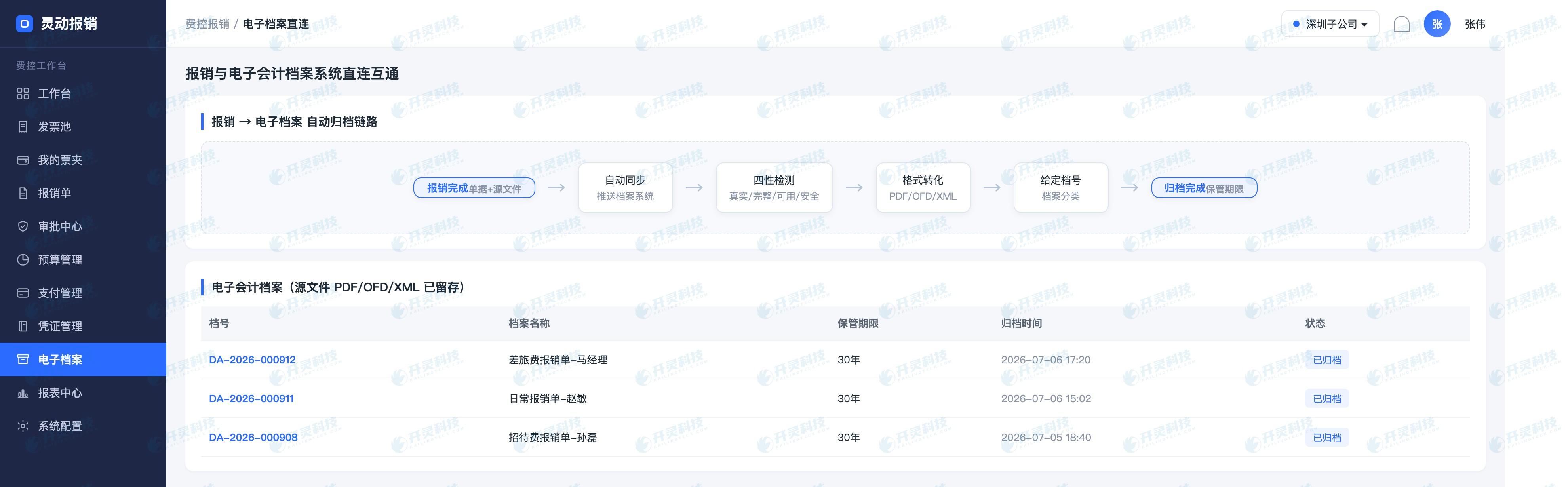
For enterprises served by Kailing Technology, compliance with Document No. 6 is more like a natural result after the chain runs smoothly: no extra organizing work at month-end, and no need to wait for someone to request files before supplementing documents.
▍FAQ
Q: During audit file retrieval, exactly which document must be provided?
A: Try to provide all three: the signed layout file shows that the invoice face has not been altered, the data file is used to check whether the invoice elements match the numbers in the accounts, and the general layout file is convenient for viewing and printing. If only one is provided, there is often a question that cannot be answered.
Q: The printouts have already been pasted and bound; can the electronic copies in the system be cleared?
A: No. Document No. 6 is very clear about reimbursement and accounting based on paper form; the electronic voucher that generated this paper must also be retained. Clearing it is equivalent to clearing the basis for self-verification in the future.
Q: How long must electronic accounting vouchers be retained after archiving?
A: It is implemented according to the Measures for the Management of Accounting Archives (Ministry of Finance and National Archives Administration Order No. 79), and accounting voucher categories are 30 years. Electronic preservation must also be readable, verifiable, and usable, and it is recommended to rely on an archive system for unified management.
Q: For old invoices from before go-live that have no files, can they still be recovered?
A: If the invoicing party can still be contacted, ask them to provide it again; if it cannot be recovered, it is recommended to clearly specify the starting point for standardized collection in the policy, retain existing images and business supporting materials, and bring all newly occurring invoices into the standardized process so the gap does not continue to grow.
Want to know whether one fully digitalized e-invoice of your enterprise can fully retrieve all three files: PDF, OFD, and XML? Welcome to work with Kailing Technology to make the chain from reimbursement posting to archive retention work: https://www.kailingteck.com/feikong/ .
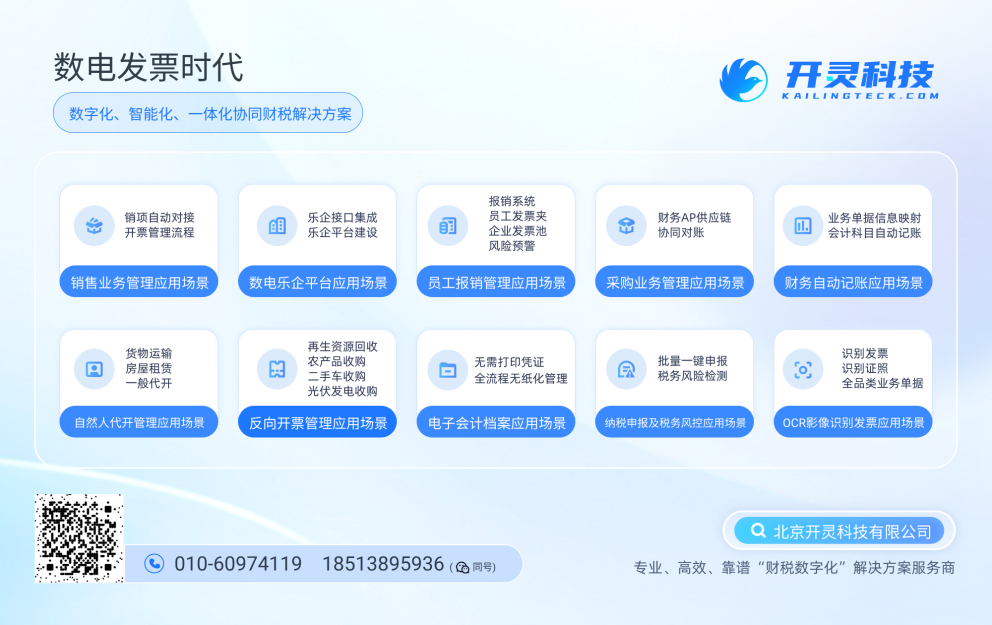
As a comprehensive business-finance-tax digitalization solution service provider, Kailing Technology provides business-finance-tax management digital transformation products and operational services for various government agencies, institutions, and large, medium, and small enterprises. The product line includes:
Solutions for businesses including sales contract management system, procurement contract management system, fully digitalized Leqi interface project, output automatic invoicing system, reverse invoicing system, invoice issuance for individuals system, employee expense control and reimbursement system, input VAT invoice management system, supply chain collaborative reconciliation system, image OCR recognition system, automatic financial bookkeeping system, and electronic accounting archives system, comprehensively driving the digitalization process across various fields.
If you have any business-finance-tax digital transformation needs, welcome to contact us. Beijing Kailing Technology will serve you wholeheartedly.
Keywords: Ministry of Finance Document No. 6, Caihui [2020] No. 6, reimbursement, booking, and archiving of electronic accounting vouchers, invoice source files, OFD, XML, invoice verification, electronic accounting archives, expense control reimbursement system, Kailing Technology, Lingdong Reimbursement
As a comprehensive business-finance-tax digitalization solution service provider, Kailing Technology provides business-finance-tax management digital transformation products and operational services for various government agencies, institutions, and large, medium, and small enterprises. The product line includes: solutions for sales contract management system, procurement contract management system, fully digitalized Leqi interface project, automatic output invoicing system, reverse invoicing system, invoice issuance for individuals system, employee expense control and reimbursement system, input VAT invoice management system, supply chain collaborative reconciliation system, image AI OCR recognition system, automatic financial bookkeeping system, electronic accounting archives system, etc., comprehensively driving the digitalization process across various fields.
Consultation Hotline: 18513895936 / 010-60974119 Location: Beijing