
How to turn delivery notes into electronic files? Photo recognition, automatic statement generation | Kailing Technology AI OCR delivery note solution
"How to turn delivery notes into electronic files" is a question warehouse and finance staff often search online. Many enterprises do this: warehouse staff scan signed paper delivery notes into PDFs, save them by date on a shared drive, and at month-end open them one by one for reconciliation. This is indeed "electronic", but it only replaces paper with images; note numbers, quantities, and amounts remain locked in the images, and reconciliation still relies on human eyes. A truly useful electronic file should achieve three things: images can be searched, key fields become data, and data can directly generate statements. The Kailing Technology AI OCR delivery note solution works by taking photos with a mobile phone or high-speed scanning; the system automatically recognizes note numbers and details, attaches them to the corresponding ERP documents, and automatically generates statements based on receipt data during reconciliation. Below, the complete method for turning paper delivery notes into electronic files is explained through four actions: "shoot, recognize, store, reconcile".

▍Three "electronic" approaches, differing in whether the data can be used
There are three common approaches enterprises use to turn delivery notes into electronic files, with very different results.
- Manual entry into Excel: Warehouse staff or clerks type note numbers, customers, and quantities into spreadsheets based on paper notes. Statistics are possible, but entry is slow and prone to misalignment; hundreds of notes a day require dedicated staff, and originals still need separate storage.
- Scan and save as PDF: Use a scanner or mobile scanning app to save as files. The original now has an image, but file names are chosen by people, and note numbers and quantities remain text inside images; finding a note depends on memory and browsing folders.
- Photo recognition into structured data: After photographing or scanning, OCR recognizes the note number, date, material, and quantity into fields; images and data are saved together and attached to business documents by note number.
The first two approaches solve "paper gets lost"; only the third solves "data needs to be used". What follows is all about the third: Kailing Technology AI OCR saves delivery note images together with recognized fields, and subsequent search, verification, and reconciliation all start from data.
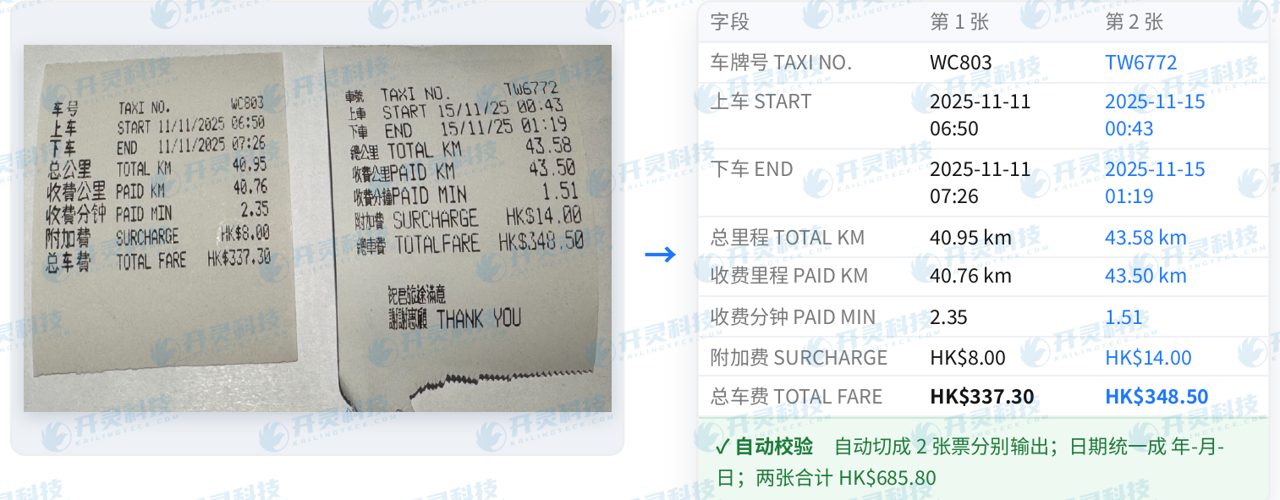
Kailing Technology AI OCR: outputs structured fields after photographing documents
▍Step one "shoot": how to choose between mobile photos and scanners
For enterprises with few delivery notes scattered across multiple receiving points, mobile photos are sufficient; for enterprises with hundreds of returns per day concentrated in storage and transportation or finance, it is recommended to equip a high-speed sheet-fed scanner, loading the whole stack for continuous scanning. Both methods enter the same recognition process and do not need separate maintenance.
There are several practical points for photographing and scanning: first, try to scan the stub copy or white copy, as the last carbon copies have faint ink and a noticeably lower recognition rate; second, lay the document flat with all four corners in frame, avoiding fingers covering the note number area; third, print a QR code in the upper right corner of the delivery note template, which makes subsequent note number recognition much more stable. Kailing Technology AI OCR first performs image quality detection; blurry, re-photographed, or severely tilted images are prompted for retake, preventing illegible images from being stored in the archives.
For historical paper delivery notes that have already accumulated, they can also be scanned into the system in batches, processed by delivery date or customer, without affecting current daily returns.
▍Step two "recognize": secure the note number first, then recognize details
When delivery notes become data, the core is two types of information: note number and details. The note number determines which transaction this paper belongs to and must be accurate; details include material, specification, quantity, recipient, date, and handwritten notes, used for subsequent verification.
Kailing Technology AI OCR recognizes note numbers in the order of "QR code first, printed digits second, AI vision as fallback", and recognition results must also pass enterprise note number rule validation, such as prefix and digit count. Non-compliant note numbers are not written directly into ERP but enter pending number supplementation for manual confirmation. The detail part uses layout understanding and handwriting recognition; tables are split row by row into fields, and inconsistencies between quantity multiplied by unit price and the total are marked.
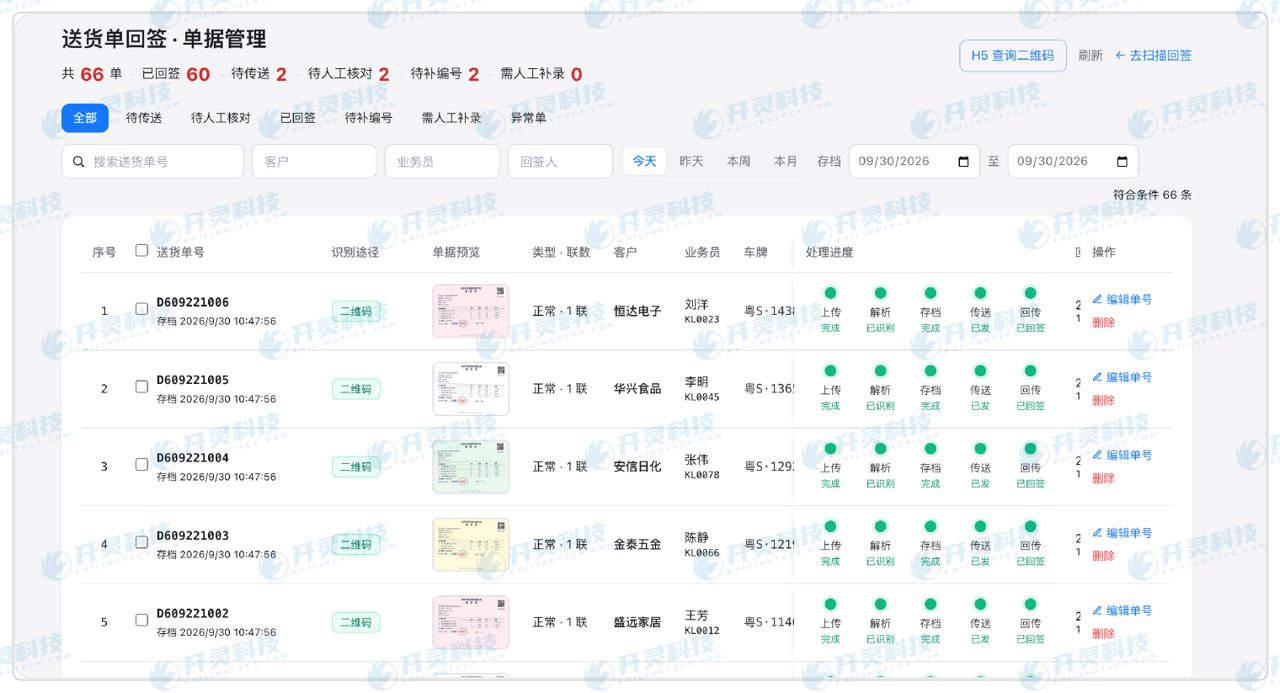
Kailing Technology delivery note document management and recognition status (information desensitized)
If an enterprise has special fields, such as batch numbers, license plates, or pallet counts, custom extraction rules can be defined: field names, formats, and value criteria. Rules are shared within the organization, and adding a new type of document does not require redevelopment.
▍Step three "store": attach electronic files to documents, not put them in folders
After recognition is complete, delivery notes should not merely be stored in a folder but attached to the corresponding business documents. After Kailing Technology AI OCR recognizes the note number, it automatically calls the enterprise ERP signed-return interface, marks the note as signed and received, and attaches the original image under that document. Sales staff, storage and transportation, and finance can retrieve the signed original by note number, no longer calling to ask "has that note come back yet".
When multiple copies of the same note are scanned repeatedly, the system records only one entry and accumulates the number of copies, without duplicate signed returns; documents that time out momentarily in ERP are automatically queued for retry, and note numbers not found in ERP are transferred to manual verification. In this way, every paper delivery note has a clear destination: signed returned, pending transmission, pending verification, or pending number supplementation, with none silently lost.
Recognition results can also be returned as structured JSON via open API, or exported to Excel, for direct use by systems such as expense control and electronic accounting archives.
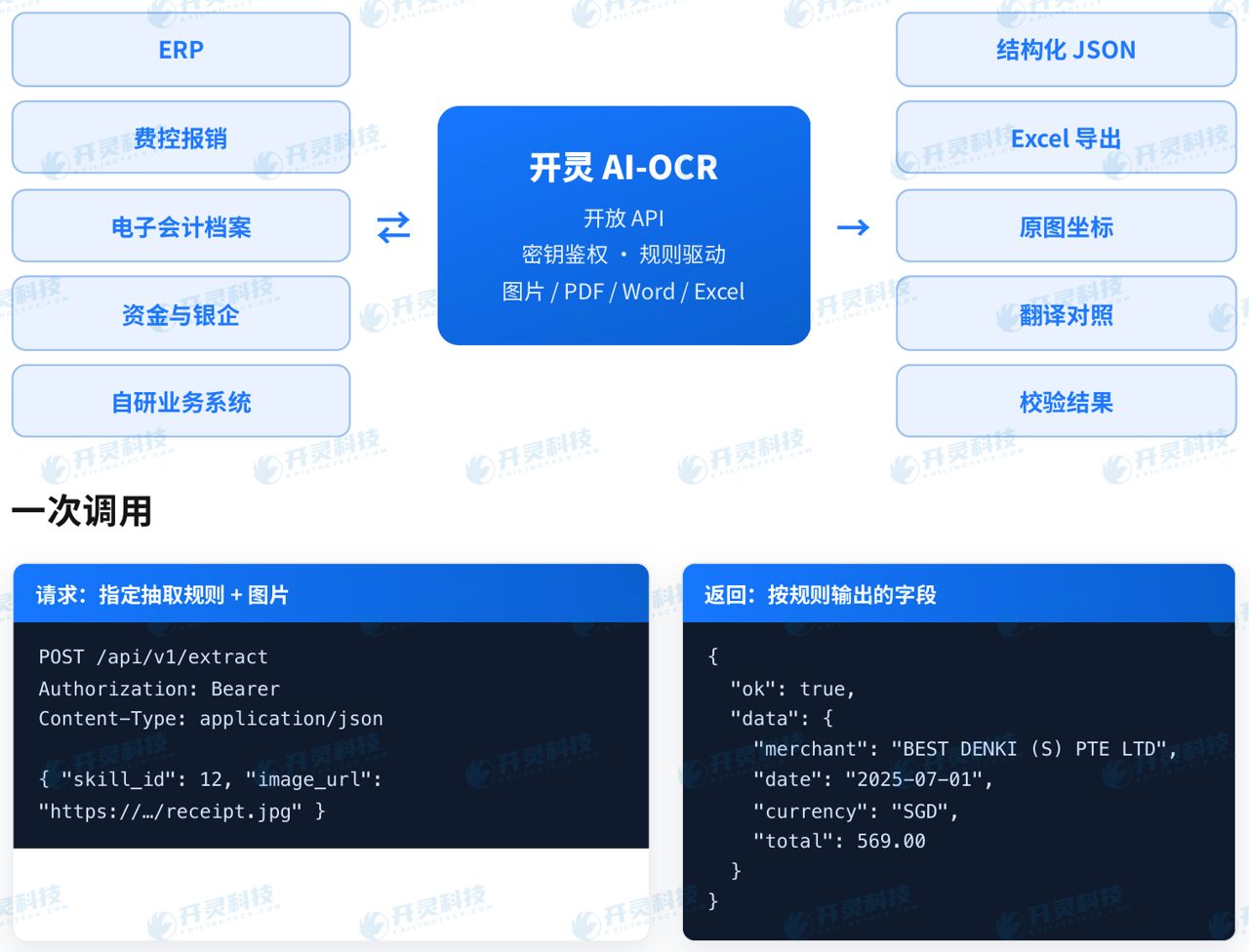
Kailing Technology AI OCR open API: one call returns structured fields
▍Step four "reconcile": automatically generate statements from receipt data
Once delivery notes become data, month-end reconciliation no longer has to start from a pile of paper. The Kailing Technology supply chain collaboration platform automatically generates statements based on receipt data, with receipt lines, negative return lines, discount lines, and expense lines listed on the same statement; suppliers confirm online, and discrepancy lines are automatically marked in red. When quantity disputes arise during reconciliation, finance can directly open the signed original and handwritten notes of the corresponding delivery note.
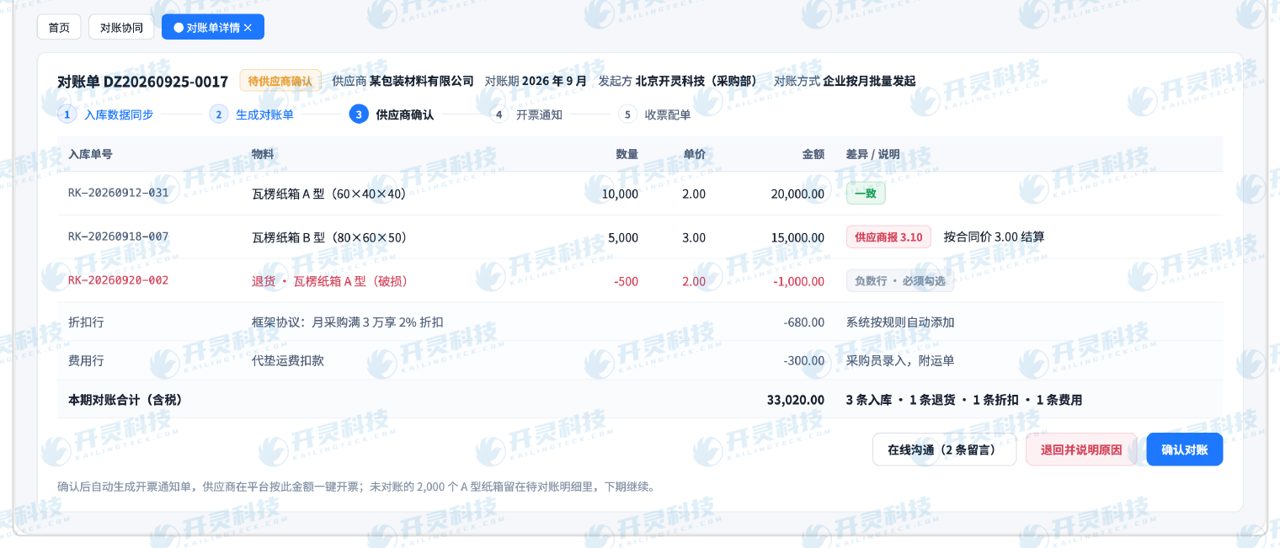
Kailing Technology statements: receipt, return, and expense verification on the same note (information desensitized)
It should be noted that the quantity basis for statements is the receipt note; the signed original of the delivery note is the prerequisite voucher for receipt and the evidence in disputes, and the two have separate roles. If the signed quantity and receipt quantity are inconsistent, it often indicates shortages, damage, or rejection during receiving, which should be handled before receipt rather than checked later during reconciliation.
▍What is needed to launch a delivery note electronization system
The launch difficulty of delivery note electronization is not high; mainly four things need to be prepared. The table below lists each item and the responsible party.
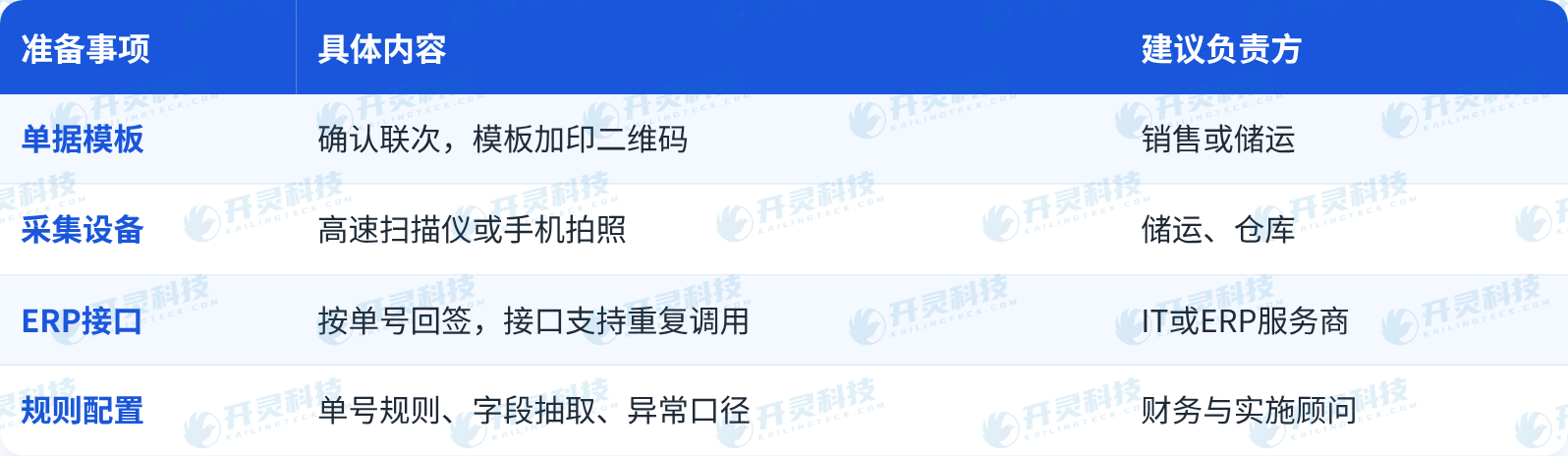
Delivery note electronization launch preparation checklist
For deployment, it can be installed on the enterprise intranet server so delivery note images and data do not leave the factory, with mobile access through the enterprise gateway; SaaS can also be chosen as needed. It is recommended to first select a business line with the largest return volume for a trial run of two to four weeks, verify recognition accuracy and signed-return results, and then gradually roll out to other receiving points.
| "The value of electronic files is not in 'storing them', but in 'matching them and finding them'." |
▍FAQ
Q: Can photographed delivery notes be directly turned into Excel?
A: Yes. After Kailing Technology AI OCR recognition, fields such as note number, material, and quantity are output as structured data, which can be exported to Excel or written directly into ERP via API.
Q: What should be done when carbon-copy delivery notes have very faint handwriting?
A: It is recommended to scan the stub copy or white copy first; after a QR code is printed on the template, note number recognition becomes more stable. When image quality does not meet standards, the system prompts for a retake.
Q: After paper delivery notes are scanned, do the originals still need to be retained?
A: The retention requirements for delivery notes depend on the enterprise's internal controls and their use as accounting materials. It is recommended to confirm according to the enterprise archive system before handling originals, and do not destroy them on your own.
Q: Can it be used without an ERP interface?
A: You can first export recognition results and signed-return lists by batch, then import them into ERP; once conditions allow, switch to real-time signed returns via interface.
To turn paper delivery notes into reconcilable electronic files with just a photo, welcome to learn about the Kailing Technology AI OCR delivery note solution: https://www.kailingteck.com/ai-ocr/ .
As a national high-tech enterprise, Kailing Technology focuses on the digital and intelligent transformation of enterprise business-finance-tax and operations management, providing software products, system integration, implementation and delivery, and operational services for various government agencies, institutions, group enterprises, and SMEs.
The company has now formed ten core product lines, including: AI digital employee system, enterprise expense control management system, customer relationship management system, reverse invoicing management system, invoice issuance for individuals management system, electronic archives management system, tax fully digitalized e-invoice Leqi system, tax invoice management system, group tax filing system, and AI OCR recognition system. It is committed to connecting enterprise business, finance, tax, funds, and archive data to help customers improve operational efficiency, business-finance-tax compliance capabilities, and digital management levels.
If you have any business-finance-tax digital transformation needs, welcome to contact us. Beijing Kailing Technology will serve you wholeheartedly.
Keywords: How to turn delivery notes into electronic files, delivery note photo recognition, delivery note OCR, automatic statement generation from delivery notes, delivery note electronization, Kailing Technology AI OCR, delivery note solution
As a comprehensive business-finance-tax digitalization solution service provider, Kailing Technology provides business-finance-tax management digital transformation products and operational services for various government agencies, institutions, and large, medium, and small enterprises. The product line includes: solutions for sales contract management system, procurement contract management system, fully digitalized Leqi interface project, automatic output invoicing system, reverse invoicing system, invoice issuance for individuals system, employee expense control and reimbursement system, input VAT invoice management system, supply chain collaborative reconciliation system, image AI OCR recognition system, automatic financial bookkeeping system, electronic accounting archives system, etc., comprehensively driving the digitalization process across various fields.
Consultation Hotline: 18513895936 / 010-60974119 Location: Beijing