
Month-end report data scattered across multiple systems, tiring to copy and paste? Kailing Technology's AI digital employee retrieves data across systems and generates reports with one command
At the end of every month, the same action in finance and operations is repeated countless times: open the ERP to export a detail sheet, switch to the OA to dig up a process record, then log into the BI to pull a business metric, and finally return to Excel to Ctrl+C and Ctrl+V, piecing them together cell by cell into the report the boss wants. The data is clearly all there, yet it is scattered across several systems that do not talk to each other, so people become the "movers" between systems—the most time-consuming part is not analysis, but gathering, aligning, and piecing the data together. Kailing Technology's AI digital employee wants to completely reverse this: you just say "help me generate report X," and the rest—cross-system data retrieval, processing, and report generation—is left to Kailing Technology's AI digital employee to run through on its own. In this article, we follow that one sentence and walk through its journey stop by stop.
▍The starting point of the journey: a single "help me generate report X"
First look clearly at this type of requirement. It usually comes once a month, has a relatively fixed format, but the data comes from several systems—for example, "help me produce this month's project profit and loss statement" or "help me pull a summary of expenses for each branch." In the past, it was broken into a long series of manual actions: confirm which fields are needed, which systems to retrieve them from, how to reconcile definitions after export, and then apply a template after assembling them. Kailing compresses this long series of actions into one natural language instruction. You do not need to know which table is in which system, nor do you need to remember which menu level hides the export button. Just explain what you want clearly, as if instructing a colleague.
▍Stop one · The large model first understands which "table" you want
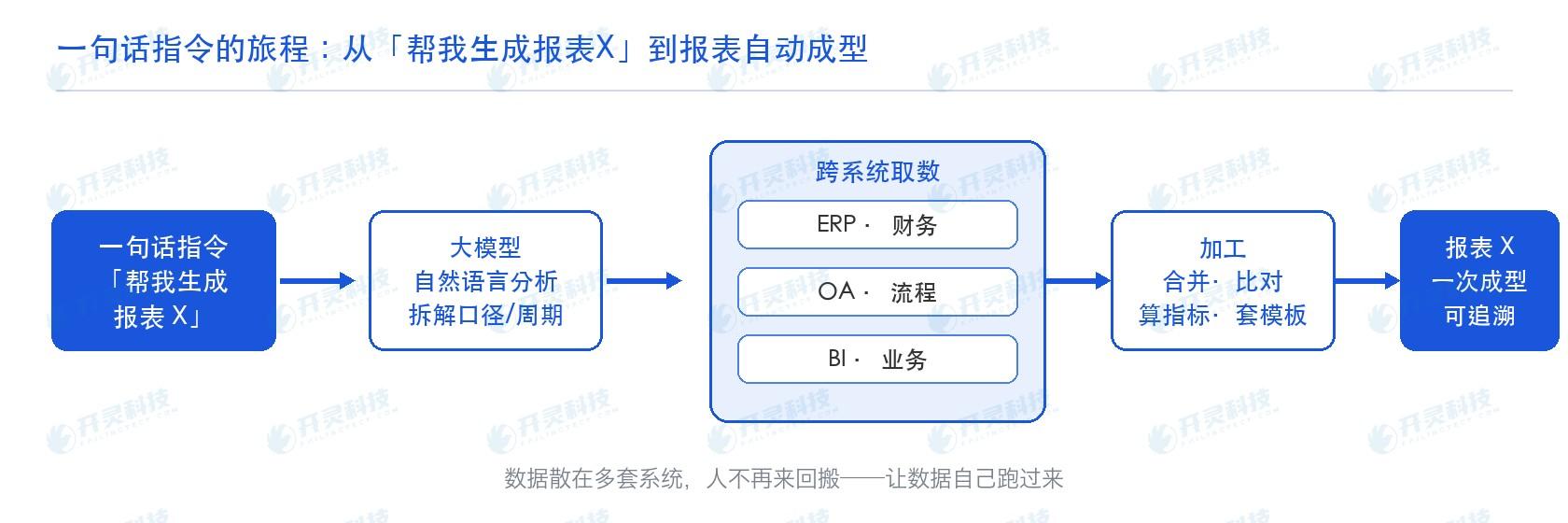
When an instruction comes in, the first step is not to rush to retrieve data, but to "understand." The large model behind Kailing Technology's AI digital employee performs natural language analysis on the sentence: which report do you want? Is the statistical period this month or this quarter? Is the basis tax-inclusive or tax-exclusive, by contract or by invoice? Which systems' data are needed to support this report? Only by clearly breaking down these intents can it avoid retrieving the wrong data and calculating the wrong accounts. This step is equivalent to an experienced finance professional clarifying the requirements before starting—except it completes this in one or two seconds, and asks just as thoroughly every time.
▍Stop two · Cross-system data retrieval: let the data run over on its own
This is the core of the entire journey, and also where Kailing Technology differs most from ordinary reporting tools. After understanding the requirements, AI digital employees take a clear "data retrieval checklist" and go separately into multiple systems to retrieve the data: from ERP·finance, they retrieve account and voucher details; from OA·process, they retrieve the status of approvals and business documents; from BI·business, they retrieve indicators under the operating caliber. In the past, these steps required people to log in one by one and export one by one; now AI digital employees retrieve the data all at once for you within permission boundaries. You no longer need to switch back and forth among several systems and repeatedly copy and paste—
In other words, it is no longer people chasing data across every system, but a single command that actively "calls" together data scattered across ERP, OA, and BI. The diagram below shows the complete path of "help me generate report X" from being understood to automatically retrieving, processing, and forming the report.
▍Stop three · Process into tables: merge, compare, calculate metrics, apply templates
Retrieving the data is only the "raw material." What the digital employee does next is the most labor-intensive part that people used to do in Excel: merging and aligning data from different systems by primary key, comparing duplicates and gaps, calculating subtotals, totals, year-over-year and month-over-month metrics according to preset rules, and then fitting them into the fixed template and format of this report. Once the rules are configured, they are executed with the same standards every month, and will not change to "calculated this way this time and that way next time" because of a change in personnel or time pressure. The assembly step that was most error-prone and most likely to require rework has been solidified into repeatable, verifiable actions.
▍Stop four · Output report X: formed in one pass, uniform format, traceable
At the final stop, the report takes shape in one pass and is delivered to you: unified format, consistent definitions, with all the headers, units, and notes in place. More importantly, it is traceable—which system each figure came from, which step it was taken from, and how it was processed are all recorded throughout. A real person only needs to do a final review and confirmation; responsibility still rests with people, but the manual labor of gathering, aligning, and assembling data no longer requires you to stay up late.
▍Traditional Ctrl+C / Ctrl+V: where exactly it is slow and where it goes wrong
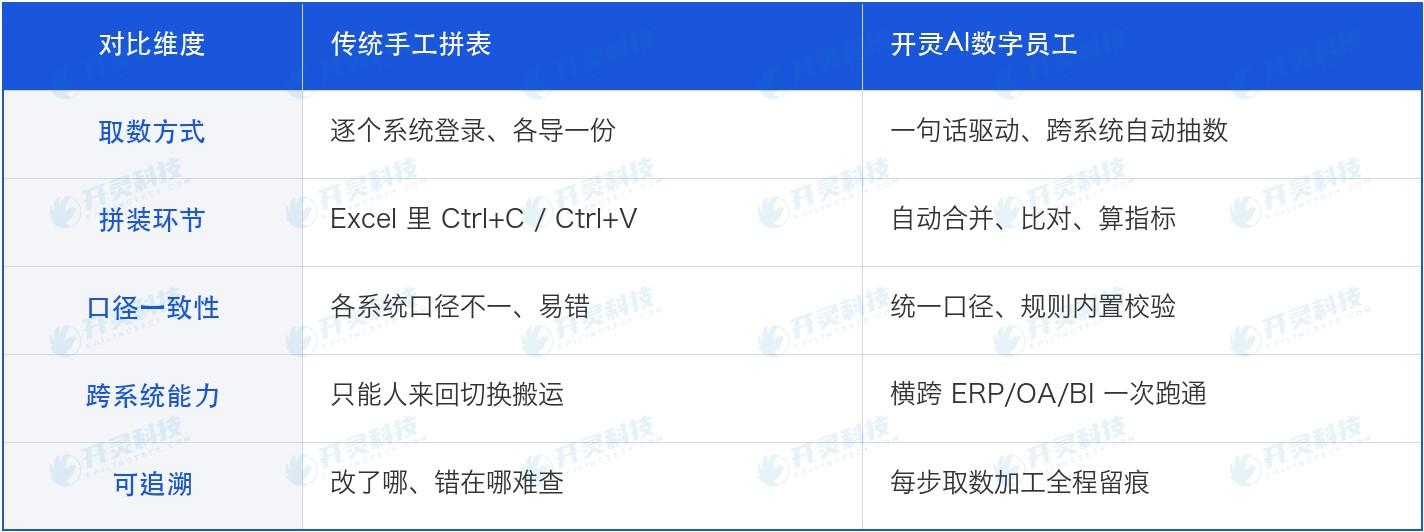
Place the traditional approach and Kailing Technology's approach side by side, and the difference is more intuitive. In traditional processes, most time is spent on two low-value tasks: "transfer" and "verification": logging into each system one by one, exporting one copy from each, manually piecing them together, and then repeatedly checking standards; moreover, the closer to month-end, the more concentrated it becomes, and the busier people are, the more prone to error. Kailing Technology, by contrast, hands "transfer" to AI digital employees and leaves people for the review steps that truly require judgment.
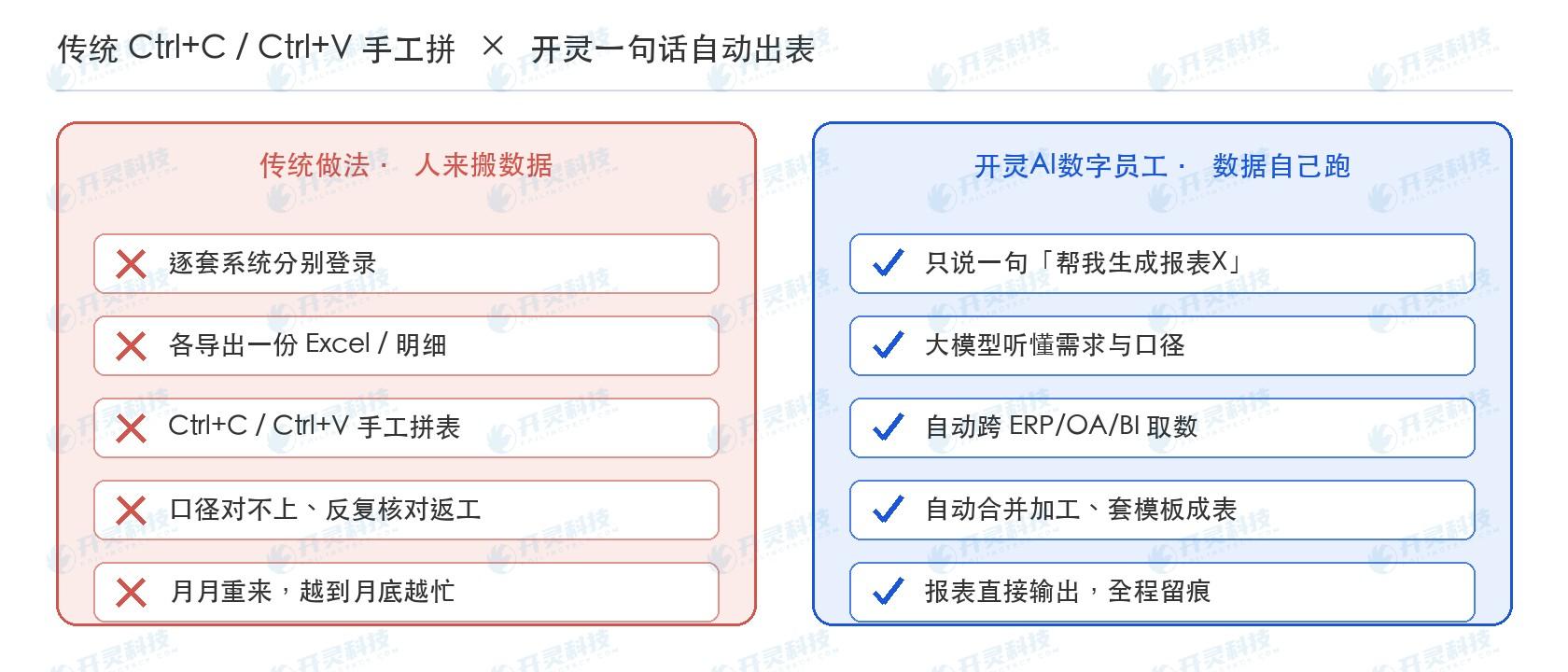
The differences between the two approaches can also be compared item by item as follows:
▍Why Kailing Technology's AI digital employee can run "horizontally" across multiple systems
Many reporting tools also talk about "automation," but most can only operate within their own systems—once data crosses beyond their territory, it again has to be moved by people. What makes Kailing Technology's AI digital employee different is that it runs "horizontally": it is not limited to a single piece of software, but can work across multiple existing enterprise systems such as ERP, OA, and BI, and can intelligently process systems not developed by its own vendor as well. Its integration is non-intrusive—encapsulating the interfaces, forms, and processes of existing systems into tools callable by the digital employee, without modifying the original systems or touching the underlying layer, so the enterprise's decade-plus IT investments remain usable. Moreover, it always retrieves data within the permission boundaries you grant: it can only retrieve data that the employee themselves can see, and cannot touch data beyond their authority. This is also why "cross-system, no copy-paste" can truly be implemented, rather than just buying another system.
▍FAQ
Q: Our reporting calibers are adjusted frequently; is it troublesome to change them?
A: It is not troublesome. The data retrieval scope and calculation standards are configured in the form of rules. Adjusting the standard only requires changing the rules, and the next cycle will execute according to the new standard, without modifying any original system or redeveloping reports.
Q: When retrieving data across systems, will it access data that should not be viewed?
A: No. Digital employees only retrieve data within the permission boundaries you grant; permissions follow the position — it can only access data the employee themselves can access, sensitive fields can be masked and encrypted, and all operations are logged and auditable.
Q: What if the wrong data is retrieved or the wrong table is assembled?
A: The key lies in "traceability + human in the loop": every step of data retrieval and processing leaves a trace, allowing problems to be traced back to the step where they occurred. Reports are used only after final review and confirmation by a real person. If anomalies occur, they can be rolled back and rerun, and responsibility always remains with people.
Q: There are many systems to integrate, including legacy systems. Will the integration period be very long?
A: Use non-intrusive access to encapsulate existing system interfaces and forms into tools with low code, without modifying the underlying layer. This usually compresses integration that originally took months into weeks, and old systems can also be reused.
Want data to come to you on its own? Welcome to contact Kailing Technology and let your first cross-system data retrieval digital employee start running: www.kailingteck.com .
As a comprehensive business-finance-tax digitalization solution service provider, Kailing Technology provides business-finance-tax management digital transformation products and operational services for various government agencies, institutions, and large, medium, and small enterprises. The product line includes:
Solutions for businesses including sales contract management system, procurement contract management system, fully digitalized Leqi interface project, output automatic invoicing system, reverse invoicing system, invoice issuance for individuals system, employee expense control and reimbursement system, input VAT invoice management system, supply chain collaborative reconciliation system, image OCR recognition system, automatic financial bookkeeping system, and electronic accounting archives system, comprehensively driving the digitalization process across various fields.
If you have any business-finance-tax digital transformation needs, welcome to contact us. Beijing Kailing Technology will serve you wholeheartedly.
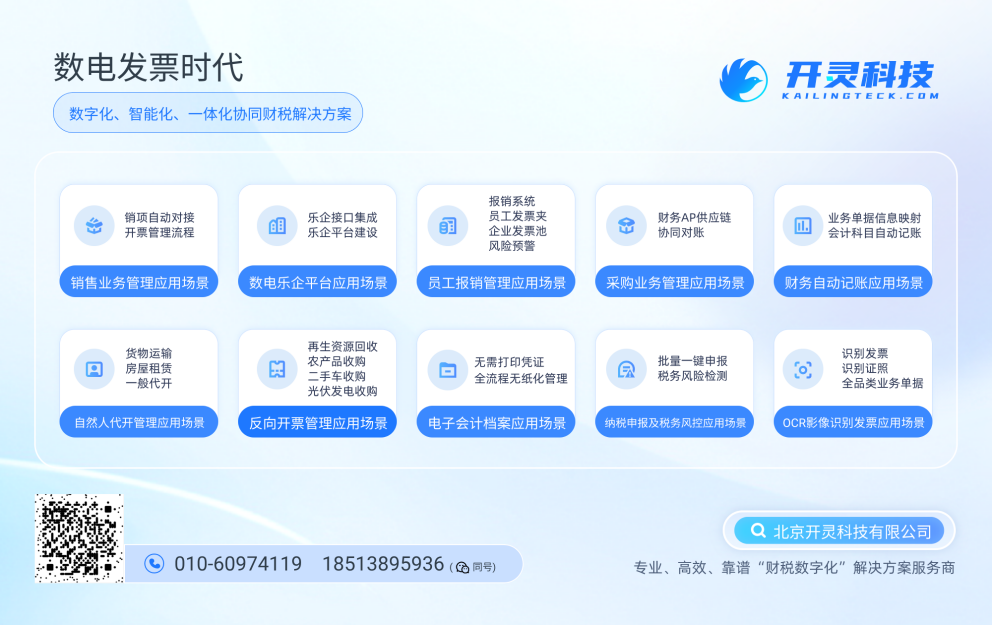
As a comprehensive business-finance-tax digitalization solution service provider, Kailing Technology provides business-finance-tax management digital transformation products and operational services for various government agencies, institutions, and large, medium, and small enterprises. The product line includes: solutions for sales contract management system, procurement contract management system, fully digitalized Leqi interface project, automatic output invoicing system, reverse invoicing system, invoice issuance for individuals system, employee expense control and reimbursement system, input VAT invoice management system, supply chain collaborative reconciliation system, image AI OCR recognition system, automatic financial bookkeeping system, electronic accounting archives system, etc., comprehensively driving the digitalization process across various fields.
Consultation Hotline: 18513895936 / 010-60974119 Location: Beijing