
Do approval processes that are frequently adjusted still require repeated development? Kailing Technology Lingdong reimbursement custom forms, nodes, and rules

At 4 p.m. on Friday, the finance manager received new travel approval requirements: the amount threshold was adjusted, the department head was changed to the project owner for first review, and finance review was added above the threshold, effective next Monday. In the past, when such changes occurred, business first wrote requirements, technology scheduled code changes, and after testing waited for release; the new policy had already taken effect, but the old process was still queuing.
Kailing Technology Lingdong Reimbursement turns high-frequency changes into controlled configuration. Administrators adjust fields, nodes, conditions, roles, and effective versions around one travel reimbursement form, then run the complete process with one low-amount document and one high-amount document. Who sees what, which branch the system takes, and who handles exceptions can all be made visible before release.

▍First break a policy notice into five executable configurations
The administrator did not directly drag the flowchart, but instead broke notifications into change orders with finance: which business field is added to the travel form, at which node the amount condition is judged, which documents the department head and project owner handle respectively, which branch financial review receives, and from what time and which organizations the new rules start to apply. Policy language is thus converted into five configuration objects: form, node, condition, role, and version.
The change order also marks the impact scope. Amount thresholds affect approval paths, project fields affect owner resolution, return methods affect the starting point after resubmission, and notification recipients affect mobile to-dos. Administrators review the current configuration item by item, first copying the current version to form a draft, modifying in the draft, while the online process continues to run as usual.
▍Custom forms first let employees fill in only the information needed for this document
The administrator opens the Lingdong reimbursement form designer, retains the invoice face information brought in by the invoice and the organization information brought in by the employee account in the travel reimbursement form, then adds fields such as project, travel city, and business purpose. Project expenses show project selection, while ordinary department expenses hide that field; scenarios requiring attachments give a clear prompt before submission. When employees open the form, they see content relevant to this expense.
Field sources are also clarified in the configuration. Objective invoice information is brought in from invoice collection results, departments and personnel come from the account organization, projects are selected from controlled master data, and employees only supplement business facts. Once field names, options, and validation rules are unified, the content seen by approvers, the receiving information used for payment, and subsequent voucher mapping can continue to be reused.
Form modifications retain versions. When an old document is opened, it displays the original fields and the options at that time, while new documents use the new version; field renames continue to enter reports through mapping. The administrator simulates mobile and Web separately on the preview page, confirming that key information is on the first screen and required prompts can directly tell employees what is missing, reducing repeated returns after submission.
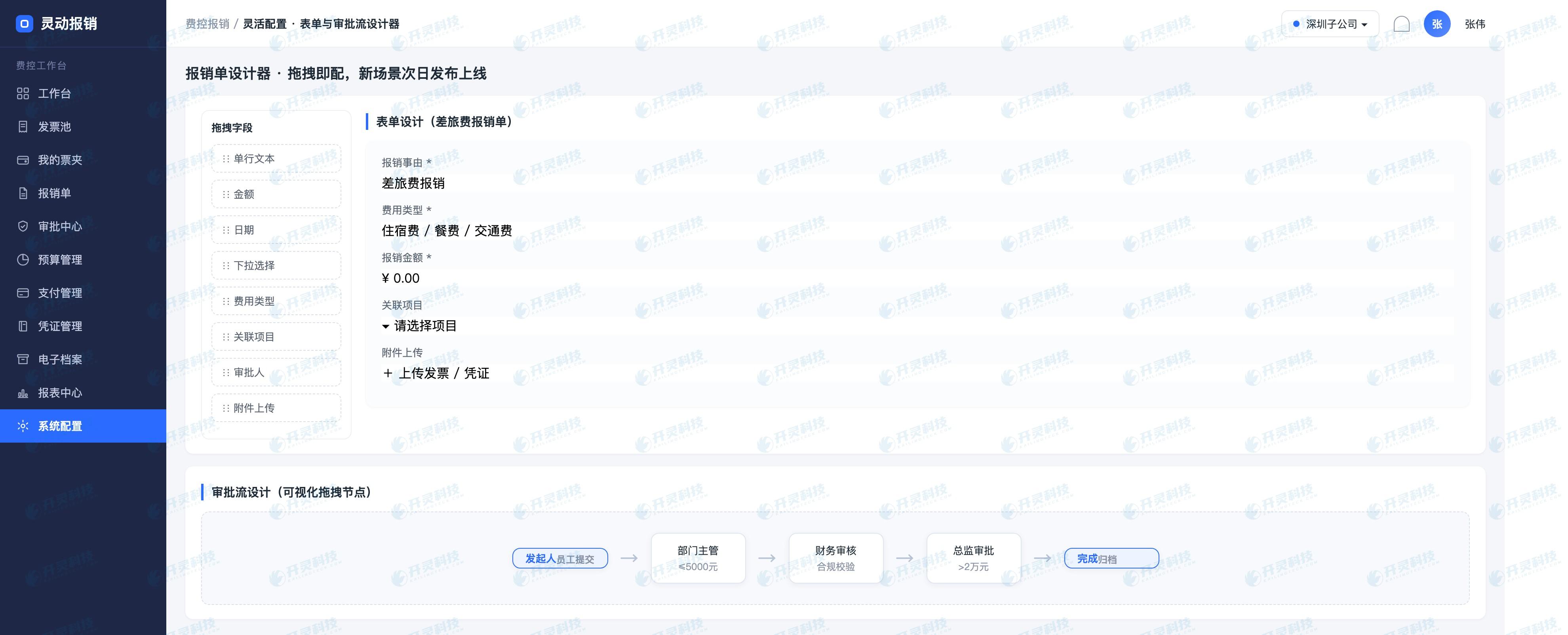
Reimbursement form and field configuration interface (information desensitized)
▍Approval nodes configure order, roles, and processing actions together
The process draft starts with employee submission. Administrators place nodes such as project owner, department head, finance review, and pre-payment confirmation in sequence, then rearrange them according to this policy adjustment. Each node is bound to a role rather than a fixed person; the employee's department, selected project, and the then-effective organizational relationship jointly resolve the actual approver, and after a job transfer new documents automatically enter the new owner's to-do list.
Node actions are also confirmed item by item. After rejecting the initiator, the employee modifies the form and resubmits; when returned to the previous level, prior approval opinions remain; adding approvers and transferring records the initiator, receiver, and time. The administrator also checks how invoice locking, budget occupation, and document status change, keeping a single click on mobile consistent with back-end business status.
Approvers open the to-do from WeCom, DingTalk messages, or the Lingdong reimbursement mobile end, and the page centrally displays the amount, purpose, project, invoice verification results, and prior opinions. After processing is complete, the PC and mobile ends sync as completed, and employees see the current position in their own documents. Entry points can change, but the process instance and status always remain one.
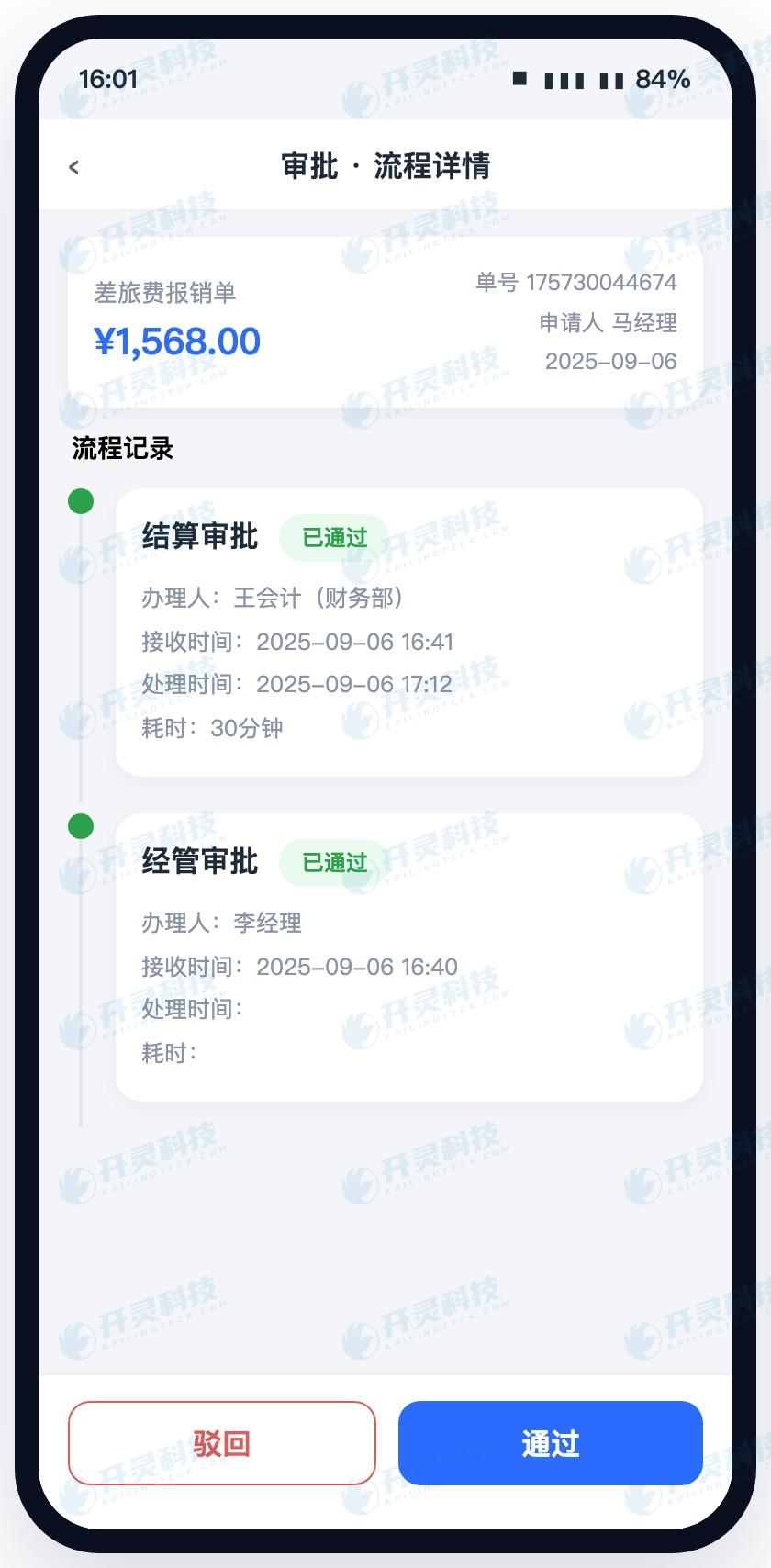
View process and handle approvals on mobile (information desensitized)
▍Use two documents with different amounts to verify conditional branching
The first test form amount is below the new threshold, and the employee selects a project and submits. The system reads the organization, expense type, and amount, first sends it to the project owner, and after the project owner approves, it goes directly to subsequent financial processing. Testers record the approver, messages received, and page status at each node, confirming that the low-amount path does not take an extra step.
The second test form amount is above the new threshold; the preceding actions are the same, and the system automatically adds financial review after the project owner approves. Finance staff can see the amount trigger reason, invoice risk alerts, and prior opinions; after review is completed, the document enters approved status. When the two documents are displayed side by side, the threshold in the policy has been transformed into two clearly visible paths.
The project team then adds a boundary sample that sits exactly at the threshold position and changes the department, project, and expense type to check the order of condition combinations. If a document hits multiple branches at the same time, the configuration specifies the priority and convergence node. Test results go directly back to the draft version for modification until every sample reaches the expected role.
▍Rule review displays the rejection reason before the submit action
The process is responsible for whom the document is sent to, and the rules are responsible for checking what problems the document carries. Administrators configure header, tax number, duplicate invoice, expense standards, budget, and attachment requirements as review conditions. When an employee clicks submit, the system first completes invoice verification, duplicate checking, and field checking, and when a problem is hit, marks the reason and handling entry on the current document.
High-risk issues can block submission, while business exceptions allow employees to add explanations and enter escalated approval. For example, when a duplicate invoice is hit, the related record is displayed; when attachments are missing, the specific materials are indicated; when the expense standard is exceeded, the reason must be filled in and forwarded to the corresponding person in charge. Employees know how to fix it, approvers know why they are seeing this document, and finance reduces returns without reasons.
Digital employees assist review according to the institutional rules configured by the enterprise. Normal documents continue to flow after completing basic checks, while documents that hit risks enter manual handling with the problem items. Rule results retain the hit conditions, handling opinions, and time, and finance can review high-frequency returns by problem type, then adjust prompts, forms, or training.
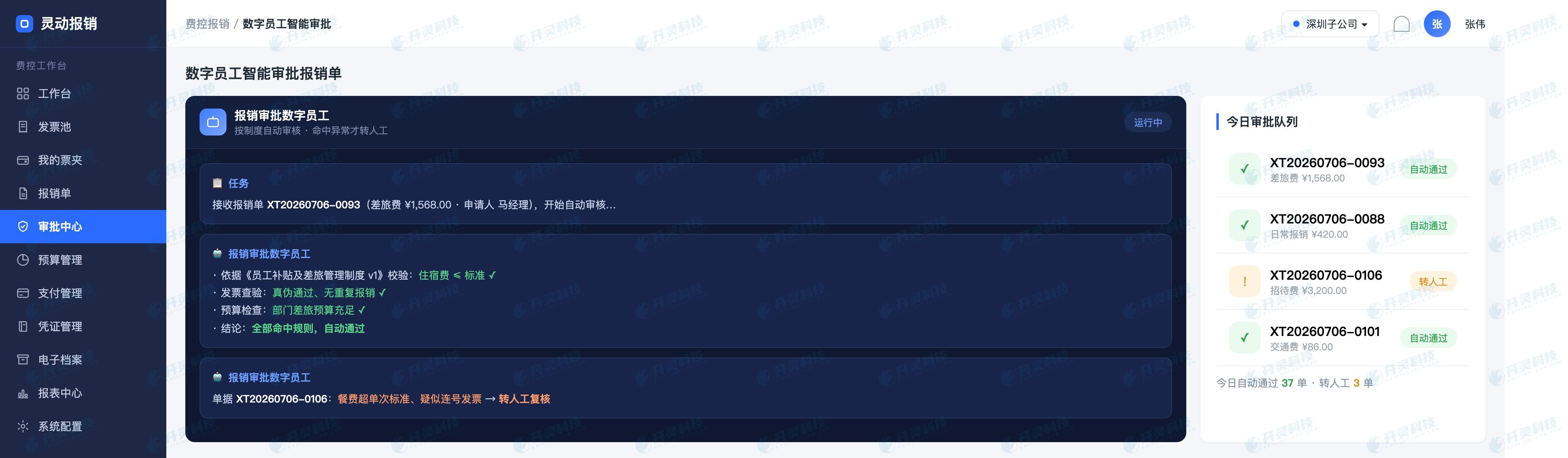
Digital employees flag anomalies according to rules (information desensitized)
▍Version release lets new and old documents each run along a clear path
After the test passes, administrators fill in the change reason, effective organization, effective time, and approver, then release the new version. Travel documents newly created next Monday automatically use the new process; documents already submitted before release continue to be handled under the original version, and the page can view the version number and the nodes at that time. Employees will not suddenly get a new owner mid-approval, and audit can also restore the policy used by the document at that time.
WeCom and DingTalk message templates, to-do links, reminder recipients, and process versions are tested together. After the project owner changes, new messages are sent to the new role, while the old approver's completed records are retained. Backend configuration, mobile entry points, and business status are updated in sync, avoiding the situation where the flowchart is corrected but messages are still sent to the original owner.
▍Implementation acceptance depends on whether administrators can independently complete one change
At the acceptance site, the enterprise administrator personally receives a simulated policy change order and, in Smart Reimbursement, copies the version, adjusts fields, moves nodes, sets amount conditions, binds roles, and publishes it to the test organization. The service provider only provides operating guidance and does not click on behalf of the administrator. After completion, the enterprise has its own configuration method and change records.
Test samples cover low amount, high amount, threshold value, cross-department, cross-project, missing attachment, duplicate invoice, rejection and modification, and approver job transfer. Each document checks page fields, actual approver, mobile messages, rule prompts, budget, and subsequent status. The acceptance report records input, operation, expected result, and actual result, and can be reused for subsequent policy adjustments.
Kailing Technology Lingdong Reimbursement uses custom forms, approval nodes, condition rules, role resolution, and version release to handle high-frequency enterprise changes. For finance, the visible result is that new policies go live on schedule; for employees, the form is shorter and the path clearer; for administrators, a routine adjustment changes from a development queue into recorded, testable, rollback-capable configuration work.
▍FAQ
Q: Which approval changes are suitable for direct configuration?
A: Common changes such as field display, required conditions, node order, role approval, amount branching, rejection location, and notification methods can enter the administrator configuration process.
Q: Can administrators publish immediately after changing the process?
A: First complete impact checks and sample tests in a draft version, then select the effective organization and time to publish; the current online version keeps running during testing.
Q: How does the new process handle documents currently under approval?
A: At publication, choose either to let old orders complete along the original version, or perform controlled migration for the authorized scope; both approaches retain versions and operation records.
Q: Do WeCom and DingTalk each need to maintain a separate process?
A: The collaboration platform provides identity, messaging, and to-do entry points, while agile reimbursement maintains one set of forms, rules, and process status, with multiple ends reading the same instance.
Turn high-frequency changes into governable configuration, validate boundaries with real processes, and learn about Kailing Technology Lingdong Reimbursement: https://www.kailingteck.com/feikong/ .
As a national high-tech enterprise, Kailing Technology focuses on the digital and intelligent transformation of enterprise business-finance-tax and operations management, providing software products, system integration, implementation and delivery, and operational services for various government agencies, institutions, group enterprises, and SMEs.
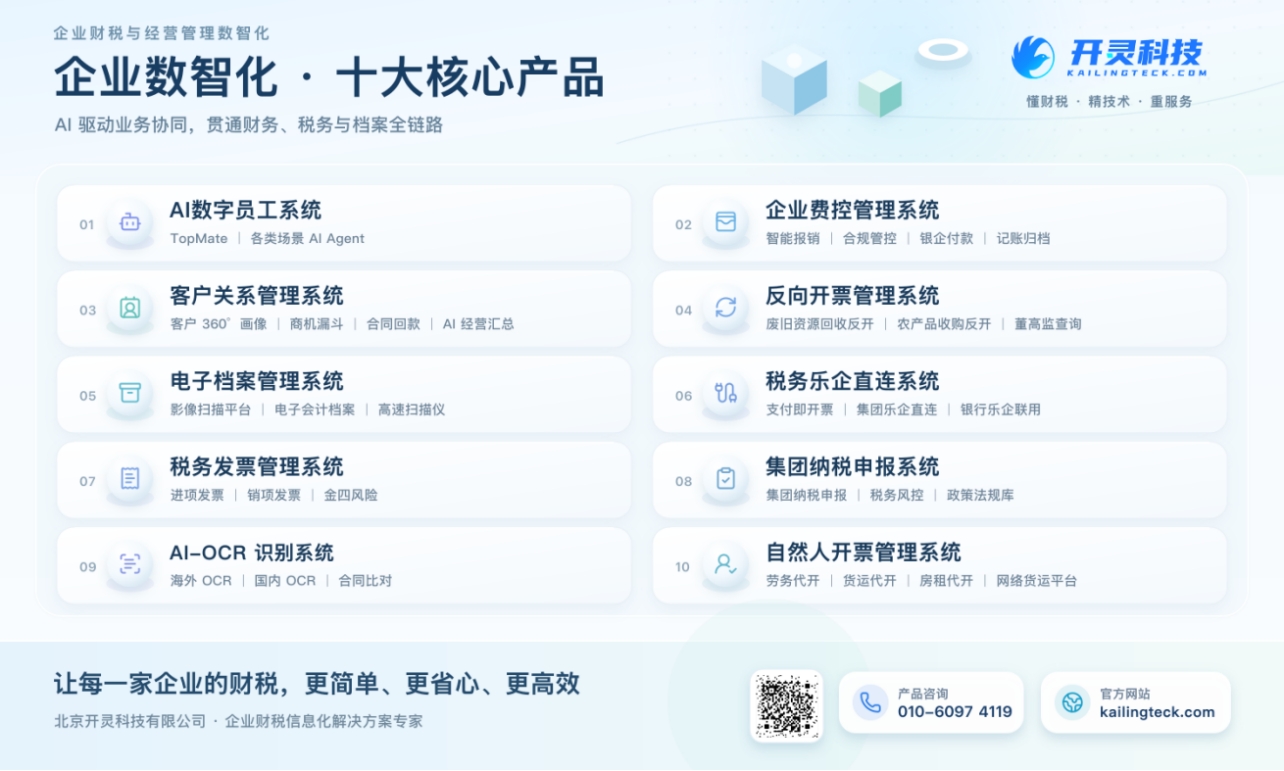
The company has now formed ten core product lines, including: AI digital employee system, enterprise expense control management system, customer relationship management system, reverse invoicing management system, invoice issuance for individuals management system, electronic archives management system, tax fully digitalized e-invoice Leqi system, tax invoice management system, group tax filing system, and AI OCR recognition system. It is committed to connecting enterprise business, finance, tax, funds, and archive data to help customers improve operational efficiency, business-finance-tax compliance capabilities, and digital management levels.
If you have any business-finance-tax digital transformation needs, welcome to contact us. Beijing Kailing Technology will serve you wholeheartedly.
Keywords: Expense control approval process configuration, custom reimbursement forms, approval nodes, expense rules, Smart Reimbursement, WeCom reimbursement
As a comprehensive business-finance-tax digitalization solution service provider, Kailing Technology provides business-finance-tax management digital transformation products and operational services for various government agencies, institutions, and large, medium, and small enterprises. The product line includes: solutions for sales contract management system, procurement contract management system, fully digitalized Leqi interface project, automatic output invoicing system, reverse invoicing system, invoice issuance for individuals system, employee expense control and reimbursement system, input VAT invoice management system, supply chain collaborative reconciliation system, image AI OCR recognition system, automatic financial bookkeeping system, electronic accounting archives system, etc., comprehensively driving the digitalization process across various fields.
Consultation Hotline: 18513895936 / 010-60974119 Location: Beijing