
How to choose an enterprise expense control and reimbursement system without pitfalls? Kailing Technology Lingdong Reimbursement uses one real document to verify the seven-stage process
Just as the procurement demo begins, the vendor prepares to play the product PPT, but the finance manager asks an employee to take out a phone and place a travel invoice received that day on the table: "Don't talk about modules first. Let this invoice go from collection to archiving first." The employee retrieves the invoice from chat records, the approver sits on the other side, and the cashier and accountant open their computers at the same time. The seven-stage process begins.
The key to choosing an enterprise expense control and reimbursement system is to see, when the same real document goes through invoice collection, verification and duplicate checking, order creation, rule validation, approval, payment, and voucher archiving, who did what, what the system returned, and how exceptions continued. Kailing Technology Lingdong Reimbursement covers this chain, and procurement teams can conduct on-site acceptance with normal documents and exception copies rather than drawing conclusions based on the number of buttons.

▍Stage one invoice collection: what employees obtain from the mobile entry point
Employees first select an electronic invoice file from WeChat chat records, then use a mobile phone to photograph a paper travel voucher. Lingdong Reimbursement collects invoices from different entry points into a personal invoice pool, identifying objective fields such as invoice number, seller, date, amount, and tax amount. Electronic files retain source files by actual channel, while paper invoices simultaneously save clear images and recognition results.
Procurement staff should observe three results: whether invoices enter the same invoice pool, whether blurry images immediately prompt a retake, and whether the source file and recognized fields can be opened at the same time. After employees complete collection, they should not have to re-enter the entire invoice on a PC, nor repeatedly search for attachments among photo albums, email, and chat records.
A common pitfall is treating "supports photo capture" as completed invoice collection. If the system only saves images, subsequent verification, order generation, and archiving will all require re-supplementing data; if the same invoice enters twice from email and chat entry points without a prompt, duplicate reimbursement risk is planted at the first step.
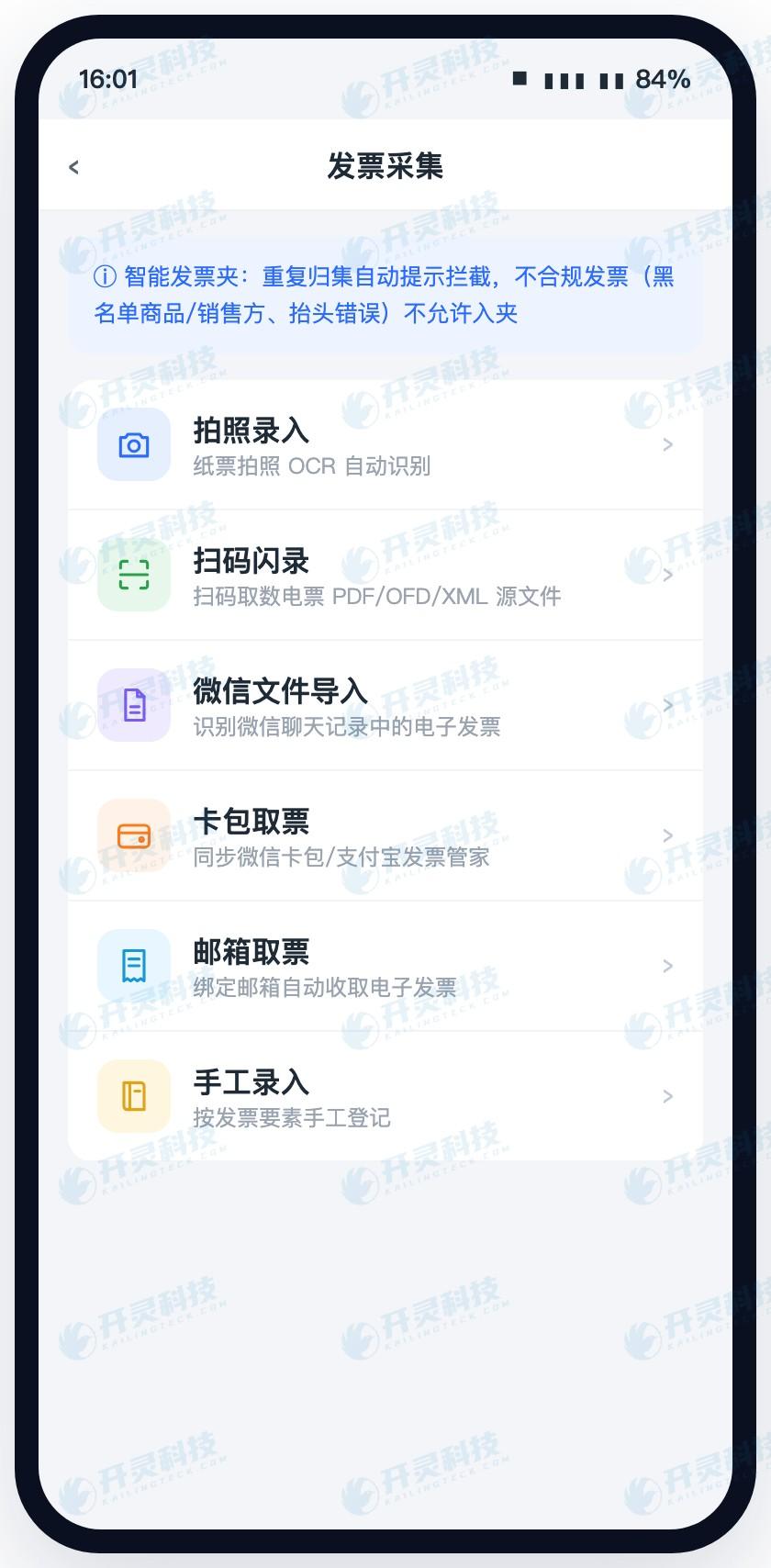
Multi-channel invoice collection on mobile (information desensitized)
▍Stage two verification and duplicate checking: how one abnormal invoice is accurately explained
After invoices enter the invoice pool, the system performs recognition, verification, and enterprise rule checks in layers. The procurement team copies the original file and uploads it again, then prepares samples with mismatched titles, abnormal tax numbers, and those already occupied by other documents. The page should display the problem type separately, letting employees know whether to replace the invoice, switch the reimbursement organization, or contact finance for handling.
When the same invoice re-enters after renaming, screenshotting, or forwarding, the system should identify duplicates based on invoice elements; electronic invoice signatures, paper invoice numbers, and seller or goods blacklists can also enter enterprise rules. Hard-control issues block continued use, while warning-type issues allow supplementary explanation and flow to the corresponding approval node.
An easily exposed pitfall is that all problems return only one "verification failed" or uniformly display red. Employees do not know how to fix it, so finance receives a large number of inquiries; another pitfall is that after a document is canceled, the invoice occupation status is not updated, so employees clearly have a valid invoice in hand but can never initiate again.
▍Stage three automatic order creation: the system brings fields, employees supplement business facts
Employees check travel invoices in the invoice folder, and the system generates a reimbursement form and brings out the seller, invoicing date, amount, and identifiable expense content. Invoices and documents maintain a two-way association: from the reimbursement form one can open the source invoice, and from the invoice pool one can see which form occupies it. When multiple invoices are merged, detail and total relationships are saved together.
Project, customer, travel reason, participants, cost center, and allocation method come from real business, and employees supplement these fields on their phones. The organization, department, receiving account, and existing travel application are referenced from master data or prior documents. The same information is maintained only once, so the amount employees need to fill in naturally decreases.
During acceptance, switch the same invoice to another expense type, then test multi-invoice merging, expense splitting, and modification after return. If automatic form generation is only effective for the demo template, and changing to another business scenario requires redevelopment, then every subsequent policy adjustment will accumulate maintenance costs.
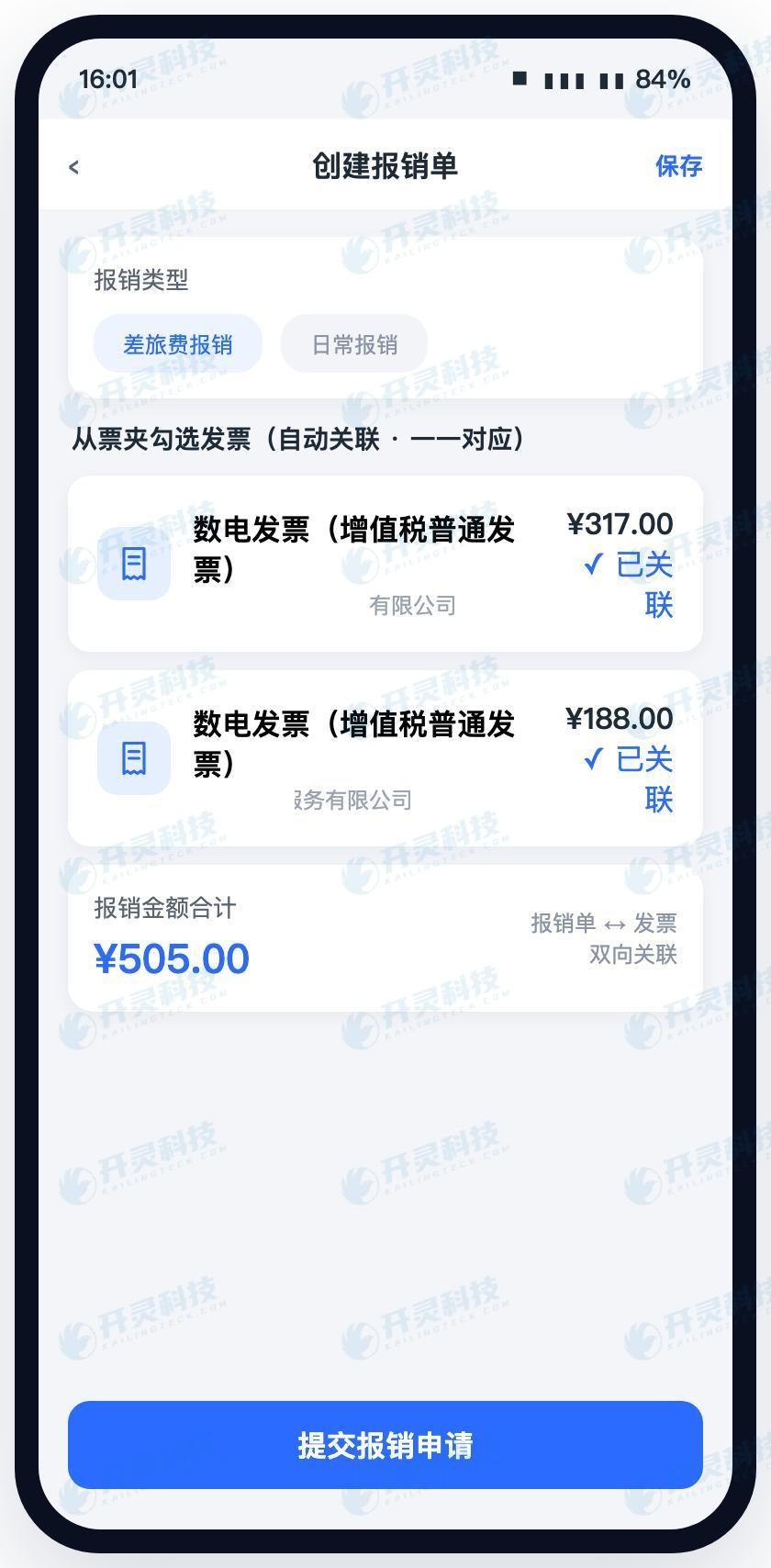
Automatically generate reimbursement forms from the invoice folder (information desensitized)
▍Stage four rule validation: tell employees what to change before submission
When a reimbursement form is ready to submit, Lingdong Reimbursement checks required fields, expense date, invoice header, duplicate status, attachments, project, and travel standards according to enterprise configuration. The procurement team copies the normal form into four versions: missing attachment, cross-organization, over-standard, and out-of-range date, to see whether the system points out problems before employees leave the form page.
An effective prompt should include the problem location and the next action. For example, when the organization and invoice title are inconsistent, guide employees to check the current reimbursement entity; when attachments are missing, jump directly to the upload location; when over-standard, allow them to supplement the reason according to policy and enter exception approval. Rules are executed jointly by forms, conditions, and processes.
A common pitfall is that verification occurs only on the finance side, so employees wait several days after submission before receiving a return; some systems also make all rules hard blocks, leaving special businesses with no path forward. Acceptance personnel should simultaneously test three statuses: within standard, outside standard, and materials pending supplementation, observing whether each status enters the correct path.
▍Stage five approval: after path changes, still explain who was involved at the time
After a normal order is submitted, the system selects the approval path based on organization, amount, expense type, project, and position. Approvers enter the same business order from WeCom, DingTalk, or mobile messages, see the invoice, reason, rule prompts, and prior opinions, and then complete approval, return to the initiator, or return to the previous level.
The procurement team temporarily changes the amount or organization to check whether the process switches according to conditions; then modifies an approval rule to verify that new forms follow the new version while historical forms keep the original path. The AI digital employee can perform basic verification according to the travel and subsidy rules configured by the enterprise, and transfer forms that hit anomalies to a manual node.
An easy pitfall is that the mobile end shows only amounts and buttons, so approvers cannot see invoices and business context; or process adjustments overwrite historical records, making it impossible during audit to restore which nodes were passed at the time. A truly usable custom process should make configuration, effective time, and document trajectory queryable together.
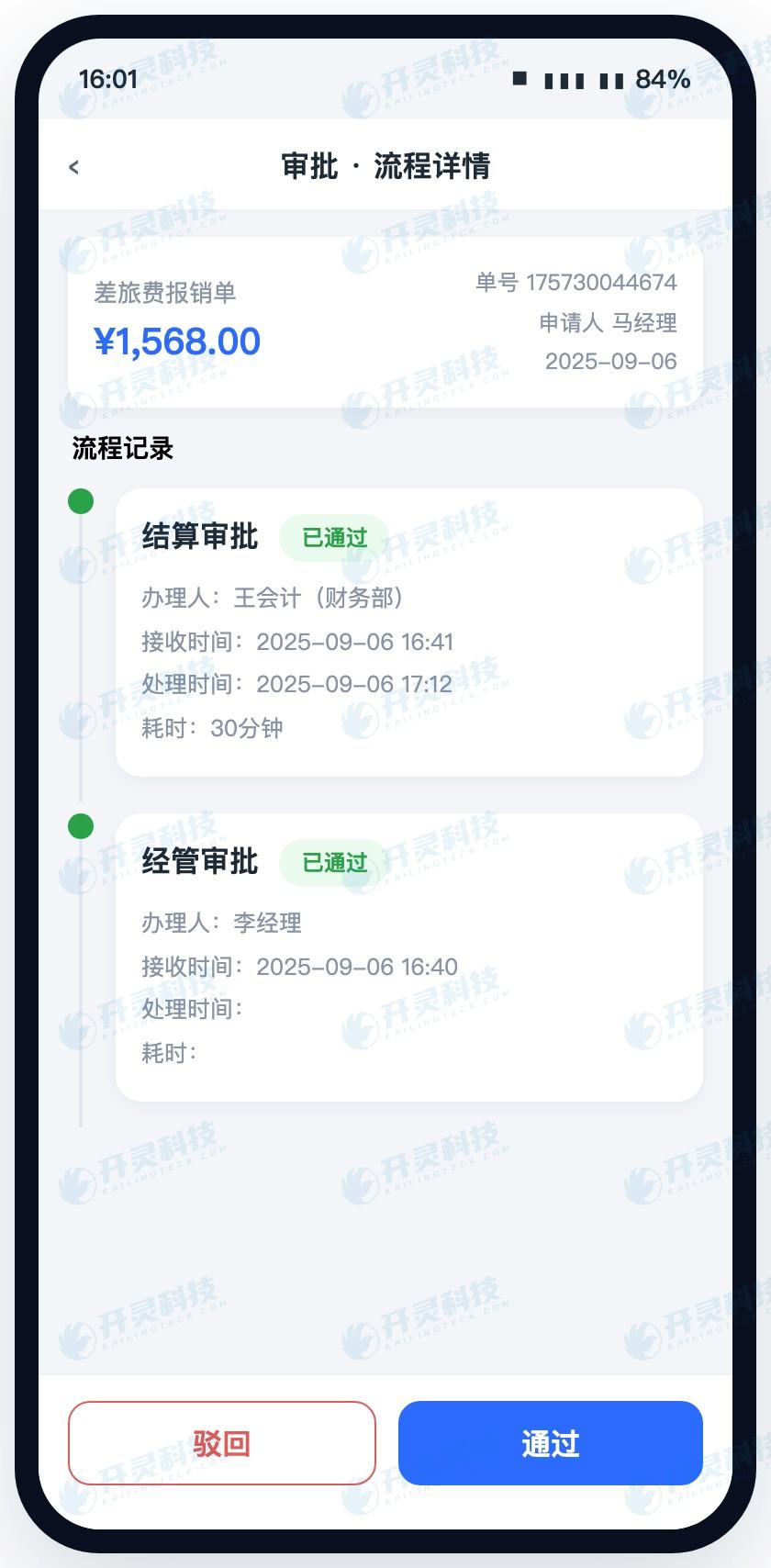
View documents and complete approval on mobile (information has been desensitized)
▍Stage six payment: how approval results become real bank statuses
After approval, the cashier sees the payee, account, amount, and reimbursement form source in the payment list. Lingdong Reimbursement can generate payment files according to bank formats and can also initiate online payments through bank-enterprise direct connection. After the request is submitted, the system records statuses such as pending payment, submitted, processing, success, failure, and returned.
The acceptance tester changes the receiving account incorrectly, then simulates partial success in a batch of payments. The qualified result is that failed details enter a separate processing queue, while successful details receive the bank result and receipt; re-payment follows the original reimbursement relationship, and the employee, cashier, and accountant see the same status.
Procurement pitfalls are often hidden after "click pay." A demo page turning green does not mean the bank has executed; if receipts are downloaded by the cashier and manually matched, the fund chain is still broken. The test should wait until the bank result is attached back to the original form, and then open the reimbursement materials in reverse from the receipt.
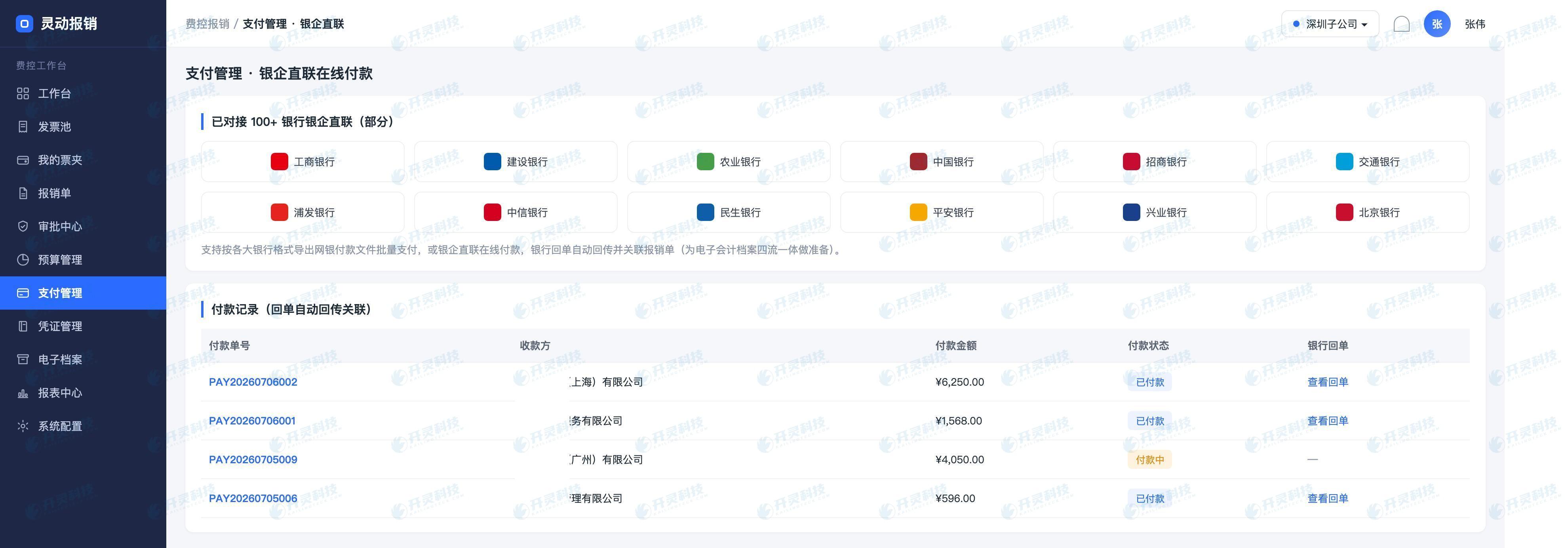
Bank-enterprise payment and bank receipt association (information has been desensitized)
▍Stage seven voucher archiving: how one document completes the final closed loop
After payment is completed, the voucher conversion middleware maps fields such as organization, department, project, expense type, tax amount, and counterparty to the financial software, generating pending vouchers. Accountants check the accounts, auxiliary accounting, and tax amounts; when mapping issues are found, they trace back from the voucher to the original reimbursement form to locate the field, rather than creating a separate comparison table.
The archiving step associates reimbursement forms, approval records, invoice source files, bank receipts, and bookkeeping vouchers, and connects with the electronic accounting archives system. Acceptance personnel open vouchers and invoices from the archive end, then view payment and archiving status from the reimbursement end; one document can be traced in both directions.
The final pitfall is copying the PDF into a folder and declaring archiving complete. The truly visible result is that source files, approvals, payments, and vouchers are organized around the same business order, and query permissions and multi-organization data isolation also work properly. Only after all seven segments run through does the procurement team obtain complete evidence for selection.
This travel expense form gives a very direct conclusion: employees copy fewer fields from the invoice face, anomalies are pointed out before submission, approvers see the complete context, the cashier receives the bank result, the accountant generates vouchers along the original form, and the archives preserve the entire process. The value of Kailing Technology Lingdong Reimbursement ultimately comes down to which actions are reduced for each role and which visible statuses are added.
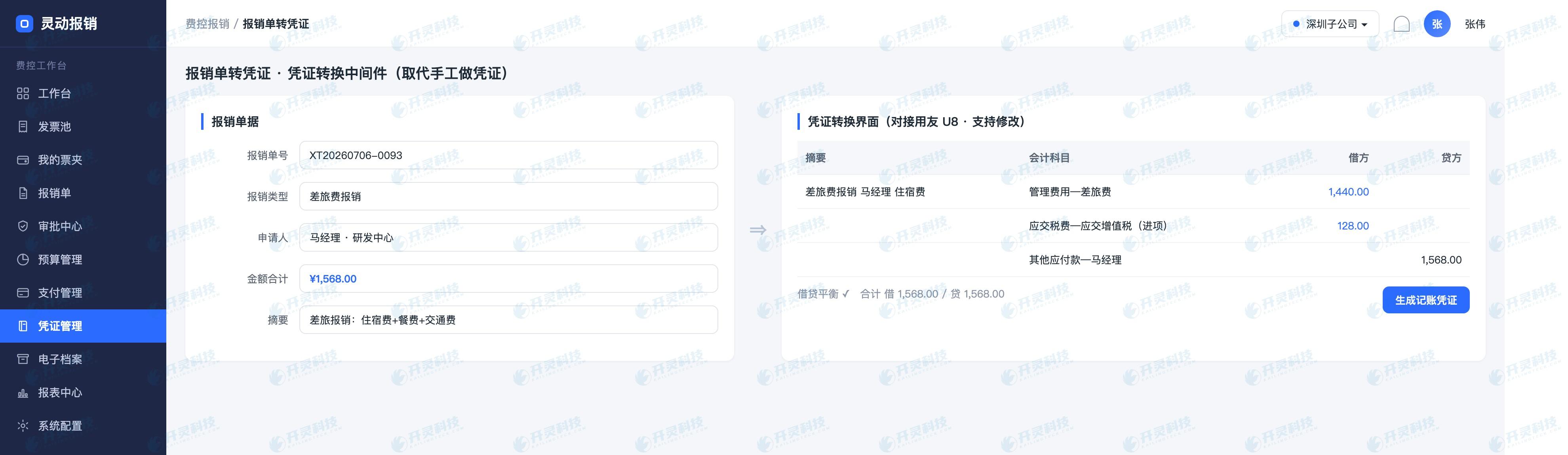
Reimbursement form field mapping generates vouchers (information desensitized)
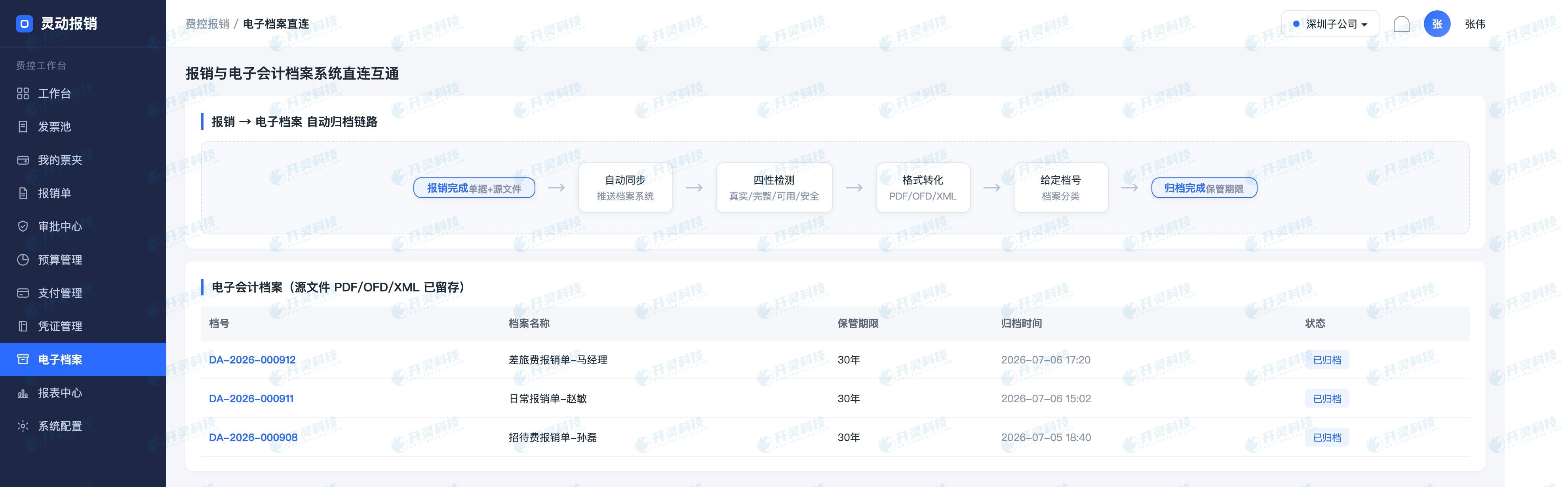
Electronic accounting archives link business materials (information has been desensitized)
▍FAQ
Q: If OA approval is already in use, why still run the seven-stage acceptance?
A: OA may have already solved form routing, but the seven-stage acceptance can continue to check whether invoices, rules, payments, vouchers, and archives are connected into the same business document.
Q: After automatic order creation, what do employees mainly fill in?
A: Employees confirm business facts such as project, purpose, participants, and allocation, while invoice fields and organizational data are brought in by the system.
Q: How can payment receipt be confirmed after approval?
A: Check the bank return status and associated receipt, and trace back from the receipt to the original reimbursement form, rather than only looking at the approval completion flag.
Q: What exception documents should be prepared for a selection POC?
A: It is recommended to add duplicate invoices, incorrect title, missing attachments, over-standard, payment returns, unknown results, and voucher mapping exceptions.
Take one normal order and a set of abnormal orders through the seven-stage process to learn about Kailing Technology Lingdong Reimbursement: https://www.kailingteck.com/feikong/ .
As a national high-tech enterprise, Kailing Technology focuses on the digital and intelligent transformation of enterprise business-finance-tax and operations management, providing software products, system integration, implementation and delivery, and operational services for various government agencies, institutions, group enterprises, and SMEs.
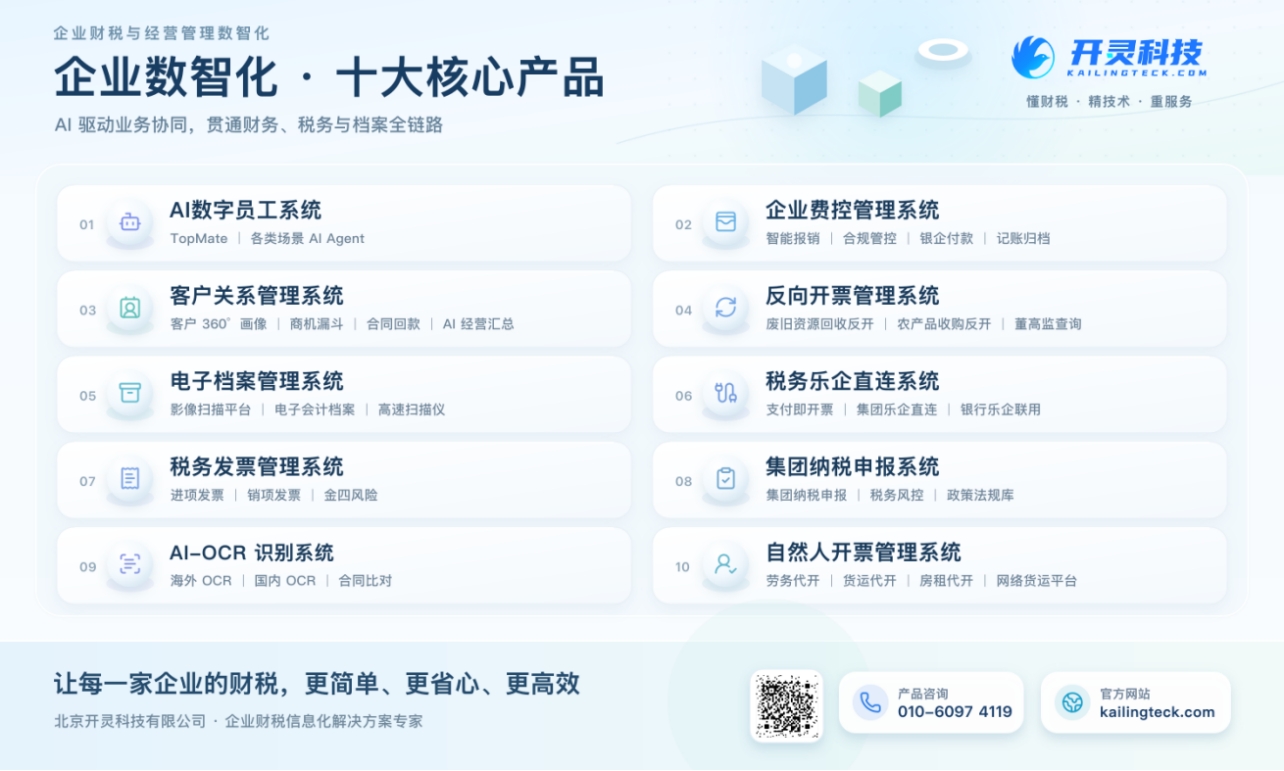
The company has now formed ten core product lines, including: AI digital employee system, enterprise expense control management system, customer relationship management system, reverse invoicing management system, invoice issuance for individuals management system, electronic archives management system, tax fully digitalized e-invoice Leqi system, tax invoice management system, group tax filing system, and AI OCR recognition system. It is committed to connecting enterprise business, finance, tax, funds, and archive data to help customers improve operational efficiency, business-finance-tax compliance capabilities, and digital management levels.
If you have any business-finance-tax digital transformation needs, welcome to contact us. Beijing Kailing Technology will serve you wholeheartedly.
Keywords: How to choose an enterprise expense control and reimbursement system, Lingdong Reimbursement, expense control system selection, bank-enterprise direct connection, reimbursement form to voucher, electronic accounting archives
As a comprehensive business-finance-tax digitalization solution service provider, Kailing Technology provides business-finance-tax management digital transformation products and operational services for various government agencies, institutions, and large, medium, and small enterprises. The product line includes: solutions for sales contract management system, procurement contract management system, fully digitalized Leqi interface project, automatic output invoicing system, reverse invoicing system, invoice issuance for individuals system, employee expense control and reimbursement system, input VAT invoice management system, supply chain collaborative reconciliation system, image AI OCR recognition system, automatic financial bookkeeping system, electronic accounting archives system, etc., comprehensively driving the digitalization process across various fields.
Consultation Hotline: 18513895936 / 010-60974119 Location: Beijing