010-6097 4119Book a Demo


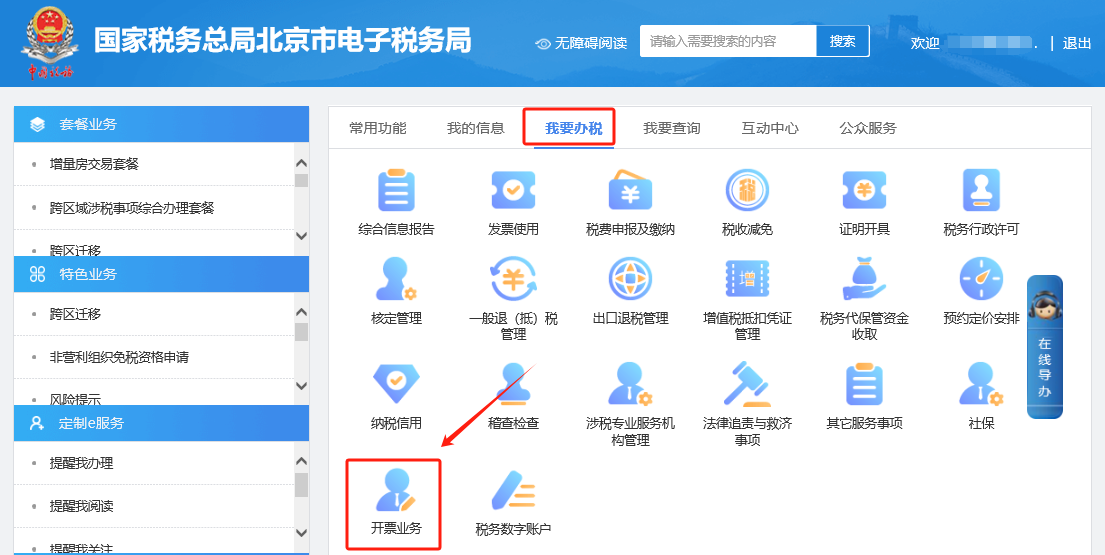
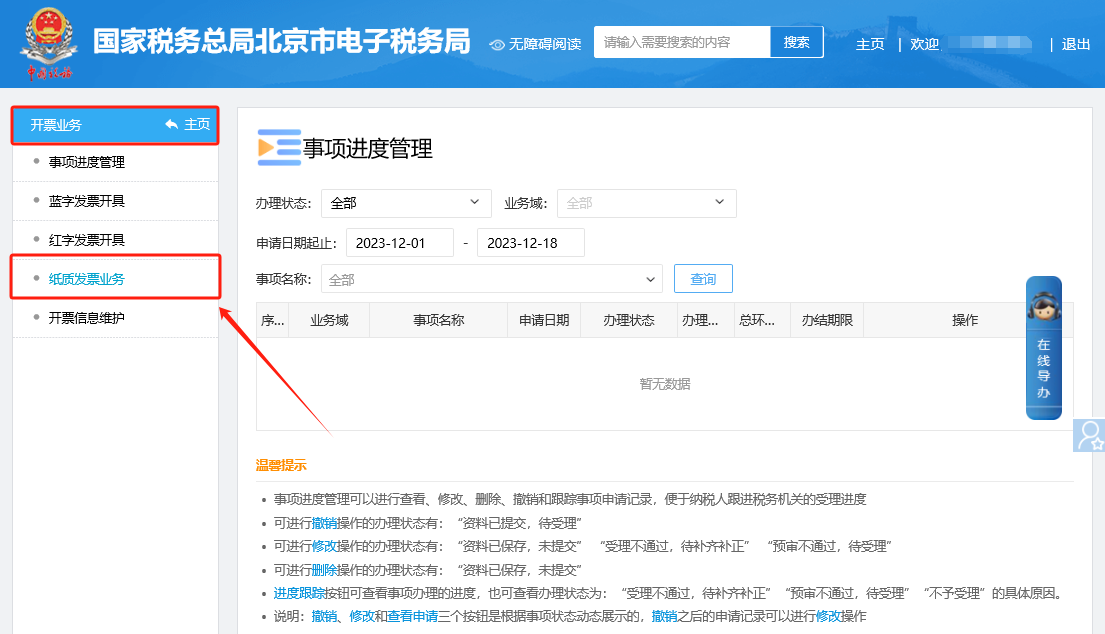
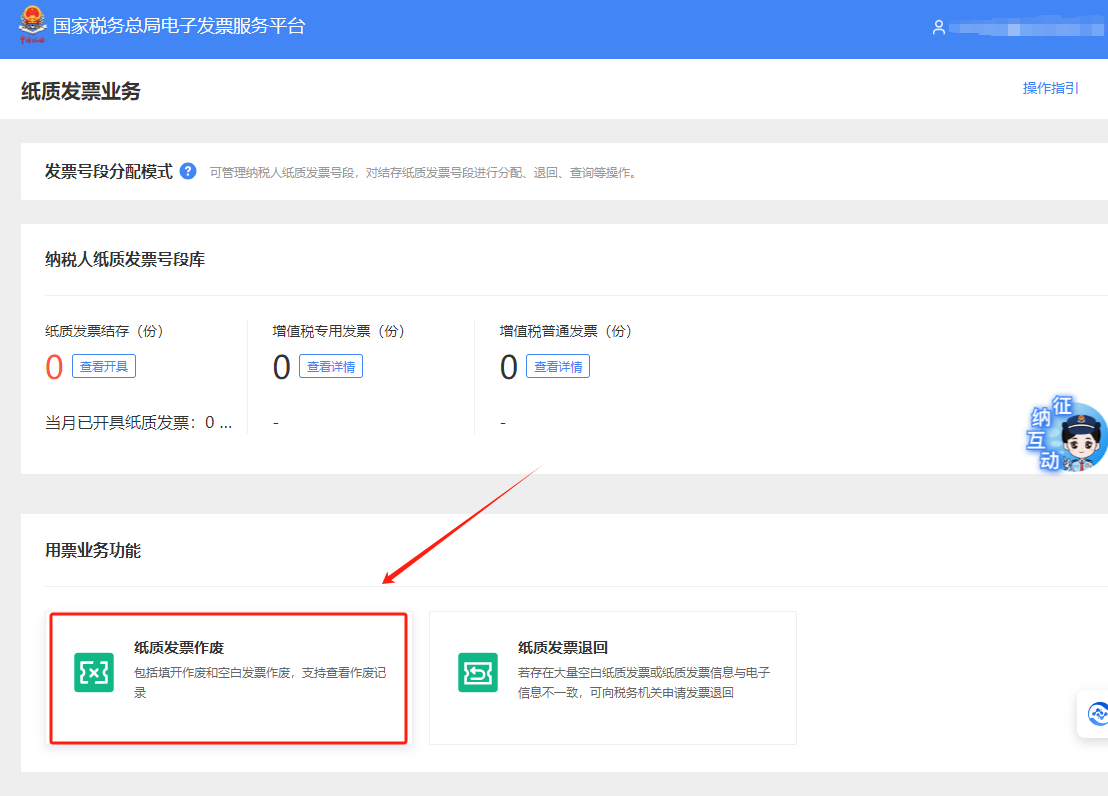
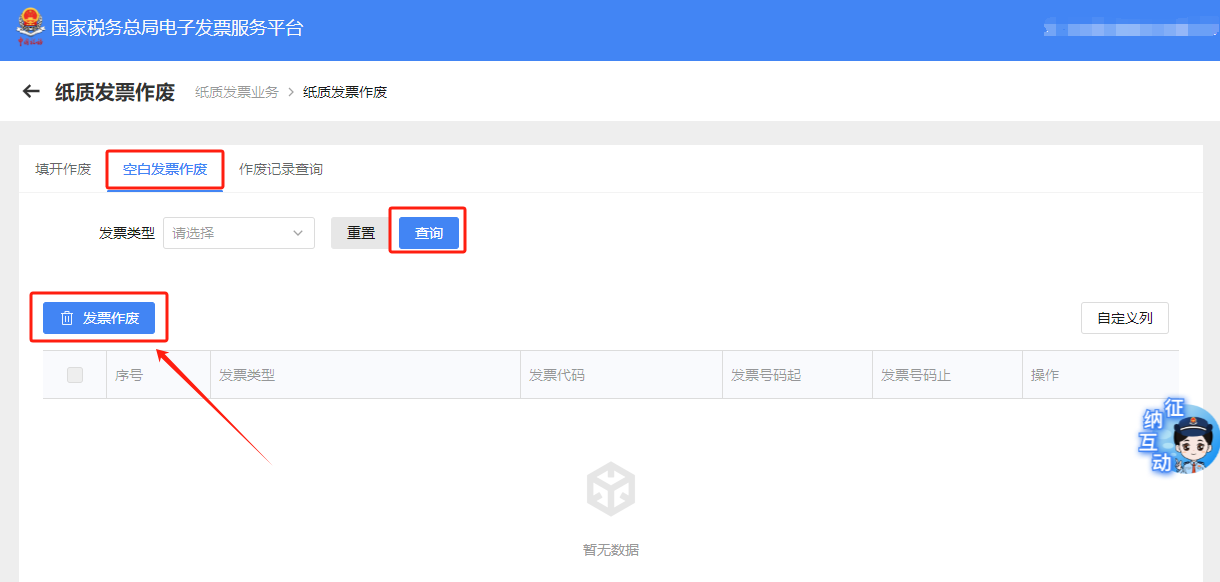
Electronic Tax Bureau operation guide | Can blank paper invoices be voided on the electronic invoice platform?Published: 2023-12-23 16:32 1. Can blank paper invoices be voided on the e-invoice platform?Answer: Hello, please click [Invoicing Business] — [Paper Invoice Business] and after entering click [Paper Invoice Voiding], select the "Blank Invoice Voiding" tab, filter blank paper invoices by type in the invoice type drop-down list, click "Query," check the blank invoices to be voided, and click "Invoice Voiding" to pop up the invoice voiding page. On the invoice voiding page, fill in the number of copies to be voided and click the "Confirm" button; the prompt box "Invoice voiding executed successfully" pops up. I. I Want to Handle Taxes—Invoicing Business.
II. Invoicing Business - Paper Invoice Business.
III. Paper Invoice Business—Paper Invoice Voiding.
IV. On the paper invoice voiding page, select the "Void Blank Invoice" tab. In the invoice type drop-down list, filter blank paper invoices by type, click "Query", check the blank invoices to be voided, and click "Void Invoice" to pop up the invoice voiding page. On the invoice voiding page, enter the number of copies to be voided and click the "Confirm" button to pop up the "Invoice voiding executed successfully" prompt box.
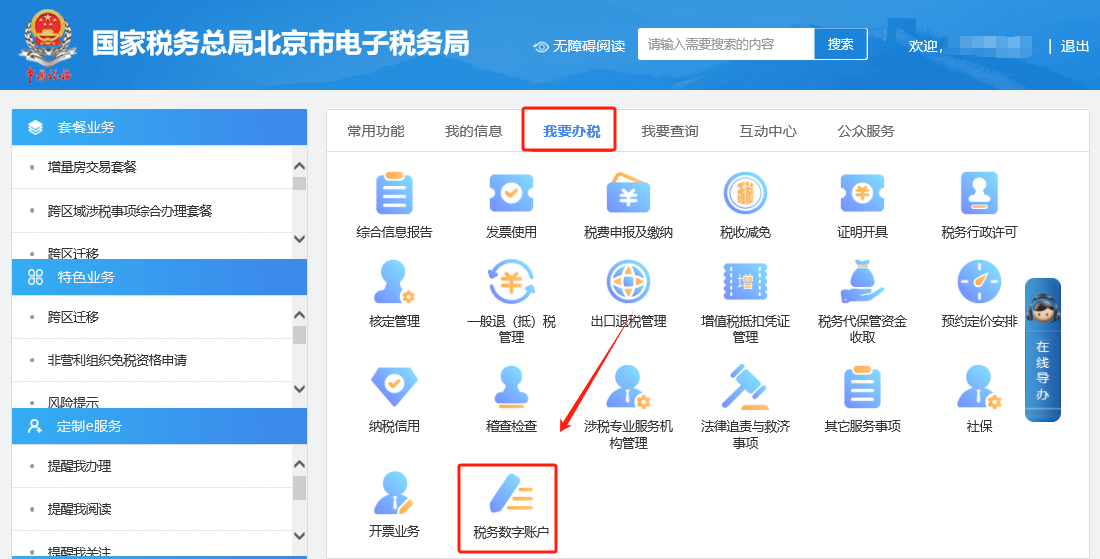
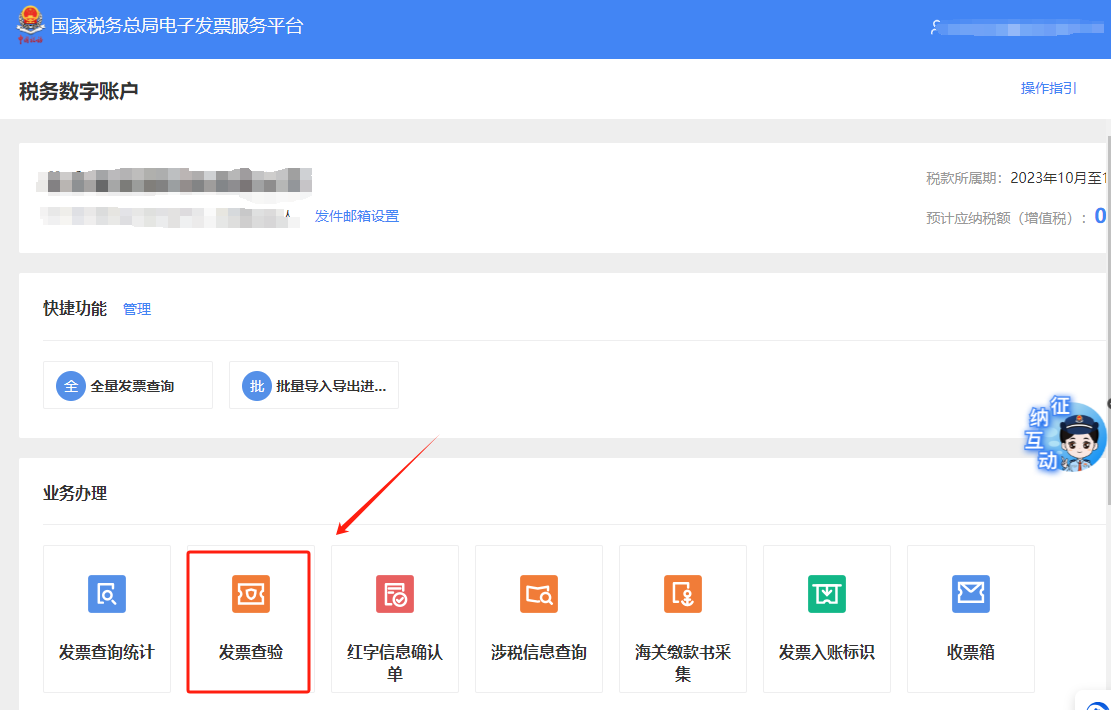
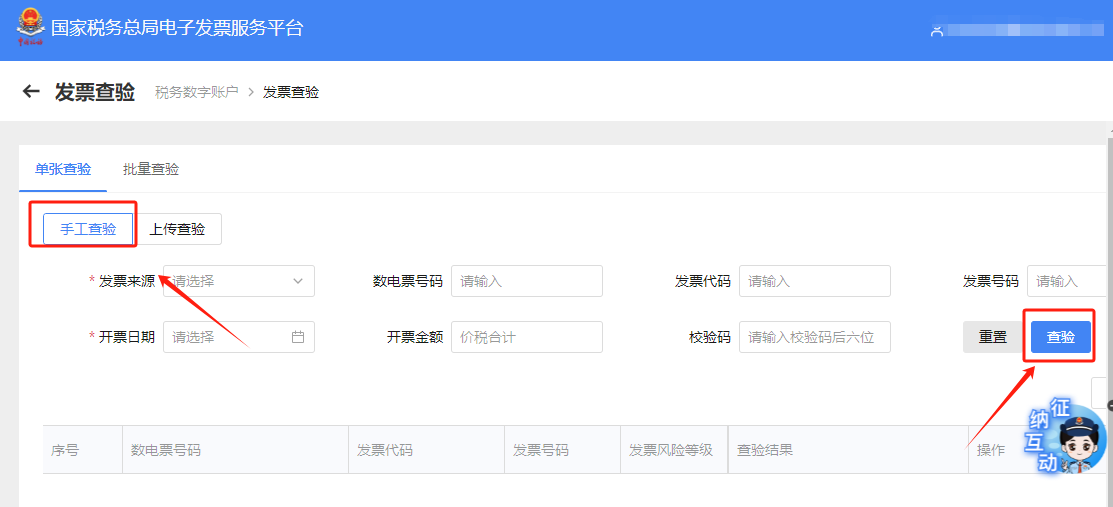
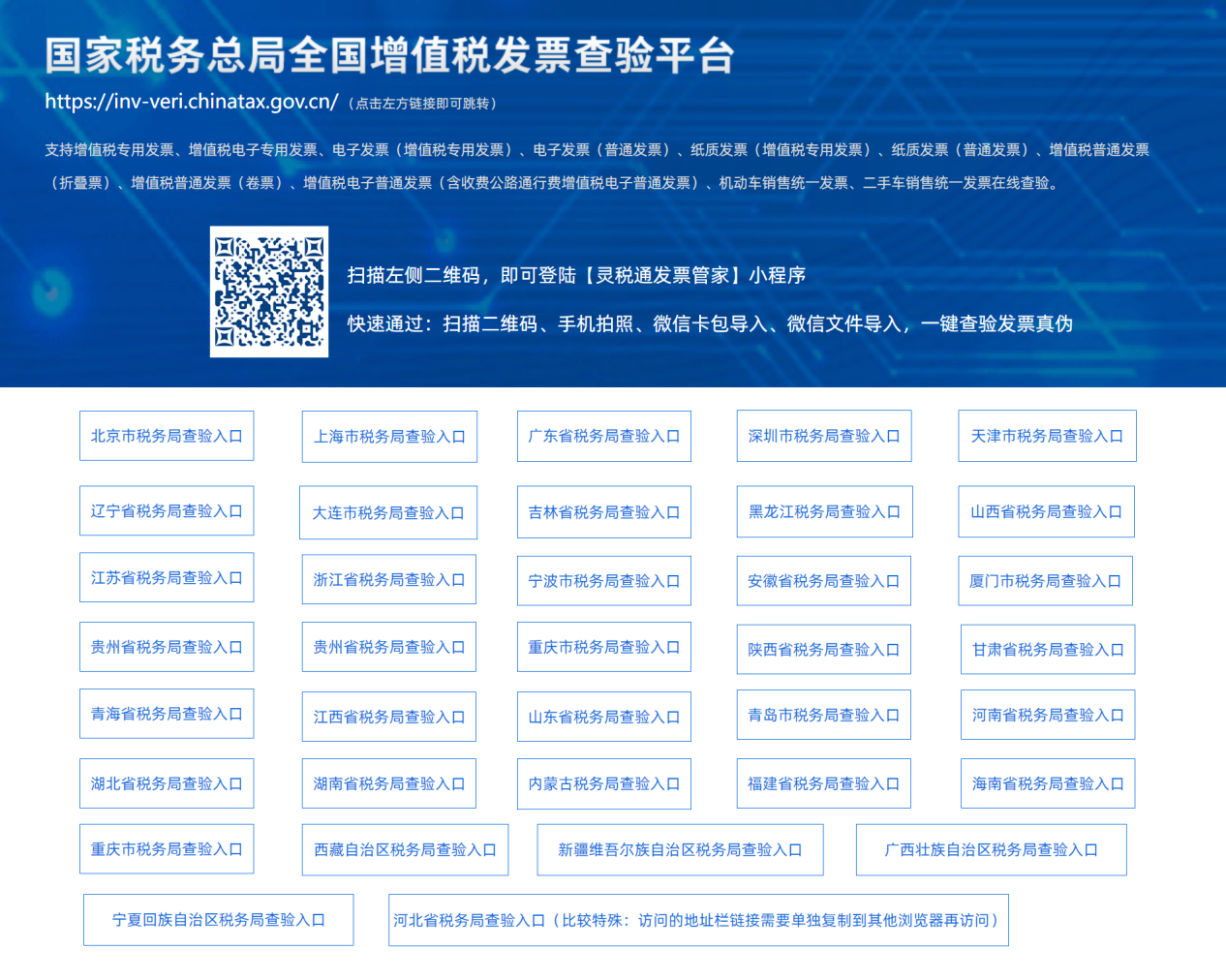
2.When issuing a fully digitalized e-invoice on the electronic tax bureau, after filling in the buyer's and seller's address and bank information on the issuance interface, when clicking preview only the taxpayer identification number and company name appear. Is this normal? Answer: Hello, the face of a fully digitalized e-invoice only displays the "taxpayer name" and "unified social credit code/taxpayer identification number" of both the buyer and seller. If the corresponding "account-opening bank" and "bank account" need to be displayed, you can check the "whether to display" option for both the buyer and seller on the invoicing interface to display them. 3. How to verify fully digitalized e-invoices?Answer: There are currently two ways to verify fully digitalized e-invoices, as follows: (1) Use the electronic invoice service platform. Taxpayers can select [Tax Digital Account] — [Invoice Verification] in sequence on the electronic invoice service platform to enter the query interface, select "Manual Verification" and fill in the corresponding items according to the actual situation, then click "Verify", and the system will display the corresponding invoice verification result. (2) UseNational VAT Invoice Verification Platform. When taxpayers query electronic invoices (VAT special invoices) and electronic invoices (general invoices), they need to enter the "invoice number (20 digits), invoicing date, and total amount including tax" information; when querying paper VAT special invoices issued by the electronic invoice service platform, they need to enter the "invoice code, invoice number, invoicing date, and issued amount (excluding tax)" information; when querying paper VAT general invoices issued by the electronic invoice service platform, they need to enter the "invoice code, invoice number, issuance date, and verification code (the last six digits of the invoice number in the password area)" information. Method 1 I. I Want to Handle Taxes—Tax Digital Account.
II. Tax digital account—invoice verification.
III. Enter the invoice verification inquiry interface, select "Manual verification" and fill in the corresponding items according to the actual situation, click "Verify", and the system will display the corresponding invoice verification result.
Method 2 Use the National VAT Invoice Verification Platform. When taxpayers query electronic invoices (VAT special invoices) and electronic invoices (ordinary invoices), they need to enter "invoice number (20 digits), invoicing date, and total amount including tax"; when querying paper VAT special invoices issued by the electronic invoice service platform, they need to enter "invoice code, invoice number, invoicing date, and issued amount (excluding tax)"; when querying paper VAT ordinary invoices issued by the electronic invoice service platform, they need to enter "invoice code, invoice number, issuance date, and verification code (the last six digits of the invoice number in the password area)".
Source: Beijing Tax official account Beijing Kailing Technology Co., Ltd.——an enterprise business-finance-tax digitalization solution service provider. Kailing Technology provides solutions for sales management systems, procurement management systems, output invoicing systems, input invoice collection systems, imaging management systems, financial posting systems, electronic accounting archives and other businesses according to enterprise needs, professionally and efficiently helping enterprises transform and upgrade their business-finance-tax digital management. If you have any business-finance-tax digital transformation needs, welcome to contact us. Beijing Kailing Technology will serve you wholeheartedly.
|