010-6097 4119Book a Demo


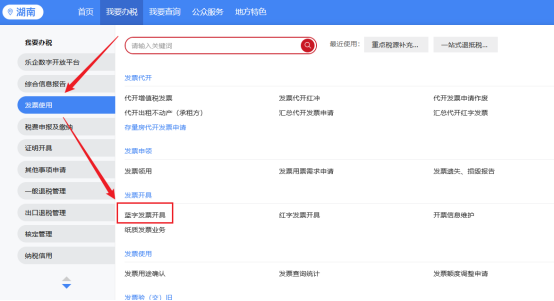
[Hot Q&A] How to issue a fully digitalized e-invoice for the Unified Invoice for Motor Vehicle Sales?Published: 2025-05-07 16:19 1. How do you issue a fully digitalized e-invoice uniform invoice for motor vehicle sales?Answer:The taxpayer logs into the electronic tax bureau and clicks [I Want to Handle Taxes]-[Invoice Use]-[Blue Invoice Issuance] in sequence
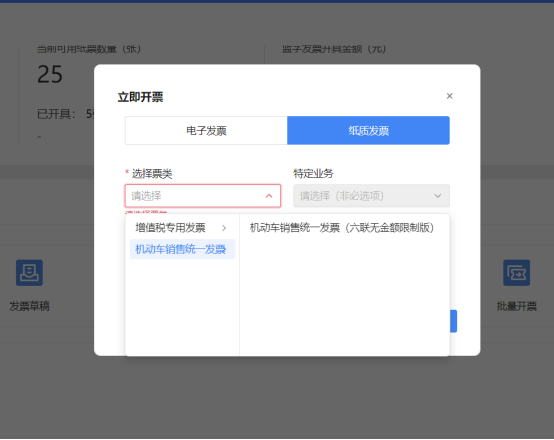
Enter the blue-letter invoice issuance interface and click [Issue Now] under [Invoice Filling], and the Issue Now window pops up. After the invoicing window pops up, electronic invoice is selected by default; change the invoice type, select [Paper Invoice], then click the drop-down list in [Select Invoice Category], select [Motor Vehicle Sales Unified Invoice] - [Motor Vehicle Sales Unified Invoice (Six-Copy Version Without Amount Limit)], click Confirm to enter the invoice issuance form view.
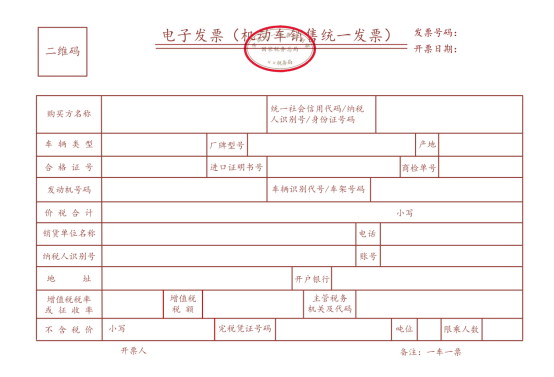
2. Can a unified motor vehicle sales invoice cover multiple vehicles on one invoice?Answer:The unified motor vehicle sales invoice defaults to "one vehicle, one invoice" and cannot be changed. 3. What does the fully digitalized e-invoice motor vehicle sales unified invoice look like?Answer:The electronic invoice (Motor Vehicle Sales Unified Invoice) sample is as follows:
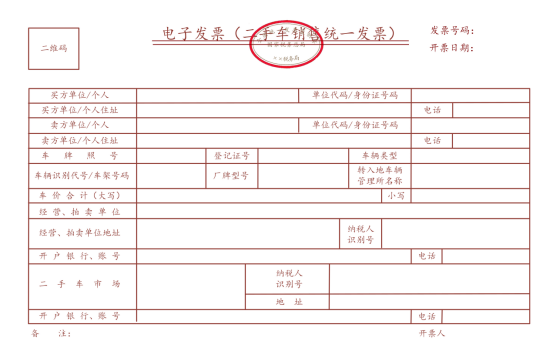
The electronic invoice (Used Car Sales Unified Invoice) sample is as follows:
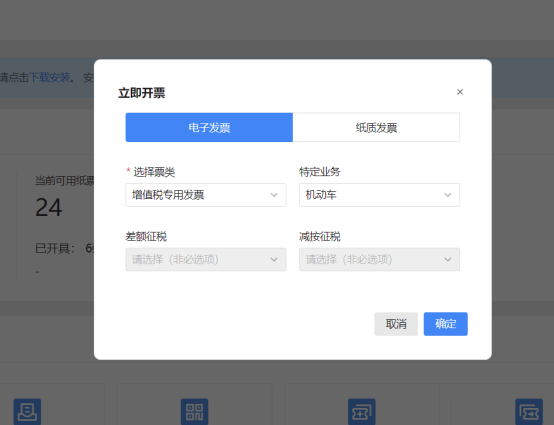
4. How to issue invoices for specific motor vehicle business using e-invoices? Answer:The taxpayer logs into the electronic tax bureau and clicks [I Want to Handle Taxes]-[Invoice Use]-[Blue Invoice Issuance] in sequence
Enter the blue-letter invoice issuance interface and click [Issue Now] under [Invoice Filling], and the Issue Now window pops up. After the invoicing window pops up, electronic invoice is selected by default; first click the drop-down list in [Select Invoice Category] and select [Special VAT Invoice], then click the drop-down list in [Specific Business] and select [Motor Vehicle], click Confirm to enter the invoice issuance form view.
5. After the launch of the fully digitalized e-invoice for motor vehicle sales unified invoice, can the original paper invoice still be used? Answer:To optimize motor vehicle registration services, simplify registration procedures, better facilitate the handling of affairs by the public and enterprises, and promote automobile consumption and circulation, tax authorities and public security authorities have further strengthened departmental collaboration, clarifying that starting May 1, paper motor vehicle sales invoices are no longer required, and motor vehicle registration business can be handled using fully digitalized e-invoice (hereinafter referred to as fully digitalized e-invoice) information. Public security traffic management departments use the fully digitalized e-invoice information transmitted by tax authorities for comparison when handling motor vehicle registration business. However, applicants who have already issued paper motor vehicle sales invoices can still use the paper motor vehicle sales invoice to handle relevant business at the public security organ's traffic management department. For more content, please follow Kailing Technology:https://www.kailingteck.com/ 。 As a comprehensive business-finance-tax digitalization solution service provider, Kailing Technology provides business-finance-tax management digital transformation products and operational services for various government agencies, institutions, and large, medium, and small enterprises. The product line includes: Solutions for sales contract management system, procurement contract management system, fully digitalized Leqi interface project, automatic output VAT invoicing system, invoice issuance for individuals system, employee expense control and reimbursement system, input VAT invoice management system, supply chain collaborative reconciliation system, imaging OCR recognition system, automatic financial bookkeeping system, electronic accounting archives system and other businesses, comprehensively advancing the digitalization process across various fields. If you have any business-finance-tax digital transformation needs, welcome to contact us. Beijing Kailing Technology will serve you wholeheartedly.
|