010-6097 4119Book a Demo


No need to print train and flight tickets for reimbursement; electronic passenger tickets can be obtained via the "Individual Income Tax APP"!Published: 2023-12-20 15:25 Currently, 36 provinces, municipalities, and autonomous regions nationwide (including cities with independent planning status) have fully achieved pilot coverage of fully digitalized e-invoices. In newly issued announcements by several provinces, one change caught our attention. (1.)Official announcement from the tax bureau! Train and flight tickets no longer need to be printed for reimbursement!
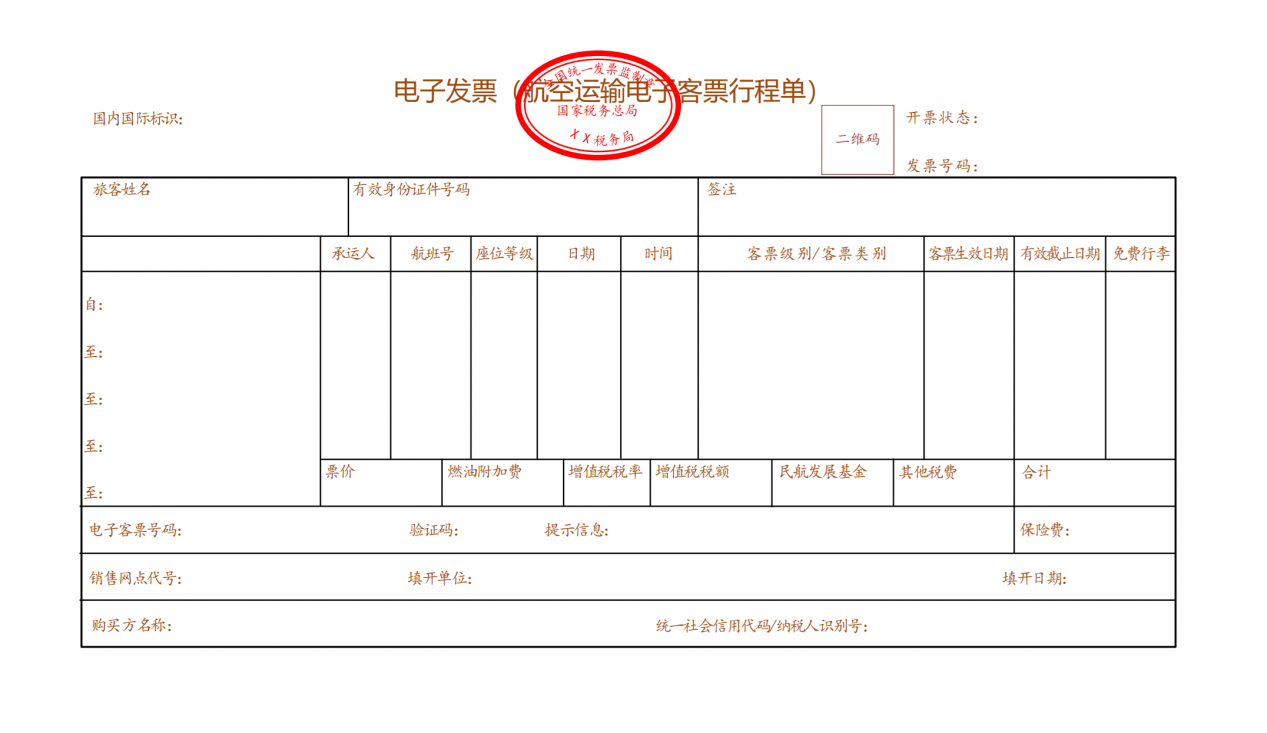
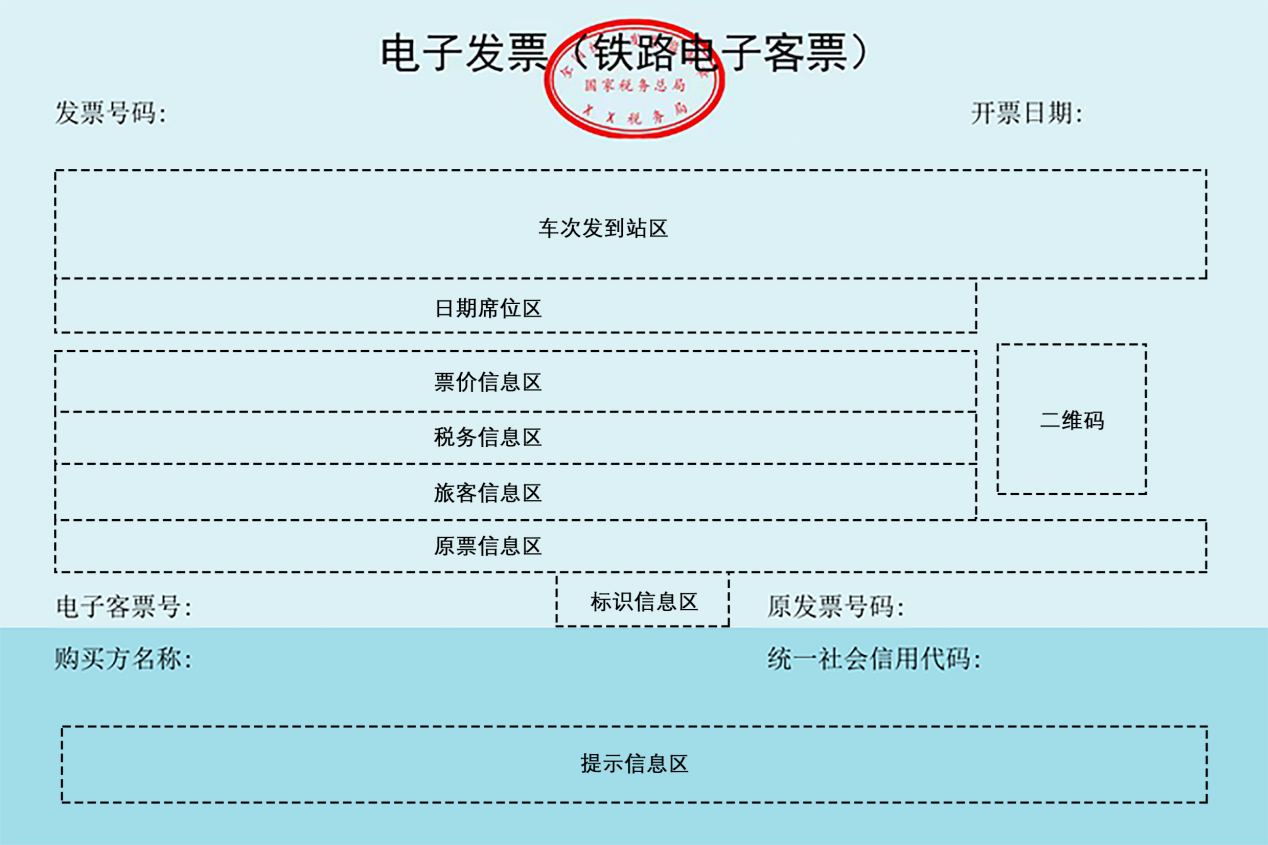
WithBeijing MunicipalityAs an example, the announcement newly added "electronic invoice (air transport electronic ticket itinerary)" and "electronic invoice (railway electronic ticket)". At the same time, the tax bureau also announced,Invoices for individual railway and air tickets will be unified in the "Individual Income Tax APP" in the future, with no need for separate printing.
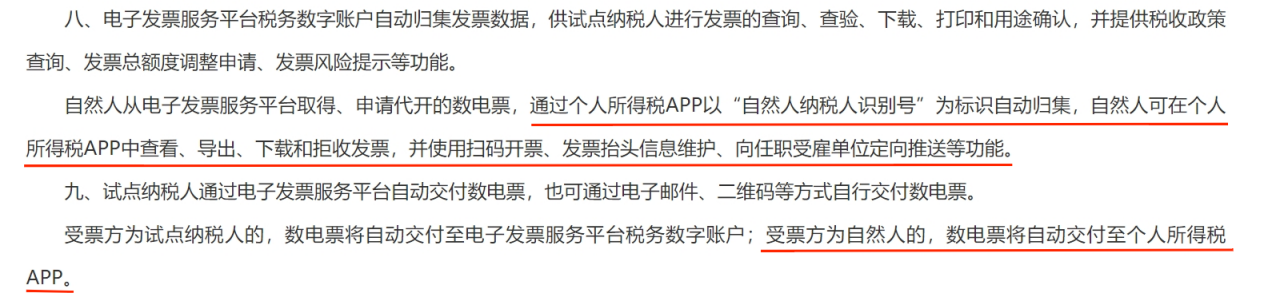
Original text from the tax bureau: Fully digitalized e-invoices obtained or applied for issuance on behalf of by natural persons from the electronic invoice service platform are automatically aggregated through the Individual Income Tax APP using the "natural person taxpayer identification number" as the identifier. Natural persons can view, export, download, and reject invoices in the Individual Income Tax APP, and use functions such as scan-to-invoice, invoice header information maintenance, and targeted push to employing units. That is to say,For invoices obtained by a natural person as a traveler, the seller must accurately fill in the traveler's ID type and number for passenger transport services, civil aviation, railway and other specific businesses when issuing the invoice. The invoice will be automatically aggregated into the "Individual Income Tax APP", where the taxpayer can push the issued railway electronic ticket and aviation electronic ticket to the employing unit for reimbursement. Attached: Samples of air transport electronic ticket itineraries and railway electronic tickets
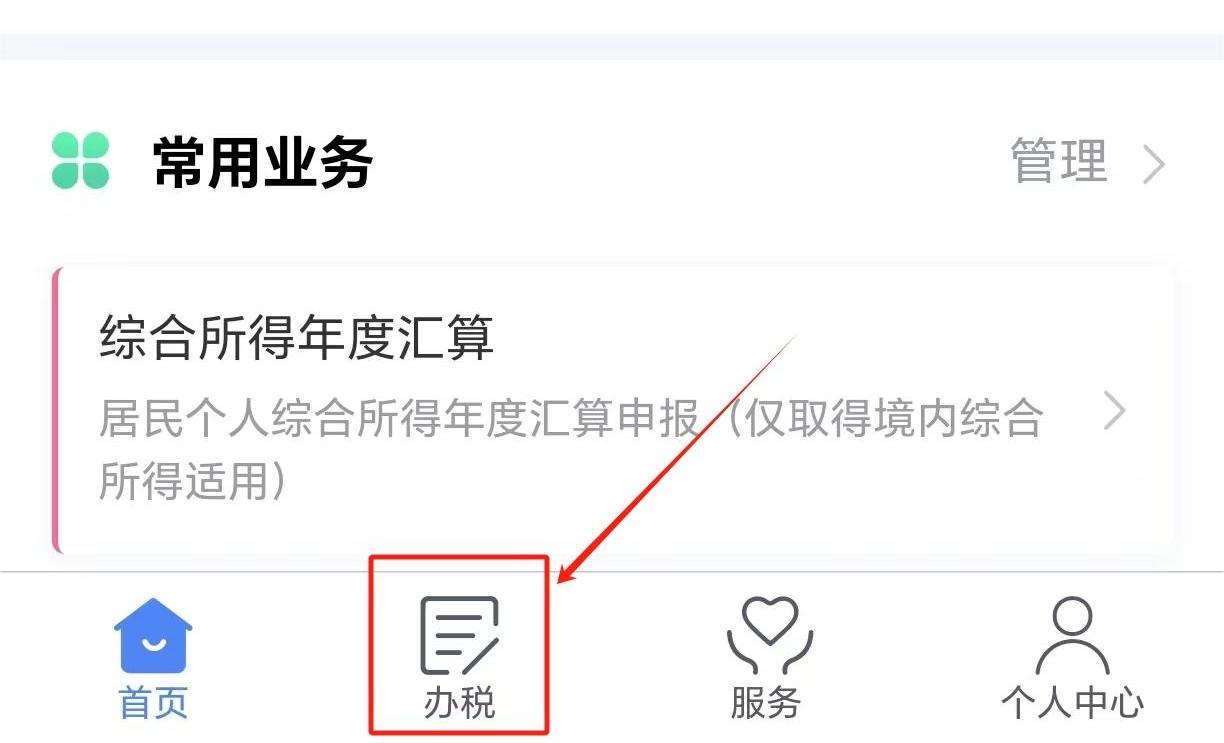
(2)How to obtain air transport electronic ticket itineraries and railway electronic tickets on the "Individual Income Tax APP"? Step 1: Open the individual income tax app and click"Tax Handling" in the bottom menu bar
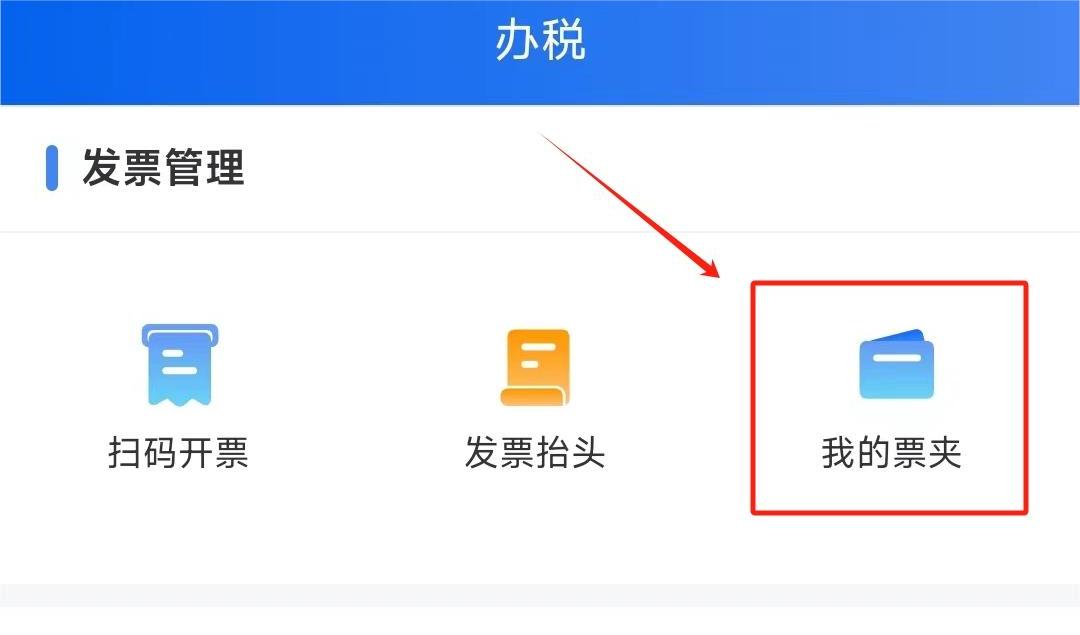
Step 2: Click the "My Invoice Folder" function under "Invoice Management"
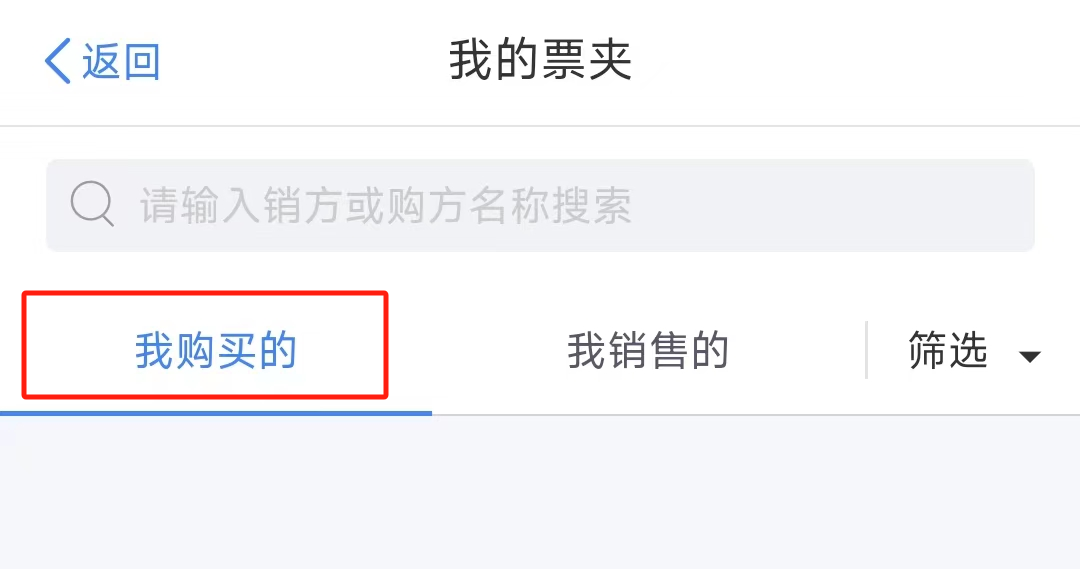
Step 3: After entering "My Invoice Folder", the system will display two categories: "Purchased by Me" and "Sold by Me". Taxpayers' railway and air tickets will be displayed under the "Purchased by Me" category
Step 4: After acquisition is completed, the taxpayer only needs to push the invoice to their employing unit. (3)Interpretation of the Tax Bureau's Original Text 1.Fully digitalized e-invoices obtained or applied for issuance on behalf of by natural persons from the electronic invoice service platform are automatically aggregated through the Individual Income Tax APP using the "natural person taxpayer identification number" as the identifier. What is the "natural person taxpayer identification number," and how can one view their own "natural person taxpayer identification number"? Answer: The "natural person taxpayer identification number" is the unique code identifier for natural person taxpayers to handle various tax-related matters. Taxpayers can view it after completing real-name registration in the Individual Income Tax APP. According to Article 9 of the Individual Income Tax Law of the People's Republic of China: if a taxpayer has a Chinese citizen identity number, the Chinese citizen identity number shall be used as the taxpayer identification number; if the taxpayer does not have a Chinese citizen identity number, the tax authority shall assign a taxpayer identification number. 2.When the invoice recipient is an individual, how are invoices classified and collected in the Individual Income Tax APP? Answer: When the invoice recipient is a natural person, the Individual Income Tax APP will, based on the natural person's identity as a buyer (including traveler) or seller, classify and collect the fully digitalized e-invoices obtained or applied for issuance by that person under the "My Invoice Folder" module according to the tabs "Purchased by Me" and "Sold by Me". For invoices obtained by a natural person as the buyer, the seller must accurately fill in the taxpayer identification number and check the natural person identifier when issuing the invoice; for invoices obtained by a natural person as a traveler, the seller must accurately fill in the traveler's ID type and number for passenger transport services, civil aviation, railway and other specific businesses when issuing the invoice. Then the invoices obtained by the natural person as the buyer (including traveler) are aggregated under the "Purchased by Me" tab; For purchase invoices obtained by a natural person as the seller or invoices applied for issuance on their behalf, the buyer or tax authority must accurately fill in the taxpayer identification number and check the natural person identifier when issuing the invoice. Then the purchase invoices obtained by the natural person as the seller or invoices applied for issuance on their behalf are aggregated under the "Sold by Me" tab. 3.How can individuals reject a fully digitalized e-invoice they have doubts about? Answer: If a natural person has doubts about a fully digitalized e-invoice in the "My Invoice Folder" module of the Individual Income Tax APP, they can view the invoice details page and select a rejection reason (incorrect issuance content, transaction did not occur, contains sensitive information, other) to reject the invoice, or use the "Cancel Rejection" function to receive it again. 4.How do I issue an invoice by scanning a code through the Individual Income Tax APP? Answer: Natural persons may use the Individual Income Tax APP to scan the QR code generated by the invoicing party's electronic invoice service platform to issue invoices. QR codes are divided into basic information QR codes and transaction information QR codes. A basic information QR code is a fixed QR code containing basic information such as the seller's unified social credit code and taxpayer name, which can be downloaded, saved, or printed for long-term use; after the buyer scans it and enters the invoice header information, the seller can reference this information for invoicing within 48 hours. A transaction information QR code is a dynamic QR code generated after the seller fills in transaction information such as product name, amount, and tax amount; the buyer can scan it within 24 hours to enter the invoice header information and automatically issue an invoice, after which the QR code automatically becomes invalid upon timeout. 5.How can natural persons push fully digitalized e-invoices obtained from the electronic invoice service platform in a targeted manner to their employing units? Answer: If a natural person needs to provide a fully digitalized e-invoice to their employing unit (such as for reimbursement), they may use the "Invoice Push" function of the Individual Income Tax APP to directly push it to the invoice receipt box of the employing unit's Tax Digital Account. The "invoice push" function only supports pushing invoices in normal status, and does not support invoices that have been red-flushed or rejected. Note: The pilot areas for this function are divided by the [registered residence location] in the personal basic information in the individual income tax APP. The pilot areas are as follows:
Some text is from the internet Beijing Kailing Technology Co., Ltd.——an enterprise business-finance-tax digitalization solution service provider. Kailing Technology provides solutions for sales management systems, procurement management systems, output invoicing systems, input invoice collection systems, imaging management systems, financial posting systems, electronic accounting archives and other businesses according to enterprise needs, professionally and efficiently helping enterprises transform and upgrade their business-finance-tax digital management. If you have any business-finance-tax digital transformation needs, welcome to contact us. Beijing Kailing Technology will serve you wholeheartedly.
|