010-6097 4119Book a Demo


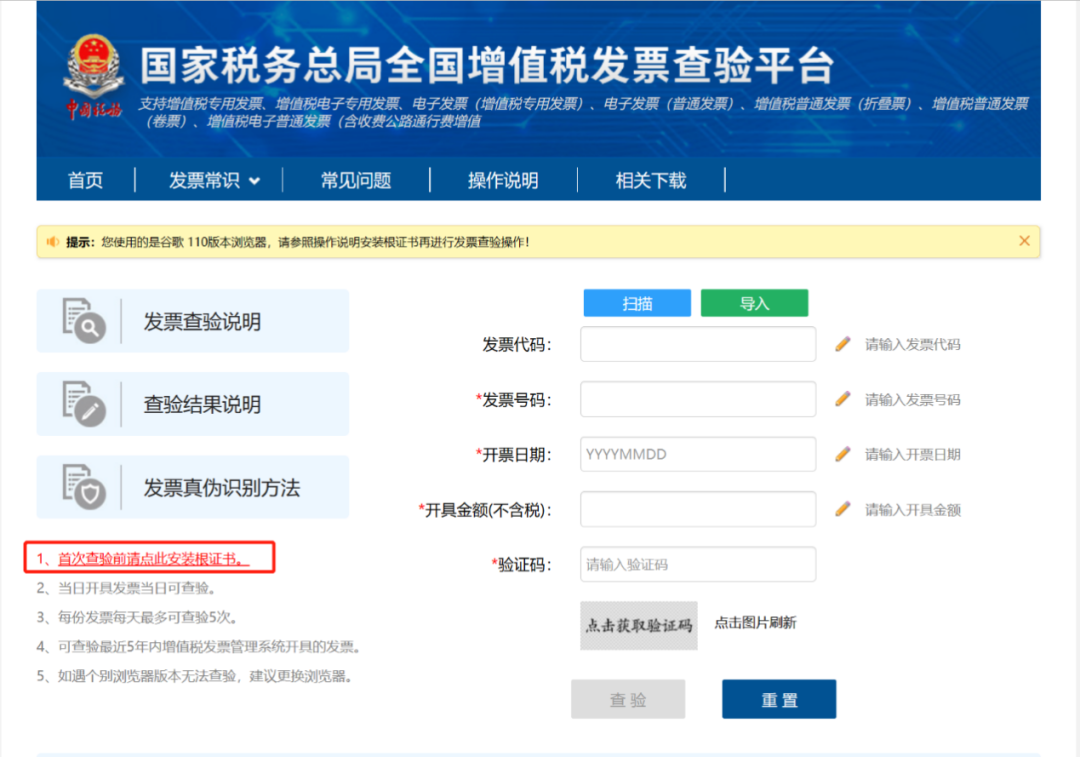
Invoice Verification Platform | Invoice Inquiry: Easy to Handle! Make Invoice Verification and Duplicate Reimbursement Prevention SimplerPublished: 2025-04-27 15:59 After receiving an invoice, how do you determine whether it is genuine? How do you avoid tax risks caused by posting fake invoices? Today we will teach youTwoRecruitPC verification method + two mobile verification methods, easilyExpose fake invoices and jointly safeguard your taxSecurity! 1. National VAT Invoice Verification PlatformWebsite: inv-veri.chinatax.gov.cn/ Step 1 Enter the National VAT Invoice Verification Platform. If this is your first verification, you need to install the root certificate first. Please click "1. For first-time verification, please click here to install the root certificate" in the left guide bar, and follow the steps prompted on the webpage to install it.
Step 2 After installation is complete, re-enter the National VAT Invoice Verification Platform, fill in the invoice information you want to verify in the verification area on the right, and click [Verify]. In addition, you can also choose verification methods such as scanning or importing.
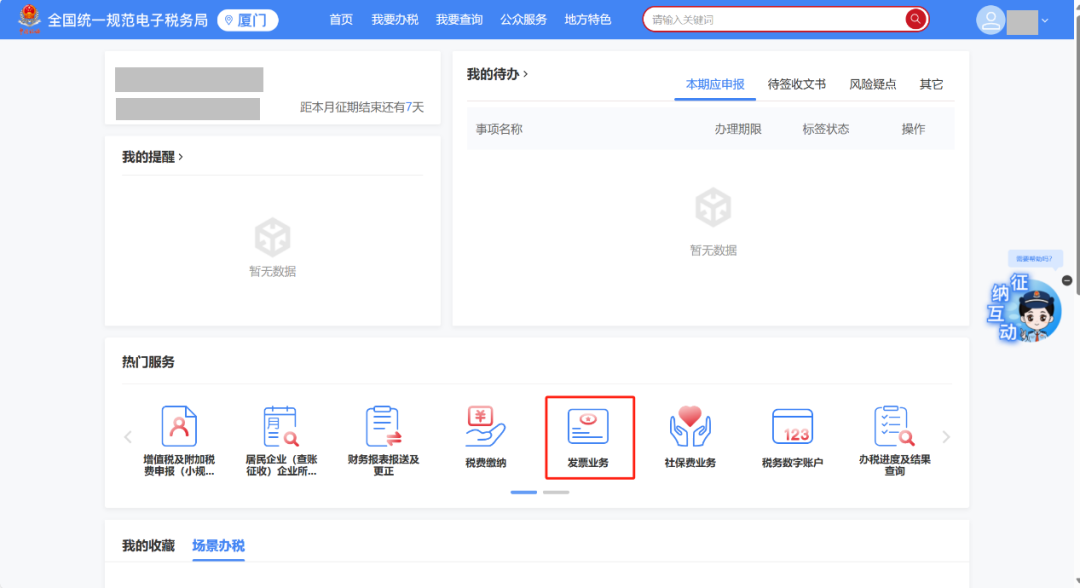
2. National unified standardized electronic tax bureauStep 1 Log in to the Electronic Tax Bureau and click [Invoice Business] in the popular services on the homepage.
Step 2 Click the [Invoice Verification] function under invoice usage processing.
Step 3 On the invoice verification page, there are three verification methods: single manual verification, single upload verification, and batch verification. Click the [Verify] button to obtain the verification result.
3. New Electronic Tax Bureau APPStep 1 After logging in, select the function menus in order: [Handle Taxes] - [Invoice Use] - [Invoice Information Query] - [Invoice Verification] to enter the invoice verification page; you can also customize [Invoice Verification] on the homepage or search by entering keywords in the search bar.
Step 2 Enter the "Invoice Verification" page. You can bring up relevant information by scanning the QR code on the face of an issued invoice, or manually enter the relevant invoice information on the page and click the [Confirm] button; if it is your own invoice, you only need to enter the invoice number to verify it; if it is a third-party invoice, you will be prompted to enter the invoicing date and invoicing amount (tax-inclusive amount) before verification.
Step 3 When verifying your own invoice and the results are consistent, the verification result is fed back as "Upon verification, the invoice information is consistent", and the invoice face information, invoice label information (including invoice purpose labels and red-letter invoice labels, etc.), and invoice verification time are displayed; click [Preview Invoice] to preview the invoice face. If the query results are inconsistent, the result is fed back as "Upon verification, the invoice information is inconsistent"; when the verification result is inconsistent, the invoice cannot be previewed. If the invoice information is not found, the result is fed back as "The invoice information was not found".
Step 4 When verifying a third-party invoice, if the verification results are consistent, the feedback prompt is "Third-party invoice; upon verification, the invoice information is consistent"; when the verification results are consistent, you can click [Preview Invoice] to view the invoice face information; if the results are inconsistent, the feedback prompt is "Third-party invoice; upon verification, the invoice information is inconsistent"; when the verification results are inconsistent, the invoice cannot be previewed; if not found, the system feeds back "Third-party invoice; the invoice information was not found".
4. Kailing Technology·Lingshuitong Smart Invoice Management PlatformWebsite:https://www.kailingteck.com/ ▪ Intelligent verification of all invoice face information Supports parsing of all invoice types including fully digitalized e-invoices (special/general), VAT electronic invoices, and blockchain invoices. Core fields such as invoice code, number, amount, and tax rate are automatically extracted via OCR recognition technology, with an accuracy rate of 99.9%. Connect to the tax digital account,While enteringVerify invoice authenticity, status (normal/voided/red-ink reversed), and issuer qualifications in real time to prevent fake invoice risks.
▪ Multi-dimensional risk early warning mechanism Blacklist monitoring: automatically screens whether product names or sellers involve sensitive industries such as gambling and tobacco, or are listed in the tax abnormality directory. Compliance Verification: Intelligently detects invoice header, tax ID, and tax rate matching to prevent "wrong-number invoices," "duplicate invoices," and "abnormal tax rate invoices" from being recorded. Status tracking: Real-time monitoring of in-transit invoice status, warning of abnormal operations such as invoice voiding and red-letter reversal, avoiding deduction losses.
For more business-finance-tax digitalization solutions and customization needs, please follow Kailing Technology:https://www.kailingteck.com/ 。 As a comprehensive business-finance-tax digitalization solution service provider, Kailing Technology provides business-finance-tax management digital transformation products and operational services for various government agencies, institutions, and large, medium, and small enterprises. The product line includes: Solutions for sales contract management system, procurement contract management system, fully digitalized Leqi interface project, automatic output VAT invoicing system, invoice issuance for individuals system, employee expense control and reimbursement system, input VAT invoice management system, supply chain collaborative reconciliation system, imaging OCR recognition system, automatic financial bookkeeping system, electronic accounting archives system and other businesses, comprehensively advancing the digitalization process across various fields. If you have any business-finance-tax digital transformation needs, welcome to contact us. Beijing Kailing Technology will serve you wholeheartedly.
|