010-6097 4119Book a Demo


[Bookmark] Please check the hot tax-related Q&A on fully digitalized e-invoice quotas!Published: 2024-10-12 16:51 Recently, a netizen consulted about issues related to fully digitalized e-invoices. TodayWeWe have collected and organized five hot questions and answers about invoice quotas to study together with everyone!01 What does invoice quota mean? The invoice quota includes the total issuance amount quota, the initial total issuance amount quota, and the remaining available quota.
02 What is the remaining available invoice quota?
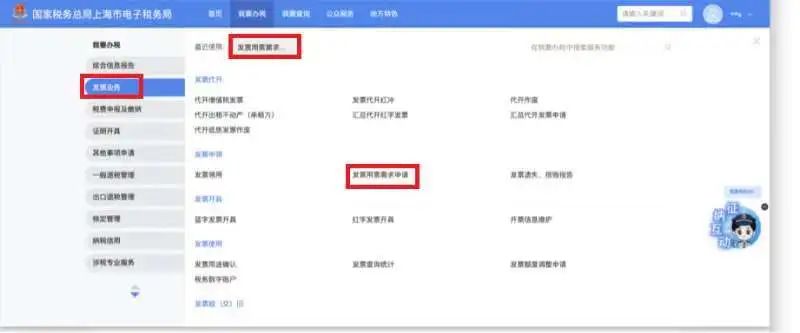
03 What is the initial total invoicing amount limit? The initial total invoice issuance amount limit refers to the upper limit of the amount for which a taxpayer using the electronic invoice service platform may issue invoices in the current month as granted by the electronic invoice service platform when using fully digitalized e-invoices for the first time, and is determined by the tax authority based on the taxpayer's actual situation. 04 Do different types of invoices share the same total issuance amount limit? Fully digitalized electronic invoices, fully digitalized VAT paper special invoices, and fully digitalized VAT paper ordinary invoices issued through the electronic invoice service platform, as well as current VAT paper special invoices, current VAT paper ordinary invoices, roll invoices, paper electronic special invoices, and paper electronic ordinary invoices issued through the VAT invoice management system, share the same total issuance amount limit. However, the deduction method and stage of the total invoice amount limit differ. Invoices issued through the electronic invoice service platform are deducted at the time of invoice issuance, and what is deducted is the amount of invoices actually issued; invoices issued through the tax control system are deducted at the time of invoice acquisition, and what is deducted is the product of the maximum single-invoice issuance limit and the number of invoice copies acquired. 05 How to operate manual invoice quota adjustment? 1. After logging in to the new electronic tax bureau, click the [I Want to Handle Taxes] - [Invoice Business] - [Invoice Usage Demand Application] function menu.
If the taxpayer is undergoing "non-first-time" invoice type verification, the system automatically brings up the current valid invoice type verification application information; you can click [Add] to fill in the invoice type verification information that needs to be applied for, and you can also modify already applied invoice type verification information.
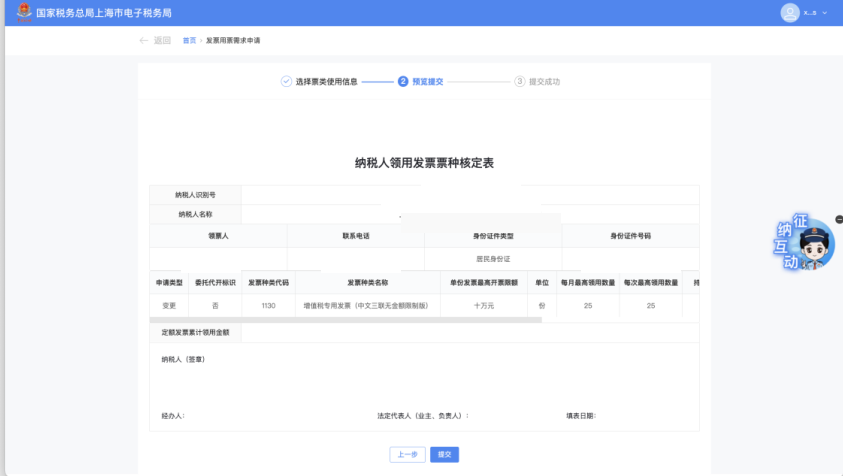
3. The taxpayer checks the newly added or modified invoice type approval information, clicks [Next], and the system jumps to the preview and submission page.
4. After the taxpayer confirms the data is correct, click [Submit] to complete the invoice type verification application; they may also click [Previous Step] to modify the invoice type verification application information. When the application submitted by the taxpayer does not meet the conditions for automatic review, manual review is triggered. Tax authority staff conduct the review in the Golden Tax Phase III core tax administration system. Source: Shanghai Tax Kailing Technology provides enterprise business-finance-tax digital product lines according to enterprise needs: Solutions for businesses including sales contract management system, procurement contract management system, fully digitalized Leqi interface project, output automatic invoicing system, employee expense control and reimbursement system, input VAT invoice management system, supply chain collaborative reconciliation system, image OCR recognition system, automatic financial bookkeeping system, and electronic accounting archives system, professionally and efficiently supporting the transformation and upgrading of enterprise business-finance-tax digital management. If you have any business-finance-tax digital transformation needs, welcome to contact us. Beijing Kailing Technology will serve you wholeheartedly.
|