010-6097 4119Book a Demo


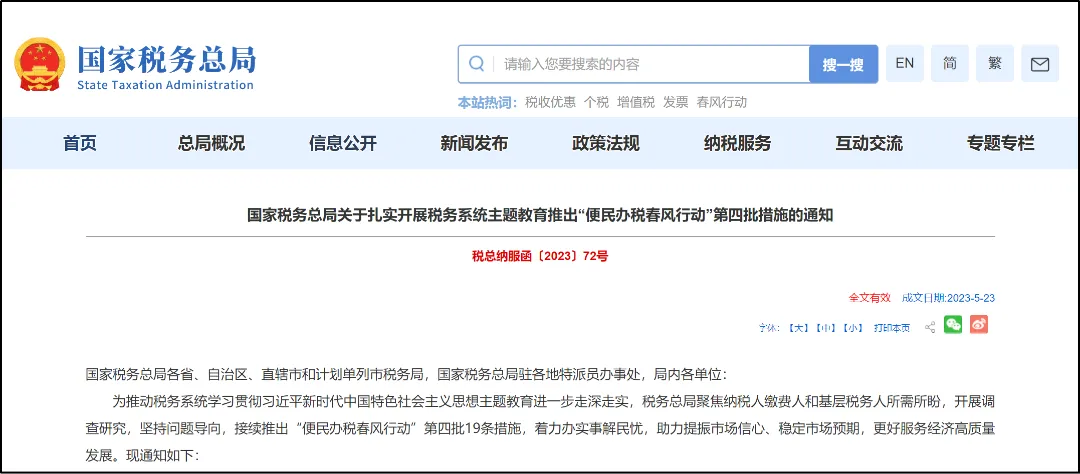
"Confirmatory filing" fully launched! Can enterprises withstand the test of the new filing?Published: 2024-06-17 17:11 As early as last year, the State Taxation Administration proposed "confirmatory filing" concept and conducted pilots. So "confirmation-based filing" has really arrived. Can enterprises withstand the test of the new filing? For example, for those lacking cost invoices and concealing income, the fourth batch of measures of the "Spring Breeze Action for Convenient Tax Payment" publicly announced by the State Taxation Administration
Will launch the "confirmation-based filing" scenario in Shanghai, Sichuan, and Chongqing, providing "confirmation-based filing" services to taxpayers and fee payers with relatively simple business operations, and further compressing the time for taxpayers and fee payers to handle tax and fee filing through intelligent data pre-filling services. After these three places run trials, will other places be far behind? Some may wonder, what is the difference between confirmatory filing and our current filing?To embrace the new filing, what preparations should enterprises make? What impact will it have on our finance?Come and follow me to take a look! 01 "What is the difference between 'confirmation-based filing' and 'current filing'?" The way we file now is "Tax-return-style filing", our enterprise prepares the report first, then files with the tax bureau, and the tax bureau passively receives it. The more tax we owe, the more it seems the initiative is with our enterprise. And "Confirm-style filing" is under the China Golden Tax Phase IV system,Relying on tax big data and intelligent tax calculation rules, combined with the tag characteristics of taxpayers and fee payers, for taxpayers with simple business element characteristics, it provides one-time confirmation filing for a total of 7 tax and fee types: VAT and surcharges, consumption tax and surcharges, corporate income tax, and cultural undertaking construction fee. The system automatically extracts data, automatically calculates tax amounts, and automatically generates element-based forms, and the filing is completed upon taxpayer confirmation, realizing multi-tax and fee "One confirmation, one submission" simplified confirmation filing function. That is to say, how much tax an enterprise pays in the future will be at the tax authority's discretion. The tax authority will automatically calculate how much tax the enterprise should pay based on its situation, and the enterprise can simply confirm if it finds no problem. But many of our enterprises have not obtained cost invoices, have sales without invoices, and other non-compliant situations. Can they withstand automatic calculation? How to operate? What preparations should our enterprises make? 02 Simple confirmation filing operation guide (taking the Shanghai Electronic Tax Bureau as an example) (1.)Function Path
Electronic Tax Bureau - I Want to File Taxes - Featured Services - Simplified Confirmation Filing.
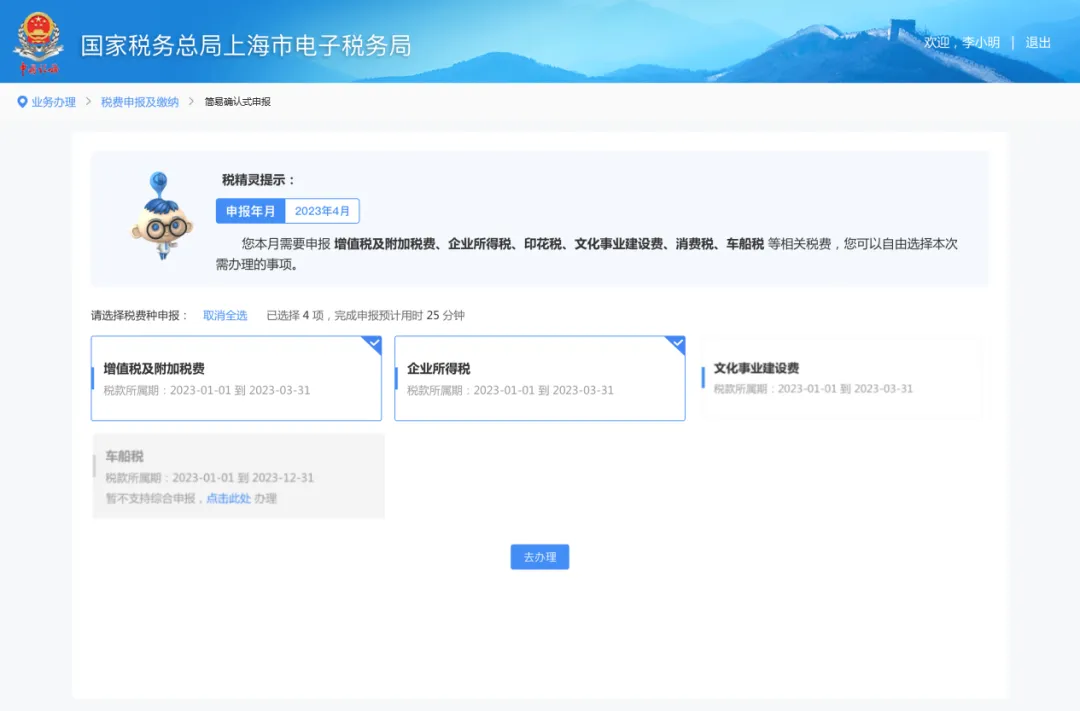
Electronic Tax Bureau - enter "Simplified Confirmation Filing" found by entering keywords in the search bar on the homepage. (II)Operation Steps 1. Click "Simplified confirmation-based filing" function, the system automatically determines whether the taxpayer meets the simplified confirmation filing rules; if so, the system automatically enters the tax type selection navigation page. 2. Enter the tax type selection navigation page, and the system automatically lists all tax types pending filing by the taxpayer. For tax categories that meet the conditions for simplified confirmation filing, the system checks all by default, and taxpayers can select and adjust according to actual circumstances; For tax categories that do not meet the conditions, the system defaults to not selectable and provides single tax category filing guidance; taxpayers file and handle according to the guidance. After the taxpayer completes the selection, click the "Go to Handle" button to enter the tax and fee trial calculation page.
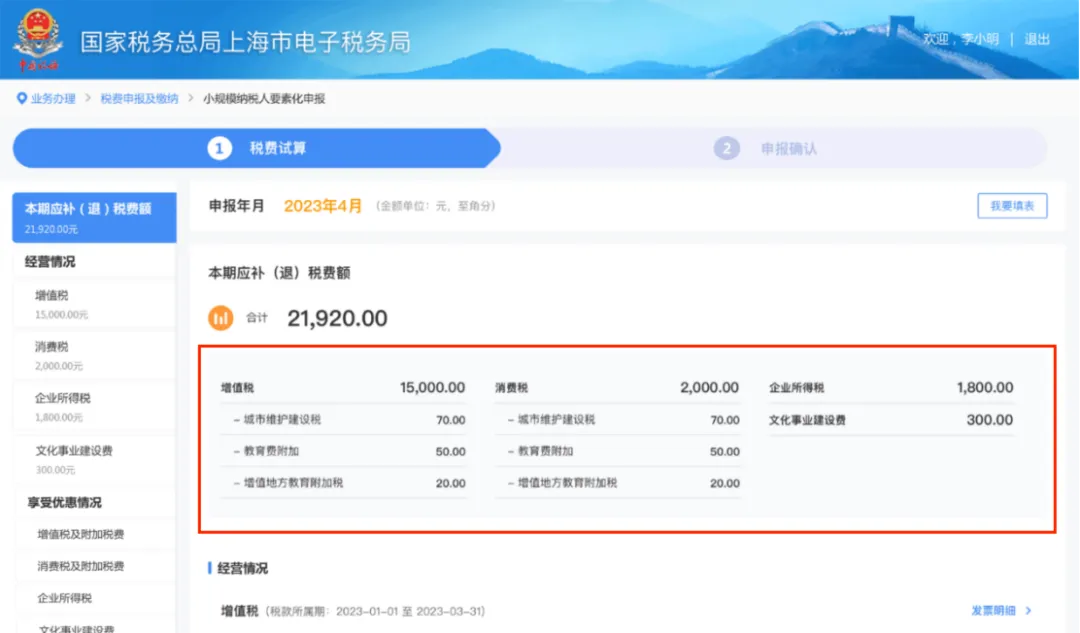
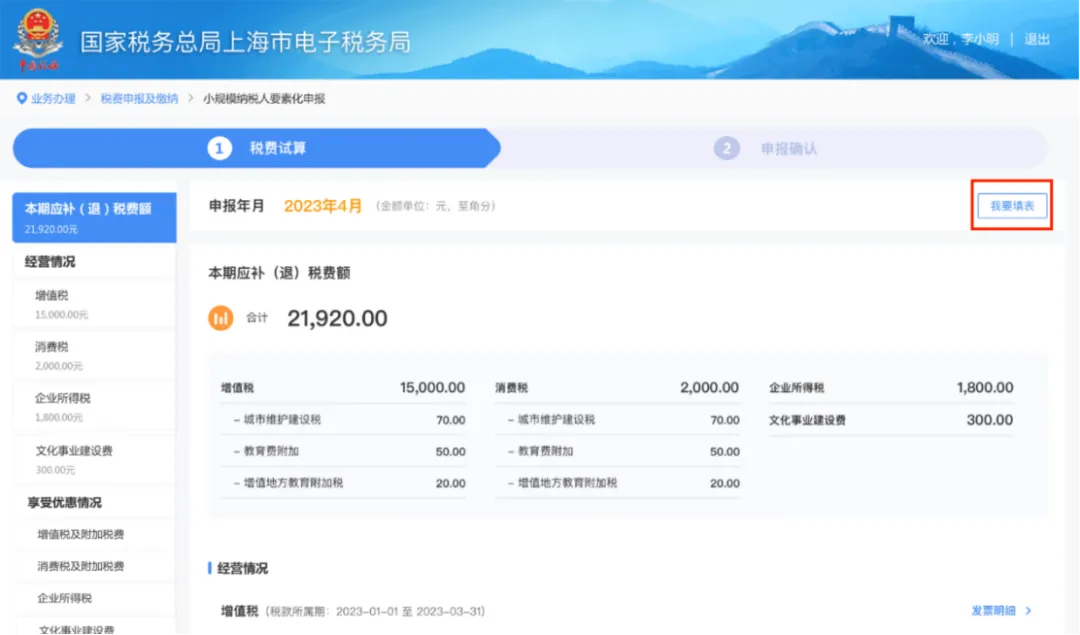
3. Enter the tax calculation trial interface,The system automatically displays, based on the taxpayer's characteristic information, key data such as the total amount of tax to be refunded or paid for the selected tax types for the current period, sales of goods and labor services, sales of services, real estate, and intangible assets, operating revenue, operating costs, and total profit. 1) The taxpayer confirms the tax (fee) results:
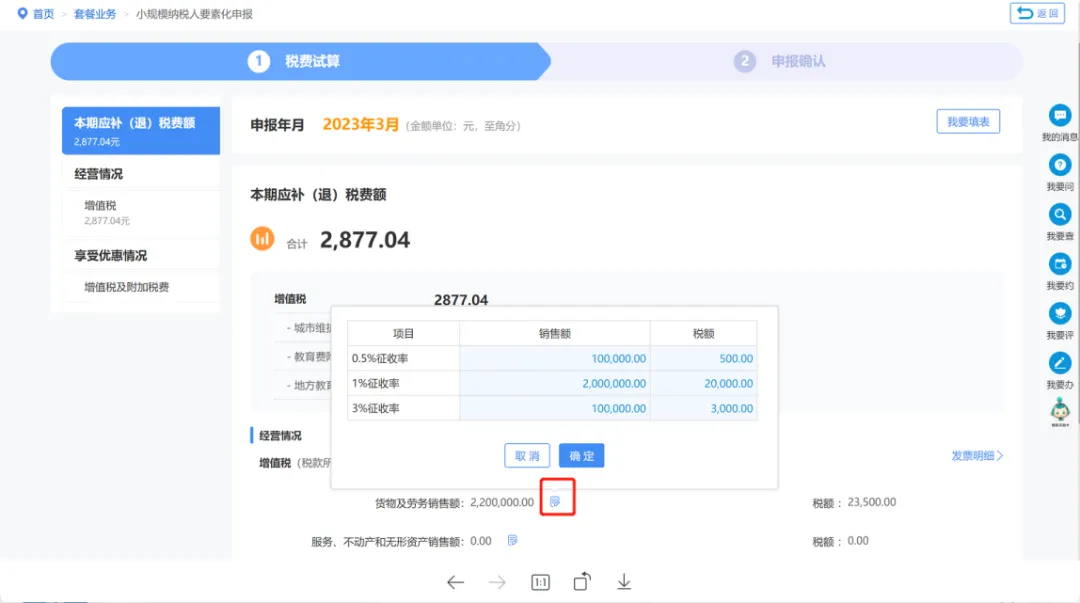
2) If the taxpayer needs to adjust relevant element data according to actual operating conditions, editing and adjustment can be made. If there is un-invoiced income, the taxpayer can separately supplement the un-invoiced income by goods and services. After input is completed, click the "Confirm" button.
3) If a taxpayer needs to enter the filing form filling interface, click "I Want to Fill the Form" to enter the form-filling filing mode.
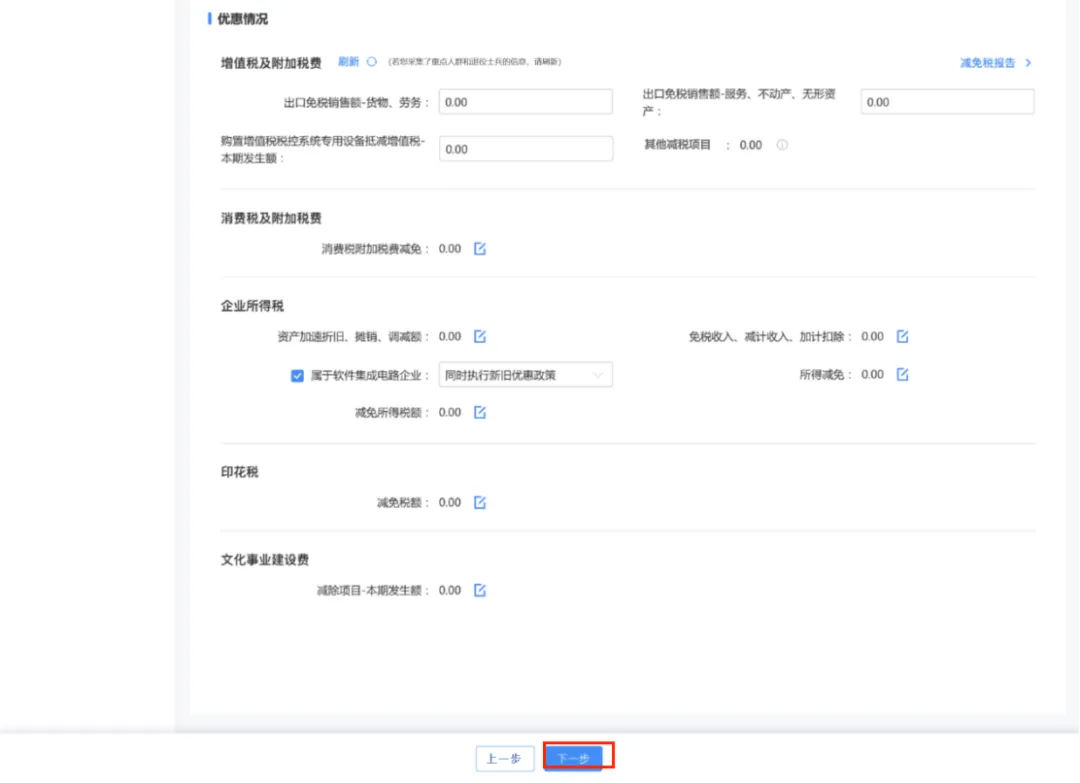
4) After the taxpayer confirms that the relevant data is correct, they can click "Next".
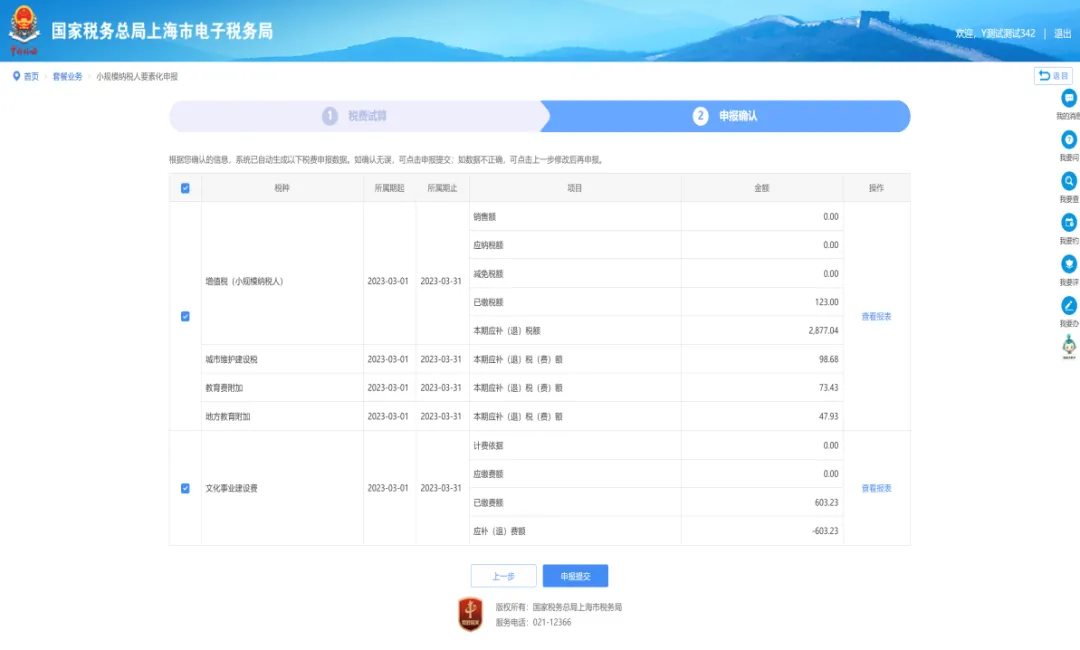
4. Enter the filing confirmation page. This page displays in detail the sales amount, tax payable, current period tax to be refunded or paid, and other information for the tax types selected by the taxpayer. If the taxpayer needs to view it, click the "View Report" button to view the standard filing form for the corresponding tax type. After confirming it is correct, click "Submit Filing" to file.
5. After the filing is submitted, the taxpayer needs to enter "true" and "responsible" to complete the submission confirmation. After entering, click the "Confirm" button to submit the filing data.
6. After a successful filing, the taxpayer can view the detailed information of this successful filing and the amount pending payment. Taxpayers can pay taxes and fees through two methods: "Pay Now" and "Schedule Payment."
(Three)Common Questions 1. If a taxpayer has data items in the current period that exceed those that can be supplemented on the simplified confirmation filing interface, how should the taxpayer file? Answer: Taxpayers may click the [I Want to Fill in the Form] function on the simplified confirmation filing interface to enter form-filling mode for filing. 2. How should a taxpayer operate if they need to enjoy preferential policies for key group personnel or self-employed retired soldiers? Answer: Taxpayers may click [Tax Reduction and Exemption Report] in the tax calculation trial page under the preferential treatment situation to collect preferential information. 3. Where are VAT uninvoiced revenues reported? Answer: Click "Sales of Goods and Labor Services" or "Sales of Services, Real Estate, and Intangible Assets" under Business Situation - VAT, and fill in the corresponding pop-up form. The pop-up box will bring out invoice data by default. If there is uninvoiced income, simply add the uninvoiced income to the brought-out data. 4. After a simplified filing is successful, if a data entry error is discovered, how can a corrected filing be made? Answer: Taxpayers may use the I Want to Handle Taxes - Tax Law Filing and Payment - Filing Correction and Voiding function to correct incorrectly filled reports, or search for Filing Correction and Voiding through the search function in the upper right corner to enter and correct incorrectly filled reports. 5. If a taxpayer still wants to use the traditional form-filling method for filing, how should they file using the traditional form-filling method? Answer: On the first line of the filing mode page, there is a prominent phrase "I Want to Fill in the Form." Taxpayers can click "I Want to Fill in the Form" to enter the traditional form-filling filing mode. 03 To embrace the new filing, our enterprise should make the following preparations in advance: First, enterprises are required to have basic accounting and tax compliance and refined bookkeeping, so that once errors in generated accounts are found, adjustments can be made according to actual business. Whether willing or not, they will be pushed and forced into compliance. The result can already be foreseen; the difference lies in the level of cost and the size of losses. Investigate the company's potential risks as soon as possible: whether there are two sets of accounts, whether income is concealed, whether there is false invoicing, whether costs are falsely accrued, and whether taxes are underreported. For legacy issues and risks, come up with feasible solutions and stop delaying; many enterprises are actually delaying. Second, It is recommended to cooperate more with legitimate enterprises and obtain compliant invoices. Third, the business invoices provided by the enterprise must match the actual business logic of the enterprise, such as the ratio of revenue to cost, the proportion among various costs and expenses, and so on. In the future, against the backdrop of reasonableness and compliance, it is necessary to build compliant tax management models and establish compliant reimbursement systems. Illegal and non-compliant behaviors such as concealing income, falsely inflating costs, falsely issuing invoices, and malicious planning must never be undertaken. In the future, under the big data supervision of China Golden Tax Phase IV, it should be said that everything actually cannot be hidden, and proactive compliance is the best choice. Source:Network Beijing Kailing Technology Co., Ltd.——an enterprise business-finance-tax digitalization solution service provider. Kailing Technology provides solutions for sales management systems, procurement management systems, output invoicing systems, input invoice collection systems, imaging management systems, financial posting systems, electronic accounting archives, fully digitalized e-invoice and Leqi interfaces and other businesses according to enterprise needs, professionally and efficiently helping enterprises transform and upgrade their business-finance-tax digital management. If you have any business-finance-tax digital transformation needs, welcome to contact us. Beijing Kailing Technology will serve you wholeheartedly.
|