
010-6097 4119Book a Demo


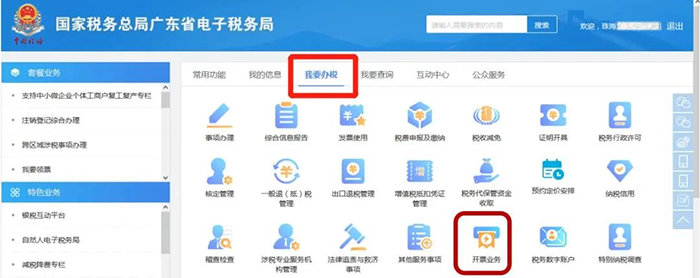
Fully digitalized e-invoices have changed again! The latest and most complete issuance methods and operational practices!Published: 2024-03-29 15:33 Starting December 1, 2023, except for Hong Kong, Macao, and Taiwan, the whole country has achieved full coverage of fully digitalized e-invoice pilots. For the latest and most complete knowledge about fully digitalized e-invoices, forward and save it quickly~ 1、 How are fully digitalized e-invoices issued?2、 How are fully digitalized e-invoices reversed in red?3、 How should the remarks column of a fully digitalized e-invoice be filled in?4、 How are fully digitalized e-invoices received?5、 How are fully digitalized e-invoices verified?6、 How are fully digitalized e-invoices recorded and archived?7、 How are fully digitalized e-invoices filed?8、 The Most Complete Formats of Fully Digitalized E-Invoices01 How are fully digitalized e-invoices issued? I. Log in to the Electronic Tax Bureau, [I Want to Handle Taxes]——[Invoicing Business]. As shown in the figure below:
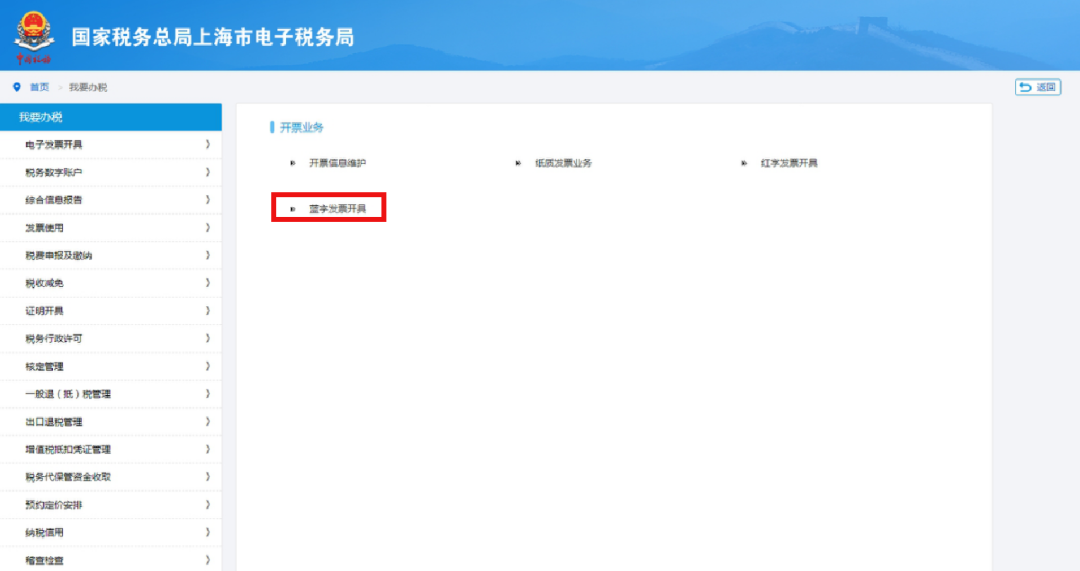
II. Select [Blue-Letter Invoice Issuance]. As shown below:
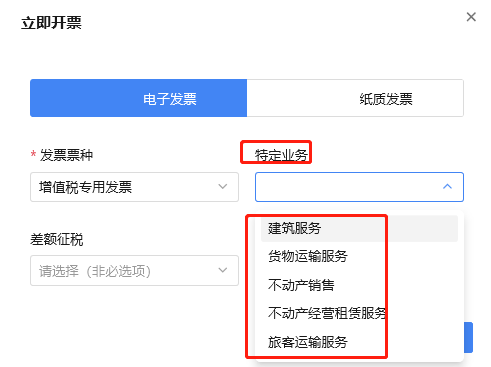
III. Select [Issue Now]—[Electronic Invoice], select the invoice type [VAT Special Invoice/General Invoice], and select [Specific Business] as needed. As shown in the figure below:
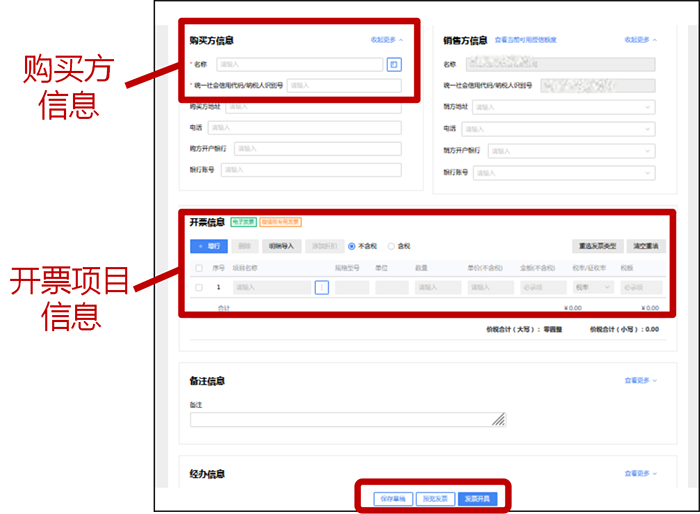
IV. Below, we take the "VAT special invoice for goods transport services" as an example to explain the steps for filling in invoice issuance information:(1) Fill in [Buyer Information]: when issuing a special VAT invoice, [Name] and [Unified Social Credit Code/Taxpayer Identification Number] are required fields; when issuing a general invoice, only [Name] is required. (2) Fill in [Invoicing Information]: [Item Name], [Amount (tax-inclusive)], [Tax Rate/Levy Rate], and [Tax Amount] are four required fields.
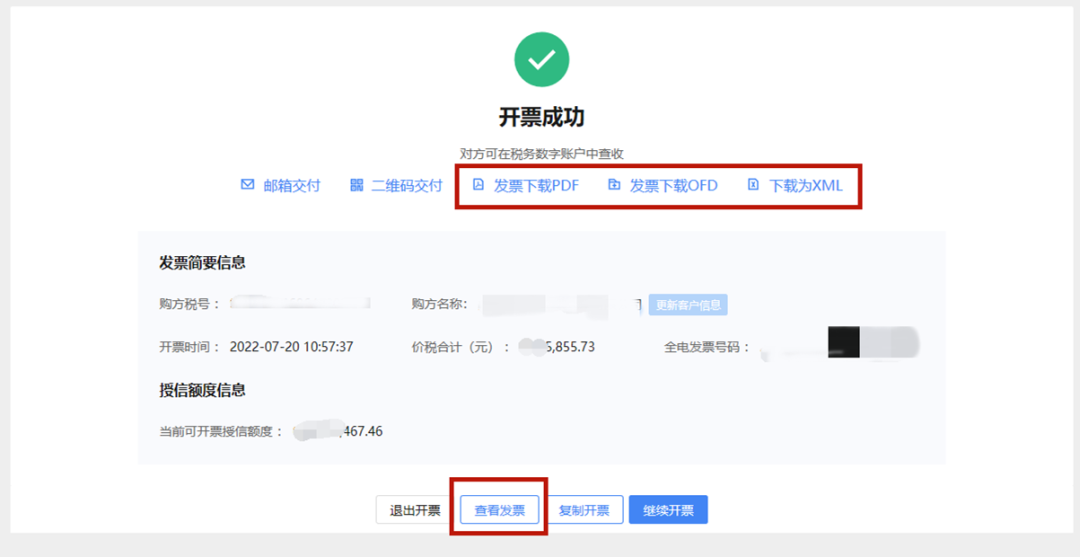
(3) Fill in [Specific Information]: for specific information on freight transport services, [Type of Transport Vehicle], [Transport Vehicle License Plate Number], [Place of Departure], [Place of Arrival], and [Name of Transported Goods] need to be reported. PS: Only those who select [Specific Business] need to fill in specific information. This specific information is equivalent to the remarks column content that some paper invoices currently must fill in. V. After completing the information, confirm it is correct and select [Invoice Issuance].
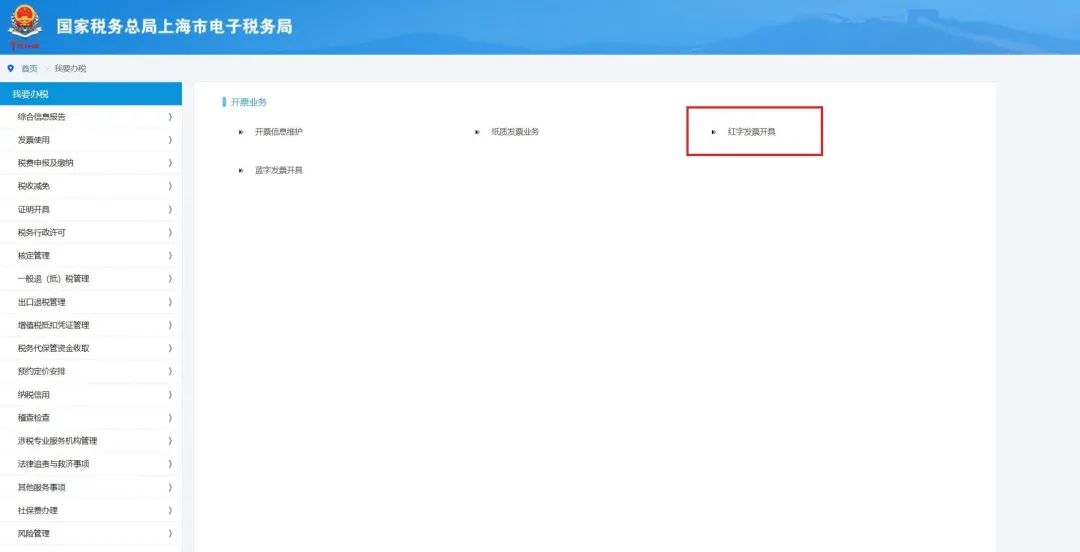
02 How are fully digitalized e-invoices reversed in red? Scenario 1: After the invoicing party issues a fully digitalized e-invoice, if the invoice recipient has not made purpose confirmation or accounting confirmation, the invoicing party, after filling out the Red-Letter Invoice Information Confirmation Form on the electronic invoice service platform, issues a full red-letter fully digitalized e-invoice without the need for confirmation by the invoice recipient. The specific operation steps are as follows: I. Log in to the Electronic Tax Bureau, [I Want to Handle Taxes]——[Invoicing Business]——[Red-Letter Invoice Issuance]. As shown in the figure below:
II. Select [Red-letter Invoice Confirmation Information Entry], enter the corresponding blue-letter invoice information, then click [Query]
III. Click [Select] on the page, and the selected blue-letter invoice information will be automatically brought into the page.
IV. After the Confirmation Form is submitted successfully, select [Red-Letter Invoice Issuance], click the corresponding Confirmation Form, and then the red-letter invoice can be issued. As shown in the figure below:
Scenario 2: The invoice recipient has already made purpose confirmation or accounting confirmation I. Use by the invoice recipient On the [Electronic Invoice Service Platform], either the invoicing party or the invoice recipient may fill out and upload the Confirmation Form for Red-Letter Invoice Information. After the other party confirms it on the Electronic Invoice Service Platform, the invoicing party may issue a full or partial red-letter fully digitalized e-invoice. The confirmation steps are as follows: (1) The taxpayer logs in to the Electronic Tax Bureau, [I Want to Handle Taxes] — [Invoicing Business] — [Red-Letter Invoice Issuance] — [Red-Letter Invoice Confirmation Information Processing]. As shown below:
(2) Enter the query conditions and click the [Query] button.
(3) Click the [View] button to enter the page for information confirmation.
(4) Click the [Confirm] button, and a prompt indicating successful confirmation will appear. II. The invoice recipient continues to use the [Comprehensive VAT Invoice Service Platform]. The invoicing party fills out and uploads the Confirmation Form on the Electronic Invoice Service Platform. After the invoice recipient confirms it on the Comprehensive VAT Invoice Service Platform, the invoicing party issues a full or partial red-letter fully digitalized e-invoice or red-letter paper invoice. The confirmation steps are as follows: (1) In the menu, select [Invoice Management] — [Red-Letter Application Confirmation] in sequence to enter the following screen.
(2) Select "Pending Confirmation", enter the invoice number and seller's identification number based on the invoice information, and click [Query].
(3) The query results are shown in the following figure:
(4) Drag the slider to the right and click [Operate].
(5) A window pops up, as shown in the following figure:
(6) In the pop-up window, check whether the data in the red-letter invoice information confirmation form is correct, slide the vertical bar downward, and enter the screen.
(7) After checking that it is correct, click the [Agree] button.
III. After the Confirmation Form is submitted successfully, select [Red-Letter Invoice Issuance], click the corresponding Confirmation Form, and the red-letter invoice can be issued. As shown in the figure below:
Here is a table on invoice red-flushing compiled for everyone, which can help you remember!
03 How should the remarks column of a fully digitalized e-invoice be filled in? I. Remarks column for specific businessFully digitalized e-invoices can be issued directly through the 'Electronic Tax Bureau', among which there are5 specific businesses, its corresponding "remarks information" is a required field (Cannot issue an invoice without filling it in), including: construction services, freight transport services, real estate sales, real estate operating lease services, and passenger transport services.
(1)Construction services Mandatory content in the remarks column of construction service invoices includes [Place where construction services occur】【Construction project name】【Cross-prefecture (city) marker】。
(2) freight transport services Required contents in the remarks column of goods transportation services include [Type of transport vehicle】【Transport vehicle plate number】【Place of Departure】【Destination】【Name of transported goods】。
(for reference only) (3) real estate sales Mandatory items in the remarks column for real estate sales include [Real estate address.】【Area unit】【Cross-prefecture (city) marker】。
(4) real estate operating lease services Required contents in the remarks column of real estate operating lease service invoices include [Real estate address.】【Lease start and end】【Cross-prefecture (city) marker】【Property ownership certificate/real estate ownership certificate number】【Area unit】。
(for reference only) (5) tourism and transportation services Passenger transport services have no required information; taxpayers fill in departure place, arrival place, means of transport, and other information according to their own needs.
II. Bank Branch and Account Remarks ColumnFully digitalized e-invoices' requirements for remarks column informationNo specific provisions(unless otherwise provided), but may be noted in the following ways according to customer needs: (1) Directly select and display when issuing an invoice
When entering purchaser information, there is a "whether to display" option on the right; we just need to check it.
When the final invoice is issued, the bank information will appear in the remarks column. (2) Directly note in the remarks column This method is very simple: when issuing a fully digitalized e-invoice, just manually enter the bank information into the remarks column. 1. Click Blue-Letter Invoice Issuance to enter.
2. On the invoicing interface, enter the bank account information in the remarks information. 3. The remarks column of the fully digitalized (digital) invoice issued naturally contains the bank information. (3)Set fixed templates through business scenarios. Add business scenario (bank account), selecting the fixed template for the business scenario each time 1. Click Invoice Information Maintenance to enter.
2. Click Additional Information Maintenance to enter.
3. Add two additional information items under the additional information section, one bank name (text type) and one account number (numeric type) As shown:
4. Then add a scenario template and associate these two additional pieces of information with one scenario. As shown:
5. Now each time you issue an invoice, you can directly select a template scenario and then enter the specific account information, as shown in the figure:
6. The invoice issued in this way looks like the following. Compared with directly entering it in the remarks column, the remarks status under the scenario template has a font that looks more like it was produced by a template annotation, making it appear more formal.
04 How are fully digitalized e-invoices received? Scenario 1: The taxpayer's local Electronic Tax Bureau has not been updated and continues to use the "VAT Invoice Comprehensive Service Platform" Taxpayers can use the local "VAT Invoice Comprehensive Service Platform", enter the "Tax Digital Account Module", and through filtering, query and receive invoices issued through the electronic invoice service platform. In addition, it is also possible to obtain fully digitalized e-invoices delivered by the seller via email, QR code, and other means.
Scenario 2: The taxpayer's local electronic tax bureau has not been updated and no longer uses the "Comprehensive VAT Invoice Service Platform" Taxpayers may conduct invoice use business operations through the local Electronic Tax Bureau. The specific steps are: I. Log in to [Electronic Tax Bureau]——[I Want to Handle Taxes]——[Tax Digital Account].
II. Select [Invoice queryStatistics】——【Full invoice query】.
III. After entering the query conditions, click Query to view the obtained invoices.
05 How are fully digitalized e-invoices verified? Entities and individuals may throughNational VAT Invoice Verification Platform(https://inv-veri.chinatax.gov.cn) to verify fully digitalized e-invoice information. Basic information such as the invoice code and invoice number can be entered manually, or imported directly.
06 How are electronic invoices posted and archived? On May 17, the Accounting Department of the Ministry of Finance announced the notice on accounting data standards for electronic vouchers, which clarified the preservation method for reimbursement and archiving of fully digitalized e-invoices:
Notice highlights: Where the recipient obtains a fully digitalized e-invoice for reimbursement, bookkeeping, and archiving, First, the recipient may, in accordance with Articles 3 and 5 of the Notice, use only the XML file of a fully digitalized e-invoice containing a digital signature for reimbursement, accounting, and archiving, and may no longer keep it separately in paper form. Second, if the recipient needs to use a paper printout of the PDF or OFD format file of a fully digitalized e-invoice as the basis for reimbursement, accounting, and archiving, it shall, in accordance with Article 4 of the Notice, also retain the XML format electronic file of the fully digitalized e-invoice containing the digital signature. Summarized for everyone as follows: 1. After the recipient receives the fully digitalized e-invoice, there is no need to print it; it can be directly reimbursed, recorded and archived using the XML file. 2. If the recipient really needs to print a fully digitalized e-invoice, in addition to saving the paper invoice, it must also save the XML-format electronic file. Therefore, finance personnel should pay attention: after receiving a fully digitalized e-invoice, whether or not it is printed,Both require preserving the XML-format electronic file of fully digitalized e-invoices containing digital signatures! Finally, let's summarize the functions of the three styles:
07 How are fully digitalized e-invoices filed? After fully digitalized e-invoices are launched, there are new changes in VAT deduction filing, mainly including changes in the filling of the output and input sections of Annex 1 and Annex 2 of the VAT tax filing form. I. VAT Appendix 1
1. If you issuedFully digitalized e-invoice(special VAT invoice), then when filing you need to fill in the relevant columns for issuing special VAT invoices in Schedule 1; 2. If you have issuedFully digitalized e-invoice(general invoice), then when filing you fill in the relevant columns for issuing other invoices.
For example, the company's invoice summary for February 2023 is as above, including VAT invoices issued through the tax-control system and those issued through the electronic invoice service platform.Fully digitalized e-invoice。 In fact, filling in the filing is very simple, it is justFully digitalized e-invoice's special VAT invoices in the special VAT invoice column, and ordinary invoices in the other invoice column. For example, the 6% tax rate portion did not have fully digitalized special invoices issued, so all filing forms only contain data from tax-control special invoices. Ordinary invoices were issuedFully digitalized e-invoice, then the fully digitalized ordinary invoice and the ordinary invoice issued by the tax control system should both be filled in the other invoicing columns.
The same principle applies to both 13% and 5% simplified taxation. So after issuing fully digitalized e-invoices, the attribution in the filing form is actually like this: For fully digitalized e-invoices, paper special invoices, and paper ordinary invoices bearing the words 'VAT Special Invoice' or 'Ordinary Invoice' issued by a small-scale taxpayer through the electronic invoice service platform, their amounts and tax amounts shall be entered in the relevant columns of the 'VAT and Surcharge Tax Return (Applicable to Small-Scale Taxpayers)' for 'VAT special invoice sales excluding tax' or 'other VAT invoice sales excluding tax'. Where the VAT exemption policy applies, they shall be entered in the relevant 'tax-exempt sales' columns as required. II. VAT Appendix 2Line 1 of Appendix 2 of the VAT filing form is the aggregate amount, equal to lines 2+3. Although the line name is "certified VAT special invoices", what actually needs to be filled in here includes VAT special invoices (including VAT electronic special invoices), motor vehicle invoices, toll electronic invoices, and nowNewly added fully digitalized e-invoices (VAT special invoices) and VAT paper special invoices.
For example, the company selected and confirmed 6 fully digitalized special invoices in February 2023, as shown in the figure:
So this part of the invoices is uniformly filled in Appendix 2, lines 1, 2, and 35, in the same place as tax control special invoices.
At this point, the first column of Appendix 2 can actually be filled with four types of deduction vouchers in total. 08 The Most Complete Formats of Fully Digitalized E-Invoices I. VAT special invoice
II. Ordinary invoice
III. Rare earth electronic invoice
IV. Construction service electronic invoice
V. Passenger transport service electronic invoice
Six, Electronic invoice for goods transportation services
Seven, Electronic Invoice for Real Estate Sales
Eight, Electronic invoice for real estate operating lease services.
IX. Electronic invoices for agricultural product purchases
10. Photovoltaic acquisition electronic invoice
11. Electronic invoice for vehicle and vessel tax collected on behalf
12. Self-produced agricultural product sales electronic invoice
13. Electronic invoice under differential taxation (differential invoicing)
14. Electronic invoice under differential taxation (full-amount invoicing)
15. Refined oil electronic invoice
16. Air transport electronic ticket itinerary
17. Railway electronic ticket
Beijing Kailing Technology Co., Ltd.——an enterprise business-finance-tax digitalization solution service provider. Kailing Technology provides solutions for sales management systems, procurement management systems, output invoicing systems, input invoice collection systems, imaging management systems, financial posting systems, electronic accounting archives, fully digitalized e-invoice and Leqi interfaces and other businesses according to enterprise needs, professionally and efficiently helping enterprises transform and upgrade their business-finance-tax digital management. If you have any business-finance-tax digital transformation needs, welcome to contact us. Beijing Kailing Technology will serve you wholeheartedly.
|

![Select [Red-letter Invoice Confirmation Information Entry], enter the corresponding blue-letter invoice information, then click [Query]](/assets/27201696.s21i.faiusr.com/2/ABUIABACGAAgvt2ZsAYo98T-6QQwuAg45QM.jpg "descript")
![Select [Red-letter Invoice Confirmation Information Entry], enter the corresponding blue-letter invoice information, then click [Query]](/assets/27201696.s21i.faiusr.com/2/ABUIABACGAAgvt2ZsAYozYbD_wQwuAg4uAM.jpg "descript")
![Select [Red-letter Invoice Confirmation Information Entry], enter the corresponding blue-letter invoice information, then click [Query]](/assets/27201696.s21i.faiusr.com/2/ABUIABACGAAgvt2ZsAYogN_jlAUwuAg4zQM.jpg "descript")
![Select [Red-letter Invoice Confirmation Information Entry], enter the corresponding blue-letter invoice information, then click [Query]](/assets/27201696.s21i.faiusr.com/2/ABUIABACGAAgvt2ZsAYoqPjd8gUwuAg4hwQ.jpg "descript")
![Select [Red-letter Invoice Confirmation Information Entry], enter the corresponding blue-letter invoice information, then click [Query]](/assets/27201696.s21i.faiusr.com/2/ABUIABACGAAgv92ZsAYo0vOwowUwuAg4wwM.jpg "descript")
![Select [Red-letter Invoice Confirmation Information Entry], enter the corresponding blue-letter invoice information, then click [Query]](/assets/27201696.s21i.faiusr.com/2/ABUIABACGAAgv92ZsAYo8JnZtwcwuAg4vQM.jpg "descript")
![Select [Red-letter Invoice Confirmation Information Entry], enter the corresponding blue-letter invoice information, then click [Query]](/assets/27201696.s21i.faiusr.com/2/ABUIABACGAAgv92ZsAYokKeGpgIwrgg4uAM.jpg "descript")
![Select [Red-letter Invoice Confirmation Information Entry], enter the corresponding blue-letter invoice information, then click [Query]](/assets/27201696.s21i.faiusr.com/2/ABUIABACGAAgv92ZsAYo7rDS4QEwiAc4vgI.jpg "descript")
![Select [Red-letter Invoice Confirmation Information Entry], enter the corresponding blue-letter invoice information, then click [Query]](/assets/27201696.s21i.faiusr.com/2/ABUIABACGAAgv92ZsAYogJW7mwEwiQc40QE.jpg "descript")
![Select [Red-letter Invoice Confirmation Information Entry], enter the corresponding blue-letter invoice information, then click [Query]](/assets/27201696.s21i.faiusr.com/2/ABUIABACGAAgv92ZsAYouJ-h6wcwgQc4tAE.jpg "descript")
![Select [Red-letter Invoice Confirmation Information Entry], enter the corresponding blue-letter invoice information, then click [Query]](/assets/27201696.s21i.faiusr.com/2/ABUIABACGAAgv92ZsAYogPufnAUwzgY4oQE.jpg "descript")
![Select [Red-letter Invoice Confirmation Information Entry], enter the corresponding blue-letter invoice information, then click [Query]](/assets/27201696.s21i.faiusr.com/2/ABUIABACGAAgv92ZsAYohJqDyAMwrwQ49QI.jpg "descript")
![Select [Red-letter Invoice Confirmation Information Entry], enter the corresponding blue-letter invoice information, then click [Query]](/assets/27201696.s21i.faiusr.com/2/ABUIABACGAAgv92ZsAYolpnenAEwgAU4pAM.jpg "descript")