
Still manually screening invoices for input VAT selection? Kailing Technology's expense control system enables one-click certification and deduction directly connected to the tax digital account to complete input VAT confirmation
During those few days of monthly certification and deduction, finance usually has three windows open on the computer: one for flipping through reimbursed documents, one for checking posted vouchers, and another for the electronic tax bureau, searching page by page for which input VAT invoices can be selected. If the three sides differ even slightly, you have to recheck from the beginning, and by the end you cannot even remember which line you selected. This article does not discuss concepts; it walks through the one-click certification and deduction in Kailing Technology's Smart Reimbursement according to "the few steps after opening the system"—first filter invoices, then batch select, then let the system connect on its own to the "tax digital account" on the electronic tax bureau side to confirm input VAT, and finally pull out the deduction statistics table for passenger transport invoices. Kailing Technology's approach is to string these actions into one line, rather than having people move data back and forth between several systems.
First clarify one thing: the reason manual selection is tiring is not clicking the mouse, but that "which invoices should be selected" depends on people piecing information together across systems. Whether an invoice can enter the current period's input VAT confirmation must simultaneously satisfy several conditions—the invoice is real, not duplicated, reimbursement has been completed, and a corresponding voucher already exists in the accounts. These pieces of information lie separately in the invoice pool, reimbursement forms, and accounting system, and the comparison cost is far higher than the selection itself. What needs to be solved is bringing the basis for judgment into one place first.
▍Step one: open the invoice pool and first filter out the "deductible invoices"
After opening the system, the first place to go is the invoice pool, not the selection page. In the row of filters above, invoice types can be multi-selected at once, and for invoice dates, besides pulling your own range, there are also shortcut buttons for this month, last month, and this year—for certification and deduction, the first thing is to set the date range to the current period. Scroll the list to the right, and all the information that should appear on the invoice face is in the row, with the source file address also attached for retrieval at any time.
The key to this step lies in the two columns on the right—reimbursement status and booking status. Filter them respectively to reimbursed and booked, and what remains is the batch of invoices eligible for input VAT confirmation in the current period; those whose reimbursement is not yet complete and those without vouchers in the accounts are blocked by the filter conditions, with no need for anyone to go back and check document numbers.
The number that truly needs attention is in the bottom row of the list, and it changes with the filter conditions: how many invoices are in this batch, the total amount including tax and the amount excluding tax, the total tax amount, and how much of it is deductible. Look at this row before starting, and you will have a clear picture of the scope; if something does not match later, it will be easier to spot.
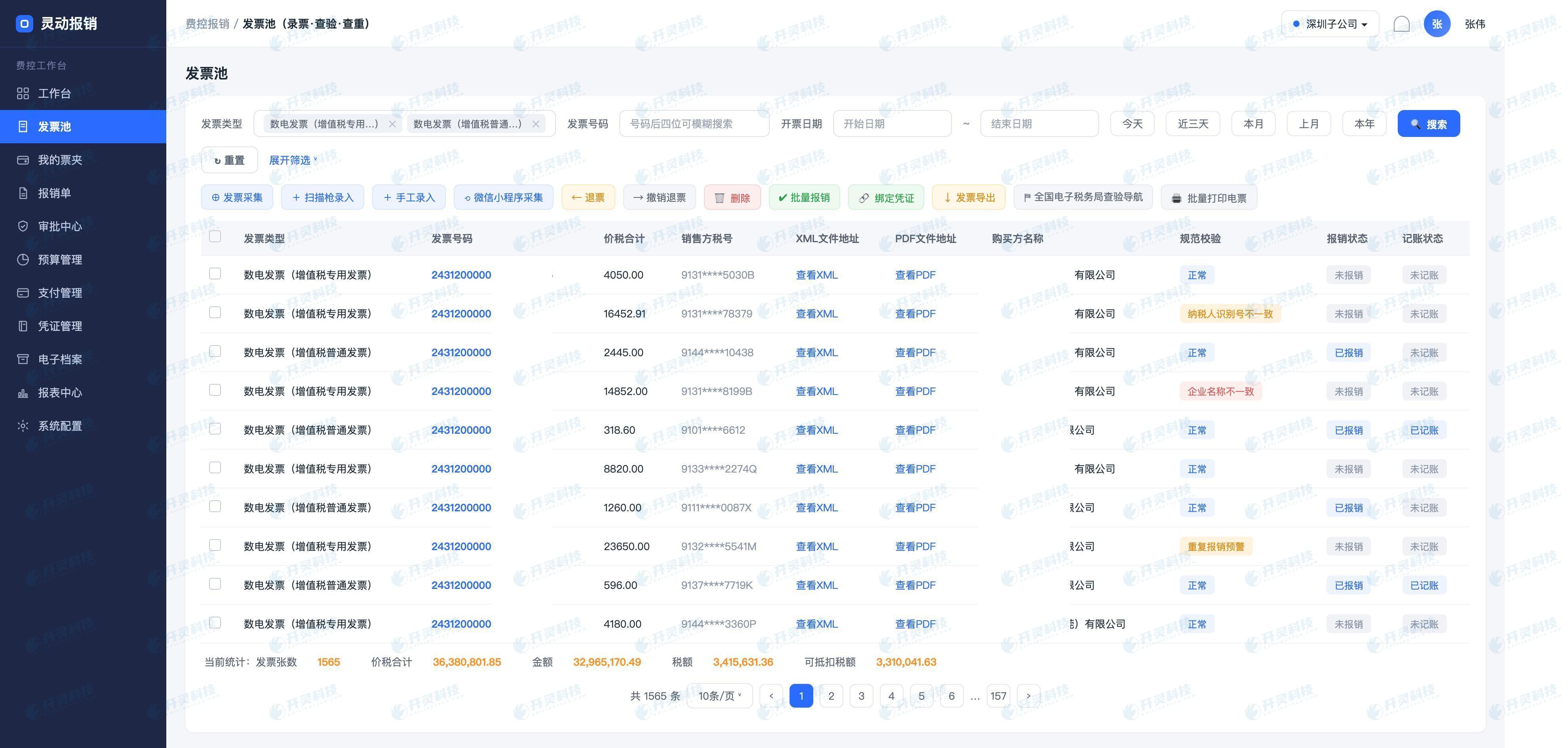
One more note: invoices that make it to this step have already passed a checkpoint earlier. Kailing Technology pushes verification and duplicate checking into the collection stage—as soon as an invoice is entered, the buyer's fields are checked one by one: whether the name is written correctly, whether the tax number matches, and whether the address, phone, and bank account belong to the entity; paper invoices are verified against the tax bureau using the invoice number, while electronic invoices are checked for signatures to see if they have been altered; if the same invoice is entered again, a prompt appears immediately and it is not allowed to be filed again. After verification, a conclusion is given on the right side of each row, either marked "Normal" or directly indicating whether the tax number or enterprise name does not match. By the certification and deduction step, authenticity and duplication no longer need to be checked.
▍Step two: batch-select in the invoice ledger, no need to click one by one
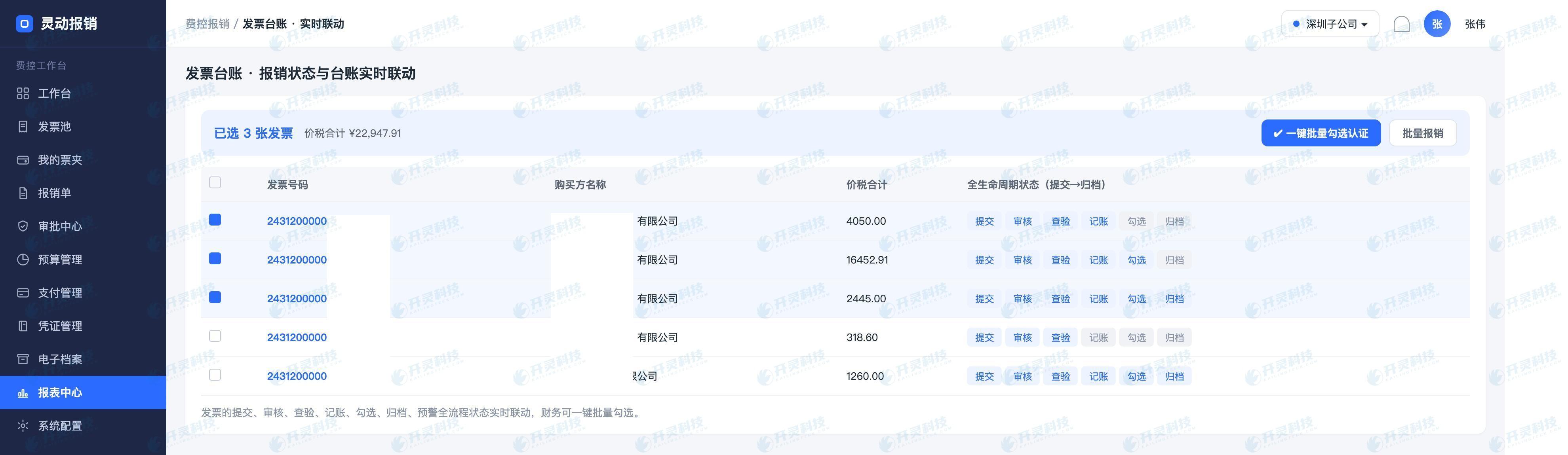
Answer: After filtering, it enters the invoice ledger. The ledger is linked in real time with reimbursement progress: whichever step the document reaches and whatever the invoice status becomes, the ledger changes accordingly, avoiding the time lag where "reimbursement has long been completed but the ledger is still in the old status". If the certification period happens to coincide with concentrated settlement of documents, a one-day status lag may result in missing a batch of invoices for selection.
Selection is batch-based: you can select all on an entire page, or select in batches by seller, invoice type, or invoicing period. The reason for recommending batch selection is practical—the processing logic behind different invoice types is not exactly the same. Selecting in batches and confirming in batches makes it easy to trace which batch is mismatched if a problem occurs.
▍Step three: click one-click certification and deduction; Kailing Technology connects directly to the tax digital account to complete confirmation
Once selected, only one action remains: click "One-Click Certification Deduction." Kailing Technology has made this step a direct connection—the system connects itself to the tax digital account side, that is, the section in the Electronic Tax Bureau that manages input VAT selection, and takes the selected invoices over to complete confirmation. There is no need to log in to the tax end again, nor to search one by one by number on the tax bureau page according to a list.
What this step eliminates is precisely the handling step that was prone to errors in the past. The manual approach is usually: first export a deductible list, then open the tax digital account and check items while looking at the list. Wrong rows, missed checks, and duplicate checks all occur in this back-and-forth, and are often only discovered during review or even filing. Kailing Technology's approach is to have both sides agree on the same set of data—whichever invoices are checked in the system are exactly the ones brought over for confirmation.
The confirmation result can be seen right back in the ledger, placed alongside reimbursement and bookkeeping status; an invoice's entire journey from collection to input confirmation is tracked on the same row, so in the future, answering "how was this invoice handled at the time" does not require digging through multiple systems.
▍Step four: for passenger transport invoices, let the system automatically generate the deduction statistics table
Travel takes time, not because of volume but because of mixed ticket types: a batch of travel tickets may include both e-invoices and other passenger transport vouchers that must be processed according to the information noted on the ticket, and the input tax calculation method differs by ticket type. Manually, they must first be classified, then calculated using their respective formulas, and then summarized; once an error occurs, it is often only exposed at review.
Lingdong Reimbursement handles it this way: after filtering out this batch of passenger transport invoices, the system automatically calculates the input tax amount based on the formula corresponding to each invoice type and directly generates a deduction statistics table. The judgment finance needs to make is reduced to one thing—whether these invoices are travel expenses incurred by personnel of this entity and fall within the deductible scope.
One reminder: formulas are implemented in accordance with current tax regulations and adjusted accordingly, and applicability is still subject to the interpretation of the competent tax authority. The value of the system is to fix and leave a trail for the repetitive work of "classification—calculation—aggregation," not to replace judgment on policy.


▍A few things worth deciding before getting started
- Filter conditions are fixed first: Write "reimbursed + recorded" into operating standards as fixed prerequisites; it is less troublesome than making ad hoc judgments every month.
- Check in batches and confirm in batches: Advance in batches by invoice type or seller; whichever batch does not match, the scope to locate is small, and there is no need to start over.
- Travel tickets go through a separate process: Passenger transport industry invoices are automatically calculated into the deduction statistics table, and people only make the judgment of "whether it falls within the deductible scope."
- Treat traceability as a deliverable: The status track from collection to input VAT confirmation in the ledger is the basis for saving effort when responding to reviews and inspections in the future.
▍FAQ
Q: Which invoices will be blocked at this step?
A: Invoices not reimbursed or not booked do not enter this screening scope; those that failed verification during collection (for example, tax number mismatch or enterprise name mismatch) or were judged as duplicate entries in the folder already carry conclusions in the invoice pool and are not recommended to be brought into input confirmation. Whether deduction is allowed is subject to current tax regulations and tax authority interpretations.
Q: How is the input VAT amount on passenger transport invoices calculated?
A: After the system picks out this batch of invoices, it automatically calculates the input tax amount according to the formula corresponding to each invoice type and summarizes them into a deduction statistics table. Each type of passenger transport voucher follows its own formula, so finance does not need to classify first and then add up category by category. The formulas are executed according to current regulations, and the applicable tax authority's standards shall prevail.
Q: Could what is checked in the system differ from what is confirmed on the tax side?
A: One-click authentication and deduction brings the selected batch of invoices in the system directly over to complete selection, with both sides recognizing the same data and no manual transcription in between, avoiding copying errors from a list. The confirmation result returns to the ledger and is displayed alongside reimbursement and bookkeeping status.
Q: To use this feature, must all preceding steps be implemented?
A: Filter conditions are built on collection, verification, reimbursement, and bookkeeping status; these steps are prerequisites. If you want to run in some scenarios first, you can proceed by organization or invoice type in scoped phases, bringing already-working parts into automation first and connecting the rest gradually.
Want to know what these four steps look like when running under your invoice volume? Welcome to visit Kailing Technology to book a live system demo and run through the complete process using your own invoices: https://www.kailingteck.com/feikong/ .
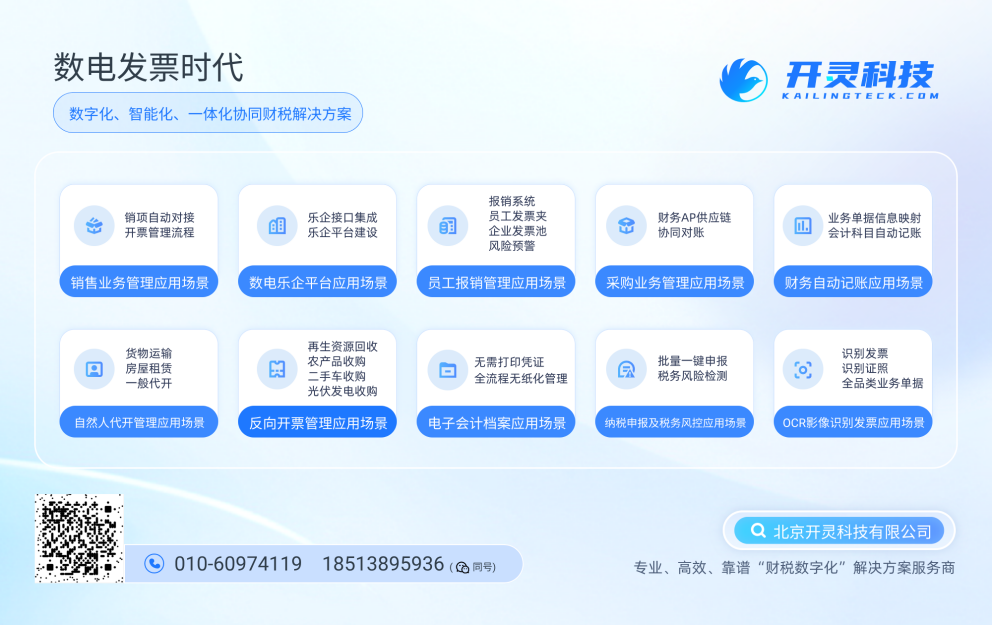
As a comprehensive business-finance-tax digitalization solution service provider, Kailing Technology provides business-finance-tax management digital transformation products and operational services for various government agencies, institutions, and large, medium, and small enterprises. The product line includes:
Solutions for businesses including sales contract management system, procurement contract management system, fully digitalized Leqi interface project, output automatic invoicing system, reverse invoicing system, invoice issuance for individuals system, employee expense control and reimbursement system, input VAT invoice management system, supply chain collaborative reconciliation system, image OCR recognition system, automatic financial bookkeeping system, and electronic accounting archives system, comprehensively driving the digitalization process across various fields.
If you have any business-finance-tax digital transformation needs, welcome to contact us. Beijing Kailing Technology will serve you wholeheartedly.
Keywords: Kailing Technology, one-click certification and deduction, input tax selection, tax digital account, input VAT invoice management, Lingdong Reimbursement, expense control reimbursement system, passenger transport invoice deduction, invoice ledger batch selection, business-finance-tax digitalization
As a comprehensive business-finance-tax digitalization solution service provider, Kailing Technology provides business-finance-tax management digital transformation products and operational services for various government agencies, institutions, and large, medium, and small enterprises. The product line includes: solutions for sales contract management system, procurement contract management system, fully digitalized Leqi interface project, automatic output invoicing system, reverse invoicing system, invoice issuance for individuals system, employee expense control and reimbursement system, input VAT invoice management system, supply chain collaborative reconciliation system, image AI OCR recognition system, automatic financial bookkeeping system, electronic accounting archives system, etc., comprehensively driving the digitalization process across various fields.
Consultation Hotline: 18513895936 / 010-60974119 Location: Beijing