
On a business trip without a computer, how to print reimbursement forms? Kailing Technology's reimbursement system remote printing lets your phone remotely use the headquarters printer
At 8:30 on a Wednesday evening, an after-sales engineer who spends most of the year on site had just returned to his hotel from the industrial park. His suitcase was still standing by the door as he spread the receipts he had accumulated over the past two days across the desk: high-speed rail tickets, electronic invoices for accommodation, two dining receipts, and one special VAT invoice for materials purchased on behalf of the company. The project team was pressing for settlement, and Finance had reminded him that this batch of documents had to be submitted this week, with scanned paper copies sent over first. The problem was that his laptop had been sent back to the company on Monday for a system upgrade, leaving him with only a phone; when he asked the hotel front desk to borrow a computer, he was told the business center closes at 9. Anyone who travels for work has run into this scene. It is not the same as an approver being unable to approve on the road—approval has long been doable on a phone; what gets stuck is the step after approval, when the expense report and invoices have to become paper. The receipts are all there, the form is filled out, and the workflow has been completed, yet the person is left stranded by a printer. At companies using Kailing Technology's Lingdong reimbursement, the solution to this step is to tap "air printing" on the phone.
▍When on a business trip and needing to submit a reimbursement form, the old way has three paths
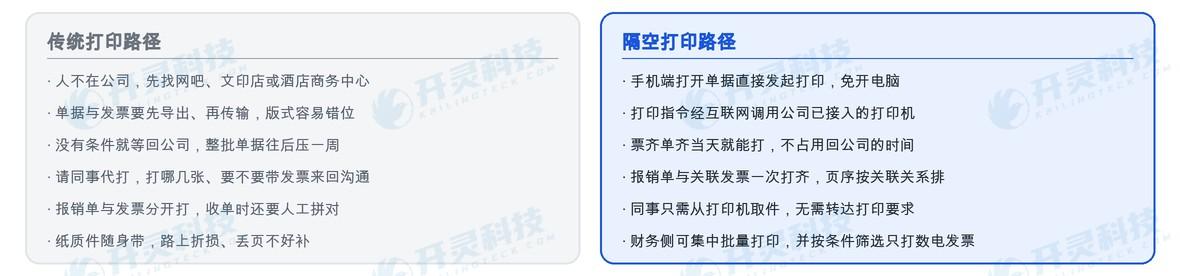
The first path is to find a nearby place to print. Hotel business centers, print shops in industrial parks, or a temporarily found internet cafe — first send the files over, then queue and wait for the machine. The file transfer step alone brings many troubles: documents are in the system, clean layouts cannot be exported from mobile phones, invoices are scattered across invoice folders, chat records, and email, and must be found and sent one by one; when opened on the print shop's computer, layouts are often misaligned, and after printing, page and copy counts still need to be checked.
The second path is simply to wait. Wait until the business trip ends, wait until returning to the company, and then submit from one's own workstation. It sounds easier, but the cost is that the entire batch of documents gets pushed back — if it hits the month-end closing period, the finance department's document intake window has already closed, and this batch is postponed to the next month, with the expense attribution period changing accordingly.
The third route is asking a colleague to print it. Send the order number over and ask an office colleague to print a copy and put it on the finance desk. This route depends on personal favors and also on accurate wording: which pages to print, whether to include the invoice, double-sided or single-sided, who signs after printing. The back-and-forth messages take more time than the printing itself, and if the colleague prints a version based on their own understanding, it often has to be redone.
What the three paths have in common is: the employee clearly has all the information on hand, but because there is no computer connected to a printer, a matter of seconds is dragged into a matter of days. This is not poor process design, but rather that the last link of the process is still tied to hardware.
▍Kailing Technology's remote printing: tap on your phone, and paper comes out of the company printer
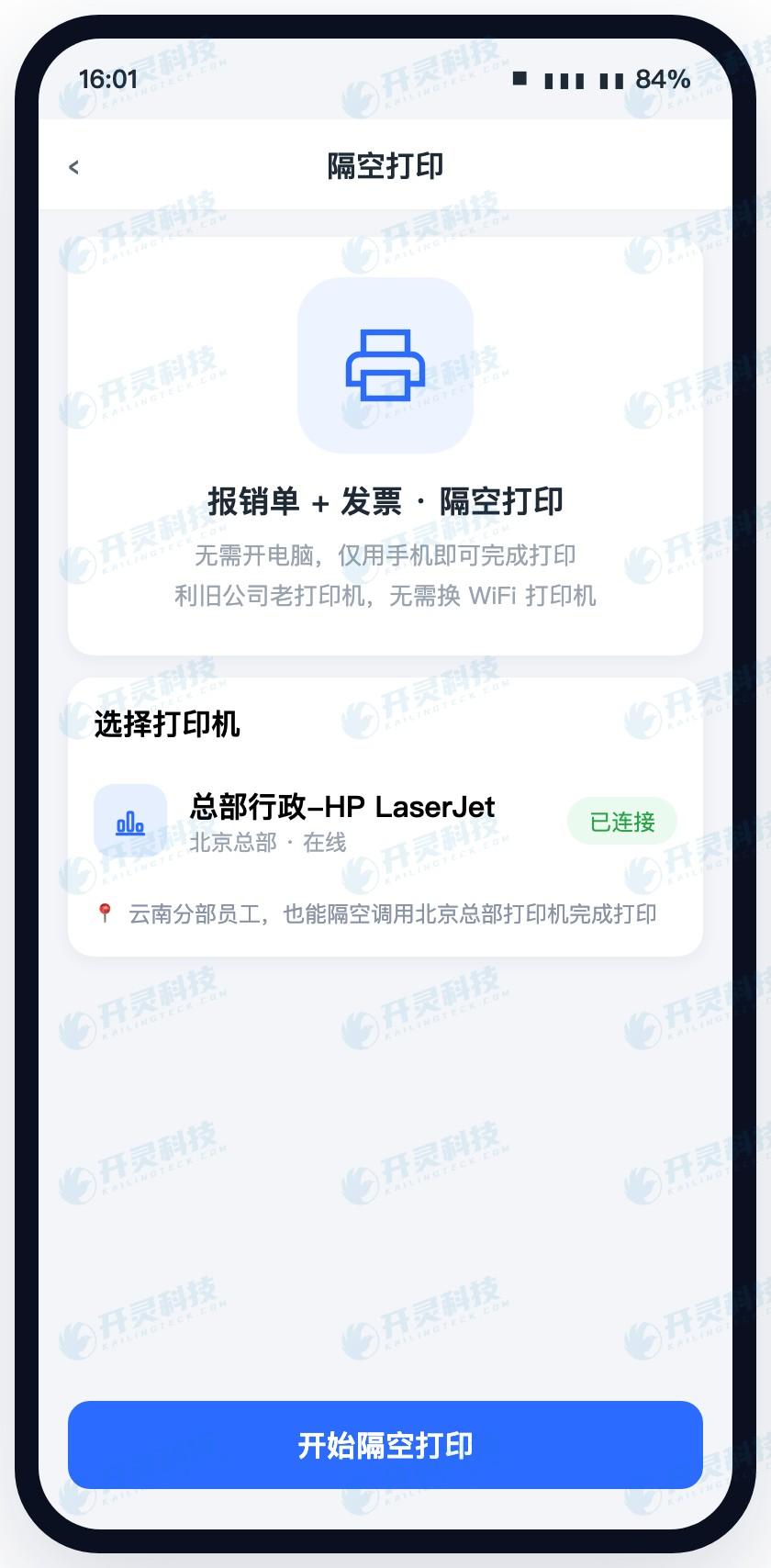
Remote printing is designed to solve this binding relationship. On the mobile end of Kailing Technology LingDong Reimbursement, employees open their submitted or approved reimbursement forms, select print, and the print command is sent via the internet to a printer already connected at the company, with paper coming directly out of the machine in the office or finance room. Throughout the process, employees do not need to turn on a computer, install print drivers, or export documents and invoices to transfer them around.
From another angle, it turns "printing" from a local action into an action within the system. Previously, printing meant "this computer of mine is connected to this printer"; now it means "my account has permission to print to this company machine." The employee is in Suzhou, the machine is at headquarters in Beijing—what lies between them is the network, not distance. For sales, engineering, and audit staff who are constantly on the road, this change is very real: whenever the documents are complete, they can print, no need to save them up until the day they return to the office.
▍Why emphasize "printing the reimbursement form and invoice together"
Many people hear about remote printing for the first time and think it is just sending a PDF remotely. The truly convenient part is in the second half of the sentence: the reimbursement form and its associated invoices are printed together.
The premise of this is that individual invoices are inherently related. In Lingdong Reimbursement, the invoices in employees' hands first enter their personal invoice folder—the few scanned and saved on the road, the e-invoices sent to WeChat by hotels, the itinerary files sent by clients through chat windows, the reconciliation email attachments sitting in the inbox—invoices that sporadically appear during business trips can all be grouped into the same pool; when initiating reimbursement, selecting invoices from the folder automatically generates a reimbursement form, with two-way linking between the form and invoices. It is precisely because of this linkage that the system knows which invoices are attached to a form when printing, printing them all in order at once, with correct page sequence, avoiding the situation where "the form is printed but the invoices are still scattered."
A comparison with the manual approach makes it even clearer: in the past, when finance received a stack of paper, they first had to review the order, then compare invoice by invoice to see whether each invoice belonged to that order, and return it if one was missing. Now the printed stack itself is already arranged by association relationships, and the person receiving the documents saves a matching step. This is also why Kailing Technology incorporates printing into the reimbursement chain rather than treating it as an auxiliary tool — printing is part of reimbursement, not a matter of the printer.
▍On the finance side: centralized batch printing, and you can filter to print only fully digitalized e-invoices
What the employee side solves is "people are not in the company"; what the finance side must solve is "large volume." When receipts are concentrated at month-end, finance faces thousands of invoices and hundreds of documents; opening and printing them one by one means just clicking takes a whole day.
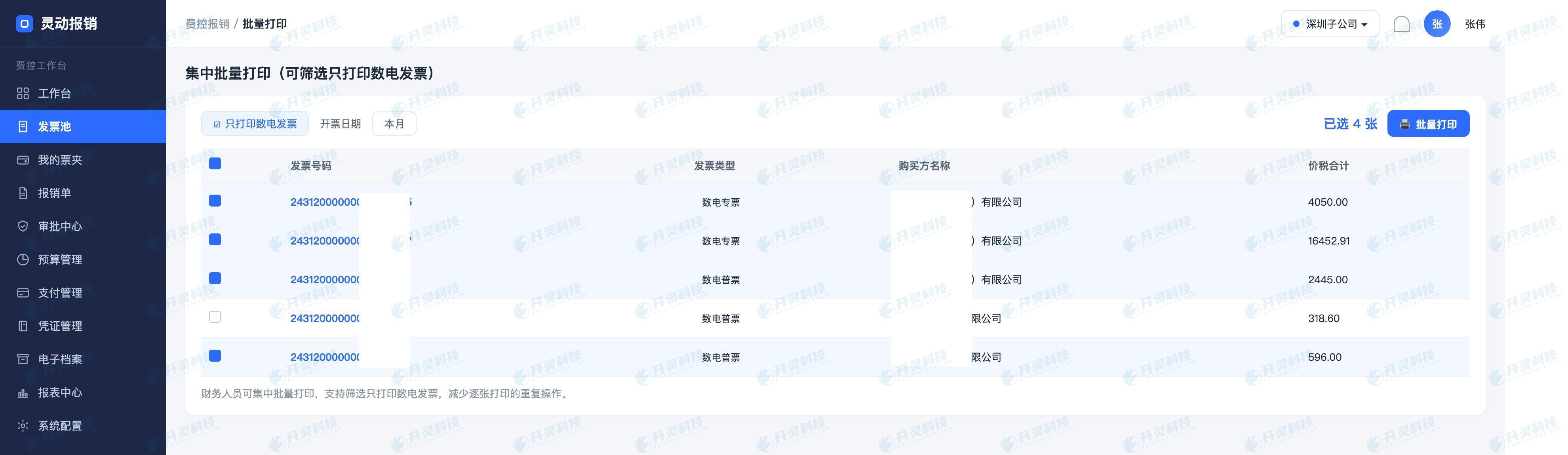
Lingdong Reimbursement provides centralized batch printing on the PC side: finance filters by conditions in the invoice pool or ledger, and after checking, issues batch printing tasks. Filter conditions can be combined by dimensions such as invoice type, invoice number, and invoicing date (today, last three days, this month, last month, this year). A common practice is to filter out fully digitalized e-invoices for separate batch printing—fully digitalized e-invoices have no paper original, so when paper copies are needed, printing a batch at once is much less trouble than handling them one by one.
The value of the filtering step is shown more clearly in the paper binding process. When finance organizes a batch of documents, the customary practice is to put reimbursement forms first and the corresponding invoices after, binding them into volumes by batch. Fully digitalized e-invoices have no paper originals, so opening, saving, and printing them one by one is slow and prone to wrong order; in the invoice pool, filter out the electronic invoices to be printed for this batch by conditions such as invoice type, invoice number, and invoicing date, select them, and issue them for batch printing. When the paper is received, simply stack it in order. As for the electronic side, the system has already saved the invoice source files at the time of accounting, so the connection with electronic accounting archives no longer needs manual moving of paper boxes, which will not be elaborated here.
Batch printing and employee-side remote printing are two ends of the same thing: one end is employees scattered in different locations printing out their own documents, and the other end is finance processing the collected invoices and receipts in batches. What connects them is the same set of associations between documents and invoices, as well as the invoice source files (PDF, OFD, XML) saved at the time of booking.
▍Looking at the two paths side by side
▍FAQ
Q: Does AirPrint require installing anything on the phone?
A: Employees can initiate directly in the Lingdong Reimbursement mobile app they already use daily, with no need to install a separate print driver or additional office software on the phone. The print command is sent over the internet to a printer already connected on the company side.
Q: What are the requirements for printers? Can the old machines in our office be used?
A: Printer access is uniformly completed on the enterprise side, and employees do not need to be aware of specific models. It is recommended to connect one or two commonly used machines during implementation, placed in the finance or administrative area. The specific access method and network conditions only need to be confirmed once with the implementation team.
Q: Can it only print invoices and not print reimbursement forms?
A: Yes, you can choose what to print as needed. The employee side can print a single form or print it together with linked invoices; the finance side's centralized batch printing also supports filtering by invoice type, number, issuance date, and other conditions, for example filtering out only fully digitalized e-invoices for batch printing.
Q: If a document is temporarily changed on a business trip, will the printed version be the old version?
A: Printing takes the current document content in the system and its associated invoice. After the document is modified, simply initiate printing again; because the reimbursement form and invoice are bidirectionally linked, the association remains after changes, and there is no need to reassemble attachments.
Q: Is it still necessary to print fully digitalized e-invoices?
A: Most circulation steps can use electronic copies directly, and the system saves PDF, OFD, and XML source files at posting. Paper copies are usually needed for external provision, special inspections, or the enterprise's own archiving habits; selecting these for centralized batch printing is easier than having each employee print their own.
On a business trip and want to print reimbursement forms and invoices all at once? Learn about Kailing Technology Lingdong Reimbursement's remote printing and centralized batch printing: https://www.kailingteck.com/feikong/ .
As a comprehensive business-finance-tax digitalization solution service provider, Kailing Technology provides business-finance-tax management digital transformation products and operational services for various government agencies, institutions, and large, medium, and small enterprises. The product line includes:
Solutions for businesses including sales contract management system, procurement contract management system, fully digitalized Leqi interface project, output automatic invoicing system, reverse invoicing system, invoice issuance for individuals system, employee expense control and reimbursement system, input VAT invoice management system, supply chain collaborative reconciliation system, image OCR recognition system, automatic financial bookkeeping system, and electronic accounting archives system, comprehensively driving the digitalization process across various fields.
If you have any business-finance-tax digital transformation needs, welcome to contact us. Beijing Kailing Technology will serve you wholeheartedly.
Keywords: Remote printing, mobile printing of reimbursement forms, Kailing Technology, LingDong Reimbursement, expense control reimbursement system, batch printing, fully digitalized e-invoice, business trip reimbursement, expense reimbursement management
As a comprehensive business-finance-tax digitalization solution service provider, Kailing Technology provides business-finance-tax management digital transformation products and operational services for various government agencies, institutions, and large, medium, and small enterprises. The product line includes: solutions for sales contract management system, procurement contract management system, fully digitalized Leqi interface project, automatic output invoicing system, reverse invoicing system, invoice issuance for individuals system, employee expense control and reimbursement system, input VAT invoice management system, supply chain collaborative reconciliation system, image AI OCR recognition system, automatic financial bookkeeping system, electronic accounting archives system, etc., comprehensively driving the digitalization process across various fields.
Consultation Hotline: 18513895936 / 010-60974119 Location: Beijing