
How can employees fill in fewer fields and be returned less often when reimbursing on mobile? Kailing Technology's Lingdong Reimbursement automatically captures invoices into documents and performs pre-verification
Just after the return high-speed train departs, a sales manager handles reimbursement on her phone: one high-speed rail ticket, one hotel invoice, and one taxi receipt, corresponding to an already approved business trip application. She follows the old process for the first time and manually creates a form, filling in amount, date, city, and project item by item, but after submission she receives three consecutive rejections: the hotel invoice title selected the wrong organization, the taxi receipt duplicates another draft, and the accommodation exceeds the standard without explanation.
The second time, the project team has this sales manager rerun the same set of invoices using Kailing Technology Lingdong Reimbursement. From mobile invoice capture, entering the personal invoice wallet, and automatic form creation, to supplementing only the customer and business trip reason, the system then points out specific issues before submission. The evaluation does not look at how many menus there are, but records how many clicks the employee made, how many items were manually filled, at which step errors were found, and whether after return the employee can directly edit to the problem location.

▍From copying invoices item by item to mobile invoice capture: problems are visible on the spot
The sales manager selects the hotel electronic invoice from chat records, uploads the taxi receipt from the album, and then aggregates the high-speed rail ticket from the trip. The three sources finally enter the same entry point, and the system recognizes invoice fields such as invoice number, seller, invoicing date, amount, and tax amount. The content the employee previously had to copy appears directly on the ticket card.
The project team simultaneously places a clear hotel file and an edge-cropped taxi receipt screenshot, observes whether the ticket collection step can identify file quality problems, and gives action prompts to obtain a clear original image again. The sales manager completes the correction on the high-speed train, and acceptance personnel record where the problem appears, who is prompted, and the subsequent action.
The project team simultaneously uploads the original file, forwarded file, and screenshot, observes whether the system recognizes the same ticket, and checks whether duplicate determination relies only on file name. The employee action changes from "flipping through the album, copying fields, guessing whether it was uploaded before" to "selecting the file, viewing the recognition result, and handling clear prompts."
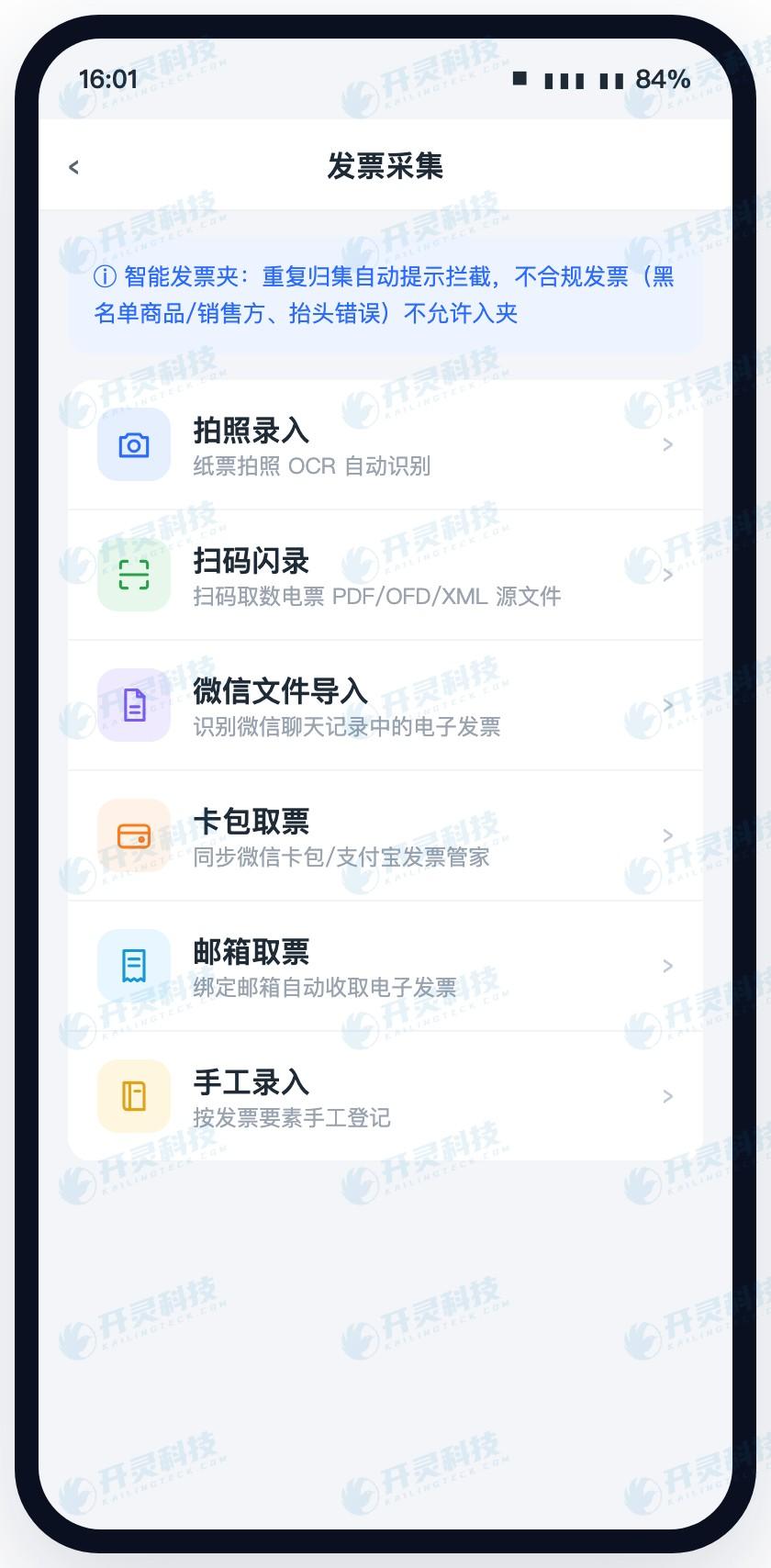
Capture invoices on mobile and enter the personal invoice pool (information masked)
▍From browsing the photo album to a personal invoice wallet: the status of three invoices is clear at a glance
After entering the personal ticket wallet, the project team checks whether the three tickets clearly display source, recognition result, verification status, and current occupation relationship, then finds the draft not submitted last week from the occupation relationship and removes the old association. Acceptance records the ticket source, current destination, occupying business, and removal action, and does not treat a fixed label name as a pass condition.
The invoice wallet is not a pile of files. Business staff continue to filter by date, amount, or status, and select the three invoices for this trip, checking whether the system can summarize the selected invoices and reduce the chance of missing one or bringing in invoices from other projects.
During project acceptance, business personnel also used the same document to test duplicate upload, draft occupation, release after cancellation, and reimbursed status. The passing result should be that employees can understand where the document is, why it is temporarily unavailable, and how to recover, rather than only seeing a red icon that cannot be continued.
▍From blank forms to automatic form generation: invoice face and trip details are brought in directly
The sales manager checks the three tickets to generate a reimbursement form, and date, seller, amount, tax amount, and expense content are brought in with the tickets. The system references departure place, destination, and trip dates based on the approved business trip application, while organization, department, and receiving account come from the employee file. Fields that previously had to be repeatedly entered become confirmation items.
Reimbursement forms stay linked to invoices. Employees can open the original invoice by clicking any expense detail, and approvers can return from the amount to the corresponding attachment when viewing the document. The total of the three invoices, the reimbursement form total, and the trip application form an intuitive correspondence, reducing the chance of employees summing with a calculator and entering the wrong number.
The contrast between the before and after actions is clear: the old way first creates a blank form, then copies invoices item by item, finds applications, and uploads attachments; the new way first selects invoices, the system brings out objective fields and existing materials, and then lets the employee confirm. The mobile page is therefore shorter, but important evidence remains closely tied to each expense.
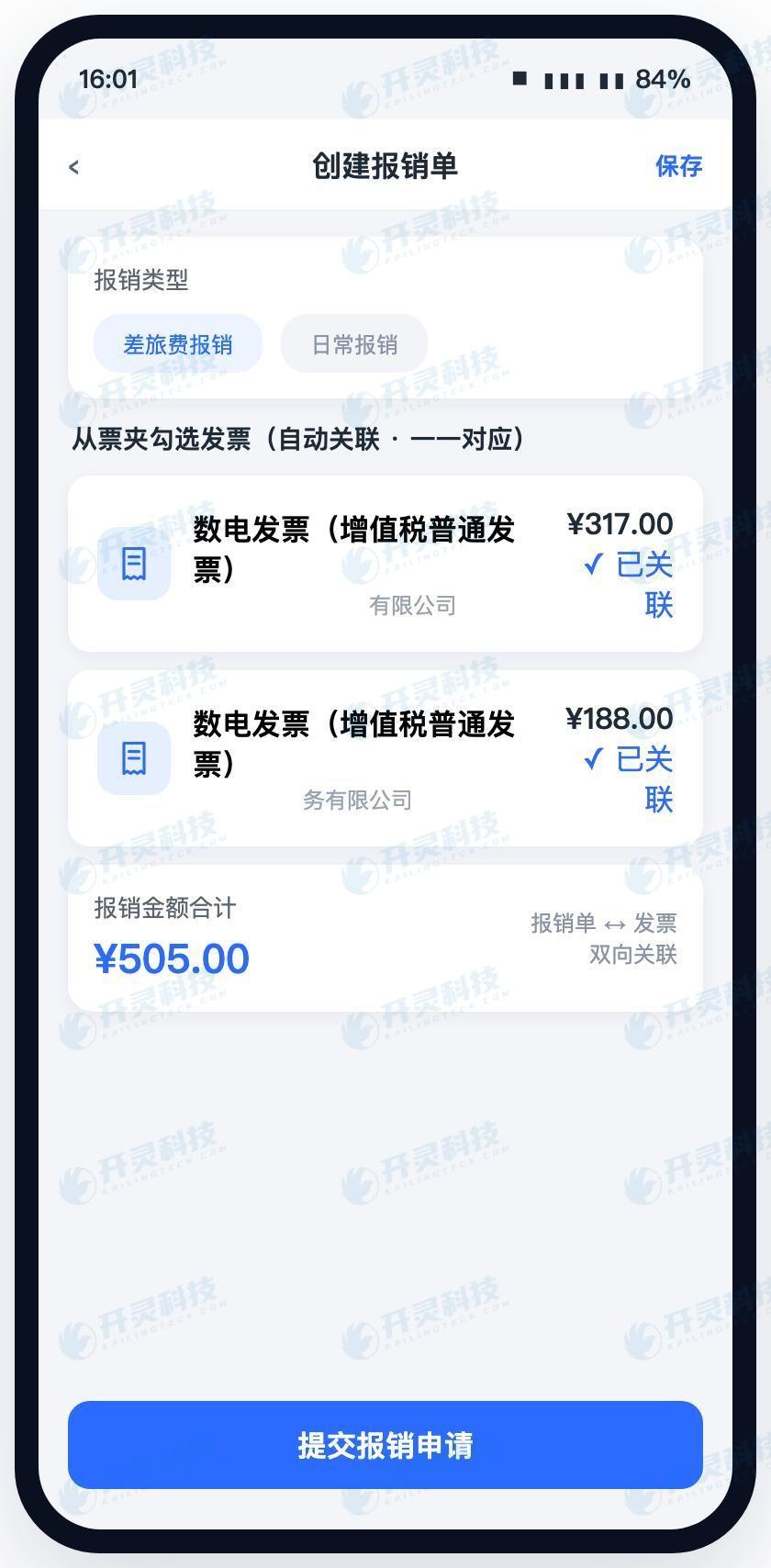
Automatically generate a mobile reimbursement form from the invoice folder (information has been desensitized)
▍From repeated entry to supplementing only business facts: employee actions are truly reduced
After automatic form creation, what the sales manager actually fills in manually is the customer name, visit purpose, and over-standard reason, while the project and cost center are confirmed from the selectable range. The invoice face provides the seller and amount, but not business facts such as "why the trip was made and which customer the expense belongs to"; the system separates the two types of fields, avoiding duplicate work for employees and making explanations more focused.
The project team separately opens the three expense forms for transportation, accommodation, and entertainment, and checks whether configurable forms can present only the business fields and material requirements set by the enterprise. Acceptance personnel record the items that must be filled in, selected, and supplemented for each expense type, and confirm that employees do not need to scroll past long field lists unrelated to this reimbursement.
The acceptance method for this step is to count manually filled fields, rather than saying "the form is simple" based on feeling. Use the same three tickets to compare the old process and the new process, record how many items are automatically brought in, selected and confirmed, and must be explained, then have an ordinary employee complete it independently once and observe whether finance needs to guide them alongside.
▍From finance returns to pre-submission prompts: errors are resolved in advance
After the sales manager clicks submit, the project team observes whether the system checks ticket verification and duplicate checking, invoice title, expense standards, trip dates, required fields, and attachments. When the hotel invoice title is inconsistent with the current organization, the acceptance goal is to indicate the problem object and handling direction; after switching to the correct organization, the check is executed again.
When the accommodation amount exceeds company standards, can the project team's inspection page explain the rule that was hit and guide the user to supplement the reason? When a taxi receipt lacks trip proof, can the inspection prompt point to the corresponding line item? Strong control items such as duplicate invoices and missing key materials stop submission, while explainable exceptions enter the corresponding approval path.
Three returns that originally occurred after financial review were moved to within the few minutes while employees were still editing the document. What finance receives is an application that has already completed basic checks, allowing attention to be placed on business reasonableness and exception judgment; employees also know whether each issue requires changing a field, replacing an invoice, or supplementing an attachment.
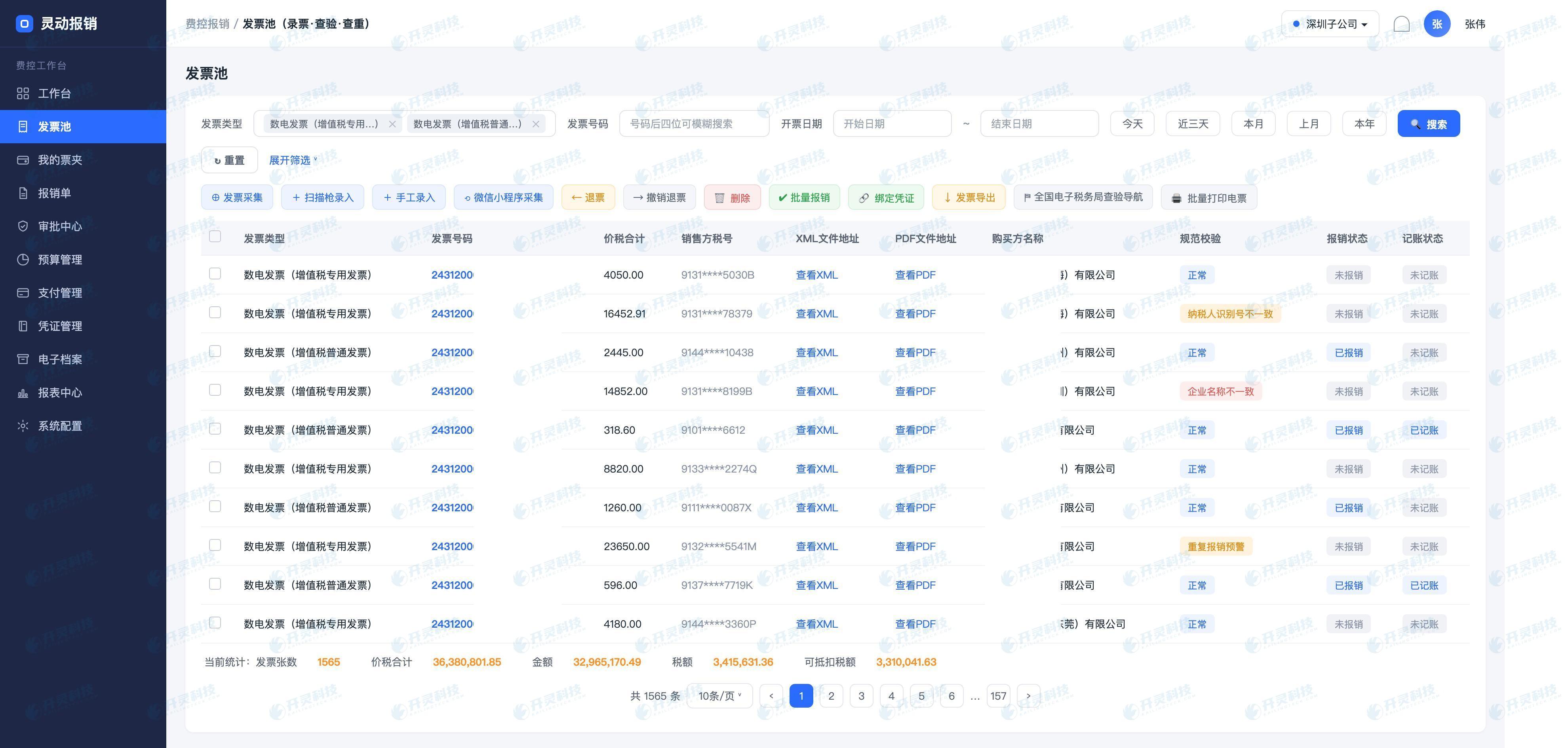
Invoice verification, duplicate check, and exception prompts (information desensitized)
▍From refilling the entire form to targeted edits: mobile approval retains the original order
After passing pre-verification, the document enters mobile approval. The department head sees the employee, customer, itinerary, total expenses, and over-standard explanation, and can click into the details to view the corresponding original invoice; finance sees the verification, duplicate check, and standard-hit results. Different roles first see the information they need to judge, without having to squeeze all PC fields onto a mobile screen.
If the approver finds that the customer name was selected incorrectly, they can leave a comment and return it. The sales manager opens the original order from the message, and the acceptance staff checks whether the return reason points to the content to be modified and whether the three invoices, trip application, and other completed content can be retained; after the employee corrects it and submits again, the process returns to the corresponding node according to the enterprise settings.
The difference from returning the entire form for refilling is intuitive: employees no longer guess which ticket an approval comment refers to, and do not need to re-upload and re-aggregate; approvers can see the content before and after modification; the system continues to keep the ticket occupied, preventing the same ticket from entering another reimbursement form during modification.
▍From repeated explanations to reason statistics: continue reducing actions in the next round
At month-end, the expense control administrator reviews returned data by reason: how many times each occurred for wrong header, duplicate invoice, over-standard without explanation, missing attachment, and wrong item selection, and in which departments and expense types they are concentrated. This customer field issue enters the corresponding category and forms an analyzable record.
If many employees select the same wrong project, administrators can adjust the candidate range and prompts; if accommodation over-standard explanations are repeatedly missing, the explanation box can be shown earlier; if a certain type of attachment is always supplemented at the finance stage, clear examples can be added before submission. The optimization target changes from "employees are not careful" to specific forms, rules, and master data.
In the next round of acceptance, three invoices and one trip application are used again to compare manually filled fields, first-pass rate, number of returns, and modification paths. Kailing Technology's Lingdong Reimbursement gives invoice face data to the system, leaves business facts to employees, and prompts common errors in advance, making "fill in fewer fields, be returned less often" an observable and continuously improvable result.
▍FAQ
Q: What else do employees need to fill in after capturing invoices on mobile?
A: Invoice face fields are recognized by the system. Employees mainly supplement business facts such as customer, project, purpose, participants, allocation, and exception reasons.
Q: What should be done if the same invoice enters two drafts?
A: During acceptance, check whether the system can identify the occupation relationship and prevent duplicate use. After employees release the old draft association, it can be used for the current document.
Q: Will exceeding the accommodation standard directly block reimbursement?
A: The system prompts the standard according to enterprise rules. It can be set as a hard control, or employees can be required to supplement the reason and enter exception approval.
Q: Do the three invoices need to be re-uploaded after the reimbursement form is returned?
A: The original order, invoices, and trip application remain linked. Employees can enter the specific problem location from the return prompt and modify it.
Let employees supplement only business facts and leave invoice fields and rule checks to the system. Learn about Kailing Technology Lingdong Reimbursement: https://www.kailingteck.com/feikong/ .
As a national high-tech enterprise, Kailing Technology focuses on the digital and intelligent transformation of enterprise business-finance-tax and operations management, providing software products, system integration, implementation and delivery, and operational services for various government agencies, institutions, group enterprises, and SMEs.
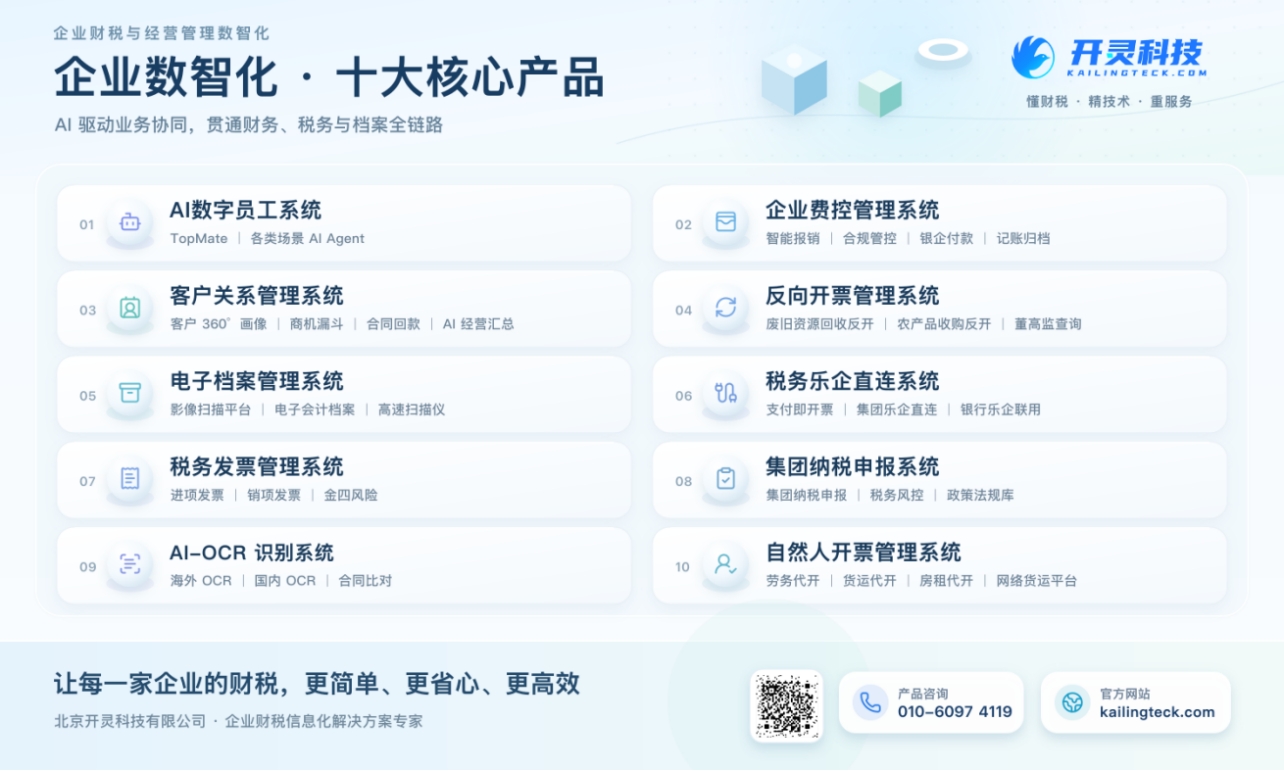
The company has now formed ten core product lines, including: AI digital employee system, enterprise expense control management system, customer relationship management system, reverse invoicing management system, invoice issuance for individuals management system, electronic archives management system, tax fully digitalized e-invoice Leqi system, tax invoice management system, group tax filing system, and AI OCR recognition system. It is committed to connecting enterprise business, finance, tax, funds, and archive data to help customers improve operational efficiency, business-finance-tax compliance capabilities, and digital management levels.
If you have any business-finance-tax digital transformation needs, welcome to contact us. Beijing Kailing Technology will serve you wholeheartedly.
Keywords: Employee mobile reimbursement, automatic invoice capture into documents, reimbursement pre-verification, Lingdong Reimbursement, invoice verification and duplicate check, mobile reimbursement
As a comprehensive business-finance-tax digitalization solution service provider, Kailing Technology provides business-finance-tax management digital transformation products and operational services for various government agencies, institutions, and large, medium, and small enterprises. The product line includes: solutions for sales contract management system, procurement contract management system, fully digitalized Leqi interface project, automatic output invoicing system, reverse invoicing system, invoice issuance for individuals system, employee expense control and reimbursement system, input VAT invoice management system, supply chain collaborative reconciliation system, image AI OCR recognition system, automatic financial bookkeeping system, electronic accounting archives system, etc., comprehensively driving the digitalization process across various fields.
Consultation Hotline: 18513895936 / 010-60974119 Location: Beijing