
How to choose invoice automatic recognition and entry software? Start with collection, validation, and archiving

How to choose invoice automatic recognition and entry software? Start with collection, validation, and archiving
When invoices pile up at month-end, employees chase reimbursements, and finance repeatedly enters fields, OCR and process automation are indeed suitable for reducing the burden. But selection should not only ask "how high is the recognition rate," nor should "recognition completed" be directly equated with "ready for entry." Truly implementable invoice automatic recognition and entry software should connect authorized collection, field recognition, rule validation, manual review, entry interfaces, and electronic archiving into a controllable chain.
Recognition is only the first step; whether it can validate, review, connect to entry, and leave compliant archives determines whether the software is truly usable. |
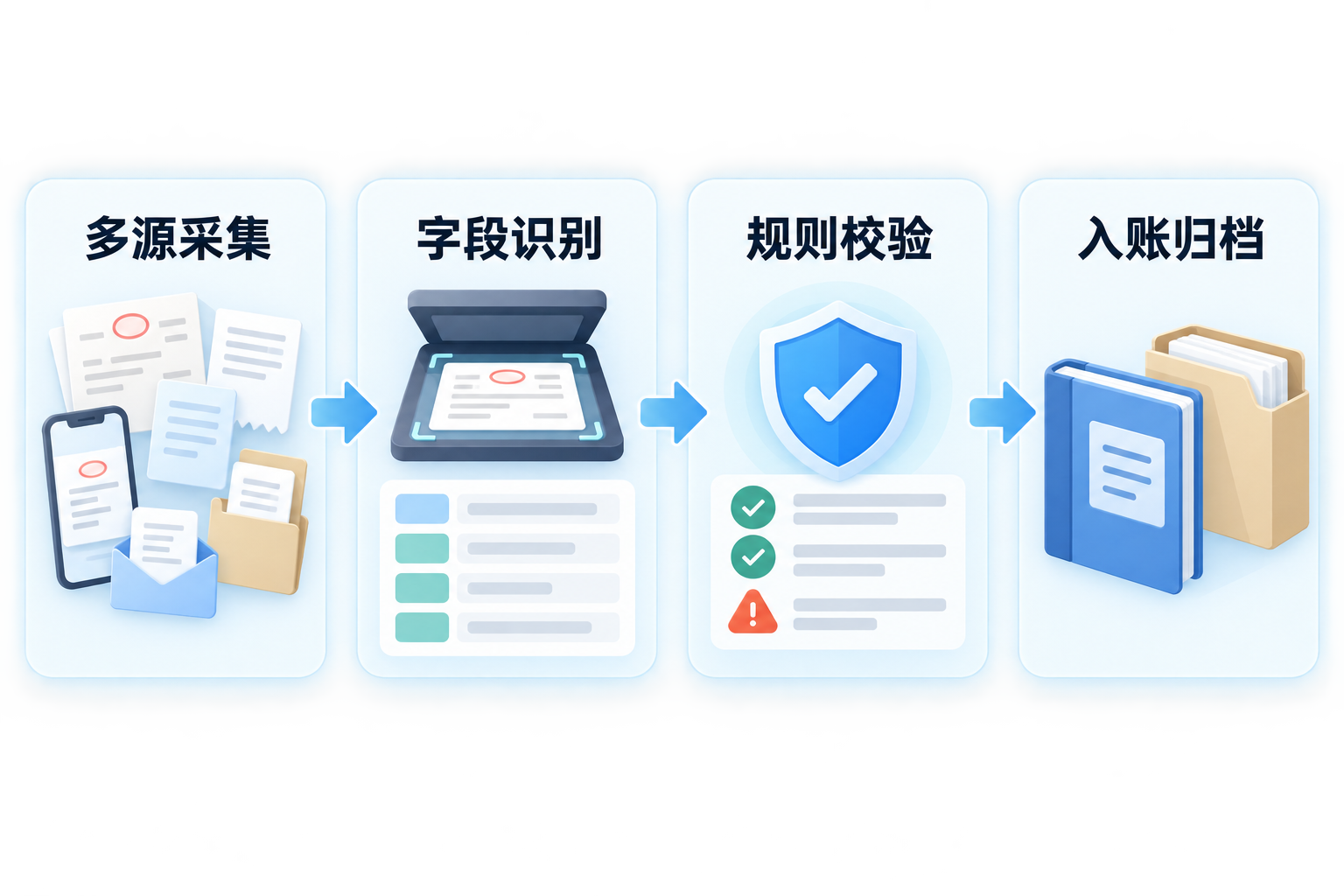
▍1. First look at the collection scope: where do invoices come from, and is authorization obtained?
Common invoice sources include employee uploads, email, scanned copies, business systems, and enterprise tax digital accounts. Tax authorities publicly state that the Tax Digital Account of the Electronic Invoice Service Platform aggregates full invoice data and provides functions such as invoice query and statistics, purpose confirmation, and information download; enterprises can query obtained invoices in the Electronic Tax Bureau. Note that whether commercial software can connect and the actual acquisition scope depend on enterprise authorization, interface conditions, regional systems, and implementation configuration; "all invoice sources" cannot be understood as unconditionally scraping all data. Kailing TechnologyInput invoice collection management platformCan be unified through channels such as QR code scanning, email, OCR, and tax invoice pools; before project go-live, available channels and authorization boundaries should first be confirmed.
▍2. Next, look at field recognition: it must not only be read out, but also be verifiable
Kailing TechnologyAI OCR Visual Capability PlatformSupports field extraction for invoices, receipts, contracts, and financial documents, and can connect to business systems through interfaces. Selection testing should not only look at one clear sample invoice, but cover folds, skew, glare, multiple invoices pasted together, scanned copies, and different layouts. Key fields such as invoice code, number, date, seller, buyer, and total amount including tax should be set with format, required-field, cross-check relationship, and duplicate record validation; low-confidence or rule-conflicting results must be transferred to manual review.
▍3. What problems do verification and duplicate checking each solve?
Verification is used to check invoice face information and status in the tax system, while duplicate checking is used to identify whether there is duplicate submission, reimbursement, or entry within the enterprise. The State Taxation Administration National VAT Invoice Verification Platform clearly states that the platform provides verification results for the invoice face information queried; therefore, "verification passed" alone cannot prove that the transaction is real, expenses are reasonable, or business materials are complete. The system can intercept duplicate numbers, abnormal statuses, and contradictory fields, but contracts, orders, acceptance, payment, and reimbursement reasons should still be reviewed according to enterprise systems.
▍4. How should "recognition is entry" be understood accurately?
A more accurate statement is: OCR converts invoice face information into structured candidate data, and after rule validation and necessary review, entry data or voucher drafts are generated according to configured accounts, organizations, projects, and approval rules. Whether to finally record accounts should be determined by the enterprise accounting system, position authorization, and system approval. Kailing Technology can connect AI OCR with expense control, input invoice collection, financial systems, and electronic accounting archives to reduce duplicate entry; however, situations such as abnormal tax rates, red-letter reversals, cross-period items, and inconsistent entities should not be unconditionally released automatically.
▍5. Archiving cannot just look at whether "the file has been stored"
Ministry of Finance and National Archives Administration "Measures for the Management of Accounting Archives"Requires electronic accounting archives to be authentic, complete, usable, and secure, and sets conditions for system reception and reading, review and signature procedures, tamper prevention, backup, and related retrieval. Kailing TechnologyElectronic Accounting Archive Management SystemCan be used to aggregate vouchers, invoices and related materials, and establish retrieval and borrowing audit trails; enterprises still need to configure retention periods, permissions, backup, transfer, and disposal processes according to their own systems.
▍6. Five things finance leaders can ask when selecting a solution
First, ask which invoice sources can be connected and what authorization is required; second, ask how key fields are verified and how low-confidence results are reviewed; third, ask about the coverage scope and failure handling of verification and duplicate checking; fourth, ask how to integrate with existing expense control, ERP, and voucher processes; fifth, ask whether archiving retains original files, metadata, approval records, and operation logs. Clarifying these five questions is more useful for judging whether software is suitable for long-term use than looking only at the "recognition rate."
Keywords: Invoice automatic recognition and entry software, AI OCR invoice recognition, input VAT invoice management, invoice verification and duplicate checking, recognition and entry, electronic accounting archives, finance automation, Kailing Technology
As a comprehensive business-finance-tax digitalization solution service provider, Kailing Technology provides business-finance-tax management digital transformation products and operational services for various government agencies, institutions, and large, medium, and small enterprises. The product line includes: solutions for sales contract management system, procurement contract management system, fully digitalized Leqi interface project, automatic output invoicing system, reverse invoicing system, invoice issuance for individuals system, employee expense control and reimbursement system, input VAT invoice management system, supply chain collaborative reconciliation system, image AI OCR recognition system, automatic financial bookkeeping system, electronic accounting archives system, etc., comprehensively driving the digitalization process across various fields.
Consultation Hotline: 18513895936 / 010-60974119 Location: Beijing