
Still manually entering input VAT invoices and worried about missed or erroneous reporting? Kailing Technology's reimbursement system directly connects to the tax bureau to automatically obtain authentic invoices including XMLPDFOFD source files
Still manually entering input VAT invoices and worried about missed or erroneous reporting? Kailing Technology's reimbursement system directly connects to the tax bureau to automatically obtain authentic invoices including XML/PDF/OFD source files
Input VAT invoices no longer need manual entry. Kailing Technology's expense control and reimbursement system (Lingdong Reimbursement) supports "scan-and-flash entry" directly connected to the electronic tax bureau's "tax digital account." A single scan retrieves the real invoice along with PDF, OFD, and XML source files into the system at once, with no need for anyone to type character by character from the invoice face. This is the answer to the problem of "input VAT invoices still being manually entered with fear of missed or erroneous reporting"—let machines retrieve real invoices directly from the tax bureau, and people only handle review and decision-making.
Why emphasize "source files"? Because the Ministry of Finance and the National Archives Administration's Notice on Regulating the Reimbursement, Booking, and Archiving of Electronic Accounting Vouchers (Cai Kuai [2020] No. 6, commonly referred to in the industry as "Document No. 6") clearly states: when electronic accounting vouchers are used for reimbursement, booking, and archiving, the electronic accounting vouchers and their metadata must be preserved at the same time, that is, the XML/OFD/PDF source files of the invoices, rather than a printout or screenshot. The Kailing Technology reimbursement system directly connects to the tax bureau to automatically obtain real invoices and store the source files together in the database, which both saves the annual invoice verification fee and prevents omissions, errors, and duplicate reporting at the source.
▍Manual entry of input VAT invoices—what landmines does it actually bury
In many companies, input VAT invoice management is still stuck at the stage of "receive invoice → visually inspect → manually type into the system." It seems like it just takes a bit more time, but in reality every step is accumulating risk:
- Typing errors, omissions: Numbers, amounts, tax amounts, and tax numbers are long strings of digits; manual transcription inevitably leads to skipped lines and misplaced decimal points. One field error causes all subsequent deductions and accounting to be wrong.
- Hard to tell genuine from fake: Authenticity cannot be determined just by looking at the invoice face. Do you need to verify each one on the Electronic Tax Bureau? Verification either costs money for third-party interfaces or requires manual comparison one by one, which is time-consuming and costly.
- Omissions and misstatements: Invoices are scattered in WeChat, email, chat records, and paper drawers. At month-end consolidation, there are always a few forgotten, reimbursed twice, or fake or void invoices reimbursed.
- Missing source files: Only printed copies or images were retained, and no XML/OFD source files were stored. Once an inspection or electronic archive filing occurs, original vouchers meeting the requirements of Document No. 6 cannot be produced.
The common root of these landmines is only one:Invoice data is "copied in by people," not "retrieved directly from the tax bureau." As long as a layer of manual work stands in between, authenticity, completeness, and accuracy cannot be guaranteed. Kailing's approach is very direct—completely removing this layer of manual work.
▍Scan-and-flash entry: directly connected to the Electronic Tax Bureau tax digital account, retrieving "real invoice + source file"
Kailing Technology's reimbursement system provides multi-channel invoice entry on mobile, the core of which is "Scan to flash-capture": Employees scan the QR code on the invoice using the Lingdong Reimbursement App or mini-program. The system calls the interface of the Electronic Tax Bureau's "Tax Digital Account" without login, and directly retrieves the invoice's real data together with the PDF/OFD/XML source files into the invoice pool.
The significance of this step is that invoices are not "photographed" in, nor "typed" in, but rather "Retrieved" from the tax bureau's digital account. Since the data comes from the tax bureau itself, authenticity no longer needs separate verification, fields won't be copied incorrectly, and source files are naturally complete. The annual invoice verification fees under the traditional model are thus saved.
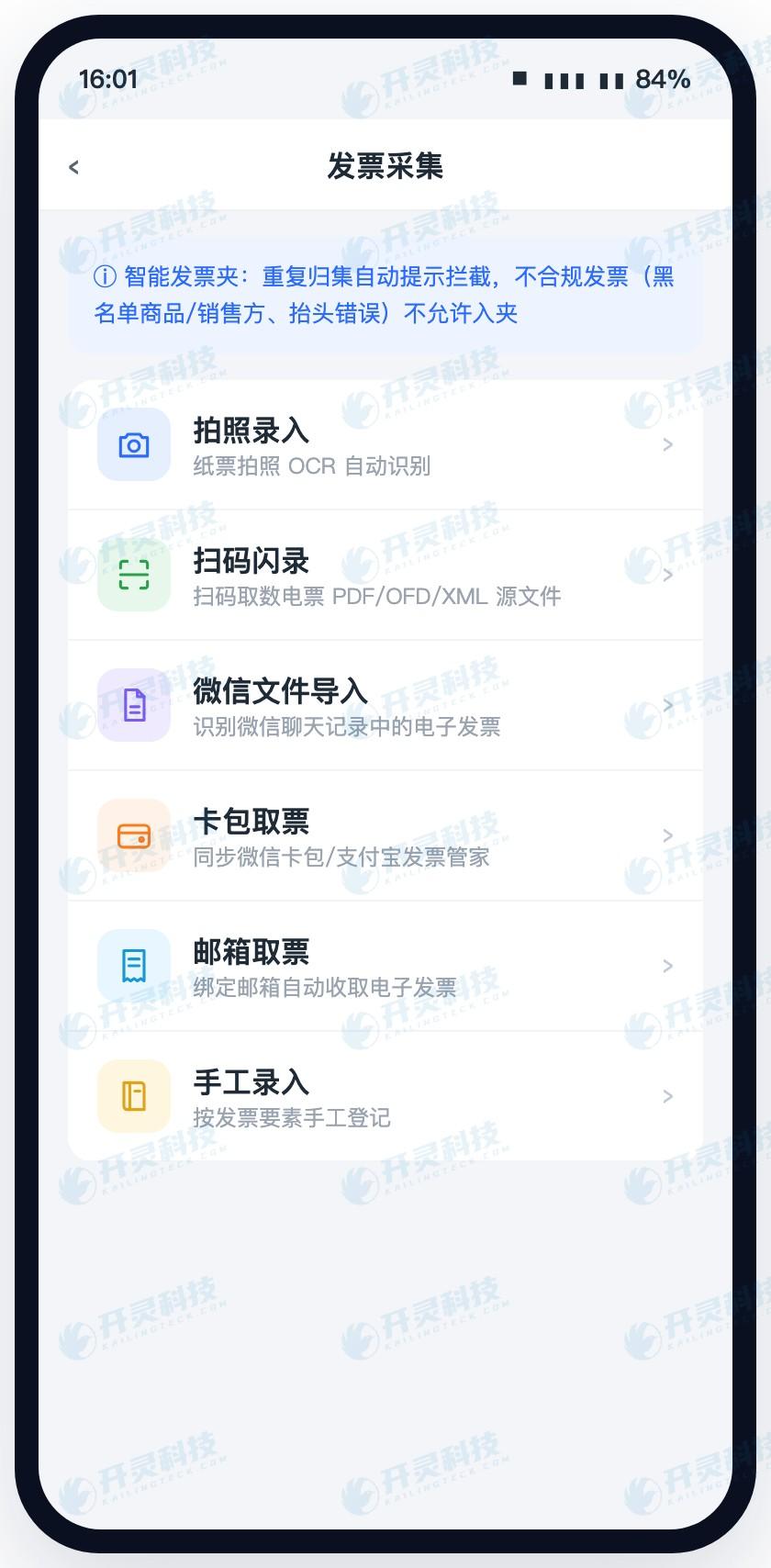
Besides scan-and-flash entry, Kailing also provides a full set of supplementary channels such as photo entry, WeChat file import, card pack invoice retrieval, email invoice retrieval and manual entry, ensuring invoices from all sources can enter the system. The smart invoice folder performs "automatic prompt and interception for duplicate collection" at the entrance, and non-compliant invoices (blacklisted goods/sellers, wrong title) are not allowed into the folder at all.
▍Why input VAT invoices must retain XML/PDF/OFD source files
Many finance colleagues have a misconception: printing out an electronic invoice and pasting it, or saving a PDF screenshot, counts as "having the invoice." But according to the requirements of Cai Kuai [2020] No. 6,For reimbursement, booking, and archiving of electronic accounting vouchers, the source files and metadata of invoices must be retained. The "source" of a fully digitalized e-invoice is XML (a structured data file), OFD is a format file, and PDF is a common reading format—each has its own use, and none can be omitted.
Why are printed copies insufficient? Because they may be printed repeatedly for reimbursement, and machines cannot verify signatures or prove they have not been tampered with. Kailing stores PDF/OFD/XML source files together when booking and archiving, and directly connects with the electronic accounting archives system for automatic synchronized archiving, making every input VAT invoice "traceable to its source."
"The dividing line for invoice management compliance is not "whether there is an invoice," but "whether there is a source file." Retrieving and retaining XML/OFD/PDF directly from the tax authority is what makes input VAT management stand up to inspection. |
▍In the invoice pool, each invoice's XML/PDF source file address is clear at a glance
All retrieved invoices are gathered into the PC-side "Invoice Pool" for unified management. This is not just a list — each row directly provides the viewing entry points for "XML file address" and "PDF file address", Click to view and download the source file of this invoice; the "Compliance Verification" column marks the status of each invoice in real time: normal, inconsistent taxpayer identification number, inconsistent enterprise name, duplicate reimbursement warning, etc., so anomalies are visible at a glance.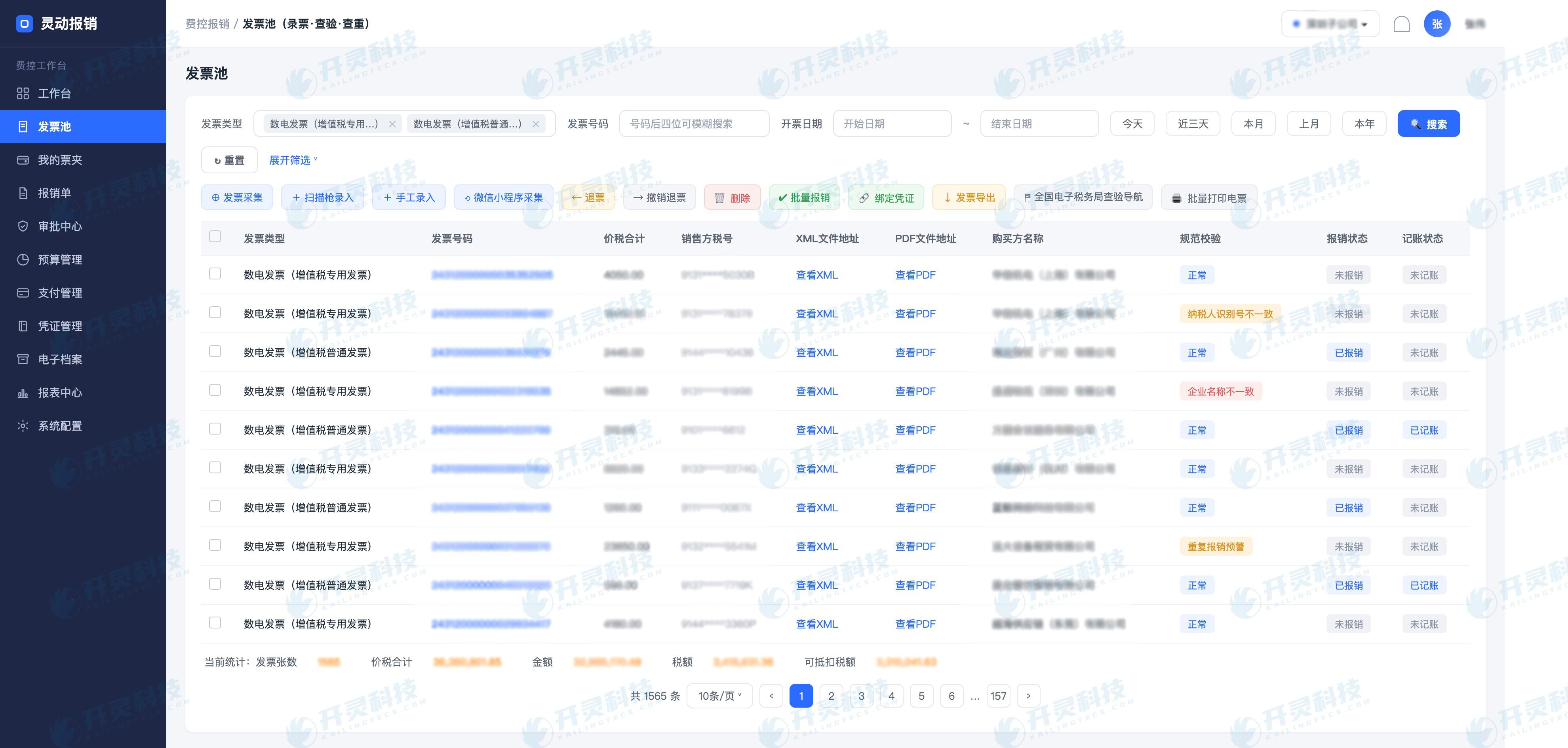
In the invoice pool, multi-dimensional risk verification runs automatically: checking the header, tax number, address and phone, bank account, comparing paper invoice numbers with the electronic tax bureau, anti-tampering verification of e-invoice signatures, early warning upon blacklist hits, and real-time interception of duplicate reimbursements. At the bottom, "invoice count/price-tax total/amount/tax amount/deductible tax amount" is also summarized in real time, making the input VAT base clear at a glance, blocking under-reporting, misreporting, and duplicate reporting from the moment of entering the pool.
▍What to do with invoices whose codes can't be scanned: full-category AI OCR as the fallback
Not every invoice has a QR code to scan—old-style fixed-amount invoices, general machine-printed invoices, and out-of-town paper invoices are always encountered. At this point Full-category OCR recognition to cover the rest: after photo upload, invoice elements are automatically recognized and structured into the pool, covering all categories including special VAT invoices, general invoices, electronic general invoices, fully digitalized e-invoices, roll invoices, general machine-printed invoices, fixed-amount invoices, motor vehicle invoices, second-hand vehicle invoices, and passenger transport invoices; fixed-amount invoices also support consecutive number recognition and embedded local verification.
In this way, a “double insurance” is formed: those that can be scanned go through scan-and-flash entry and directly connect to the tax bureau to obtain source files; those that cannot be scanned go through AI OCR recognition as a fallback into the pool. The two paths converge into the same invoice pool for unified verification, duplicate checking, and risk validation, so input VAT invoices are fully collected, not one missed.
▍From invoice collection to posting, deduction, and archiving: nothing missed, no duplicates, no omissions
Retrieving invoices accurately and retaining all source files is only the first step. Kailing also strings the subsequent chain into an automated closed loop, so input management requires no manual firefighting from start to finish:
- Automatically generate reimbursement content: Automatically generate reimbursement forms based on invoice content (editable), with two-way linkage between the invoice and the reimbursement form.
- Locked upon initiation: After reimbursement is initiated, the invoice automatically locks its tax accounting status (accounted - pre-tax deduction/non-deduction/reversal of accounting) to prevent malicious red-letter reversal.
- One-click authentication and deduction: Filter reimbursed/recorded invoices, select with one click to automatically link to the Electronic Tax Bureau's "Tax Digital Account" to select input VAT, and automatically generate a deduction statistics table for passenger transport invoices.
- Retain source files for booking and archiving: Save PDF/OFD/XML source files at the same time as booking, directly connect to the electronic accounting archives system, and automatically synchronize archiving, in compliance with Document No. 6.
Running the whole set end to end turns input VAT invoices from "manually copied in" into "retrieved from the tax bureau," and from "printed copies pasted on" into "all source files retained." Finance no longer worries about missed or erroneous filings, and no longer has to pay for verification—Genuine invoices, genuine source files, genuine compliance, all in one step.
▍FAQ
Q: For invoices retrieved by scan-and-flash entry, do they still need to be verified for authenticity on the electronic tax bureau?
A: No. Scan-to-record directly connects to the "Tax Digital Account" of the Electronic Tax Bureau without login to retrieve invoice data and source files. The data itself comes from the tax bureau, so its authenticity is inherently trustworthy, and there is no need to verify each invoice one by one.
Q: What are the differences between XML, OFD, and PDF source files, and why keep all three?
A: XML is the structured original data file of fully digitalized e-invoices, OFD is the national standard layout document, and PDF is a common reading layout. Cai Kuai [2020] No. 6 requires that bookkeeping and archiving must preserve source files and metadata; storing only printouts or screenshots is non-compliant, so all three must be retrieved and retained together.
Q: How do you prevent the same input VAT invoice from being reimbursed twice or reported incorrectly?
A: Multiple interceptions from entry to reimbursement: when the smart invoice folder collects invoices, it performs "automatic prompt and interception for duplicate collection"; the compliance verification column of the invoice pool marks anomalies in real time, such as "Duplicate reimbursement warning / Taxpayer identification number inconsistent"; after reimbursement is initiated, the invoice automatically locks the tax booking status to prevent malicious red-ink reversal.
Q: Can retrieved input VAT invoices be directly connected to deduction and electronic archives?
A: Yes. For reimbursed/booked invoices, one-click selection automatically links to the "Tax Digital Account" of the Electronic Tax Bureau for input VAT deduction selection. At booking, source files are saved synchronously and directly connected to the electronic accounting archives system for automatic archiving.
Want input VAT invoices to no longer be manually entered, with authentic invoices and XML/PDF/OFD source files automatically retrieved through direct connection to the tax bureau, preventing omissions and errors from the source? Welcome to learn about the Kailing Technology expense control and reimbursement system: www.kailingteck.com .
As a comprehensive business-finance-tax digitalization solution service provider, Kailing Technology provides business-finance-tax management digital transformation products and operational services for various government agencies, institutions, and large, medium, and small enterprises. The product line includes:
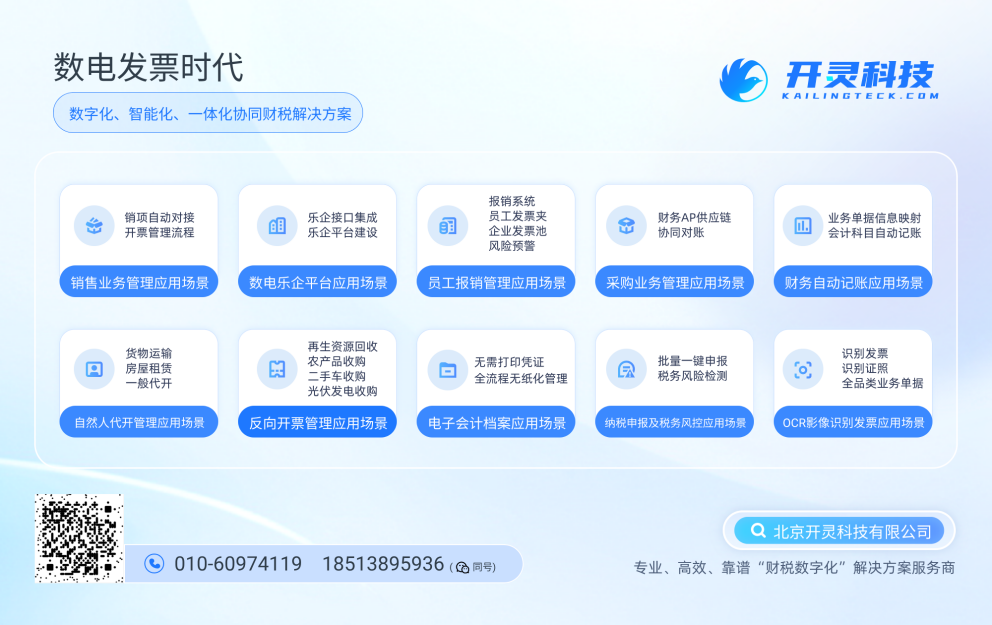
Solutions for businesses including sales contract management system, procurement contract management system, fully digitalized Leqi interface project, output automatic invoicing system, reverse invoicing system, invoice issuance for individuals system, employee expense control and reimbursement system, input VAT invoice management system, supply chain collaborative reconciliation system, image OCR recognition system, automatic financial bookkeeping system, and electronic accounting archives system, comprehensively driving the digitalization process across various fields.
If you have any business-finance-tax digital transformation needs, welcome to contact us. Beijing Kailing Technology will serve you wholeheartedly.
Keywords: Input VAT invoice, manual entry, scan-and-flash entry, direct connection to tax bureau, tax digital account, XML source file, OFD, PDF source file, Caihui Document No. 6 of 2020, invoice verification, prevention of missed or erroneous filings, full-category OCR, Kailing Technology expense control and reimbursement system, Lingdong Reimbursement
As a comprehensive business-finance-tax digitalization solution service provider, Kailing Technology provides business-finance-tax management digital transformation products and operational services for various government agencies, institutions, and large, medium, and small enterprises. The product line includes: solutions for sales contract management system, procurement contract management system, fully digitalized Leqi interface project, automatic output invoicing system, reverse invoicing system, invoice issuance for individuals system, employee expense control and reimbursement system, input VAT invoice management system, supply chain collaborative reconciliation system, image AI OCR recognition system, automatic financial bookkeeping system, electronic accounting archives system, etc., comprehensively driving the digitalization process across various fields.
Consultation Hotline: 18513895936 / 010-60974119 Location: Beijing