
Approvers away on business trips with reimbursement forms piling up and no one approving? Kailing Technology's reimbursement system supports multi-terminal approval via PC, APP, DingTalk, Feishu, and WeCom, enabling one-click processing anytime, anywhere
Approvers away on business trips with reimbursement forms piling up and no one approving? Kailing Technology's reimbursement system supports multi-terminal approval via PC, APP, DingTalk, Feishu, and WeCom, enabling one-click processing anytime, anywhere
Approvers are away on business trips and reimbursement forms pile up with no one approving them. The root cause is not that people are not diligent, but that approval can only be completed sitting in front of an office computer. Kailing Technology's expense control and reimbursement system offers a two-pronged solution: first, move approvals to multiple terminals—PC, mobile APP, as well as DingTalk, Feishu, and WeCom. Approval messages are pushed directly to the approver's commonly used office App, and clicking a link allows approval or rejection, enabling one-click processing anytime, anywhere, whether traveling, in meetings, or on a high-speed train. Second, introduce "digital employee intelligent approval," letting AI automatically approve compliant forms according to company policies first, and only forwarding those with anomalies to humans, so reimbursement forms no longer queue waiting for one person to return to the office. Below is a clear explanation of how to use multi-terminal approval, how to configure rejection, and how digital employees solve backlogs.
"The bottleneck in approval is never slow review, but that approvers are "not at the computer"—move approval to their always-carried phone and office app, and the backlog naturally dissolves. |
▍1. Why do reimbursement forms pile up as soon as an approver goes on a business trip?
Approval for traditional offline reimbursement is naturally tied to the office: reimbursement forms must be printed and placed on the approver's desk for level-by-level signatures, or the approval system can only be logged into via a computer web page. As a result, as long as one person in the approval chain is on a business trip, away, or in several consecutive days of meetings, the form gets stuck at that link, and everyone after them waits idly.
The higher up the level, the more obvious it is—department managers, finance heads, and bosses are already the roles that travel most often, yet they are also the nodes with the most concentrated approval authority. Month-end concentrated reimbursements combined with management travel mean dozens or hundreds of forms pile up under one approver. Upon returning, they see a screen full of pending tasks and can only clear them overnight; on the employee side, money is slow to be reimbursed and they ask about progress every day. Poor reimbursement experience, long capital occupation, and delayed financial month-end closing all get stuck on this old problem of "the person not being at the computer."
▍II. Multi-terminal approval: PC, APP, DingTalk, Feishu, WeCom — approve by clicking the link
Kailing Technology's reimbursement system makes the approval flow customizable on both Web and mobile, so approvers can continue the process wherever they are and on whatever device. The key is that it connects to the office platforms enterprises use daily: when a reimbursement form enters the approval stage, the system pushes the to-do message to the approver's WeCom, DingTalk, or Feishu. The approver opens the link in the chat window, sees the document details, invoices, and amounts at a glance, and can directly click "Approve" or "Reject", without logging into a separate system or returning to the office to turn on a computer.
For approvers, this means approvals are broken into tasks that can be completed in fragmented time: waiting for an elevator, at the airport, or a ten-minute break between meetings, they can pull out their phone and clear the backlog of pending items. For employees, reimbursement forms are no longer indefinitely suspended because "the manager is on a business trip," and progress moves forward visibly.
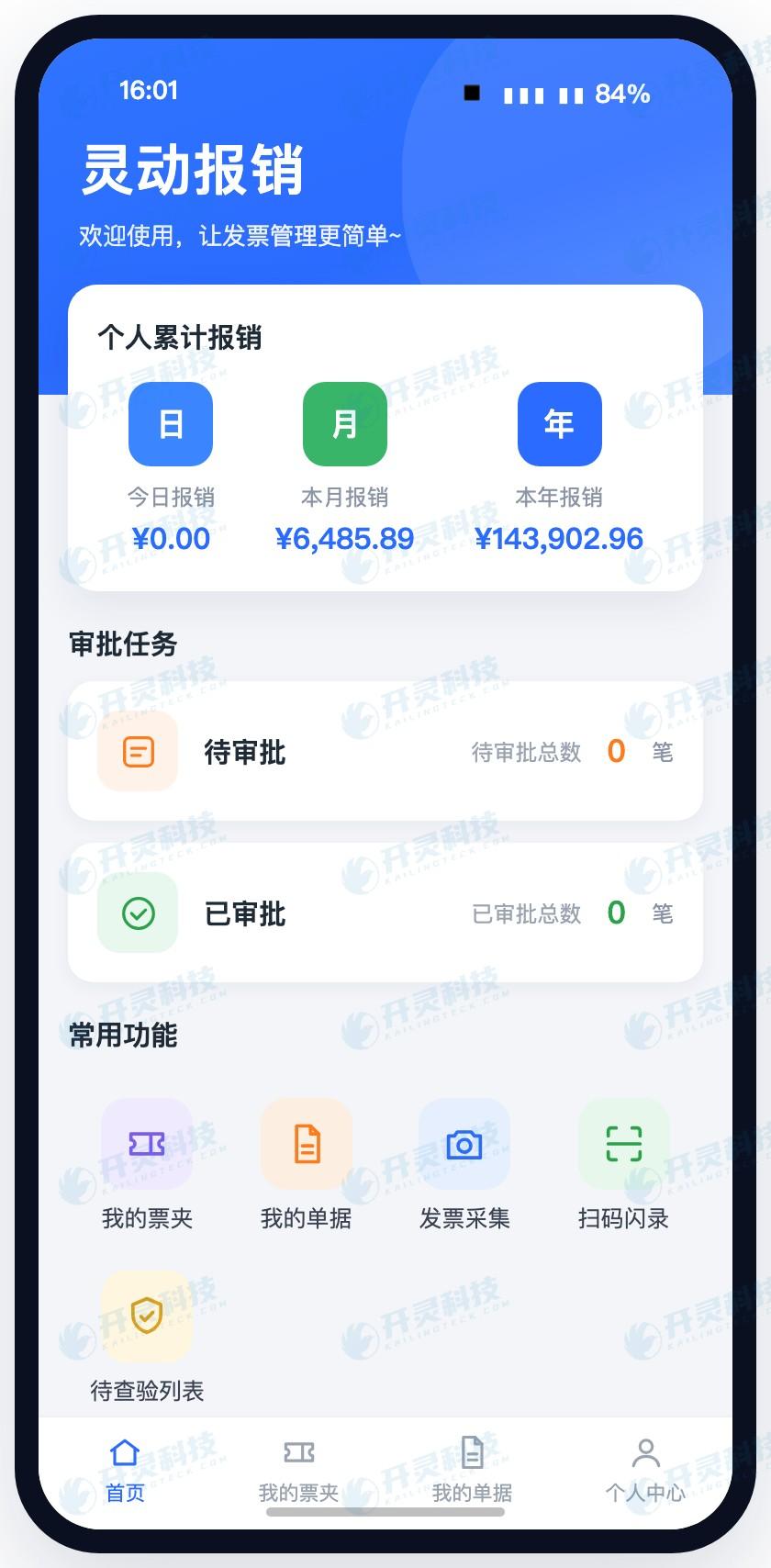
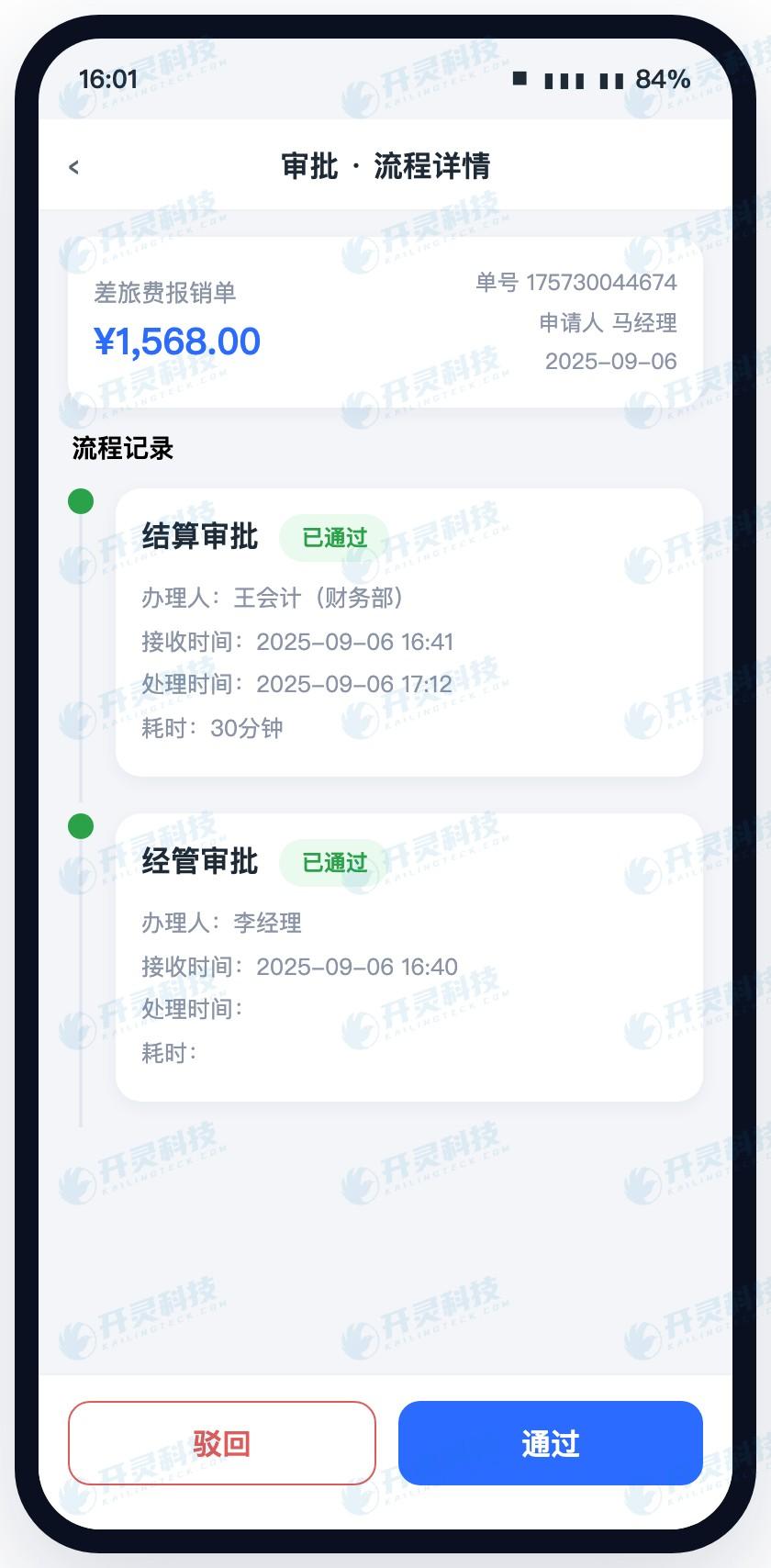
The mobile end is not just about tapping approve. Tapping into any pending item opens the complete process detail page—who initiated it, which level it has reached, which invoice is attached to each expense, and the opinions of approvers at each previous level are all laid out for review. Approvers see clearly before deciding to approve or reject, with the same basis for judgment as sitting in front of a computer.
▍III. How to configure rejection: return to the initiator, or return to the previous level
Approval does not have only one exit, "agree." A truly usable approval flow should also make rejection convenient and configurable. Kailing Technology's reimbursement system approval flow supports configuring rejection destinations by scenario: it can "reject to initiator," allowing employees to modify again and supplement receipts before going through the complete process again; it can also "reject to previous level," returning only to the previous approval node for the superior to re-decide, without starting over. Enterprises configure it in the process designer according to their own management habits, and the employee side and approval side automatically execute accordingly.
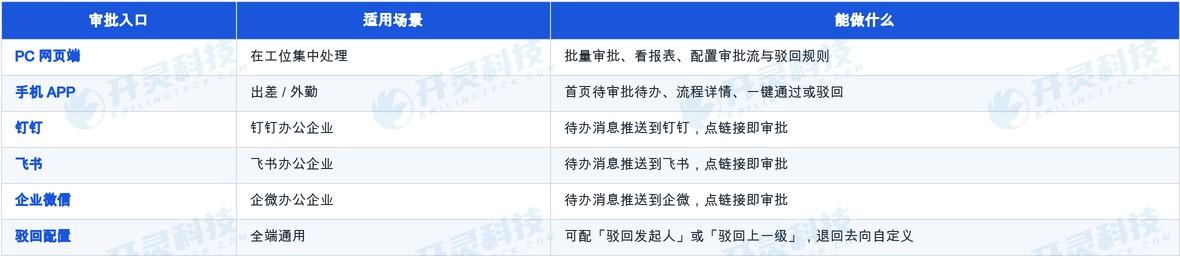
Why is this important? Because when approving business trips on a mobile phone, the biggest fear is "having doubts but being able to do nothing but wait or force approval." Rejection is configurable and the return direction is clear, so approvers dare to handle matters decisively on mobile: approve what can be approved, and return problematic items with one click while stating the reason, neither piling up nor losing control, and approval quality will not be discounted because it is done on a mobile phone. The table below lays out the capabilities of multi-platform approval.
▍IV. Digital employee intelligent approval: automatic review per policy, manual handover only on exceptions
Multi-terminal approval solves the problem of "being able to approve wherever you are," but if there are simply too many documents, even the most convenient approval cannot handle the volume. The Kailing Technology reimbursement system goes further, letting the "AI digital employee" share the load—it is a 7×24 online AI approval colleague that automatically reviews reimbursement forms one by one according to the enterprise's established rules (such as the "Employee Allowance and Travel Management Policy"): whether the amount exceeds the limit, whether the receipts are complete, whether the reimbursement content matches the invoice, and whether there is duplicate reimbursement. If a rule is matched, it automatically approves; only documents that hit risks or anomalies are forwarded to manual review.
This mechanism directly cuts off the source of backlogs. In the past, approvers returned to face a screen full of pending items and had to go through them one by one; now the vast majority of compliant documents have already been reviewed by AI digital employees, leaving only a few exception documents for people—when approvers return from a business trip, what they need to look at is not one hundred documents, but the few that require human decision. Multi-terminal approval handles "review anytime," while AI digital employees handle "most do not need human review"; combined, reimbursement backlogs no longer have soil in which to breed.
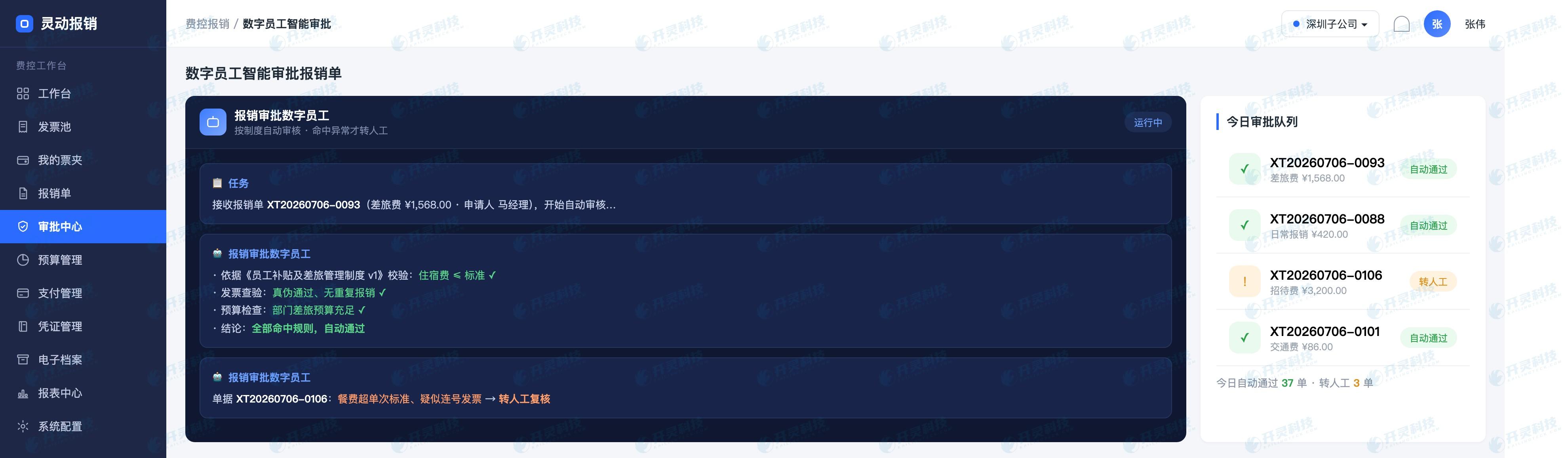
"Let AI first review 90% of compliant forms and move approval into the always-carried phone—when approvers are on business trips, reimbursement forms no longer queue waiting for their return. |
▍V. From "waiting for someone to return and approve" to "one-click approval anytime, anywhere": how to implement
Implementing the full set of capabilities is not complicated. Enterprises first configure approval flows, approvers, and rejection routing by organization and amount in the PC-based process designer, and bind it to whichever of DingTalk, Feishu, or WeCom they are already using. Then they hand common, clearly-ruled reimbursement types to AI digital employees for automatic review according to policy. Once configured, employees initiate reimbursements, invoices automatically populate reimbursement content, and approval messages are pushed in real time to approvers' mobile office apps. Those that can be auto-reviewed are handled by AI digital employees, and those requiring human review are processed with one click—with online traces throughout and trackable progress.
For enterprises, this is not about buying another approval tool, but about turning the "approval" step—the most likely bottleneck in the reimbursement chain—from "depending on a certain person in front of a certain computer" into a normalized process that is "available anytime, anywhere, on multiple devices, with AI as a fallback." Approvers can handle it with one click even when traveling, employees' reimbursement progress is no longer indefinitely delayed, and finance month-end closing no longer has to wait until the last moment for a few documents stuck midway.
▍FAQ
Q: If the approver is traveling and does not have a computer, can they still approve reimbursement forms?
A: Yes. The Kailing Technology reimbursement system supports PC and mobile APP, and is also connected with DingTalk, Feishu, and WeCom. To-do messages are pushed to the office App commonly used by approvers. By clicking the link in the chat window, they can view document details and approve or reject with one click. They can handle it anytime and anywhere while traveling, in meetings, or on the road, without returning to the office to turn on a computer.
Q: Can mobile approval show invoices and expense details, or will people approve carelessly just to be fast?
A: No. Tapping any to-do on mobile opens the complete process detail page: initiator, current approval level, the invoice corresponding to each expense, and prior approval opinions at each level are all expanded and viewable. Approvers can see clearly before deciding, with the same basis for judgment as at a computer.
Q: Can rejection be configured? What is the difference between returning to the initiator and returning to the previous level?
A: Yes, it can be configured by scenario. "Reject to initiator" returns the form to the employee for revision and invoice supplementation before going through the full process again; "reject to previous level" returns it only to the previous approval node for the superior to re-decide, without starting over. Enterprises can customize the rejection destination in the process designer according to their management habits.
Q: Is intelligent approval by AI digital employees reliable, and will it let problematic forms pass?
A: The digital employee checks each item against the enterprise's established policies (such as the Employee Allowance and Travel Management Policy) for amount, invoices, content consistency, and duplicate reimbursement. Only compliant documents clearly hit by the rules pass automatically; any that hit risks or are abnormal are all transferred to manual review, focusing human energy on the few documents that truly require judgment.
Want reimbursement forms to no longer pile up when approvers are away on business? Welcome to Kailing Technology to learn about the multi-terminal approval and digital employee intelligent approval solution: www.kailingteck.com .
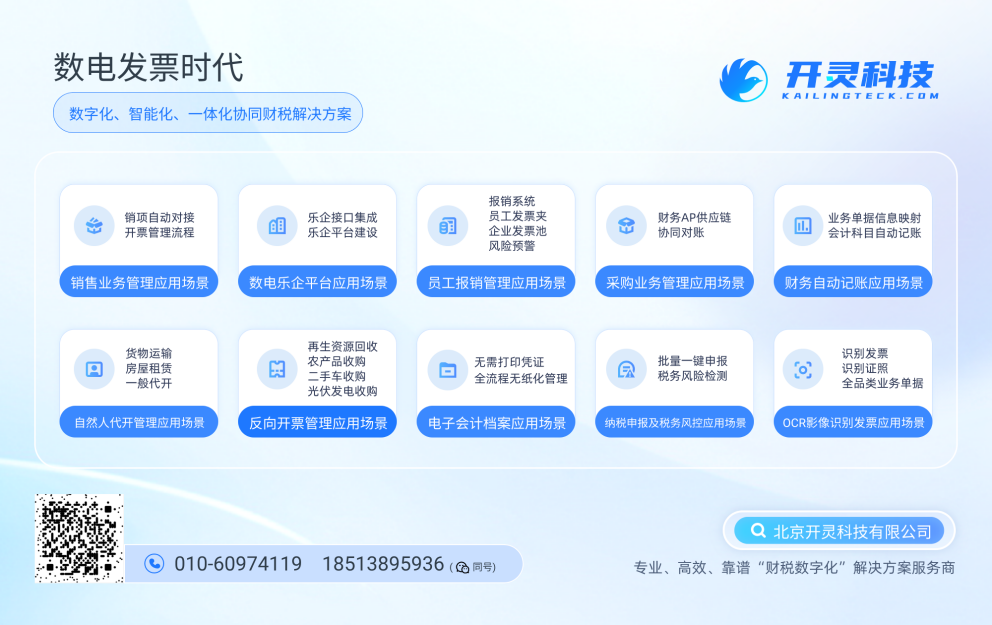
As a comprehensive business-finance-tax digitalization solution service provider, Kailing Technology provides business-finance-tax management digital transformation products and operational services for various government agencies, institutions, and large, medium, and small enterprises. The product line includes:
Solutions for businesses including sales contract management system, procurement contract management system, fully digitalized Leqi interface project, output automatic invoicing system, reverse invoicing system, invoice issuance for individuals system, employee expense control and reimbursement system, input VAT invoice management system, supply chain collaborative reconciliation system, image OCR recognition system, automatic financial bookkeeping system, and electronic accounting archives system, comprehensively driving the digitalization process across various fields.
If you have any business-finance-tax digital transformation needs, welcome to contact us. Beijing Kailing Technology will serve you wholeheartedly.
Keywords: Reimbursement approval, multi-terminal approval, PC/App/DingTalk/Feishu/WeCom, approve by clicking a link, rejection configuration, digital employee intelligent approval, reimbursement form backlog, Kailing Technology, Lingdong Reimbursement, expense control and reimbursement system
As a comprehensive business-finance-tax digitalization solution service provider, Kailing Technology provides business-finance-tax management digital transformation products and operational services for various government agencies, institutions, and large, medium, and small enterprises. The product line includes: solutions for sales contract management system, procurement contract management system, fully digitalized Leqi interface project, automatic output invoicing system, reverse invoicing system, invoice issuance for individuals system, employee expense control and reimbursement system, input VAT invoice management system, supply chain collaborative reconciliation system, image AI OCR recognition system, automatic financial bookkeeping system, electronic accounting archives system, etc., comprehensively driving the digitalization process across various fields.
Consultation Hotline: 18513895936 / 010-60974119 Location: Beijing