010-6097 4119Book a Demo


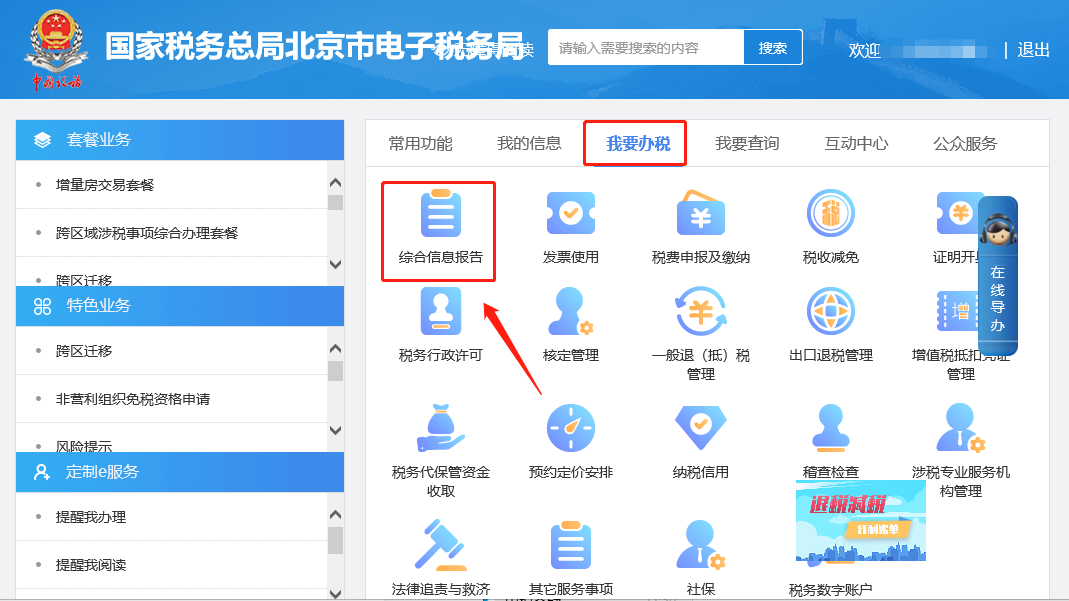
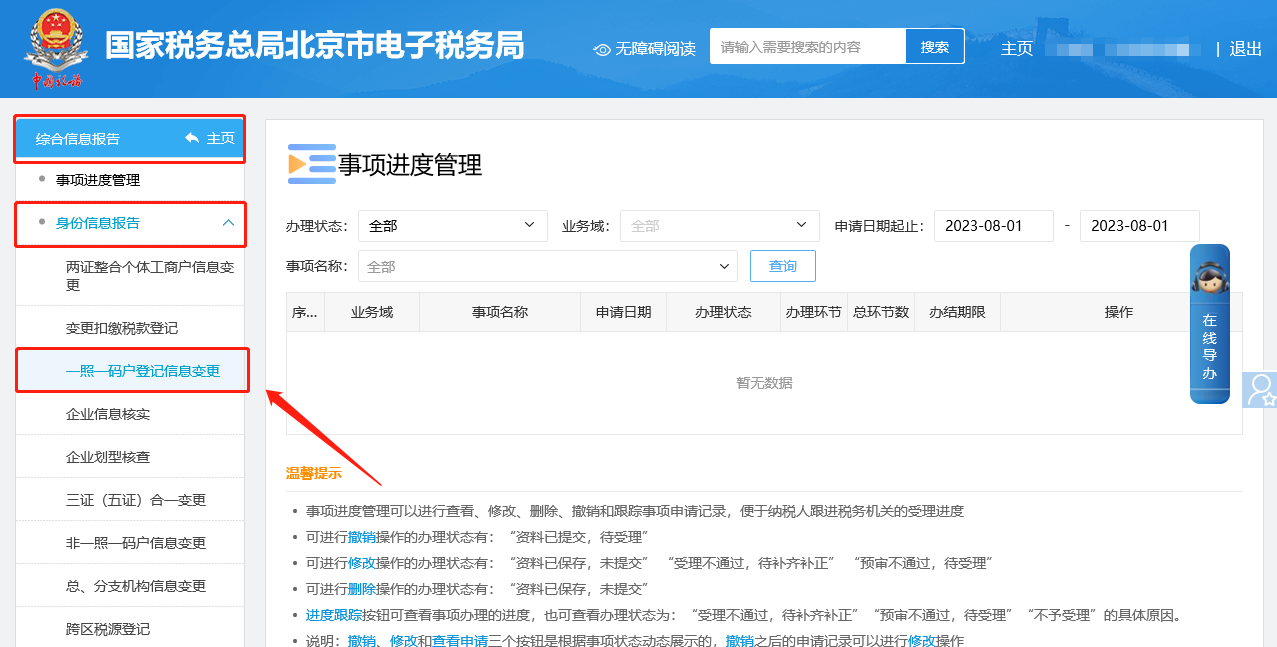
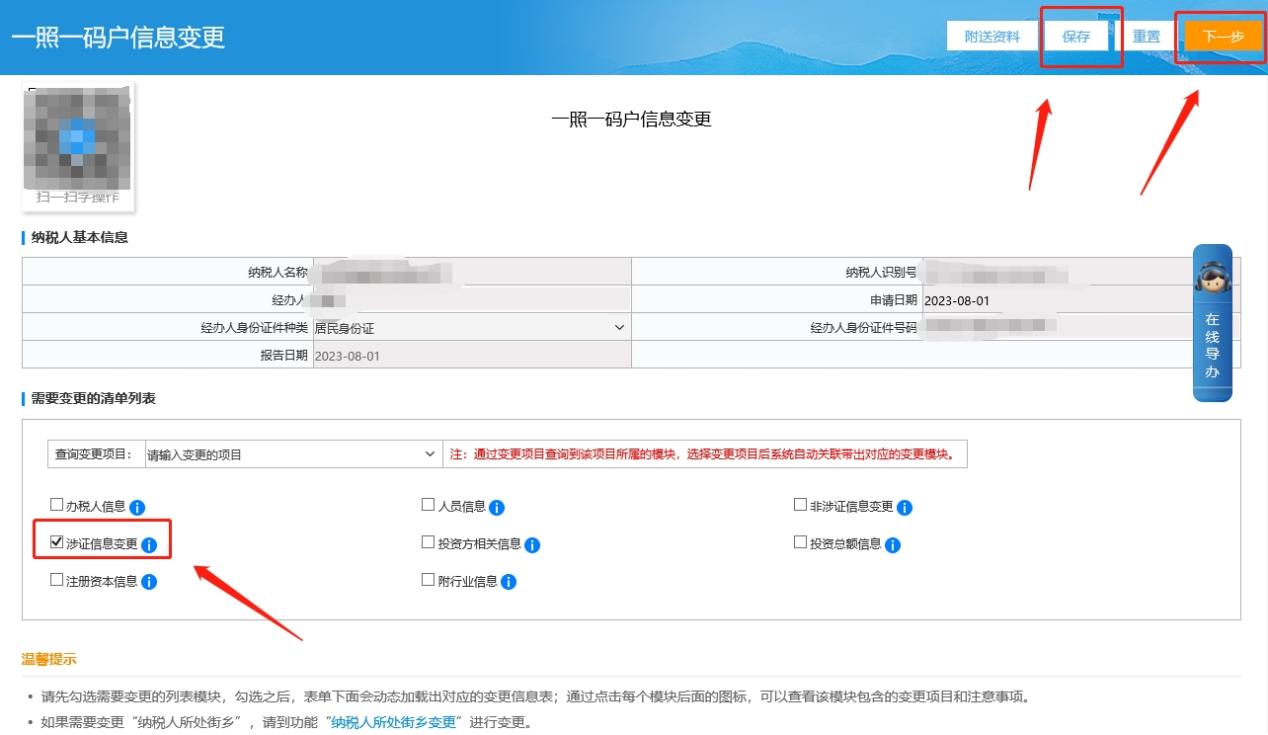
E-Tax Bureau Operation Guide | How to modify the registered address in the E-Tax Bureau?Published: 2023-12-18 09:46 1.How to modify the registered address on the electronic tax bureau? Answer: Hello, please click [I Want to Handle Taxes] — [Comprehensive Information Report] — [Identity Information Report] — [One-License-One-Code Household Registration Information Change]. After entering, please check "License-Related Information Change" in the list of items to be changed. The license-related information change list below will then automatically populate the content before and after the registered address change. After checking that the information is correct, please click Next to submit. In addition, please return to the homepage of the Electronic Tax Bureau and check the new registered address shown via [My Information] — [Taxpayer Information] — [Basic Information]. Step 1 I. I Want to Handle Taxes—Comprehensive Information Report.
II. Comprehensive Information Report—Identity Information Report—One-License-One-Code Household Registration Information Change.
III. On the one-license-one-code household registration information change page, after entering, please check "License-related information change" in the list of items to be changed, and the content before and after the change of the production and operation address will be automatically brought out in the license-related information change list below. After checking that the information is correct, please fill in the "Handler ID number" in the upper right corner, and after completing it, please save and click Next to submit.
Step 2 I. My Information—Taxpayer Information.
II. Taxpayer Information—Basic Information. Just verify the new registered address brought up.
2.How do you query tax fee information that has not been successfully paid on the electronic tax bureau? Answer: Hello, please click [I Want to Handle Taxes] — [Tax and Fee Filing and Payment] — [Tax and Fee Payment] — [Void and Unlock Unpaid Voucher] — [Unlock Now] to display the unpaid tax and fee information. I. I Want to Handle Taxes—Tax and Fee Filing and Payment.
II. Tax and fee filing and payment—Tax and fee payment—Void and unlock unpaid payment vouchers.
III. Unlock immediately to display the unpaid tax and fee information.
3.Can I print a vehicle and vessel tax payment certificate by entering the certificate issuance module on the Electronic Tax Bureau? Answer: Hello, please click [I Want to Handle Taxes] — [Certificate Issuance] — [Issue Tax Payment Certificate (Document Form)] or [Issue Tax Payment Certificate (Tabular Form)] to query and print. If it can be found, it can be printed. If it is withheld and remitted by an insurance company, you can apply for issuance under [I Want to Handle Taxes] — [Certificate Issuance] — [Tax Payment Certificate (Tabular Form) Re-issuance]. If the information still cannot be found, try a different browser. If it still cannot be found, please contact the competent tax authority for consultation on issuance. Step 1 I. I Want to Handle Taxes—Certificate Issuance.
II. Certificate Issuance—Issue Tax Payment Certificate (Document Format) or Issue Tax Payment Certificate (Tabular Format).
III. Query and print in the module for issuing tax payment certificates (document style) or issuing tax payment certificates (table style); if it can be found, it can be printed.
Step 2 I. I Want to Handle Taxes—Certificate Issuance.
II. Certificate Issuance—Reissue Tax Payment Certificate (Tabular Format).
III. Apply for issuance on the Tax Payment Certificate (Tabular Form) reissuance interface. If the information still cannot be found, try a different browser. If it still cannot be found, please contact the competent tax authority for consultation on issuance.
Source: Beijing Tax official account Beijing Kailing Technology Co., Ltd.——an enterprise business-finance-tax digitalization solution service provider. Kailing Technology provides solutions for sales management systems, procurement management systems, output invoicing systems, input invoice collection systems, imaging management systems, financial posting systems, electronic accounting archives and other businesses according to enterprise needs, professionally and efficiently helping enterprises transform and upgrade their business-finance-tax digital management. If you have any business-finance-tax digital transformation needs, welcome to contact us. Beijing Kailing Technology will serve you wholeheartedly.
|